start button VOLVO XC70 2013 Owner´s Manual
[x] Cancel search | Manufacturer: VOLVO, Model Year: 2013, Model line: XC70, Model: VOLVO XC70 2013Pages: 382, PDF Size: 6.78 MB
Page 166 of 382
04 Driver support
Collision warning with Full Auto-brake and Pedestrian Detection*
04
164* Option/accessory, for more information, see Introduction.
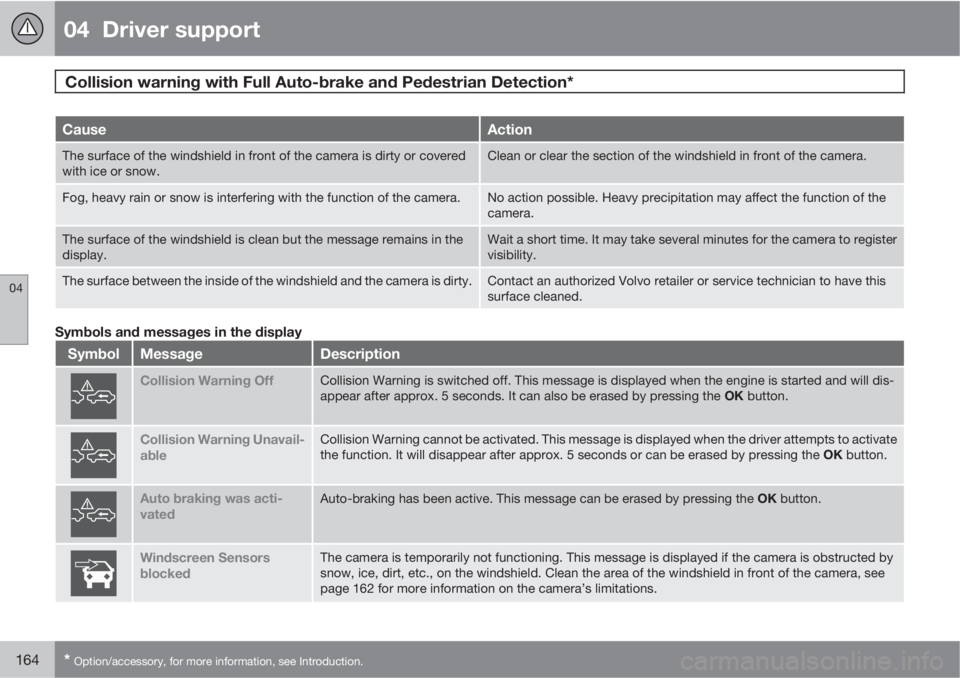
CauseAction
The surface of the windshield in front of the camera is dirty or covered
with ice or snow.Clean or clear the section of the windshield in front of the camera.
Fog, heavy rain or snow is interfering with the function of the camera.No action possible. Heavy precipitation may affect the function of the
camera.
The surface of the windshield is clean but the message remains in the
display.Wait a short time. It may take several minutes for the camera to register
visibility.
The surface between the inside of the windshield and the camera is dirty.Contact an authorized Volvo retailer or service technician to have this
surface cleaned.
Symbols and messages in the display
SymbolMessageDescription
Collision Warning OffCollision Warning is switched off. This message is displayed when the engine is started and will dis-
appear after approx. 5 seconds. It can also be erased by pressing the OK button.
Collision Warning Unavail-
ableCollision Warning cannot be activated. This message is displayed when the driver attempts to activate
the function. It will disappear after approx. 5 seconds or can be erased by pressing the OK button.
Auto braking was acti-
vatedAuto-braking has been active. This message can be erased by pressing the OK button.
Windscreen Sensors
blockedThe camera is temporarily not functioning. This message is displayed if the camera is obstructed by
snow, ice, dirt, etc., on the windshield. Clean the area of the windshield in front of the camera, see
page 162 for more information on the camera’s limitations.
Page 174 of 382
04 Driver support
Park assist*
04
172* Option/accessory, for more information, see Introduction.
Introduction
The park assist system is designed to assist
you when driving into parking spaces, garages,
etc. It utilizes ultrasound sensors in the front
bumper and rear bumper(s) to measure the dis-
tance to a vehicle or an object that may be
close to the front or rear of your vehicle. An
audible signal and symbols in the audio sys-
tem’s display indicate the distance to the
object.
NOTE
A trailer hitch whose wiring is integrated
with the vehicle's electrical system will be
included in the measurement of the availa-
ble space behind the vehicle.
WARNING
Park Assist is an information system, NOT a
safety system. This system is designed to
be a supplementary aid when parking the
vehicle. It is not, however, intended to
replace the driver's attention and judge-
ment.
Function
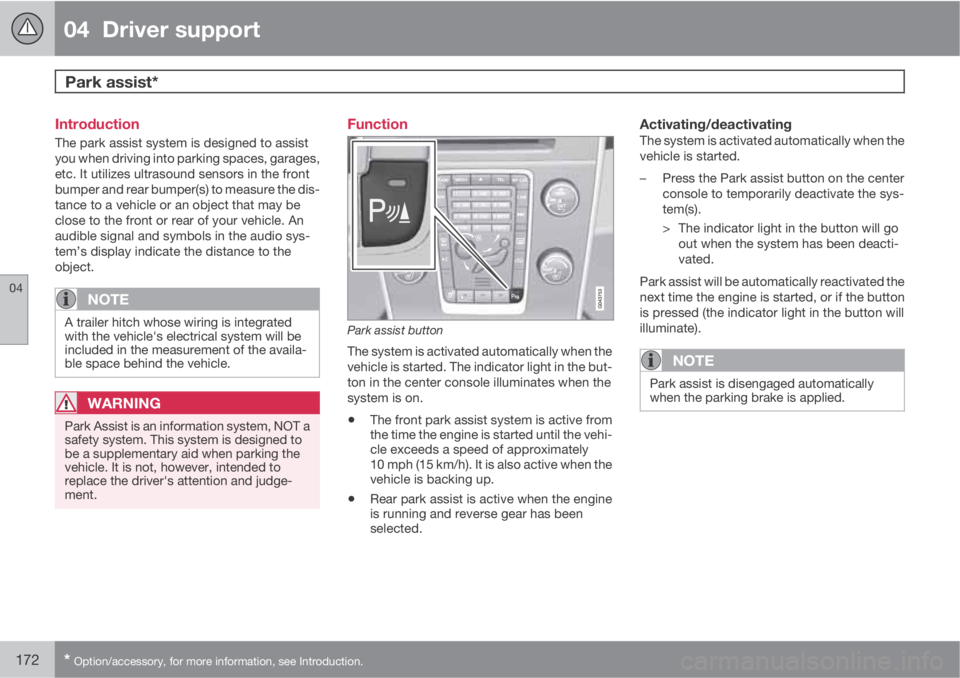
Park assist button
The system is activated automatically when the
vehicle is started. The indicator light in the but-
ton in the center console illuminates when the
system is on.
•The front park assist system is active from
the time the engine is started until the vehi-
cle exceeds a speed of approximately
10 mph (15 km/h). It is also active when the
vehicle is backing up.
•Rear park assist is active when the engine
is running and reverse gear has been
selected.
Activating/deactivatingThe system is activated automatically when the
vehicle is started.
–Press the Park assist button on the center
console to temporarily deactivate the sys-
tem(s).
> The indicator light in the button will go
out when the system has been deacti-
vated.
Park assist will be automatically reactivated the
next time the engine is started, or if the button
is pressed (the indicator light in the button will
illuminate).
NOTE
Park assist is disengaged automatically
when the parking brake is applied.
Page 194 of 382
05 Comfort and driving pleasure
The MY CAR menus
05
192
Calibrate tire pressure
See page 317 for more information. This sys-
tem is optional in Canada.
Steering wheel force
High
Medium
Low
See page 206 for more information.
Reset car settings
This feature returns the "Car settings" menu to
the original factory settings.
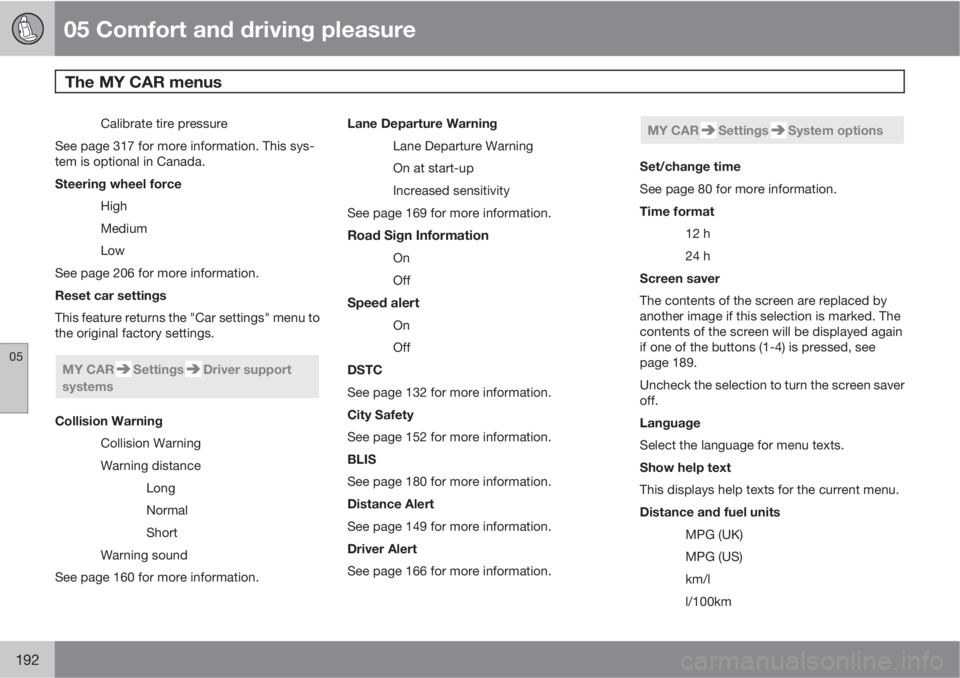
MY CARSettingsDriver support
systems
Collision Warning
Collision Warning
Warning distance
Long
Normal
Short
Warning sound
See page 160 for more information.Lane Departure Warning
Lane Departure Warning
On at start-up
Increased sensitivity
See page 169 for more information.
Road Sign Information
On
Off
Speed alert
On
Off
DSTC
See page 132 for more information.
City Safety
See page 152 for more information.
BLIS
See page 180 for more information.
Distance Alert
See page 149 for more information.
Driver Alert
See page 166 for more information.
MY CARSettingsSystem options
Set/change time
See page 80 for more information.
Time format
12 h
24 h
Screen saver
The contents of the screen are replaced by
another image if this selection is marked. The
contents of the screen will be displayed again
if one of the buttons (1-4) is pressed, see
page 189.
Uncheck the selection to turn the screen saver
off.
Language
Select the language for menu texts.
Show help text
This displays help texts for the current menu.
Distance and fuel units
MPG (UK)
MPG (US)
km/l
l/100km
Page 202 of 382

05 Comfort and driving pleasure
Climate system
05
200
Air distribution
Manual air distribution—defroster
Manual air distribution—dashboard air
vents
Manual air distribution—floor
The figure consists of three buttons. When a
button is pressed, the corresponding figure will
appear in the display with an arrow indicating
which manual air flow has been selected (see
the following illustration). See also the air dis-
tribution chart on page 202.
Air distribution is shown in the center console dis-
play
AutoThe function automatically
regulates cooling, heating,
blower speed, recirculation,
and air distribution to main-
tain the chosen temperature.
If you select one or more man-
ual functions, the other func-
tions continue to be controlled automatically.
The air quality sensor is engaged and all man-
ual settings are switched off when AUTO is
pressed. The display shows
AUTO CLIMATE.
Blower speed in automatic mode can be set
under Climate settings
Automatic blower
adjustment. Choose between
Low, Normalor High.
NOTE
Selecting the lowest blower speed may
increases the risk of fog forming on the win-
dows.
Temperature controlThe temperatures on the
driver and passenger sides
can be set separately. When
the vehicle is started, the
most recent setting is
resumed.
NOTE
Heating or cooling cannot be speeded up by
selecting a higher/lower temperature than
the actual temperature required.
Page 208 of 382
05 Comfort and driving pleasure
Active chassis system–Four C*
05
206* Option/accessory, for more information, see Introduction.
Active chassis (Four C)
Active chassis, Four-C (Continuously Con-
trolled Chassis Concept), regulates the cha-
racteristics of the shock absorbers so that the
car's driving characteristics can be adjusted.
There are three settings: Comfort, Sport and
Advanced.
NOTE
This system is available on Canadian mod-
els only.
ComfortComfort mode offers a somewhat softer ride
and the transmission shifts gears at lower rpm.
This mode is particularly suitable for long-dis-
tance highway driving. The indicator light in the
button will be on when this mode is selected.
SportIn this mode, the vehicle's body sway is
reduced during cornering and steering
response is more immediate. The transmission
shifts up at higher rpm for sportier driving. The
indicator light in the button will be on to indi-
cate that Sport mode has been selected.
AdvancedIn this mode, body sway in curves is minimal
and steering response is very direct. Gear shift-ing is done at high rpm in each gear for
dynamic and active driving.
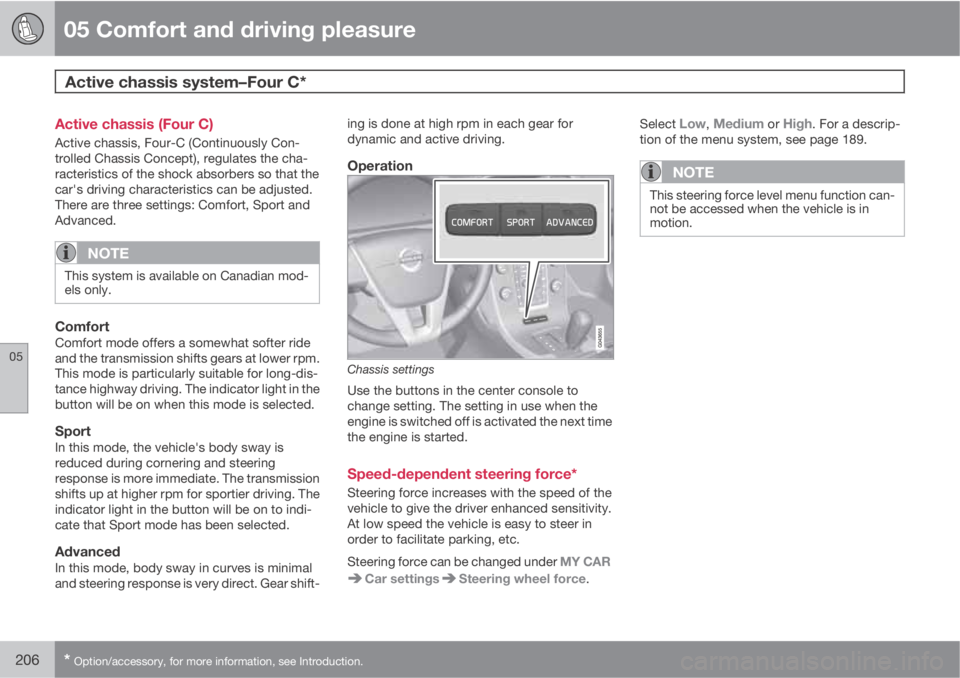
Operation
Chassis settings
Use the buttons in the center console to
change setting. The setting in use when the
engine is switched off is activated the next time
the engine is started.
Speed-dependent steering force*
Steering force increases with the speed of the
vehicle to give the driver enhanced sensitivity.
At low speed the vehicle is easy to steer in
order to facilitate parking, etc.
Steering force can be changed under MY CAR
Car settingsSteering wheel force.Select
Low, Medium or High. For a descrip-
tion of the menu system, see page 189.
NOTE
This steering force level menu function can-
not be accessed when the vehicle is in
motion.
Page 216 of 382
06 Infotainment
Introduction
06
214* Option/accessory, for more information, see Introduction.
General information
The infotainment system consists of radio and
media player features and also makes it pos-
sible to communicate via a cell phone. The
information is displayed on a 7" screen in the
center console. Infotainment functions can be
controlled from the center console or via the
buttons on the steering wheel keypad. On
models equipped with the optional navigation
system, voice commands can also be used to
e.g., set destinations, make calls from a
Bluetooth
Ÿ-connected cell phone, etc.
If the infotainment system was on when the
ignition was switched off, the most recently
used source (
FM1, etc.) will restart the next
time the ignition is put in mode I or higher. The
driver's door must also be closed on vehicles
with keyless drive*.
The infotainment system can be operated for
15 minutes at a time while the engine is
switched off by pressing the On/Off button.
While the engine is being started, the infotain-
ment system will be temporarily interrupted
and will resume when the engine has started.
NOTE
To help avoid excessive battery drain,
remove the remote key from the ignition slot
if the infotainment system is used while the
engine is switched off.
Dolby Pro Logic
The system is manufactured under license
from Dolby Laboratories Licensing
Corporation.
Dolby Pro Logic II and the
symbol are
trademarks of Dolby Laboratories Licensing
Corporation.
Audyssey MultEQ1
The Audyssey MultEQ system has been used
to optimize sound quality to help ensure a
world-class listening experience.
1Applies only to models with Premium Sound Multimedia.
Page 222 of 382
06 Infotainment
Introduction
06
220* Option/accessory, for more information, see Introduction.
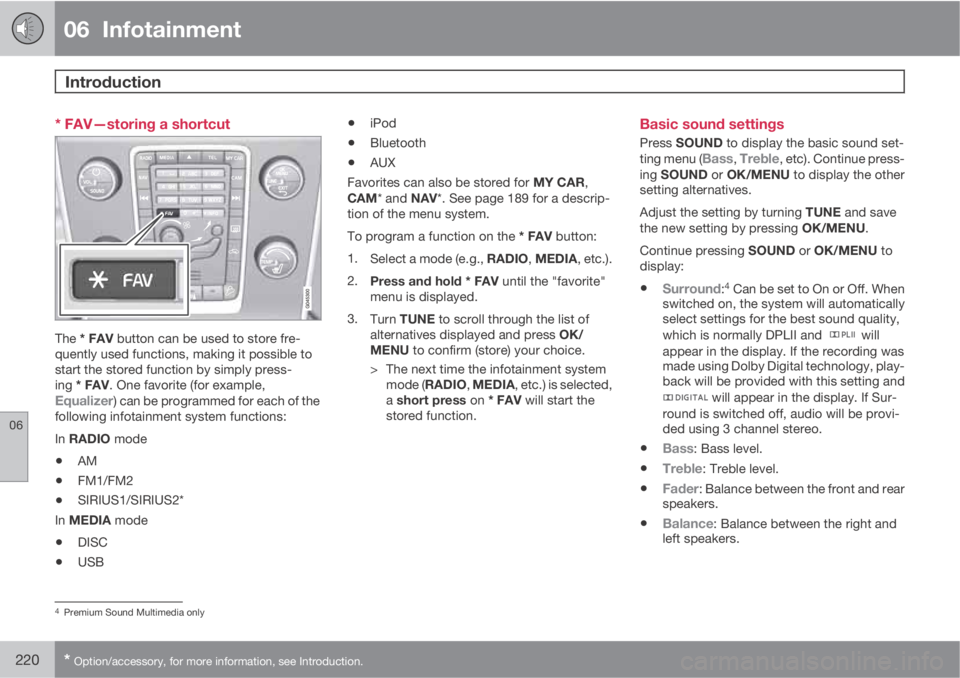
* FAV—storing a shortcut
The * FAV button can be used to store fre-
quently used functions, making it possible to
start the stored function by simply press-
ing * FAV. One favorite (for example,
Equalizer) can be programmed for each of the
following infotainment system functions:
In RADIO mode
•AM
•FM1/FM2
•SIRIUS1/SIRIUS2*
In MEDIA mode
•DISC
•USB
•iPod
•Bluetooth
•AUX
Favorites can also be stored for MY CAR,
CAM* and NAV*. See page 189 for a descrip-
tion of the menu system.
To program a function on the * FAV button:
1.
Select a mode (e.g., RADIO, MEDIA, etc.).
2.
Press and hold * FAV until the "favorite"
menu is displayed.
3.
Turn TUNE to scroll through the list of
alternatives displayed and press OK/
MENU to confirm (store) your choice.
> The next time the infotainment system
mode (RADIO, MEDIA, etc.) is selected,
a short press on * FAV will start the
stored function.
Basic sound settings
Press SOUND to display the basic sound set-
ting menu (Bass, Treble, etc). Continue press-
ing SOUND or OK/MENU to display the other
setting alternatives.
Adjust the setting by turning TUNE and save
the new setting by pressing OK/MENU.
Continue pressing SOUND or OK/MENU to
display:
•Surround:4 Can be set to On or Off. When
switched on, the system will automatically
select settings for the best sound quality,
which is normally DPLII and
will
appear in the display. If the recording was
made using Dolby Digital technology, play-
back will be provided with this setting and
will appear in the display. If Sur-
round is switched off, audio will be provi-
ded using 3 channel stereo.
•Bass: Bass level.
•Treble: Treble level.
•Fader: Balance between the front and rear
speakers.
•Balance: Balance between the right and
left speakers.
4Premium Sound Multimedia only
Page 228 of 382
06 Infotainment
Radio
06
226
keypad on the center console to switch to
manual tuning (or to switch back from manual
tuning to the "list of stations" function).
Manual tuningBy default, the list of stations of the strongest
stations in the area will be displayed when you
turn TUNE (see the preceding section, "List of
stations"). While the list of stations is displayed,
press
on the center console keypad to
switch to manual tuning, which enables you to
select a frequency from the complete list of all
radio frequencies available on the currently
selected waveband. In other words, in manual
tuning mode, turning TUNE one step will
change from e.g., 93.3 to 93.5, etc.).
To manually tune a station:
1.
Press RADIO. Turn TUNE to scroll to the
desired waveband (
AM, FM1, etc.) and
press OK/MENU or the thumb wheel on
the steering wheel keypad to confirm.
2.
Turn TUNE or the thumb wheel to select a
frequency.
NOTE
The radio is initially set to automatically
search for stations in the area in which you
are driving (see the preceding section, "List
of stations").
However, if you have switched to manual
tuning (by pressing
on the keypad on
the center console while the list of stations
is displayed), the radio will remain in manual
tuning mode the next time it is switched on.
To switch back to "list of stations" mode,
turn TUNE one step (to display the full list of
stations) and press
.
Please note that if you press
when the
list of stations is not displayed, this will acti-
vate the INFO function.
Storing preset stationsTen preset stations can be stored for each
waveband (AM, FM1, etc.).
Stored preset stations are selected using the
buttons on the keypad on the center console.
Manually storing preset stations1. Tune to a station (see "Selecting a station"
on page 225).
2. Press and hold one of the number key but-
tons.
> The sound will be muted for several sec-
onds and when it returns, the station hasbeen stored on the number key button
used.
A list of preset stations can be displayed. This
function can be activated/deactivated in AM/
FM mode in FM menu
Show presets or in
AM menu
Show presets
ScanThe function automatically searches the cur-
rent waveband for radio stations. When a sta-
tion is found, it is played for several seconds
before scanning is resumed. While the station
is playing it can be stored as a preset in the
usual way (see "Manually storing preset sta-
tions").
–To start scanning in AM/FM mode, go to
FM menu
Scan or in AM menu
Scan.
Stop station scanning by pressing EXIT.
NOTE
Storing a station interrupts the SCAN func-
tion.
Radio textSome stations transmit information on pro-
gram content, artists, etc. This information can
be shown on the display.
Page 236 of 382
06 Infotainment
Media player
06
234
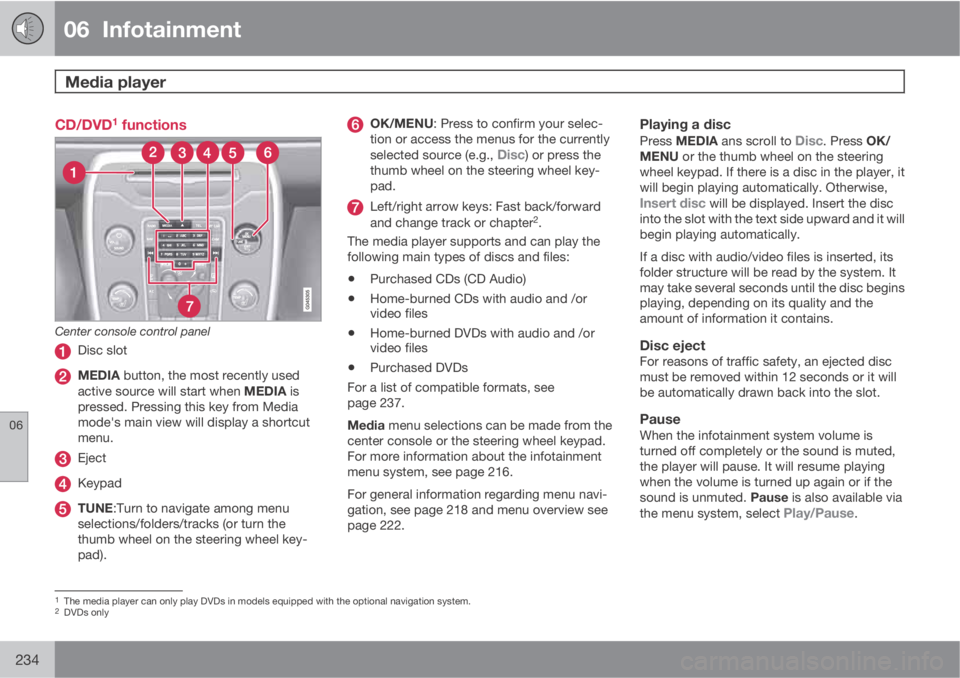
CD/DVD1 functions
Center console control panel
Disc slot
MEDIA button, the most recently used
active source will start when MEDIA is
pressed. Pressing this key from Media
mode's main view will display a shortcut
menu.
Eject
Keypad
TUNE:Turn to navigate among menu
selections/folders/tracks (or turn the
thumb wheel on the steering wheel key-
pad).
OK/MENU: Press to confirm your selec-
tion or access the menus for the currently
selected source (e.g.,
Disc) or press the
thumb wheel on the steering wheel key-
pad.
Left/right arrow keys: Fast back/forward
and change track or chapter2.
The media player supports and can play the
following main types of discs and files:
•Purchased CDs (CD Audio)
•Home-burned CDs with audio and /or
video files
•Home-burned DVDs with audio and /or
video files
•Purchased DVDs
For a list of compatible formats, see
page 237.
Media menu selections can be made from the
center console or the steering wheel keypad.
For more information about the infotainment
menu system, see page 216.
For general information regarding menu navi-
gation, see page 218 and menu overview see
page 222.
Playing a disc
Press MEDIA ans scroll to Disc. Press OK/
MENU or the thumb wheel on the steering
wheel keypad. If there is a disc in the player, it
will begin playing automatically. Otherwise,
Insert disc will be displayed. Insert the disc
into the slot with the text side upward and it will
begin playing automatically.
If a disc with audio/video files is inserted, its
folder structure will be read by the system. It
may take several seconds until the disc begins
playing, depending on its quality and the
amount of information it contains.
Disc ejectFor reasons of traffic safety, an ejected disc
must be removed within 12 seconds or it will
be automatically drawn back into the slot.
PauseWhen the infotainment system volume is
turned off completely or the sound is muted,
the player will pause. It will resume playing
when the volume is turned up again or if the
sound is unmuted. Pause is also available via
the menu system, select
Play/Pause.
1The media player can only play DVDs in models equipped with the optional navigation system.2DVDs only
Page 237 of 382
06 Infotainment
Media player
06
* Option/accessory, for more information, see Introduction.235
Navigating a disc and playing tracks
CD audio discs
Turn TUNE to access the disc's playlist and to
navigate in this list. Press OK/MENU to con-
firm a choice and begin listening. Press EXIT
to cancel. Press and hold EXIT to return to the
playlist's root level.
The
/ buttons on the center console or
steering wheel keypad can also be used to
change tracks.
Home-burned CD/DVD audio/video filesTurn TUNE to access the disc's playlist and to
navigate in this list. Press OK/MENU to con-
firm a choice and begin listening. Use EXIT to
stop or to go back in the disc's folder structure.
Press and hold EXIT to return to the playlist's
root level.
The
/ buttons on the center console or
steering wheel keypad* can also be used to
change audio/video files.
The following symbols are used in the display:
•- audio files
•- video files
•- foldersWhen a file has been played, the player will
continue to play the rest of the files (of the same
type) in the current folder. When all of the files
in the folder have been played, the player will
automatically go to the next folder and play the
files in it (unless
Repeat folder is activated).
The system automatically detects and changes
settings if a disc containing only audio or only
video files is inserted in the player and will play
these files. However, the system will not
change settings if a disc containing both audio
and video files is inserted and the player will
continue to play the current type of file.
NOTE
Video images will only be visible when the
vehicle is not moving. When the vehicle is
traveling faster than approximately 4 mph
(6 km/h),
No visual media available while
driving will be displayed. Sound from the
film will still be audible and video images will
be shown again when the vehicle stops.
NOTE
Some copy protected audio files or home-
burned audio files may not be read by the
player.
DVD videosFor information, see page 234.
Fast forward/reverse
Press and hold the / buttons to fast
forward/reverse. This is done at one speed for
audio files but several speeds can be chosen
for video files. Press the
/ buttons sev-
eral times to increase the speed. Release the
button to return to normal viewing speed.
Scan3
This function plays the first ten seconds of
each track/audio file. To start scanning:
1.
Press OK/MENU.
2.
Scroll to
Scan.
> The first ten seconds of each track/
audio file will be played.
3.
Stop scanning by pressing EXIT. The cur-
rent track/audio file will continue playing.
Random3
This function plays the tracks in random order
(shuffle). The random tracks/sound files can be
scrolled through in the normal way. To listen to
tracks in random order:
1.
Press OK/MENU,
3Not video DVDs