display VOLVO XC70 2013 Owner´s Manual
[x] Cancel search | Manufacturer: VOLVO, Model Year: 2013, Model line: XC70, Model: VOLVO XC70 2013Pages: 382, PDF Size: 6.78 MB
Page 94 of 382
03 Your driving environment
Lighting
03
92
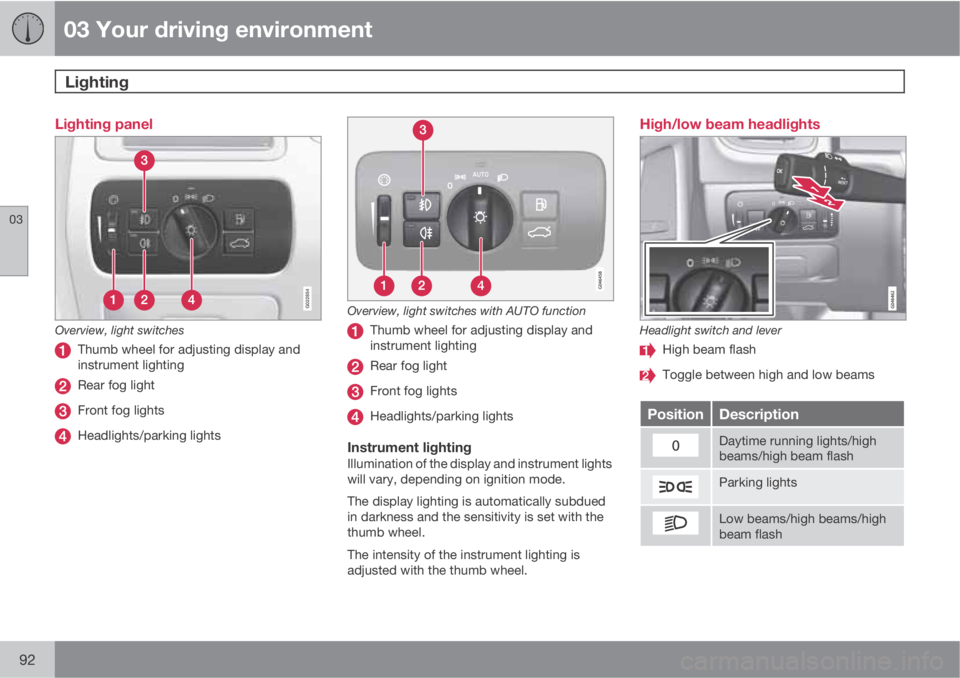
Lighting panel
G022854
Overview, light switches
Thumb wheel for adjusting display and
instrument lighting
Rear fog light
Front fog lights
Headlights/parking lights
Overview, light switches with AUTO function
Thumb wheel for adjusting display and
instrument lighting
Rear fog light
Front fog lights
Headlights/parking lights
Instrument lightingIllumination of the display and instrument lights
will vary, depending on ignition mode.
The display lighting is automatically subdued
in darkness and the sensitivity is set with the
thumb wheel.
The intensity of the instrument lighting is
adjusted with the thumb wheel.
High/low beam headlights
Headlight switch and lever
High beam flash
Toggle between high and low beams
PositionDescription
Daytime running lights/high
beams/high beam flash
Parking lights
Low beams/high beams/high
beam flash
Page 96 of 382
03 Your driving environment
Lighting
03
94* Option/accessory, for more information, see Introduction.
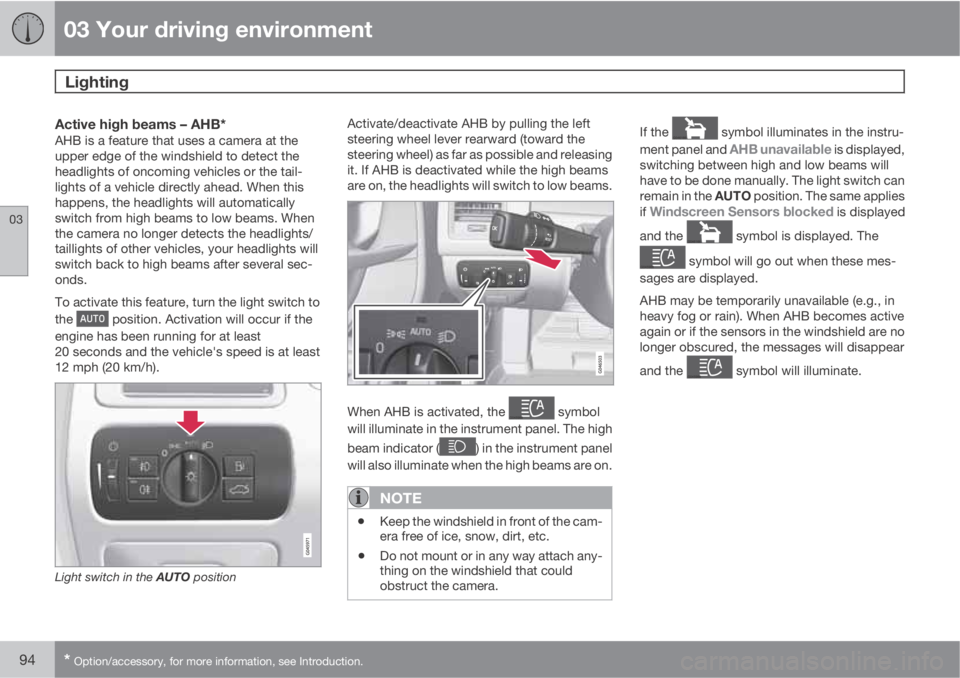
Active high beams – AHB*AHB is a feature that uses a camera at the
upper edge of the windshield to detect the
headlights of oncoming vehicles or the tail-
lights of a vehicle directly ahead. When this
happens, the headlights will automatically
switch from high beams to low beams. When
the camera no longer detects the headlights/
taillights of other vehicles, your headlights will
switch back to high beams after several sec-
onds.
To activate this feature, turn the light switch to
the
position. Activation will occur if the
engine has been running for at least
20 seconds and the vehicle's speed is at least
12 mph (20 km/h).
Light switch in the AUTO position
Activate/deactivate AHB by pulling the left
steering wheel lever rearward (toward the
steering wheel) as far as possible and releasing
it. If AHB is deactivated while the high beams
are on, the headlights will switch to low beams.
When AHB is activated, the symbol
will illuminate in the instrument panel. The high
beam indicator (
) in the instrument panel
will also illuminate when the high beams are on.
NOTE
•Keep the windshield in front of the cam-
era free of ice, snow, dirt, etc.
•Do not mount or in any way attach any-
thing on the windshield that could
obstruct the camera.
If the symbol illuminates in the instru-
ment panel and
AHB unavailable is displayed,
switching between high and low beams will
have to be done manually. The light switch can
remain in the AUTO position. The same applies
if
Windscreen Sensors blocked is displayed
and the
symbol is displayed. The
symbol will go out when these mes-
sages are displayed.
AHB may be temporarily unavailable (e.g., in
heavy fog or rain). When AHB becomes active
again or if the sensors in the windshield are no
longer obscured, the messages will disappear
and the
symbol will illuminate.
Page 97 of 382
03 Your driving environment
Lighting
03
* Option/accessory, for more information, see Introduction.95
CAUTION
In the following situations, it may be neces-
sary to switch between high and low beams
manually:
•In heavy fog or rain
•In blowing snow or slush
•In bright moonlight
•In freezing rain
•In areas with dim street lighting
•When oncoming vehicles have dim front
lighting
•If there are pedestrians on or near the
road
•If there are reflective objects, such as
signs, near the road
•When oncoming vehicles' lights are
obscured by e.g., fences, bushes, etc.
•When there are vehicles on connecting
roads
•At the top of hills or in dips in the road
•In sharp curves
See page162 for more information about the
camera's limitations.
Tunnel detection (standard on models
with a rain sensor)
The optional rain sensor reacts to the change
in lighting conditions when, for example, the
vehicle is driven into a tunnel. If the daytime
running lights have been deactivated, tunnel
detection will activate the low beam headlights
while the vehicle is in the tunnel. The low
beams will be switched off approx.
20 seconds after the vehicle leaves the tunnel.
The rain sensor does not have to be activated
for tunnel detection to function.
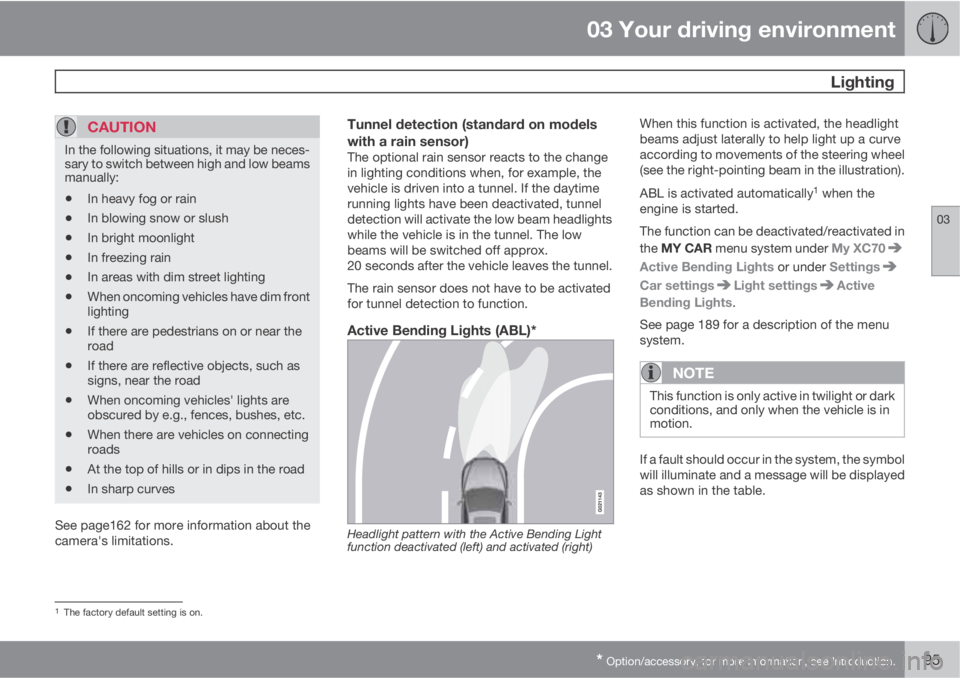
Active Bending Lights (ABL)*
Headlight pattern with the Active Bending Light
function deactivated (left) and activated (right)
When this function is activated, the headlight
beams adjust laterally to help light up a curve
according to movements of the steering wheel
(see the right-pointing beam in the illustration).
ABL is activated automatically
1 when the
engine is started.
The function can be deactivated/reactivated in
the MY CAR menu system under My XC70
Active Bending Lights or under Settings
Car settingsLight settingsActive
Bending Lights.
See page 189 for a description of the menu
system.
NOTE
This function is only active in twilight or dark
conditions, and only when the vehicle is in
motion.
If a fault should occur in the system, the symbol
will illuminate and a message will be displayed
as shown in the table.
1The factory default setting is on.
Page 98 of 382
03 Your driving environment
Lighting
03
96* Option/accessory, for more information, see Introduction.
SymbolDisplayExplana-
tion
Headlamp
failure
Service
requiredThe system
is not func-
tioning
properly and
should be
inspected/
repaired by
a trained
and qualified
Volvo serv-
ice techni-
cian.
Auxiliary lights*If the vehicle is fitted with auxiliary lights, the
driver can use the MY CAR menu system to
choose to deactivate and turn these lights on
and off along with the high beam headlights
2.
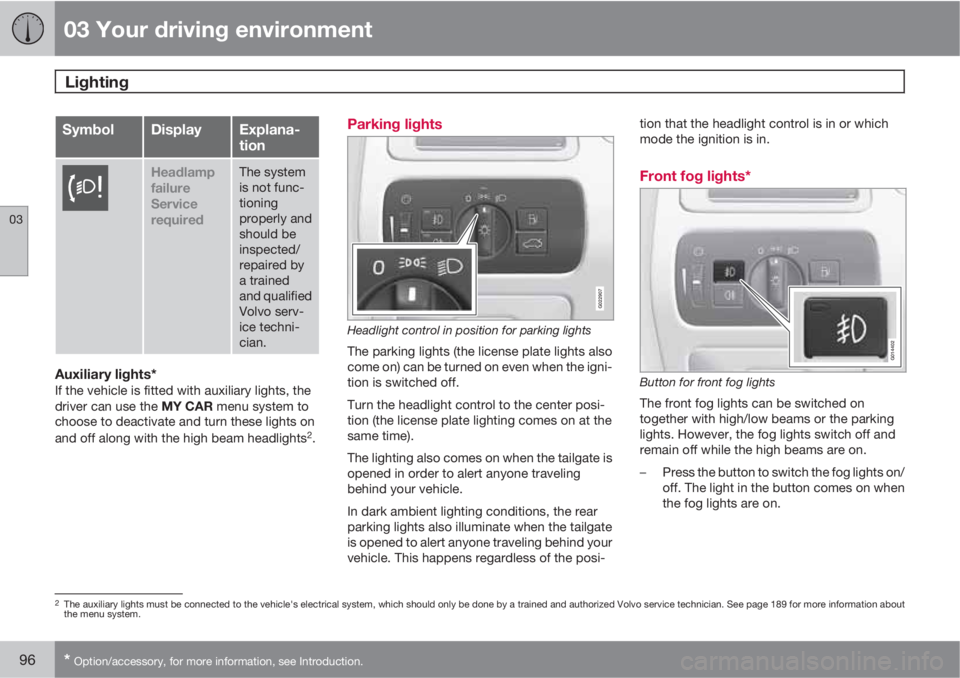
Parking lights
G022907
Headlight control in position for parking lights
The parking lights (the license plate lights also
come on) can be turned on even when the igni-
tion is switched off.
Turn the headlight control to the center posi-
tion (the license plate lighting comes on at the
same time).
The lighting also comes on when the tailgate is
opened in order to alert anyone traveling
behind your vehicle.
In dark ambient lighting conditions, the rear
parking lights also illuminate when the tailgate
is opened to alert anyone traveling behind your
vehicle. This happens regardless of the posi-tion that the headlight control is in or which
mode the ignition is in.
Front fog lights*
G014402
Button for front fog lights
The front fog lights can be switched on
together with high/low beams or the parking
lights. However, the fog lights switch off and
remain off while the high beams are on.
–Press the button to switch the fog lights on/
off. The light in the button comes on when
the fog lights are on.
2The auxiliary lights must be connected to the vehicle's electrical system, which should only be done by a trained and authorized Volvo service technician. See page 189 for more information about
the menu system.
Page 103 of 382
03 Your driving environment
Wipers and washers
03
* Option/accessory, for more information, see Introduction.101
The rain sensor is automatically deactivated
when the key is removed from the ignition slot
or five minutes after the ignition has been
switched off.
CAUTION
The rain sensor should be deactivated when
washing the car in an automatic car wash,
etc. If the rain sensor function is left on, the
wipers will start inadvertently in the car
wash and could be damaged.
Windshield washing
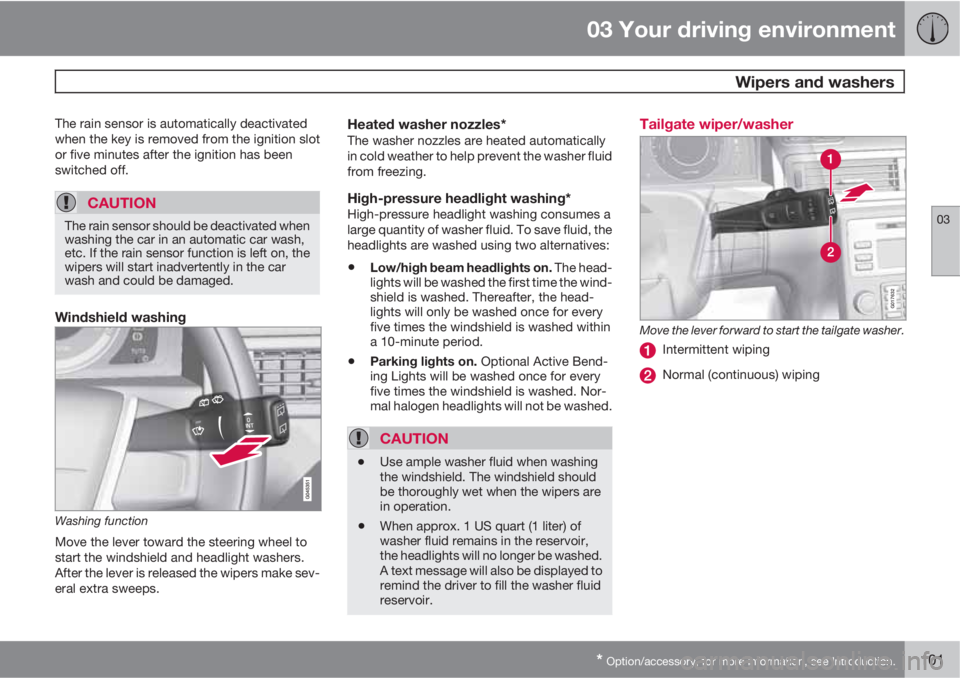
Washing function
Move the lever toward the steering wheel to
start the windshield and headlight washers.
After the lever is released the wipers make sev-
eral extra sweeps.
Heated washer nozzles*The washer nozzles are heated automatically
in cold weather to help prevent the washer fluid
from freezing.
High-pressure headlight washing*High-pressure headlight washing consumes a
large quantity of washer fluid. To save fluid, the
headlights are washed using two alternatives:
•Low/high beam headlights on. The head-
lights will be washed the first time the wind-
shield is washed. Thereafter, the head-
lights will only be washed once for every
five times the windshield is washed within
a 10-minute period.
•Parking lights on. Optional Active Bend-
ing Lights will be washed once for every
five times the windshield is washed. Nor-
mal halogen headlights will not be washed.
CAUTION
•Use ample washer fluid when washing
the windshield. The windshield should
be thoroughly wet when the wipers are
in operation.
•When approx. 1 US quart (1 liter) of
washer fluid remains in the reservoir,
the headlights will no longer be washed.
A text message will also be displayed to
remind the driver to fill the washer fluid
reservoir.
Tailgate wiper/washer
G017632
Move the lever forward to start the tailgate washer.
Intermittent wiping
Normal (continuous) wiping
Page 109 of 382
03 Your driving environment
Compass*
03
* Option/accessory, for more information, see Introduction.107 Operation
G029737
Rearview mirror with compass.
The rearview mirror has an integrated display
that shows the compass direction in which the
vehicle is pointing. Eight different directions are
shown with the abbreviations:
N (north), NE(north east), E (east), SE (southeast), S (south),SW (southwest), W (west) and NW (northwest).
The compass is displayed automatically when
the vehicle is started or in ignition mode II. To
switch the compass on/off use a pen or similar
object and press in the button on the rear side
of the mirror.
CalibrationThe compass will need to be calibrated if the
vehicle is driven into a new magnetic zone (see
the magnetic zones on the map at the end of
this section). To do so:1. Stop the vehicle in a large open area, safely
out of traffic and away from steel structures
and high-tension electrical wires.
2. Start the vehicle.
NOTE
For best results from calibration, switch off
all electrical equipment in the vehicle (cli-
mate system, windshield wipers, audio sys-
tem, etc.) and make sure that all doors are
closed.
3. Using a pen or similar object, press and
hold the button on the rear side of mirror
until
C is shown again in the mirror (after
approx. 6 seconds).
4.
Drive as usual.
C disappears from the dis-
play when calibration is complete.
Alternative calibration method:
Drive slowly in a circle at a speed of no
more than 5 mph (8 km/h) until
C disap-
pears from the display when calibration is
complete.
Selecting a magnetic zone
15
14
13
12
11
9 8
7 6 5 4 32 1
10
G018632
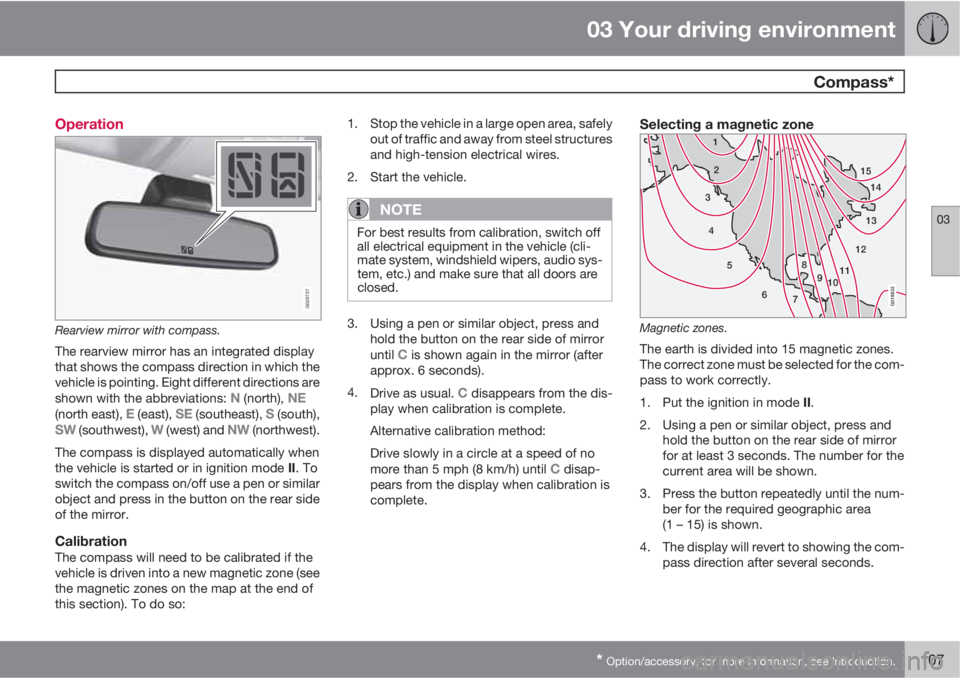
Magnetic zones.
The earth is divided into 15 magnetic zones.
The correct zone must be selected for the com-
pass to work correctly.
1.
Put the ignition in mode II.
2. Using a pen or similar object, press and
hold the button on the rear side of mirror
for at least 3 seconds. The number for the
current area will be shown.
3. Press the button repeatedly until the num-
ber for the required geographic area
(1 – 15) is shown.
4. The display will revert to showing the com-
pass direction after several seconds.
Page 118 of 382
03 Your driving environment
Starting the engine
03
116
Deactivated functionsWhen the engine is started with ERS, the fol-
lowing functions are deactivated:
•Headlights
•Parking lights
•License plate lights
•Windshield wipers
Switching off an engine started with ERSAny of the following will switch off the engine if
it has been started with ERS:
•Pressing the lock button (1) on the remote
key
•Unlocking the vehicle
•Opening a door
•Depressing the throttle or brake pedal
•Moving the gear selector from the P posi-
tion
•If there are less than approx. 2.5 gallons
(10 liters) of fuel in the tank
•More than 15 minutes have elapsed.
If the engine has been started with ERS and
switches off, the turn signals will illuminate for
3 seconds.
Message in the instrument panel displayIf ERS is interrupted, a text message will be
displayed in the instrument panel.
Switching off the engine
With the engine running, press the START/
STOP ENGINE button.
If the gear selector is not in the P position or if
the vehicle is moving, press the START/STOP
ENGINE button twice or press and hold it in
until the engine switches off.
Jump starting
G021347
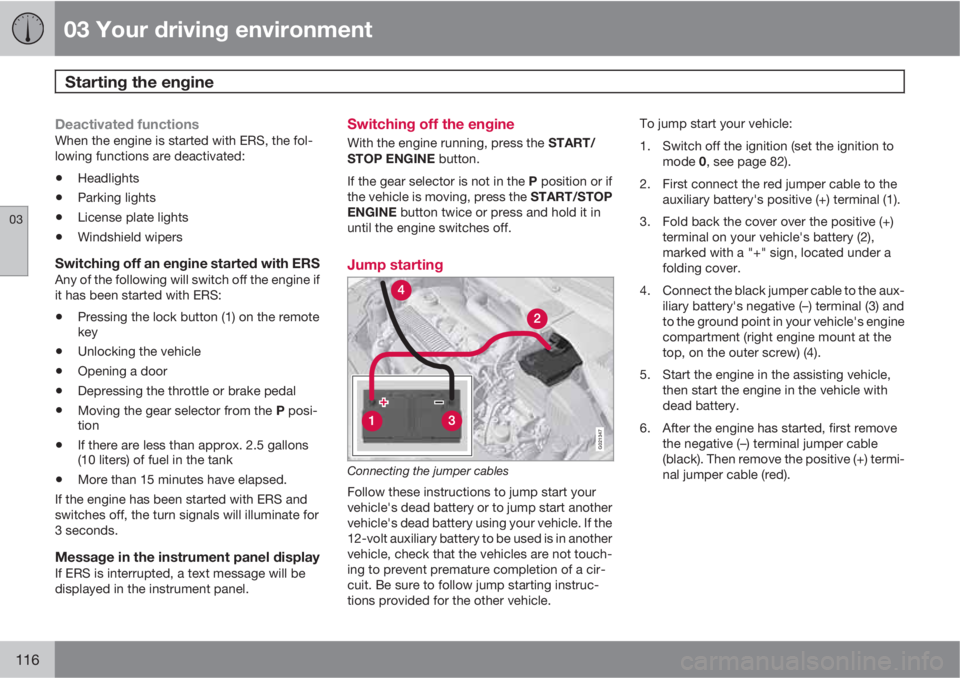
Connecting the jumper cables
Follow these instructions to jump start your
vehicle's dead battery or to jump start another
vehicle's dead battery using your vehicle. If the
12-volt auxiliary battery to be used is in another
vehicle, check that the vehicles are not touch-
ing to prevent premature completion of a cir-
cuit. Be sure to follow jump starting instruc-
tions provided for the other vehicle.To jump start your vehicle:
1. Switch off the ignition (set the ignition to
mode 0, see page 82).
2. First connect the red jumper cable to the
auxiliary battery's positive (+) terminal (1).
3. Fold back the cover over the positive (+)
terminal on your vehicle's battery (2),
marked with a "+" sign, located under a
folding cover.
4. Connect the black jumper cable to the aux-
iliary battery's negative (–) terminal (3) and
to the ground point in your vehicle's engine
compartment (right engine mount at the
top, on the outer screw) (4).
5. Start the engine in the assisting vehicle,
then start the engine in the vehicle with
dead battery.
6. After the engine has started, first remove
the negative (–) terminal jumper cable
(black). Then remove the positive (+) termi-
nal jumper cable (red).
Page 120 of 382
03 Your driving environment
Transmission
03
118
Automatic transmission
G021351
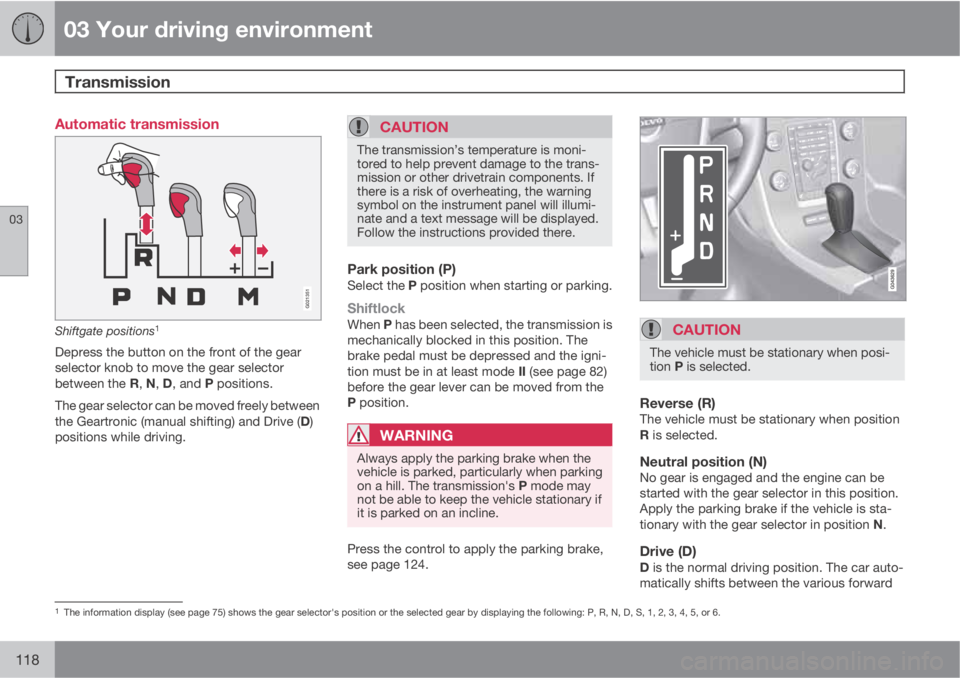
Shiftgate positions1
Depress the button on the front of the gear
selector knob to move the gear selector
between the R, N, D, and P positions.
The gear selector can be moved freely between
the Geartronic (manual shifting) and Drive (D)
positions while driving.
CAUTION
The transmission’s temperature is moni-
tored to help prevent damage to the trans-
mission or other drivetrain components. If
there is a risk of overheating, the warning
symbol on the instrument panel will illumi-
nate and a text message will be displayed.
Follow the instructions provided there.
Park position (P)Select the P position when starting or parking.
ShiftlockWhen P has been selected, the transmission is
mechanically blocked in this position. The
brake pedal must be depressed and the igni-
tion must be in at least mode II (see page 82)
before the gear lever can be moved from the
P position.
WARNING
Always apply the parking brake when the
vehicle is parked, particularly when parking
on a hill. The transmission's P mode may
not be able to keep the vehicle stationary if
it is parked on an incline.
Press the control to apply the parking brake,
see page 124.
CAUTION
The vehicle must be stationary when posi-
tion P is selected.
Reverse (R)The vehicle must be stationary when position
R is selected.
Neutral position (N)No gear is engaged and the engine can be
started with the gear selector in this position.
Apply the parking brake if the vehicle is sta-
tionary with the gear selector in position N.
Drive (D)D is the normal driving position. The car auto-
matically shifts between the various forward
1The information display (see page 75) shows the gear selector's position or the selected gear by displaying the following: P, R, N, D, S, 1, 2, 3, 4, 5, or 6.
Page 121 of 382
03 Your driving environment
Transmission
03
119
gears, based on the level of acceleration and
speed. The car must be at a standstill when
shifting from position R to position D.
Geartronic–manual shiftingGeartronic allows you to manually shift among
your vehicle's six forward speeds. Geartronic
can be selected at any time.
•To access the manual shifting position
from Drive (D), move the gear selector to
the right (to the area marked M in the illus-
tration.
•To return to the D position from the manual
shifting position, move the gear selector to
the left.
While driving
•If you select the manual shifting position
while driving, the gear that was being used
in the Drive position will also initially be
selected in the manual shifting position.
•Move the gear selector forward (toward
"+") to shift to a higher gear or rearward
(toward "–") to shift to a lower gear.
•If you hold the gear selector toward "–", the
transmission will downshift one gear at a
time and will utilize the braking power of
the engine. If the current speed is too high
for using a lower gear, the downshift willnot occur until the speed has decreased
enough to allow the lower gear to be used.
•If you slow to a very low speed, the trans-
mission will automatically shift down.
Shiftlock – Neutral (N)If the gear selector is in the N position and the
vehicle has been stationary for at least 3 sec-
onds (irrespective of whether the engine is run-
ning) then the gear selector is locked.
To be able to move the gear selector from N to
another gear position, the brake pedal must be
depressed and the ignition must be in posi-
tion II, see page 82.
Geartronic–Sport mode (S)2
This transmission mode provides sportier shift-
ing characteristics and enables a more active
driving style by making it possible to drive at
higher rpm in each gear before shifting up. The
engine also responds faster when the throttle
pedal is pressed.
To access Sport mode from Drive (D), move the
gear selector to the right. The transmission will
not switch to manual shifting mode until the
gear selector is moved forward or rearward
toward + or –.
Sport mode can be selected any time.
NOTE
•On vehicles equipped with Sport mode,
the transmission symbol in the main
instrument panel will change from D to
S when the gear selector is moved to
the manual shifting mode. If the gear
selector is moved toward "+" or "-", the
number of the gear currently being used
will be displayed, see page 75).
•Please be aware that using Sport mode
may result in a slight decrease in fuel
economy. Driving in D can help improve
fuel economy.
Geartronic–starting on slippery surfacesSelecting 3rd gear in Geartronic’s manual shift-
ing mode can help provide better traction when
starting off on slippery surfaces. To do so:
1. Depress the brake pedal and move the
gear selector to the right from the D posi-
tion to the manual shifting position. The
text in the instrument panel display will
change from
D to 1.
2. Press the gear selector forward and
release it (this selects 2nd gear). Press the
selector forward again and release it to
select 3rd gear.
2Certain models only
Page 122 of 382
03 Your driving environment
Transmission
03
120
3. Release the brake pedal and press gently
on the accelerator pedal.
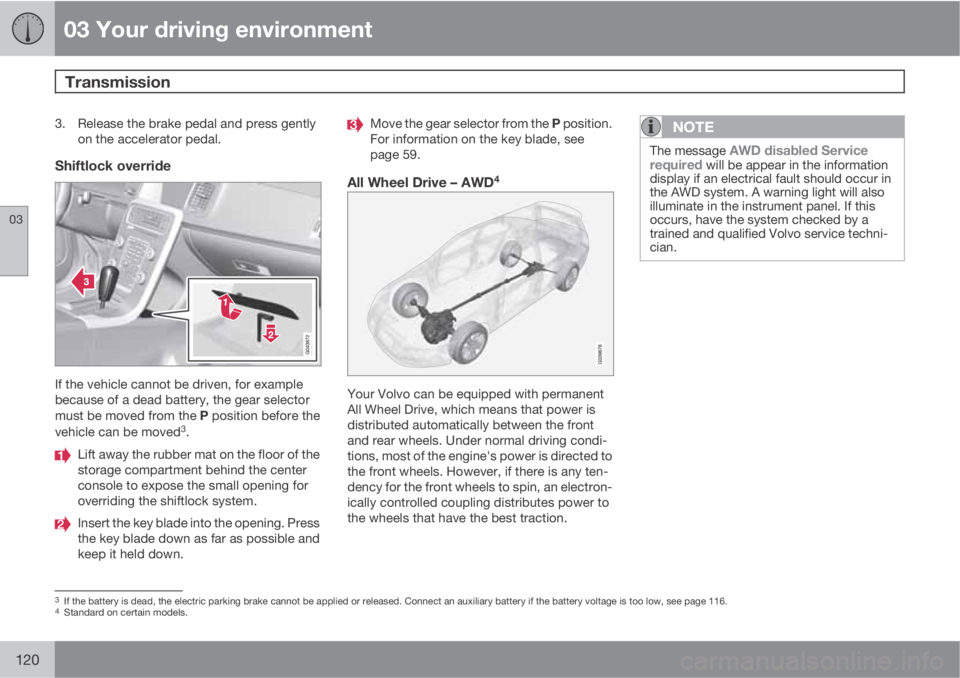
Shiftlock override
If the vehicle cannot be driven, for example
because of a dead battery, the gear selector
must be moved from the P position before the
vehicle can be moved
3.
Lift away the rubber mat on the floor of the
storage compartment behind the center
console to expose the small opening for
overriding the shiftlock system.
Insert the key blade into the opening. Press
the key blade down as far as possible and
keep it held down.
Move the gear selector from the P position.
For information on the key blade, see
page 59.
All Wheel Drive – AWD4
Your Volvo can be equipped with permanent
All Wheel Drive, which means that power is
distributed automatically between the front
and rear wheels. Under normal driving condi-
tions, most of the engine's power is directed to
the front wheels. However, if there is any ten-
dency for the front wheels to spin, an electron-
ically controlled coupling distributes power to
the wheels that have the best traction.
NOTE
The message AWD disabled Service
required will be appear in the information
display if an electrical fault should occur in
the AWD system. A warning light will also
illuminate in the instrument panel. If this
occurs, have the system checked by a
trained and qualified Volvo service techni-
cian.
3If the battery is dead, the electric parking brake cannot be applied or released. Connect an auxiliary battery if the battery voltage is too low, see page 116.4Standard on certain models.