audio VOLVO XC70 2013 Owner´s Manual
[x] Cancel search | Manufacturer: VOLVO, Model Year: 2013, Model line: XC70, Model: VOLVO XC70 2013Pages: 382, PDF Size: 6.78 MB
Page 264 of 382

06 Infotainment
Rear Seat Entertainment (RSE)*
06
262* Option/accessory, for more information, see Introduction.
RSE pop-up menu6
Press on the remote control while a video
file is playing to display the pop-up menu. Use
the scroll wheel and the buttons on the remote
to make menu selections. See page 264 for
detailed information about the remote control.
Screen aspect ration
Image settings
Day/Night mode
Source menu
7
DVD disc menu8
RSE rear screen menus
Press on the remote control when a
source (e.g.,
Disc) has been selected to access
the RSE-menus for the rear screens.
Use the scroll wheel and the buttons on the
remote to make menu selections. See page
264 for detailed information about the remote
control.
RADIO
The menus for AM, FM1, FM2, SAT1* andSAT2* are:
Day/Night mode
Display off
Reset all RSE settings
MEDIA
RSE CD Audio menuDisc menu
Random
Day/Night mode
Display off
Reset all CD settings
RSE CD/DVD Data menuDisc menu
Random
Repeat folder
DivX® VOD code
Day/Night mode
Display offReset all CD/DVD settings
RSE DVD Video menuDVD Video Menu
DVD disc menu
Subtitles
Audio tracks
Advanced settings
Day/Night mode
Display off
Reset all DVD settings
RSE USB menuUSB menu
Random
Repeat folder
DivX® VOD code
Select USB device
Day/Night mode
Display off
Reset all USB settings
6Applies only when a video file is playing.7The content of the menu will vary according to what is being played, for example CD/DVD data menu or USB menu.8Applies to DVD videos only
Page 267 of 382
06 Infotainment
Remote control*
06
* Option/accessory, for more information, see Introduction.265
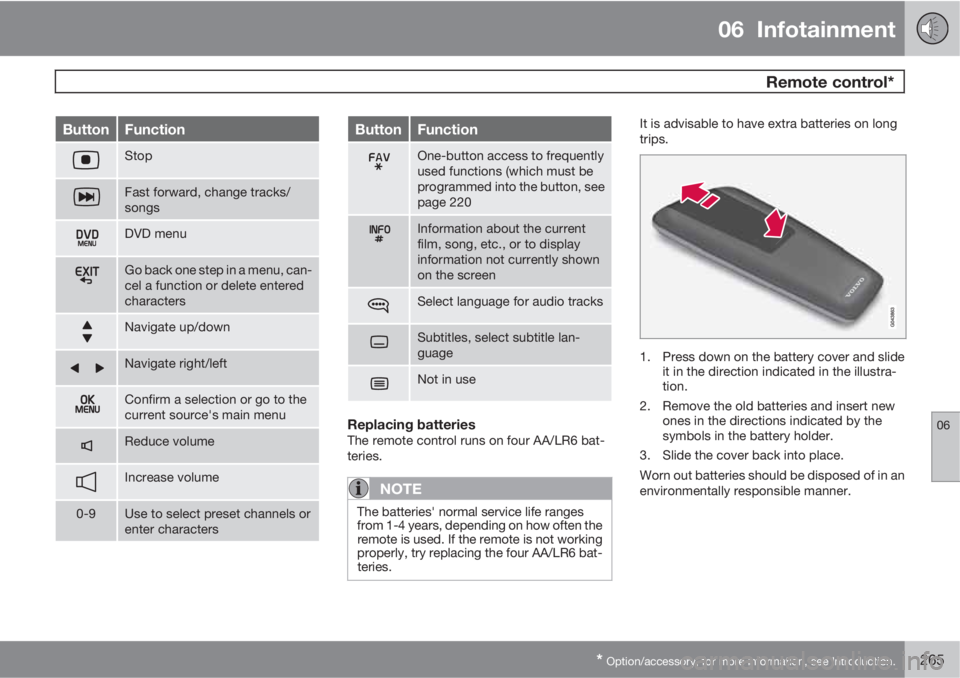
ButtonFunction
Stop
Fast forward, change tracks/
songs
DVD menu
Go back one step in a menu, can-
cel a function or delete entered
characters
Navigate up/down
Navigate right/left
Confirm a selection or go to the
current source's main menu
Reduce volume
Increase volume
0-9Use to select preset channels or
enter characters
ButtonFunction
One-button access to frequently
used functions (which must be
programmed into the button, see
page 220
Information about the current
film, song, etc., or to display
information not currently shown
on the screen
Select language for audio tracks
Subtitles, select subtitle lan-
guage
Not in use
Replacing batteriesThe remote control runs on four AA/LR6 bat-
teries.
NOTE
The batteries' normal service life ranges
from 1-4 years, depending on how often the
remote is used. If the remote is not working
properly, try replacing the four AA/LR6 bat-
teries.
It is advisable to have extra batteries on long
trips.
1. Press down on the battery cover and slide
it in the direction indicated in the illustra-
tion.
2. Remove the old batteries and insert new
ones in the directions indicated by the
symbols in the battery holder.
3. Slide the cover back into place.
Worn out batteries should be disposed of in an
environmentally responsible manner.
Page 271 of 382
07 During your trip
Driving recommendations
07
269
tributed so that capacity weight or maximum
permissible axle loads are not exceeded.
Driving through water
•The vehicle can be driven through water up
to a depth of approximately 10 in. (25 cm),
at a maximum speed of 6 mph (10 km/h).
•Take particular care when driving through
flowing water.
•Clean the electrical connections for trailer
wiring after driving in mud or water.
•When driving through water, maintain low
speed and do not stop in the water.
WARNING
After driving through water, press lightly on
the brake pedal to ensure that the brakes
are functioning normally. Water or mud can
make the brake linings slippery, resulting in
delayed braking effect.
CAUTION
•Engine damage will occur if water is
drawn into the air cleaner.
•If the vehicle is driven through water
deeper than 10 in (25 cm), water may
enter the differential and the transmis-
sion. This reduces the oil's lubricating
capacity and may shorten the service
life of these components.
•Do not allow the vehicle to stand in
water up to the door sills longer than
absolutely necessary. This could result
in electrical malfunctions.
•If the engine has been stopped while the
vehicle is in water, do not attempt to
restart it. Have the vehicle towed out of
the water.
Engine and cooling systemUnder special conditions, for example when
driving in hilly terrain, extreme heat or with
heavy loads, there is a risk that the engine and
cooling system will overheat. Proceed as fol-
lows to avoid overheating the engine.
•Maintain a low speed when driving with a
trailer up long, steep hills.
•Do not turn the engine off immediately
when stopping after a hard drive.
WARNING
The cooling fan may start or continue to
operate (for up to 6 minutes) after the engine
has been switched off.
•Remove any auxiliary lights from in front of
the grille when driving in hot weather con-
ditions.
•Do not exceed engine speeds of 4500 rpm
if driving with a trailer in hilly terrain. The oil
temperature could become too high.
Conserving electrical currentKeep the following in mind to help minimize
battery drain:
•When the engine is not running, avoid
using ignition mode II. Many electrical sys-
tems (the audio system, the optional navi-
gation system, power windows, etc) will
function in ignition modes 0 and I. These
modes reduce drain on the battery.
•Please keep in mind that using systems,
accessories, etc., that consume a great
deal of current when the engine is not run-
ning could result in the battery being com-
pletely drained. Driving or having the
engine running for approximately
15 minutes will help keep the battery
charged.
•The optional 12 volt socket in the cargo
area provides electrical current even with
Page 370 of 382
10 Specifications
Overview of information and warning symbols
10
368* Option/accessory, for more information, see Introduction.
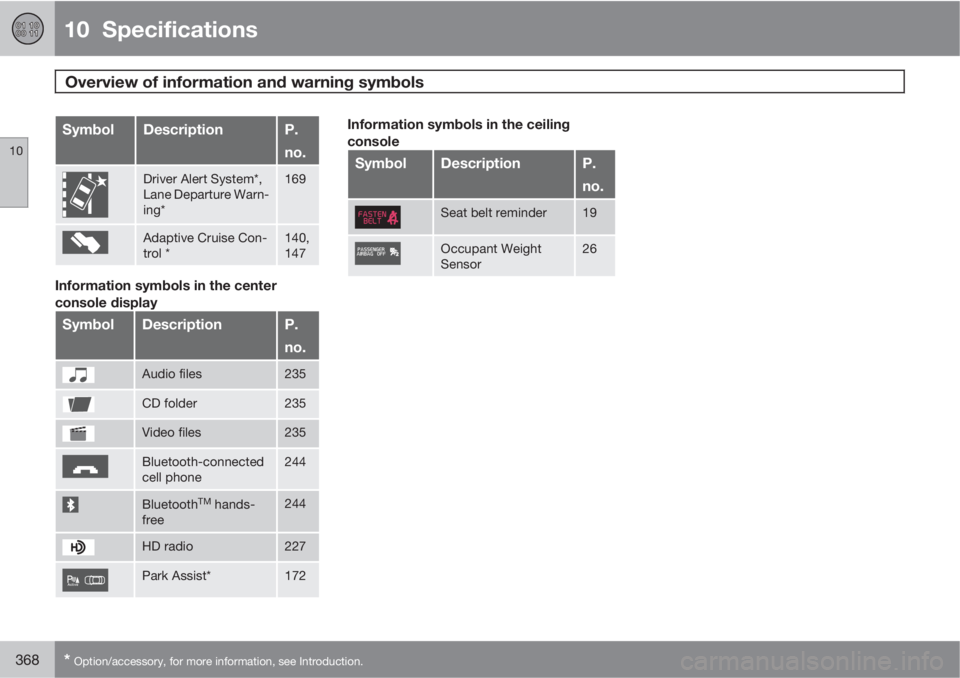
SymbolDescriptionP.
no.
Driver Alert System*,
Lane Departure Warn-
ing*169
Adaptive Cruise Con-
trol *140,
147
Information symbols in the center
console display
SymbolDescriptionP.
no.
Audio files235
CD folder235
Video files235
Bluetooth-connected
cell phone244
BluetoothTM hands-
free244
HD radio227
Park Assist*172
Information symbols in the ceiling
console
SymbolDescriptionP.
no.
Seat belt reminder19
Occupant Weight
Sensor26
Page 372 of 382
11 Index
11
370
1, 2, 3 ...
12-volt sockets........................................ 209
A
ABS (anti-lock brake system).................. 122
Accessory installation warning.................. 13
Active chassis system.............................206
Active high beams..................................... 94
Active yaw control................................... 132
Adaptive brake lights............................... 121
Adaptive cruise control.................... 138, 140
Airbags
disconnecting the front passenger’s
side.................................................26, 27
front...................................................... 22
inflatable curtain................................... 32
side impact........................................... 30
Air conditioning........................................ 200
Air distribution.......................................... 196
Air distribution table................................. 202
Air vents................................................... 197
All Wheel Drive......................................... 120Anti-freeze.......................................270, 328
Anti-lock brake system
warning light......................................... 76
Anti-lock Brake System (ABS)................. 122
Approach lighting................................57, 99
Audio system
AUX/USB sockets............................... 238
BluetoothŸ devices............................. 241
BluetoothŸ hands-free system........... 243
Bluetooth streaming audio................. 241
getting started.................................... 215
HD digital radio................................... 227
introduction......................................... 214
media player....................................... 234
overview.............................................. 214
radio functions.................................... 225
Rear seat entertainment..................... 255
SiriusXM
E satellite radio.................... 229
sound settings.................................... 220
steering wheel keypad........................ 216
voice control....................................... 251
Auto-dim rearview mirror......................... 106
Automatic locking retractor....................... 37
Automatic transmission
Geartronic........................................... 119
general description.....................118, 119oil........................................................ 364
shiftlock override................................ 120
Axle weight.............................................. 303
B
Battery
changing..................................... 340, 341
maintenance....................................... 340
remote key, replacing........................... 60
specifications...................................... 365
warning symbols................................. 339
Blind Spot Information System
(BLIS)....................................... 180, 181, 182
Bluetooth cell phone connection............. 243
Booster cushion, integrated...................... 48
Booster cushions....................................... 45
Brake lights.............................................. 121
Brake system
ABS..................................................... 122
Brake pad inspection.......................... 121
checking fluid level............................. 328
emergency brake assistance.............. 122
fluid..................................................... 364
general information............................. 121
Page 376 of 382
11 Index
11
374
Interior lighting..................................... 98, 99
iPodŸ connector (audio system)............. 238
ISOFIX/LATCH anchors............................. 46
J
Jack
attaching.............................................314
location of........................................... 314
Jump starting........................................... 116
K
Key blade.................................54, 59, 62, 63
private locking...................................... 62
Keyless drive
general description............................... 63
starting the vehicle.............................113
L
Labels
list of................................................... 359
location of........................................... 358
LATCH anchors......................................... 46
Leather care............................................. 352
Lighting panel............................................ 92
Load anchoring eyelets...........................278
Loading
floor rails............................................. 278
hooks for securing loads............278, 279
Loading the vehicle.......................... 276, 303
roof loads............................................ 280
Locking...................................................... 66
tailgate.................................................. 67
Locking the vehicle.................................... 57
Locks, child safety..................................... 51
Low beams................................................ 92
Low fuel level warning light........................ 77
Low oil pressure warning light................... 78
M
Main instrument panel............................. 187
Maintenance............................................ 322
hoisting the vehicle............................. 323
performed by the owner.....................323
Malfunction indicator light......................... 77
Media player (infotainment system)......... 234
Menu........................................................ 189
Messages in the instrument panel........... 187
Mirrors
defroster............................................. 106
power door......................................... 105
rearview, auto-dim function................ 106
retractable........................................... 105
vanity.................................................. 209
Moonroof................................................. 108
Motor oil
checking............................................. 326
volumes.............................................. 364
MY CAR................................................... 189
N
Net in cargo area..................................... 282