warning VOLVO XC70 2014 Owner´s Manual
[x] Cancel search | Manufacturer: VOLVO, Model Year: 2014, Model line: XC70, Model: VOLVO XC70 2014Pages: 394, PDF Size: 11.55 MB
Page 249 of 394
06 Infotainment
Radio
06
247
WARNING
Settings should be made when the vehicle is at a standstill.
The following settings can be made in the satellite menus: •Channel skip settings can be made
• Channel lock settings can be made
• The channel access code can be dis- played or changed (see also "Locking achannel" on page 247)
• Your SiriusXM
™ ID can be displayed
• Reset SiriusXM
™ settings
Skip optionsThis function is used to remove a channel from the list of available channels.
Skipping a channel1. Press OK/MENU .
2. Scroll to the
Advanced settings menu.
3. Press OK/MENU to enter the
Skip
options menu.
4. Press OK/MENU to enter
Channel skip
list. 5.
Press OK/MENU to select
All categoriesor turn TUNE to scroll to a category and
press OK/MENU to select it.
6. Press OK/MENU to select
Skip all
channels in the category or turn TUNE
to scroll to a channel and press OK/
MENU to select or deselect it. Multiple
channels can be selected.
Unskip all channelsThis removes all channels from the skip list and makes them available for selection.
Temporary unskip all channelsThis function will temporarily unskip all chan- nels and make them available for selection.The channels remain on the skip list and willagain be skipped the next time the ignition isswitched on.
Channel lockAccess to specific channels can be restricted(locked). A locked channel will not provideaudio, song titles, or artist information.
NOTE
All channels are initially unlocked.
Locking a channel1. Press OK/MENU .
2. Scroll to the
Advanced settings menu.
3. Press OK/MENU and turn TUNE to scroll
to the
Lock options menu and press
OK/MENU .
4. Use the keypad in the central control panel to enter the channel access code 2
and press OK/MENU .
5. Press OK/MENU to enter the
Channel
lock list.
6. Press OK/MENU to select
All categoriesor turn TUNE to scroll to a category and
press OK/MENU to select it.
7. Press OK/MENU to select
Lock all
channels in the category or turn TUNE
to scroll to a channel and press OK/
MENU to select it. Multiple channels can
be selected.
The selected channel is now locked and a checked box will be displayed to indicatethis. It will be necessary to enter the channel access code 2
in order to listen to a locked
channel.
2 The default code is 0000. If you have changed the code and forgotten it, see the section "If you have forgotten the access code."
Page 261 of 394
06 Infotainment
Bluetooth®
hands-free connection
06
259
Introduction
This feature makes it possible to set up a wireless connection between a Bluetooth ®
-
enabled cell phone or other device and the vehicle’s infotainment system. This enablesthe infotainment system to function as ahands-free connection and allows you toremote-control a number of the phone’s func-tions. The microphone used by this system islocated near the driver's side sun visor (2).The buttons and other controls on the cellphone can always be used regardless ofwhether or not the phone is connected to thehands-free system.
NOTE
Not all cell phones are fully compatible with the hands-free system. A list of com-patible phones is available at your Volvoretailer or at www.volvocars.us
WARNING
Never use the hands-free feature or any other device in your vehicle in a way thatdistracts you from the task of drivingsafely. Distraction can lead to a seriousaccident.
Compliance
FCC/IC common sentenceThis device complies with Part 15 of FCC Rules and RSS-Gen of IC Rules and IndustryCanada license-exempt RSS standard(s).Operation is subject to the following two con-ditions: (1) this device may not cause interfer-ence, and (2) this device must accept anyinterference, including interference that maycause undesired operation of this device. USA: FCC ID A269ZUA134USA: FCC ID A269ZUA135FCC WARNINGChanges or modifications not expressly approved by the party responsible for compli-ance could void the user’s authority to oper-ate the equipment.
IC RSS-GenThis equipment complies with FCC/IC radia- tion exposure limits set forth for an uncontrol-led environment and meets the FCC radio fre-quency (RF) Exposure Guidelines in Supple-ment C to OET65 and RSS-102 of the ICradio frequency (RF) Exposure rules. Thisequipment has very low levels of RF energythat it deemed to comply without maximumpermissive exposure evaluation (MPE). But itis desirable that it should be installed andoperated keeping the radiator at least 8 in. (20 cm) or more away from person’s body(excluding extremities: hands, wrists, feet andankles). Canada: IC 700BIAM2103Canada: IC 700BIAM2104
Menu navigationTEL
menu selections can be made from the
center console or the steering wheel keypad. For additional information about navigatingthe various menus, see page 231.
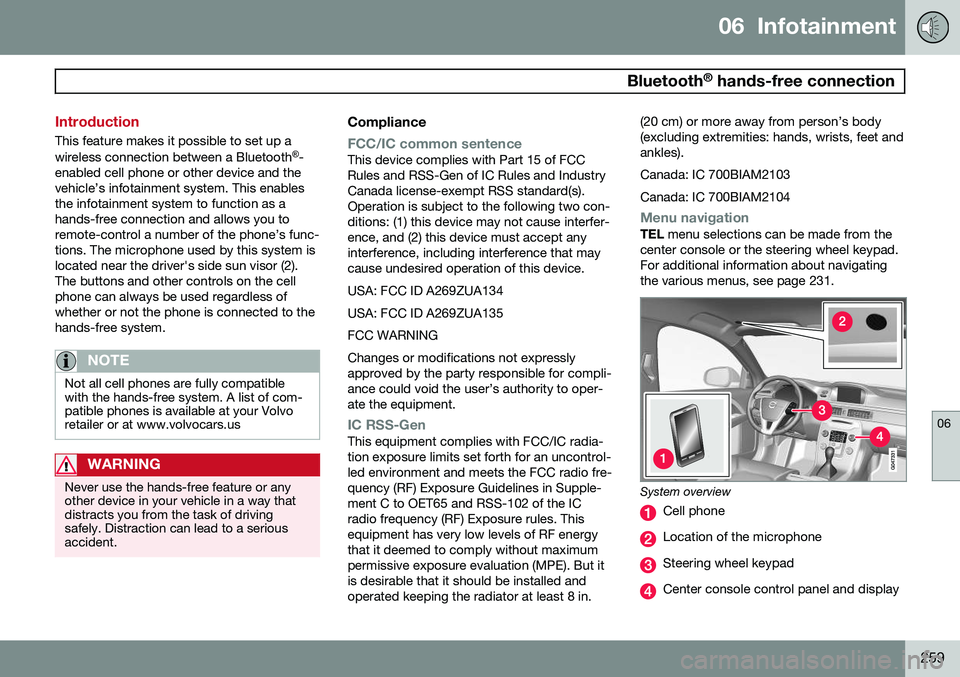
System overview
Cell phone
Location of the microphone
Steering wheel keypad
Center console control panel and display
Page 270 of 394
06 Infotainment
Cell phone voice control*
06
268* Option/accessory, for more information, see Introduction.
Introduction
The infotainment system's voice control fea- ture 1
enables the driver to voice-activate cer-
tain functions in a Bluetooth ®
-connected cell
phone or the navigation system.
NOTE
• The information in this section applies to using voice commands to operate a Bluetooth
®
-connected cell phone .
See also the section "Bluetooth ®
hands-free connection" beginning on page 259 for detailed informationabout using a cell phone with the vehi-cle's infotainment system.
• The navigation system has a separateuser's guide containing informationabout voice commands for operatingthat system.
Voice commands offer convenience and help avoid distractions so that you can concen-trate on driving and focus your attention onroad and traffic conditions.
WARNING
As the driver, you have full responsibility for operating the vehicle safely and adher-ing to all applicable traffic regulations.
The voice control feature provides access to a number of functions in the Bluetooth ®
hands-free and navigation systems while allowing you to keep your hands on the steer-ing wheel. Input is in dialogue form usingspoken commands from the user and verbalprompts from the system. Voice control uses the same microphone as the Bluetooth ®
hands-free system (see the illustration on page 259) and system prompts are providedthrough the infotainment system's frontspeakers.
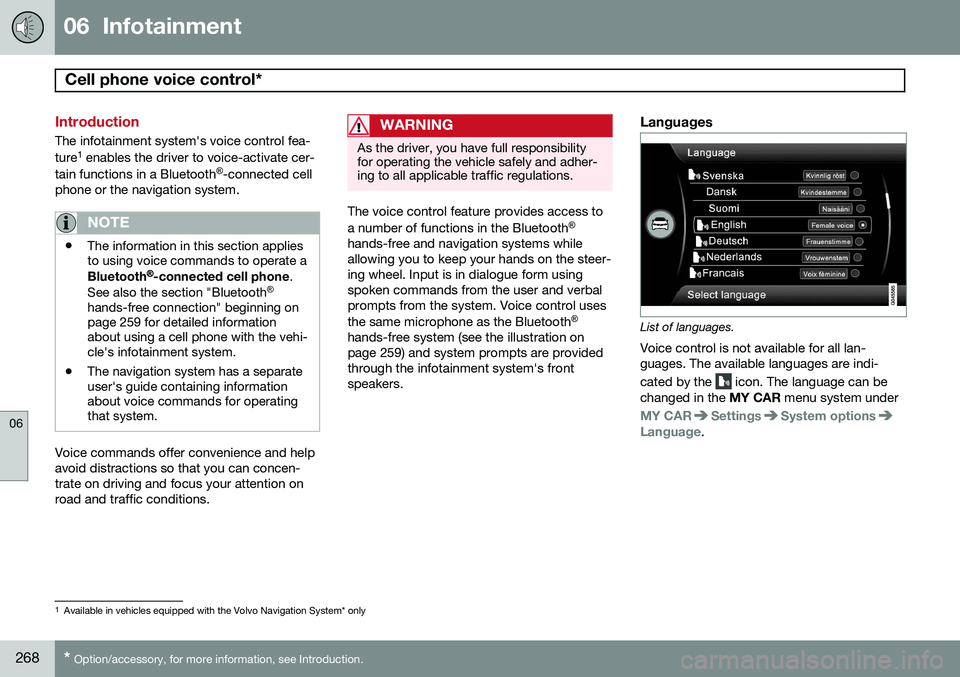
Languages
List of languages.
Voice control is not available for all lan- guages. The available languages are indi- cated by the
icon. The language can be
changed in the MY CAR menu system under
MY CARSettingsSystem optionsLanguage.
1
Available in vehicles equipped with the Volvo Navigation System* only
Page 276 of 394

07 During your trip
Driving recommendations
07
274
General information
Economical driving conserves natural
resources
Better driving economy may be obtained by thinking ahead, avoiding rapid starts andstops and adjusting the speed of your vehicleto immediate traffic conditions. Observe the following rules:
• Bring the engine to normal operating tem- perature as soon as possible by drivingwith a light foot on the accelerator pedalfor the first few minutes of operation. Acold engine uses more fuel and is subjectto increased wear.
• Whenever possible, avoid using the vehi-cle for driving short distances. This doesnot allow the engine to reach normaloperating temperature.
• Drive carefully and avoid rapid accelera-tion and hard braking.
• Use the transmission's Drive (
D) position
as often as possible and avoid using kick-down.
• Using the transmission's Sport mode 1
may increase fuel consumption some-what. Use the transmission's Drive ( D)
position as often as possible. See page 127 for additional information about Sportmode.
• Do not exceed posted speed limits.
• Avoid carrying unnecessary items (extraload) in the vehicle.
• Maintain correct tire pressure. Check tirepressure regularly (when tires are cold).
• Remove snow tires when threat of snowor ice has ended.
• Note that roof racks, ski racks, etc,increase air resistance and also fuel con-sumption.
• At highway driving speeds, fuel consump-tion will be lower with the air conditioningon and the windows closed than with theair conditioning off and the windowsopen.
• Using the onboard trip computer's fuelconsumption modes can help you learnhow to drive more economically.
Other factors that decrease gas mileage are: • Dirty air cleaner
• Dirty engine oil and clogged oil filter
• Dragging brakes
• Incorrect front end alignment Some of the above mentioned items and oth- ers are checked at the standard maintenanceintervals.WARNING
Driving with the tailgate open:
Driving
with the tailgate open could lead to poi- sonous exhaust gases entering the pas-senger compartment. If the tailgate mustbe kept open for any reason, proceed asfollows: • Close the windows
• Set the ventilation system control to air flow to floor, windshield and side win-dows and the blower control to itshighest setting.
Weight distribution affects handlingAt the specified curb weight your vehicle has a tendency to understeer, which means thatthe steering wheel has to be turned morethan might seem appropriate for the curva-ture of a bend. This ensures good stabilityand reduces the risk of rear wheel skid.Remember that these properties can alterwith the vehicle load. The heavier the load inthe cargo area, the less the tendency toundersteer.
1
Models with the T6 turbo engine only.
Page 277 of 394

07 During your trip
Driving recommendations
07
275
Handling, roadholdingVehicle load, tire design and inflation pres- sure all affect vehicle handling. Therefore,check that the tires are inflated to the recom-mended pressure according to the vehicleload. See the "Tire pressure" section. Loadsshould be distributed so that capacity weightor maximum permissible axle loads are notexceeded.
Driving through water
•The vehicle can be driven through water up to a depth of approximately 10 in.(25 cm), at a maximum speed of 6 mph(10 km/h).
• Take particular care when driving throughflowing water.
• Clean the electrical connections for trailerwiring after driving in mud or water.
• When driving through water, maintain lowspeed and do not stop in the water.
WARNING
•Avoid driving through standing or rushing water. Doing so can be dan-gerous and it may also be difficult todetermine the actual depth of thewater.
• If water cannot be avoided, after driv-ing through the water, press lightly onthe brake pedal to ensure that thebrakes are functioning normally. Wateror mud can make the brake liningsslippery, resulting in delayed brakingeffect.
CAUTION
• Engine damage will occur if water is drawn into the air cleaner.
• If the vehicle is driven through waterdeeper than 10 in (25 cm), water mayenter the differential and the transmis-sion. This reduces the oil's lubricatingcapacity and may shorten the servicelife of these components.
• Do not allow the vehicle to stand inwater up to the door sills longer thanabsolutely necessary. This could resultin electrical malfunctions.
• If the engine has been stopped whilethe vehicle is in water, do not attemptto restart it. Have the vehicle towedout of the water.
Engine and cooling systemUnder special conditions, for example when driving in hilly terrain, extreme heat or withheavy loads, there is a risk that the engineand cooling system will overheat. Proceed asfollows to avoid overheating the engine. •
Maintain a low speed when driving with a trailer up long, steep hills.
• Do not turn the engine off immediatelywhen stopping after a hard drive.
Page 278 of 394
07 During your trip
Driving recommendations
07
276
WARNING
The cooling fan may start or continue to operate (for up to 6 minutes) after theengine has been switched off.
•Remove any auxiliary lights from in front of the grille when driving in hot weatherconditions.
• Do not exceed engine speeds of4500 rpm if driving with a trailer in hillyterrain. The oil temperature could becometoo high.
Conserving electrical currentKeep the following in mind to help minimize battery drain:
• When the engine is not running, avoid using ignition mode
II. Many electrical
systems (the audio system, the optionalnavigation system, power windows, etc)will function in ignition modes 0 and I.
These modes reduce drain on the battery.
• Please keep in mind that using systems,accessories, etc., that consume a greatdeal of current when the engine is notrunning could result in the battery beingcompletely drained. Driving or having theengine running for approximately15 minutes will help keep the batterycharged. •
The optional 12 volt socket in the cargoarea provides electrical current even withthe ignition switched off, which drains thebattery.
Before a long distance tripIt is always worthwhile to have your vehicle checked by a trained and qualified Volvoservice technician before driving long dis-tances. Your retailer will also be able to sup-ply you with bulbs, fuses, spark plugs andwiper blades for your use in the event thatproblems occur. As a minimum, the following items should be checked before any long trip:
• Check that engine runs smoothly and that fuel consumption is normal.
• Check for fuel, oil, and fluid leakage.
• Have the transmission oil level checked.
• Check condition of drive belts.
• Check state of the battery's charge.
• Examine tires carefully (the spare tire aswell), and replace those that are worn.Check tire pressures.
• The brakes, front wheel alignment, andsteering gear should be checked by atrained and qualified Volvo service techni-cian only.
• Check all lights, including high beams. •
Reflective warning triangles are legallyrequired in some states/provinces.
• Have a word with a trained and qualifiedVolvo service technician if you intend todrive in countries where it may be difficultto obtain the correct fuel.
• Consider your destination. If you will bedriving through an area where snow or iceare likely to occur, consider snow tires.
Cold weather precautionsIf you wish to check your vehicle before the approach of cold weather, the followingadvice is worth noting:
• Make sure that the engine coolant con- tains 50 percent antifreeze. Any othermixture will reduce freeze protection. Thisgives protection against freezing down to–31 °F (–35 °C). The use of "recycled"antifreeze is not approved by Volvo. Dif-ferent types of antifreeze must not bemixed.
• Volvo recommends using only genuineVolvo antifreeze in your vehicle's radiator.
• Try to keep the fuel tank well filled – thishelps prevent the formation of condensa-tion in the tank. In addition, in extremelycold weather conditions it is worthwhileto add fuel line de-icer before refueling.
• The viscosity of the engine oil is impor-tant. Oil with low viscosity (thinner oil)
Page 281 of 394
07 During your trip
Refueling
07
279
Octane rating
Minimum octane
G028920
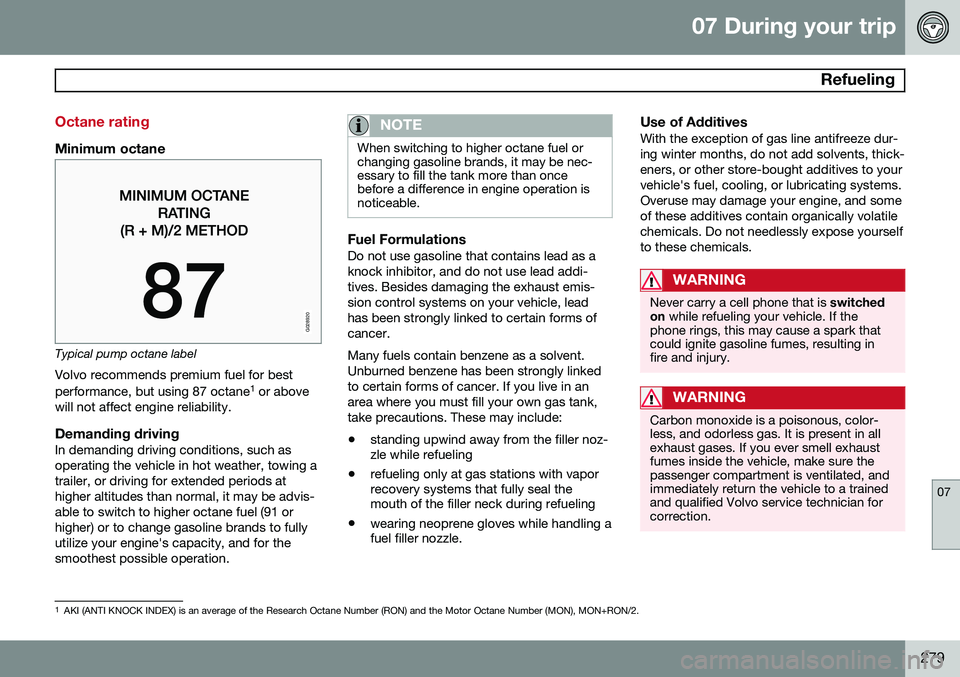
Typical pump octane labelVolvo recommends premium fuel for best performance, but using 87 octane 1
or above
will not affect engine reliability.
Demanding drivingIn demanding driving conditions, such as operating the vehicle in hot weather, towing atrailer, or driving for extended periods athigher altitudes than normal, it may be advis-able to switch to higher octane fuel (91 orhigher) or to change gasoline brands to fullyutilize your engine's capacity, and for thesmoothest possible operation.
NOTE
When switching to higher octane fuel or changing gasoline brands, it may be nec-essary to fill the tank more than oncebefore a difference in engine operation isnoticeable.
Fuel FormulationsDo not use gasoline that contains lead as a knock inhibitor, and do not use lead addi-tives. Besides damaging the exhaust emis-sion control systems on your vehicle, leadhas been strongly linked to certain forms ofcancer. Many fuels contain benzene as a solvent. Unburned benzene has been strongly linkedto certain forms of cancer. If you live in anarea where you must fill your own gas tank,take precautions. These may include:
• standing upwind away from the filler noz- zle while refueling
• refueling only at gas stations with vaporrecovery systems that fully seal themouth of the filler neck during refueling
• wearing neoprene gloves while handling afuel filler nozzle.
Use of AdditivesWith the exception of gas line antifreeze dur- ing winter months, do not add solvents, thick-eners, or other store-bought additives to yourvehicle's fuel, cooling, or lubricating systems.Overuse may damage your engine, and someof these additives contain organically volatilechemicals. Do not needlessly expose yourselfto these chemicals.
WARNING
Never carry a cell phone that is
switched
on while refueling your vehicle. If the
phone rings, this may cause a spark that could ignite gasoline fumes, resulting infire and injury.
WARNING
Carbon monoxide is a poisonous, color- less, and odorless gas. It is present in allexhaust gases. If you ever smell exhaustfumes inside the vehicle, make sure thepassenger compartment is ventilated, andimmediately return the vehicle to a trainedand qualified Volvo service technician forcorrection.
1 AKI (ANTI KNOCK INDEX) is an average of the Research Octane Number (RON) and the Motor Octane Number (MON), MON+RON/2.
Page 285 of 394
07 During your trip
Loading
07
}}
* Option/accessory, for more information, see Introduction.283
Introduction
The load carrying capacity of your vehicle is determined by factors such as the number ofpassengers, the amount of cargo, the weightof any accessories that may be installed, etc. To increase loading space, the rear seat backrests can be folded down, see page 91. When loading the cargo area, keep the fol- lowing in mind:
• Load objects in the cargo area against the backrest whenever possible.
• Unstable loads can be secured to theload anchoring eyelets with straps or weblashings to help keep them from shifting.
• Stop the engine and apply the parkingbrake when loading or unloading longobjects. The gear selector can beknocked out of position by long loads,which could set the vehicle in motion.WARNING
•Stop the engine, put the gear selector in
P, and apply the parking brake
when loading or unloading longobjects.
• The vehicle's driving characteristicsmay change depending on the weightand distribution of the load.
• A 44-pound (20 kg) object produces aforce of 2,200 pounds (1,000 kg) in ahead-on collision at 30 mph (50 km/h).
• The cargo area and rear seat shouldnot be loaded to a level higher than2 in. (5 cm) below the upper edge ofthe rear side windows. Objects placedhigher than this level could impede thefunction of the Inflatable Curtain.
Power tailgate*
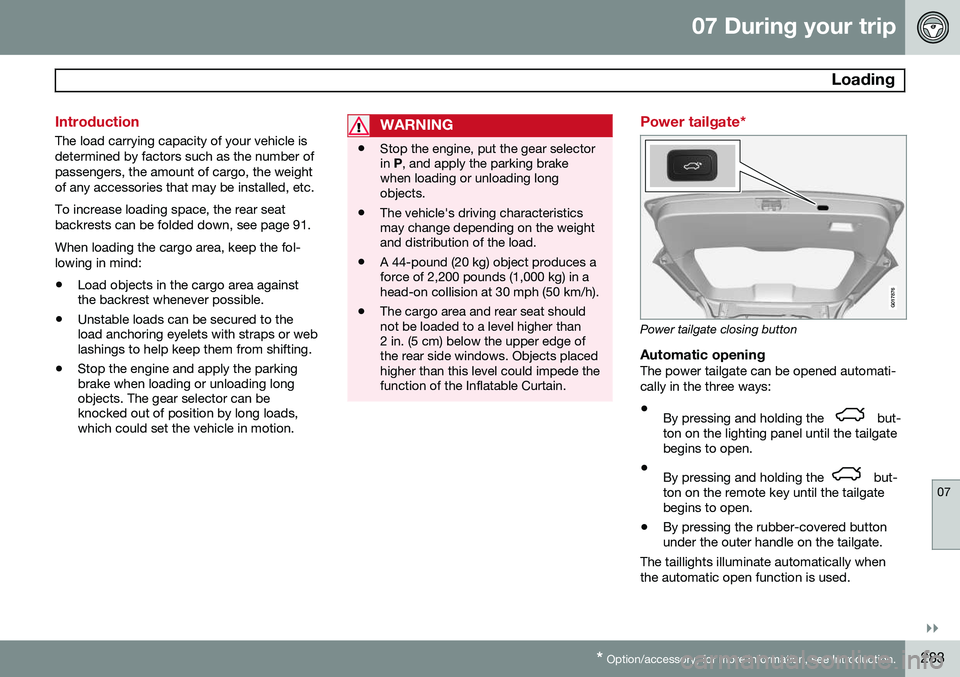
G017876
Power tailgate closing button
Automatic openingThe power tailgate can be opened automati- cally in the three ways:
• By pressing and holding the
but-
ton on the lighting panel until the tailgate begins to open.
• By pressing and holding the
but-
ton on the remote key until the tailgate begins to open.
• By pressing the rubber-covered buttonunder the outer handle on the tailgate.
The taillights illuminate automatically when the automatic open function is used.
Page 286 of 394
07 During your trip
Loading
07
284
CAUTION
Be sure that there is adequate space above and behind the vehicle before open-ing the tailgate automatically. The vehicle should not be driven or moved with the tailgate in the open position. How-ever, if the vehicle is moved with the tail-gate in the open position, the automaticclosing function will be inoperative untilone of the following occurs:• The tailgate is closed manually
• The ignition is switched off and the key is removed for approximately 10minutes (the tailgate will function againafter restart).
NOTE
If the tailgate has been opened and closed continuously too long, the automatic func-tion will be deactivated to avoid overload-ing the electrical system. The automaticfunction can be used again after approxi-mately 2 minutes. If the vehicle's battery has been dis- charged or disconnected, the tailgate mustbe opened and closed once manually toreset the system.
Programming the tailgate opening angle
The tailgate's maximum opening angle can be programmed, which can be useful, forexample, if the tailgate has to be opened in agarage with a low ceiling. To do so:
• Open the tailgate manually, hold it at the desired maximum opening angle andpress the tailgate's closing button for atleast 3 seconds. When the tailgate isreleased, programming is complete.
• To remove this programming, open thetailgate manually to a higher openingangle.
Automatic closingThe power tailgate can be closed by pressing the
button on the tailgate (see the
illustration) or by pressing it down.
NOTE
If the tailgate is pressed down e.g., by the weight of snow or strong wind, it will closeautomatically.
WARNING
Be sure that no one is near the tailgate when it is opened or closed automatically.The tailgate should never be obstructed inany way when it is operated.
Interrupting automatic opening/closingAutomatic opening or closing the tailgate can be interrupted in four ways:
• By pressing the
button on the
lighting panel.
• By pressing the
button on the
remote key.
• By pressing the button on the lower edge of the tailgate.
• By pressing the rubber-covered buttonunder the outer handle on the tailgate.
If one of these actions is taken, the tailgate will stop moving.
Pinch protectionIf the tailgate is obstructed while it is being operated, the pinch protection function isactivated.
• If the tailgate is being
opened, the electri-
cal function will be switched off and the
Page 287 of 394
07 During your trip
Loading
07
285
tailgate will be released from the electrical system.
• If the tailgate is being
closed, it will stop
and move slightly in the opposite direc-tion.
Operating the tailgate manuallyThe power tailgate can be disconnected from the vehicle’s electrical system by quickly pull-ing the outer handle twice. The tailgate canthen be opened/closed manually.
Folding down the rear seat backrests
The rear seat backrests can be folded down for additional loading space, see page 93.
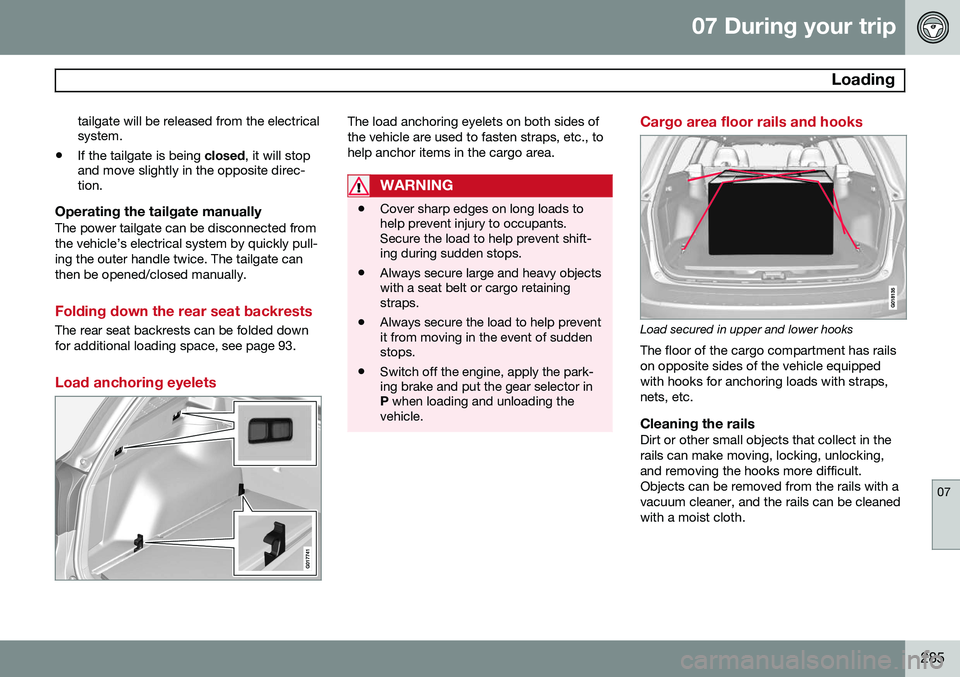
Load anchoring eyelets
The load anchoring eyelets on both sides of the vehicle are used to fasten straps, etc., tohelp anchor items in the cargo area.
WARNING
• Cover sharp edges on long loads to help prevent injury to occupants.Secure the load to help prevent shift-ing during sudden stops.
• Always secure large and heavy objectswith a seat belt or cargo retainingstraps.
• Always secure the load to help preventit from moving in the event of suddenstops.
• Switch off the engine, apply the park-ing brake and put the gear selector inP
when loading and unloading the
vehicle.
Cargo area floor rails and hooks
Load secured in upper and lower hooks The floor of the cargo compartment has rails on opposite sides of the vehicle equippedwith hooks for anchoring loads with straps,nets, etc.
Cleaning the railsDirt or other small objects that collect in therails can make moving, locking, unlocking,and removing the hooks more difficult.Objects can be removed from the rails with avacuum cleaner, and the rails can be cleanedwith a moist cloth.