child lock VOLVO XC70 2014 Owner´s Manual
[x] Cancel search | Manufacturer: VOLVO, Model Year: 2014, Model line: XC70, Model: VOLVO XC70 2014Pages: 394, PDF Size: 11.55 MB
Page 53 of 394
01 Safety
Integrated booster cushion*01
}}
* Option/accessory, for more information, see Introduction.51
•
That the seat belt is properly positioned and is taut.
• The shoulder section of the seat belt isacross the child's collarbone, not over theneck.
• The lap section of the seat belt is acrossthe child's hips and not the abdomen.
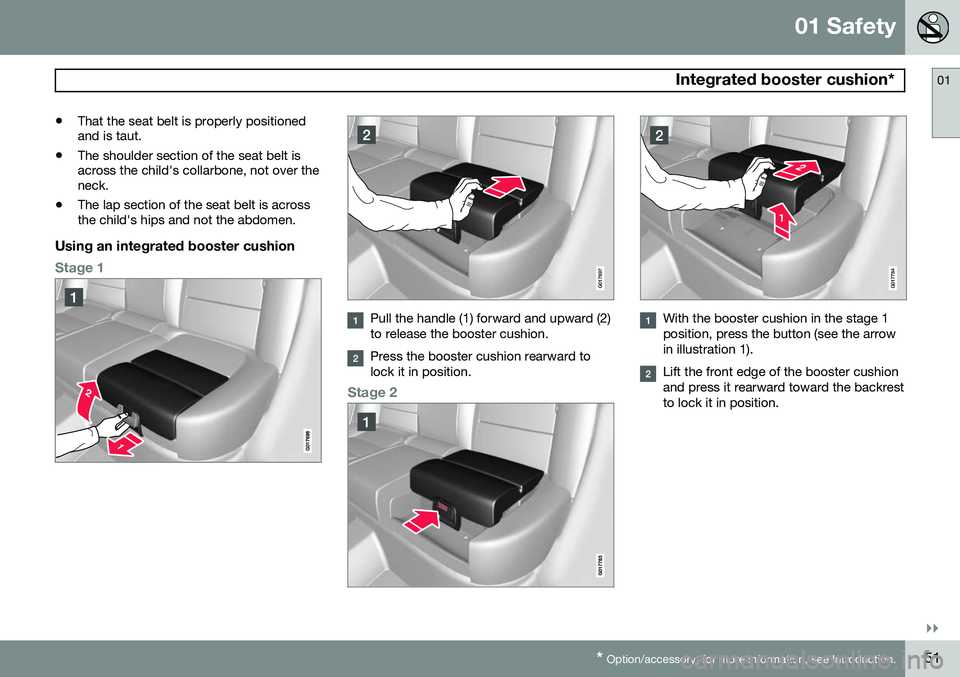
Using an integrated booster cushion
Stage 1G017697
Pull the handle (1) forward and upward (2) to release the booster cushion.
Press the booster cushion rearward to lock it in position.
Stage 2
G017784
With the booster cushion in the stage 1 position, press the button (see the arrowin illustration 1).
Lift the front edge of the booster cushion and press it rearward toward the backrestto lock it in position.
Page 54 of 394
01 Safety
Integrated booster cushion* 01
52* Option/accessory, for more information, see Introduction.
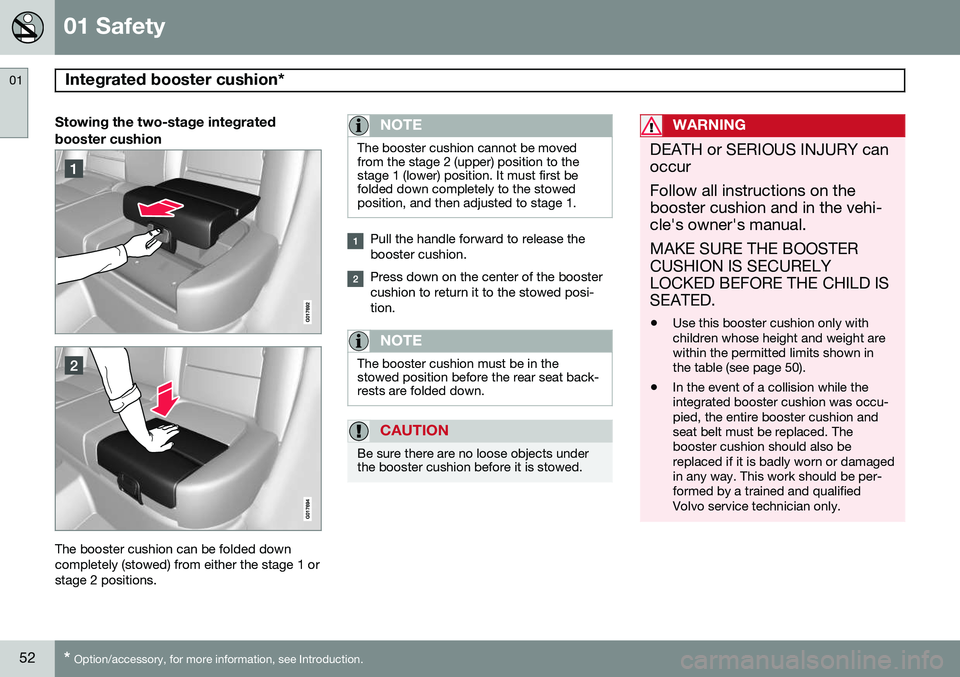
Stowing the two-stage integrated booster cushion
The booster cushion can be folded down completely (stowed) from either the stage 1 orstage 2 positions.
NOTE
The booster cushion cannot be moved from the stage 2 (upper) position to thestage 1 (lower) position. It must first befolded down completely to the stowedposition, and then adjusted to stage 1.
Pull the handle forward to release the booster cushion.
Press down on the center of the booster cushion to return it to the stowed posi-tion.
NOTE
The booster cushion must be in the stowed position before the rear seat back-rests are folded down.
CAUTION
Be sure there are no loose objects under the booster cushion before it is stowed.
WARNING
DEATH or SERIOUS INJURY can occur Follow all instructions on the booster cushion and in the vehi-cle's owner's manual. MAKE SURE THE BOOSTER CUSHION IS SECURELYLOCKED BEFORE THE CHILD ISSEATED. • Use this booster cushion only with children whose height and weight arewithin the permitted limits shown inthe table (see page 50).
• In the event of a collision while theintegrated booster cushion was occu-pied, the entire booster cushion andseat belt must be replaced. Thebooster cushion should also bereplaced if it is badly worn or damagedin any way. This work should be per-formed by a trained and qualifiedVolvo service technician only.
Page 55 of 394

01 Safety
Child safety locks01
* Option/accessory, for more information, see Introduction.53
Child safety locks
G021077
Child safety locks – rear doorsThe controls are located on the rear door jambs. Use the remote control's key blade ora screwdriver to adjust these controls.
The rear doors can only be opened from the outside when the slot is in the hori-zontal position.
The rear doors can be opened from the inside when the slot is in the vertical posi-tion.
Power child safety locks and disengaging rear door windows*
Driver's door control panel
The power child safety locks can be acti- vated/deactivated when the remote key is inmode I (see page 87) or higher. Activation/
deactivation can be done up to 2 minutesafter the engine has been switched off (if nodoor has been opened). To activate the child safety locks:
1. Put the ignition in mode I or higher or
start the engine.
2. Press the button on the driver's door con- trol panel (see the illustration). >
Rear child locks Activated will be
displayed in the instrument panel and the indicator light in the button will illu- minate when the function is activated.
When the child safety locks are activated:
• The rear door windows can only be opened from the driver's door controlpanel
• The rear doors cannot be opened fromthe inside
The child safety locks' current setting is stored when the engine is switched off. Ifthese locks were activated when the enginewas switched off, they will also be activewhen the engine is restarted.
Page 58 of 394

02 Locks and alarm
Remote key and key blade
02
56
Introduction
Two remote keys or optional Personal Car Communicators (PCC) are provided with yourvehicle. They enable you to unlock the doorsand tailgate, and also function as ignitionkeys to start the vehicle or operate electricalcomponents. The remote keys containdetachable metal key blades for manuallylocking or unlocking the driver's door and theglove compartment. The visible ends of thesekey blades are unique to make it easier toidentify "your" remote key. Up to six remotescan be programmed for use on the samevehicle. The PCCs have enhanced functionality com- pared with the standard remote key.
NOTE
In the remainder of this chapter, all refer- ences to the remote key also pertain to thePCC unless otherwise stated.
WARNING
Never leave the remote key in the ignition slot if children are to remain in the vehicle.
See page 86 for more information on the various ignition modes.
Detachable key bladeEach remote key or PCC contains a detacha-ble metal key blade for mechanically lockingor unlocking the driver's door and the glovecompartment, and to enable the private lock-ing function. See page 62 for more informa-tion on the key blade and page 65 for infor-mation on the private locking function. Thekey blades have a unique code, which is usedif new ones need to be produced. This codeis available at an authorized Volvo retailer. The visible ends of these key blades are unique to make it easier to identify "your"remote key.
Loss of a remote keyIf either of the remote keys is lost, the othershould be taken with the car to a Volvoretailer. As an anti-theft measure, the code ofthe lost remote key must be erased from thesystem.
NOTE
Additional or duplicate remote control keys can be obtained from any AuthorizedVolvo Retailer. You can also obtain additional or duplicate remote control keys from certain inde-pendent repair facilities and locksmithsthat are qualified to make remote controlkeys. Each key must be programmed towork with your vehicle. California Only: A list of independent repair facilities and/or locksmiths known to Volvo that can cutand code replacement keys can be found:
• on the Volvo website at http://www.volvocars.com/us/keys
• by calling Volvo Customer Care at1-800-458-1552
The number of registered keys for the vehicle can be found by pressing
MY CAR and going
into
SettingsInformationNumber of
keys. See page 199 for a description of the
menu system. USA-5WK49264FCC ID:KR55WK49264 + Siemens VDO 5WK49236 FCC ID:KR55WK49236, 5WK49266
Page 79 of 394

03 Your driving environment
Instruments and controls
03
}}
* Option/accessory, for more information, see Introduction.77
FunctionPage
Controls for menus and messages, turn signals,high/low beams, tripcomputer199, 102,97, 215
Paddles for manually shifting gears*126
Cruise control146
Horn, airbag95, 22
Main instrument panel77
Infotainment system/ Bluetooth hands-freecontrols230, 259
START/STOP ENGINE button86
Ignition slot86
Display for infotainment system functions andmenus230, 197
Hazard warning flashers102
Door handle–
FunctionPage
In-door control panels (power windows, mirrors,central locking button,power child safety locks)108, 110,69,53
Controls for the infotain- ment system and menus199, 230, 208
Climate system controls208
Gear selector125
Controls for active chas- sis (Four-C)*222
Wipers and washers105, 106
Steering wheel adjust- ment95
Parking brake134
Hood opening control335
Power seat* adjustment controls88
Lighting panel, buttons for opening fuel fillerdoor and unlocking thetailgate97, 280, 70
Instrument panel information displays
Information displays: analog instrument panel
Information displays: digital instrument panel* These displays show information on some of the vehicle's functions, such as cruise con-
Page 93 of 394
03 Your driving environment
Seats
03
* Option/accessory, for more information, see Introduction.91
NOTE
• The seat will move to this position even if someone else has moved it to adifferent position and locked the vehi-cle with a
different remote key.
• This feature will work in the same waywith all of the remote keys that youuse with your vehicle.
Emergency stop
WARNING
•
Because the driver's seat can be adjusted with the ignition off, childrenshould never be left unattended in thevehicle.
• Movement of the seat can be STOP-PED at any time by pressing any but-ton on the power seat control panel.
• Do not adjust the seat while driving.The seat should be adjusted so thatthe brake pedal can be depressedfully. In addition, position the seat asfar rearward as comfort and controlallow.
• The seat rails on the floor must not beobstructed in any way when the seat isin motion.
Heated/ventilated seats*See page 208.
Rear seats
Rear center head restraint
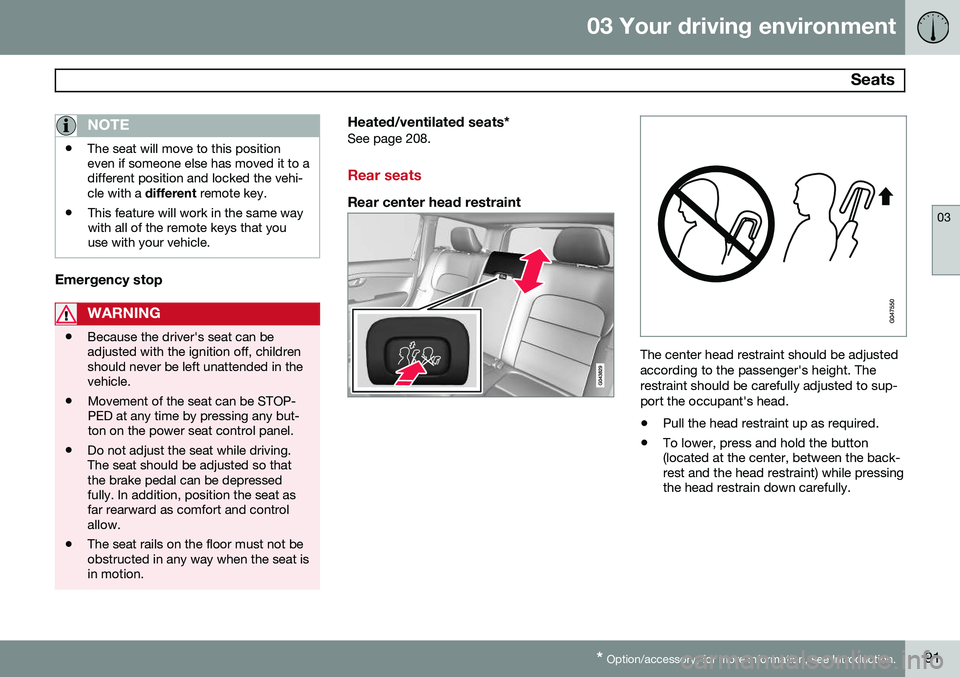
The center head restraint should be adjusted according to the passenger's height. Therestraint should be carefully adjusted to sup-port the occupant's head.
• Pull the head restraint up as required.
• To lower, press and hold the button (located at the center, between the back-rest and the head restraint) while pressingthe head restrain down carefully.
Page 96 of 394
03 Your driving environment
Seats
03
94
WARNING
•When one or more sections of the backrest is returned to the uprightposition, check that it is properlylocked in place by pushing and pullingit. The red indicators should also notbe visible.
• Return the outboard head restraints tothe upright position.
• Long loads should always be securelyanchored to help avoid injury in theevent of a sudden stop.
• Always turn the engine off and applythe parking brake when loading/unloading the vehicle.
• Place the transmission in the Park (
P)
position to help prevent inadvertentmovement of the gear selector.
• On hot days, the temperature in thevehicle interior can rise very quickly.Exposure of people to these high tem-peratures for even a short period oftime can cause heat-related injury ordeath. Small children are particularly atrisk.
Page 118 of 394
03 Your driving environment
Power moonroof*
03
116* Option/accessory, for more information, see Introduction.
WARNING
• During manual closing, if the moonroof is obstructed, immediately open itagain.
• Never open or close the moonroof if itis obstructed in any way.
• Never allow a child to operate themoonroof.
• Never leave a child alone in a vehicle.
• When leaving the vehicle, ensure thatthe ignition is in mode
0 (see page 86
for information about the various igni-tion modes) to disable the moonroof.Never leave the remote key/PCC* inthe vehicle.
• Never extend any object or body partthough the open moonroof, even if thevehicle's ignition is completelyswitched off.
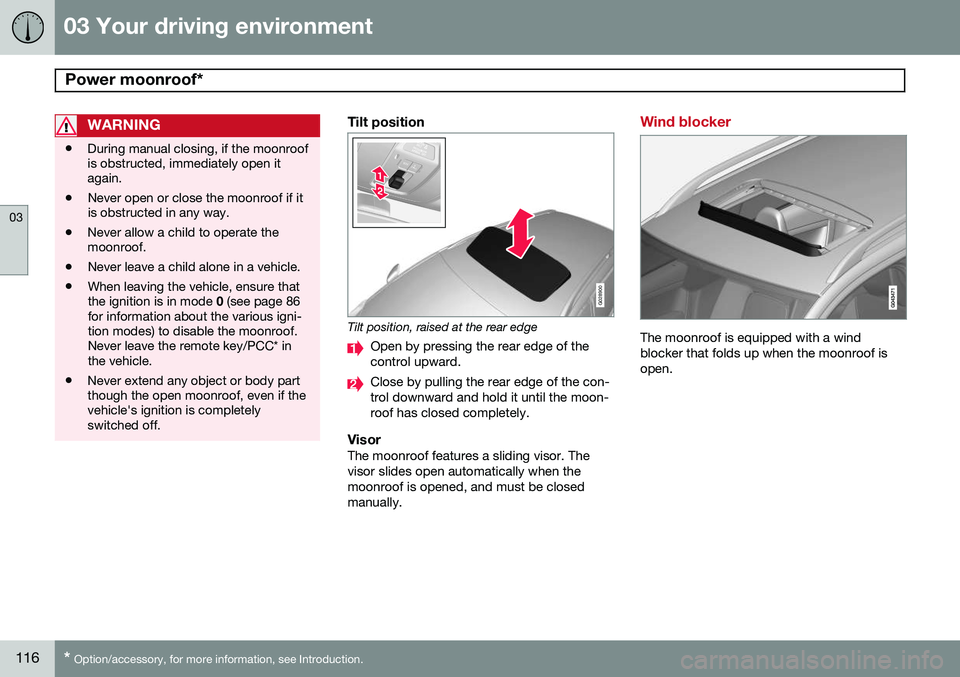
Tilt position
G028900
Tilt position, raised at the rear edge
Open by pressing the rear edge of the control upward.
Close by pulling the rear edge of the con- trol downward and hold it until the moon-roof has closed completely.
VisorThe moonroof features a sliding visor. Thevisor slides open automatically when themoonroof is opened, and must be closedmanually.
Wind blocker
The moonroof is equipped with a wind blocker that folds up when the moonroof isopen.
Page 292 of 394
07 During your trip
Cargo area
07
290* Option/accessory, for more information, see Introduction.
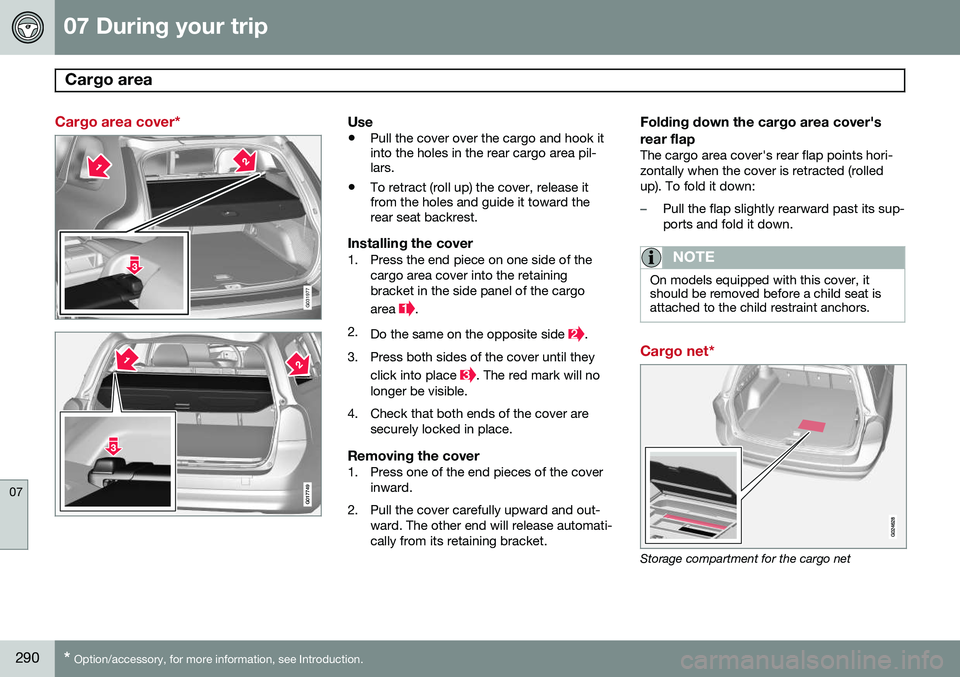
Cargo area cover*
G031977
G017749
Use
• Pull the cover over the cargo and hook it into the holes in the rear cargo area pil-lars.
• To retract (roll up) the cover, release itfrom the holes and guide it toward therear seat backrest.
Installing the cover1. Press the end piece on one side of the
cargo area cover into the retaining bracket in the side panel of the cargo area
.
2. Do the same on the opposite side
.
3. Press both sides of the cover until they click into place
. The red mark will no
longer be visible.
4. Check that both ends of the cover are securely locked in place.
Removing the cover1. Press one of the end pieces of the coverinward.
2. Pull the cover carefully upward and out- ward. The other end will release automati- cally from its retaining bracket.
Folding down the cargo area cover's rear flap
The cargo area cover's rear flap points hori- zontally when the cover is retracted (rolledup). To fold it down:
–Pull the flap slightly rearward past its sup- ports and fold it down.
NOTE
On models equipped with this cover, it should be removed before a child seat isattached to the child restraint anchors.
Cargo net*
Storage compartment for the cargo net
Page 323 of 394
08 Wheels and tires
Tire Sealing System*
08
* Option/accessory, for more information, see Introduction.321
Inflating tires
The tire sealing system can be used to inflate the tires. To do so:
1. Park the car in a safe place.
2. The compressor should be switched off.
Ensure that the on/off switch is in position0 (the 0 side of the switch should be
pressed down).
3. Take out the electrical wire and hose.
4. Remove the valve cap from the tire’s inflation valve and screw the hose con- nector onto the valve as tightly as possi-ble by hand.
5. Connect the electrical wire to the nearest 12-volt socket in the vehicle.
6. Start the vehicle’s engine.WARNING
• The vehicle’s engine should be running when the tire sealing system is used toavoid battery drain. Therefore, be surethe vehicle is parked in a well ventilatedplace, or outdoors, before using thesystem. The parking brake should besecurely applied and the gear selectorshould be in the
P (park) position.
• Children should never be left unatten-ded in the vehicle when the engine isrunning.
7. Check the tire’s inflation pressure on the
gauge. Switch off the compressor briefly to get a clear reading from the pressuregauge.
8. Refer to the tire inflation table in this chapter for the correct inflation pressure.If the tire needs to be inflated, start thetire sealing system’s compressor (pressthe on/off switch to position I). If neces-sary, release air from the tire by turningthe air release knob counterclockwise.
CAUTION
The compressor should not be used for more than 10 minutes at a time to avoidoverheating.
9. Turn off the compressor (press the on/off switch to position 0) when the correct
inflation pressure has been reached.
10. Unscrew the hose from the tire’s inflation valve and reinstall the valve cap.
CAUTION
•After pumping the tires, always reinstall the valve cap to help avoid damage tothe valve from dirt, gravel, etc.
• Use plastic valve caps only. Metal capscould corrode and become difficult toremove.
11. Disconnect the electrical wire from the
12-volt socket.