door lock VOLVO XC70 2014 Owner´s Manual
[x] Cancel search | Manufacturer: VOLVO, Model Year: 2014, Model line: XC70, Model: VOLVO XC70 2014Pages: 394, PDF Size: 11.55 MB
Page 207 of 394
05 Comfort and driving pleasure
Climate system
05
* Option/accessory, for more information, see Introduction.205
Introduction
Air conditioningThe vehicle is equipped with Electronic Cli- mate Control (ECC). The climate control sys-tem cools, heats or dehumidifies the air in thepassenger compartment.
NOTE
• The air conditioning can be switched off, but to ensure the best possible cli-mate comfort in the passenger com-partment and to prevent the windowsfrom misting, it should always be on.
• In warm weather, a small amount ofwater may accumulate under the carwhen it has been parked. This water iscondensation from the A/C systemand is normal.
Sensor location
•
The sunlight sensor is located on the top side of the dashboard.
NOTE
The sunlight sensor monitors which side of the car that is most exposed to sunlight.This can mean that the temperature maydiffer between the right and left-side airvents, even if the temperatures set for bothsides of the passenger compartment arethe same.
•The temperature sensor for the passen- ger compartment is located below the cli-mate control panel.
• The outside (ambient) temperature sensoris located on the door mirror.
• The humidity sensor* is located in theinterior rearview mirror.
NOTE
Do not cover or block the sensors with clothing or other objects.
Side windows and moonroofTo ensure that the air conditioning works optimally, the side windows, and the optionalmoonroof should be closed.
Fog on the inside of the windowsThe defroster function should be used toremove fog or mist from the inside of the win-dows. Keeping the windows clean with acommercially available window washing spray will also help prevent fogging or mist-ing.
Temporary shut-off of the air
conditioning
The air conditioning is momentarily disen-gaged during full acceleration or when drivinguphill with a trailer. This may result in a tem-porary increase in cabin temperature.
Ice and snowAlways keep the air intake grille at the base ofthe windshield free of snow.
Climate system maintenanceSpecial tools and equipment are required tomaintain and carry out repairs on the climatesystem. Work of this type should only bedone by a trained and qualified Volvo servicetechnician.
RefrigerantVolvo cares about the environment. The airconditioning system in your car contains aCFC-free refrigerant – R134a. This substancewill not deplete the ozone layer. The air con-ditioning system contains 1.76 lbs (800 g) ofR134a. The systems uses PAG oil.
Passenger compartment filterReplace the cabin air filter with a new one atthe recommended intervals. Please refer to
Page 217 of 394
05 Comfort and driving pleasure
Trip computer
05
215
Introduction
The content and appearance of the trip com- puter varies depending on whether the vehi-cle is equipped with an analog or digital
instrument panel. The instrument panel illuminates as soon as the vehicle is unlocked and trip computer set-tings can be made. If none of the trip com-puter's controls are used within 30 secondsafter the driver's door has been opened, theinstrument panel lighting will go out and thetrip computer cannot be used again until: • the ignition is put in mode II1
• the engine is started
NOTE
If a warning message appears while you are using the trip computer, this messagemust be acknowledged in order to returnto the trip computer function. Acknowl-edge a message by pressing
OK.
Trip computer in models with an analog instrument panel
The trip computer has two different menu groups: •
Trip computer functions
• Trip computer information headings in the instrument panel
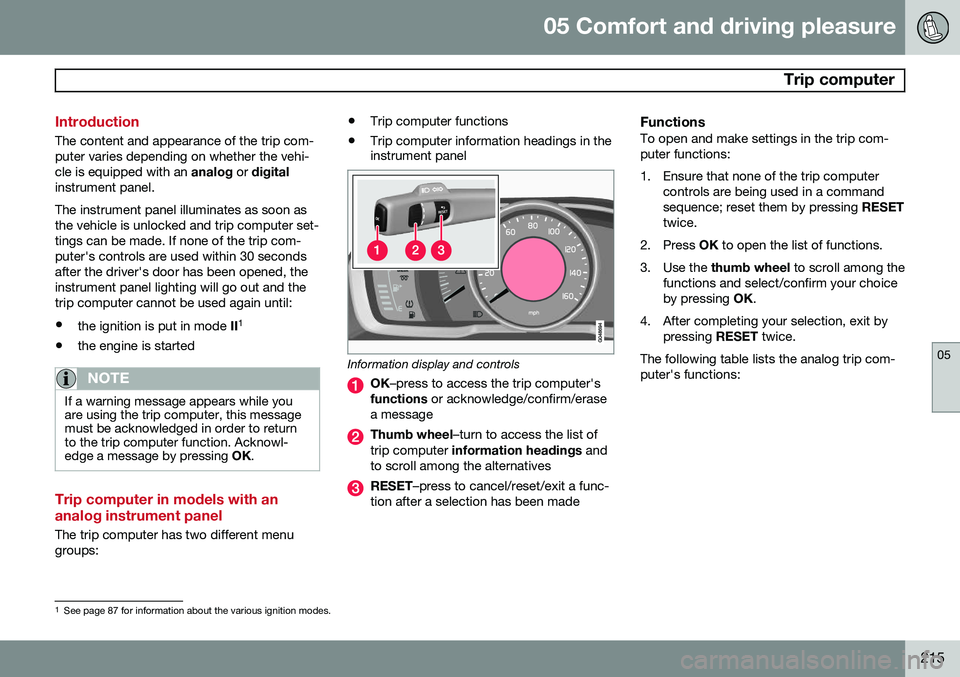
Information display and controls
OK
–press to access the trip computer's
functions or acknowledge/confirm/erase
a message
Thumb wheel –turn to access the list of
trip computer information headings and
to scroll among the alternatives
RESET –press to cancel/reset/exit a func-
tion after a selection has been made
FunctionsTo open and make settings in the trip com- puter functions:
1. Ensure that none of the trip computer controls are being used in a command sequence; reset them by pressing RESET
twice.
2. Press OK to open the list of functions.
3. Use the thumb wheel to scroll among the
functions and select/confirm your choiceby pressing OK.
4. After completing your selection, exit by pressing RESET twice.
The following table lists the analog trip com-puter's functions:
1 See page 87 for information about the various ignition modes.
Page 226 of 394

05 Comfort and driving pleasure
Passenger compartment convenience
05
224
Compartment in door panel
Storage pocket on the front edge of the front seat cushions
Glove compartment
Storage compartment, 12-volt socket and AUX input
Jacket holder
Rear seat cup holders
Storage pocket
Jacket holderThe jacket hanger is located on the inboard side of the front passenger's seat headrestraint. It is only intended for hanging lightgarments.
Tunnel console
Storage compartment (for CDs, etc.) under armrest, AUX input/USB connec-tor.
Includes cup holder for driver and pas- senger, 12-volt socket and a small stor-age compartment.
Glove compartment
The owner's manual and maps can be kept here. There are also holders for pens and fuelcards. The glove compartment can be lockedmanually with the key blade, see page 70.
Page 264 of 394
06 Infotainment
Bluetooth®
hands-free connection
06
262
Making a call1. Ensure that is shown at the top of
the center console display and that the hands-free function is in telephone mode.
2. Dial the desired phone number using the center console keypad or use the speeddial function (see page 266). In normalview (see page see page 231 for informa-tion about the various display views), it isalso possible to turn TUNE clockwise to
access the phone book and then counter-clockwise for the call list. See page 267for more information about the phonebook.
3. Press the thumb wheel or OK/MENU.
End or reject a call by pressing EXIT.
Disconnecting the cell phoneThe cell phone is automatically disconnectedfrom the infotainment system if it is movedout of range. The cell phone can be manually disconnected from the hands-free system by pressing andholding TEL or in phone mode, going to
Phone menuDisconnect phone. See also
page 263 for more information about con- nections. The hands-free system is also deactivatedwhen the ignition is switched off (or if thedriver’s door is opened). When the cell phone is disconnected from the hands-free system, a call in progress can becontinued using the cell phone’s own speakerand microphone. Even if the cell phone has been disconnected manually, some phones may reconnect auto-matically, for example when a new call is initi-ated.
Removing a paired deviceA paired phone or device can be removedfrom the list. To do so:
1. Press
TEL.
2. Select
Phone menuRemove
Bluetooth device.
Handling calls
Incoming calls–Press OK/MENU (or the thumb wheel on
the steering wheel keypad) to answer a call, even if the infotainment system is currently in another mode (e.g.,
RADIO orMEDIA).
Press EXIT to reject a call.
Auto answerThis function means that incoming calls will be answered automatically. Activate or deac-tivate the function in the menu system under
Phone menuCall optionsAuto
answer.
Call settingsWhile a call is in progress, press OK/MENU
or the thumb wheel on the steering wheel keypad to access the following functions:
•
Mute: mute the infotainment system’s
microphone.
•
Mobile phone: transfer the call from
hands-free to the cell phone. On certain cell phones, the connection will be bro-ken, which is normal. The hands-freefunction will ask if you would like toreconnect.
•
Dial number: dial a third party during an
ongoing call using the keypad (the current call will be put on hold).
Call listsCall lists are copied to the hands-free func- tion each time a cell phone is connected andthe lists are updated while the phone is con-nected. In normal view, turn TUNE counter-
clockwise to see the
All calls list.
Page 282 of 394
07 During your trip
Refueling
07
280
Opening/closing the fuel filler door
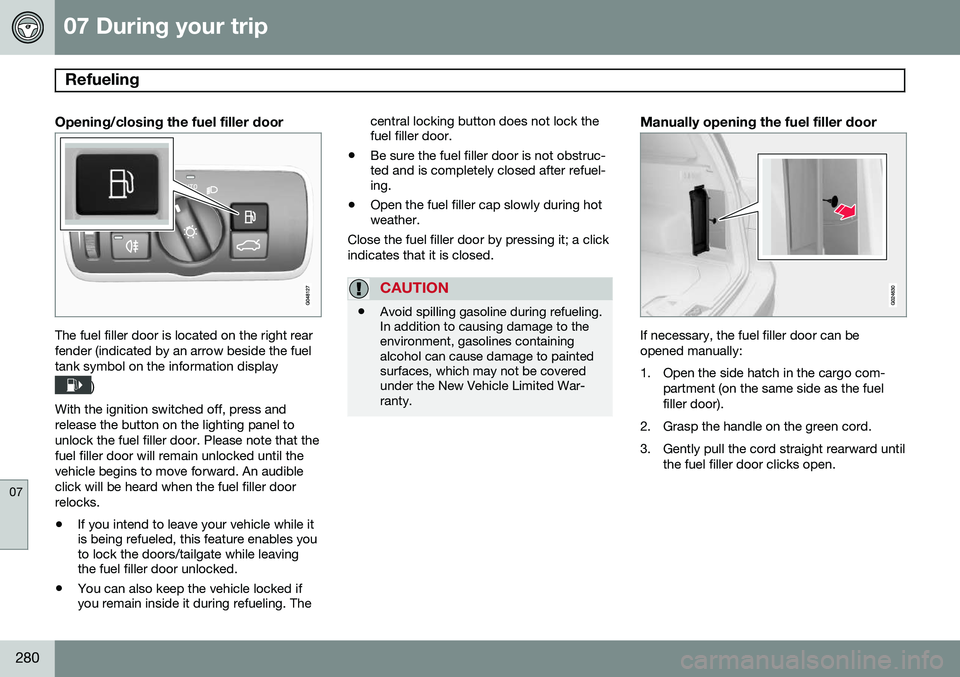
The fuel filler door is located on the right rear fender (indicated by an arrow beside the fueltank symbol on the information display
)
With the ignition switched off, press and release the button on the lighting panel tounlock the fuel filler door. Please note that thefuel filler door will remain unlocked until thevehicle begins to move forward. An audibleclick will be heard when the fuel filler doorrelocks. • If you intend to leave your vehicle while it is being refueled, this feature enables youto lock the doors/tailgate while leavingthe fuel filler door unlocked.
• You can also keep the vehicle locked ifyou remain inside it during refueling. The central locking button does not lock thefuel filler door.
• Be sure the fuel filler door is not obstruc-ted and is completely closed after refuel-ing.
• Open the fuel filler cap slowly during hotweather.
Close the fuel filler door by pressing it; a click indicates that it is closed.
CAUTION
• Avoid spilling gasoline during refueling. In addition to causing damage to theenvironment, gasolines containingalcohol can cause damage to paintedsurfaces, which may not be coveredunder the New Vehicle Limited War-ranty.
Manually opening the fuel filler door
If necessary, the fuel filler door can be opened manually:
1. Open the side hatch in the cargo com-
partment (on the same side as the fuel filler door).
2. Grasp the handle on the green cord.
3. Gently pull the cord straight rearward until the fuel filler door clicks open.
Page 323 of 394
08 Wheels and tires
Tire Sealing System*
08
* Option/accessory, for more information, see Introduction.321
Inflating tires
The tire sealing system can be used to inflate the tires. To do so:
1. Park the car in a safe place.
2. The compressor should be switched off.
Ensure that the on/off switch is in position0 (the 0 side of the switch should be
pressed down).
3. Take out the electrical wire and hose.
4. Remove the valve cap from the tire’s inflation valve and screw the hose con- nector onto the valve as tightly as possi-ble by hand.
5. Connect the electrical wire to the nearest 12-volt socket in the vehicle.
6. Start the vehicle’s engine.WARNING
• The vehicle’s engine should be running when the tire sealing system is used toavoid battery drain. Therefore, be surethe vehicle is parked in a well ventilatedplace, or outdoors, before using thesystem. The parking brake should besecurely applied and the gear selectorshould be in the
P (park) position.
• Children should never be left unatten-ded in the vehicle when the engine isrunning.
7. Check the tire’s inflation pressure on the
gauge. Switch off the compressor briefly to get a clear reading from the pressuregauge.
8. Refer to the tire inflation table in this chapter for the correct inflation pressure.If the tire needs to be inflated, start thetire sealing system’s compressor (pressthe on/off switch to position I). If neces-sary, release air from the tire by turningthe air release knob counterclockwise.
CAUTION
The compressor should not be used for more than 10 minutes at a time to avoidoverheating.
9. Turn off the compressor (press the on/off switch to position 0) when the correct
inflation pressure has been reached.
10. Unscrew the hose from the tire’s inflation valve and reinstall the valve cap.
CAUTION
•After pumping the tires, always reinstall the valve cap to help avoid damage tothe valve from dirt, gravel, etc.
• Use plastic valve caps only. Metal capscould corrode and become difficult toremove.
11. Disconnect the electrical wire from the
12-volt socket.
Page 324 of 394
08 Wheels and tires
Changing a wheel
08
322* Option/accessory, for more information, see Introduction.
Removing a wheel
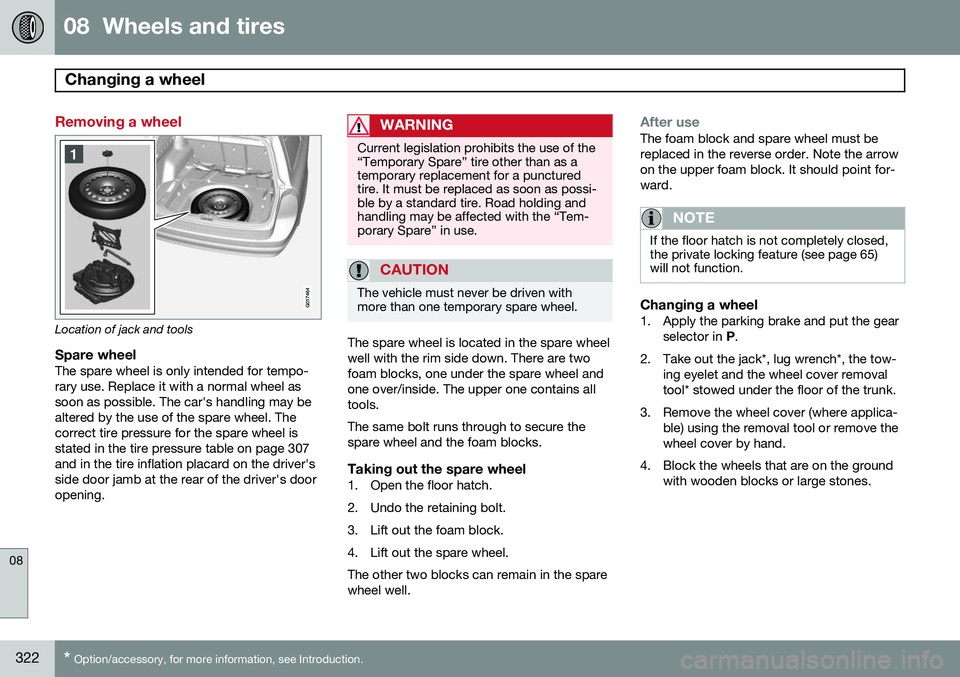
G017464
Location of jack and tools
Spare wheelThe spare wheel is only intended for tempo- rary use. Replace it with a normal wheel assoon as possible. The car's handling may bealtered by the use of the spare wheel. Thecorrect tire pressure for the spare wheel isstated in the tire pressure table on page 307and in the tire inflation placard on the driver'sside door jamb at the rear of the driver's dooropening.
WARNING
Current legislation prohibits the use of the “Temporary Spare” tire other than as atemporary replacement for a puncturedtire. It must be replaced as soon as possi-ble by a standard tire. Road holding andhandling may be affected with the “Tem-porary Spare” in use.
CAUTION
The vehicle must never be driven with more than one temporary spare wheel.
The spare wheel is located in the spare wheel well with the rim side down. There are twofoam blocks, one under the spare wheel andone over/inside. The upper one contains alltools. The same bolt runs through to secure the spare wheel and the foam blocks.
Taking out the spare wheel1. Open the floor hatch.
2. Undo the retaining bolt.
3. Lift out the foam block.
4. Lift out the spare wheel.The other two blocks can remain in the spare wheel well.
After useThe foam block and spare wheel must be replaced in the reverse order. Note the arrowon the upper foam block. It should point for-ward.
NOTE
If the floor hatch is not completely closed, the private locking feature (see page 65)will not function.
Changing a wheel1. Apply the parking brake and put the gear
selector in P.
2. Take out the jack*, lug wrench*, the tow- ing eyelet and the wheel cover removal tool* stowed under the floor of the trunk.
3. Remove the wheel cover (where applica- ble) using the removal tool or remove thewheel cover by hand.
4. Block the wheels that are on the ground with wooden blocks or large stones.
Page 360 of 394
09 Maintenance and specifications
Fuses 09
358* Option/accessory, for more information, see Introduction.
Under the glove compartment
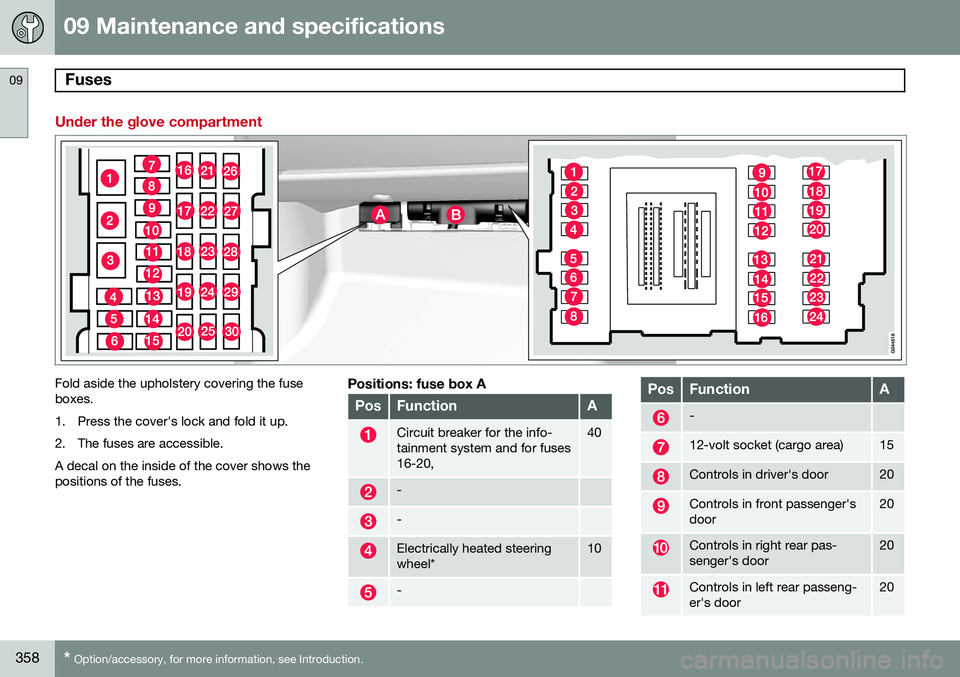
Fold aside the upholstery covering the fuse boxes.
1. Press the cover's lock and fold it up.
2. The fuses are accessible.A decal on the inside of the cover shows the positions of the fuses.Positions: fuse box A
PosFunctionA
Circuit breaker for the info- tainment system and for fuses16-20,40
-
-
Electrically heated steering wheel*10
-
PosFunctionA
-
12-volt socket (cargo area)15
Controls in driver's door20
Controls in front passenger's door20
Controls in right rear pas- senger's door20
Controls in left rear passeng- er's door20
Page 361 of 394

09 Maintenance and specifications
Fuses09
}}
* Option/accessory, for more information, see Introduction.359
PosFunctionA
Keyless drive*20
Power driver's seat*20
Power front passenger's seat*20
-
Infotainment control module5
Infotainment system, Sir- iusXM ™ satellite radio*10
Infotainment system15
Bluetooth hands-free system5
Rear Seat Entertainment sys- tem (RSE)*7.5
Power moonroof* Courtesy lighting, climate sys- tem sensor5
12-volt sockets15
Heated rear seat* (passeng- er's side)15
Heated rear seat* (driver's side)15
PosFunctionA
-
Heated front passenger's seat*15
Heated driver's seat*15
Park assist*, trailer hitch con- trol module*, park assist cam-era*5
All Wheel Drive* control mod- ule5
Active chassis system*10
Positions: fuse box B
PosFunctionA
Tailgate wiper15
-
Front courtesy lighting, driv- er's door power window con-trols, power seat(s)*, Home- LInk ®
Wireless Control Sys-
tem*7.5
Instrument panel5
PosFunctionA
Adaptive cruise control/colli- sion warning*10
Courtesy lighting, rain sensor*7.5
Steering wheel module7.5
Cental locking: fuel filler door10
Tailgate window washer15
Windshield washers15
Tailgate unlock10
Electrical folding rear seat outboard head restraints*10
Fuel pump20
Climate system control panel5
-
Alarm, On-board diagnostic system5
-
Airbag system, occupant weight sensor10
Page 365 of 394
09 Maintenance and specifications
Vehicle care09
363
Washing the car
The following points should be kept in mind when washing and cleaning the car: •The car should be washed at regular intervals since dirt, dust, insects and tarspots adhere to the paint and may causedamage. To help prevent corrosion, it isparticularly important to wash the car fre-quently in the wintertime.
• Avoid washing your car in direct sunlight.Doing so may cause detergents and waxto dry out and become abrasive. To avoidscratching, use lukewarm water to softenthe dirt before you wash with a softsponge, and plenty of sudsy water.
• Bird droppings
: Remove from paintwork
as soon as possible. Otherwise the finishmay be permanently damaged.
• A detergent can be used to facilitate thesoftening of dirt and oil.
• Dry the car with a clean chamois andremember to clean the drain holes in thedoors and rocker panels.
• Tar spots can be removed with tarremover after the car has been washed.
• A stiff-bristle brush and lukewarm soapywater can be used to clean the wiperblades. Frequent cleaning of the wind-shield and wiper blades improves visibility considerably and also helps prolong theservice life of the wiper blades.
• Wash off the dirt from the underside(wheel housings, fenders, etc).
• In areas of high industrial fallout, morefrequent washing is recommended.
NOTE
When washing the car, remember to remove dirt from the drain holes in thedoors and sills.
CAUTION
• During high pressure washing, the spray mouthpiece must never becloser to the vehicle than 13" (30 cm).Do not spray into the locks.
• Dirt, snow, etc., on the headlights canreduce lighting capacity considerably.Clean the headlights regularly, forexample when refueling.
Special moonroof cautions:
• Always close the moonroof and sunshade before washing your vehicle.
• Never use abrasive cleaning agents onthe moonroof.
• Never use wax on the rubber sealsaround the moonroof.
Exterior componentsVolvo recommends the use of special clean- ing products, available at your Volvo retailer,for cleaning colored plastic, rubber, or orna-mental components such as chromed stripson the exterior of your vehicle. The instruc-tions for using these products should be fol-lowed carefully. Solvents or stain removersshould not be used.
CAUTION
•Avoid waxing or polishing plastic or rubber components
• Polishing chromed strips can wearaway or damage the surface
• Polishes containing abrasive sub-stances should not be used
Automatic car wash
•
We do NOT recommend washing your car in an automatic wash during the firstfew months (because the paint will nothave hardened sufficiently).
• An automatic wash is a simple and quickway to clean your car, but it is worthremembering that it may not be as thor-ough as when you yourself go over thecar with sponge and water. Keeping theunderbody clean is most important, espe-cially in the winter. Some automatic