seats VOLVO XC70 2014 Owner´s Manual
[x] Cancel search | Manufacturer: VOLVO, Model Year: 2014, Model line: XC70, Model: VOLVO XC70 2014Pages: 394, PDF Size: 11.55 MB
Page 95 of 394
03 Your driving environment
Seats
03
93
CAUTION
The rear head restraints should not be kept folded down for prolonged periods.This could result in pressure marks inleather upholstery.
WARNING
For safety reasons, no one should be allowed to sit in the outboard rear seatpositions if the head restraints are foldeddown. If these positions are occupied, thehead restraints should be in the upright(fixed) position.
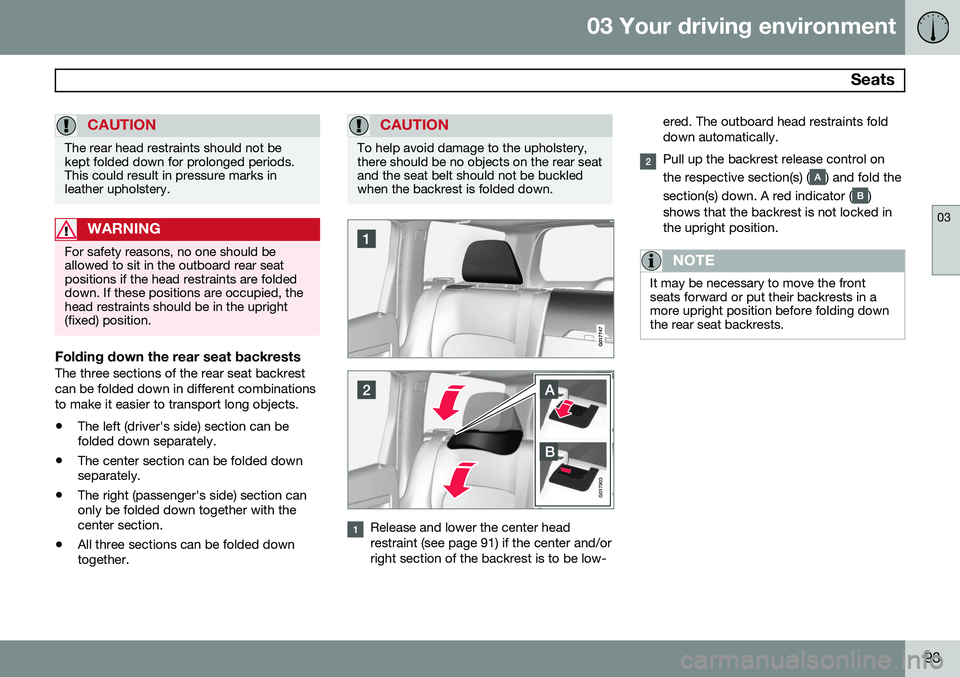
Folding down the rear seat backrestsThe three sections of the rear seat backrest can be folded down in different combinationsto make it easier to transport long objects.
• The left (driver's side) section can be folded down separately.
• The center section can be folded downseparately.
• The right (passenger's side) section canonly be folded down together with thecenter section.
• All three sections can be folded downtogether.
CAUTION
To help avoid damage to the upholstery, there should be no objects on the rear seatand the seat belt should not be buckledwhen the backrest is folded down.
G017903
Release and lower the center head restraint (see page 91) if the center and/orright section of the backrest is to be low- ered. The outboard head restraints folddown automatically.
Pull up the backrest release control on the respective section(s) (
) and fold the
section(s) down. A red indicator (
)
shows that the backrest is not locked in the upright position.
NOTE
It may be necessary to move the front seats forward or put their backrests in amore upright position before folding downthe rear seat backrests.
Page 96 of 394
03 Your driving environment
Seats
03
94
WARNING
•When one or more sections of the backrest is returned to the uprightposition, check that it is properlylocked in place by pushing and pullingit. The red indicators should also notbe visible.
• Return the outboard head restraints tothe upright position.
• Long loads should always be securelyanchored to help avoid injury in theevent of a sudden stop.
• Always turn the engine off and applythe parking brake when loading/unloading the vehicle.
• Place the transmission in the Park (
P)
position to help prevent inadvertentmovement of the gear selector.
• On hot days, the temperature in thevehicle interior can rise very quickly.Exposure of people to these high tem-peratures for even a short period oftime can cause heat-related injury ordeath. Small children are particularly atrisk.
Page 103 of 394
03 Your driving environment
Lighting
03
101
The intensity of the instrument lighting is adjusted with the thumb wheel.
"Theater" lightingWhen the overhead courtesy lighting hasgone out and the engine is running, severalLEDs located near the roof console illuminateto provide faint lighting for the occupants ofthe front seats. This lighting goes out justafter the overhead courtesy lighting when thevehicle is locked.
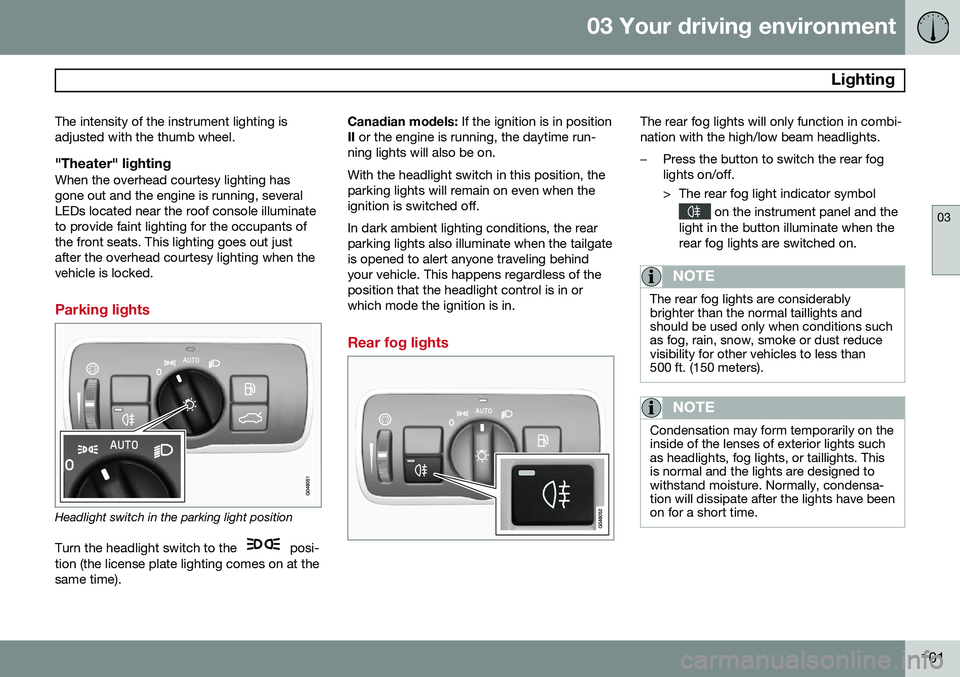
Parking lights
Headlight switch in the parking light position
Turn the headlight switch to the
posi-
tion (the license plate lighting comes on at the same time). Canadian models:
If the ignition is in position
II or the engine is running, the daytime run-
ning lights will also be on. With the headlight switch in this position, the parking lights will remain on even when theignition is switched off. In dark ambient lighting conditions, the rear parking lights also illuminate when the tailgateis opened to alert anyone traveling behindyour vehicle. This happens regardless of theposition that the headlight control is in orwhich mode the ignition is in.
Rear fog lights
The rear fog lights will only function in combi- nation with the high/low beam headlights.
–Press the button to switch the rear fog lights on/off.
> The rear fog light indicator symbol
on the instrument panel and the
light in the button illuminate when the rear fog lights are switched on.
NOTE
The rear fog lights are considerably brighter than the normal taillights andshould be used only when conditions suchas fog, rain, snow, smoke or dust reducevisibility for other vehicles to less than500 ft. (150 meters).
NOTE
Condensation may form temporarily on the inside of the lenses of exterior lights suchas headlights, fog lights, or taillights. Thisis normal and the lights are designed towithstand moisture. Normally, condensa-tion will dissipate after the lights have beenon for a short time.
Page 210 of 394
05 Comfort and driving pleasure
Climate system
05
208* Option/accessory, for more information, see Introduction.
Electronic climate control, ECC
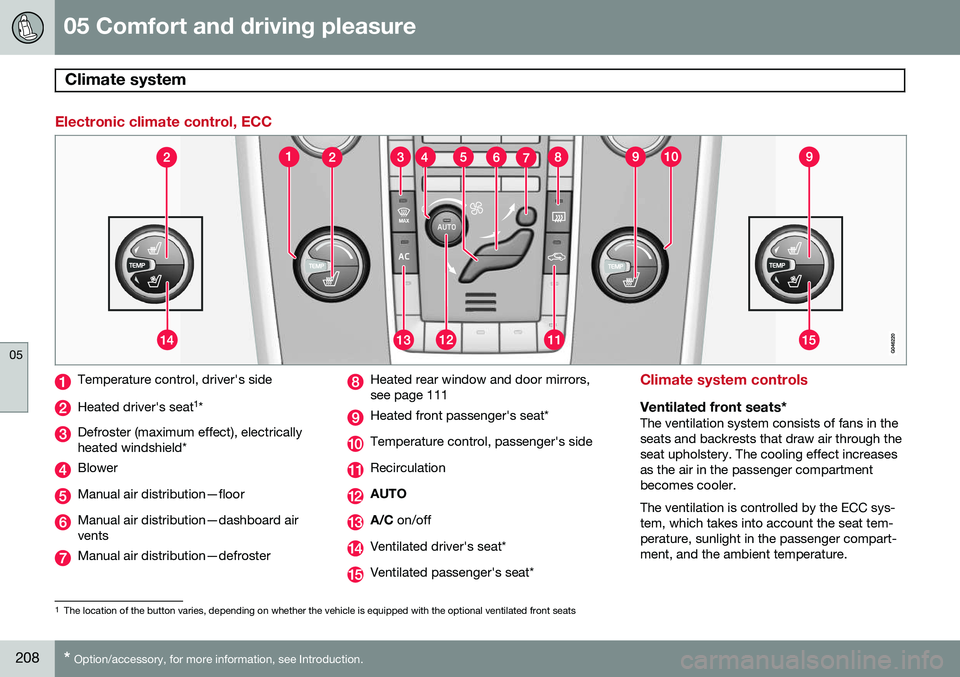
Temperature control, driver's side
Heated driver's seat 1
*
Defroster (maximum effect), electrically heated windshield*
Blower
Manual air distribution—floor
Manual air distribution—dashboard air vents
Manual air distribution—defroster
Heated rear window and door mirrors, see page 111
Heated front passenger's seat*
Temperature control, passenger's side
Recirculation
AUTO
A/C on/off
Ventilated driver's seat*
Ventilated passenger's seat*
Climate system controls
Ventilated front seats*The ventilation system consists of fans in the seats and backrests that draw air through theseat upholstery. The cooling effect increasesas the air in the passenger compartmentbecomes cooler. The ventilation is controlled by the ECC sys- tem, which takes into account the seat tem-perature, sunlight in the passenger compart-ment, and the ambient temperature.
1
The location of the button varies, depending on whether the vehicle is equipped with the optional ventilated front seats
Page 211 of 394
05 Comfort and driving pleasure
Climate system
05
}}
* Option/accessory, for more information, see Introduction.209
The ventilation can be used at the same time as seat heating. The ventilation system can be activated when the engine is running. There are three comfortlevels that produce different cooling anddehumidifying effects:
• Level three: press the button once for maximum output – three indicator lightscome on.
• Level two: press the button twice for alower output – two indicator lights comeon.
• Level one: press the button three timesfor the lowest output – one indicator lightcomes on.
• Press the button a fourth time to switchoff the function – the indicator light will goout.
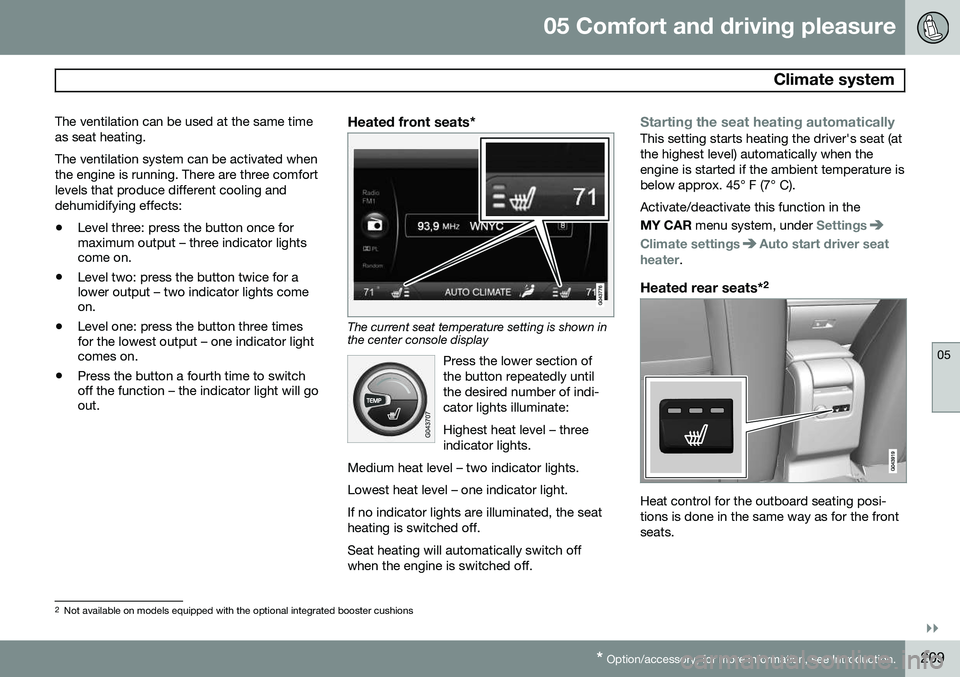
Heated front seats*
The current seat temperature setting is shown in the center console display
Press the lower section of the button repeatedly untilthe desired number of indi-cator lights illuminate: Highest heat level – three indicator lights.
Medium heat level – two indicator lights. Lowest heat level – one indicator light.If no indicator lights are illuminated, the seat heating is switched off.
Seat heating will automatically switch off when the engine is switched off.
Starting the seat heating automaticallyThis setting starts heating the driver's seat (at the highest level) automatically when theengine is started if the ambient temperature isbelow approx. 45° F (7° C). Activate/deactivate this function in the MY CAR menu system, under
Settings
Climate settingsAuto start driver seat
heater.
Heated rear seats* 2
Heat control for the outboard seating posi- tions is done in the same way as for the frontseats.
2
Not available on models equipped with the optional integrated booster cushions
Page 238 of 394
06 Infotainment
Introduction
06
236* Option/accessory, for more information, see Introduction.
•Subwoofer*: subwoofer volume level.
•
DPL II centre level/3 channel centre
level3 : Volume for the center speaker.
•
DPL II surround level3 /4
: Surround level.
Advanced sound settings
EqualizerSound levels for different frequencies can be adjusted separately using this feature. To do so:1. Press OK/MENU to access
Audio
settings and select Equalizer
2. Turn TUNE to select one of the frequen-
cies and press OK/MENU.
3. Turn TUNE to adjust the sound setting
and confirm the change by pressing OK/
MENU . Do the same for the other fre-
quencies.
4. When you have finished making your set- tings, press EXIT to save and return to
normal view.
For general information regarding menu navi- gation, see page 233 and menu overview seepage 237.
Sound stage 5The sound experience can be optimized forthe driver's seat, both front seats or the rearseat. If the front and rear seats are occupied, the sound stage setting
Front seats is rec-
ommended. Select one of the options under
Audio settingsSound stage.
Audio volume and automatic volume
control
The infotainment system compensates for disrupting noises in the passenger compart-ment by increasing the volume according tothe speed of the vehicle. The level of soundcompensation can be set at low, medium,high or off. Select the level under
Audio
settings
Volume compensation.
External audio source volumeIf an external device such as an MP3 player or an iPod ®
is connected to the AUX socket,
the device's volume may be different than the volume of the internal sound sources such asthe disc player or the radio. If the externalsound source's volume is too high, the qualityof the sound may be impaired. To help pre-vent this, adjust the input volume of the exter-nal audio source:
NOTE
Sound quality may be affected if the MP3 player is being charged while the system isin AUX mode. To help prevent this, avoidcharging the MP3 player in a 12-voltsocket while it is being played.
1. Press MEDIA and turn TUNE to AUX.
Press OK/MENU or the thumb wheel on
the steering wheel keypad.
2. Press OK/MENU and turn TUNE to
AUX
input volume. Confirm by pressing OK/
MENU .
3. Turn TUNE to adjust the volume.
Optimal sound reproductionThe infotainment system is pre-calibrated for optimal sound reproduction using digital sig-nal processing. This calibration takes into account factors such as the speakers, amplifier, cabin acous-tics, the listeners' seating positions, etc., foreach combination of vehicle/infotainmentsystem.
3
Premium Sound Multimedia only
4 Only when Surround is on.
5Premium Sound Multimedia only
Page 256 of 394
06 Infotainment
AUX/USB sockets
06
254
Connecting external devices
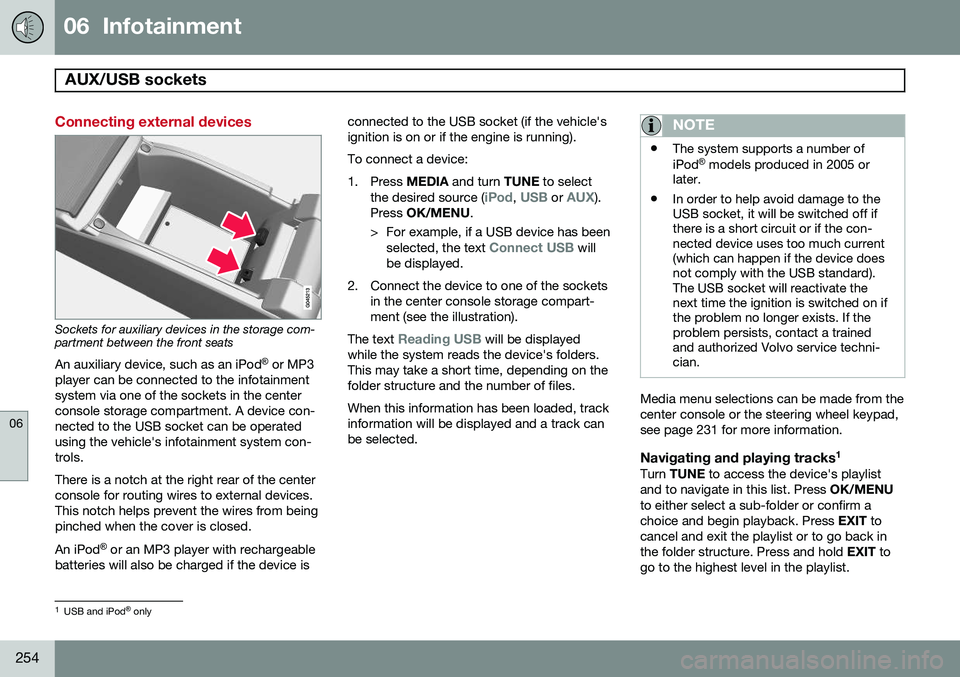
Sockets for auxiliary devices in the storage com- partment between the front seatsAn auxiliary device, such as an iPod ®
or MP3
player can be connected to the infotainment system via one of the sockets in the centerconsole storage compartment. A device con-nected to the USB socket can be operatedusing the vehicle's infotainment system con-trols. There is a notch at the right rear of the center console for routing wires to external devices.This notch helps prevent the wires from beingpinched when the cover is closed. An iPod ®
or an MP3 player with rechargeable
batteries will also be charged if the device is connected to the USB socket (if the vehicle's ignition is on or if the engine is running). To connect a device:
1. Press
MEDIA and turn TUNE to select
the desired source (
iPod, USB or AUX).
Press OK/MENU .
> For example, if a USB device has been selected, the text
Connect USB will
be displayed.
2. Connect the device to one of the sockets in the center console storage compart- ment (see the illustration).
The text
Reading USB will be displayed
while the system reads the device's folders. This may take a short time, depending on thefolder structure and the number of files. When this information has been loaded, track information will be displayed and a track canbe selected.
NOTE
• The system supports a number of iPod ®
models produced in 2005 or
later.
• In order to help avoid damage to the USB socket, it will be switched off ifthere is a short circuit or if the con-nected device uses too much current(which can happen if the device doesnot comply with the USB standard).The USB socket will reactivate thenext time the ignition is switched on ifthe problem no longer exists. If theproblem persists, contact a trainedand authorized Volvo service techni-cian.
Media menu selections can be made from the center console or the steering wheel keypad,see page 231 for more information.
Navigating and playing tracks 1Turn
TUNE to access the device's playlist
and to navigate in this list. Press OK/MENU
to either select a sub-folder or confirm achoice and begin playback. Press EXIT to
cancel and exit the playlist or to go back inthe folder structure. Press and hold EXIT to
go to the highest level in the playlist.
1 USB and iPod ®
only
Page 293 of 394

07 During your trip
Cargo area
07
291
Two cassettes containing nylon cargo nets are stored in a compartment under the cargoarea floor.
Attaching the cassette(s)
The two-sections of the net are attached to the rear side of the rear seat backrest. Thecassettes have different widths, and the wid-est section should be mounted on the rightside (seen from the rear of the vehicle).
1. Fold down the rear seat backrests.
2. Align the cassette’s mounting rail above
the mounting brackets on the backrest
.
3. Slide the cassette onto the mounting brackets
. 4. Return the backrest to the upright posi-
tion.
Using the net(s)
G018246
With the backrests uprightThe net is pulled up from the cassette and locks in position after approximately 1minute.
Pull up the right side of the net by grasp- ing its strap.
Insert the net’s rod in the retaining bracket on the right side near the ceilingand press it forward. It will click intoplace.
Extend the left section of the rod and insert it in the bracket on the left side of the cargo compartment. Press it forwarduntil it clicks into place.
Pull up the left side of the cargo net and secure it on the rod.
NOTE
•
The net can be fastened in the same way if the rear seat backrests arefolded down. In this case, use theretaining brackets near the ceiling,above the front seats.
• The front passenger's seat backrestcan also be folded down for carryinglong objects, see page 88.
Removing the cargo net cassettes1. Retract the net(s) in the reverse order.
2. Fold the entire rear seat backrest down.
3. Slide the cassettes outward until they
release from the mounting brackets.
WARNING
•When not in use, return the cassettes to their storage compartment underthe cargo area floor.
• Objects in the cargo area should besecurely anchored, even if the cargonet is correctly installed and in use.
Page 350 of 394
09 Maintenance and specifications
Wiper blades and washer fluid 09
348
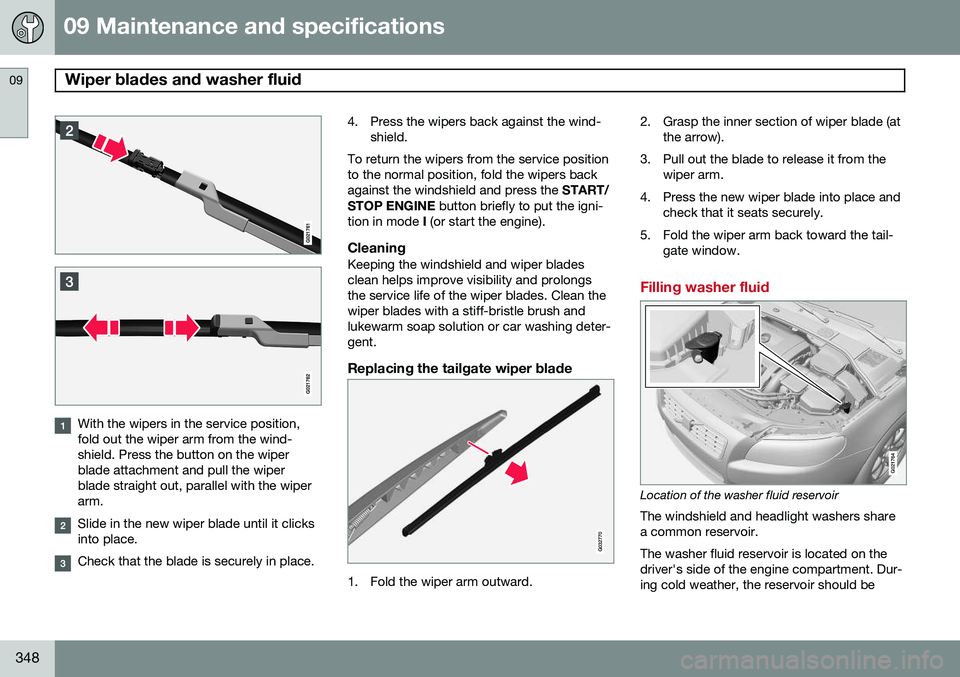
With the wipers in the service position, fold out the wiper arm from the wind-shield. Press the button on the wiperblade attachment and pull the wiperblade straight out, parallel with the wiperarm.
Slide in the new wiper blade until it clicks into place.
Check that the blade is securely in place.4. Press the wipers back against the wind-
shield.
To return the wipers from the service position to the normal position, fold the wipers backagainst the windshield and press the START/
STOP ENGINE button briefly to put the igni-
tion in mode I (or start the engine).
CleaningKeeping the windshield and wiper bladesclean helps improve visibility and prolongsthe service life of the wiper blades. Clean thewiper blades with a stiff-bristle brush andlukewarm soap solution or car washing deter-gent.
Replacing the tailgate wiper blade
G032770
1. Fold the wiper arm outward. 2. Grasp the inner section of wiper blade (at
the arrow).
3. Pull out the blade to release it from the wiper arm.
4. Press the new wiper blade into place and check that it seats securely.
5. Fold the wiper arm back toward the tail- gate window.
Filling washer fluid
G021764
Location of the washer fluid reservoir
The windshield and headlight washers share a common reservoir. The washer fluid reservoir is located on the driver's side of the engine compartment. Dur-ing cold weather, the reservoir should be
Page 362 of 394
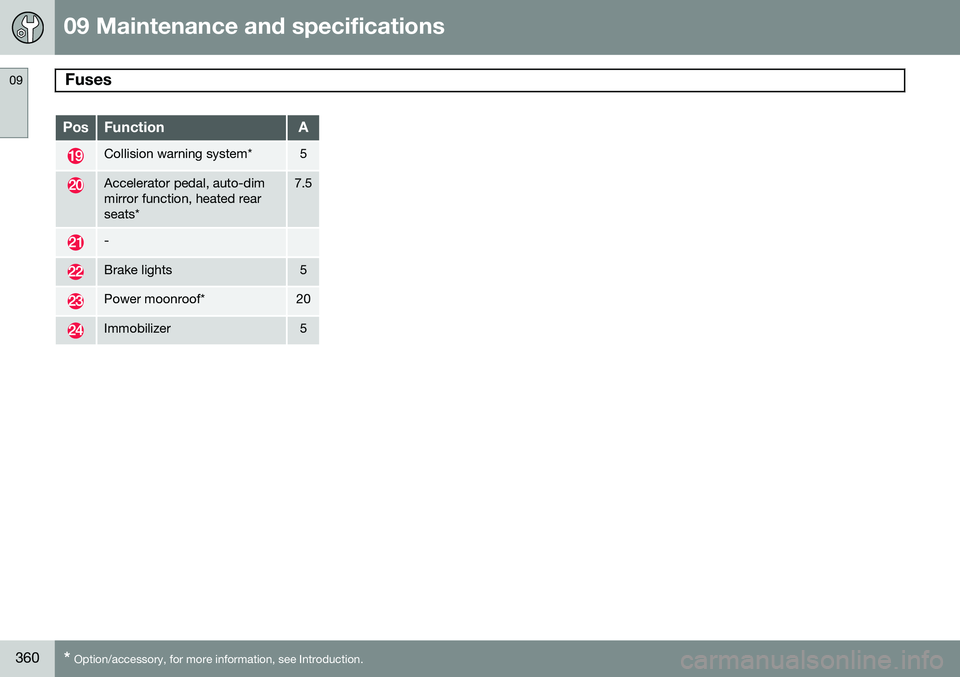
09 Maintenance and specifications
Fuses 09
360* Option/accessory, for more information, see Introduction.
PosFunctionA
Collision warning system*5
Accelerator pedal, auto-dim mirror function, heated rearseats*7.5
-
Brake lights5
Power moonroof*20
Immobilizer5