brake VOLVO XC70 2014 Owner´s Manual
[x] Cancel search | Manufacturer: VOLVO, Model Year: 2014, Model line: XC70, Model: VOLVO XC70 2014Pages: 394, PDF Size: 11.55 MB
Page 174 of 394
04 Driver support
Collision warning with Full Auto-brake and Pedestrian Detection*
04
172* Option/accessory, for more information, see Introduction.
NOTE
If warnings are given too frequently, the warning distance can be reduced (seepage 170). This causes the system to pro-vide later warnings, which decreases thetotal number of warnings provided.
WARNING
• The system is not activated at speeds under approx. 2 mph (4 km/h). There-fore, it will not brake your vehicle if youapproach a vehicle ahead at very lowspeed, such as when parking.
• The driver's actions always have high-est priority and override the CollisionWarning system. This means that thesystem will not intervene in situationswhere the driver is actively steering,braking or pressing the acceleratorpedal, even if a collision is imminent.
• When Auto-brake has prevented a col-lision with a stationary object, yourvehicle will remain at a standstill forapprox. 1.5 seconds. If your vehiclehas been braked for a moving vehicleahead, your vehicle's speed will bereduced to the same speed as thatvehicle's.
The camera’s limitationsThe camera is used by Collision Warning with Auto-brake, Driver Alert Control (seepage 176), and Lane Departure Warning (seepage 179).
NOTE
•To help protect the camera in very hot conditions, it may be temporarilyswitched off for approximately 15minutes after the engine has beenstarted.
• Keep the section of the windshield infront of the camera clean and free ofice, snow, or condensation.
WARNING
•The camera has the same limitations as the human eye. In other words, its“vision is impaired” by adverseweather conditions such as heavysnowfall, dense fog, etc. These condi-tions may reduce the function of sys-tems that depend on the camera orcause these systems to temporarilystop functioning.
• Never place any objects, decals, etc.,on the windshield in front of the cam-era. This could reduce or block thecamera’s function, and could causeone or more of the systems that utilizethe camera to stop functioning.
• Strong sunlight, reflections from theroad surface, ice or snow covering theroad, a dirty road surface, or unclearlane marker lines may drasticallyreduce the camera’s capacity todetect the side of a lane, a pedestrianor another vehicle.
Page 175 of 394

04 Driver support
Collision warning with Full Auto-brake and Pedestrian Detection*
04
* Option/accessory, for more information, see Introduction.173
Pedestrians
The system cannot identify all pedestrians
The Collision Warning system can only iden- tify and detect a pedestrian who is standingupright. This person can be standing still,walking or running. This means that the system has to be able to identify a person's head, arms, shoulders,legs, the upper and lower parts of the bodyand a person's pattern of movement whenwalking or running. If parts of the body are not visible to the cam- era, the system cannot detect the pedestrian. The following conditions apply:
• In order to detect a pedestrian, the sys- tem must have a full view of the person'sentire body and the person must be atleast 32 in. (80 cm) tall.
• The system cannot detect a pedestriancarrying a large object.
• The camera's capacity to see a pedes-trian at dawn or dusk is limited, much asit is for the human eye.
• The camera's function is deactivated andwill not detect a pedestrian in darkness orin tunnels, even if there is street lighting inthe area.
WARNING
• Collision Warning with Full Auto-brake and Pedestrian Detection is designedto be a supplementary driving aid. It isnot, however, intended to replace thedriver's attention and judgement. Thedriver is always responsible for operat-ing the vehicle in a safe manner.
• The system cannot detect all pedes-trians in all situations, such as in dark-ness/at night and cannot detect parti-ally hidden pedestrians, people whoare less than approx. 32 in. (80 cm)tall, or people wearing clothing thatobscures the contours of their bodies.
Fault tracing and actions
If the message Windscreen Sensors
blocked is displayed, this means that the
camera is obscured and cannot detect pedestrians, vehicles or road marker lines infront of the vehicle. This, in turn, means that Collision Warning with Full Auto-brake and Pedestrian Detec-tion, Lane Departure Warning, and DriverAlert Control will not have full functionality. The table lists possible causes for this mes- sage being displayed, and suitable actions.
Page 176 of 394
04 Driver support
Collision warning with Full Auto-brake and Pedestrian Detection*
04
174* Option/accessory, for more information, see Introduction.
CauseAction
The surface of the windshield in front of the camera is dirty or covered with ice or snow.Clean or clear the section of the windshield in front of the camera.
Fog, heavy rain or snow is interfering with the function of the camera.No action possible. Heavy precipitation may affect the function of the camera.
The surface of the windshield is clean but the message remains in the display.Wait a short time. It may take several minutes for the camera to regis- ter visibility.
The surface between the inside of the windshield and the camera is dirty.Contact an authorized Volvo retailer or service technician to have this surface cleaned.
Symbols and messages in the display
SymbolMessageDescription
Collision Warning OffCollision Warning is switched off. This message is displayed when the engine is started and will disappear after approx. 5 seconds. It can also be erased by pressing the OK button.
Collision Warning UnavailableCollision Warning cannot be activated. This message is displayed when the driver attempts to activate the function. It will disappear after approx. 5 seconds or can be erased by pressing the OK button.
Auto braking was activatedAuto-braking has been active. This message can be erased by pressing the OK button.
Windscreen Sen- sors blockedThe camera is temporarily not functioning. This message is displayed if the camera is obstructed by snow, ice, dirt, etc., on the windshield. Clean the area of the windshield in front of the camera, see page 172 formore information on the camera’s limitations.
Page 177 of 394

04 Driver support
Collision warning with Full Auto-brake and Pedestrian Detection*
04
* Option/accessory, for more information, see Introduction.175
SymbolMessageDescription
Radar blocked See manualCollision Warning and Auto-brake are temporarily not functioning. The radar sensor is blocked, for example by heavy rain or snow that has accumulated in front of the sensor, and cannot detect other vehicles, seepage 155 for more information on the radar sensor’s limitations.
Collision warn. Service requiredCollision Warning and Auto-brake are partially or completely not functioning. Contact a trained and qualified Volvo service technician if the message remains in the display.
Page 182 of 394
04 Driver support
Driver Alert System*
04
180* Option/accessory, for more information, see Introduction.
WARNING
The driver will only be warned once for each time the wheels cross a marker line.No alarm will be given if a marker line isbetween the wheels.
Limitations
The camera used by LDW has the same limi- tations as the human eye. See page172 for
more information about the camera's limita-tions.
NOTE
No warning signal will be given in the cer-
tain situations, such as:
• If the turn signal is being used
• The driver’s foot is on the brake pedal 1
• The accelerator pedal is pressed quickly 1
• If the steering wheel is moved quickly 1
• In sharp turns that cause the vehicle’s body to sway
Settings
Settings for Lane Departure Warning can be made in the menu system by pressing
My
Car . Go to
SettingsCar settings
Driver support systemsLane Departure
Warning.
There are two alternatives:
On at start-up: This selection switches LDW
on each time the engine is started. Otherwise, the system will be in the mode that it was inwhen the engine was switched off.
Increased sensitivity: This selection increa-
ses the function’s sensitivity. Warnings will be given at an earlier stage and fewer limitationsapply. When this setting is being used, thesystem only needs to monitor lane markerlines on one side of the vehicle to change sta- tus to
Lane Depart Warn Available.
1 When Increased sensitivity has been selected, a warning will be issued if a side marker line is crossed in this situation.
Page 184 of 394

04 Driver support
Park assist*
04
182* Option/accessory, for more information, see Introduction.
Introduction
The park assist system is designed to assist you when driving into parking spaces,garages, etc. It utilizes ultrasound sensors inthe front bumper and rear bumper(s) to meas-ure the distance to a vehicle or an object thatmay be close to the front or rear of your vehi-cle. An audible signal and symbols in theaudio system’s display indicate the distanceto the object.
NOTE
A trailer hitch whose wiring is integrated with the vehicle's electrical system will beincluded in the measurement of the availa-ble space behind the vehicle.
WARNING
Park Assist is an information system, NOT a safety system. This system is designedto be a supplementary aid when parkingthe vehicle. It is not, however, intended toreplace the driver's attention and judge-ment.
Function
Park assist button
The system is activated automatically when the vehicle is started. The indicator light in thebutton in the center console illuminates whenthe system is on.
• The front park assist system is active from the time the engine is started untilthe vehicle exceeds a speed of approxi-mately 6 mph (10 km/h). It is also activewhen the vehicle is backing up.
• Rear park assist is active when the engineis running and reverse gear has beenselected.
Activating/deactivatingThe system is activated automatically when the vehicle is started.
–Press the Park assist button on the center console to temporarily deactivate the sys-tem(s).
> The indicator light in the button will go
out when the system has been deacti- vated.
Park assist will be automatically reactivatedthe next time the engine is started, or if thebutton is pressed (the indicator light in thebutton will illuminate).
NOTE
Park assist is disengaged automatically when the parking brake is applied.
Page 186 of 394

04 Driver support
Park assist*
04
184* Option/accessory, for more information, see Introduction.
NOTE
• Rear park assist is deactivated auto- matically when towing a trailer if Volvogenuine trailer wiring is used. If a non-Volvo trailer hitch is being used, it maybe necessary to switch off the systemmanually, see page 182.
• The system will not detect highobjects, such as a loading dock, etc.
• Objects such as chains, thin shinypoles or low objects may temporarilynot be detected by the system. Thismay result in the pulsing tone unex-pectedly stopping instead of changingto a constant tone as the vehicleapproaches the object. In such cases,use caution when backing up or stopthe vehicle to help avoid damage.
Front park assist
G021424
The distance monitored in front of the vehicle is approximately 2.5 ft (0.8 m). The audiblesignal comes from the audio system's frontspeakers. It may not be possible to combine auxiliary headlights and front park assist since theselights could trigger the system's sensors.
NOTE
Front park assist is deactivated when the parking brake is applied and or when thegear selector is in the
P position.
Faults in the system
If the information symbol illuminates andPark assist syst Service required is shown
on the information display, this indicates that the system is not functioning properly andhas been disengaged. Consult a trained andqualified Volvo service technician.
CAUTION
In certain circumstances, the park assist system may give unexpected warning sig-nals that can be caused by external soundsources that use the same ultrasound fre-quencies as the system. This may includesuch things as the horns of other vehicles,wet tires on asphalt, pneumatic brakes,motorcycle exhaust pipes, etc. This doesnot indicate a fault in the system.
Page 271 of 394
06 Infotainment
Cell phone voice control*
06
* Option/accessory, for more information, see Introduction.269
Getting started
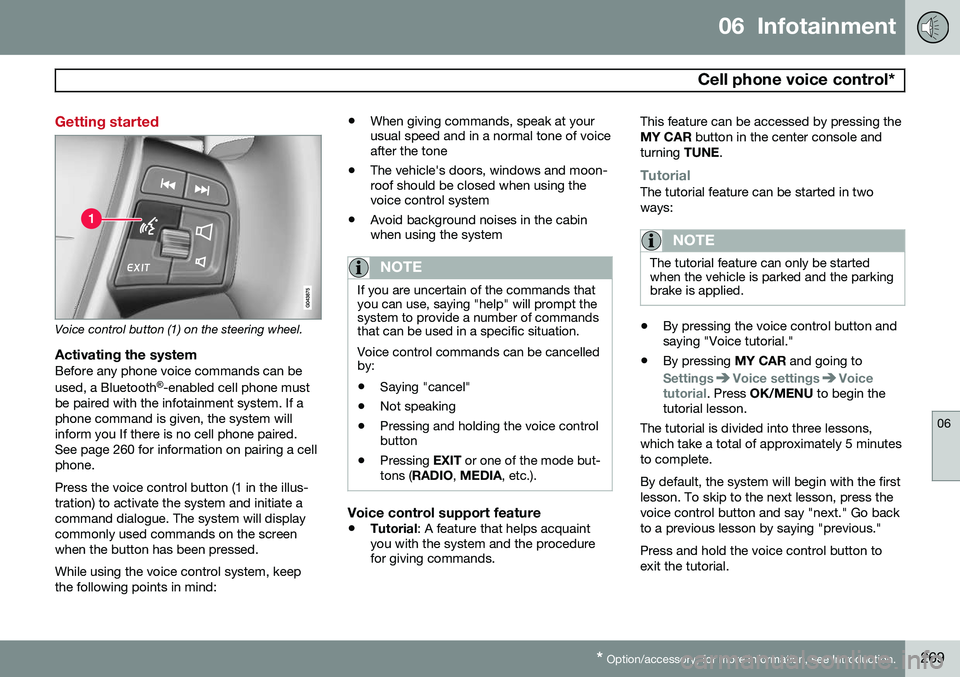
Voice control button (1) on the steering wheel.
Activating the systemBefore any phone voice commands can be used, a Bluetooth ®
-enabled cell phone must
be paired with the infotainment system. If a phone command is given, the system willinform you If there is no cell phone paired.See page 260 for information on pairing a cellphone. Press the voice control button (1 in the illus- tration) to activate the system and initiate acommand dialogue. The system will displaycommonly used commands on the screenwhen the button has been pressed. While using the voice control system, keep the following points in mind: •
When giving commands, speak at your usual speed and in a normal tone of voiceafter the tone
• The vehicle's doors, windows and moon-roof should be closed when using thevoice control system
• Avoid background noises in the cabinwhen using the system
NOTE
If you are uncertain of the commands that you can use, saying "help" will prompt thesystem to provide a number of commandsthat can be used in a specific situation. Voice control commands can be cancelled by:
• Saying "cancel"
• Not speaking
• Pressing and holding the voice control button
• Pressing
EXIT or one of the mode but-
tons ( RADIO , MEDIA , etc.).
Voice control support feature
•Tutorial
: A feature that helps acquaint
you with the system and the procedure for giving commands. This feature can be accessed by pressing the MY CAR
button in the center console and
turning TUNE.
TutorialThe tutorial feature can be started in two ways:
NOTE
The tutorial feature can only be started when the vehicle is parked and the parkingbrake is applied.
•By pressing the voice control button and saying "Voice tutorial."
• By pressing
MY CAR and going to
SettingsVoice settingsVoice
tutorial. Press OK/MENU to begin the
tutorial lesson.
The tutorial is divided into three lessons, which take a total of approximately 5 minutesto complete. By default, the system will begin with the first lesson. To skip to the next lesson, press thevoice control button and say "next." Go backto a previous lesson by saying "previous." Press and hold the voice control button to exit the tutorial.
Page 276 of 394

07 During your trip
Driving recommendations
07
274
General information
Economical driving conserves natural
resources
Better driving economy may be obtained by thinking ahead, avoiding rapid starts andstops and adjusting the speed of your vehicleto immediate traffic conditions. Observe the following rules:
• Bring the engine to normal operating tem- perature as soon as possible by drivingwith a light foot on the accelerator pedalfor the first few minutes of operation. Acold engine uses more fuel and is subjectto increased wear.
• Whenever possible, avoid using the vehi-cle for driving short distances. This doesnot allow the engine to reach normaloperating temperature.
• Drive carefully and avoid rapid accelera-tion and hard braking.
• Use the transmission's Drive (
D) position
as often as possible and avoid using kick-down.
• Using the transmission's Sport mode 1
may increase fuel consumption some-what. Use the transmission's Drive ( D)
position as often as possible. See page 127 for additional information about Sportmode.
• Do not exceed posted speed limits.
• Avoid carrying unnecessary items (extraload) in the vehicle.
• Maintain correct tire pressure. Check tirepressure regularly (when tires are cold).
• Remove snow tires when threat of snowor ice has ended.
• Note that roof racks, ski racks, etc,increase air resistance and also fuel con-sumption.
• At highway driving speeds, fuel consump-tion will be lower with the air conditioningon and the windows closed than with theair conditioning off and the windowsopen.
• Using the onboard trip computer's fuelconsumption modes can help you learnhow to drive more economically.
Other factors that decrease gas mileage are: • Dirty air cleaner
• Dirty engine oil and clogged oil filter
• Dragging brakes
• Incorrect front end alignment Some of the above mentioned items and oth- ers are checked at the standard maintenanceintervals.WARNING
Driving with the tailgate open:
Driving
with the tailgate open could lead to poi- sonous exhaust gases entering the pas-senger compartment. If the tailgate mustbe kept open for any reason, proceed asfollows: • Close the windows
• Set the ventilation system control to air flow to floor, windshield and side win-dows and the blower control to itshighest setting.
Weight distribution affects handlingAt the specified curb weight your vehicle has a tendency to understeer, which means thatthe steering wheel has to be turned morethan might seem appropriate for the curva-ture of a bend. This ensures good stabilityand reduces the risk of rear wheel skid.Remember that these properties can alterwith the vehicle load. The heavier the load inthe cargo area, the less the tendency toundersteer.
1
Models with the T6 turbo engine only.
Page 277 of 394

07 During your trip
Driving recommendations
07
275
Handling, roadholdingVehicle load, tire design and inflation pres- sure all affect vehicle handling. Therefore,check that the tires are inflated to the recom-mended pressure according to the vehicleload. See the "Tire pressure" section. Loadsshould be distributed so that capacity weightor maximum permissible axle loads are notexceeded.
Driving through water
•The vehicle can be driven through water up to a depth of approximately 10 in.(25 cm), at a maximum speed of 6 mph(10 km/h).
• Take particular care when driving throughflowing water.
• Clean the electrical connections for trailerwiring after driving in mud or water.
• When driving through water, maintain lowspeed and do not stop in the water.
WARNING
•Avoid driving through standing or rushing water. Doing so can be dan-gerous and it may also be difficult todetermine the actual depth of thewater.
• If water cannot be avoided, after driv-ing through the water, press lightly onthe brake pedal to ensure that thebrakes are functioning normally. Wateror mud can make the brake liningsslippery, resulting in delayed brakingeffect.
CAUTION
• Engine damage will occur if water is drawn into the air cleaner.
• If the vehicle is driven through waterdeeper than 10 in (25 cm), water mayenter the differential and the transmis-sion. This reduces the oil's lubricatingcapacity and may shorten the servicelife of these components.
• Do not allow the vehicle to stand inwater up to the door sills longer thanabsolutely necessary. This could resultin electrical malfunctions.
• If the engine has been stopped whilethe vehicle is in water, do not attemptto restart it. Have the vehicle towedout of the water.
Engine and cooling systemUnder special conditions, for example when driving in hilly terrain, extreme heat or withheavy loads, there is a risk that the engineand cooling system will overheat. Proceed asfollows to avoid overheating the engine. •
Maintain a low speed when driving with a trailer up long, steep hills.
• Do not turn the engine off immediatelywhen stopping after a hard drive.