door panel VOLVO XC70 2014 Owner´s Manual
[x] Cancel search | Manufacturer: VOLVO, Model Year: 2014, Model line: XC70, Model: VOLVO XC70 2014Pages: 394, PDF Size: 11.55 MB
Page 11 of 394
Introduction
Important information
9
ShiftlockWhen your vehicle is parked, the gear selec- tor is locked in the P (Park) position. To
release the selector from this position, theignition must be in mode II (see page 86) orthe engine must be running. Depress thebrake pedal, press the button on the frontside of the gear selector and move the selec-tor from P (Park).
Anti-lock Brake System (ABS)The ABS system performs a brief self-diag-nostic test when the engine has been startedand driver releases the brake pedal. Anotherautomatic test may be performed when thevehicle first reaches a speed of approximately6 mph (10 km/h). The brake pedal will pulsateseveral times and a sound may be audiblefrom the ABS control module. This is normal.
Fuel filler doorPress the button on the light switch panel(see the illustration on page 280) when thevehicle is at a standstill to unlock the fuel fillerdoor. It will relock when closed and there willbe an audible click.
Points to keep in mind
• Do not export your Volvo to another country before investigating that coun-try's applicable safety and exhaust emis-sion requirements. In some cases it maybe difficult or impossible to comply with these requirements. Modifications to theemission control system(s) may renderyour Volvo not certifiable for legal opera-tion in the U.S., Canada and other coun-tries.
• All information, illustrations and specifica-tions contained in this manual are basedon the latest product information availa-ble at the time of publication. Please notethat some vehicles may be equipped dif-ferently, depending on special legalrequirements. Optional equipment descri-bed in this manual may not be available inall markets.
• Some of the illustrations shown aregeneric and may not depict the exactmodel for which this manual is intended.
• Volvo reserves the right to make modelchanges at any time, or to change speci-fications or design without notice andwithout incurring obligation.
Crash event data
This vehicle is equipped with an event data recorder (EDR). The main purpose of an EDRis to record, in certain crash or near crash-likesituations, such as an air bag deployment orhitting a road obstacle, data that will assist inunderstanding how a vehicle's systems per-formed. The EDR is designed to record datarelated to vehicle dynamics and safety sys- tems for a short period of time, typically 30seconds or less. The EDR in this vehicle isdesigned to record such data as:
• How various systems in your vehicle were operating;
• Whether or not the driver and passengersafety belts were buckled/fastened;
• How far (if at all) the driver was depress-ing the accelerator and/or brake pedal;and,
• How fast the vehicle was traveling.
These data can help provide a better under- standing of the circumstances in whichcrashes and injuries occur.
NOTE
EDR data are recorded by your vehicle only if a non-trivial crash situation occurs;no data are recorded by the EDR undernormal driving conditions and no personaldata (e.g., name, gender, age, and crashlocation) are recorded. However, otherparties, such as law enforcement, couldcombine the EDR data with the type ofpersonally identifying data routinelyacquired during a crash investigation.
To read data recorded by an EDR, special equipment is required, and access to thevehicle or the EDR is needed. In addition to
Page 37 of 394
01 Safety
Crash mode01
* Option/accessory, for more information, see Introduction.35
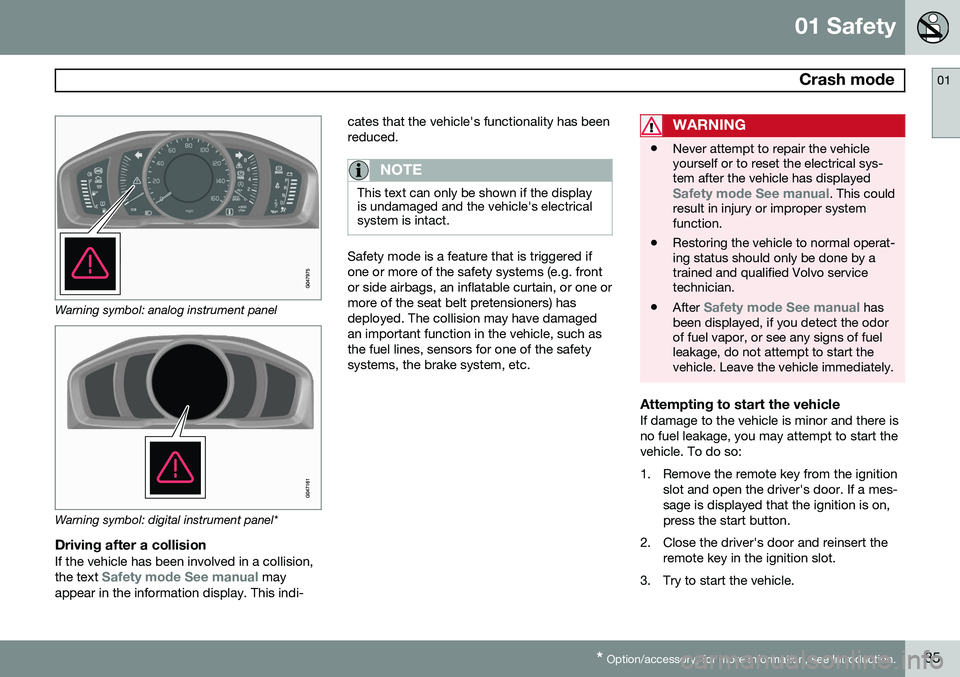
Warning symbol: analog instrument panel
Warning symbol: digital instrument panel*
Driving after a collisionIf the vehicle has been involved in a collision, the text Safety mode See manual may
appear in the information display. This indi- cates that the vehicle's functionality has been reduced.
NOTE
This text can only be shown if the display is undamaged and the vehicle's electricalsystem is intact.
Safety mode is a feature that is triggered if one or more of the safety systems (e.g. frontor side airbags, an inflatable curtain, or one ormore of the seat belt pretensioners) hasdeployed. The collision may have damagedan important function in the vehicle, such asthe fuel lines, sensors for one of the safetysystems, the brake system, etc.
WARNING
•
Never attempt to repair the vehicle yourself or to reset the electrical sys-tem after the vehicle has displayed
Safety mode See manual. This could
result in injury or improper system function.
• Restoring the vehicle to normal operat-ing status should only be done by atrained and qualified Volvo servicetechnician.
• After
Safety mode See manual has
been displayed, if you detect the odor of fuel vapor, or see any signs of fuelleakage, do not attempt to start thevehicle. Leave the vehicle immediately.
Attempting to start the vehicleIf damage to the vehicle is minor and there is no fuel leakage, you may attempt to start thevehicle. To do so:
1. Remove the remote key from the ignition
slot and open the driver's door. If a mes- sage is displayed that the ignition is on,press the start button.
2. Close the driver's door and reinsert the remote key in the ignition slot.
3. Try to start the vehicle.
Page 55 of 394

01 Safety
Child safety locks01
* Option/accessory, for more information, see Introduction.53
Child safety locks
G021077
Child safety locks – rear doorsThe controls are located on the rear door jambs. Use the remote control's key blade ora screwdriver to adjust these controls.
The rear doors can only be opened from the outside when the slot is in the hori-zontal position.
The rear doors can be opened from the inside when the slot is in the vertical posi-tion.
Power child safety locks and disengaging rear door windows*
Driver's door control panel
The power child safety locks can be acti- vated/deactivated when the remote key is inmode I (see page 87) or higher. Activation/
deactivation can be done up to 2 minutesafter the engine has been switched off (if nodoor has been opened). To activate the child safety locks:
1. Put the ignition in mode I or higher or
start the engine.
2. Press the button on the driver's door con- trol panel (see the illustration). >
Rear child locks Activated will be
displayed in the instrument panel and the indicator light in the button will illu- minate when the function is activated.
When the child safety locks are activated:
• The rear door windows can only be opened from the driver's door controlpanel
• The rear doors cannot be opened fromthe inside
The child safety locks' current setting is stored when the engine is switched off. Ifthese locks were activated when the enginewas switched off, they will also be activewhen the engine is restarted.
Page 59 of 394
02 Locks and alarm
Remote key and key blade
02
* Option/accessory, for more information, see Introduction.57
FCC ID:KR55WK49266 + Siemens VDO 5WK49233 FCC ID:KR55WK49233This device complies with part 15 of the FCC rules and RSS-210. Operation is subject tothe following conditions: (1) This device maynot cause harmful interference, and (2) thisdevice must accept any interferencereceived, including interference that maycause undesired operation. Canada-5WK49264IC:267T-5WK49264 + Siemens VDO 5WK49236 IC:267T-5WK49236, 5WK49266IC:267T-5WK49266 + Siemens VDO 5WK49233 IC:267T-5WK49233Operation is subject to the following condi- tions: (1) this device may not cause interfer-ence, and (2) this device must accept anyinterference, including interference that maycause undesired operation of the device.
Key memory: door mirrors and driver's seat
The position of the side door mirrors, power driver's seat* and the selected instrument panel theme
1
are stored in the remote keys
when the vehicle is locked. The next time the
driver's door is unlocked with the same
remote key and the door is opened within 2 minutes , the power driver's seat and side
door mirrors will automatically move to theposition that they were in when the doorswere most recently locked with the sameremote key. If the seat/mirrors have not beenreadjusted since the vehicle was locked, theywill already be in the position stored in thatparticular remote key and will not move. Seepage 89 for more information. See alsopage 90 for more information on this fea-ture. This feature can be activated or deactivated in the vehicle's menu by pressing MY CAR
and going into
SettingsCar settingsCar key memory. See page 199 for a
description of the menu system. See also page 66 for information regarding vehicles with the optional keyless drive.
Confirmation when locking/unlocking the vehicle
Settings can be made in the menu system for audible and visual confirmation when thevehicle has been locked or unlocked. Withthese functions activated, the following willoccur when the vehicle is locked/unlocked:
Locking confirmation
• The turn signals flash once, an audible signal sounds and the door mirrors willfold* in.
Confirmation will only be given when all doors and the tailgate are properly closed andlocked.
NOTE
If you do not receive confirmation when locking the vehicle, check whether a dooror the tailgate is ajar, or if this feature hasbeen turned off in the menu.
Unlocking confirmation
• The turn signals will flash twice and the door mirrors will fold* out.
Making a settingDifferent alternatives for locking/unlocking confirmation can be selected in the menus by
1
Optional digital instrument panel only
Page 60 of 394

02 Locks and alarm
Remote key and key blade
02
58
pressing MY CAR on the center console con-
trol panel. • To activate visual confirmation: go to
SettingsCar settingsLight
settings and select Door lock
confirmation light and/or Unlock
confirmation light by pressing OK/
MENU .
• To activate audible confirmation: go to
SettingsCar settingsLock
settings and select Audible
confirmation by pressing OK/MENU.
See page 199 for a description of the menu system.
Immobilizer (start inhibitor)Each of the keys supplied with your vehiclecontains a coded transponder. The code inthe key is transmitted to an antenna in theignition slot where it is compared to the codestored in the start inhibitor module. The vehi-cle will start only with a properly coded key. Ifyou misplace a key, take the other keys to atrained and qualified Volvo service technicianfor reprogramming as an anti-theft measure.The following messages (which may appearin the instrument panel display) are related tothe immobilizer:
MessageMeaning
Insert car keyRemote key not recognized during start. Try to start thevehicle again.
Car key not foundPCC with keyless drive only. Remote key not recognizedduring start. Try to start thevehicle again. If the problem continues, insert the remote key intothe ignition slot and try tostart the vehicle again.
Immobil- izer TrystartagainRemote key fault during start. Contact an authorizedVolvo workshop.
CAUTION
Never use force when inserting the remote key in the ignition slot. The vehicle cannotbe started if the transponder is damaged.
USA–FCC ID: LTQWFS 125VO This device complies with part 15 of the FCC rules. Operation is subject to the followingcondition: (1) This device may not causeharmful interference, and (2) this device must accept any interference received, includinginterference that may cause undesired opera-tion. Canada–IC: 3659A-WFS125VOOperation is subject to the following condi- tions: (1) this device may not cause interfer-ence, and (2) this device must accept anyinterference, including interference that maycause undesired operation of the device. See page 120 for information on starting the vehicle.
Replacing the battery in the remote keyThe batteries should be replaced if:
• The information symbol illuminates and
Low battery in remote control. Please change batteries. is shown in the dis-
play and/or
• if the locks do not react after several attempts to unlock or lock the vehicle.
NOTE
The remote key's range is normally approximately 60 ft (20 m) from the vehi-cle.
See page 62 for information about replacing the battery.
Page 62 of 394
02 Locks and alarm
Remote key and key blade
02
60* Option/accessory, for more information, see Introduction.
NOTE
As an added safety precaution, the parking lights will come on automatically for ashort period when the tailgate has beenopened.
After closing, the tailgate will not automati- cally relock. Press Lock to relock it and rearmthe alarm. See also the section "Unlocking the tailgate from the passenger compartment."
Panic alarm – This button can be used
to attract attention during emergency situa- tions. To activate the panic alarm, press and hold this button for at least 3 seconds or press ittwice within 3 seconds. The turn signals andhorn will be activated. The panic alarm willstop automatically after 2 minutes and45 seconds. To deactivate, wait approximately 5 seconds and press the button again. The Panic alarm button will not unlock the vehicle.
RangeThe remote key has a range of approximately60 ft. (20 m) from the vehicle.
NOTE
Buildings or other obstacles may interfere with the function of the remote key. Thevehicle can also be locked or unlockedwith the key blade, see page 62.
If the remote key is removed from the vehicle while the engine is running or if the ignition isin mode I or II and all of the doors are closed,
a message will appear in the instrument paneldisplay and there will be an audible signal. When the remote key is returned to the vehi- cle, the message will be erased and the audi-ble signal will stop after one of the followinghas been done: • The remote key is inserted in the ignition slot
• The vehicle's speed exceeds 20 mph(30 km/h)
• The
OK button on the left steering wheel
lever is pressed
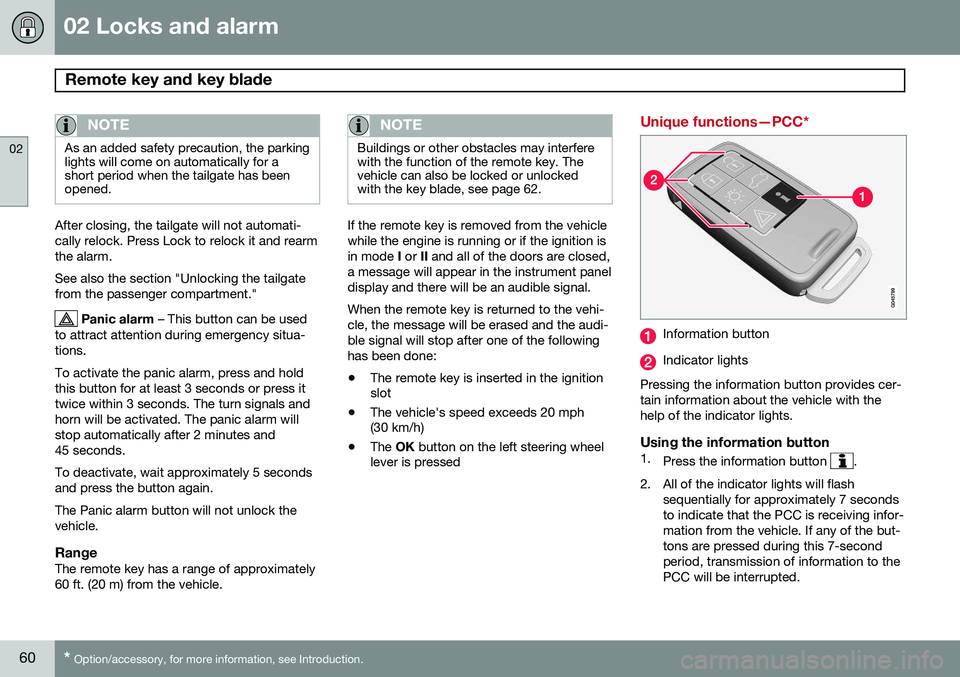
Unique functions—PCC*
Information button
Indicator lights
Pressing the information button provides cer- tain information about the vehicle with thehelp of the indicator lights.
Using the information button1. Press the information button .
2. All of the indicator lights will flash sequentially for approximately 7 seconds to indicate that the PCC is receiving infor-mation from the vehicle. If any of the but-tons are pressed during this 7-secondperiod, transmission of information to thePCC will be interrupted.
Page 67 of 394
02 Locks and alarm
Private locking
02
65
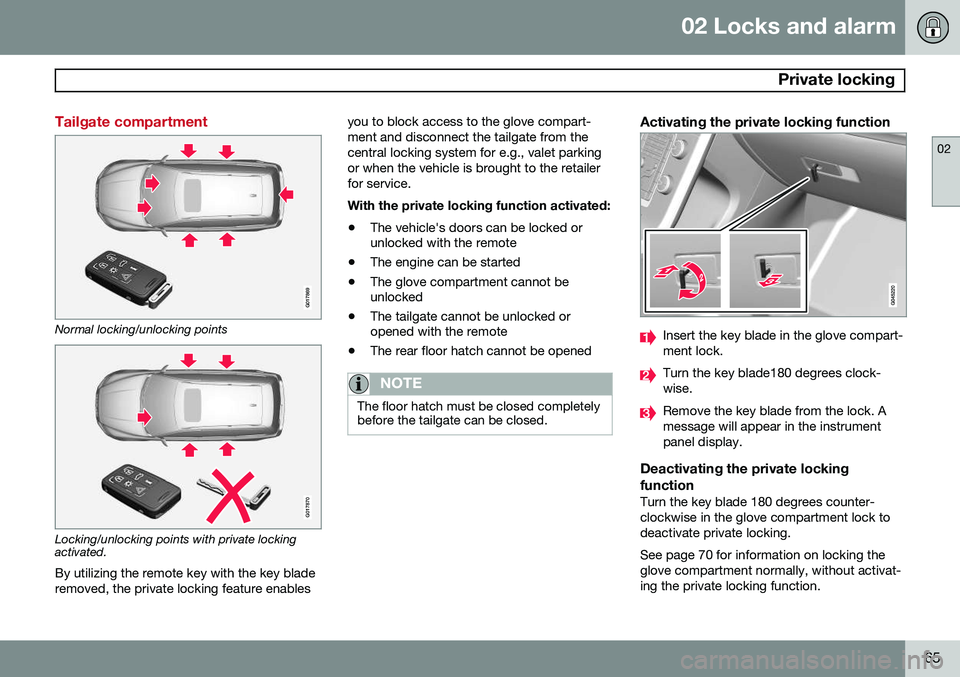
Tailgate compartment
G017869
Normal locking/unlocking points
G017870
Locking/unlocking points with private locking activated.By utilizing the remote key with the key blade removed, the private locking feature enables you to block access to the glove compart-ment and disconnect the tailgate from thecentral locking system for e.g., valet parkingor when the vehicle is brought to the retailerfor service. With the private locking function activated:
• The vehicle's doors can be locked or unlocked with the remote
• The engine can be started
• The glove compartment cannot beunlocked
• The tailgate cannot be unlocked oropened with the remote
• The rear floor hatch cannot be opened
NOTE
The floor hatch must be closed completely before the tailgate can be closed.
Activating the private locking function
Insert the key blade in the glove compart- ment lock.
Turn the key blade180 degrees clock- wise.
Remove the key blade from the lock. A message will appear in the instrumentpanel display.
Deactivating the private locking function
Turn the key blade 180 degrees counter- clockwise in the glove compartment lock todeactivate private locking. See page 70 for information on locking the glove compartment normally, without activat-ing the private locking function.
Page 69 of 394

02 Locks and alarm
Keyless drive
02
67
Locking the vehicle
Models with keyless drive have a button on the outside door handlesThe doors and the tailgate can be locked by pressing the lock button in any of the outsidedoor handles.
NOTE
On keyless drive vehicles, the gear selec- tor must be in the Park ( P) position, all
doors and the tailgate must be closed andthe ignition must be switched off beforethe vehicle can be locked.
Keyless drive remote key and driver's seat/door mirror memory
• When you leave the vehicle with a PCC in your possession and lock any door, the position of the driver's seat and door mir-rors will be stored in the seat's memory.
• The next time a door is opened by a per-son with the
same PCC in his/her pos-
session, the driver's seat and door mir-rors will automatically move to the posi-tion that they were in when the door wasmost recently locked.
NOTE
If several people carrying PCCs approach the vehicle at the same time, the driver'sseat and door mirrors will assume thepositions they were in for the person whoopens the driver's door.
See also page 89 for information on adjust- ing and storing the seat's position in the seatmemory.
Keyless drive information messagesIf all of the PCCs are removed from the vehi-cle while the engine is running or if the igni-tion is in mode II (see page 86) and all of
the doors are closed, a message will appearin the instrument panel display and an audiblesignal will sound. When at least one PCC has been returned to the car, the message will be erased in the dis-play and the audible signal will stop when: •
A door has been opened and closed
• The PCC has been inserted in the ignition slot
• The
OK button (see page 197 for the
location of this button) has been pressed.
CAUTION
• Keyless drive remote keys should never be left in the vehicle. In the eventof a break-in, a remote found in thevehicle could make it possible to startthe engine.
• Electromagnetic fields or metalobstructions can interfere with thekeyless drive system. The remote keyshould never be placed closer thanapproximately 4-6 in. (10-15 cm) tocell phones, metallic objects or e.g.,stored in a metal briefcase.
USA – FCC ID:KR55WK48952, KR55WK48964 NOTEThis device complies with part 15 of the FCC Rules. Operation is subject to the followingtwo conditions: (1) This device may not causeharmful interference, and (2) this device mustaccept interference received, including inter-ference that may cause undesired operation.
Page 71 of 394
02 Locks and alarm
Locks
02
69
Locking and unlocking the vehicle
From outside the vehicleThe remote key locks and unlocks all of the doors and the tailgate. Before the vehicle can be locked from the outside with the remote key, the driver's doormust be closed. Any other door/tailgate thatis open will be locked and the alarm will bearmed.
NOTE
Be sure the remote key is outside of the vehicle before the other doors/tailgate areclosed to help avoid locking the remoteinside the vehicle.
If the vehicle is equipped with the optional keyless drive system, all doors/tailgate mustbe closed before the vehicle can be locked. The first press on the unlock button unlocks the driver's door and a second press unlocksthe other doors and the tailgate (see alsopage 59). This setting can be changed in themenu system. See page 199 for a descrip-tion. If the locks repeatedly do not react when the unlock button is pressed, it may be necessaryto replace the batteries in the remote, seepage 58. In this case the vehicle can beunlocked with the detachable key blade. Seepage 62.
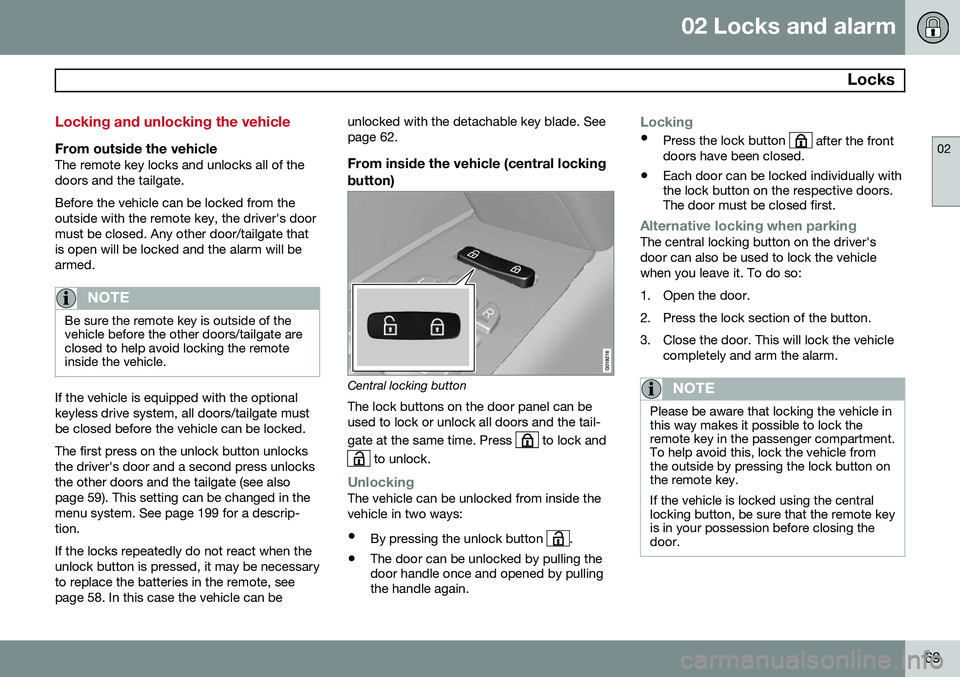
From inside the vehicle (central locking button)
Central locking button
The lock buttons on the door panel can be used to lock or unlock all doors and the tail- gate at the same time. Press
to lock and
to unlock.
UnlockingThe vehicle can be unlocked from inside the vehicle in two ways:
• By pressing the unlock button
.
• The door can be unlocked by pulling the door handle once and opened by pullingthe handle again.
Locking
•
Press the lock button after the front
doors have been closed.
• Each door can be locked individually with the lock button on the respective doors.The door must be closed first.
Alternative locking when parkingThe central locking button on the driver's door can also be used to lock the vehiclewhen you leave it. To do so:
1. Open the door.
2. Press the lock section of the button.
3. Close the door. This will lock the vehicle
completely and arm the alarm.
NOTE
Please be aware that locking the vehicle in this way makes it possible to lock theremote key in the passenger compartment.To help avoid this, lock the vehicle fromthe outside by pressing the lock button onthe remote key. If the vehicle is locked using the central locking button, be sure that the remote keyis in your possession before closing thedoor.
Page 79 of 394

03 Your driving environment
Instruments and controls
03
}}
* Option/accessory, for more information, see Introduction.77
FunctionPage
Controls for menus and messages, turn signals,high/low beams, tripcomputer199, 102,97, 215
Paddles for manually shifting gears*126
Cruise control146
Horn, airbag95, 22
Main instrument panel77
Infotainment system/ Bluetooth hands-freecontrols230, 259
START/STOP ENGINE button86
Ignition slot86
Display for infotainment system functions andmenus230, 197
Hazard warning flashers102
Door handle–
FunctionPage
In-door control panels (power windows, mirrors,central locking button,power child safety locks)108, 110,69,53
Controls for the infotain- ment system and menus199, 230, 208
Climate system controls208
Gear selector125
Controls for active chas- sis (Four-C)*222
Wipers and washers105, 106
Steering wheel adjust- ment95
Parking brake134
Hood opening control335
Power seat* adjustment controls88
Lighting panel, buttons for opening fuel fillerdoor and unlocking thetailgate97, 280, 70
Instrument panel information displays
Information displays: analog instrument panel
Information displays: digital instrument panel* These displays show information on some of the vehicle's functions, such as cruise con-