seats VOLVO XC70 2016 Owner´s Manual
[x] Cancel search | Manufacturer: VOLVO, Model Year: 2016, Model line: XC70, Model: VOLVO XC70 2016Pages: 396, PDF Size: 10.01 MB
Page 88 of 396
||
03 Instruments and controls
03
86
NOTE
•The head restraint must be returned to the upright position manually.
• The outboard head restraints cannotbe folded down on models that are notequipped with this button.
CAUTION
The rear head restraints should not be kept folded down for prolonged periods.This could result in pressure marks inleather upholstery.
WARNING
For safety reasons, no one should be allowed to sit in the outboard rear seatpositions if the head restraints are foldeddown. If these positions are occupied, thehead restraints should be in the upright(fixed) position.
Related information
•
Front seats (p. 80)
• Front seats – power seat (p. 81)
• Rear seats – head restraints (p. 84)
Rear seats – folding backrest
The rear seat head restraints and backrests can be folded down. The center headrestraint can be raised/lowered according tothe passenger's height.
Folding down the rear seat backrestsThe three sections of the rear seat backrestcan be folded down in different combinationsto make it easier to transport long objects.
• The left (driver's side) section can be folded down separately.
• The center section can be folded downseparately.
• The right (passenger's side) section canonly be folded down together with thecenter section.
• All three sections can be folded downtogether.
CAUTION
To help avoid damage to the upholstery, there should be no objects on the rear seatand the seat belt should not be buckledwhen the backrest is folded down.
G017903
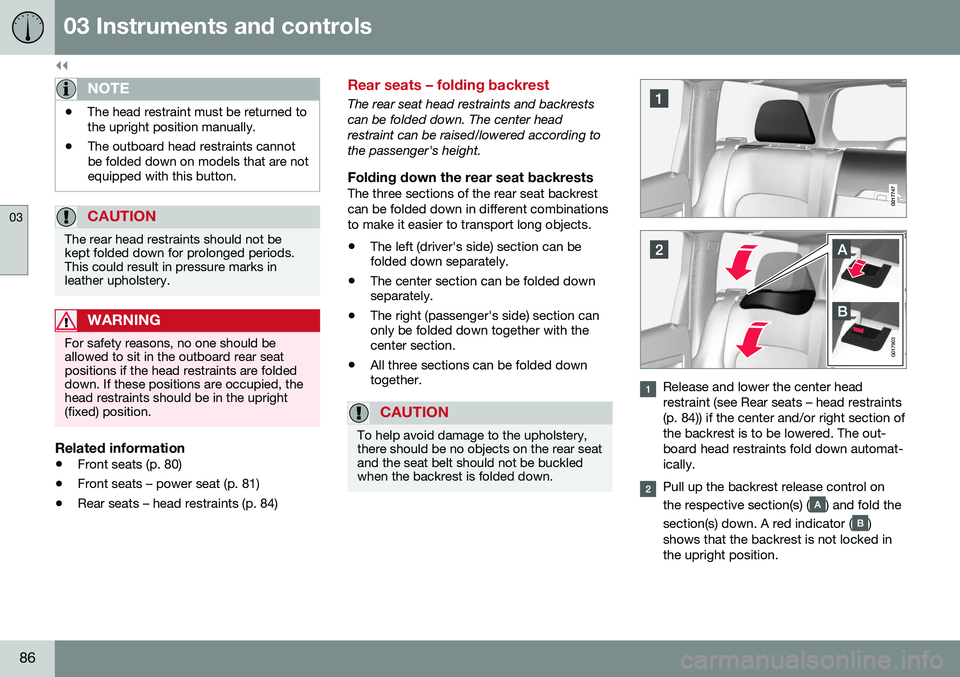
Release and lower the center head restraint (see Rear seats – head restraints(p. 84)) if the center and/or right section ofthe backrest is to be lowered. The out-board head restraints fold down automat-ically.
Pull up the backrest release control on the respective section(s) (
) and fold the
section(s) down. A red indicator (
)
shows that the backrest is not locked in the upright position.
Page 89 of 396
03 Instruments and controls
03
}}
* Option/accessory, for more information, see Introduction.87
NOTE
It may be necessary to move the front seats forward or put their backrests in amore upright position before folding downthe rear seat backrests.
WARNING
• When one or more sections of the backrest is returned to the uprightposition, check that it is properlylocked in place by pushing and pullingit. The red indicators should also notbe visible.
• Return the outboard head restraints tothe upright position.
• Long loads should always be securelyanchored to help avoid injury in theevent of a sudden stop.
• Always turn the engine off and applythe parking brake when loading/unloading the vehicle.
• Place the transmission in the Park (
P)
position to help prevent inadvertentmovement of the gear selector.
• On hot days, the temperature in thevehicle interior can rise very quickly.Exposure of people to these high tem-peratures for even a short period oftime can cause heat-related injury ordeath. Small children are particularly atrisk.
Related information
•
Front seats (p. 80)
• Front seats – power seat (p. 81)
• Rear seats – head restraints (p. 84)
Steering wheel
The steering wheel can be adjusted to various positions and has controls for the horn, cruisecontrol*, menus, the infotainment system and Bluetooth
®-connected cell phone.
Adjusting
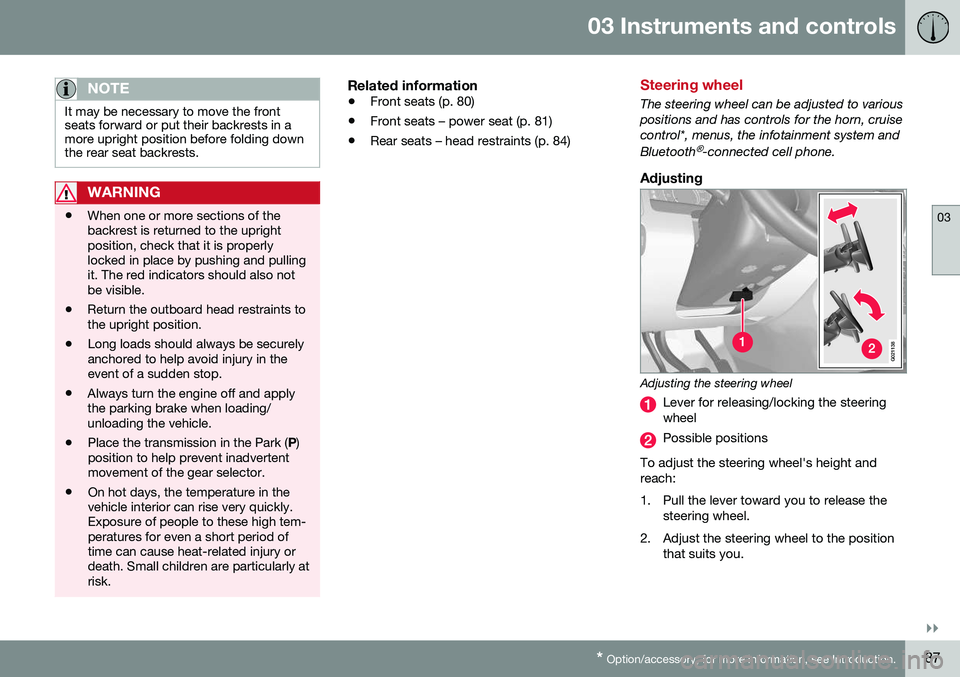
G021138
Adjusting the steering wheel
Lever for releasing/locking the steering wheel
Possible positions
To adjust the steering wheel's height and reach:
1. Pull the lever toward you to release the steering wheel.
2. Adjust the steering wheel to the position that suits you.
Page 95 of 396
03 Instruments and controls
03
* Option/accessory, for more information, see Introduction.93
Auxiliary lights*
If the vehicle is fitted with auxiliary lights, the driver can use the MY CAR menu system to
choose to deactivate and turn these lights onand off along with the high beam headlights. The auxiliary lights must be connected to the vehicle's electrical system, which should onlybe done by a trained and authorized Volvoservice technician. See My Car – introduction(p. 76) for more information about the menusystem.
Instrument and "theater" lighting
Instrument lightingIllumination of the display and instrument lights will vary, depending on ignition mode. The display lighting is automatically subdued in darkness and the sensitivity is set with thethumb wheel. The intensity of the instrument lighting is adjusted with the thumb wheel.
"Theater" lightingWhen the overhead courtesy lighting hasgone out and the engine is running, severalLEDs located near the roof console illuminateto provide faint lighting for the occupants ofthe front seats. This lighting goes out justafter the overhead courtesy lighting when thevehicle is locked.
Related information
• Lighting panel (p. 89)
• Front interior lighting (p. 96)
• Rear interior lighting (p. 97)
• Ignition modes (p. 79)
Parking lights
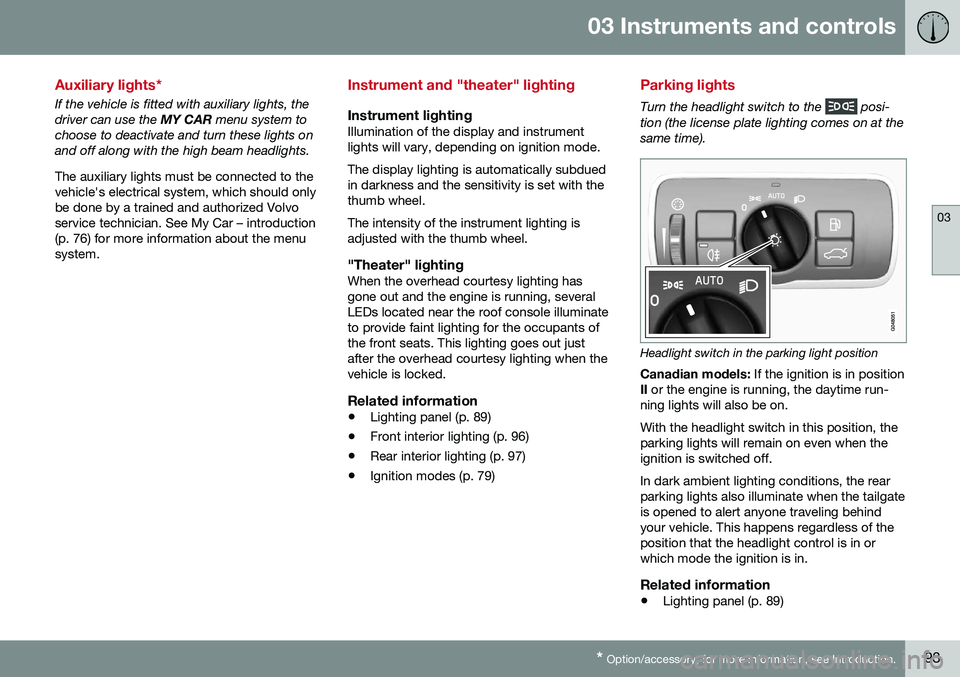
Turn the headlight switch to the posi-
tion (the license plate lighting comes on at the same time).
Headlight switch in the parking light position
Canadian models: If the ignition is in position
II or the engine is running, the daytime run-
ning lights will also be on. With the headlight switch in this position, the parking lights will remain on even when theignition is switched off. In dark ambient lighting conditions, the rear parking lights also illuminate when the tailgateis opened to alert anyone traveling behindyour vehicle. This happens regardless of theposition that the headlight control is in orwhich mode the ignition is in.
Related information
• Lighting panel (p. 89)
Page 130 of 396
04 Climate
04
128* Option/accessory, for more information, see Introduction.
Electronic climate control (ECC)
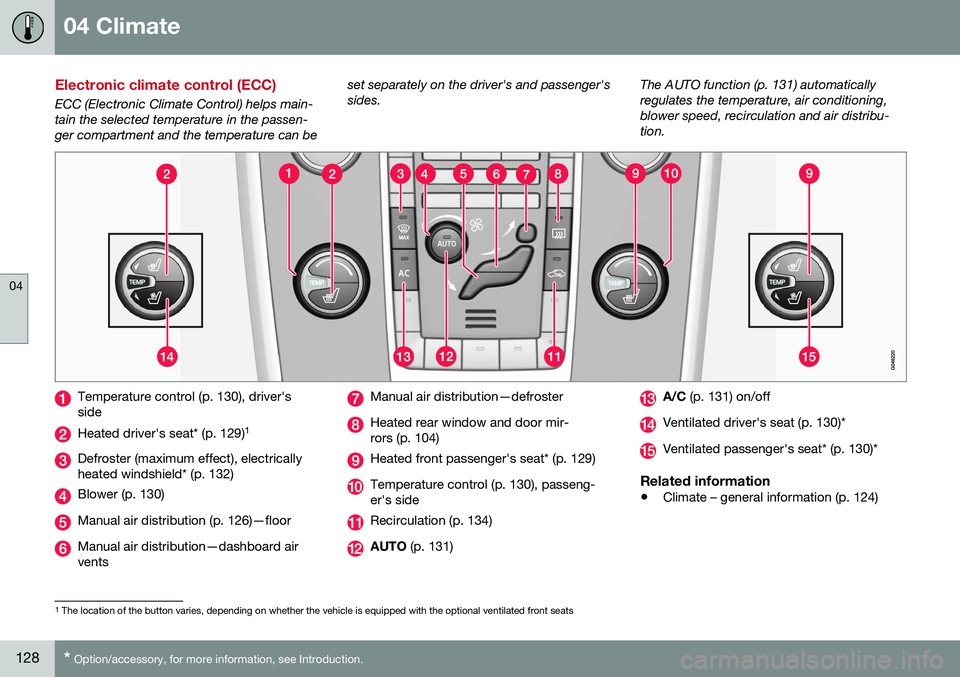
ECC (Electronic Climate Control) helps main- tain the selected temperature in the passen-ger compartment and the temperature can be set separately on the driver's and passenger'ssides.
The AUTO function (p. 131) automaticallyregulates the temperature, air conditioning,blower speed, recirculation and air distribu-tion.
Temperature control (p. 130), driver's side
Heated driver's seat* (p. 129)
1
Defroster (maximum effect), electrically heated windshield* (p. 132)
Blower (p. 130)
Manual air distribution (p. 126)—floor
Manual air distribution—dashboard air vents
Manual air distribution—defroster
Heated rear window and door mir- rors (p. 104)
Heated front passenger's seat* (p. 129)
Temperature control (p. 130), passeng- er's side
Recirculation (p. 134)
AUTO
(p. 131)
A/C (p. 131) on/off
Ventilated driver's seat (p. 130)*
Ventilated passenger's seat* (p. 130)*
Related information
•Climate – general information (p. 124)
1
The location of the button varies, depending on whether the vehicle is equipped with the optional ventilated front seats
Page 131 of 396
04 Climate
04
* Option/accessory, for more information, see Introduction.129
Heated seats
The front seat heating has three levels to increase comfort for the driver and passengerin cold weather. The rear outboard seat heating has three lev- els to increase comfort for the passengers incold weather.
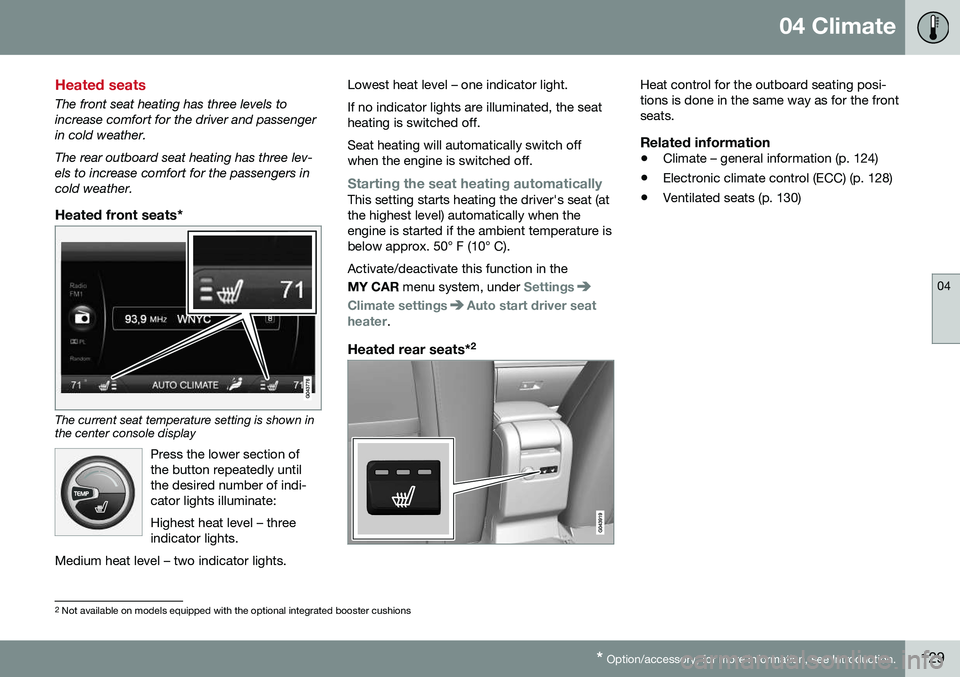
Heated front seats*
The current seat temperature setting is shown in the center console display
Press the lower section of the button repeatedly untilthe desired number of indi-cator lights illuminate: Highest heat level – three indicator lights.
Medium heat level – two indicator lights.
Lowest heat level – one indicator light. If no indicator lights are illuminated, the seat heating is switched off. Seat heating will automatically switch off when the engine is switched off.
Starting the seat heating automaticallyThis setting starts heating the driver's seat (at the highest level) automatically when theengine is started if the ambient temperature isbelow approx. 50° F (10° C). Activate/deactivate this function in the MY CAR menu system, under
Settings
Climate settingsAuto start driver seat
heater.
Heated rear seats* 2
Heat control for the outboard seating posi- tions is done in the same way as for the frontseats.
Related information
•
Climate – general information (p. 124)
• Electronic climate control (ECC) (p. 128)
• Ventilated seats (p. 130)
2
Not available on models equipped with the optional integrated booster cushions
Page 132 of 396

04 Climate
04
130* Option/accessory, for more information, see Introduction.
Ventilated seats
Seat ventilation can be used at the same time as seat heating (p. 129) to e.g., help remove
dampness from the seat occupant's clothing.
Ventilated front seats*The ventilation system consists of fans in theseats and backrests that draw air through theseat upholstery. The cooling effect increasesas the air in the passenger compartmentbecomes cooler. The ventilation is controlled by the ECC sys- tem (p. 128), which takes into account theseat temperature, sunlight in the passengercompartment, and the ambient temperature. The ventilation can be used at the same time as seat heating. The ventilation system can be activated when the engine is running. There are three comfortlevels that produce different cooling anddehumidifying effects:
• Level three: press the button once for maximum output – three indicator lightscome on.
• Level two: press the button twice for alower output – two indicator lights comeon.
• Level one: press the button three timesfor the lowest output – one indicator lightcomes on. •
Press the button a fourth time to switchoff the function – the indicator light will goout.
Related information
•Climate – general information (p. 124)
Temperature and blower control
When the vehicle is started, the most recent setting is resumed. The blower should always be activated to help avoid condensation and fogging on thewindows.
Temperature controlThe temperatures on thedriver and passenger sidescan be set separately.
NOTE
Heating or cooling cannot be speeded up by selecting a higher/lower temperaturethan the actual temperature required.
Blower controlTurn the control clockwise to increase or counterclockwiseto decrease the blowerspeed. If
AUTO (p. 131) is
selected, blower speed willbe regulated automaticallyand this will override manual
adjustment.
Page 142 of 396
05 Loading and storage
05
140* Option/accessory, for more information, see Introduction.
Tunnel console
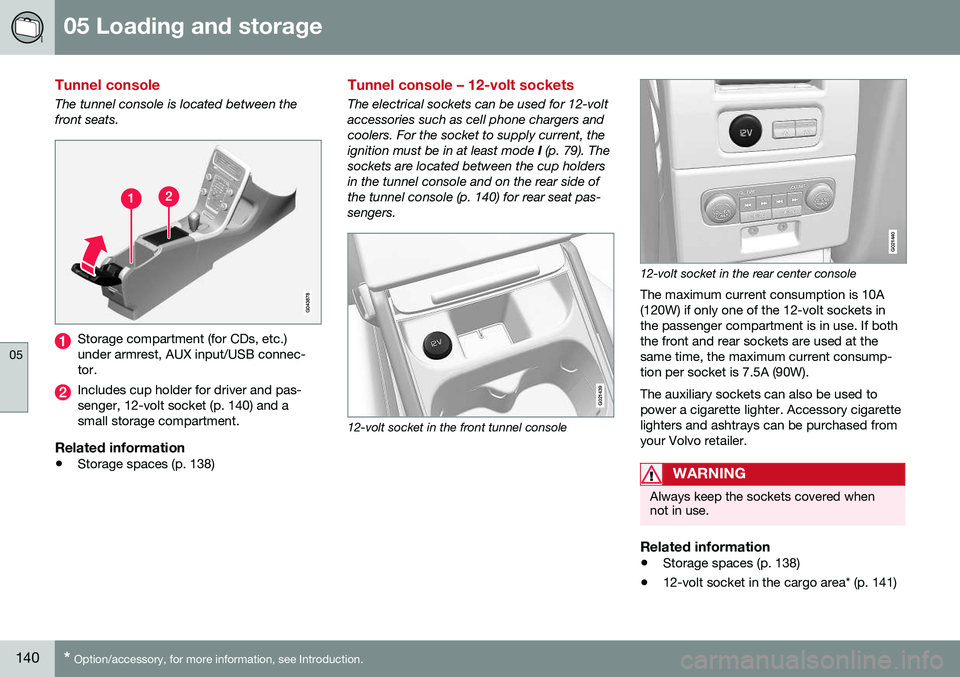
The tunnel console is located between the front seats.
Storage compartment (for CDs, etc.) under armrest, AUX input/USB connec-tor.
Includes cup holder for driver and pas- senger, 12-volt socket (p. 140) and asmall storage compartment.
Related information
• Storage spaces (p. 138)
Tunnel console – 12-volt sockets
The electrical sockets can be used for 12-volt accessories such as cell phone chargers andcoolers. For the socket to supply current, theignition must be in at least mode
I (p. 79). The
sockets are located between the cup holdersin the tunnel console and on the rear side ofthe tunnel console (p. 140) for rear seat pas-sengers.
G021439
12-volt socket in the front tunnel console
G021440
12-volt socket in the rear center console
The maximum current consumption is 10A (120W) if only one of the 12-volt sockets inthe passenger compartment is in use. If boththe front and rear sockets are used at thesame time, the maximum current consump-tion per socket is 7.5A (90W). The auxiliary sockets can also be used to power a cigarette lighter. Accessory cigarettelighters and ashtrays can be purchased fromyour Volvo retailer.
WARNING
Always keep the sockets covered when not in use.
Related information
• Storage spaces (p. 138)
• 12-volt socket in the cargo area* (p. 141)
Page 144 of 396
05 Loading and storage
05
142
Loading – general
The load carrying capacity of your vehicle is determined by factors such as the number ofpassengers, the amount of cargo, the weightof any accessories that may be installed, etc. To increase loading space, the rear seat backrests can be folded down, see Rearseats – folding backrest (p. 86). When loading the cargo area, keep the fol- lowing in mind:
• Load objects in the cargo area against the backrest whenever possible.
• Unstable loads can be secured to theload anchoring eyelets with straps or weblashings to help keep them from shifting.
• Stop the engine and apply the parkingbrake when loading or unloading longobjects. The gear selector can beknocked out of position by long loads,which could set the vehicle in motion.WARNING
•Stop the engine, put the gear selector in
P, and apply the parking brake
when loading or unloading longobjects.
• The vehicle's driving characteristicsmay change depending on the weightand distribution of the load.
• A 44-pound (20 kg) object produces aforce of 2,200 pounds (1,000 kg) in ahead-on collision at 30 mph (50 km/h).
• The cargo area and rear seat shouldnot be loaded to a level higher than2 in. (5 cm) below the upper edge ofthe rear side windows. Objects placedhigher than this level could impede thefunction of the Inflatable Curtain.
Related information
•
Load anchoring eyelets (p. 143)
• Steel cargo grid (p. 149)
• Loading – roof load carriers (p. 142)
Loading – roof load carriers
Using load carriersLoad carriers are available as Volvo accesso- ries. Observe the following points when inuse:
• To avoid damaging your vehicle and to achieve maximum safety when driving,we recommend using the load carriersthat Volvo has developed especially foryour vehicle.
• Volvo-approved removable roof racks aredesigned to carry the maximum allowableroof load for this vehicle: 220 lbs (100 kg).For non-Volvo roof racks, check the man-ufacturer's weight limits for the rack.
• Never exceed the rack manufacturer'sweigh limits and never exceed the maxi-mum rated roof load of 220 lbs (100 kg).
• Avoid single-point loads. Distribute loadsevenly.
• Place heavier cargo at the bottom of theload.
• Secure the cargo correctly with appropri-ate tie-down equipment.
• Check periodically that the load carriersand load are properly secured.
• Remember that the vehicle's center ofgravity and handling change when youcarry a load on the roof.
Page 150 of 396
||
05 Loading and storage
05
148
With the backrests uprightThe net is pulled up from the cassette and locks in position after approximately 1minute.
Pull up the right side of the net by grasp- ing its strap.
Insert the net’s rod in the retaining bracket on the right side near the ceilingand press it forward. It will click intoplace.
Extend the left section of the rod and insert it in the bracket on the left side ofthe cargo compartment. Press it forwarduntil it clicks into place.
Pull up the left side of the cargo net and secure it on the rod.
NOTE
•The net can be fastened in the same way if the rear seat backrests arefolded down. In this case, use theretaining brackets near the ceiling,above the front seats.
• The front passenger's seat backrestcan also be folded down for carryinglong objects.
Removing the cargo net cassettes1. Retract the net(s) in the reverse order.
2. Fold the entire rear seat backrest down. 3. Slide the cassettes outward until they
release from the mounting brackets.
WARNING
•When not in use, return the cassettes to their storage compartment underthe cargo area floor.
• Objects in the cargo area should besecurely anchored, even if the cargonet is correctly installed and in use.
Using the cargo net with the cargo area cover
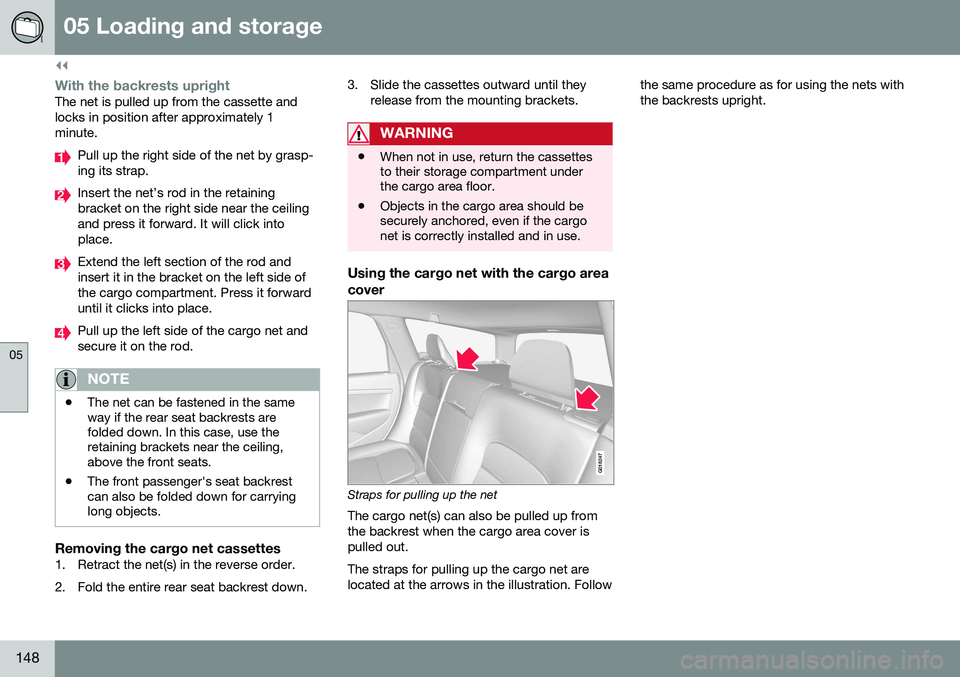
G018247
Straps for pulling up the net
The cargo net(s) can also be pulled up from the backrest when the cargo area cover ispulled out. The straps for pulling up the cargo net are located at the arrows in the illustration. Follow the same procedure as for using the nets withthe backrests upright.
Page 152 of 396
||
05 Loading and storage
05
150
see Rear seats – folding backrest (p. 86)for instructions.
NOTE
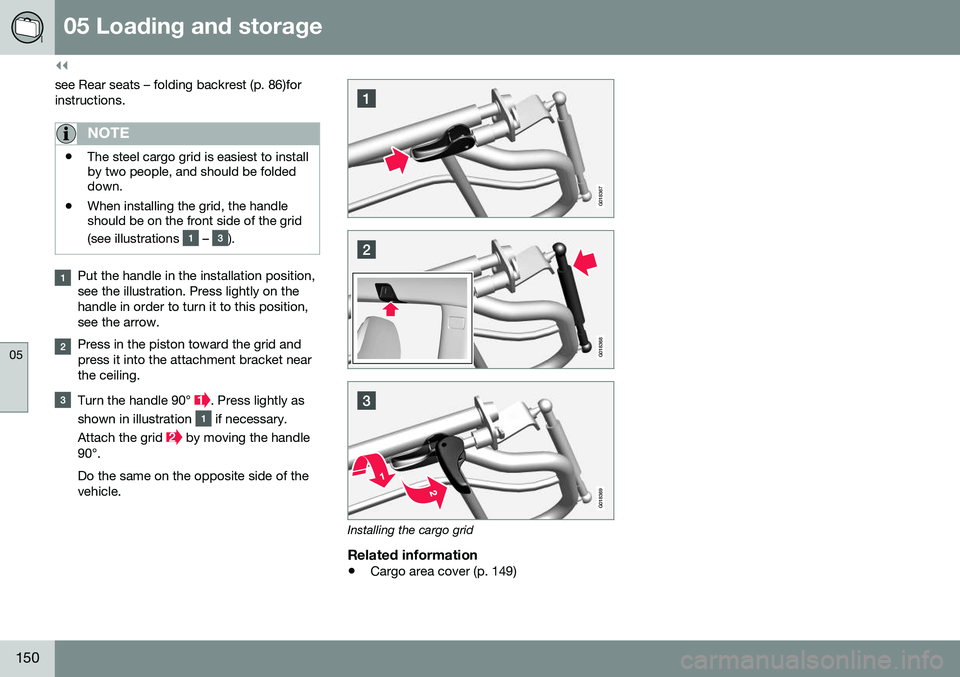
•The steel cargo grid is easiest to install by two people, and should be foldeddown.
• When installing the grid, the handleshould be on the front side of the grid (see illustrations
– ).
Put the handle in the installation position, see the illustration. Press lightly on thehandle in order to turn it to this position,see the arrow.
Press in the piston toward the grid and press it into the attachment bracket nearthe ceiling.
Turn the handle 90° . Press lightly as
shown in illustration
if necessary.
Attach the grid
by moving the handle
90°. Do the same on the opposite side of the vehicle.
G018367
G018368
G018369
Installing the cargo grid
Related information
• Cargo area cover (p. 149)