ECO mode VOLVO XC90 2004 Owners Manual
[x] Cancel search | Manufacturer: VOLVO, Model Year: 2004, Model line: XC90, Model: VOLVO XC90 2004Pages: 245, PDF Size: 6.36 MB
Page 4 of 245
, lead chromates, naphtanates, asbestos, mercury and cadmium; an\
d")
2004 VOLVO XC90
In production, Volvo has partly or completely phased out several chemica\
ls including chloro-fluorocarbons
(CFCs), lead chromates, naphtanates, asbestos, mercury and cadmium; an\
d reduced the amount of chemicals
used in our plants 50% since 1991.
Volvo was the first in the world to introduce into production a three-wa\
y catalytic converter with Lambda
Sond, now called oxygen sensor, in 1976. The current version of this hig\
hly efficient system reduces emissions
of harmful substances (CO, HC, NOx) from the exhaust pipe by approxima\
tely 95% and the search to eliminate
the remaining emissions continues. Volvo is the only automobile manufact\
urer to offer CFC-free retrofit kits
for the air conditioning system of all models as far back as the 1975 Vo\
lvo 240. Advanced electronic engine
controls, refined purification systems and cleaner fuels are bringing us\
closer to our goal.
After Volvo vehicles and parts have fulfilled their use, recycling is th\
e next critical step in completing the life
cycle. The metal content is about 75% of the total weight of a vehicle, \
which makes the vehicle among the most
recycled industrial products. In order to have efficient and well contro\
lled recycling, many Volvo variants have
printed dismantling manuals, indicating the weight and material of indiv\
idual components. For Volvo, all
homogeneous plastic parts weighing more than 1.7 oz. (50 grams) are ma\
rked with international symbols that
indicate how the component is to be sorted for recycling.
In addition to continuous environmental refinement of conventional gasol\
ine-powered internal combustion
engines, Volvo is actively looking at advanced technology alternative-fu\
el vehicles.
When you drive a Volvo, you become our partner in the work to lessen the\
car's impact on the environment.
To reduce your vehicle's environmental impact, you can:
l Maintain proper air pressure in your tires. Tests have shown decreased f\
uel economy with improperly
inflated tires.
l Follow the recommended maintenance schedule in your Warranty and Service\
Records Information booklet.
l Drive at a constant speed.
l See an authorized Volvo retailer as soon as possible for inspection if t\
he check engine (malfunction
indicator) lamp illuminates, or stays on after the vehicle has started.\
l Properly dispose of any vehicle-related waste such as used motor oil, us\
ed batteries, brake pads, etc.
l When cleaning your car, use Volvo's own car care products, all of which \
have systematically been adapted to
the environment.
For additional information regarding the environmental activities in whi\
ch Volvo Cars of North America, LLC.
and Volvo Car Corporation are involved, visit our Internet Home Page at:\
http://www.volvocars.com
PremAir®
On the surface of the radiator in the engine compartment, there is a spe\
cial coating called PremAir®. PremAir®
works as a catalytic converter, converting most of the ground-level ozon\
e passing through the radiator into
oxygen, thereby reducing harmful ground-level ozone.
file:///K|/ownersdocs/2004/2004_XC90/04xc90_00.htm (4 of 7)12/30/2006 \
4:35:10 PM
Page 22 of 245

7-seat model shown
Volvo Inflatable Curtain (IC)
This system consists of Inflatable Curtains located along the sides of t\
he roof liners, stretching from")
2004 VOLVO XC90
Inflatable Curtain (IC)
7-seat model shown
Volvo Inflatable Curtain (IC)
This system consists of Inflatable Curtains located along the sides of t\
he roof liners, stretching from the
front side windows to the rear edge of the rear side windows. It is desi\
gned to help protect the heads of
the occupants of the front seats and the occupant of the outboard rear s\
eating positions, including the
outboard passenger in the optional third row of seats in certain side im\
pact collisions.
The Inflatable Curtains in the Volvo XC90 are also designed to help prot\
ect the occupants of the vehicle
in a roll-over situation, and to help prevent them from being thrown fro\
m the vehicle if a roll-over
occurs.
NOTE:
In 5-seat models, the Inflatable Curtains extend to protect both rows of\
seats. In 7-seat models, they
extend to protect all three rows.
By design, the IC system deploys only on the side of the vehicle affecte\
d by the impact.
However, in certain side impacts, or in a rollover situation, BOTH the Inflatable Curtains (IC) and the
Side Impact Airbag System (SIPS-bag) will deploy, whereas, in some cas\
es, ONLY the Inflatable
Curtain (IC) will deploy. In cases where BOTH the IC and the SIPS-bag deploy, deployment will occur
simultaneously. If the Inflatable Curtain deploys, it remains inflated f\
or approximately 5 seconds.
file:///K|/ownersdocs/2004/2004_XC90/04xc90_01b.htm (3 of 16)12/30/200\
6 4:35:12 PM
Page 32 of 245
. Refer to the child seat manufacturers ins\
tru")
2004 VOLVO XC90
Volvo vehicles are equipped with child restraint top tether anchorages i\
n the rear seats (second row of
seats in seven-seat models). Refer to the child seat manufacturer's ins\
tructions for information on
securing the child seat.
WARNING!
Child Restraint Anchorages are designed to withstand only those loads im\
posed by correctly fitted
Child Restraints. Under no circumstances are they to be used for adult s\
eat belts or harnesses. The
anchorages are not able to withstand excessive forces on them in the eve\
nt of collision if full harness
seat belts or adult seat belts are installed to them. An adult who uses \
a belt anchored in a Child
Restraint Anchorage runs a great risk of suffering severe injuries shoul\
d a collision occur. Do not
install rear speakers which would require the removal of the top tether \
anchors or interfere with the
proper use of the top tether strap.
pg. 20 Safety
Child safety (contd)
Keeping child seats in place (ALR/ ELR*)
To make child seat installation easier, each seat belt (except for the \
driver's belt) is equipped with a
locking mechanism to help keep the seat belt taut.
When attaching the seat belt to a child seat:
l Attach the seat belt to the child seat according to the child seat manuf\
acturer's instructions.
l Pull the seat belt out as far as possible.
l Insert the seat belt latch plate into the buckle (lock) in the usual w\
ay.
l Release the seat belt and pull it taut around the child seat.
A sound from the seat belt retractor will be audible at this time and is\
normal.
The belt will now be locked in place.
This function is automatically disabled when the seat belt is unlocked a\
nd the belt is fully retracted.
WARNING!
Do not use child safety seats or child booster cushions/backrests in the\
front passenger's seat. We also
recommend that children who have outgrown these devices sit in the rear \
seat with the seat belt
properly fastened.
file:///K|/ownersdocs/2004/2004_XC90/04xc90_01b.htm (13 of 16)12/30/20\
06 4:35:12 PM
Page 38 of 245

2004 VOLVO XC90
continuously with the needle in the red area of the dial, which indicate\
s maximum allowable engine rpm
range. Instead, shift to a higher gear or slow the vehicle down. The eng\
ine management system will
automatically prevent excessively high engines speeds. This will be noti\
ceable as a pronounced
unevenness in engine speed.
10. Gear and driving mode indicator
The currently selected driving mode is displayed here. If you use the op\
tional Geartronic function on the
automatic transmission, the currently selected gear will be displayed.
11. Ambient temperature gauge
This display indicates the air temperature outside your vehicle. A "snow\
flake" symbol in the text
window is displayed when the temperature is in the range of 23 -36° F\
(-5 -+2° C). Please note that this
symbol does not indicate a fault with your vehicle. At low speeds or whe\
n the vehicle is not moving, the
temperature readings may be slightly higher than the actual ambient temp\
erature.
12. Clock/set button
Turn the button to set the clock.
13. Fuel gauge
The fuel tank holds approximately 19 US gals (72 liters). When a warni\
ng light in the gauge comes on,
there are approximately 1.8 US gal. (8 liters) of fuel remaining in th\
e tank.
14. Indicator and warning symbols
pg. 25 Instruments and controls
Indicator and warning symbols
The indicator and warning symbols light up when you turn the ignition ke\
y to the driving position
(position II) before starting. This shows that the symbols are functio\
ning. When the engine starts, all
symbols go out. If the engine is not started within 5 seconds, all symbo\
ls except CHECK ENGINE and
go out. The symbol for the parking brake goes out when the parking brak\
e is released.
Warning symbol
in center of instrument panel
This symbol shines as a red or yellow light depending on the severity of\
the fault that has been detected.
Red symbol -Stop the vehicle as soon as possible in a suitable location and read th\
e message shown in
the text window.
Yellow symbol -Follow the instructions shown in the text window.
file:///K|/ownersdocs/2004/2004_XC90/04xc90_02a.htm (3 of 16)12/30/200\
6 4:35:14 PM
Page 44 of 245

This system provides an audible warning if you back t")
2004 VOLVO XC90
The positions of these buttons may vary, depending on the specifications\
of your vehicle
1. Rear Parking Assistants (option)
This system provides an audible warning if you back the vehicle to withi\
n approximately 5 feet (1.5
meters) of an object. See
page 97 for more information.
NOTE: The system activates automatically when the engine is started, and can b\
e deactivated by
pressing this button (e.g. when towing a trailer) or reactivated if ne\
cessary.
2. Folding sideview mirrors (option)
Press the button and release it to fold the sideview mirrors in or out. \
On certain models, when the button
is pressed, there may be a long pause before the mirrors move. Pressing \
the button again during this
pause may erase your first button press. If this happens, wait ten secon\
ds and press the button one more
time. The mirrors cannot be adjusted during the first ten seconds after \
they have been folded out. NOTE:
If the sideview mirrors have been inadvertently pushed out of position (\
in a car wash, parking lot, etc.)
manually return them to normal position. If mirror adjustment does not s\
eem to operate after manual
folding, reset the folding mirrors as follows:
l Turn the ignition key to position II.
l Manually fold the mirror(s) to the normal position.
l Press the button to fold both mirrors in.
l Press the button again to fold the mirrors out to their normal position.\
3. Auxiliary lights
This button is used to switch on auxiliary lights (if installed). An L\
ED in the switch will light up to
indicate that the auxiliary lights are illuminated.
4. Dynamic Stability Traction Control system (DSTC)
This button is used to switch off DSTC's stability Control function. Whe\
n the LED in the button is ON,
all DSTC functions are active. See
pages 95 and 96 for additional information.
WARNING!
The Please be aware that the vehicle's handling characteristics may be a\
ffected if the Stability Control
function is switched off.
file:///K|/ownersdocs/2004/2004_XC90/04xc90_02a.htm (9 of 16)12/30/200\
6 4:35:14 PM
Page 45 of 245

This button controls the optional rear seat air conditioning system on s\
even-seat models.
6. Temporarily disconnecting the alarm sensors (op")
2004 VOLVO XC90
5. Rear seat air conditioning (option)
This button controls the optional rear seat air conditioning system on s\
even-seat models.
6. Temporarily disconnecting the alarm sensors (option)
See
page 79 for more details.
7. Not in use
8. 12 volt socket
This 12 volt socket can be used to plug in certain accessories such as c\
ellular telephones, etc. The
ignition key must be in position 1 (or higher) for the auxiliary socke\
t to function.
NOTE: The auxiliary sockets can also be used for cigarette lighters, which are\
available as accessories
at your Volvo retailer.
pg. 30 Instruments and controls
Lighting panel
A - Headlights and parking lights
All lighting off.
Models with daytime running lights:
Low beam headlights will automatically come on if the ignition key is in\
position II. Front and rear
parking lights, tail lights, side marker lights, and license plate light\
s will also be on. Volvo recommends
the use of daytime running lights. If, however, you would prefer to have\
these lights turned off (USA
only), please consult your Volvo retailer. Please note that the use of \
daytime running lights is mandatory
in Canada.
NOTE: Bi-Xenon headlights (option): Turn the headlight switch to position 0\
to activate a daylight
sensor, which automatically switches the low beams on or off, depending \
on ambient light conditions.
When driving in daylight, the headlights will switch off and the daytime\
running lights will come on. In
darkness, the daytime running lights will switch off and the Bi-Xenon he\
adlights will switch on.
Parking lights on. The parking lights should be switched off when you leave the vehicle to \
help avoid battery drain.
file:///K|/ownersdocs/2004/2004_XC90/04xc90_02a.htm (10 of 16)12/30/20\
06 4:35:14 PM
Page 54 of 245

2004 VOLVO XC90
l The front seat heating can be switched on and off as required.
l Press the switch once for maximum seat heating. Both LED's in the switch\
will be lit.
l Press the switch a second time for comfort heating. One LED in the switc\
h will be lit.
l Press the switch a third time to turn the heating off completely.
The seat heating for the passenger seat should be switched off when the \
seat is not occupied.
pg. 36 Instruments and controls
Trip computer (option)
The trip computer stores information gathered from several systems in yo\
ur vehicle and has four menus
that can be displayed in the text window.
l Driving distance on current fuel reserve
l Average fuel consumption
l Current fuel consumption
l Average speed
l Current speed in mph (Canadian models only)
NOTE: Warning messages from the vehicle's monitoring systems will override the\
trip computer
function. If a warning message is displayed in the text window while you\
are using the trip computer,
you must acknowledge the message by pressing button A. Press button A ag\
ain to return to the trip
computer function.
Trip computer controls and functions.
The four* trip computer functions can be accessed by twisting control B \
one step at a time in either
direction. Twisting a fifth** time returns you to the original function.\
The trip computer can be reset (current data will be erased from system\
memory) by pressing RESET
file:///K|/ownersdocs/2004/2004_XC90/04xc90_02b.htm (3 of 16)12/30/200\
6 4:35:15 PM
Page 55 of 245
.
1. Driving distance on current fuel reserve
This function shows the approximate distance that can be driven on the f\
uel remaining in the tank. This
calculation is base")
2004 VOLVO XC90
(button C).
1. Driving distance on current fuel reserve
This function shows the approximate distance that can be driven on the f\
uel remaining in the tank. This
calculation is based on average fuel consumption during the last 12 mile\
s (20 km) of driving and the
amount of fuel remaining in the tank when the reading was taken.
When the driving distance on current fuel reserve is less than 12 miles \
(20 km), "----" will be displayed
in the text window.
2. Average fuel consumption
This value indicates fuel consumption since the last time the trip compu\
ter was reset (by pressing
RESET, button C). When the engine is switched off, information on fuel \
consumption is stored and
remains in system memory until the RESET (button C) is pressed again.
3. Current fuel consumption
This value indicates the current fuel consumption, based on readings tak\
en once per second. When the
vehicle is not moving, "----" will be displayed.
4. Average speed
This value indicates average speed since the last time the trip computer\
was reset (by pressing RESET,
button C). When the engine is switched off, information on average spee\
d is stored and remains in
system memory until the RESET (button C) is pressed again.
5. Current speed in miles per hour (Canadian models only)
This function provides the driver with an instantaneous conversion of th\
e vehicle's current speed from
km/h to mph.
NOTE: Trip computer readings may vary slightly depending on the circumfe\
rence of the tires on the
vehicle.
* Five functions on Canadian models
** A sixth time on Canadian models
pg. 37 Instruments and controls
Cruise control
file:///K|/ownersdocs/2004/2004_XC90/04xc90_02b.htm (4 of 16)12/30/200\
6 4:35:15 PM
Page 73 of 245

2004 VOLVO XC90
A/C - ON/OFF
Press the switch to turn the air conditioning on or off. The "ON" or "OF\
F" LED will light up to indicate if the system is
switched on or off. Other functions will still be regulated automaticall\
y (if the AUTO switch is on).
l The air conditioning functions only at temperatures above 32° F (0°\
C).
l While the Defroster function is selected, the air conditioning is tempor\
arily activated to dehumidify the air, even if you
have manually switched the air conditioning off. This will only function\
if the blower is not switched off.
Recirculation
Press this switch to engage the recirculation function (air in the pass\
enger compartment recirculates - no fresh air enters the
compartment). The LED in the switch will light up to indicate that the \
function is engaged.
l Use this function if the outside air is contaminated with exhaust gases,\
smoke, etc or to heat/cool the vehicle quickly.
l Recirculation should not be used for more than 15 minutes. If your windows begin to fog or mist, make sure that the
recirculation function is switched off.
l Selecting Defroster automatically switches recirculation off.
l Timer mode activation: (Vehicles equipped with the Interior Air Quality System have no timer m\
ode) Press and hold
the recirculation button for at least 3 seconds to activate a recirculat\
ion timer mode. The amber LED in the recirculation
button will flash 5 times to show that the timer mode is being activated\
. In timer mode, each time the recirculation button is
pressed, the climate control system will recirculate the air in the pass\
enger compartment for 5-12 minutes, depending on the
outside air temperature, and then revert back to fresh air.
l Timer mode deactivation: Press and hold the recirculation button for 3 s\
econds. The amber LED in the recirculation
button will illuminate steadily for 5 seconds to show a return to "norma\
l" mode.
pg. 51 Climate control
l In normal mode, when the recirculation button is pressed, the climate co\
ntrol system will recirculate the air in the
passenger compartment until the recirculation button is pressed again.
l Timer mode memory: If the vehicle is turned off while timer mode is acti\
ve, timer mode will still be active when the
vehicle is restarted.
Interior Air Quality sensor (option)
Some vehicles are equipped with a multifilter and Air Quality sensor. Th\
e filter separates gases and particles, thereby
reducing the amounts of odors and contaminants entering the vehicle. The\
Air Quality sensor detects increased levels of
contaminants in the outside air. When the Air Quality sensor detects con\
taminated outside air, the air intake closes and the
air inside the passenger compartment is recirculated, i.e. no outside ai\
r enters the vehicle. The filter also cleans recirculated
passenger compartment air. When the ECC system is in the AUTO mode, the \
green LED will be on
.
file:///K|/ownersdocs/2004/2004_XC90/04xc90_03.htm (6 of 7)12/30/2006 \
4:35:16 PM
Page 80 of 245
2004 VOLVO XC90
pg. 58 Interior
Rear seats
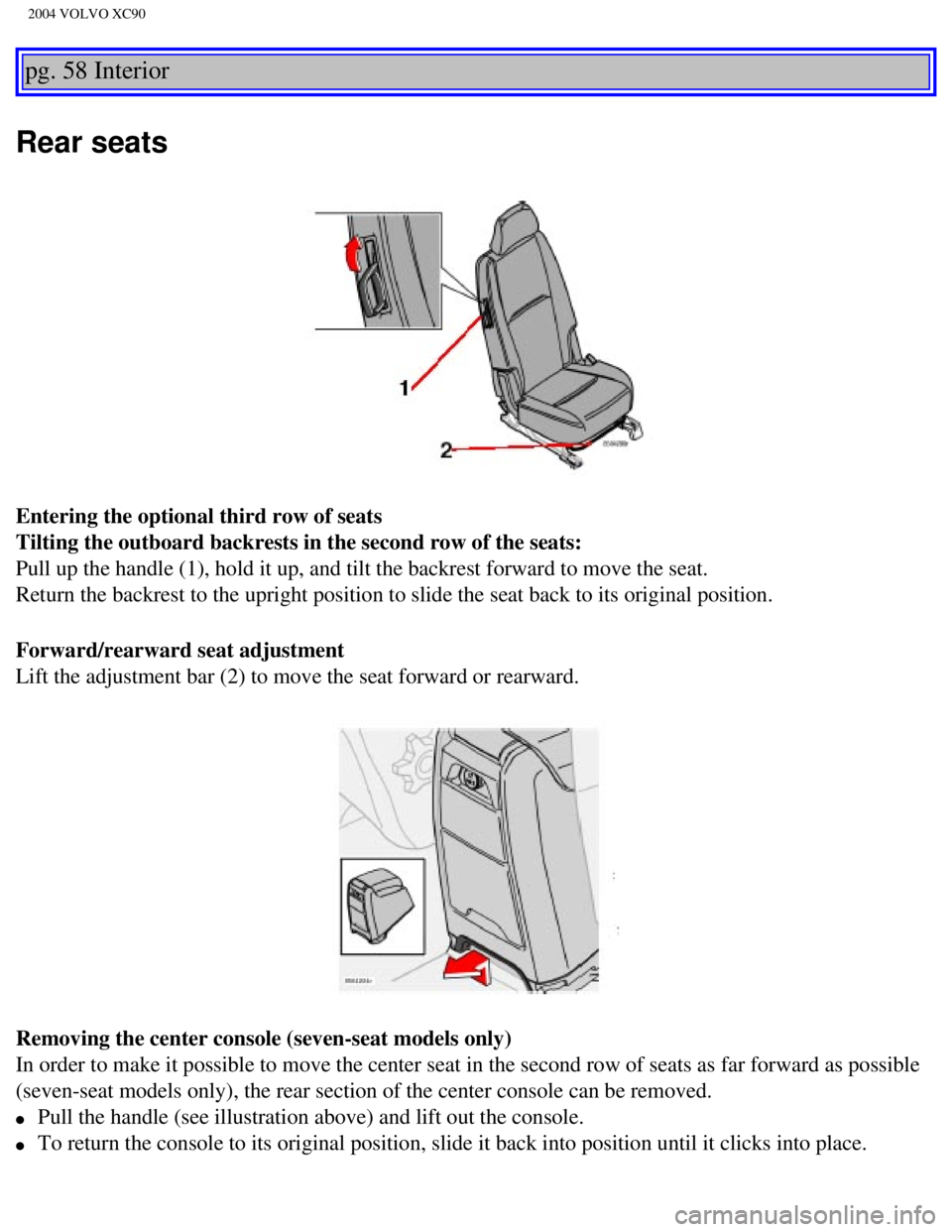
Entering the optional third row of seats
Tilting the outboard backrests in the second row of the seats:
Pull up the handle (1), hold it up, and tilt the backrest forward to m\
ove the seat.
Return the backrest to the upright position to slide the seat back to it\
s original position.
Forward/rearward seat adjustment
Lift the adjustment bar (2) to move the seat forward or rearward.
Removing the center console (seven-seat models only)
In order to make it possible to move the center seat in the second row o\
f seats as far forward as possible
(seven-seat models only), the rear section of the center console can b\
e removed.
l Pull the handle (see illustration above) and lift out the console.
l To return the console to its original position, slide it back into posit\
ion until it clicks into place.
file:///K|/ownersdocs/2004/2004_XC90/04xc90_04a.htm (6 of 11)12/30/200\
6 4:35:19 PM