tire VOLVO XC90 2005 Owner's Guide
[x] Cancel search | Manufacturer: VOLVO, Model Year: 2005, Model line: XC90, Model: VOLVO XC90 2005Pages: 263, PDF Size: 6.99 MB
Page 191 of 263

2005 VOLVO XC90
6. Side turn signals WY5W W2,1x9,5d
7. Brake lights, backup lights P21W BAY15d
8. Rear turn signals PY21W BA15s
9. Rear parking lights P21/4W BAZ15s
10. Vanity mirror lighting 1.2W SV5.5
11. Front footwell lighting, cargo area lighting C5W SV8.5
WARNING!
Bi-Xenon headlights (option) - due to the high voltage used by these h\
eadlights, these bulbs should
only be replaced by an authorized Volvo service technician.
pg. 150 Maintenance
Retaining pins
Replacing high/low beams/turn signal/parking light bulbs
The entire lamp housing must be lifted out when replacing these bulbs.
To lift out the lamp housing:
1. Switch off the ignition.
2. Open the hood.
3. Pull up the retaining pins (see the illustration above).
4. Lift out the lamp housing.
file:///K|/ownersdocs/2005/2005_XC90/05xc90_09b.htm (6 of 25)12/30/200\
6 4:42:40 PM
Page 197 of 263

2005 VOLVO XC90
C - Back-up light
D - Parking light
Replacing bulbs in the tail light cluster
1. Switch off all lights and turn ignition key to position 0.
2. Fold down the lower section of the tailgate, and fold up the rear sec\
tion of the cargo area floor.
3. If the vehicle is equipped with the optional grocery bag holder, deta\
ch the holder's bands.
4. Remove the corner panel (1 in the illustration above).
5. Open the cover (2) in the side panel by pulling the tab (3) upwar\
d/outward.
6. Loosen the bolts (4) with the 10 mm wrench.
7. Pull the entire tail light housing straight out.
8. Disconnect the wiring.
9. Place the tail light housing on a soft cloth to avoid scratching the \
lens.
10. Turn the lamp holder(s) counterclockwise and pull out.
11. Turn the bulb counterclockwise and remove. Insert a new bulb.
12. Place the lamp holder in the groove and turn clockwise.
13. Press wiring back into place.
14. Align the tail light housing with the holes for the retaining bolts \
and press it into place.
15. Tighten the retaining bolts.
16. Reinsert the side and corner panels.
pg. 154 Maintenance
Bulbs (contd)
file:///K|/ownersdocs/2005/2005_XC90/05xc90_09b.htm (12 of 25)12/30/20\
06 4:42:40 PM
Page 212 of 263

2005 VOLVO XC90
Label information
1. Vehicle Emission Control Information
Your Volvo is designed to meet all applicable emission standards, as evi\
denced by the certification label
on the underside of the hood. For further information regarding these re\
gulations, please consult your
Volvo retailer.
2. Vacuum hose routing
(underside of hood)
3. Loads and Tire Pressures
(on inside of fuel filler door). Canadian models only.
4. Model plate
Vehicle Identification Number (VIN). Codes for color and upholstery, e\
tc. The plate is located in the
engine compartment, on the inside of the left front fender.
file:///K|/ownersdocs/2005/2005_XC90/05xc90_10.htm (2 of 10)12/30/2006\
4:42:41 PM
Page 213 of 263
 1
The VIN plate is located on the top left surface of the dashboard. The V\
IN is also stamped on the right
hand door pillar.
6. Federal Motor")
2005 VOLVO XC90
5. Vehicle Identification Number (VIN) 1
The VIN plate is located on the top left surface of the dashboard. The V\
IN is also stamped on the right
hand door pillar.
6. Federal Motor Vehicle Safety Standards (FMVSS) specifications (USA\
) and Ministry of
Transport (CMVSS) standards (Canada)
Your Volvo is designed to meet all applicable safety standards, as evide\
nced by the certification label on
the facing side of the driver's door. For further information regarding \
these regulations, please consult
your Volvo retailer.
7. Child safety latch label
8. Loads and Tire Pressures U.S. models only
Certain models will only have one decal, depending on the specifications\
of the vehicle.
1 The Vehicle Identification Number (VIN) should always be quoted in a\
ll correspondence concerning your vehicle with the
retailer and when ordering parts.
pg. 165 Specifications
Weights
Gross vehicle weight* USACanada
5-seat, 5-cyl, FWD 5640
lbs -
5-seat, 5-cyl, AWD 5790
lbs 2630 kg
5-seat, 6-cyl, AWD 5900
lbs 2680 kg
7-seat, 5-cyl, FWD 5840
lbs -
7-seat, 5-cyl, AWD 6005
lbs 2720 kg
7-seat, 6-cyl, AWD 6080
lbs 2760 kg
Capacity weight
file:///K|/ownersdocs/2005/2005_XC90/05xc90_10.htm (3 of 10)12/30/2006\
4:42:41 PM
Page 237 of 263

2005 VOLVO XC90
Search for a specific program type - PTY
This functions enables you to search for a certain type of program by se\
arching through the entire
waveband.
1. Select FM1 or FM2 and press the MENU button.
2. Select RADIO SETTINGS and press ENTER.
3. Select PTY and press ENTER.
4. Choose SELECT PTY and press ENTER.
5. Press ENTER for one or more of the listed program types to select. Th\
e PTY symbol is displayed and
lights up when you make your first selection and the radio goes into PTY\
mode.
6. When you have made all of your selections, press EXIT/CLEAR to exit t\
he PTY list.
7. Select SEARCH PTY and press ENTER. If the radio finds a station with \
the selected program type,
this station will be played.
8. If the radio finds a station that does not match your selections, con\
tinue the search with the
and
buttons.
9. If no station with the selected program type is found, the radio will\
return to the previously tuned
frequency. PTY will remain in standby mode.
10. To deactivate the PTY standby mode, select CLEAR ALL PTY and press E\
NTER. The PTY symbol
then disappears and the radio returns to the normal operating mode.
PTY standby
To set the radio in PTY standby, repeat steps 1-6.
file:///K|/ownersdocs/2005/2005_XC90/05xc90_11a.htm (17 of 18)12/30/20\
06 4:42:43 PM
Page 242 of 263

2005 VOLVO XC90
pg. 192 Audio
CD player (contd)
SCAN This function plays the first ten seconds of each track.
1. Press the MENU button.
2. Select SCAN and press ENTER.
3. Press EXIT/CLEAR to listen to an entire track.
Disctext
Certain CDs contain information about the disc, such as the titles of th\
e tracks, etc. This information can
be shown in the display by activating the DISCTEXT function.
1. Press the MENU button.
2. Select DISCTEXT in the menu and press ENTER.
3. Any information that may be stored on the disc will be displayed.
4. To deactivate this function, select DISCTEXT and press ENTER.
NOTE: This function is only available on the CD changer.
CD eject
Press button 1 to eject the CD.
NOTE: For reasons of traffic safety, the ejected CD must be removed within 12 \
seconds or it will be
automatically drawn back into the slot and the CD player will enter paus\
e mode. Press the CD button to
file:///K|/ownersdocs/2005/2005_XC90/05xc90_11b.htm (4 of 11)12/30/200\
6 4:42:44 PM
Page 243 of 263

2005 VOLVO XC90
restart the disc.
pg. 193 Audio
CD changer (option)
CD changer (option)
The CD changer can hold up to six discs.
1. Choose CD mode using the SELECTOR control or the CD button.
2. Select an empty slot with the number keys 1-6 (1). The display indi\
cates which slots are empty.
3. Insert a disc into the changer.
To insert a new disc, you must first select an available empty slot in t\
he CD changer. Make sure
INSERT DISC is displayed before inserting a new disc.
Selecting disc number
Use the station setting buttons 1-6 (1) to select which disc is to be \
played. The number of the disc and
the track are shown in the display.
SCAN
This function plays the first ten seconds of each track and only functio\
ns on the currently selected disc.
1. Press the MENU button.
2. Select SCAN and press ENTER.
Press EXIT/CLEAR to listen to an entire track.
file:///K|/ownersdocs/2005/2005_XC90/05xc90_11b.htm (5 of 11)12/30/200\
6 4:42:44 PM
Page 245 of 263

2005 VOLVO XC90
changer.
4. RND or RND ALL is shown in the display for as long as the function is\
activated.
NOTE: Press
to play the next randomly selected track. This can only be done on the \
currently
selected disc.
5. Press EXIT to stop random play.
Ejecting one disc
A short press on the EJECT button (1) will eject the CD that is currently playing. \
NOTE: For reasons of traffic safety, you have 12 seconds in which to remove th\
e ejected disc. After
that, the disc automatically reinserts into the player.
Ejecting all discs
A long press on the EJECT button (1) starts the EJECT ALL function.
The text EJECTING ALL will be displayed and the entire magazine will be \
emptied disc by disc.
NOTE:
- The EJECT ALL function can only be used while the vehicle is at a stan\
dstill and will be cancelled if
the vehicle begins to move.
- For reasons of traffic safety, you have 12 seconds in which to remove \
the ejected disc. After that, the
disc automatically reinserts into the player.
pg. 195 Audio
Audio systems - general information
Compact disc care
l Before using a new CD for the first time, remove any burrs in the center\
/outer edge by running the
stem of a pen or similar object around the hole/edge of the disc.
l Use CD standard EN 60908 discs only. Discs not meeting this standard may\
cause problems with
system (poor sound). CDR discs can cause listening problems due to the\
quality of the disc or recording
equipment used.
l Keep the discs clean. Wipe them with a soft, clean, lint-free cloth, wor\
king from the center outwards.
If necessary, dampen the cloth with a neutral soap solution. Dry thoroug\
hly before using.
l Never use cleaning spray or antistatic liquid. Use only cleaners specifi\
cally made for CD's.
l Use discs of the correct size only (3.5" discs should never be used). \
l Do not put tape or labels on the disc itself. They could become stuck in\
the player.
l Volvo does not recommend the use of plastic outer rings on the disc.
l Condensation may occur on discs/optical components of the changer in col\
d winter weather. The disc
file:///K|/ownersdocs/2005/2005_XC90/05xc90_11b.htm (7 of 11)12/30/200\
6 4:42:44 PM
Page 252 of 263
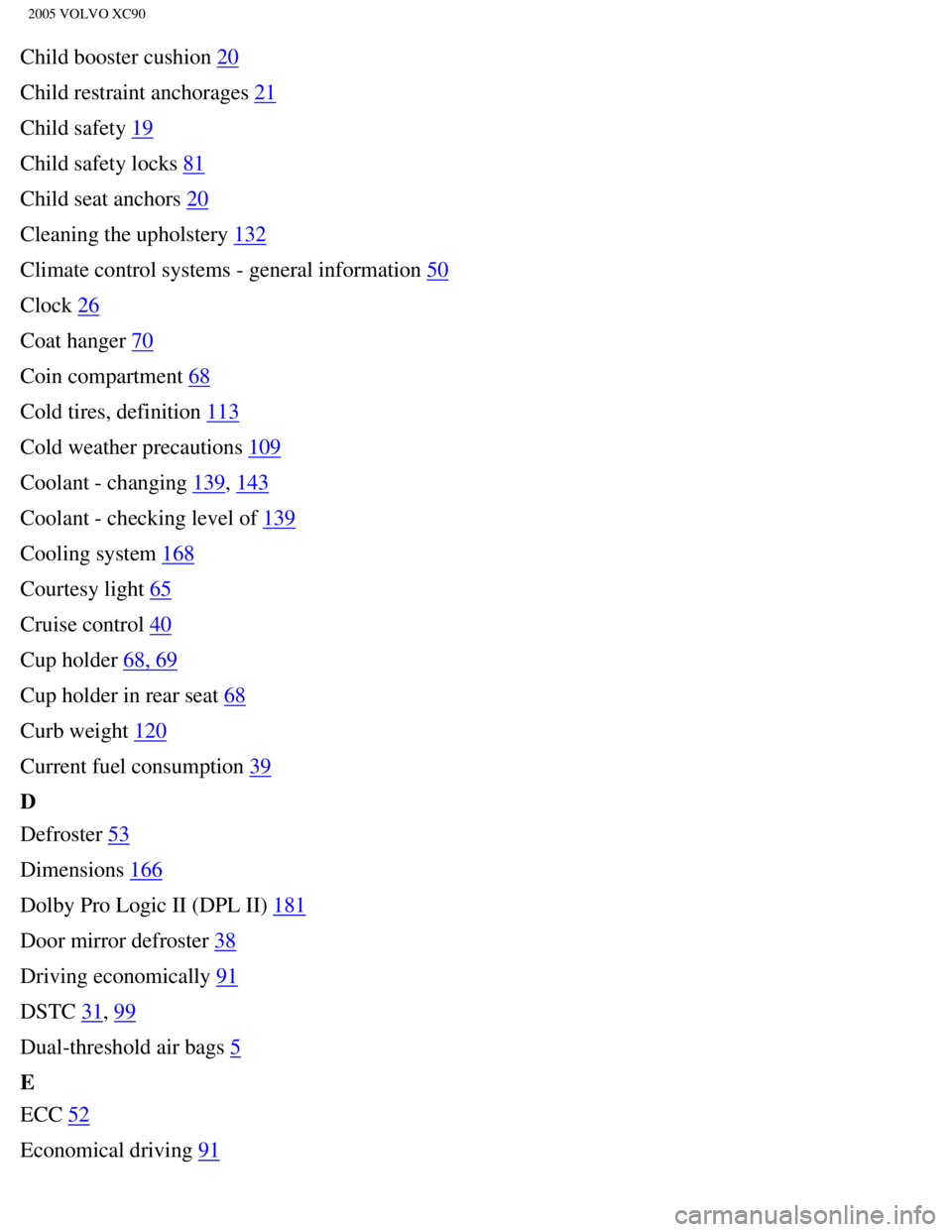
2005 VOLVO XC90
Child booster cushion 20
Child restraint anchorages
21
Child safety
19
Child safety locks
81
Child seat anchors
20
Cleaning the upholstery
132
Climate control systems - general information
50
Clock
26
Coat hanger
70
Coin compartment
68
Cold tires, definition
113
Cold weather precautions
109
Coolant - changing
139, 143
Coolant - checking level of
139
Cooling system
168
Courtesy light
65
Cruise control
40
Cup holder
68, 69
Cup holder in rear seat
68
Curb weight
120
Current fuel consumption
39
D
Defroster
53
Dimensions
166
Dolby Pro Logic II (DPL II)
181
Door mirror defroster
38
Driving economically
91
DSTC
31, 99
Dual-threshold air bags
5
E
ECC
52
Economical driving
91
file:///K|/ownersdocs/2005/2005_XC90/05xc90_12.htm (3 of 14)12/30/2006\
4:42:46 PM
Page 253 of 263

2005 VOLVO XC90
Electric socket 32
Electrical current - conserving
92
Electrical sockets, 12-volt
43
Electrical system
171
Emergency Locking Retractor
22
Engine - starting
89
Engine compartment
140
Engine oil
141
Engine oil - checking
142
Engine oil, capacity
167
Engine specifications
172
Environment
iii
F
Fader
181
Federal Clean Air Act
136
FIX NEXT SERVICE
30
Flat tire, changing
124
Floor mats
66
Fog light symbol (rear)
29
Fog lights, front
33
Folding sideview mirrors
31
Front fog lights
33
Front park assist
101
Front seat, folding backrest
59
Front seats
58
Front seats - heated
38
Front seats - manual adjustment
58
Front seats - power
60
Front suspension
169
Fuel
ii, 86
Fuel filler cap
ii, 88
Fuel filler door
ii, 88
file:///K|/ownersdocs/2005/2005_XC90/05xc90_12.htm (4 of 14)12/30/2006\
4:42:46 PM