dashboard VOLVO XC90 2006 User Guide
[x] Cancel search | Manufacturer: VOLVO, Model Year: 2006, Model line: XC90, Model: VOLVO XC90 2006Pages: 254, PDF Size: 8.43 MB
Page 173 of 254

172 MaintenanceandserviceBonnetandenginecompartmentOpeningthebonnet–Pullthehandleonthefarleft(orrightif
thecarisRHD)underthedashboard.You
willhearwhenthelockreleases.
–Insertyourhandtotherightunderthe
frontedgeofthebonnet(belowthe
grille).
–Pressupthesafetycatchhandle.
–Releasethehandleandopenthebonnet.
EnginecompartmentTheappearanceoftheenginecompartment
mayvaryslightlyduetoenginevariant.
However,thecomponentslistedareinthe
samepositions.
1.Clutchandbrakefluidreservoir
2.Relayandfuses
3.Airfilter.(Thecoverhasadifferent
designdependingonenginevariant.)
4.Radiator
5.Engineoildipstick
6.Engineoilfilling
7.Washerfluidreservoir
8.Powersteeringfluidreservoir
9.Expansiontank,coolingsystem10.Chassisdataplate
11.Battery(incargocompartment)
56
1
2
3 4789
10
11
WARNING!
Checkthatthebonnetlocksproperly
whenyoucloseit!
ProCarManuals.com
Page 190 of 254
189 Maintenanceandservice
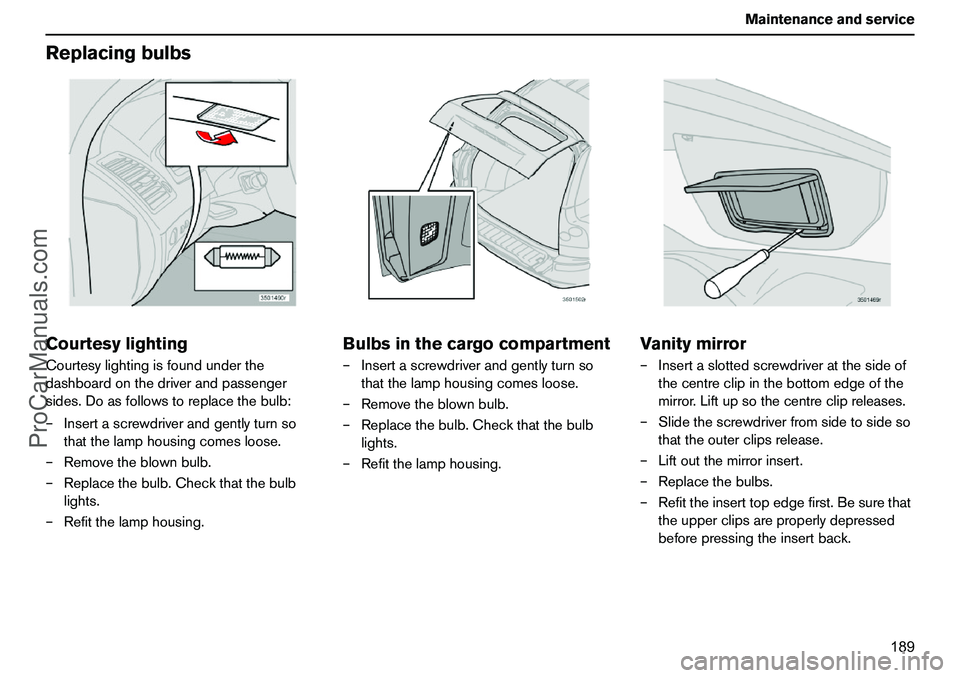
ReplacingbulbsCourtesylightingCourtesylightingisfoundunderthe
dashboardonthedriverandpassenger
sides.Doasfollowstoreplacethebulb:
–Insertascrewdriverandgentlyturnso
thatthelamphousingcomesloose.
–Removetheblownbulb.
–Replacethebulb.Checkthatthebulb
lights.
–Refitthelamphousing.
Bulbsinthecargocompartment–Insertascrewdriverandgentlyturnso
thatthelamphousingcomesloose.
–Removetheblownbulb.
–Replacethebulb.Checkthatthebulb
lights.
–Refitthelamphousing.
Vanitymirror–Insertaslottedscrewdriveratthesideof
thecentreclipinthebottomedgeofthe
mirror.Liftupsothecentreclipreleases.
–Slidethescrewdriverfromsidetosideso
thattheouterclipsrelease.
–Liftoutthemirrorinsert.
–Replacethebulbs.
–Refittheinserttopedgefirst.Besurethat
theupperclipsareproperlydepressed
beforepressingtheinsertback.
ProCarManuals.com
Page 191 of 254

190 MaintenanceandserviceFusesCableroutingmayvaryslightlyduetoenginevariant.However,thecomponentslistedareinthesamepositions.Allelectricalfunctionsandcomponentsare
protectedwithanumberoffusestoprotect
yourcar’selectricalsystemfromdamageby
short-circuitsoroverloads.
Fusesarehousedinfourdifferentlocationsin
thecar:
1.Relay/fuseboxintheengine
compartment.
2.Fuseboxinthepassengercompartment
withinthesoundbarrieronthedriver’s
side.
3.Fuseboxinthepassengercompartment
atdashboardendondriver’sside.
4.Fuseboxincargocompartment.Ifanelectricalcomponentorfunctiondoes
notwork,thismaybebecausethe
component’sfusewastemporarily
overloadedandblew.
–Lookinthefusediagramtolocatethe
fuse.
–Pulloutthefuseandcheckfromtheside
toseewhetherthecurvedwirehas
blown.
–Ifthisisthecase,replaceitwithanew
fuseofthesamecolourandamperage.
Thereareanumberofsparefusesinthe
coverontheendofthedashboard.Thereare
alsoplierswhichfacilitatetheremovaland
fittingoffuses.Ifthesamefuseblowsrepeatedly,thereisa
faultinthecomponentandyoushould
contactanauthorisedVolvoworkshopto
haveitchecked.
ProCarManuals.com
Page 193 of 254
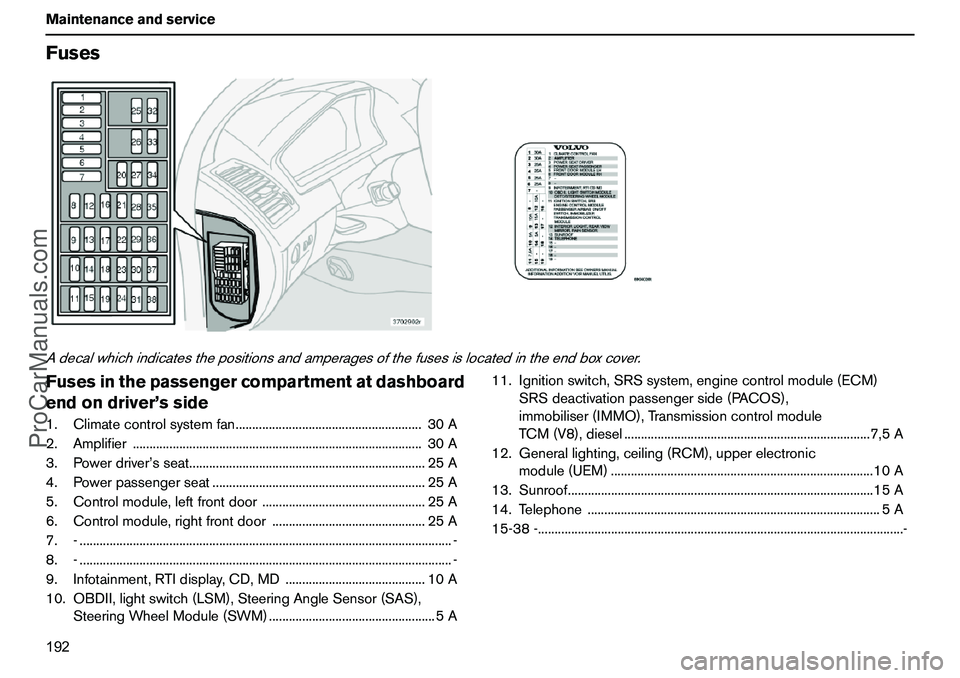
192 MaintenanceandserviceFusesAdecalwhichindicatesthepositionsandamperagesofthefusesislocatedintheendboxcover.Fusesinthepassengercompartmentatdashboard
endondriver’sside1.Climatecontrolsystemfan........................................................30A
2.Amplifier.......................................................................................30A
3.Powerdriver’sseat.......................................................................25A
4.Powerpassengerseat................................................................25A
5.Controlmodule,leftfrontdoor.................................................25A
6.Controlmodule,rightfrontdoor..............................................25A
7.-................................................................................................................-
8.-................................................................................................................-
9.Infotainment,RTIdisplay,CD,MD..........................................10A
10.OBDII,lightswitch(LSM),SteeringAngleSensor(SAS),
SteeringWheelModule(SWM)..................................................5A11.Ignitionswitch,SRSsystem,enginecontrolmodule(ECM)
SRSdeactivationpassengerside(PACOS),
immobiliser(IMMO),Transmissioncontrolmodule
TCM(V8),diesel..........................................................................7,5A
12.Generallighting,ceiling(RCM),upperelectronic
module(UEM)...............................................................................10A
13.Sunroof............................................................................................15A
14.Telephone........................................................................................5A
15-38-..............................................................................................................-
ProCarManuals.com
Page 204 of 254
203 Infotainmentsystem
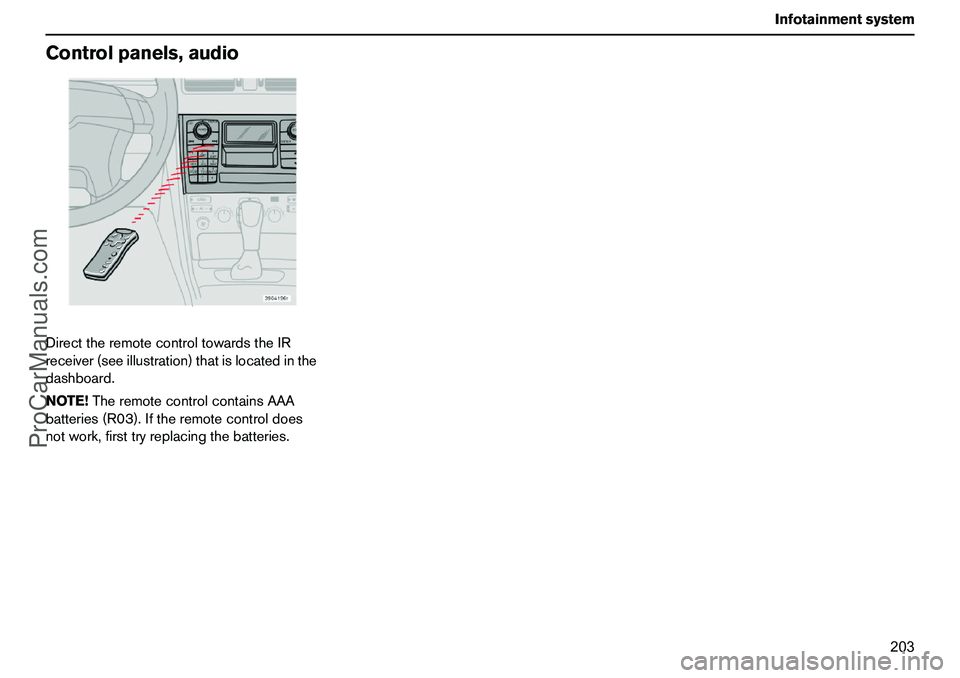
Controlpanels,audioDirecttheremotecontroltowardstheIR
receiver(seeillustration)thatislocatedinthe
dashboard.
NOTE!TheremotecontrolcontainsAAA
batteries(R03).Iftheremotecontroldoes
notwork,firsttryreplacingthebatteries.
ProCarManuals.com
Page 207 of 254
206 InfotainmentsystemAudiosystemfunctionsSURROUND(option)
DolbySurroundProLogicIIDolbySurroundProLogicII
1togetherwitha
centrespeakerinthedashboardoffersa
soundexperienceveryclosetobeingthere.
Thenormalleft-rightstereochannelsare
dividedintoleft-centre-right.Inaddition,
surroundsoundisproducedbytherear
speakerchannels.Surroundsoundcanbe
describedasthetypesofresidualtones
whichareaudibleinaconcerthall.Settings
forFMradioandCD/MDplayerarestored
individually.NOTE!IfFMradioreceptiondeteriorates
thentwoorthreechannelstereocanprovide
bettersoundqualitythansurroundsound.
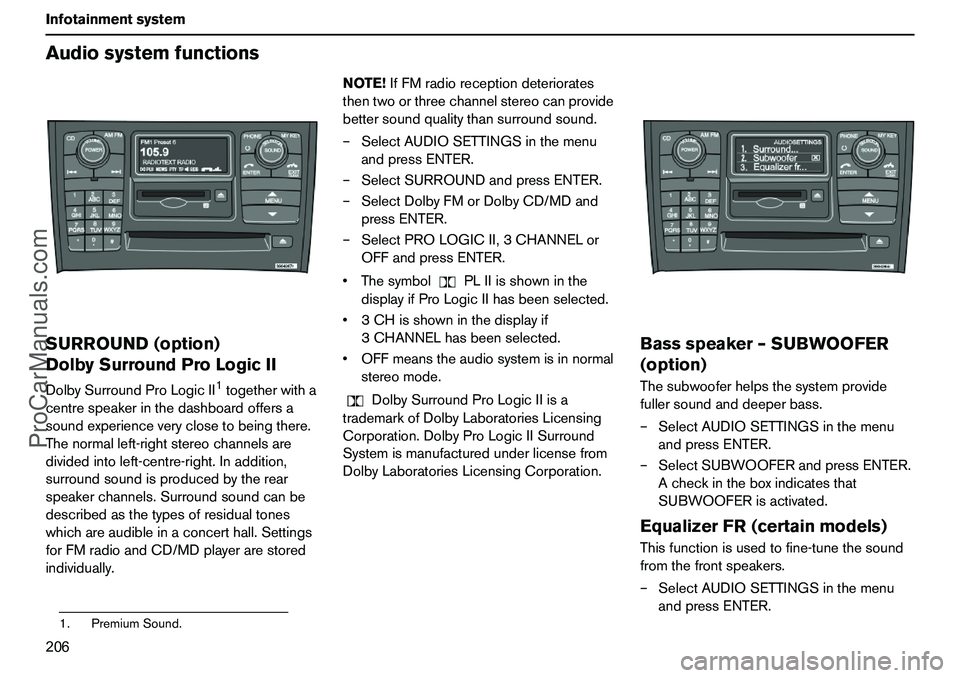
–SelectAUDIOSETTINGSinthemenu
andpressENTER.
–SelectSURROUNDandpressENTER.
–SelectDolbyFMorDolbyCD/MDand
pressENTER.
–SelectPROLOGICII,3CHANNELor
OFFandpressENTER.
ThesymbolPLIIisshowninthe
displayifProLogicIIhasbeenselected.
3CHisshowninthedisplayif
3CHANNELhasbeenselected.
OFFmeanstheaudiosystemisinnormal
stereomode.
DolbySurroundProLogicIIisa
trademarkofDolbyLaboratoriesLicensing
Corporation.DolbyProLogicIISurround
Systemismanufacturedunderlicensefrom
DolbyLaboratoriesLicensingCorporation.
Bassspeaker–SUBWOOFER
(option)Thesubwooferhelpsthesystemprovide
fullersoundanddeeperbass.
–SelectAUDIOSETTINGSinthemenu
andpressENTER.
–SelectSUBWOOFERandpressENTER.
Acheckintheboxindicatesthat
SUBWOOFERisactivated.EqualizerFR(certainmodels)Thisfunctionisusedtofine-tunethesound
fromthefrontspeakers.
–SelectAUDIOSETTINGSinthemenu
andpressENTER.
1.PremiumSound.
ProCarManuals.com