steering VOLVO XC90 2006 Owner's Manual
[x] Cancel search | Manufacturer: VOLVO, Model Year: 2006, Model line: XC90, Model: VOLVO XC90 2006Pages: 254, PDF Size: 8.43 MB
Page 199 of 254
198 InfotainmentsystemInfotainmentsystemInformation–EntertainmentInfotainmentisasystemwithintegrated
audioandtelephonefunctions.Youcan
easilyandconvenientlyuseyourInfotainment
systembymeansofthejointcontrolpanelor
thesteeringwheelkeypad.Thecontrolpanel
displayindicatesthecurrentfunction.
XC90canbeequippedwithDolbySurround
ProLogicII(PremiumSound),whichoffers
anoptimalsoundexperienceverycloseto
beingtherewithabroad,naturalsound
profile.
Thesystemalsoallowsyourpassengersto
useheadphones(option)withseparate
soundsources.
ProCarManuals.com
Page 201 of 254
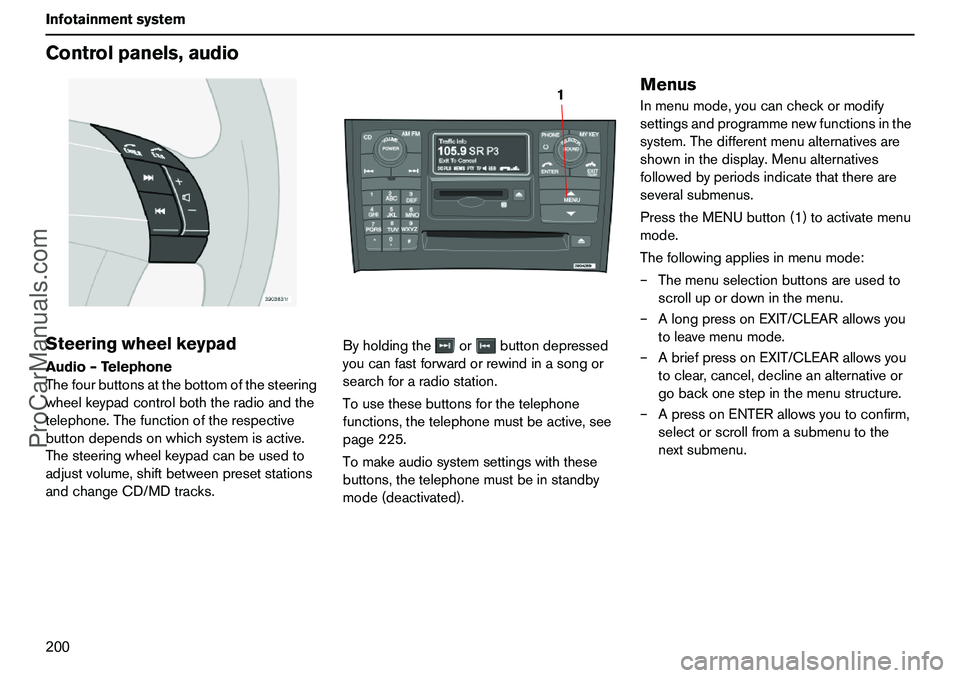
200 InfotainmentsystemControlpanels,audioSteeringwheelkeypadAudio–Telephone
Thefourbuttonsatthebottomofthesteering
wheelkeypadcontrolboththeradioandthe
telephone.Thefunctionoftherespective
buttondependsonwhichsystemisactive.
Thesteeringwheelkeypadcanbeusedto
adjustvolume,shiftbetweenpresetstations
andchangeCD/MDtracks.Byholdingtheorbuttondepressed
youcanfastforwardorrewindinasongor
searchforaradiostation.
Tousethesebuttonsforthetelephone
functions,thetelephonemustbeactive,see
page225.
Tomakeaudiosystemsettingswiththese
buttons,thetelephonemustbeinstandby
mode(deactivated).
MenusInmenumode,youcancheckormodify
settingsandprogrammenewfunctionsinthe
system.Thedifferentmenualternativesare
showninthedisplay.Menualternatives
followedbyperiodsindicatethatthereare
severalsubmenus.
PresstheMENUbutton(1)toactivatemenu
mode.
Thefollowingappliesinmenumode:
–Themenuselectionbuttonsareusedto
scrollupordowninthemenu.
–AlongpressonEXIT/CLEARallowsyou
toleavemenumode.
–AbriefpressonEXIT/CLEARallowsyou
toclear,cancel,declineanalternativeor
gobackonestepinthemenustructure.
–ApressonENTERallowsyoutoconfirm,
selectorscrollfromasubmenutothe
nextsubmenu.
1
ProCarManuals.com
Page 205 of 254
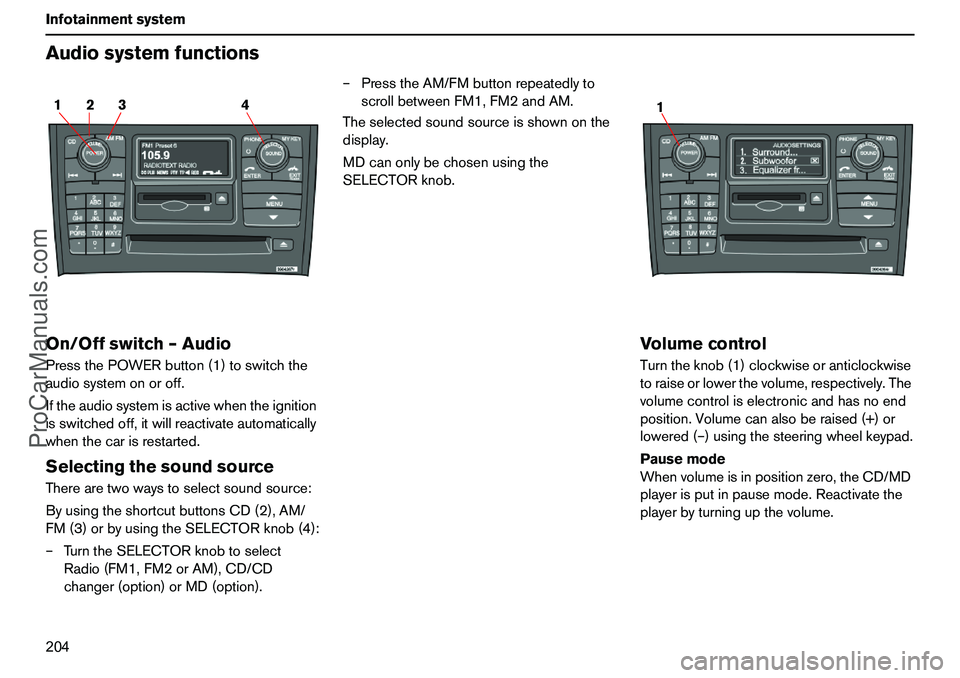
204 InfotainmentsystemAudiosystemfunctionsOn/Offswitch–AudioPressthePOWERbutton(1)toswitchthe
audiosystemonoroff.
Iftheaudiosystemisactivewhentheignition
isswitchedoff,itwillreactivateautomatically
whenthecarisrestarted.SelectingthesoundsourceTherearetwowaystoselectsoundsource:
ByusingtheshortcutbuttonsCD(2),AM/
FM(3)orbyusingtheSELECTORknob(4):
–TurntheSELECTORknobtoselect
Radio(FM1,FM2orAM),CD/CD
changer(option)orMD(option).–PresstheAM/FMbuttonrepeatedlyto
scrollbetweenFM1,FM2andAM.
Theselectedsoundsourceisshownonthe
display.
MDcanonlybechosenusingthe
SELECTORknob.
VolumecontrolTurntheknob(1)clockwiseoranticlockwise
toraiseorlowerthevolume,respectively.The
volumecontroliselectronicandhasnoend
position.Volumecanalsoberaised(+)or
lowered(–)usingthesteeringwheelkeypad.
Pausemode
Whenvolumeisinpositionzero,theCD/MD
playerisputinpausemode.Reactivatethe
playerbyturningupthevolume.
2 14 3
1
ProCarManuals.com
Page 217 of 254
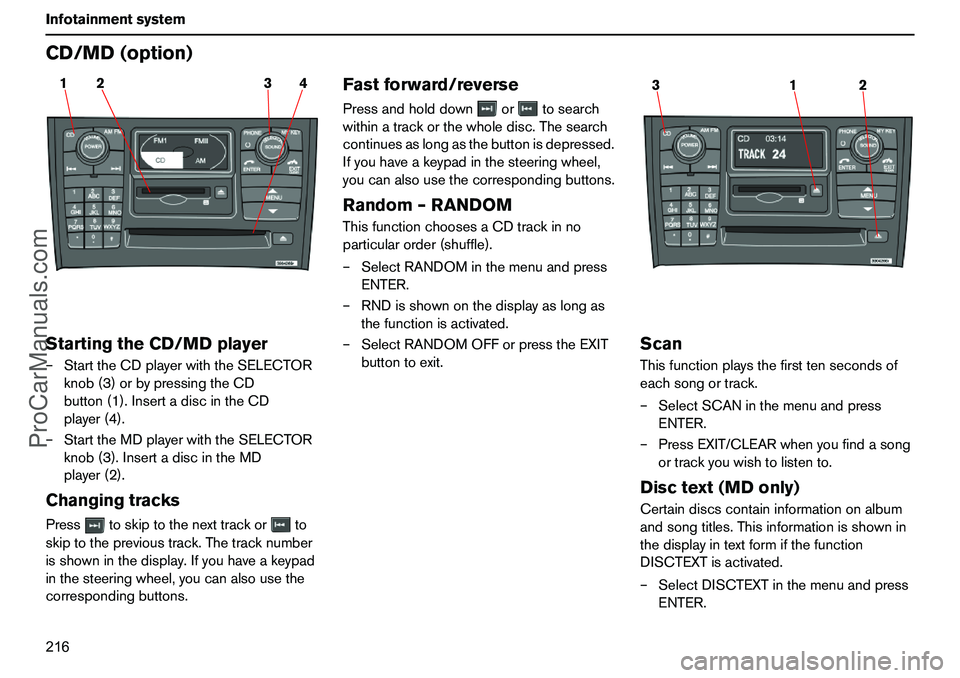
216 InfotainmentsystemCD/MD(option)StartingtheCD/MDplayer–StarttheCDplayerwiththeSELECTOR
knob(3)orbypressingtheCD
button(1).InsertadiscintheCD
player(4).
–StarttheMDplayerwiththeSELECTOR
knob(3).InsertadiscintheMD
player(2).ChangingtracksPresstoskiptothenexttrackorto
skiptotheprevioustrack.Thetracknumber
isshowninthedisplay.Ifyouhaveakeypad
inthesteeringwheel,youcanalsousethe
correspondingbuttons.
Fastforward/reversePressandholddownortosearch
withinatrackorthewholedisc.Thesearch
continuesaslongasthebuttonisdepressed.
Ifyouhaveakeypadinthesteeringwheel,
youcanalsousethecorrespondingbuttons.Random–RANDOMThisfunctionchoosesaCDtrackinno
particularorder(shuffle).
–SelectRANDOMinthemenuandpress
ENTER.
–RNDisshownonthedisplayaslongas
thefunctionisactivated.
–SelectRANDOMOFForpresstheEXIT
buttontoexit.
ScanThisfunctionplaysthefirsttensecondsof
eachsongortrack.
–SelectSCANinthemenuandpress
ENTER.
–PressEXIT/CLEARwhenyoufindasong
ortrackyouwishtolistento.Disctext(MDonly)Certaindiscscontaininformationonalbum
andsongtitles.Thisinformationisshownin
thedisplayintextformifthefunction
DISCTEXTisactivated.
–SelectDISCTEXTinthemenuandpress
ENTER.
2 14 3
1 32
ProCarManuals.com
Page 219 of 254
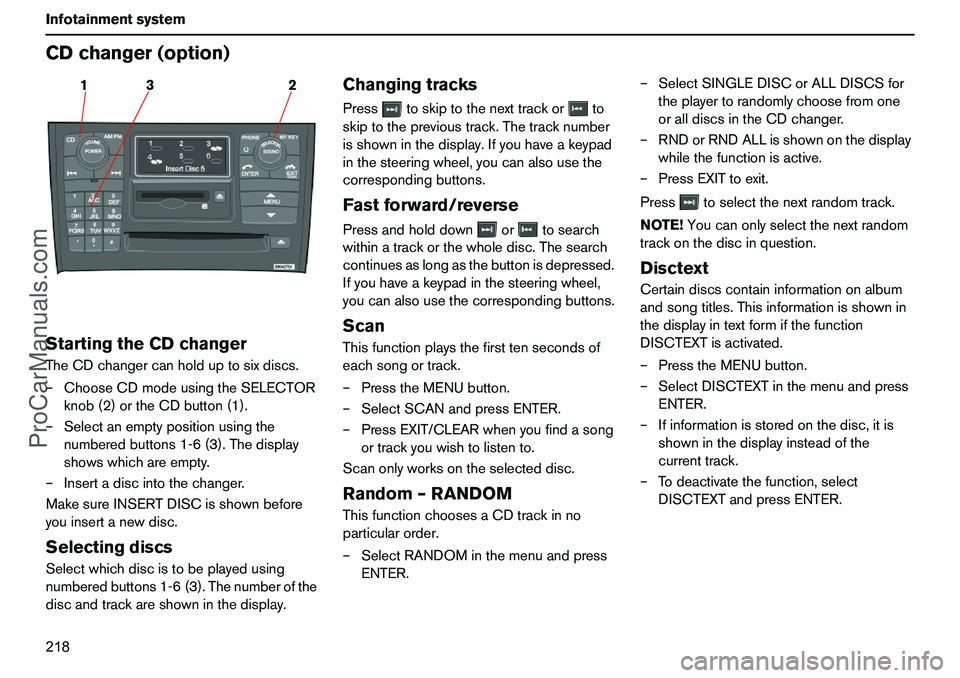
218 InfotainmentsystemCDchanger(option)StartingtheCDchangerTheCDchangercanholduptosixdiscs.
–ChooseCDmodeusingtheSELECTOR
knob(2)ortheCDbutton(1).
–Selectanemptypositionusingthe
numberedbuttons1-6(3).Thedisplay
showswhichareempty.
–Insertadiscintothechanger.
MakesureINSERTDISCisshownbefore
youinsertanewdisc.SelectingdiscsSelectwhichdiscistobeplayedusing
numberedbuttons1-6(3).Thenumberofthe
discandtrackareshowninthedisplay.
ChangingtracksPresstoskiptothenexttrackorto
skiptotheprevioustrack.Thetracknumber
isshowninthedisplay.Ifyouhaveakeypad
inthesteeringwheel,youcanalsousethe
correspondingbuttons.Fastforward/reversePressandholddownortosearch
withinatrackorthewholedisc.Thesearch
continuesaslongasthebuttonisdepressed.
Ifyouhaveakeypadinthesteeringwheel,
youcanalsousethecorrespondingbuttons.ScanThisfunctionplaysthefirsttensecondsof
eachsongortrack.
–PresstheMENUbutton.
–SelectSCANandpressENTER.
–PressEXIT/CLEARwhenyoufindasong
ortrackyouwishtolistento.
Scanonlyworksontheselecteddisc.Random–RANDOMThisfunctionchoosesaCDtrackinno
particularorder.
–SelectRANDOMinthemenuandpress
ENTER.–SelectSINGLEDISCorALLDISCSfor
theplayertorandomlychoosefromone
oralldiscsintheCDchanger.
–RNDorRNDALLisshownonthedisplay
whilethefunctionisactive.
–PressEXITtoexit.
Presstoselectthenextrandomtrack.
NOTE!Youcanonlyselectthenextrandom
trackonthediscinquestion.
DisctextCertaindiscscontaininformationonalbum
andsongtitles.Thisinformationisshownin
thedisplayintextformifthefunction
DISCTEXTisactivated.
–PresstheMENUbutton.
–SelectDISCTEXTinthemenuandpress
ENTER.
–Ifinformationisstoredonthedisc,itis
showninthedisplayinsteadofthe
currenttrack.
–Todeactivatethefunction,select
DISCTEXTandpressENTER.
3 12
ProCarManuals.com
Page 224 of 254
223 Infotainmentsystem
Telephone(option)Telephonesystemcomponents1.Steeringwheelkeypad
Youcancontrolthemajorityoftelephone
functionsusingthesteeringwheelkeypad.
Whenthetelephoneisactive,thesteering
wheelkeypadcanonlybeusedfortelephone
functions.Wheninactivemode,telephone
informationisalwaysshowninthecontrol
paneldisplay.
2.Microphone
Thehandsfreemicrophoneisintegratedin
theceilingpanel.
3.Controlpanel
Alltelephonesystemfunctions,exceptcall
volume,canbecontrolledfromthecontrol
panelkeypad.Thedisplayshowsmenu
functions,messages,telephonenumbers,
etc.
4.SIMcard
TheSIMcardisinsertedintothefrontofthe
controlpanel.
5.Privacyhandset
Theprivacyhandsetcanbeusedwhenyou
donotwishtobedisturbed.
6.Antenna
Theantennaismountedagainstthe
windscreeninfrontoftherearviewmirror.
GeneralrulesPuttrafficsafetyfirst!Ifasthedriveryou
needtousetheprivacyhandset,parkthe
carinasafeplacefirst.
Switchoffthesystemwhenrefuellingthe
car.
Switchoffthesystemnearblastingwork.
Letonlyauthorisedpersonnelservice
yourtelephonesystem.EmergencycallsEmergencycallstoalarmcentrescanbe
madewithoutaSIMcardaslongasthereis
coveragebyaGSMoperator.
–Activatethetelephone.
–Ringtheemergencynumberthatapplies
toyourregion(withinEU:112).
–PresstheENTERbuttononthecontrol
panelorsteeringwheel.LoudspeakerThetelephoneusesthespeakerinthe
driver’sdoororthecentrespeakerofthe
audiosystem(ifthereisone).
ProCarManuals.com
Page 227 of 254
226 InfotainmentsystemTelephonefunctionsTrafficsafetyForreasonsofsafety,partsofthetelephone
menusystemcannotbeaccessedatspeeds
inexcessof8km/h.Youmayonlycomplete
menusystemactivitiesthathavealready
beenstarted.
Thespeedlimitercanbedisconnectedusing
menufunction5.6.
SIMcardThetelephonecanonlybeusedwithavalid
SIMcard(SubscriberIdentityModule).Your
networkoperatorsuppliesthiscard.
AlwaysinserttheSIMcardwhenyouwishto
usethetelephone.
–Switchoffthetelephone.
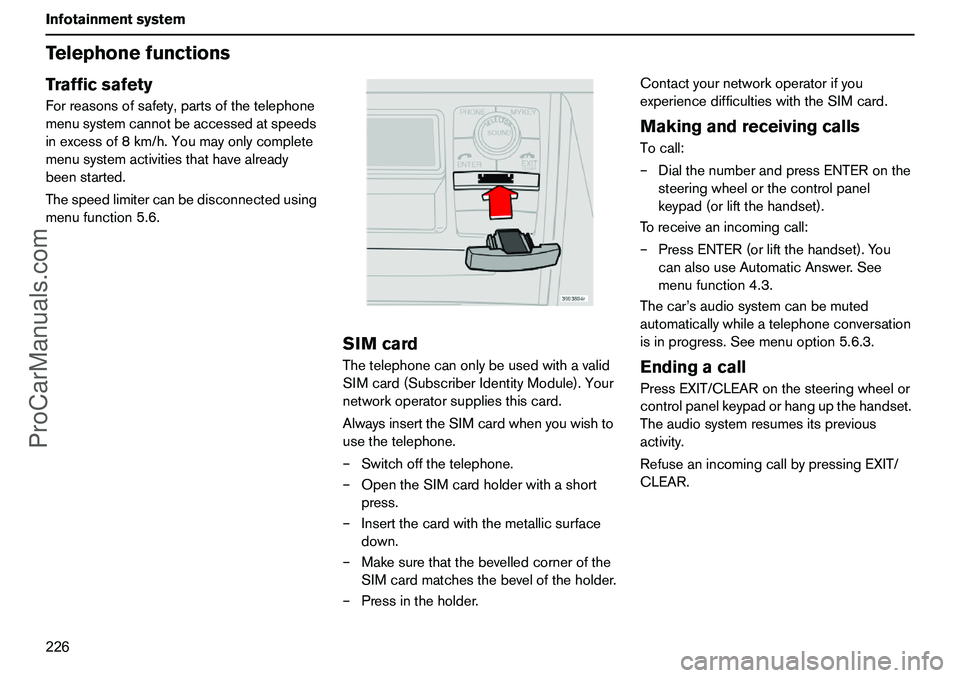
–OpentheSIMcardholderwithashort
press.
–Insertthecardwiththemetallicsurface
down.
–Makesurethatthebevelledcornerofthe
SIMcardmatchesthebeveloftheholder.
–Pressintheholder.Contactyournetworkoperatorifyou
experiencedifficultieswiththeSIMcard.
MakingandreceivingcallsTocall:
–DialthenumberandpressENTERonthe
steeringwheelorthecontrolpanel
keypad(orliftthehandset).
Toreceiveanincomingcall:
–PressENTER(orliftthehandset).You
canalsouseAutomaticAnswer.See
menufunction4.3.
Thecar’saudiosystemcanbemuted
automaticallywhileatelephoneconversation
isinprogress.Seemenuoption5.6.3.EndingacallPressEXIT/CLEARonthesteeringwheelor
controlpanelkeypadorhangupthehandset.
Theaudiosystemresumesitsprevious
activity.
RefuseanincomingcallbypressingEXIT/
CLEAR.
ProCarManuals.com
Page 228 of 254
227 Infotainmentsystem
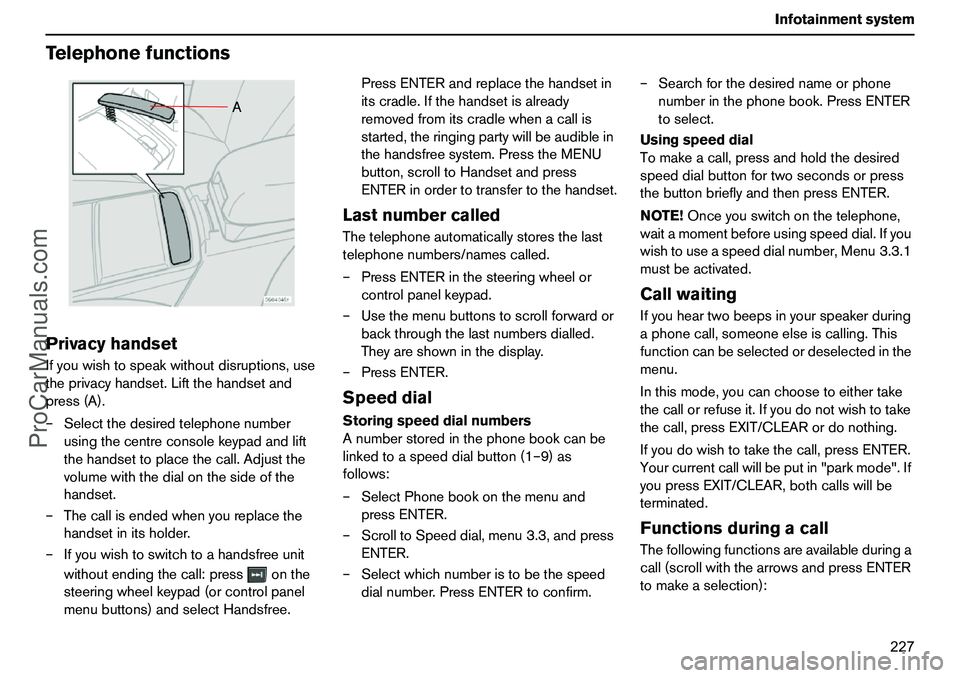
TelephonefunctionsPrivacyhandsetIfyouwishtospeakwithoutdisruptions,use
theprivacyhandset.Liftthehandsetand
press(A).
–Selectthedesiredtelephonenumber
usingthecentreconsolekeypadandlift
thehandsettoplacethecall.Adjustthe
volumewiththedialonthesideofthe
handset.
–Thecallisendedwhenyoureplacethe
handsetinitsholder.
–Ifyouwishtoswitchtoahandsfreeunit
withoutendingthecall:pressonthe
steeringwheelkeypad(orcontrolpanel
menubuttons)andselectHandsfree.PressENTERandreplacethehandsetin
itscradle.Ifthehandsetisalready
removedfromitscradlewhenacallis
started,theringingpartywillbeaudiblein
thehandsfreesystem.PresstheMENU
button,scrolltoHandsetandpress
ENTERinordertotransfertothehandset.
LastnumbercalledThetelephoneautomaticallystoresthelast
telephonenumbers/namescalled.
–PressENTERinthesteeringwheelor
controlpanelkeypad.
–Usethemenubuttonstoscrollforwardor
backthroughthelastnumbersdialled.
Theyareshowninthedisplay.
–PressENTER.SpeeddialStoringspeeddialnumbers
Anumberstoredinthephonebookcanbe
linkedtoaspeeddialbutton(1–9)as
follows:
–SelectPhonebookonthemenuand
pressENTER.
–ScrolltoSpeeddial,menu3.3,andpress
ENTER.
–Selectwhichnumberistobethespeed
dialnumber.PressENTERtoconfirm.–Searchforthedesirednameorphone
numberinthephonebook.PressENTER
toselect.
Usingspeeddial
Tomakeacall,pressandholdthedesired
speeddialbuttonfortwosecondsorpress
thebuttonbrieflyandthenpressENTER.
NOTE!Onceyouswitchonthetelephone,
waitamomentbeforeusingspeeddial.Ifyou
wishtouseaspeeddialnumber,Menu3.3.1
mustbeactivated.
CallwaitingIfyouheartwobeepsinyourspeakerduring
aphonecall,someoneelseiscalling.This
functioncanbeselectedordeselectedinthe
menu.
Inthismode,youcanchoosetoeithertake
thecallorrefuseit.Ifyoudonotwishtotake
thecall,pressEXIT/CLEARordonothing.
Ifyoudowishtotakethecall,pressENTER.
Yourcurrentcallwillbeputin"parkmode".If
youpressEXIT/CLEAR,bothcallswillbe
terminated.FunctionsduringacallThefollowingfunctionsareavailableduringa
call(scrollwiththearrowsandpressENTER
tomakeaselection):
A
ProCarManuals.com
Page 229 of 254
228 InfotainmentsystemTelephonefunctionsThefollowingfunctionsareavailablewhen
youhaveacurrentcallandaparkedcall
(scrollwiththearrowsandpressENTERto
makeaselection):
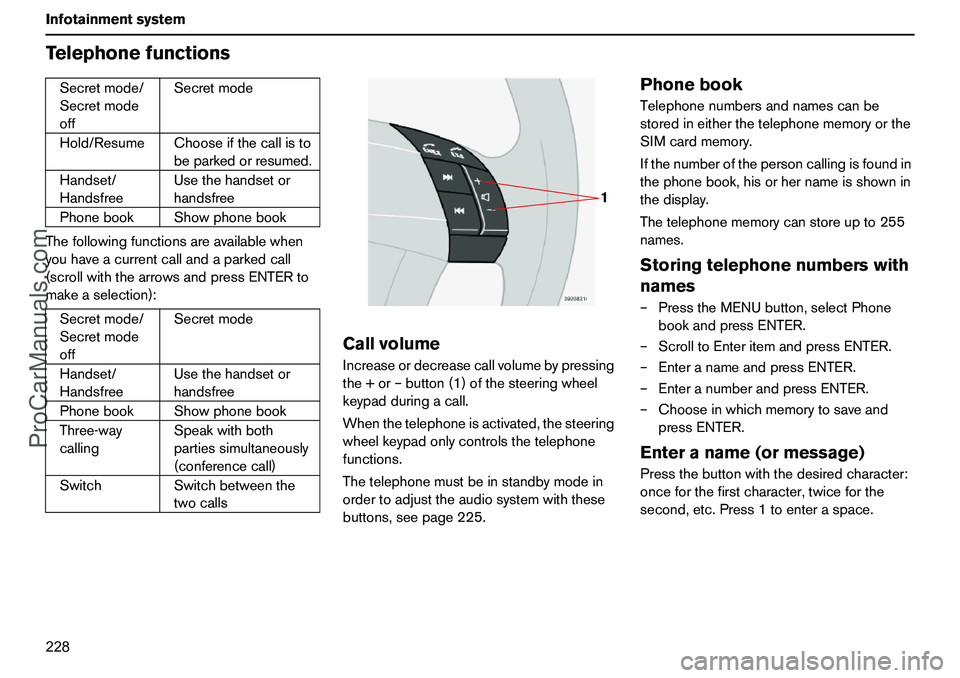
CallvolumeIncreaseordecreasecallvolumebypressing
the+or–button(1)ofthesteeringwheel
keypadduringacall.
Whenthetelephoneisactivated,thesteering
wheelkeypadonlycontrolsthetelephone
functions.
Thetelephonemustbeinstandbymodein
ordertoadjusttheaudiosystemwiththese
buttons,seepage225.
PhonebookTelephonenumbersandnamescanbe
storedineitherthetelephonememoryorthe
SIMcardmemory.
Ifthenumberofthepersoncallingisfoundin
thephonebook,hisorhernameisshownin
thedisplay.
Thetelephonememorycanstoreupto255
names.Storingtelephonenumberswith
names–PresstheMENUbutton,selectPhone
bookandpressENTER.
–ScrolltoEnteritemandpressENTER.
–EnteranameandpressENTER.
–EnteranumberandpressENTER.
–Chooseinwhichmemorytosaveand
pressENTER.Enteraname(ormessage)Pressthebuttonwiththedesiredcharacter:
onceforthefirstcharacter,twiceforthe
second,etc.Press1toenteraspace. Secretmode/
Secretmode
offSecretmode
Hold/ResumeChooseifthecallisto
beparkedorresumed.
Handset/
HandsfreeUsethehandsetor
handsfree
PhonebookShowphonebook
Secretmode/
Secretmode
offSecretmode
Handset/
HandsfreeUsethehandsetor
handsfree
PhonebookShowphonebook
Three-way
callingSpeakwithboth
partiessimultaneously
(conferencecall)
SwitchSwitchbetweenthe
twocalls
1
ProCarManuals.com
Page 230 of 254
229 Infotainmentsystem
TelephonefunctionsQuittingtextinput:–Clearallenteredcharacterswithalong
pressontheEXIT/CLEARbutton.
–Returntothemenuwithanadditional
longpressontheEXIT/CLEARbutton.
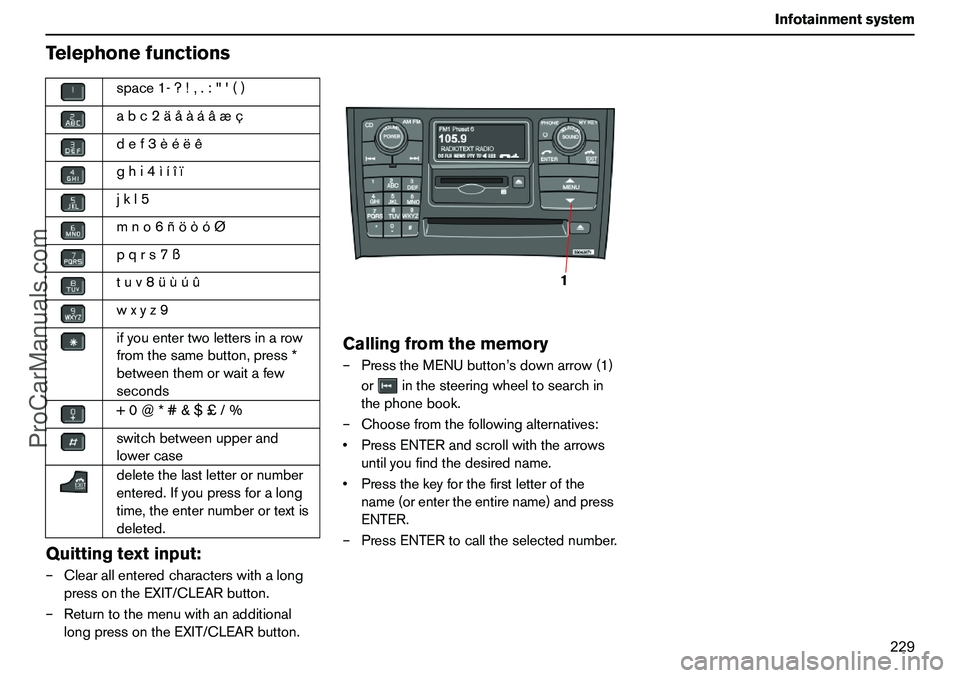
Callingfromthememory–PresstheMENUbutton’sdownarrow(1)
orinthesteeringwheeltosearchin
thephonebook.
–Choosefromthefollowingalternatives:
PressENTERandscrollwiththearrows
untilyoufindthedesiredname.
Pressthekeyforthefirstletterofthe
name(orentertheentirename)andpress
ENTER.
–PressENTERtocalltheselectednumber. space1-?!,.:"'()
abc2äåàáâæç
def3èéëê
ghi4ìíîï
jkl5
mno6ñöòóØ
pqrs7ß
tuv8üùúû
wxyz9
ifyouentertwolettersinarow
fromthesamebutton,press*
betweenthemorwaitafew
seconds
+0@*#&$£/%
switchbetweenupperand
lowercase
deletethelastletterornumber
entered.Ifyoupressforalong
time,theenternumberortextis
deleted.
1
ProCarManuals.com