light VOLVO XC90 2006 User Guide
[x] Cancel search | Manufacturer: VOLVO, Model Year: 2006, Model line: XC90, Model: VOLVO XC90 2006Pages: 256, PDF Size: 6.87 MB
Page 38 of 256
. Do not drive
continuously with the needle in the red area of the dial, which indicate\
s maximum all")
2006 VOLVO XC90
The tachometer shows engine speed in thousands of revolutions per minute\
(rpm). Do not drive
continuously with the needle in the red area of the dial, which indicate\
s maximum allowable engine rpm
range. Instead, shift to a higher gear or slow the vehicle down. The eng\
ine management system will
automatically prevent excessively high engines speeds. This will be noti\
ceable as a pronounced
unevenness in engine speed.
10. Gear and driving mode indicator
The currently selected driving mode is displayed here. If you use the Ge\
artronic function on the
automatic transmission, the currently selected gear will be displayed.
11. Ambient temperature gauge
This display indicates the air temperature outside your vehicle. A "snow\
flake" symbol in the text
window is displayed when the temperature is in the range of 23 - 36° \
F (-5 - +2° C). Please note that this
symbol does not indicate a fault with your vehicle. At low speeds or whe\
n the vehicle is not moving, the
temperature readings may be slightly higher than the actual ambient temp\
erature.
12. Clock/set button
Turn the button to set the clock.
13. Fuel gauge
The fuel tank holds approximately 21.1 US gals. (80 liters).
When a warning light in the gauge comes on, there are approximately 2.1 \
US gal. (8 liters) of fuel
remaining in the tank.
14. Indicator and warning symbols
pg. 23 Instruments and controls
Indicator and warning symbols
The indicator and warning symbols light up when you turn the ignition ke\
y to the driving position
(position II) before starting. This shows that the symbols are functio\
ning. When the engine starts, all
symbols go out. If the engine is not started within 5 seconds, all symbo\
ls except CHECK ENGINE and
go out. The symbol for the parking brake goes out when the parking brak\
e is released.
Warning symbol
in center of instrument panel
This symbol shines as a red or yellow light depending on the severity of\
the fault that has been detected.
Red symbol -Stop the vehicle as soon as possible in a suitable location and read th\
e message shown in
the text window. The symbol and accompanying text will remain on until t\
he fault has been corrected.
file:///K|/ownersdocs/2006/2006_XC90/06xc90_02a.htm (3 of 18)12/30/200\
6 5:32:38 PM
Page 39 of 256
, or will disappear automatically after two minute")
2006 VOLVO XC90
Yellow symbol -Follow the instructions shown in the text window. The text can be erase\
d by pressing
the READ button (see
page 26), or will disappear automatically after two minutes.
NOTE: When the message "TIME FOR REGULAR SERVICE" is displayed, the text can \
be erased and
the yellow symbol light can be turned off by pressing the READ button. T\
he text will disappear and the
symbol light will go out automatically after two minutes.
Anti-lock brake system ABS
If the warning light comes on, there is a malfunction of the ABS system \
(the standard braking system
will still function). The vehicle should be driven to a Volvo retailer \
for inspection. See
page 97 for
additional information.
pg. 24 Instruments and controls
Indicator and warning symbols (contd)
BRAKE Brake failure warning light
If the light comes on while driving or braking, stop immediately, open t\
he hood and check the brake
fluid level in the reservoir. See
page 147 for reservoir position and page 151 for instructions.
Canadian models are equipped with this warning light.
If the BRAKE and ABS warning lights come on at the same time, this could\
indicate a fault in the
brake system.
l Stop the vehicle in a suitable place and switch off the engine.
l Restart the engine.
l If both warning lights go off, no further action is required.
file:///K|/ownersdocs/2006/2006_XC90/06xc90_02a.htm (4 of 18)12/30/200\
6 5:32:38 PM
Page 40 of 256

2006 VOLVO XC90
l If both lights are still on after the engine has been restarted, switch \
off the engine again and check the
brake fluid level (see
page 147 for the location of the brake fluid reservoir).
WARNING!
The If the fluid level is below the MIN mark in the reservoir or if a "B\
rake failure - Service urgent"
message is displayed in the text window: DO NOT DRIVE. Have the vehicle \
towed to an authorized
Volvo retailer and have the brake system inspected.
l If the brake fluid level is above the MIN mark, drive carefully to an au\
thorized Volvo retailer and
have the brake system inspected.
DSTC
The Dynamic Stability and Traction Control system (DSTC) is explained \
in greater detail on
pages 98
and 99.
pg. 25 Instruments and controls
Supplemental Restraint system (SRS)
If this light comes on while the car is being driven, or remains on for \
longer than approximately 10
seconds after the car has been started, the SRS system's diagnostic func\
tions have detected a fault in a
seat belt lock or tensioner, a front airbag, side impact airbag, and/or \
an inflatable curtain. Have the
system(s) inspected by a trained and qualified Volvo service technicia\
n as soon as possible.
Generator warning light
If the light comes on while the engine is running, have the charging sys\
tem checked.
file:///K|/ownersdocs/2006/2006_XC90/06xc90_02a.htm (5 of 18)12/30/200\
6 5:32:38 PM
Page 41 of 256

2006 VOLVO XC90
Seat belt reminder
This symbol lights up to indicate that the driver has not fastened his/h\
er seat belt.
Tire pressure monitoring light
See
page 117 for more information on this function.
PARKING BRAKE
This light will be on when the parking brake is applied. The parking bra\
ke pedal is located on the left
side of the driver's footwell.
Canadian models are equipped with this symbol.
Rear fog light
This light indicates that the fog light is on.
Turn signal indicator - trailer (certain models)
If you are towing a trailer, this light will flash simultaneously with t\
he turn signals on the trailer. If the
light does not flash when signaling, neither the trailer's turn signals \
nor the vehicle's turn signals are
functioning.
Oil pressure warning light
If the light comes on while driving, stop the vehicle and then stop the \
engine immediately and
check the engine oil level See
page 149. If the light stays on after restart, have the vehicle towed to the
nearest authorized Volvo retailer. After hard driving, the light may com\
e on occasionally when the
engine is idling. This is normal, provided it goes off when the engine s\
peed is increased.
CHECK ENGINE Malfunction indicator light
On-Board Diagnostics II (OBDII): As you drive, a computer called "OBDI\
I" monitors your vehicle's
engine, transmission, electrical and emission systems. The CHECK ENGINE \
light will light up if the
computer senses a condition that potentially may need correcting. When t\
his happens, please have your
vehicle checked by a Volvo retailer as soon as possible.
A CHECK ENGINE light may have many causes. Sometimes, you may not notice\
a change in your
vehicle's behavior. Even so, an uncorrected condition could hurt fuel ec\
onomy, emission cleanliness, and
driveability. Extended driving without correcting the cause could even d\
amage other components in
file:///K|/ownersdocs/2006/2006_XC90/06xc90_02a.htm (6 of 18)12/30/200\
6 5:32:38 PM
Page 42 of 256
2006 VOLVO XC90
your vehicle.
Canadian models are equipped with this warning light.
pg. 26 Instruments and controls
Indicator and warning symbols (contd)
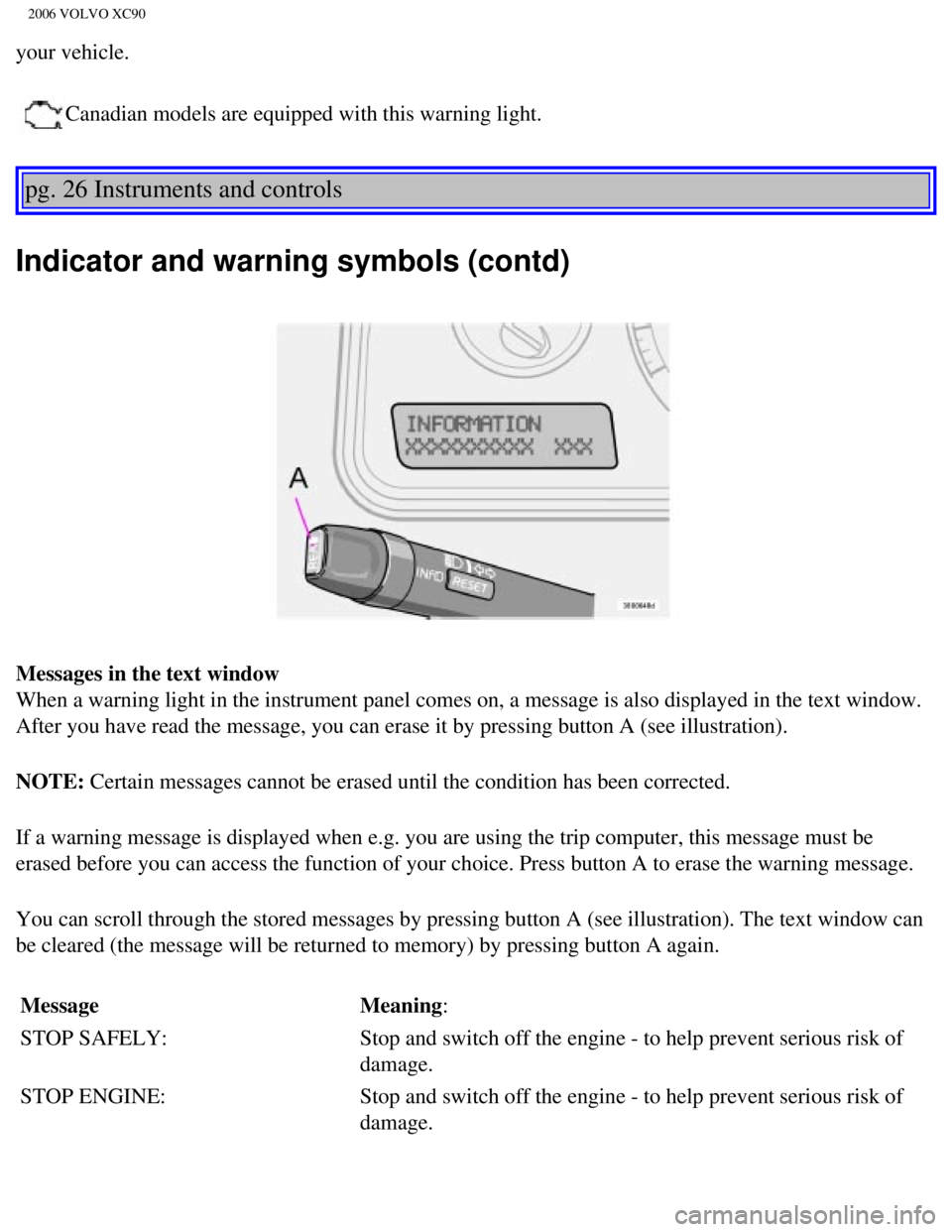
Messages in the text window
When a warning light in the instrument panel comes on, a message is also\
displayed in the text window.
After you have read the message, you can erase it by pressing button A (\
see illustration).
NOTE: Certain messages cannot be erased until the condition has been correcte\
d.
If a warning message is displayed when e.g. you are using the trip compu\
ter, this message must be
erased before you can access the function of your choice. Press button A\
to erase the warning message.
You can scroll through the stored messages by pressing button A (see il\
lustration). The text window can
be cleared (the message will be returned to memory) by pressing button\
A again. Message Meaning:
STOP SAFELY: Stop and switch off the engine - to help prevent serious risk of
damage.
STOP ENGINE: Stop and switch off the engine - to help prevent serious risk of
damage.
file:///K|/ownersdocs/2006/2006_XC90/06xc90_02a.htm (7 of 18)12/30/200\
6 5:32:38 PM
Page 43 of 256
2006 VOLVO XC90
SERVICE URGENT: Take your car to a trained and qualified Volvo service technician
for inspection immediately.
SEE MANUAL: Refer to your owner's manual. For additional information, please
contact your Volvo retailer.
SERVICE REQUIRED: Take your car to an authorized Volvo retailer for inspection at
your convenience (but preferably before the next scheduled
maintenance service).
FIX NEXT SERVICE: Have the system affected inspected at the next scheduled
maintenance.
TIME FOR REGULAR SERVICE This message will be displayed at 7,500 mile (12,000 km)
intervals, after 750 hours of driving or after 12 months,
whichever occurs first, to remind the driver that the service
interval has been exceeded. The message will be displayed for 2
minutes each time the vehicle is started until reset by the
servicing retailer.
OIL LEVEL LOW - FILL OIL
a Check the oil level and top up if necessary. See page 149.
OIL LEVEL LOW - STOP
SAFELY
b Stop as soon as possible and switch off the engine, check the oil
level and top up if necessary. See page 149.
OIL LEVEL LOW - STOP
ENGINE
b Stop as soon as possible and switch off the engine, check the oil
level and top up if necessary. See page 149.
OIL LEVEL LOW - SEE
MANUAL
b Stop as soon as possible and switch off the engine, check the oil
level and top up if necessary.See page 149.
a. The yellow warning symbol also lights up (see
page 23)
b. The red warning symbol also lights up (see
page 23)
pg. 27 Instruments and controls
Switches in center console
file:///K|/ownersdocs/2006/2006_XC90/06xc90_02a.htm (8 of 18)12/30/200\
6 5:32:38 PM
Page 45 of 256
2006 VOLVO XC90
l Turn the ignition key to position II.
l Manually fold the mirror(s) to the normal position.
l Press the button to fold both mirrors in.
l Press the button again to fold the mirrors out to their normal position.\
Park Assist (option/accessory as available)
This system provides an audible warning when the vehicle is being parked\
or if it is driven close to a
person or object. See
page 100 for more information.
NOTE: The system activates automatically when the engine is started, and can \
be deactivated by
pressing this button (e.g. when towing a trailer) or reactivated if ne\
cessary.
Temporarily disconnecting the alarm sensors (option)
See
page 83 for more details.
pg. 28 Instruments and controls
Auxiliary lights
This button is used to switch on auxiliary lights (if installed). An L\
ED in the switch will light up to
indicate that the auxiliary lights are illuminated.
file:///K|/ownersdocs/2006/2006_XC90/06xc90_02a.htm (10 of 18)12/30/20\
06 5:32:38 PM
Page 46 of 256
 for the auxili")
2006 VOLVO XC90
12 volt socket
This 12 volt socket can be used to plug in certain accessories such as c\
ellular telephones, etc. The
ignition key must be in position 1 (or higher) for the auxiliary socke\
t to function.
NOTE: The auxiliary sockets can also be used for cigarette lighters, which ar\
e available as accessories
at your Volvo retailer.
Power child locks (option)
See page 81 for more information on this function.
pg. 29 Instruments and controls
Lighting panel
Lighting panel
1. Headlight/parking light switch
2. Front fog lights
file:///K|/ownersdocs/2006/2006_XC90/06xc90_02a.htm (11 of 18)12/30/20\
06 5:32:38 PM
Page 47 of 256

2006 VOLVO XC90
3. Rear fog light
4. Instrument panel lighting
5. Fuel filler door unlock button
Parking lights
The front and rear parking lights can be turned on even when the ignitio\
n is switched off.
l Turn switch 1 to position .
The license plate lights also illuminate when the parking lights are swi\
tched on.
Headlights
l Turn the ignition key to position II.
l The low beam headlights (daytime running lights) illuminate automatica\
lly, except when the light
switch (1) is in position
1.
See
page 32 for information on switching between high and low beams.
NOTE: Bi-Xenon headlights (option): Turn the headlight switch to position 0\
to activate a daylight
sensor, which automatically switches the low beams on or off, depending \
on ambient light conditions.
When driving in daylight, the headlights will switch off and the daytime\
running lights will come on. In
darkness, the daytime running lights will switch off and the Bi-Xenon he\
adlights will switch on.
Foglights
Front fog lights (option)
The front fog lights can be used in combination with either the headligh\
ts or the parking lights.
l Turn the ignition key to position II.
l Press button 2 to turn on the front fog lights.
An indicator light in the button illuminates when the front fog lights a\
re on.
Rear fog light
The single rear fog light is located in the driver's side tail light clu\
ster.
The rear fog light will only function in combination with the high/low b\
eam headlights or the optional
front fog lights.
l Turn the ignition key to position II.
l Press button 3 to turn on the rear fog light.
An indicator light in the button illuminates when the rear fog light is \
on.
file:///K|/ownersdocs/2006/2006_XC90/06xc90_02a.htm (12 of 18)12/30/20\
06 5:32:38 PM
Page 48 of 256

2006 VOLVO XC90
NOTE: The rear fog light is considerably brighter than the normal tail lights \
and should be used only
when conditions such as fog, rain, snow, smoke or dust reduce visibility\
for other vehicles to less than
500 ft. (150 meters).
Instrument panel lighting
The instrument panel lighting illuminates when the ignition key is in po\
sition II and the light switch (1)
is in either position
or .
l Move the thumb wheel (4) up to increase brightness or down to decrease\
brightness.
Unlocking the fuel filler door
Press button 5 when the car is at a standstill to unlock the fuel filler\
door. Please note that the fuel filler
door will remain unlocked until the car begins to move forward. An audib\
le click will be heard when the
fuel filler door relocks.
NOTE: If the fuel filler door does not unlock after the button has been press\
ed, drive the car
1. On Canadian models, the daytime running lights will remain on with th\
e light switch in this position.
pg. 30 Instruments and controls
Manually unlocking the fuel filler door
NOTE: at a speed of at least 5 mph (8 km/h), stop the car, and press the b\
utton again. See the
information to the right on unlocking the fuel filler door manually.
Panel on passenger's side of cargo area
Manually unlocking the fuel filler door
1. Open the upper and lower sections of the tailgate, and fold up the re\
ar section of the cargo area floor.
file:///K|/ownersdocs/2006/2006_XC90/06xc90_02a.htm (13 of 18)12/30/20\
06 5:32:38 PM