lights VOLVO XC90 2006 User Guide
[x] Cancel search | Manufacturer: VOLVO, Model Year: 2006, Model line: XC90, Model: VOLVO XC90 2006Pages: 256, PDF Size: 6.87 MB
Page 48 of 256

2006 VOLVO XC90
NOTE: The rear fog light is considerably brighter than the normal tail lights \
and should be used only
when conditions such as fog, rain, snow, smoke or dust reduce visibility\
for other vehicles to less than
500 ft. (150 meters).
Instrument panel lighting
The instrument panel lighting illuminates when the ignition key is in po\
sition II and the light switch (1)
is in either position
or .
l Move the thumb wheel (4) up to increase brightness or down to decrease\
brightness.
Unlocking the fuel filler door
Press button 5 when the car is at a standstill to unlock the fuel filler\
door. Please note that the fuel filler
door will remain unlocked until the car begins to move forward. An audib\
le click will be heard when the
fuel filler door relocks.
NOTE: If the fuel filler door does not unlock after the button has been press\
ed, drive the car
1. On Canadian models, the daytime running lights will remain on with th\
e light switch in this position.
pg. 30 Instruments and controls
Manually unlocking the fuel filler door
NOTE: at a speed of at least 5 mph (8 km/h), stop the car, and press the b\
utton again. See the
information to the right on unlocking the fuel filler door manually.
Panel on passenger's side of cargo area
Manually unlocking the fuel filler door
1. Open the upper and lower sections of the tailgate, and fold up the re\
ar section of the cargo area floor.
file:///K|/ownersdocs/2006/2006_XC90/06xc90_02a.htm (13 of 18)12/30/20\
06 5:32:38 PM
Page 50 of 256
2006 VOLVO XC90
steering wheel is locked in the new position.
WARNING!
The Never adjust the steering wheel while
driving.
pg. 32 Instruments and controls
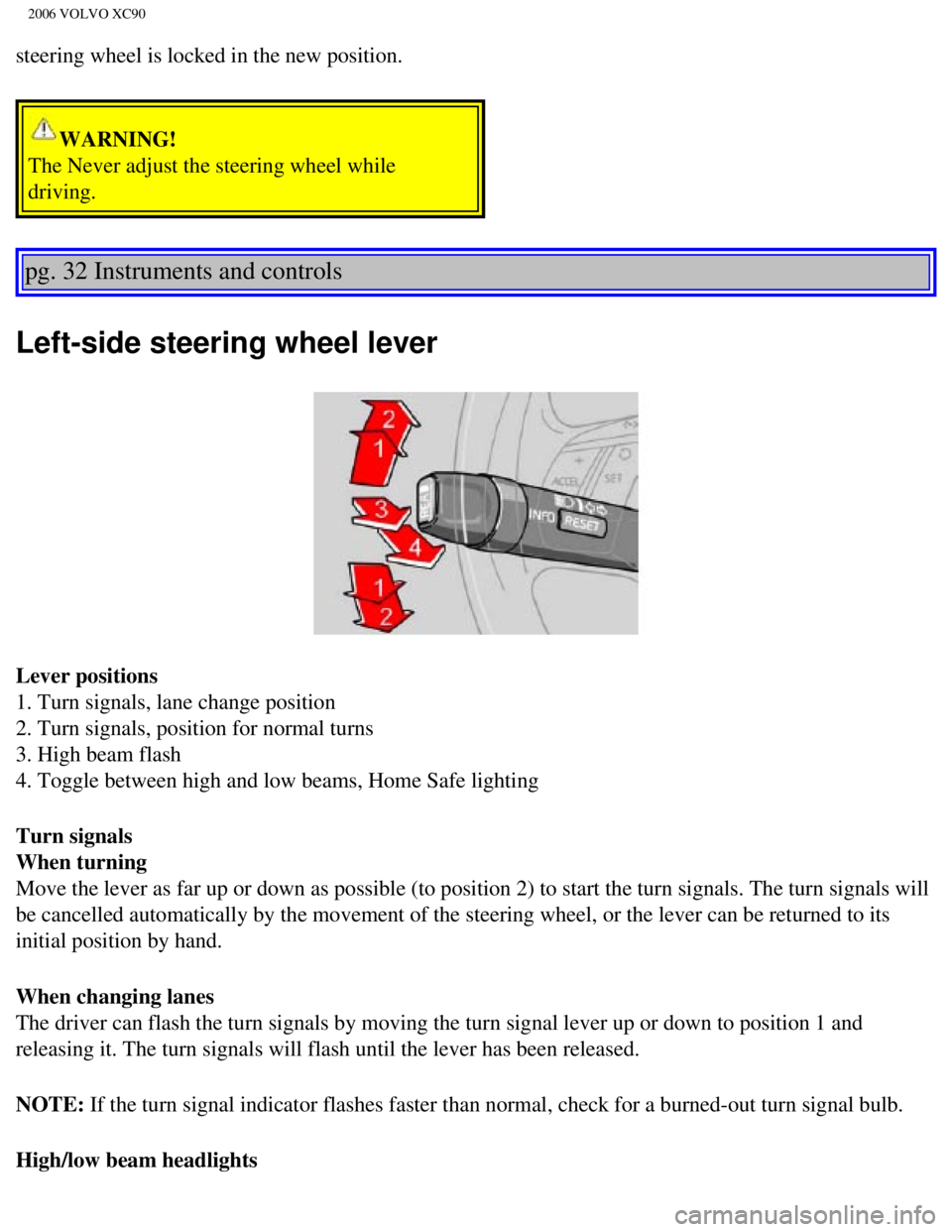
Left-side steering wheel lever
Lever positions
1. Turn signals, lane change position
2. Turn signals, position for normal turns
3. High beam flash
4. Toggle between high and low beams, Home Safe lighting
Turn signals
When turning
Move the lever as far up or down as possible (to position 2) to start \
the turn signals. The turn signals will
be cancelled automatically by the movement of the steering wheel, or the\
lever can be returned to its
initial position by hand.
When changing lanes
The driver can flash the turn signals by moving the turn signal lever up\
or down to position 1 and
releasing it. The turn signals will flash until the lever has been relea\
sed.
NOTE: If the turn signal indicator flashes faster than normal, check for a bur\
ned-out turn signal bulb.
High/low beam headlights
file:///K|/ownersdocs/2006/2006_XC90/06xc90_02a.htm (15 of 18)12/30/20\
06 5:32:38 PM
Page 51 of 256
2006 VOLVO XC90
Continuous high beams
l Turn the ignition key to position II.
l With the light switch (1) in position , (see page 29) pull the turn signal lever toward the
steering wheel (position 4) to toggle between high and low beams (thi\
s also applies on models equipped
with the optional Bi-Xenon headlights).
High beam flash
l Turn the ignition key to position II.
l Pull the turn signal lever to position 3. The high beams will remain on \
until the lever is released.
Home safe lighting
When you leave your car at night, you can make use of the home safe ligh\
ting function to illuminate the
area in front of the car.
l Remove the key from the ignition switch.
l Pull the direction indicator lever as far as possible towards the steeri\
ng wheel (to position 4) and
release it.
l Exit the car and lock the doors.
The headlights and parking lights will illuminate and remain on for 30
1, 60 or 90 seconds. The time
interval can be changed by an authorized Volvo retailer.
1. Factory setting
pg. 33 Instruments and controls
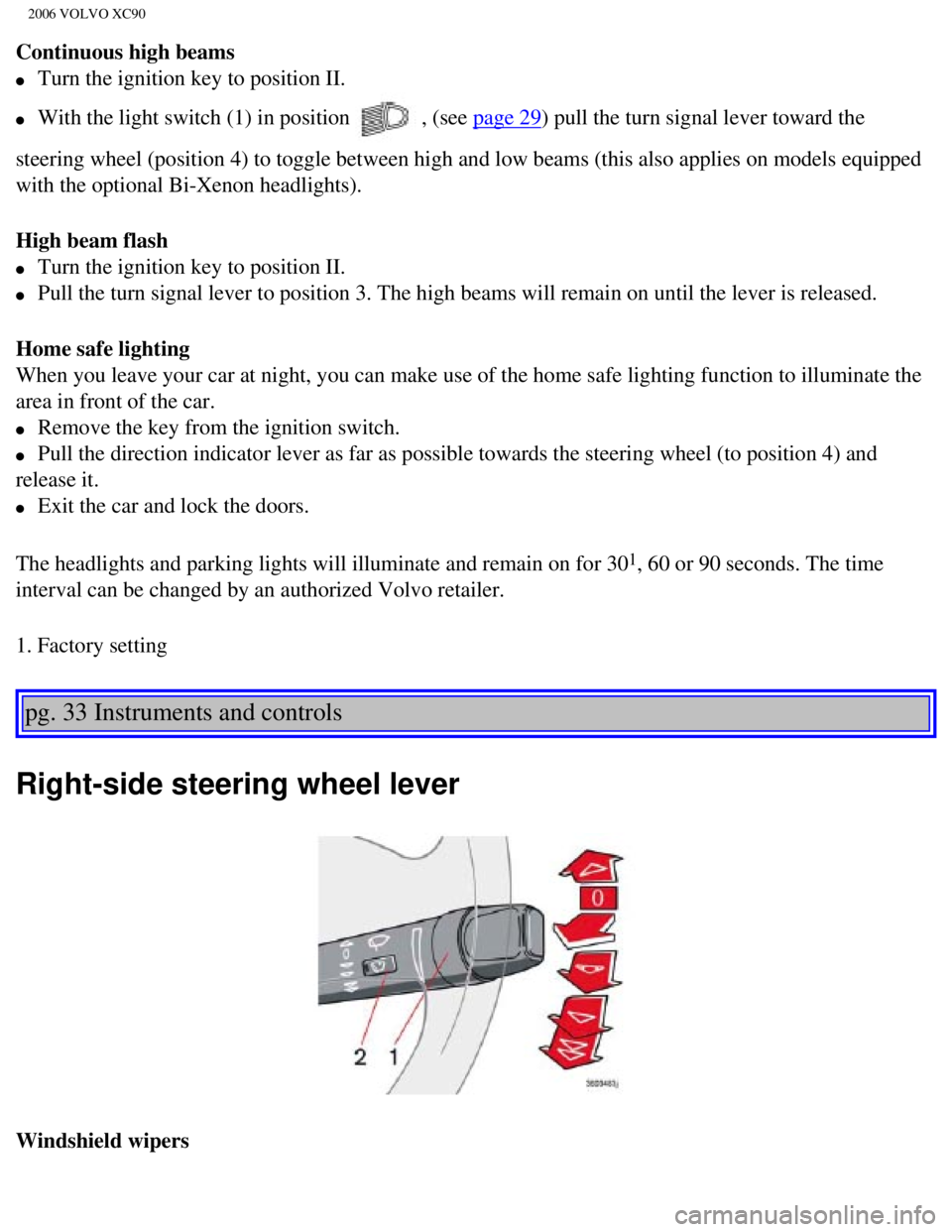
Right-side steering wheel lever
Windshield wipers
file:///K|/ownersdocs/2006/2006_XC90/06xc90_02a.htm (16 of 18)12/30/20\
06 5:32:38 PM
Page 53 of 256

Pull the lever toward you and release it. High pressure jets mounted in \
the bumper will spray t")
2006 VOLVO XC90
pg. 34 Instruments and controls
Windshield washer/headlight washer (certain models)
Pull the lever toward you and release it. High pressure jets mounted in \
the bumper will spray the
headlights.
CAUTION
Use ample washer fluid when washing the windshield to avoid scratching t\
he
glass.
NOTE:
l To conserve washer fluid in driving conditions where the windshield wash\
ers are used frequently, the
headlights will only be washed once for every five times the windshield \
is washed within a 10- minute
period.
l When approximately 1 US quart (1 liter) remains in the washer fluid re\
servoir, the rear window and
headlights will not be washed when the lever is pulled to conserve washe\
r fluid for the windshield.
Contents | Top of Page
file:///K|/ownersdocs/2006/2006_XC90/06xc90_02a.htm (18 of 18)12/30/20\
06 5:32:38 PM
Page 66 of 256
2006 VOLVO XC90
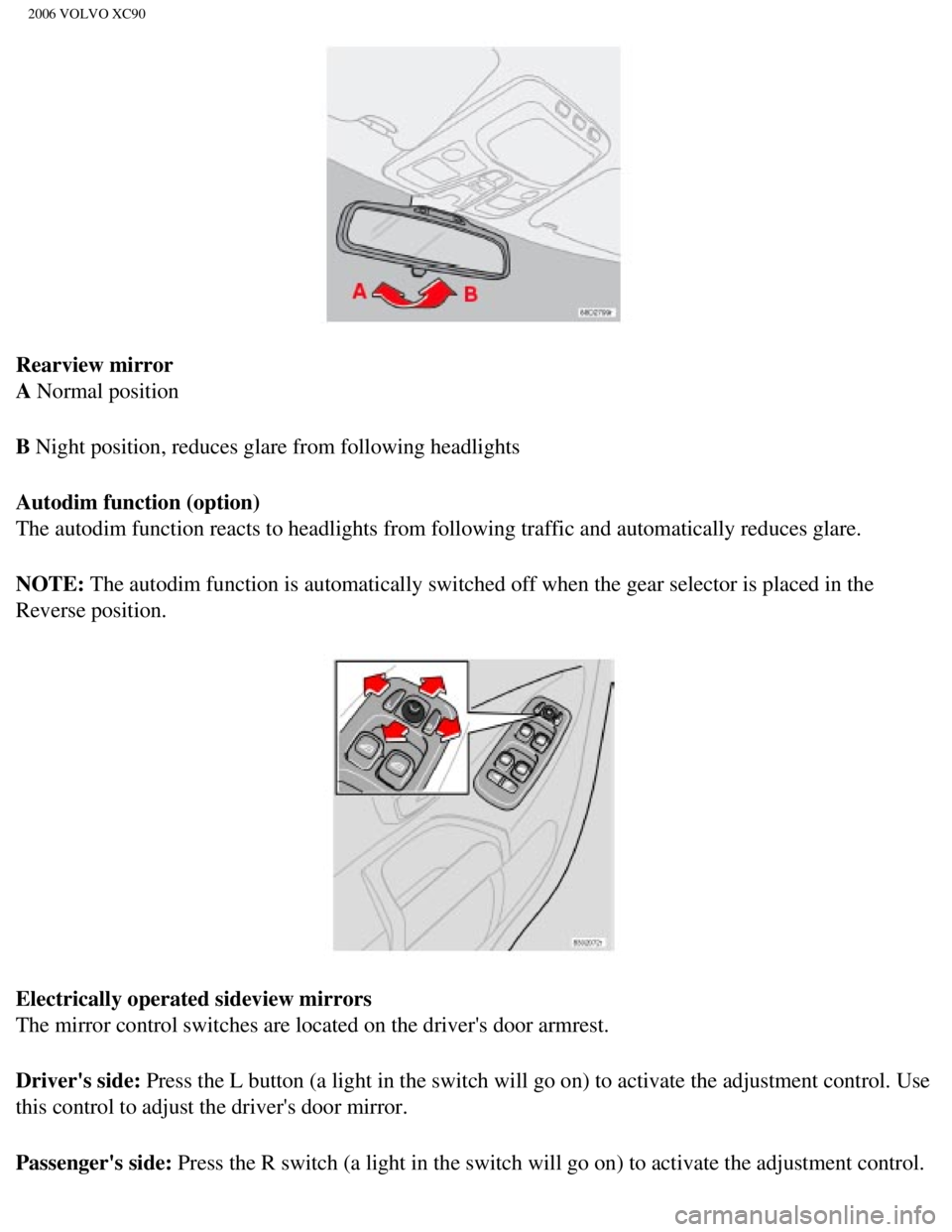
Rearview mirror
A Normal position
B Night position, reduces glare from following headlights
Autodim function (option)
The autodim function reacts to headlights from following traffic and aut\
omatically reduces glare.
NOTE: The autodim function is automatically switched off when the gear selecto\
r is placed in the
Reverse position.
Electrically operated sideview mirrors
The mirror control switches are located on the driver's door armrest.
Driver's side: Press the L button (a light in the switch will go on) to activate the \
adjustment control. Use
this control to adjust the driver's door mirror.
Passenger's side: Press the R switch (a light in the switch will go on) to activate the \
adjustment control.
file:///K|/ownersdocs/2006/2006_XC90/06xc90_02b.htm (13 of 17)12/30/20\
06 5:32:40 PM
Page 79 of 256
2006 VOLVO XC90
When the ECC system is in the AUTO mode, the green LED will be on .
Operation
Press
to operate the Air Quality sensor (normal setting).
Or:
Select one of the following three functions by pressing
1, 2 or 3 times.
1. The AUT LED lights. The Air Quality sensor is now activated.
2. No LED lights. Recirculation is not activated unless needed to cool t\
he passenger compartment in a warm
climate.
3. The MAN LED lights. Recirculation is now activated.
Keep in mind the following:
l Make it a rule to have the Air Quality sensor activated at all times.
l Recirculation is limited in cold climates to avoid fogging.
l If window fogging occurs, you should deactivate the Air Quality sensor. \
l If fogging occurs, use the defroster functions for the windshield, side \
windows and rear window. See page
54.
l The filter should be changed at the intervals recommended in the mainten\
ance schedule. However, if the
vehicle is used in a severely contaminated environment, it may be necess\
ary to change the filter more
frequently.
Contents | Top of Page
file:///K|/ownersdocs/2006/2006_XC90/06xc90_03.htm (9 of 9)12/30/2006 \
5:32:40 PM
Page 88 of 256

Folding down the backrest
If necessary, fold in the load anchorage eyelets before folding down the\
backrests.
1. Move the seat")
2006 VOLVO XC90
Folding the backrests - third row of seats (option)
Folding down the backrest
If necessary, fold in the load anchorage eyelets before folding down the\
backrests.
1. Move the seats in the second row forward, see
page 62.
2. Pull up the handle in illustration 1 above.
3. Push the seat cushion firmly rearward, under the backrest.
4. Fold down the backrests* (the head restraints fold down automaticall\
y) to the horizontal position.
Returning the backrest to the upright position
l Fold up the backrest to the upright position.
l Grasp the strap (see illustration 3 above) and pull the seat cushion o\
ut until it locks in place. This also
locks the backrest in the upright position.
* Please note that the head restraints in this row cannot be vertically \
adjusted.
pg. 65 Interior
Interior lighting
Courtesy light/front reading lights
The courtesy/reading lights can be turned on or off by pressing the resp\
ective buttons.
The courtesy light has a timer function which turns the light
1 on for 30 seconds if:
l You unlock the vehicle from the outside with the key or remote control. \
l You switch off the ignition (turn the key to position 0).
The courtesy light stays on for 10 minutes if one of the doors is left o\
pen after the vehicle is unlocked.
file:///K|/ownersdocs/2006/2006_XC90/06xc90_04a.htm (9 of 11)12/30/200\
6 5:32:41 PM
Page 89 of 256
2006 VOLVO XC90
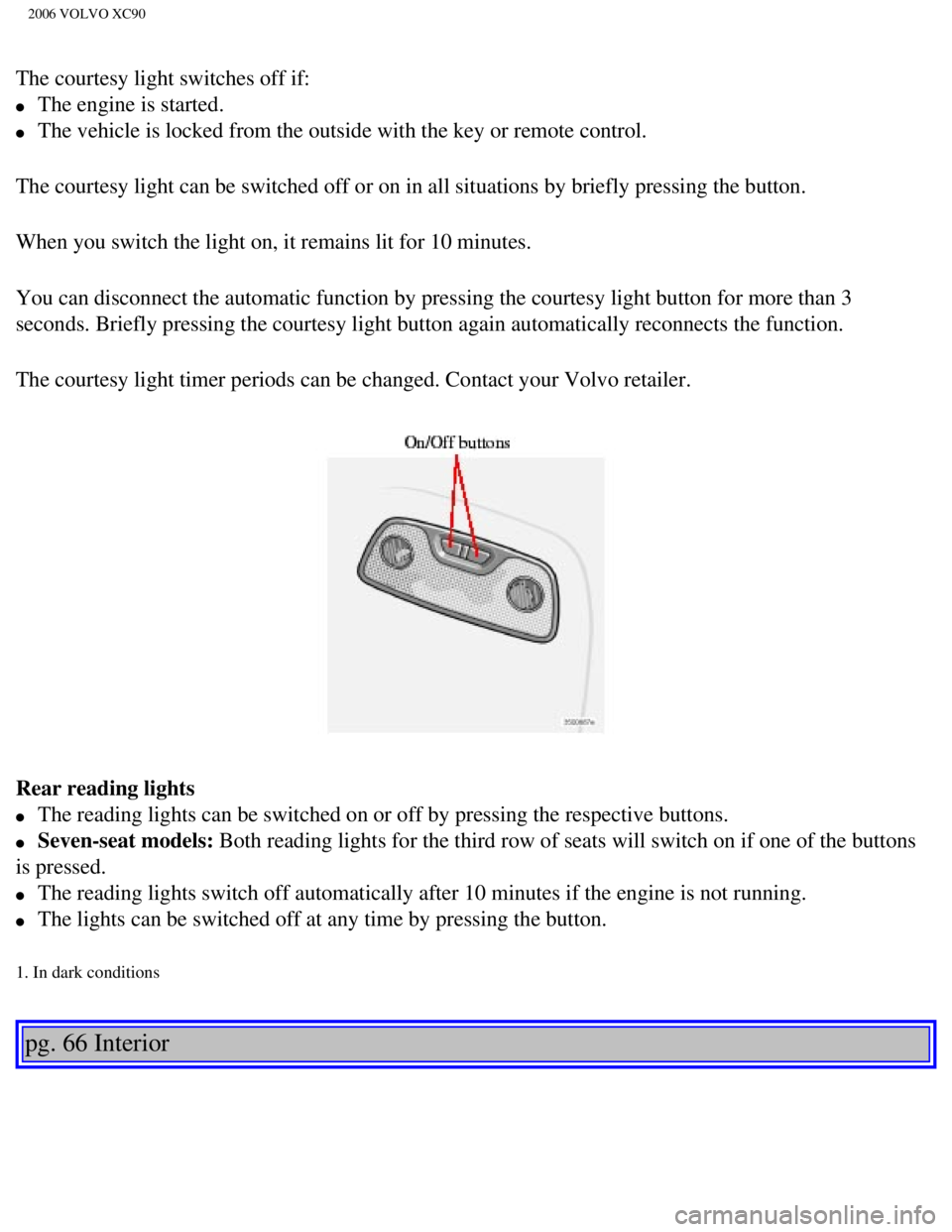
The courtesy light switches off if:
l The engine is started.
l The vehicle is locked from the outside with the key or remote control.
The courtesy light can be switched off or on in all situations by briefl\
y pressing the button.
When you switch the light on, it remains lit for 10 minutes.
You can disconnect the automatic function by pressing the courtesy light\
button for more than 3
seconds. Briefly pressing the courtesy light button again automatically \
reconnects the function.
The courtesy light timer periods can be changed. Contact your Volvo reta\
iler.
Rear reading lights
l The reading lights can be switched on or off by pressing the respective \
buttons.
l Seven-seat models: Both reading lights for the third row of seats will switch on if one of \
the buttons
is pressed.
l The reading lights switch off automatically after 10 minutes if the engi\
ne is not running.
l The lights can be switched off at any time by pressing the button.
1. In dark conditions
pg. 66 Interior
file:///K|/ownersdocs/2006/2006_XC90/06xc90_04a.htm (10 of 11)12/30/20\
06 5:32:41 PM
Page 104 of 256
: Press this button when approaching the car at night to light up the
interior courtesy light, parking lights, license plate lights and the li\
ghts in th")
2006 VOLVO XC90
Button 3 (Approach lighting): Press this button when approaching the car at night to light up the
interior courtesy light, parking lights, license plate lights and the li\
ghts in the sideview mirrors.
Button 4 (Panic): See
page 82 for more information on this function.
Button 5 (Tailgate unlock): Press this button twice within 3 seconds to unlock the tailgate (witho\
ut
unlocking the other doors).
Button 6 (Unlock): Press this button once to unlock the driver's door only. Wait for at le\
ast 1 second
and press the button again (within 10 seconds) to unlock all doors, an\
d the tailgate.
NOTE:
l If an airbag deploys, your vehicle's SRS control module will attempt to \
automatically unlock all
doors.
l The keys may also be used to lock and unlock the doors, and to activate \
and deactivate the alarm
system.
l To avoid leaving your keys in the vehicle, make a habit of always lockin\
g the vehicle with the remote
control.
Automatic re-locking If the doors are unlocked, the locks will automatically reengage (re-l\
ock) and the
alarm will rearm after 2 minutes unless a door or the tailgate has been \
opened.
Automatic locking (option)
The doors lock automatically when the vehicle's speed exceeds approximat\
ely 5 mph (7 km/h) and
remain locked a door is opened from the inside or until the car is unloc\
ked with the remote.
pg. 78 Locks and Alarms
l FCC ID:LQNP2T-APU This device complies with part 15 of the FCC rules. Op\
eration is subject to
the following conditions: (1) This device may not cause harmful interf\
erence, and (2) this device must
accept any interference received, including interference that may cause \
undesired operation.
l Canadian 2306104388 Model 504 2927 by Donnelly Operation is subject to t\
he following conditions:
(1) this device may not cause interference, and (2) this device must\
accept any interference, including
interference that may cause undesired operation of the device.
l Canadian 2306104388A Model 509 977 by Connaught Electronics Operation is\
subject to the
following conditions: (1) this device may not cause interference, and \
(2) this device must accept any
interference, including interference that may cause undesired operation \
of the device.
file:///K|/ownersdocs/2006/2006_XC90/06xc90_05.htm (5 of 13)12/30/2006\
5:32:43 PM
Page 128 of 256

2006 VOLVO XC90
Driving in rain and slush or passing through an automatic car wash can c\
ause water to collect on the
brake discs and pads. This will cause a delay in braking effect when the\
pedal is depressed. To avoid
such a delay when the brakes are needed, depress the pedal occasionally \
when driving through rain,
slush, etc. This will remove the water from the brakes. Check that brake\
application feels normal. This
should also be done after washing or starting in very damp or cold weath\
er.
Severe strain on the brake system
The brakes will be subject to severe strain when driving in mountains or\
hilly areas, or when towing a
trailer. Vehicle speed is usually slower, which means that the cooling o\
f the brakes is less efficient than
when driving on level roads. To reduce the strain on the brakes, shift i\
nto a lower gear and let the engine
help with the braking. Do not forget that if you are towing a trailer, t\
he brakes will be subjected to a
greater than normal load.
pg. 97 Starting and driving
Brake system (contd)
Anti-lock brakes (ABS)
If the warning lamp lights up there is a malfunction of the ABS system (\
the standard braking system will
however function) and the vehicle should be driven cautiously to a Volv\
o retailer for inspection. The
Anti-lock Braking System (ABS) helps to improve vehicle control (stop\
ping and steering) during severe
braking conditions by limiting brake lockup. When the system "senses" im\
pending lockup, braking
pressure is automatically modulated in order to help prevent lockup, whi\
ch could lead to a skid.
This system performs a self-diagnostic test when the engine is started a\
nd when the vehicle first
reaches a speed of approximately 12 mph (20 km/h). The brake pedal will pulsate several times and a
sound may be audible from the ABS control module. This is normal.
To obtain optimal effect from the ABS system, constant pressure should b\
e kept on the brake pedal. Do
not pump the brake pedal.
The switching of the ABS modulator will be audible and the brake pedal w\
ill pulsate during braking.
Please be aware that ABS does not increase the absolute braking potentia\
l of the vehicle. While control
will be enhanced, ABS will not shorten stopping distances on slippery su\
rfaces.
ABS with EBD (Electronic Brake Force Distribution)
EBD is an integrated part of the ABS system. EBD regulates the hydraulic\
pressure to the rear brakes to
help provide optimal braking capacity. The brake pedal will pulsate duri\
ng braking, which is normal.
file:///K|/ownersdocs/2006/2006_XC90/06xc90_06b.htm (2 of 18)12/30/200\
6 5:32:46 PM