lock VOLVO XC90 2006 User Guide
[x] Cancel search | Manufacturer: VOLVO, Model Year: 2006, Model line: XC90, Model: VOLVO XC90 2006Pages: 256, PDF Size: 6.87 MB
Page 40 of 256

2006 VOLVO XC90
l If both lights are still on after the engine has been restarted, switch \
off the engine again and check the
brake fluid level (see
page 147 for the location of the brake fluid reservoir).
WARNING!
The If the fluid level is below the MIN mark in the reservoir or if a "B\
rake failure - Service urgent"
message is displayed in the text window: DO NOT DRIVE. Have the vehicle \
towed to an authorized
Volvo retailer and have the brake system inspected.
l If the brake fluid level is above the MIN mark, drive carefully to an au\
thorized Volvo retailer and
have the brake system inspected.
DSTC
The Dynamic Stability and Traction Control system (DSTC) is explained \
in greater detail on
pages 98
and 99.
pg. 25 Instruments and controls
Supplemental Restraint system (SRS)
If this light comes on while the car is being driven, or remains on for \
longer than approximately 10
seconds after the car has been started, the SRS system's diagnostic func\
tions have detected a fault in a
seat belt lock or tensioner, a front airbag, side impact airbag, and/or \
an inflatable curtain. Have the
system(s) inspected by a trained and qualified Volvo service technicia\
n as soon as possible.
Generator warning light
If the light comes on while the engine is running, have the charging sys\
tem checked.
file:///K|/ownersdocs/2006/2006_XC90/06xc90_02a.htm (5 of 18)12/30/200\
6 5:32:38 PM
Page 46 of 256
 for the auxili")
2006 VOLVO XC90
12 volt socket
This 12 volt socket can be used to plug in certain accessories such as c\
ellular telephones, etc. The
ignition key must be in position 1 (or higher) for the auxiliary socke\
t to function.
NOTE: The auxiliary sockets can also be used for cigarette lighters, which ar\
e available as accessories
at your Volvo retailer.
Power child locks (option)
See page 81 for more information on this function.
pg. 29 Instruments and controls
Lighting panel
Lighting panel
1. Headlight/parking light switch
2. Front fog lights
file:///K|/ownersdocs/2006/2006_XC90/06xc90_02a.htm (11 of 18)12/30/20\
06 5:32:38 PM
Page 47 of 256

2006 VOLVO XC90
3. Rear fog light
4. Instrument panel lighting
5. Fuel filler door unlock button
Parking lights
The front and rear parking lights can be turned on even when the ignitio\
n is switched off.
l Turn switch 1 to position .
The license plate lights also illuminate when the parking lights are swi\
tched on.
Headlights
l Turn the ignition key to position II.
l The low beam headlights (daytime running lights) illuminate automatica\
lly, except when the light
switch (1) is in position
1.
See
page 32 for information on switching between high and low beams.
NOTE: Bi-Xenon headlights (option): Turn the headlight switch to position 0\
to activate a daylight
sensor, which automatically switches the low beams on or off, depending \
on ambient light conditions.
When driving in daylight, the headlights will switch off and the daytime\
running lights will come on. In
darkness, the daytime running lights will switch off and the Bi-Xenon he\
adlights will switch on.
Foglights
Front fog lights (option)
The front fog lights can be used in combination with either the headligh\
ts or the parking lights.
l Turn the ignition key to position II.
l Press button 2 to turn on the front fog lights.
An indicator light in the button illuminates when the front fog lights a\
re on.
Rear fog light
The single rear fog light is located in the driver's side tail light clu\
ster.
The rear fog light will only function in combination with the high/low b\
eam headlights or the optional
front fog lights.
l Turn the ignition key to position II.
l Press button 3 to turn on the rear fog light.
An indicator light in the button illuminates when the rear fog light is \
on.
file:///K|/ownersdocs/2006/2006_XC90/06xc90_02a.htm (12 of 18)12/30/20\
06 5:32:38 PM
Page 48 of 256

2006 VOLVO XC90
NOTE: The rear fog light is considerably brighter than the normal tail lights \
and should be used only
when conditions such as fog, rain, snow, smoke or dust reduce visibility\
for other vehicles to less than
500 ft. (150 meters).
Instrument panel lighting
The instrument panel lighting illuminates when the ignition key is in po\
sition II and the light switch (1)
is in either position
or .
l Move the thumb wheel (4) up to increase brightness or down to decrease\
brightness.
Unlocking the fuel filler door
Press button 5 when the car is at a standstill to unlock the fuel filler\
door. Please note that the fuel filler
door will remain unlocked until the car begins to move forward. An audib\
le click will be heard when the
fuel filler door relocks.
NOTE: If the fuel filler door does not unlock after the button has been press\
ed, drive the car
1. On Canadian models, the daytime running lights will remain on with th\
e light switch in this position.
pg. 30 Instruments and controls
Manually unlocking the fuel filler door
NOTE: at a speed of at least 5 mph (8 km/h), stop the car, and press the b\
utton again. See the
information to the right on unlocking the fuel filler door manually.
Panel on passenger's side of cargo area
Manually unlocking the fuel filler door
1. Open the upper and lower sections of the tailgate, and fold up the re\
ar section of the cargo area floor.
file:///K|/ownersdocs/2006/2006_XC90/06xc90_02a.htm (13 of 18)12/30/20\
06 5:32:38 PM
Page 49 of 256
 from the floor of the cargo area.
4. Open the cover (")
2006 VOLVO XC90
2. If the vehicle is equipped with the optional grocery bag holder, deta\
ch the holder's bands.
3. Remove the corner panel (1) from the floor of the cargo area.
4. Open the cover (2) in the side panel by pulling the tab (3) upwar\
d/outward.
5. Pull down the insulating material (4) to access the fuel filler doo\
r motor (5).
6. Move the catch (6) rearward to unlock the fuel filler door lock, or\
move it forward to lock the filler
door.
pg. 31 Instruments and controls
Steering wheel adjustment
Both the height and the reach of the steering wheel can be adjusted to a\
comfortable position for the
driver. Pull down the lever on the left of the steering column. Adjust t\
he steering wheel to a suitable
position and press the lever back into place to lock the steering wheel \
in the new position. Check that the
file:///K|/ownersdocs/2006/2006_XC90/06xc90_02a.htm (14 of 18)12/30/20\
06 5:32:38 PM
Page 50 of 256
2006 VOLVO XC90
steering wheel is locked in the new position.
WARNING!
The Never adjust the steering wheel while
driving.
pg. 32 Instruments and controls
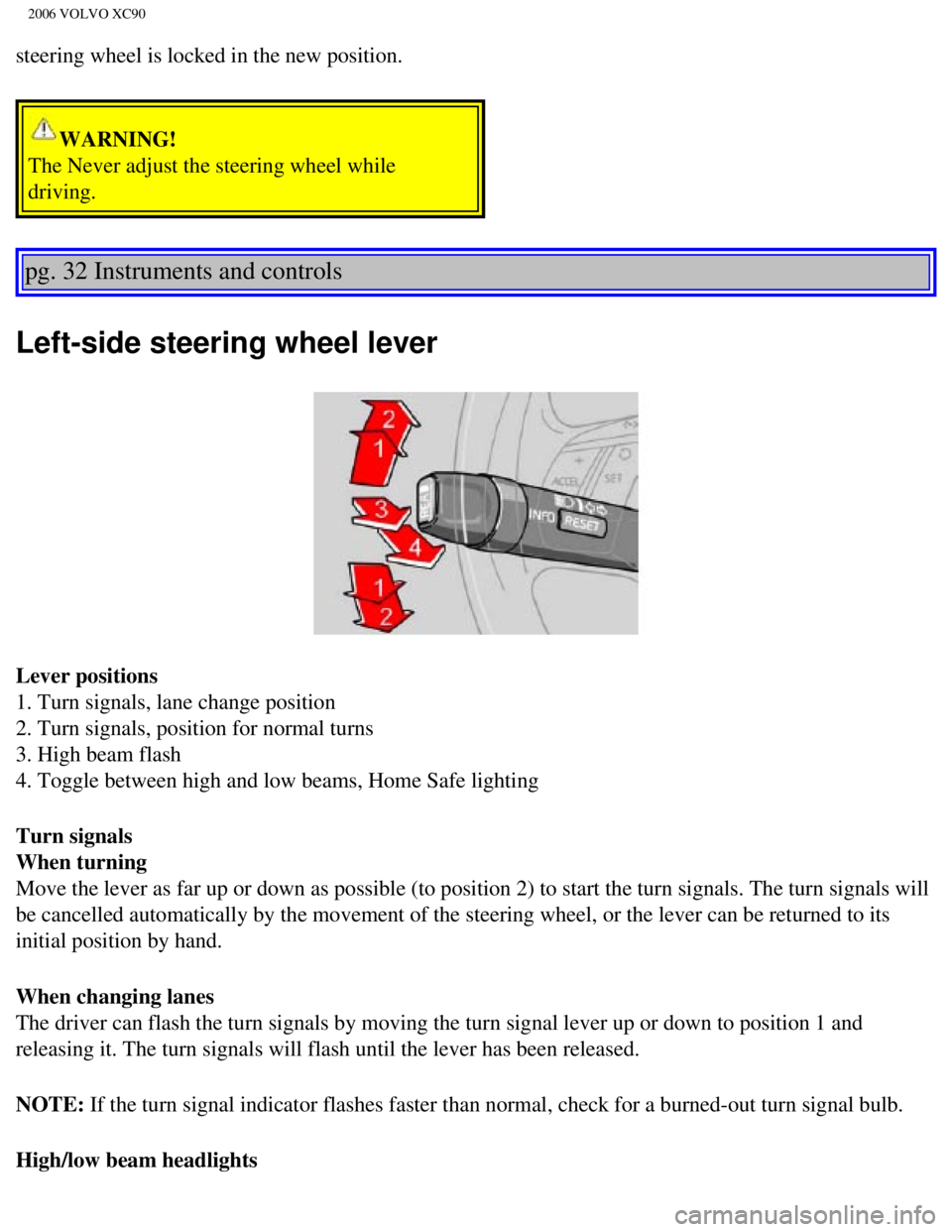
Left-side steering wheel lever
Lever positions
1. Turn signals, lane change position
2. Turn signals, position for normal turns
3. High beam flash
4. Toggle between high and low beams, Home Safe lighting
Turn signals
When turning
Move the lever as far up or down as possible (to position 2) to start \
the turn signals. The turn signals will
be cancelled automatically by the movement of the steering wheel, or the\
lever can be returned to its
initial position by hand.
When changing lanes
The driver can flash the turn signals by moving the turn signal lever up\
or down to position 1 and
releasing it. The turn signals will flash until the lever has been relea\
sed.
NOTE: If the turn signal indicator flashes faster than normal, check for a bur\
ned-out turn signal bulb.
High/low beam headlights
file:///K|/ownersdocs/2006/2006_XC90/06xc90_02a.htm (15 of 18)12/30/20\
06 5:32:38 PM
Page 51 of 256
2006 VOLVO XC90
Continuous high beams
l Turn the ignition key to position II.
l With the light switch (1) in position , (see page 29) pull the turn signal lever toward the
steering wheel (position 4) to toggle between high and low beams (thi\
s also applies on models equipped
with the optional Bi-Xenon headlights).
High beam flash
l Turn the ignition key to position II.
l Pull the turn signal lever to position 3. The high beams will remain on \
until the lever is released.
Home safe lighting
When you leave your car at night, you can make use of the home safe ligh\
ting function to illuminate the
area in front of the car.
l Remove the key from the ignition switch.
l Pull the direction indicator lever as far as possible towards the steeri\
ng wheel (to position 4) and
release it.
l Exit the car and lock the doors.
The headlights and parking lights will illuminate and remain on for 30
1, 60 or 90 seconds. The time
interval can be changed by an authorized Volvo retailer.
1. Factory setting
pg. 33 Instruments and controls
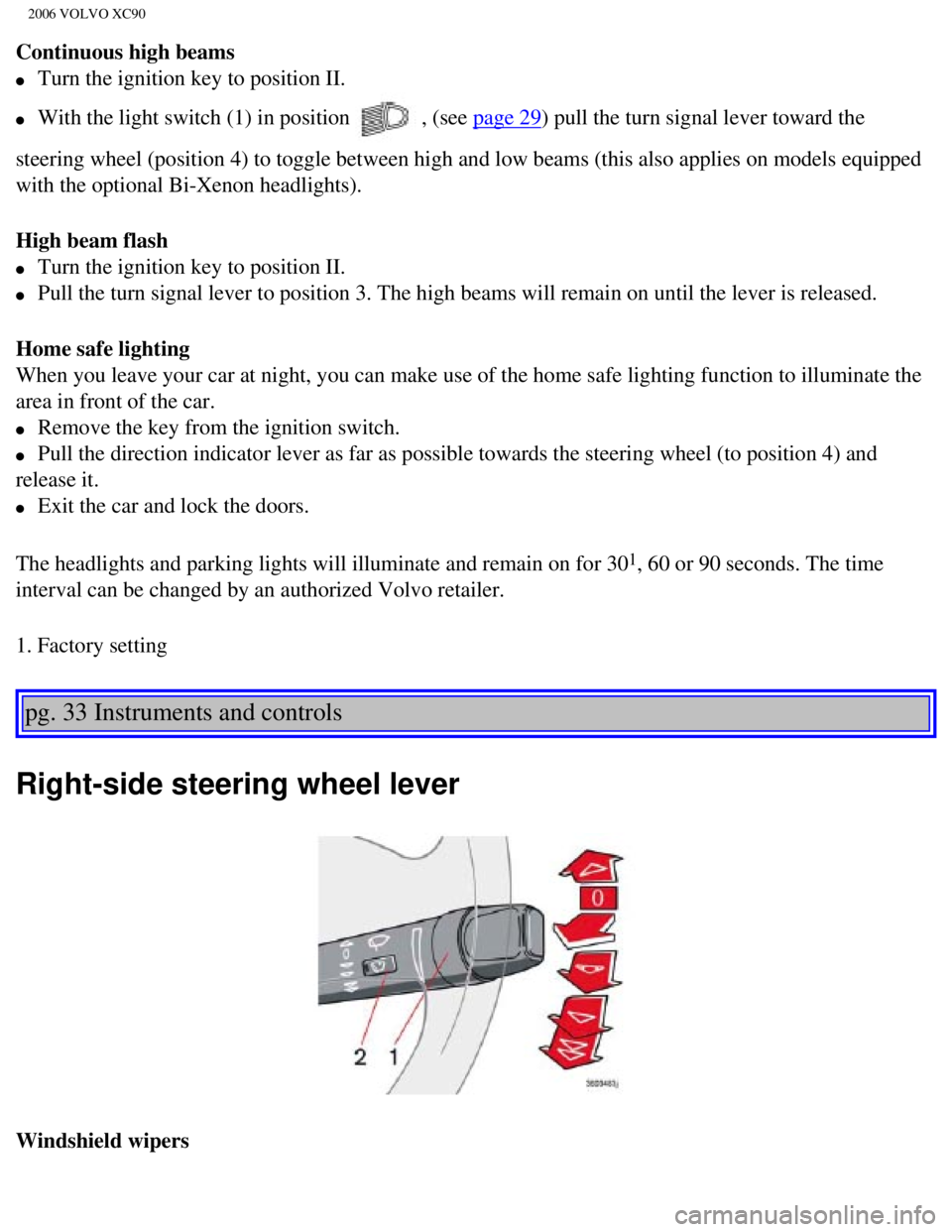
Right-side steering wheel lever
Windshield wipers
file:///K|/ownersdocs/2006/2006_XC90/06xc90_02a.htm (16 of 18)12/30/20\
06 5:32:38 PM
Page 59 of 256
.
Braking
l Cruise control is automatically disengaged when the brake pedal is depre\
ssed.")
2006 VOLVO XC90
NOTE: Cruise control will not function at speeds below approximately 20 mph (\
30 km/h).
Braking
l Cruise control is automatically disengaged when the brake pedal is depre\
ssed. The currently set speed
is stored in memory.
l Pressing resume will return the vehicle to the previously set speed.
Acceleration
Momentary acceleration, such as when passing another vehicle, does not a\
ffect cruise control operation.
The vehicle will automatically return to the previously set speed when y\
ou release the accelerator pedal.
Disengaging cruise control
To disengage cruise control, press the CRUISE button. CRUISE or CRUISE-O\
N will no longer be
displayed in the information window in the instrument panel.
NOTE: Cruise control is automatically disengaged if:
l the engine is switched off
l the gear selector is placed in (N)eutral
l the wheels start to spin or lock
l if an increase in speed is maintained for more than one minute
l if the vehicle's speed falls below approximately 20 mph (30 km/h).
Temporarily disengaging cruise control
l Press 0 to temporarily disengage cruise control. CRUISE will be displaye\
d in the information window
in the instrument panel.
l Press the brake pedal.
pg. 39 Instruments and controls
Press "resume"
to return to the previously set speed.
WARNING!
The Cruise control should not be used in heavy traffic or when driving o\
n wet or slippery roads, or
when driving on unpaved or uneven road surfaces. Cruise control may not \
maintain set speed on steep
downgrades.
pg. 40 Instruments and controls
file:///K|/ownersdocs/2006/2006_XC90/06xc90_02b.htm (6 of 17)12/30/200\
6 5:32:40 PM
Page 62 of 256

2006 VOLVO XC90
NOTE: There is also an audible signal that will sound if the car is driven wi\
th the parking brake
engaged.
l Release the parking brake pulling out the lower edge of the release hand\
le (A).
l If you inadvertently pull the plastic cover (B), it can be pressed bac\
k into place.
Opening the hood
WARNING!
Always use the parking brake when parking. On hills, also turn the front\
wheels toward the curb.The
indicator light in the instrument panel will light up even if the parkin\
g brake is applied only slightly.
Be sure to press down on the pedal sufficiently.
Opening/closing the hood
1. Pull the lever (1) located under the left side of the dashboard to \
release the hood lock.
2. Lift the hood slightly.
3. Press up the release control (2) located under the front edge of th\
e hood and lift.
To close the hood, place your hand on it and press down until the hood l\
ocks in the closed position.
WARNING!
l Do not grasp the ribs in the grille when closing the hood. If your finge\
rs protrude through the
grille, they could be injured on components in the engine compartment as\
the grille closes. We
recommend pressing down on the hood to close it.
l Check that the hood locks properly when closed!
pg. 42 Instruments and controls
file:///K|/ownersdocs/2006/2006_XC90/06xc90_02b.htm (9 of 17)12/30/200\
6 5:32:40 PM
Page 64 of 256
2006 VOLVO XC90
WARNING!
l Always remove the ignition key when the vehicle is unattended.
l Make sure that childrens' hands are clear before raising the
windows.
l Never leave children unattended in the vehicle.
pg. 43 Instruments and controls
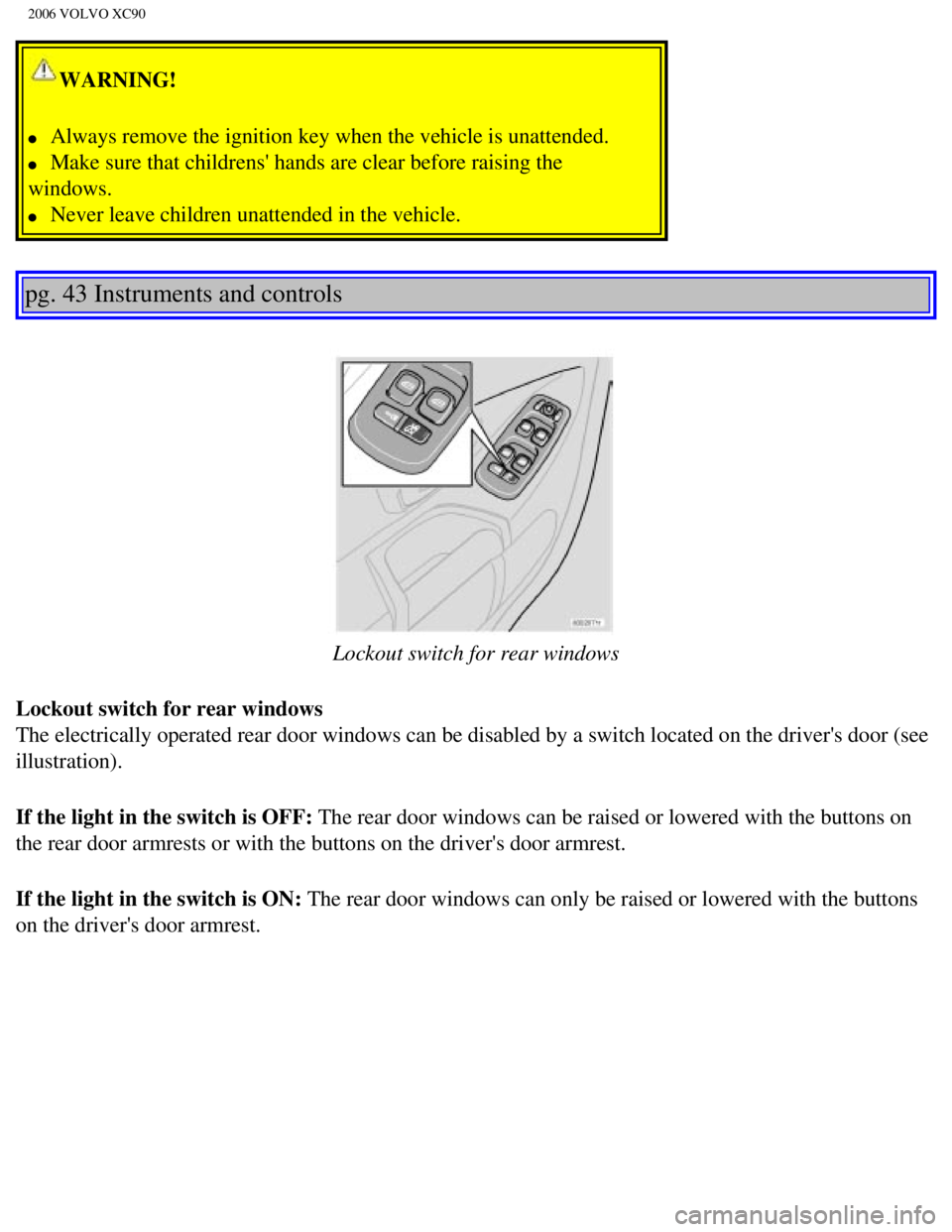
Lockout switch for rear windows
Lockout switch for rear windows
The electrically operated rear door windows can be disabled by a switch \
located on the driver's door (see
illustration).
If the light in the switch is OFF: The rear door windows can be raised or lowered with the buttons on
the rear door armrests or with the buttons on the driver's door armrest.\
If the light in the switch is ON: The rear door windows can only be raised or lowered with the buttons
on the driver's door armrest.
file:///K|/ownersdocs/2006/2006_XC90/06xc90_02b.htm (11 of 17)12/30/20\
06 5:32:40 PM