remote control VOLVO XC90 2006 User Guide
[x] Cancel search | Manufacturer: VOLVO, Model Year: 2006, Model line: XC90, Model: VOLVO XC90 2006Pages: 256, PDF Size: 6.87 MB
Page 105 of 256

2006 VOLVO XC90
WARNING!
Never use the transmitter to lock the doors from inside the vehicle.
Doing so would ACTIVATE:
- the break-in alarm, which would sound if one of the doors were opened \
- the optional interior motion and inclination alarm sensors.
Doing so would DEACTIVATE:
- the moonroof and interior courtesy light controls.
- the central locking buttons on the front door armrests, although the i\
nterior door handles would still
function to allow occupants to leave the vehicle.
Disabled features would remain disabled until the remote were used again\
to unlock the vehicle.
In addition, locking an occupied vehicle would hinder rapid access to th\
e occupants in an accident or
emergency.
Replacing the battery in the remote control
If the range of the transmitter is noticeably reduced, this indicates th\
at the battery is weak and should be
replaced.
To replace the battery
1. Carefully pry open the rear edge of the cover with a small screwdrive\
r.
2. Insert a new 3-volt, CR2032 battery, with the battery's plus side up.\
Avoid touching the contact
surfaces of the battery with your fingers.
3. Press the cover back into place. Ensure that the rubber seal is corre\
ctly positioned to help keep out
moisture.
NOTE: The old battery should be disposed of properly at a recycling center or\
at your Volvo retailer.
file:///K|/ownersdocs/2006/2006_XC90/06xc90_05.htm (6 of 13)12/30/2006\
5:32:43 PM
Page 107 of 256

2006 VOLVO XC90
Unlocking the tailgate
The tailgate lock is incorporated in the central locking system and is l\
ocked or unlocked when all doors
are locked/unlocked.
The tailgate can be unlocked by:
l Pressing UNLOCK on the remote control twice.
l Using the central locking button on the driver's door.
l Pressing twice on the remote control's tailgate unlock button (see illustration above\
).
l Relock the tailgate using the remote's "Lock" button.
Automatic relocking:
l If you use the tailgate unlock button to unlock the tailgate without ope\
ning it, it will automatically
relock after approximately 2 minutes.
Note: If you open the tailgate and close it again, it will remain unlocked an\
d the alarm will not be
rearmed. Press the lock button on the remote control to relock the tailg\
ate and rearm the alarm.
pg. 81 Locks and Alarms
file:///K|/ownersdocs/2006/2006_XC90/06xc90_05.htm (8 of 13)12/30/2006\
5:32:43 PM
Page 110 of 256
.
l The vehicle is lifted or towed (if the vehicle is equipped with the opt\
ional inclination sensor).
l The battery is disconnected (while the alarm is arm")
2006 VOLVO XC90
movement sensor).
l The vehicle is lifted or towed (if the vehicle is equipped with the opt\
ional inclination sensor).
l The battery is disconnected (while the alarm is armed).
l The siren is disconnected when the alarm is disarmed.
Arming the alarm
Press the LOCK button on the remote control, lock the vehicle using the \
key in the driver's door or press
the central lock button on driver's doors with the door open. One long f\
lash of the turn signals will
confirm that the alarm is armed.
Disarming the alarm
Press the UNLOCK button on the remote control or unlock the doors with t\
he key.
Turning off (stopping) the alarm
If the alarm is sounding, it can be stopped by pressing the UNLOCK butto\
n on the remote control or by
unlocking the driver's door with the key.
Audible/visual alarm signal
An audible alarm signal is given by a battery powered siren. The alarm c\
ycle lasts for 25 seconds.
The visual alarm signal is given by flashing all turn signals and turnin\
g on the interior lighting for
approximately 5 minutes.
"Panic" button
In an emergency situation, this feature can be used to attract attention\
.
Activate the "panic" button by pressing the red button on the remote con\
trol (see illustration on
page 77)
for at least 3 seconds or by pressing this button twice within 3 seconds\
. The turn signals will flash, and
the vehicle's horn will sound.
The function can be turned off by pressing any of the buttons on the rem\
ote control or will stop
automatically after 25 seconds. When a button is pressed, there is a 5 s\
econd delay before the panic
alarm is deactivated.
NOTE: This button will NOT unlock the vehicle.
pg. 83 Locks and Alarms
file:///K|/ownersdocs/2006/2006_XC90/06xc90_05.htm (11 of 13)12/30/200\
6 5:32:43 PM
Page 193 of 256

2006 VOLVO XC90
locking system's remote control to reactivate such features as the power\
windows, moonroof, courtesy
lighting, etc.
WARNING!
PROPOSITION 65 WARNING!
Battery posts, terminals, and related accessories contain lead and lead \
compounds, chemicals known
to the state of California to cause cancer and reproductive harm. Wash h\
ands after handling.
pg. 156 Maintenance
Bulbs
The following bulbs are used in the vehicle:
Bulb Type Socket
1. High beam H7 65W-
1. Low beam H11 55W-
2. Bi-Xenon headlight (option) D2R 35W
3. Front fog lights H1 55W
4. Front parking lights, front/rear side marker lights, license plate li\
ght, rear
footwell lighting W5W
W2,1x9,5d
5. Front turn signals H21W BAY9s
5. Rear fog light P21/4W BAY9s
file:///K|/ownersdocs/2006/2006_XC90/06xc90_09b.htm (5 of 24)12/30/200\
6 5:32:52 PM
Page 227 of 256

2006 VOLVO XC90
sensitivity of these should be equal to or greater than 102 dB. The head\
phone connections are intended
for 3.5 mm contacts and are located under the lower edge of the socket.
All headphones are automatically turned off when the ignition is switche\
d off. They must be manually
restarted when the ignition is switched on again.
Headphones - limitations
l The headphones will only work when the ignition key is in position I or \
higher.
l If a set of headphones is connected to the same source that is being sen\
t through the speakers, the
headphone controls cannot be used to change track or station. This is to\
prevent the driver from being
distracted by an unexpected change in music.
l If the driver selects the same sound source as someone listening to this\
source through headphones,
the driver takes control of the sound source.
l Only one disc in the optional CD changer, and one track on the CD can be\
played at a time.
l Headphone users can choose from among the preset radio stations (AM, FM\
1, FM2) previously set by
the driver.
l If FM is played in the speakers, AM is not available and vice versa.
pg. 187 Audio
Remote control (option)
1. Memory - stores radio stations that have been found by a search
To store a station:
- Press the memory button (1). The preset station number will flash 4 \
times in the display
- While the preset number is flashing, use the + or - buttons (5) to s\
elect a position at which to store the
station
file:///K|/ownersdocs/2006/2006_XC90/06xc90_11a.htm (5 of 18)12/30/200\
6 5:32:55 PM
Page 228 of 256
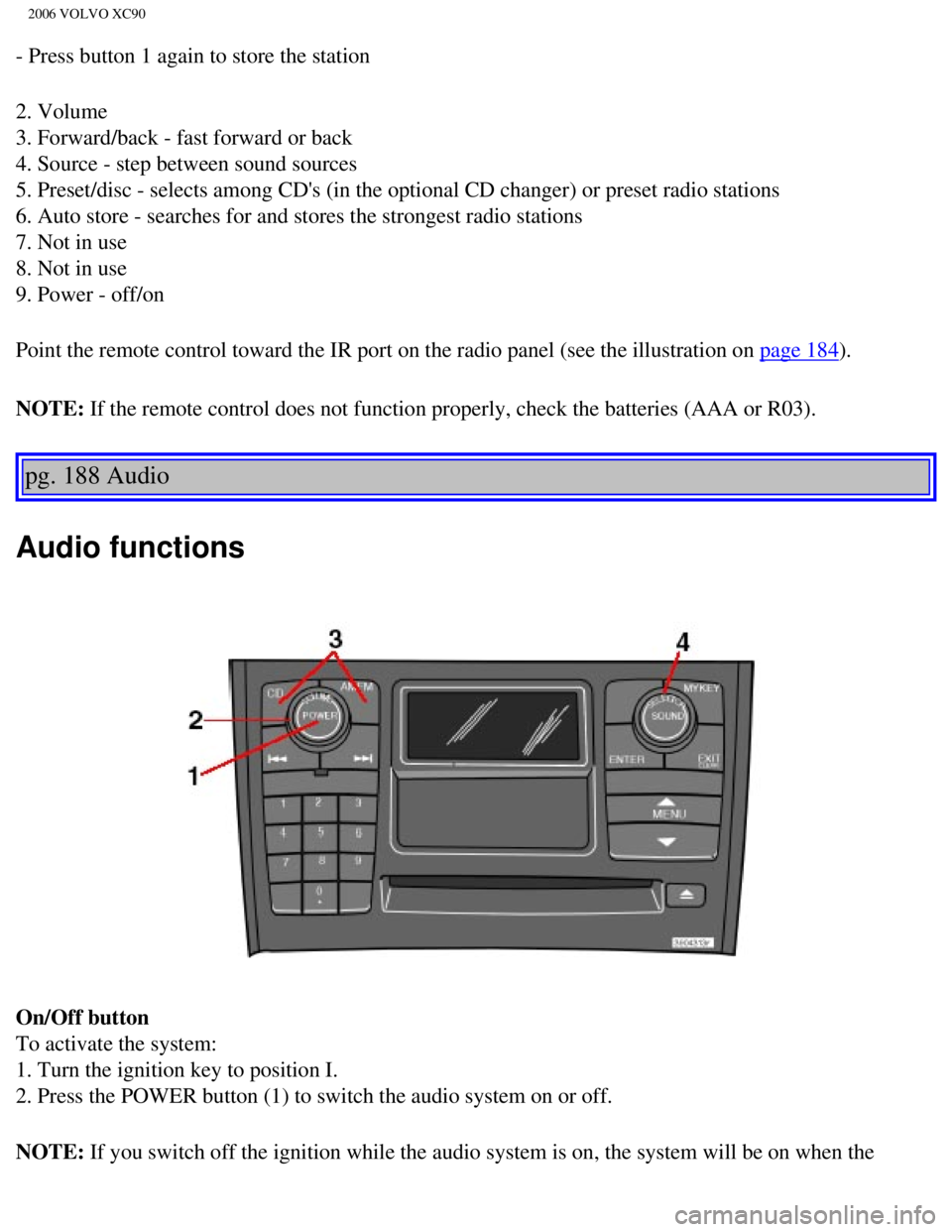
2006 VOLVO XC90
- Press button 1 again to store the station
2. Volume
3. Forward/back - fast forward or back
4. Source - step between sound sources
5. Preset/disc - selects among CD's (in the optional CD changer) or pr\
eset radio stations
6. Auto store - searches for and stores the strongest radio stations
7. Not in use
8. Not in use
9. Power - off/on
Point the remote control toward the IR port on the radio panel (see the\
illustration on
page 184).
NOTE: If the remote control does not function properly, check the batteries (\
AAA or R03).
pg. 188 Audio
Audio functions
On/Off button
To activate the system:
1. Turn the ignition key to position I.
2. Press the POWER button (1) to switch the audio system on or off.
NOTE: If you switch off the ignition while the audio system is on, the system \
will be on when the
file:///K|/ownersdocs/2006/2006_XC90/06xc90_11a.htm (6 of 18)12/30/200\
6 5:32:55 PM
Page 248 of 256

2006 VOLVO XC90
can be dried with a clean, lint-free cloth. Optical components in the CD\
changer may, however, take up
to one hour to dry off.
l Never attempt to play a disc which is damaged in any way.
l When not in use, the discs should be stored in their covers. Avoid stori\
ng discs in excessive heat,
direct sunlight or dusty locations.
pg. 204 Audio
HomeLink® Universal Transceiver
Hand-held transmitter
HomeLink® Universal Transceiver
HomeLink® is an advanced system that can be programmed to learn the c\
odes of three different remote
controlled-devices (e.g., garage door openers, remote lighting, entry d\
oor lock). HomeLink®'s sun visor-
mounted transceiver, powered by your vehicle's electrical system, may th\
en be used in place of your
hand-held remote controls.
NOTE: For your security, the HomeLink® Universal Transceiver is designed to\
not function if you lock
your vehicle from the outside.
Programming the transceiver
1. The ignition switch must be turned to the "accessory" position (II)\
before programming the
HomeLink® Universal Transceiver.
2. Begin by erasing all 3 factory default channels. Hold down the two ou\
tside buttons (buttons 1 and 3 in
the illustration) on the HomeLink® Universal Transceiver for about 2\
0 seconds, until HomeLink®'s
indicator light begins to flash. Then release the buttons.
file:///K|/ownersdocs/2006/2006_XC90/06xc90_11b.htm (8 of 11)12/30/200\
6 5:32:56 PM
Page 253 of 256

2006 VOLVO XC90
AWD 95
B
Bass
189
Battery
145, 152, 179
Battery - replacing
154
Battery drain - avoiding
92
Battery maintenance
153
Belt check
146
Black box (Vehicle Event Data)
142
Blower (fan)
54
Booster cushion, integrated
18
Brake system
24, 96
Bulbs, list of
156
Bulbs, replacing
157
C
Capacities
175
Capacity weight
121
Carbon Monoxide - Important Warning
87
Cargo capacity
174
Catalytic converter
178
CD changer
201
CD eject
200
CD Pause
199
CD player
199
Ceiling lighting
162
Center console - storage compartments
68
Central locking system - remote control
77
Changing a wheel
128
Changing coolant
146
Check Engine warning light
25
Child booster cushion
18
Child restraint anchorages
20
file:///K|/ownersdocs/2006/2006_XC90/06xc90_12.htm (2 of 5)12/30/2006 \
5:32:56 PM