reset VOLVO XC90 2006 User Guide
[x] Cancel search | Manufacturer: VOLVO, Model Year: 2006, Model line: XC90, Model: VOLVO XC90 2006Pages: 256, PDF Size: 6.87 MB
Page 227 of 256

2006 VOLVO XC90
sensitivity of these should be equal to or greater than 102 dB. The head\
phone connections are intended
for 3.5 mm contacts and are located under the lower edge of the socket.
All headphones are automatically turned off when the ignition is switche\
d off. They must be manually
restarted when the ignition is switched on again.
Headphones - limitations
l The headphones will only work when the ignition key is in position I or \
higher.
l If a set of headphones is connected to the same source that is being sen\
t through the speakers, the
headphone controls cannot be used to change track or station. This is to\
prevent the driver from being
distracted by an unexpected change in music.
l If the driver selects the same sound source as someone listening to this\
source through headphones,
the driver takes control of the sound source.
l Only one disc in the optional CD changer, and one track on the CD can be\
played at a time.
l Headphone users can choose from among the preset radio stations (AM, FM\
1, FM2) previously set by
the driver.
l If FM is played in the speakers, AM is not available and vice versa.
pg. 187 Audio
Remote control (option)
1. Memory - stores radio stations that have been found by a search
To store a station:
- Press the memory button (1). The preset station number will flash 4 \
times in the display
- While the preset number is flashing, use the + or - buttons (5) to s\
elect a position at which to store the
station
file:///K|/ownersdocs/2006/2006_XC90/06xc90_11a.htm (5 of 18)12/30/200\
6 5:32:55 PM
Page 228 of 256
2006 VOLVO XC90
- Press button 1 again to store the station
2. Volume
3. Forward/back - fast forward or back
4. Source - step between sound sources
5. Preset/disc - selects among CD's (in the optional CD changer) or pr\
eset radio stations
6. Auto store - searches for and stores the strongest radio stations
7. Not in use
8. Not in use
9. Power - off/on
Point the remote control toward the IR port on the radio panel (see the\
illustration on
page 184).
NOTE: If the remote control does not function properly, check the batteries (\
AAA or R03).
pg. 188 Audio
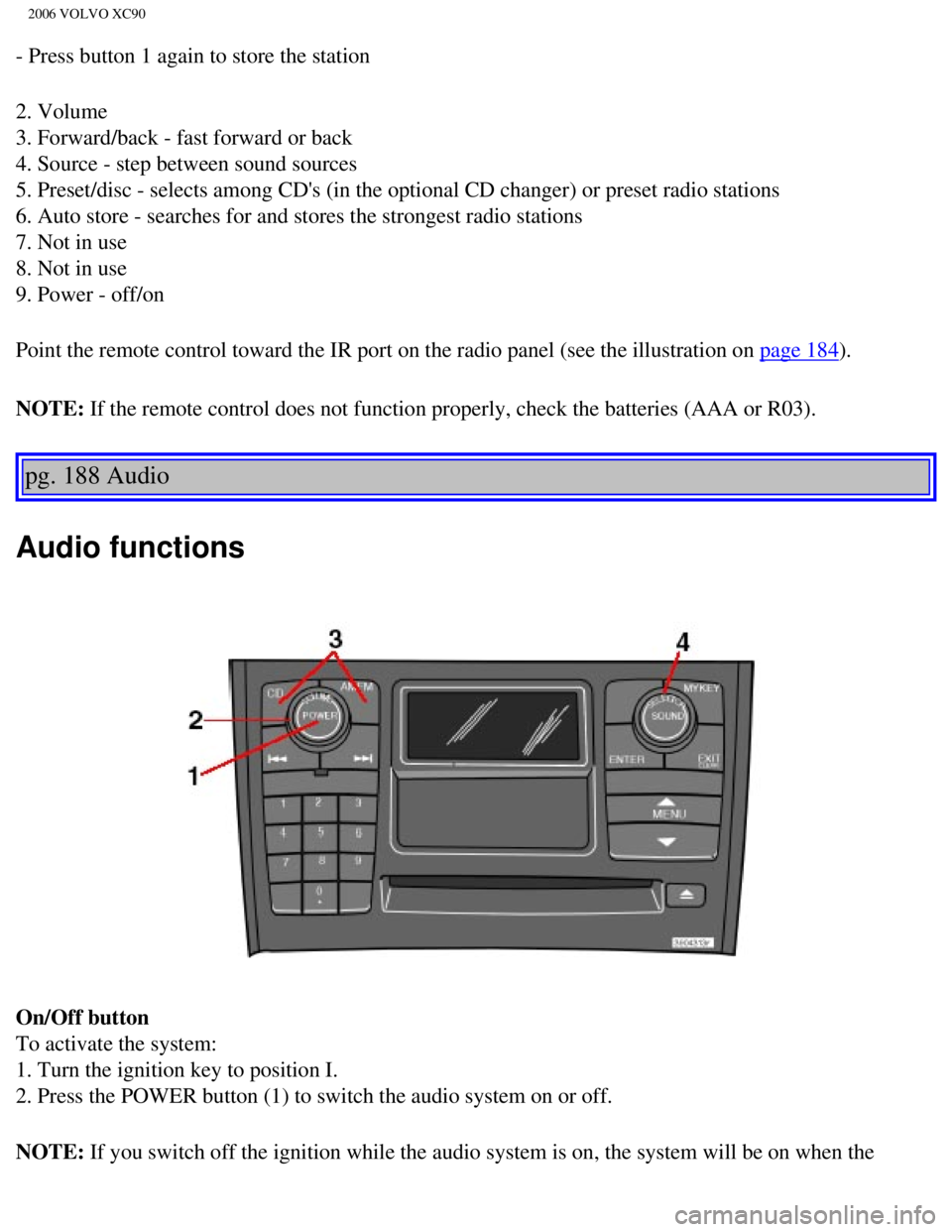
Audio functions
On/Off button
To activate the system:
1. Turn the ignition key to position I.
2. Press the POWER button (1) to switch the audio system on or off.
NOTE: If you switch off the ignition while the audio system is on, the system \
will be on when the
file:///K|/ownersdocs/2006/2006_XC90/06xc90_11a.htm (6 of 18)12/30/200\
6 5:32:55 PM
Page 236 of 256

This feature, which may not be available in your area, functions only wi\
th FM broadcasts.
The radio in your car is equipped with a")
2006 VOLVO XC90
pg. 195 Audio
Radio Broadcast Data System (RBDS)
This feature, which may not be available in your area, functions only wi\
th FM broadcasts.
The radio in your car is equipped with an advanced system allowing infor\
mation from broadcasters to be
transmitted visually, as text, together with the audio signal. This info\
rmation is then decoded by the
radio and made available for several new and unique features. The RBDS or Radio Broad\
cast Data
System operates in the FM band only, and the information transmitted is \
supplied exclusively by
participating broadcasters. Volvo has no control over the accuracy of the data or information.
Coverage by local broadcasters may be limited at this time, but as the t\
echnology and benefits grow, you
will find the radio in your car is equipped to take advantage of this sy\
stem.
NOTE: PI (Program Information) Seek: When an FM station has been stored as \
a preset, the radio also
stores RBDS program information if it is available. When the preset is s\
elected at a later time, the radio
tries to access updated program information. In weak signal areas, there\
may be a delay before the
station becomes audible. During this delay, there will be no sound and t\
he text "PI seek. Press EXIT to
cancel." will be displayed. You may press EXIT to immediately tune in th\
e station without RBDS
program information.
Scanning - SCAN
This function automatically searches for the next strongest AM and FM st\
ations. When the radio finds a
station, it will pause for approximately 8 seconds, after which it will \
continue scanning.
1. Choose radio mode using the SELECTOR control (1) or the AM/FM butto\
n (2).
file:///K|/ownersdocs/2006/2006_XC90/06xc90_11a.htm (14 of 18)12/30/20\
06 5:32:55 PM
Page 241 of 256

2006 VOLVO XC90
pg. 198 Audio
Menu settings and selections
Main menus/submenus
RADIO
1. AUTOSTORE*
1.1. AST MODE
1.2. AST SEARCH
1.2.1 AUTOSTORING
2. SCAN* ON/OFF**
3. RADIOTEXT* ON/OFF**
4. RADIO SETTINGS
4.1. PTY
4.1.1. SELECT PTY
4.1.2. SEARCH PTY*
4.1.3. SHOWPTY ON/OFF**
4.2. AF* ON**/OFF
4.3. RESET ALL
5. AUDIO SETTINGS
5.1. Dolby FM
5.1.1. Pro Logic II
5.1.2. 3CH
5.1.3. OFF**
5.2. Dolby CD
5.2.1. Pro Logic II**
5.2.2. 3CH
5.2.3. OFF
5.3. SUBWOOFER* ON/OFF** (certain audio systems)
5.4. EQ FRONT (certain audio systems)
5.5. EQ REAR (option)
5.6. RESET ALL
CD (single disc)
1. RANDOM*
2. SCAN*
3. AUDIO SETTINGS*
3.1. Dolby FM
3.1.1. Pro Logic II
3.1.2. 3CH
3.1.3. OFF**
file:///K|/ownersdocs/2006/2006_XC90/06xc90_11b.htm (1 of 11)12/30/200\
6 5:32:56 PM
Page 242 of 256

2006 VOLVO XC90
3.2. Dolby CD
3.2.1. Pro Logic II**
3.2.2. 3 CH
3.2.3. OFF ON/**OFF
3.3. SUBWOOFER* ON/OFF** (option)
3.4. EQ FRONT (certain audio systems)
3.5. EQ REAR (certain audio systems)
3.6. RESET ALL
CDX (CD changer - option)
1. RANDOM*
1.1. OFF
1.2. SINGLE DISC
1.3. ALL DISCS
2. SCAN*
3. DISC TEXT
4. AUDIO SETTINGS*
4.1. Dolby FM
4.1.1. Pro Logic II
4.1.2. 3CH
4.1.3. OFF**
4.2. Dolby CD
4.2.1. Pro Logic II**
4.2.2. 3 CH
4.2.3. OFF ON/**OFF
4.3. SUBWOOFER* ON**/OFF (option)
4.4. EQ FRONT (certain audio systems)
4.5. EQ REAR (certain audio systems)
4.6. RESET ALL
* These functions can be programmed with MY KEY (see
page 193).
** Default
pg. 199 Audio
CD player
file:///K|/ownersdocs/2006/2006_XC90/06xc90_11b.htm (2 of 11)12/30/200\
6 5:32:56 PM