steering wheel VOLVO XC90 2006 User Guide
[x] Cancel search | Manufacturer: VOLVO, Model Year: 2006, Model line: XC90, Model: VOLVO XC90 2006Pages: 256, PDF Size: 6.87 MB
Page 121 of 256

2006 VOLVO XC90
l Remove snow tires when threat of snow or ice has ended.
l Note that roof racks, ski racks, etc, increase air resistance and also f\
uel consumption.
l At highway driving speeds, fuel consumption will be lower with the air c\
onditioning on and the
windows closed than with the air conditioning off and the windows open. \
l Using the onboard trip computer's fuel consumption modes can help you le\
arn how to drive more
economically.
Other factors that decrease gas mileage are:
l Dirty air cleaner
l Dirty engine oil and clogged oil filter
l Dragging brakes
l Incorrect front end alignment
Some of the above mentioned items and others are checked at the standard\
Maintenance intervals.
Weight distribution affects handling
At the specified curb weight your vehicle has a tendency to understeer, \
which means that the steering
wheel has to be turned more than might seem appropriate for the curvatur\
e of a bend. This ensures good
stability and reduces the risk of rear wheel skid. Remember that these p\
roperties can alter with the
vehicle load. The heavier the load in the cargo area, the less the tende\
ncy to understeer.
WARNING!
Driving with the tailgate open: Driving with the tailgate open could lead to poisonous exhaust gases
entering the passenger compartment. If the tailgate must be kept open fo\
r any reason, proceed as
follows
- Close the windows
- Set the ventilation system control to air flow to floor, windshield an\
d side windows and blower
control to its highest setting.
CAUTION
Drive slowly and carefully if going through standing water (i.e. floode\
d roadways, etc.). Damage to
the engine could result if excess water is drawn in through the air inta\
ke system. Never drive the
vehicle in water deeper than 18 inches (48 cm).
pg. 92 Starting and driving
General information (contd)
Handling, roadholding
file:///K|/ownersdocs/2006/2006_XC90/06xc90_06a.htm (9 of 14)12/30/200\
6 5:32:45 PM
Page 134 of 256
.
B Screw the towing eyelet (C) in place (B), first by hand and then us\
ing the tire iron until")
2006 VOLVO XC90
To attach the towing eyelet:
A Use a coin to pry open the lower edge of the cover (A).
B Screw the towing eyelet (C) in place (B), first by hand and then us\
ing the tire iron until it is securely
in place.
After the vehicle has been towed, the eyelet should be removed and retur\
ned to the tool bag. Press the
cover back into position.
Precautions when the vehicle is in tow
l The steering wheel must be unlocked. Turn the ignition key to position I\
or II.
l The gear selector must be in position N.
l Maximum speed: 50 mph (80 km/h). Do not exceed the maximum allowable t\
owing speed.
l Maximum distance with front wheels on ground: 50 miles (80 km).
l While the vehicle is being towed, try to keep the tow rope taut at all t\
imes.
l The vehicle should only be towed in forward direction.
CAUTION
- Please check with state and local authorities before attempting this t\
ype of towing, as vehicles being
towed are subject to regulations regarding maximum towing speed, length \
and type of towing device,
lighting, etc.
- If the vehicle's battery is dead, do not attempt to start the vehicle \
by pushing or pulling it as this will
damage the three-way catalytic converter(s). The engine must be jump s\
tarted using an auxiliary
battery (see
page 103).
- If the vehicle is being towed on a flat bed truck, the towing eyelets \
must not be used to secure the
vehicle on the flat bed. Consult the tow truck operator.
WARNING!
- Remember that the power brakes and power steering will not function wh\
en engine is not running.
The braking and steering systems will function but the brake pedal press\
ure required is 3 - 4 times
above normal and greater steering effort must be exerted.
- The towing eyelets must not be used for pulling the vehicle out of a d\
itch or for any similar purpose
involving severe strain. Do not use the towing eyelets to pull the vehic\
le up onto a flat bed tow truck.
pg. 102 Starting and driving
Towing (contd)
file:///K|/ownersdocs/2006/2006_XC90/06xc90_06b.htm (8 of 18)12/30/200\
6 5:32:46 PM
Page 144 of 256
, and replace those th\
at are worn. Check tire pressures.
l The brakes, front wheel alignment, and steering gear should be")
2006 VOLVO XC90
l Examine tires carefully (the spare tire as well), and replace those th\
at are worn. Check tire pressures.
l The brakes, front wheel alignment, and steering gear should be checked b\
y your Volvo retailer only.
l Check all lights, including high beams.
l Reflective warning triangles are legally required in some states/provinc\
es.
l Have a word with your Volvo retailer if you intend to drive in countries\
where it may be difficult to
obtain the correct fuel.
l Consider your destination. If you will be driving through an area where \
snow or ice are likely to
occur, consider snow tires.
* To prevent injury from contact with hot surfaces, do not inspect your \
vehicle's transmission fluid
yourself. Have your vehicle's transmission fluid level inspected by a qu\
alified Volvo service technician.
pg. 110 Starting and driving
Contents | Top of Page
file:///K|/ownersdocs/2006/2006_XC90/06xc90_06b.htm (18 of 18)12/30/20\
06 5:32:46 PM
Page 186 of 256
2006 VOLVO XC90
Always entrust brake fluid changing to an authorized Volvo retailer.
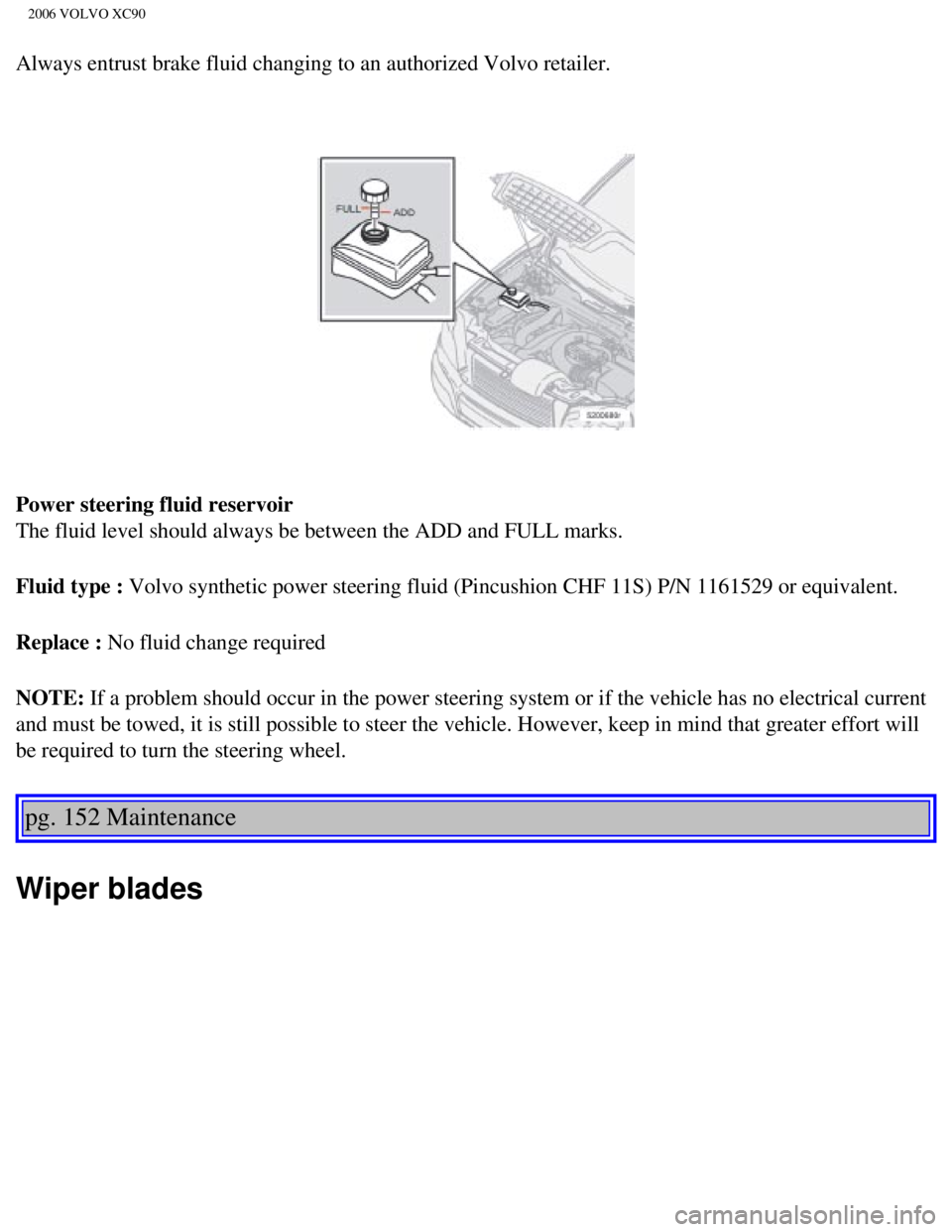
Power steering fluid reservoir
The fluid level should always be between the ADD and FULL marks.
Fluid type : Volvo synthetic power steering fluid (Pincushion CHF 11S) P/N 1161529 \
or equivalent.
Replace : No fluid change required
NOTE: If a problem should occur in the power steering system or if the vehicle\
has no electrical current
and must be towed, it is still possible to steer the vehicle. However, k\
eep in mind that greater effort will
be required to turn the steering wheel.
pg. 152 Maintenance
Wiper blades
file:///K|/ownersdocs/2006/2006_XC90/06xc90_09a.htm (13 of 15)12/30/20\
06 5:32:50 PM
Page 207 of 256
2006 VOLVO XC90
19. Engine control module feed, engine relay 5A
20. Parking lights 15A
21. -
pg. 166 Maintenance
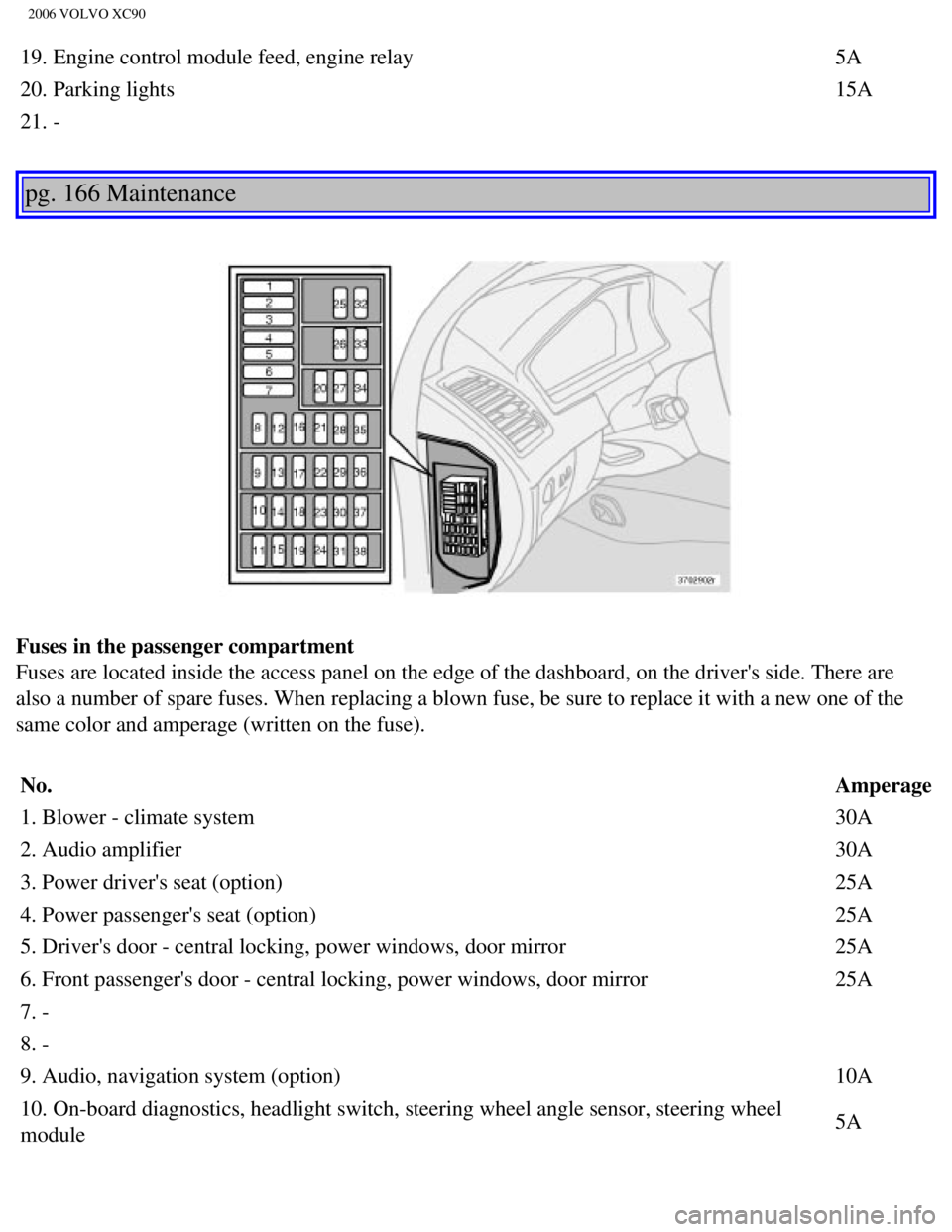
Fuses in the passenger compartment
Fuses are located inside the access panel on the edge of the dashboard, \
on the driver's side. There are
also a number of spare fuses. When replacing a blown fuse, be sure to re\
place it with a new one of the
same color and amperage (written on the fuse).
No. Amperage
1. Blower - climate system 30A
2. Audio amplifier 30A
3. Power driver's seat (option) 25A
4. Power passenger's seat (option) 25A
5. Driver's door - central locking, power windows, door mirror 25A
6. Front passenger's door - central locking, power windows, door mirror \
25A
7. -
8. -
9. Audio, navigation system (option) 10A
10. On-board diagnostics, headlight switch, steering wheel angle sensor,\
steering wheel
module 5A
file:///K|/ownersdocs/2006/2006_XC90/06xc90_09b.htm (19 of 24)12/30/20\
06 5:32:52 PM
Page 219 of 256
2006 VOLVO XC90
pg. 177 Specifications
Lubricants
Transmission
Oil grade:
See the table on
page 175.
Different types of oil should never be mixed.
Power steering
Grade: Volvo synthetic power steering fluid (Pentosin CHF 11S) P/N 1161529 \
or equivalent.
Brake fluid
Fluid type: DOT 4+ boiling point >536°F (280°C), P/N 9437433
Cooling system
Type Positive pressure, closed system.
Coolant Volvo original coolant/antifreeze
Volume 5-cyl. turbo 9.5 US qts. (9.0 liters)
V8 10.7 US qts. (10.2 liters)
The thermostat begins to open at 194°F (90°C).
Suspension
Rear suspension
Individual rear wheel suspension with longitudinal support arms, double \
link arms and track rods.
file:///K|/ownersdocs/2006/2006_XC90/06xc90_10.htm (7 of 10)12/30/2006\
5:32:53 PM
Page 225 of 256

The four buttons on the steering wheel keypad can be used to control the\
audio system. The steering
wheel keypad can be used to adjust volume, shift")
2006 VOLVO XC90
Steering wheel keypad (option)
The four buttons on the steering wheel keypad can be used to control the\
audio system. The steering
wheel keypad can be used to adjust volume, shift between preset stations\
and change CD tracks.
l Press the or buttons briefly to search for a radio station, or to go to the next/pre\
vious
track on a CD
l Press and hold down these buttons to search within a track.
Display
The display (1) shows the currently selected function, menu selections\
, etc.
Clean the display with a dry, soft, lint-free cloth. Do not use cleaning\
agents.
Accessing and using menus
In menu mode, you can change settings and program new functions in the a\
udio system. The various
file:///K|/ownersdocs/2006/2006_XC90/06xc90_11a.htm (3 of 18)12/30/200\
6 5:32:55 PM
Page 229 of 256
 clockwise or counterclockwise to raise or lower the \
volume. The volume control is
electronic and has no end positio")
2006 VOLVO XC90
ignition is switched on again.
Volume control
Turn the knob (2) clockwise or counterclockwise to raise or lower the \
volume. The volume control is
electronic and has no end position. Volume can also be raised (+) or l\
owered (-) using the optional
steering wheel keypad.
Pause mode
If the volume is turned off, the CD player will go into pause mode. Re-a\
ctivate the player by turning up
the volume.
Selecting a sound source
A sound source can be selected either with the function buttons (3) - \
CD, AM/FM, or with the
SELECTOR control (4).
To select a sound source:
l Turn the SELECTOR control to choose FM1, FM2, AM, CD, CD changer (optio\
n)
l Press the AM/FM button repeatedly to choose between FM1, FM2, AM
l Press the CD button to change to the CD player or optional CD changer
The selected sound source will be shown in the display.
pg. 189 Audio
Sound settings
1. Press the SOUND button (1) repeatedly until you come to the setting\
that you wish to change. Choose
BASS, TREBLE, FADER, BALANCE, SUBWOOFER (option), CENTER (option) or\
SURROUND
file:///K|/ownersdocs/2006/2006_XC90/06xc90_11a.htm (7 of 18)12/30/200\
6 5:32:55 PM
Page 233 of 256
 or the \
AM/FM button (2).
2. Press briefly on
or to search for the next strong station. The radio wi")
2006 VOLVO XC90
Station search
1. Choose radio mode AM/FM1/FM2 using the SELECTOR control (1) or the \
AM/FM button (2).
2. Press briefly on
or to search for the next strong station. The radio will search for the ne\
xt
audible station and then stop.
3. Press one of the buttons again to start a new search.
Manually search for a known frequency
1. Press and hold the
or button (or the corresponding buttons on the steering wheel
keypad). MAN will be shown in the display. The radio will slowly scroll\
in the desired direction and
then increase speed after a few seconds.
2. Release the button when the desired frequency is displayed.
3. If you need to adjust the frequency, press briefly on
or .
4. The manual search function is available for five seconds after you la\
st pressed the button.
pg. 193 Audio
file:///K|/ownersdocs/2006/2006_XC90/06xc90_11a.htm (11 of 18)12/30/20\
06 5:32:55 PM
Page 243 of 256
 or the CD button \
(2).
2. Insert a CD into the player.
CD Pause
To pause CD playback, turn the volume all the")
2006 VOLVO XC90
Starting the CD
1. Select the CD mode using the SELECTOR control (1) or the CD button \
(2).
2. Insert a CD into the player.
CD Pause
To pause CD playback, turn the volume all the way down. "CD paused" will\
be displayed. This will not
occur if someone in the rear seat is listening to the CD through the opt\
ional headphones.
Play will resume when the volume is turned up again.
Changing tracks
Press
to go to the next track or to go to the previous track. The track number is shown in the
display. If you have a keypad in the steering wheel, you can use the arr\
ow keys in the same way.
Searching within a track
Press and hold down
or to search within a track or the whole disc. The search continues as
long as the buttons are depressed. If you have a keypad in the steering \
wheel, you can use the arrow keys
in the same way.
Random play
This function plays the tracks on a CD in random order (shuffle).
1. Press the MENU button.
2. Select RANDOM and press ENTER.
3. RND is shown in the display as long as the function is activated.
4. Go into the menu and select RANDOM OFF to stop random play, or press \
EXIT.
file:///K|/ownersdocs/2006/2006_XC90/06xc90_11b.htm (3 of 11)12/30/200\
6 5:32:56 PM