steering VOLVO XC90 2006 Owner's Manual
[x] Cancel search | Manufacturer: VOLVO, Model Year: 2006, Model line: XC90, Model: VOLVO XC90 2006Pages: 256, PDF Size: 6.87 MB
Page 209 of 256
2006 VOLVO XC90
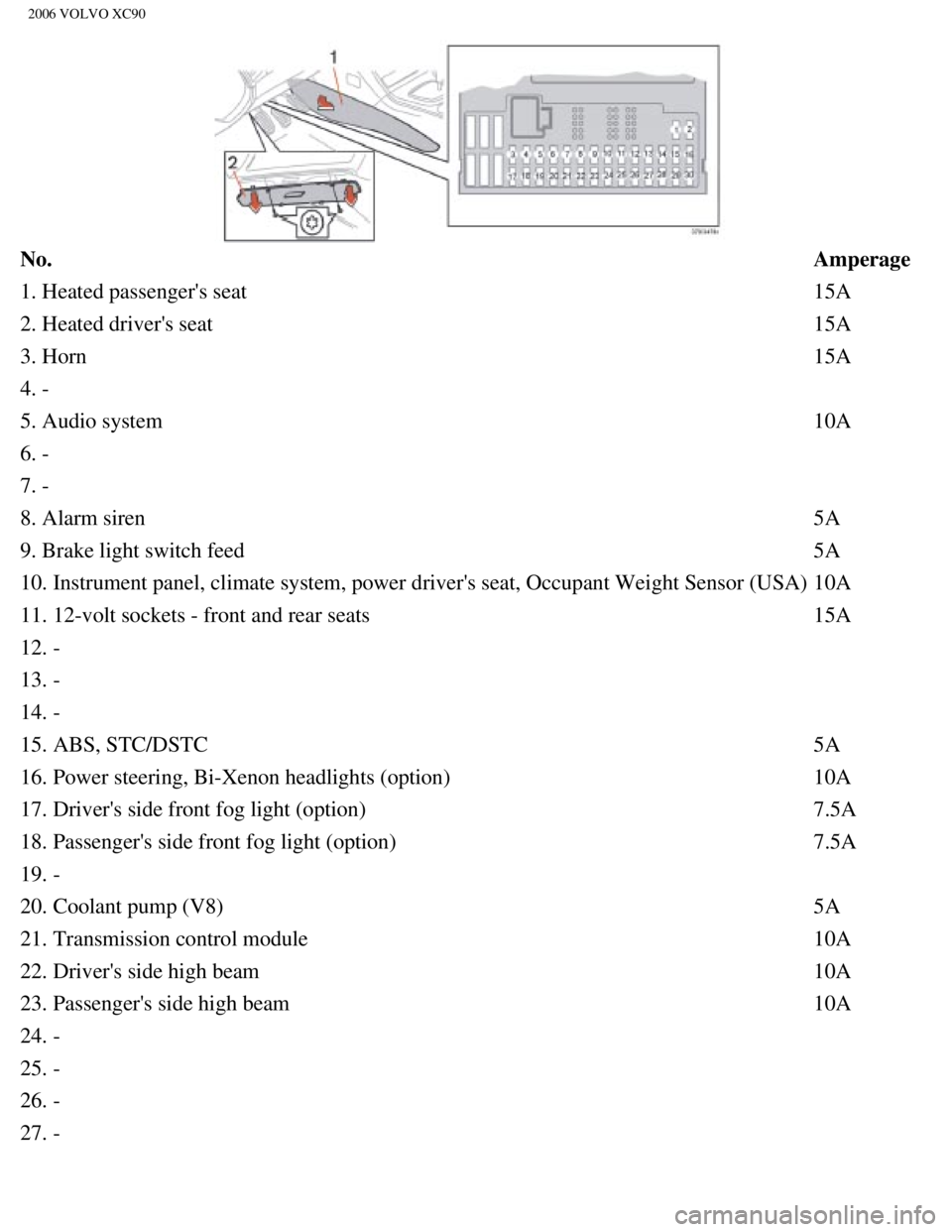
No. Amperage
1. Heated passenger's seat 15A
2. Heated driver's seat 15A
3. Horn 15A
4. -
5. Audio system 10A
6. -
7. -
8. Alarm siren 5A
9. Brake light switch feed 5A
10. Instrument panel, climate system, power driver's seat, Occupant Weig\
ht Sensor (USA) 10A
11. 12-volt sockets - front and rear seats 15A
12. -
13. -
14. -
15. ABS, STC/DSTC 5A
16. Power steering, Bi-Xenon headlights (option) 10A
17. Driver's side front fog light (option) 7.5A
18. Passenger's side front fog light (option) 7.5A
19. -
20. Coolant pump (V8) 5A
21. Transmission control module 10A
22. Driver's side high beam 10A
23. Passenger's side high beam 10A
24. -
25. -
26. -
27. -
file:///K|/ownersdocs/2006/2006_XC90/06xc90_09b.htm (21 of 24)12/30/20\
06 5:32:52 PM
Page 218 of 256
2006 VOLVO XC90
Fluid Capacities
Fuel tank 21.1 US gallons (80 liters).
Minimum octane requirement - AKI 87 (RON 91) - unleaded fuel (See
also
page 86)
Transmission oil
AW55-51 (5-cyl. turbo) 7.6 US qts. (7.2 liters) JWS 3309
TF-80SC (V8) 7.4 US qts. (7.0 liters) JWS 3309
Miscellaneous
Power steering 1.1 US qts. (1.0 liters)
Windshield washer
reservoir 6.9 US qts. (6.5 liters)
Brake fluid 0.63 US qts. (0.6 liters)
Air conditioning system Front - 2.2 lb. (1 kg), Rear (option) 2.9 lb. (1.3 kg) R 134a (HF\
C134a)
WARNING!
When adding accessories, equipment, luggage and other cargo to your vehi\
cle, the total capacity
weight must not be exceeded.
pg. 176 Specifications
Engine oil
Specifications
Engine oil must meet the minimum ILSAC specification GF-3, API SL, or AC\
EA A1/B1. Lower quality
oils may not offer the same fuel economy, engine performance, or engine \
protection.
Volume
Engine
designation Volume between MIN-MAX on dipstick
Volume
a
2.5T B5254T2 1.3 US qts (1.2 liters) 5.8 US qts. (5.5 liters)
V8 AWD B8444S 1.3 US qts (1.2 liters) 7.1 US qts. (6.7 liters)
a. Including filter replacement
file:///K|/ownersdocs/2006/2006_XC90/06xc90_10.htm (6 of 10)12/30/2006\
5:32:53 PM
Page 219 of 256
2006 VOLVO XC90
pg. 177 Specifications
Lubricants
Transmission
Oil grade:
See the table on
page 175.
Different types of oil should never be mixed.
Power steering
Grade: Volvo synthetic power steering fluid (Pentosin CHF 11S) P/N 1161529 \
or equivalent.
Brake fluid
Fluid type: DOT 4+ boiling point >536°F (280°C), P/N 9437433
Cooling system
Type Positive pressure, closed system.
Coolant Volvo original coolant/antifreeze
Volume 5-cyl. turbo 9.5 US qts. (9.0 liters)
V8 10.7 US qts. (10.2 liters)
The thermostat begins to open at 194°F (90°C).
Suspension
Rear suspension
Individual rear wheel suspension with longitudinal support arms, double \
link arms and track rods.
file:///K|/ownersdocs/2006/2006_XC90/06xc90_10.htm (7 of 10)12/30/2006\
5:32:53 PM
Page 220 of 256

2006 VOLVO XC90
Front suspension
Spring strut suspension with integrated shock absorbers and control arms\
linked to the support frame.
Power-assisted rack and pinion steering. Safety type steering column.
pg. 178 Specifications
Three-way catalytic converter cautions
l Keep your engine properly tuned. Certain engine malfunctions, particular\
ly involving the electrical,
fuel or distributor ignition systems, may cause unusually high three-way\
catalytic converter
temperatures. Do not continue to operate your vehicle if you detect engi\
ne misfire, noticeable loss of
power or other unusual operating conditions, such as engine overheating \
or backfiring. A properly tuned
engine will help avoid malfunctions that could damage the three-way cata\
lytic converter.
l Do not park your vehicle over combustible materials, such as grass or le\
aves, which can come into
contact with the hot exhaust system and cause such materials to ignite u\
nder certain wind and weather
conditions.
l Excessive starter cranking (in excess of one minute), or an intermitte\
ntly firing or flooded engine can
cause three-way catalytic converter or exhaust system overheating.
l Remember that tampering or unauthorized modifications to the engine, the\
Electronic Control
Module, or the vehicle may be illegal and can cause three-way catalytic \
converter or exhaust system
overheating. This includes:
- Altering fuel injection setting or components.
- Altering emission system components or location or removing components\
.
- Repeated use of leaded fuel.
NOTE: Unleaded fuel is required for vehicles with three-way catalytic converte\
rs.
pg. 179 Specifications
Electrical system
12-volt system with voltage controlled generator. Single wire system in \
which the chassis and engine
block are used as conductors, grounded on the chassis.
Battery 2.5TV8
Voltage 12 V12 V
Cold start capacity
(CCA) 600 A
600 A
file:///K|/ownersdocs/2006/2006_XC90/06xc90_10.htm (8 of 10)12/30/2006\
5:32:53 PM
Page 225 of 256

The four buttons on the steering wheel keypad can be used to control the\
audio system. The steering
wheel keypad can be used to adjust volume, shift")
2006 VOLVO XC90
Steering wheel keypad (option)
The four buttons on the steering wheel keypad can be used to control the\
audio system. The steering
wheel keypad can be used to adjust volume, shift between preset stations\
and change CD tracks.
l Press the or buttons briefly to search for a radio station, or to go to the next/pre\
vious
track on a CD
l Press and hold down these buttons to search within a track.
Display
The display (1) shows the currently selected function, menu selections\
, etc.
Clean the display with a dry, soft, lint-free cloth. Do not use cleaning\
agents.
Accessing and using menus
In menu mode, you can change settings and program new functions in the a\
udio system. The various
file:///K|/ownersdocs/2006/2006_XC90/06xc90_11a.htm (3 of 18)12/30/200\
6 5:32:55 PM
Page 229 of 256
 clockwise or counterclockwise to raise or lower the \
volume. The volume control is
electronic and has no end positio")
2006 VOLVO XC90
ignition is switched on again.
Volume control
Turn the knob (2) clockwise or counterclockwise to raise or lower the \
volume. The volume control is
electronic and has no end position. Volume can also be raised (+) or l\
owered (-) using the optional
steering wheel keypad.
Pause mode
If the volume is turned off, the CD player will go into pause mode. Re-a\
ctivate the player by turning up
the volume.
Selecting a sound source
A sound source can be selected either with the function buttons (3) - \
CD, AM/FM, or with the
SELECTOR control (4).
To select a sound source:
l Turn the SELECTOR control to choose FM1, FM2, AM, CD, CD changer (optio\
n)
l Press the AM/FM button repeatedly to choose between FM1, FM2, AM
l Press the CD button to change to the CD player or optional CD changer
The selected sound source will be shown in the display.
pg. 189 Audio
Sound settings
1. Press the SOUND button (1) repeatedly until you come to the setting\
that you wish to change. Choose
BASS, TREBLE, FADER, BALANCE, SUBWOOFER (option), CENTER (option) or\
SURROUND
file:///K|/ownersdocs/2006/2006_XC90/06xc90_11a.htm (7 of 18)12/30/200\
6 5:32:55 PM
Page 233 of 256
 or the \
AM/FM button (2).
2. Press briefly on
or to search for the next strong station. The radio wi")
2006 VOLVO XC90
Station search
1. Choose radio mode AM/FM1/FM2 using the SELECTOR control (1) or the \
AM/FM button (2).
2. Press briefly on
or to search for the next strong station. The radio will search for the ne\
xt
audible station and then stop.
3. Press one of the buttons again to start a new search.
Manually search for a known frequency
1. Press and hold the
or button (or the corresponding buttons on the steering wheel
keypad). MAN will be shown in the display. The radio will slowly scroll\
in the desired direction and
then increase speed after a few seconds.
2. Release the button when the desired frequency is displayed.
3. If you need to adjust the frequency, press briefly on
or .
4. The manual search function is available for five seconds after you la\
st pressed the button.
pg. 193 Audio
file:///K|/ownersdocs/2006/2006_XC90/06xc90_11a.htm (11 of 18)12/30/20\
06 5:32:55 PM
Page 243 of 256
 or the CD button \
(2).
2. Insert a CD into the player.
CD Pause
To pause CD playback, turn the volume all the")
2006 VOLVO XC90
Starting the CD
1. Select the CD mode using the SELECTOR control (1) or the CD button \
(2).
2. Insert a CD into the player.
CD Pause
To pause CD playback, turn the volume all the way down. "CD paused" will\
be displayed. This will not
occur if someone in the rear seat is listening to the CD through the opt\
ional headphones.
Play will resume when the volume is turned up again.
Changing tracks
Press
to go to the next track or to go to the previous track. The track number is shown in the
display. If you have a keypad in the steering wheel, you can use the arr\
ow keys in the same way.
Searching within a track
Press and hold down
or to search within a track or the whole disc. The search continues as
long as the buttons are depressed. If you have a keypad in the steering \
wheel, you can use the arrow keys
in the same way.
Random play
This function plays the tracks on a CD in random order (shuffle).
1. Press the MENU button.
2. Select RANDOM and press ENTER.
3. RND is shown in the display as long as the function is activated.
4. Go into the menu and select RANDOM OFF to stop random play, or press \
EXIT.
file:///K|/ownersdocs/2006/2006_XC90/06xc90_11b.htm (3 of 11)12/30/200\
6 5:32:56 PM
Page 246 of 256
2006 VOLVO XC90
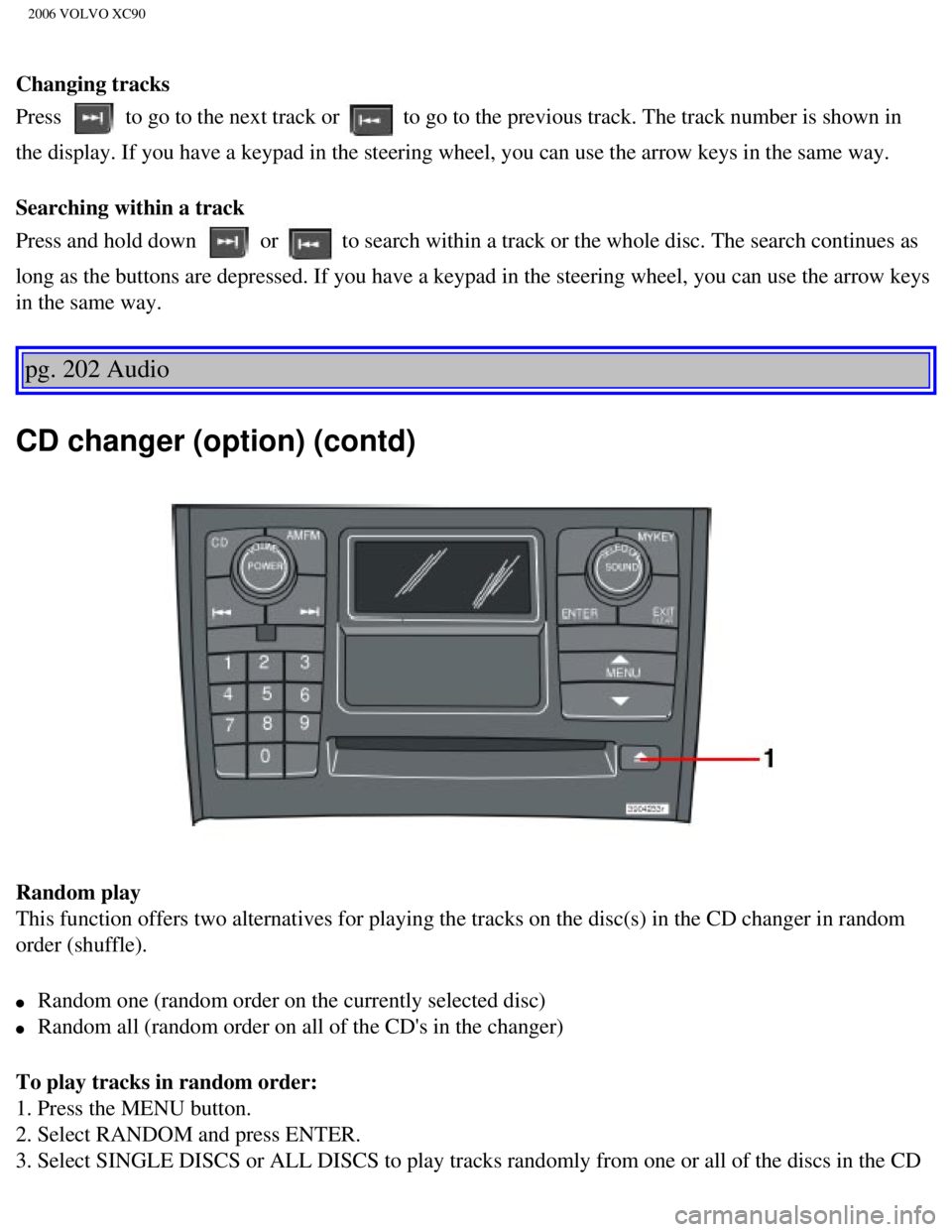
Changing tracks
Press
to go to the next track or to go to the previous track. The track number is shown in
the display. If you have a keypad in the steering wheel, you can use the\
arrow keys in the same way.
Searching within a track
Press and hold down
or to search within a track or the whole disc. The search continues as
long as the buttons are depressed. If you have a keypad in the steering \
wheel, you can use the arrow keys
in the same way.
pg. 202 Audio
CD changer (option) (contd)
Random play
This function offers two alternatives for playing the tracks on the disc\
(s) in the CD changer in random
order (shuffle).
l Random one (random order on the currently selected disc)
l Random all (random order on all of the CD's in the changer)
To play tracks in random order:
1. Press the MENU button.
2. Select RANDOM and press ENTER.
3. Select SINGLE DISCS or ALL DISCS to play tracks randomly from one or \
all of the discs in the CD
file:///K|/ownersdocs/2006/2006_XC90/06xc90_11b.htm (6 of 11)12/30/200\
6 5:32:56 PM