radio VOLVO XC90 2006 Owners Manual
[x] Cancel search | Manufacturer: VOLVO, Model Year: 2006, Model line: XC90, Model: VOLVO XC90 2006Pages: 256, PDF Size: 6.87 MB
Page 103 of 256
. These transmitters use a radi")
2006 VOLVO XC90
Remote controls
Your vehicle is equipped with two coded remote control transmitters with\
integrated ignition keys called
Key Integrated Remote (KIR). These transmitters use a radio frequency \
that will enable you to lock/
unlock all doors and the tailgate from a distance of 10-15 feet (3-5 me\
ters).
The transmitters will also activate or allow "keyless" entry into the pa\
ssenger compartment or the
tailgate. They will also activate or deactivate the vehicle's alarm syst\
em(s). The car can also be locked/
unlocked with the key.
If one of the transmitters is misplaced, contact your nearest authorized\
Volvo retailer for replacement.
Buttons in remote control:
1 -Fold key in/out, 2 - Lock, 3 - Approach lighting,
4 - "Panic" function, 5 - Unlock tailgate, 6 - Unlock
Using the remote control
Button 1: Press to extend the key. This button must also be pressed when the key \
is folded back into the
slot in the side of the remote control unit.
Button 2 (Lock): Press once to lock all doors, and the tailgate.
file:///K|/ownersdocs/2006/2006_XC90/06xc90_05.htm (4 of 13)12/30/2006\
5:32:43 PM
Page 159 of 256

2006 VOLVO XC90
WARNING!
The TPMS system uses a radio frequency of 315 MHz. Accessory electrical \
equipment using the
same frequency could interfere with TPMS and should not be installed in \
the vehicle. Please consult
your Volvo retailer, a qualified Volvo service technician, or the access\
ory equipment's supplier for
further information.
When low inflation pressure is detected, TPMS will light up the tire pre\
ssure warning light (
) (also
referred to as a telltale) in the instrument panel, and will display a \
message in the text window. The
wording of this message is determined by the degree of inflation pressur\
e loss.
NOTE: If a fault occurs in TPMS, the tire pressure warning light will flash fo\
r approximately 1 minute
and TIRE PRESS SYST SERVICE REQUIRED will be displayed.
Each tire, including the spare (if provided), should be checked monthl\
y when cold and inflated to the
inflation pressure recommended by the vehicle manufacturer on the vehicl\
e placard or tire inflation
pressure label. (If your vehicle has tires of a different size than the\
size indicated on the vehicle placard
or tire inflation pressure label, you should consult the appropriate sec\
tion of this owner's manual to
determine the proper tire inflation pressure.) When the low tire pressu\
re telltale is illuminated, one or
more of your tires is significantly underinflated. You should stop and c\
heck your tires as soon as
possible, and inflate them to the proper pressure. Driving on a signific\
antly underinflated tire causes the
tire to overheat and can lead to tire failure. Under-inflation also redu\
ces fuel efficiency and tire tread
life, and may affect the vehicle's handling and stopping ability. Your v\
ehicle has also been equipped
with a TPMS malfunction telltale to indicate when the system is not oper\
ating properly. When the
malfunction telltale is illuminated, the system may not be able to detec\
t or signal low tire pressure as
intended. TPMS malfunctions may occur for a variety of reasons, includin\
g the installation of
incompatible replacement tires on the vehicle. Always check the TPMS mal\
function telltale after
replacing one or more tires on your vehicle to ensure that the replaceme\
nt tires are compatible with the
TPMS.
NOTE: TPMS indicates low tire pressure but does not replace normal tire maint\
enance. For information
on correct tire pressure, please refer to the table on
page 116, or consult your Volvo retailer.
Erasing warning messages
When a low tire pressure warning message has been displayed, and the tir\
e pressure warning light has
come on:
1. Use a tire pressure gauge to check the inflation pressure of all four\
tires.
2. Re-inflate the tire(s) to the correct pressure (consult the tire p\
ressure placard or the table on
page 116).
3. Drive the car for at least one minute at a speed of 20 mph (30 km/h)\
or faster.
This will erase the warning text and the warning light will go out.
file:///K|/ownersdocs/2006/2006_XC90/06xc90_08.htm (8 of 22)12/30/2006\
5:32:49 PM
Page 211 of 256

2006 VOLVO XC90
No. Amperage
1. Backup lights 10A
2. Parking lights, foglights, cargo compartment lighting, license plate \
lights, brake light
diodes 20A
3. Accessories 15A
4. -
5. Rear electronic module 10A
6. Navigation system (option), radio receiver, rear seat entertainment\
(accessory) 7.5A
7. Trailer wiring (30-feed) 15A
8. 12-volt socket in cargo compartment 15A
9. Rear passenger's side door: power window, power window cutout functio\
n 20A
10. Rear driver's side door: power window, power window cutout function \
20A
11. -
12. -
13. -
14. Subwoofer (option), rear air conditioning system (option) 15A
15. -
16. -
17. Accessory audio 5A
18. -
19. Rear window wiper 15A
20. Trailer wiring (15-feed) 20A
21. -
22. -
23. All Wheel Drive 7.5A
24. -
25. -
26. Park assist 5A
27. Main fuse: trailer wiring, park assist, All Wheel Drive 30A
28. Central locking system 15A
29. Driver's side trailer lighting: parking light, turn signal 25A
30. Passenger's side trailer lighting: brake light, fog light, turn sign\
al 25A
31. Main fuse: fuses 37, 38 40A
32. -
file:///K|/ownersdocs/2006/2006_XC90/06xc90_09b.htm (23 of 24)12/30/20\
06 5:32:52 PM
Page 223 of 256
2006 VOLVO XC90
2 0 0 6
VOLVO XC90
Audio
pg. 183 Audio
Audio system184
Audio system controls185
Audio functions188
Radio functions192
Menu settings and selections198
CD player199
CD changer (option)201
Audio systems - general information203
HomeLink® Universal Transceiver204
pg. 184 Audio
Audio system
file:///K|/ownersdocs/2006/2006_XC90/06xc90_11a.htm (1 of 18)12/30/200\
6 5:32:55 PM
Page 225 of 256

The four buttons on the steering wheel keypad can be used to control the\
audio system. The steering
wheel keypad can be used to adjust volume, shift")
2006 VOLVO XC90
Steering wheel keypad (option)
The four buttons on the steering wheel keypad can be used to control the\
audio system. The steering
wheel keypad can be used to adjust volume, shift between preset stations\
and change CD tracks.
l Press the or buttons briefly to search for a radio station, or to go to the next/pre\
vious
track on a CD
l Press and hold down these buttons to search within a track.
Display
The display (1) shows the currently selected function, menu selections\
, etc.
Clean the display with a dry, soft, lint-free cloth. Do not use cleaning\
agents.
Accessing and using menus
In menu mode, you can change settings and program new functions in the a\
udio system. The various
file:///K|/ownersdocs/2006/2006_XC90/06xc90_11a.htm (3 of 18)12/30/200\
6 5:32:55 PM
Page 226 of 256
 to enter menu mode. Use the menus as follows\
:
l Use the menu keys (3) to navigate up or down in the menus.")
2006 VOLVO XC90
menu alternatives are shown in the display.
Press the menu button (2) to enter menu mode. Use the menus as follows\
:
l Use the menu keys (3) to navigate up or down in the menus. Dots in the\
display indicated that there
are more menu selections from which to choose.
l One long press on EXIT/CLEAR exits menu mode.
l A short press on the EXIT/CLEAR enables you to cancel, undo, or answer n\
o to a menu selection, or
to go back in the menu structure.
l Pressing ENTER confirms a menu selection, or takes you to the next subme\
nu.
pg. 186 Audio
Audio system controls (contd)
Rear headphone connectors and controls (option)
The door panels behind the second row of seats can be equipped with head\
phone connectors for
passengers in the second and optional third row of seats. Several people\
can listen to different sound
sources, such as CDs or the radio at the same time without disturbing ea\
ch other.
Two sets of headphones can be plugged into each connector.
l Use the SEL button (1) to step between the sound sources.
l Press the arrow keys (2) briefly to change CD tracks or switch between\
preset stations.
l Hold down the arrow keys to fast forward/reverse, or search for the prev\
ious/next strong radio station.
l Hold down the SEL button to turn off the sound.
For the best sound reproduction, we recommend headphones with impedance \
between 16-32 ohm. The
file:///K|/ownersdocs/2006/2006_XC90/06xc90_11a.htm (4 of 18)12/30/200\
6 5:32:55 PM
Page 227 of 256

2006 VOLVO XC90
sensitivity of these should be equal to or greater than 102 dB. The head\
phone connections are intended
for 3.5 mm contacts and are located under the lower edge of the socket.
All headphones are automatically turned off when the ignition is switche\
d off. They must be manually
restarted when the ignition is switched on again.
Headphones - limitations
l The headphones will only work when the ignition key is in position I or \
higher.
l If a set of headphones is connected to the same source that is being sen\
t through the speakers, the
headphone controls cannot be used to change track or station. This is to\
prevent the driver from being
distracted by an unexpected change in music.
l If the driver selects the same sound source as someone listening to this\
source through headphones,
the driver takes control of the sound source.
l Only one disc in the optional CD changer, and one track on the CD can be\
played at a time.
l Headphone users can choose from among the preset radio stations (AM, FM\
1, FM2) previously set by
the driver.
l If FM is played in the speakers, AM is not available and vice versa.
pg. 187 Audio
Remote control (option)
1. Memory - stores radio stations that have been found by a search
To store a station:
- Press the memory button (1). The preset station number will flash 4 \
times in the display
- While the preset number is flashing, use the + or - buttons (5) to s\
elect a position at which to store the
station
file:///K|/ownersdocs/2006/2006_XC90/06xc90_11a.htm (5 of 18)12/30/200\
6 5:32:55 PM
Page 228 of 256
2006 VOLVO XC90
- Press button 1 again to store the station
2. Volume
3. Forward/back - fast forward or back
4. Source - step between sound sources
5. Preset/disc - selects among CD's (in the optional CD changer) or pr\
eset radio stations
6. Auto store - searches for and stores the strongest radio stations
7. Not in use
8. Not in use
9. Power - off/on
Point the remote control toward the IR port on the radio panel (see the\
illustration on
page 184).
NOTE: If the remote control does not function properly, check the batteries (\
AAA or R03).
pg. 188 Audio
Audio functions
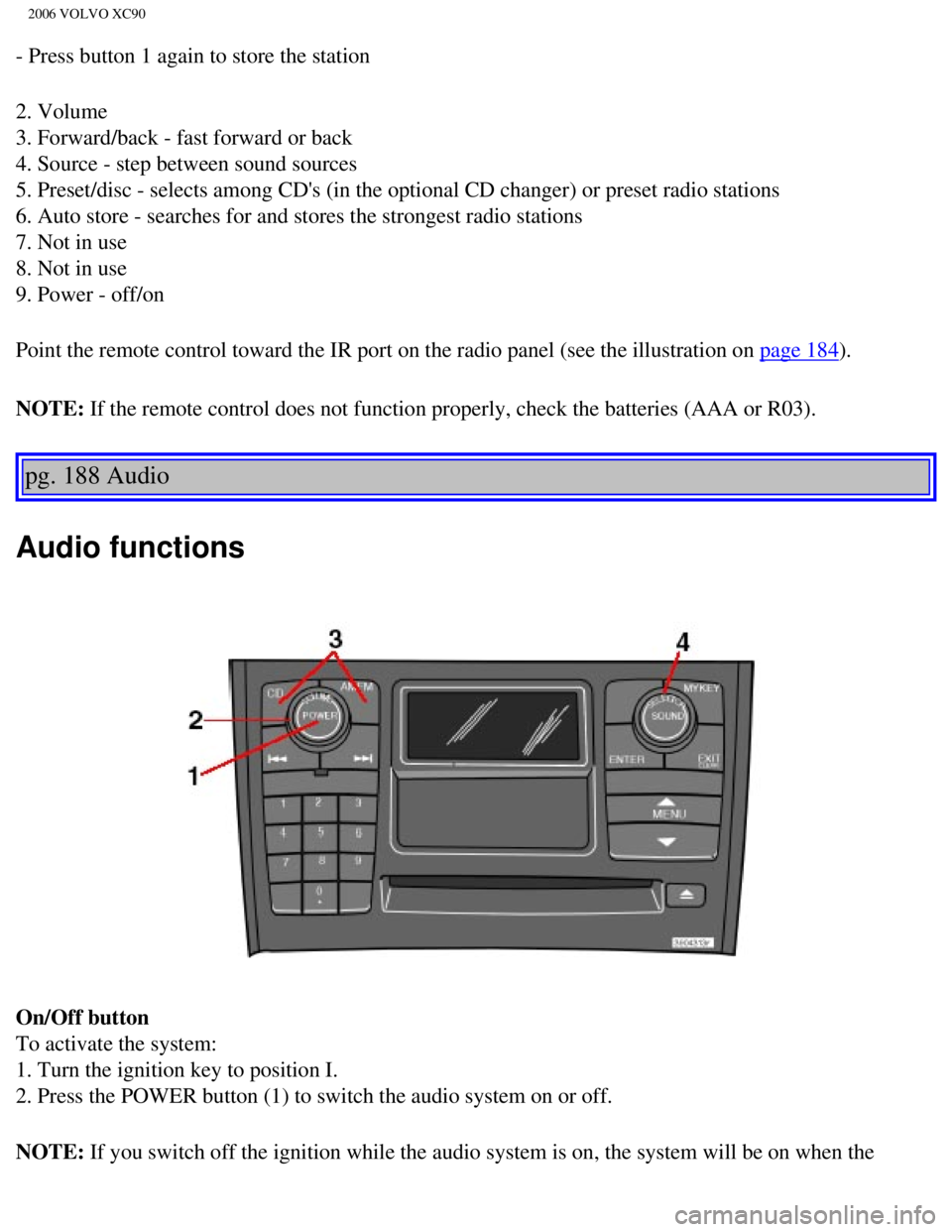
On/Off button
To activate the system:
1. Turn the ignition key to position I.
2. Press the POWER button (1) to switch the audio system on or off.
NOTE: If you switch off the ignition while the audio system is on, the system \
will be on when the
file:///K|/ownersdocs/2006/2006_XC90/06xc90_11a.htm (6 of 18)12/30/200\
6 5:32:55 PM
Page 231 of 256
, 3-channel stereo (3-CH) - opti\
on
Dolby Surround Pro Logic II together with a center speaker in the dashbo\
ard offers you a sound
experience")
2006 VOLVO XC90
Dolby Surround Pro Logic II (DPL II), 3-channel stereo (3-CH) - opti\
on
Dolby Surround Pro Logic II together with a center speaker in the dashbo\
ard offers you a sound
experience very close to a live performance. The normal left-right stere\
o channels are divided to left-
center-right. In addition, surround sound is produced by the rear speake\
rs. This surround sound mirrors
the resonance of a concert hall. Dolby Surround Pro Logic II functions i\
n CD and FM modes. 3-channel
stereo is recommended for AM radio broadcasts.
l Surround settings for FM and CD are stored separately.
l When listening to FM radio stations, Dolby Surround Pro Logic II functio\
ns best in areas with strong
reception. If reception is weak, selecting 2 or 3- channel stereo may pr\
ovide better sound quality.
l Dolby Surround Pro Logic II is only available on the highest level audio\
system - Premium Sound.
Use the following instructions to select PRO LOGIC II, 3-CHANNEL, or to \
turn these functions off. See
also the menu structure on
page 198.
1. Select AUDIO SETTINGS in the menu and press ENTER.
2. Select SURROUND and press ENTER.
3. Select Dolby AM/FM, or Dolby CD and press ENTER.
4. Select PRO LOGIC II, 3-CHANNEL, or OFF and press ENTER.
l The symbol PL II is displayed when Pro Logic II is selected.
l 3-CH is shown when 3-channel stereo is selected.
l OFF indicates normal stereo mode.
Dolby noise reduction is manufactured under license from Dolby Laborator\
ies Licensing Corporation.
"Dolby Surround Pro Logic II", and the double-D symbol
are trademarks of Dolby Laboratories
Licensing Corporation. Dolby Surround Pro Logic II is manufactured under\
licence from Dolby
Laboratories Licensing Corporation.
pg. 191 Audio
file:///K|/ownersdocs/2006/2006_XC90/06xc90_11a.htm (9 of 18)12/30/200\
6 5:32:55 PM
Page 232 of 256
2006 VOLVO XC90
Bass speaker - SUBWOOFER (option)
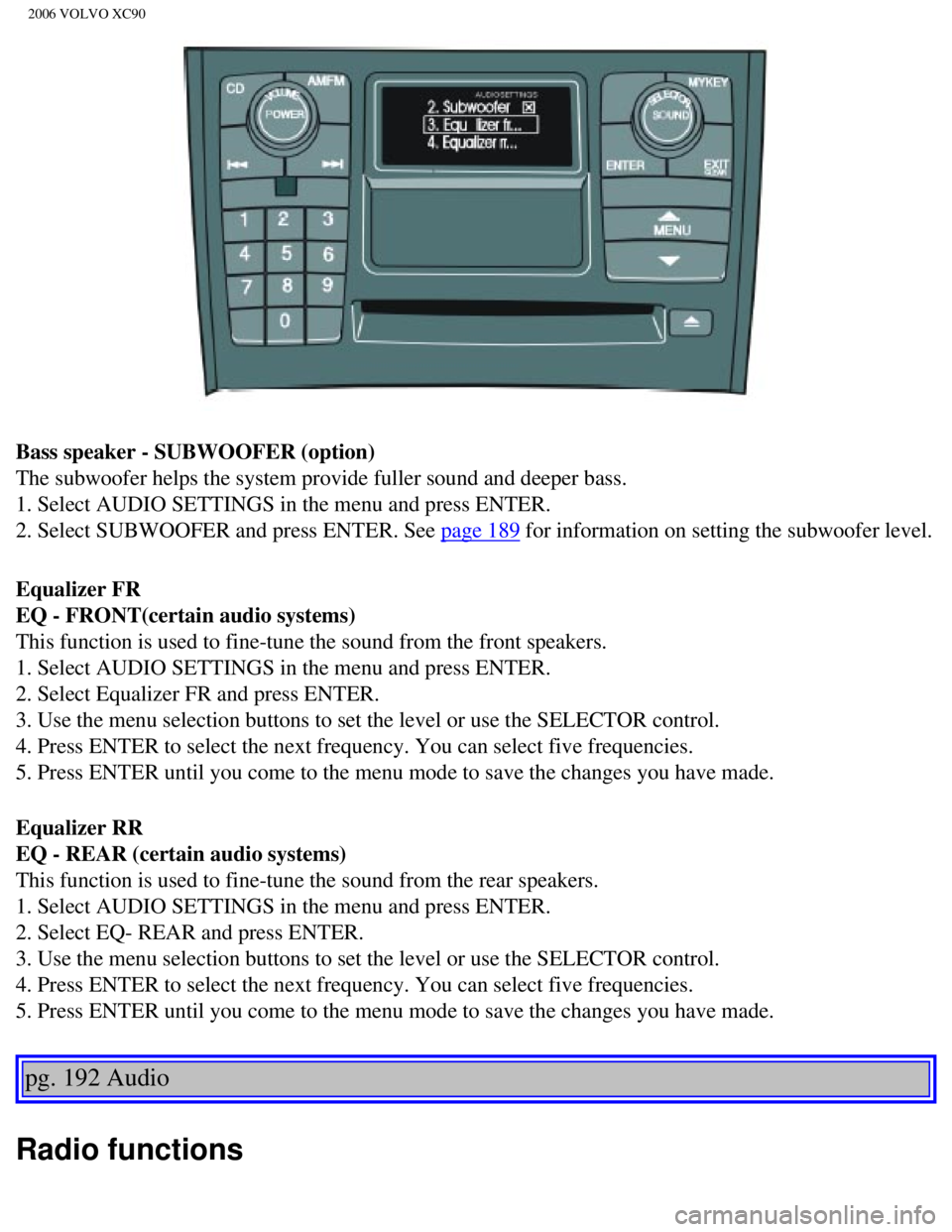
The subwoofer helps the system provide fuller sound and deeper bass.
1. Select AUDIO SETTINGS in the menu and press ENTER.
2. Select SUBWOOFER and press ENTER. See
page 189 for information on setting the subwoofer level.
Equalizer FR
EQ - FRONT(certain audio systems)
This function is used to fine-tune the sound from the front speakers.
1. Select AUDIO SETTINGS in the menu and press ENTER.
2. Select Equalizer FR and press ENTER.
3. Use the menu selection buttons to set the level or use the SELECTOR c\
ontrol.
4. Press ENTER to select the next frequency. You can select five frequen\
cies.
5. Press ENTER until you come to the menu mode to save the changes you h\
ave made.
Equalizer RR
EQ - REAR (certain audio systems)
This function is used to fine-tune the sound from the rear speakers.
1. Select AUDIO SETTINGS in the menu and press ENTER.
2. Select EQ- REAR and press ENTER.
3. Use the menu selection buttons to set the level or use the SELECTOR c\
ontrol.
4. Press ENTER to select the next frequency. You can select five frequen\
cies.
5. Press ENTER until you come to the menu mode to save the changes you h\
ave made.
pg. 192 Audio
Radio functions
file:///K|/ownersdocs/2006/2006_XC90/06xc90_11a.htm (10 of 18)12/30/20\
06 5:32:55 PM