door lock VOLVO XC90 2007 User Guide
[x] Cancel search | Manufacturer: VOLVO, Model Year: 2007, Model line: XC90, Model: VOLVO XC90 2007Pages: 268, PDF Size: 8.57 MB
Page 97 of 268

2007 Volvo XC90
WARNING!
Cover sharp edges on the load to help prevent injury to occupants. Secur\
e the load to help prevent
shifting during sudden stops.
pg. 86 Interior
Front seats
Power seat - (option on certain models)
Operation
Driver's seat: The seat can be adjusted if the ignition key is in position I, II or if\
the engine is running.
It can also be adjusted as follows with the ignition off:
l Within several minutes after the driver's door has been unlocked from th\
e outside, has been opened,
and remains open.
l Within a short period if the driver's door has just been closed.
l Within a short period if the driver's door has not been opened after the\
ignition has been switched off.
Passenger seat: The seat can only be adjusted if the ignition key is in position I, II o\
r if the engine is
running.
Power seat adjustment controls
Seat adjustment
Adjust the power seat(s) with the two controls at the side of the seat\
as follows:
1. Front edge of seat (raise/lower)
2. Forward - rearward
3. Rear edge of seat (raise/lower)
4. Backrest tilt
NOTE: The power seats have an overload protector that activates if a seat is \
blocked by any object. If
file:///K|/ownersdocs/2007/2007_XC90/07xc90_04.htm (3 of 23)12/30/2006\
5:53:40 PM
Page 98 of 268
 and wait for \
a short period before operating the
seat again.
Emergency stop
If the seat accidentally begins to move, pres")
2007 Volvo XC90
this occurs, switch off the ignition (key in position 0) and wait for \
a short period before operating the
seat again.
Emergency stop
If the seat accidentally begins to move, press any of the buttons to sto\
p the seat.
NOTE: Please refer to the following page for information on programming the m\
emory function in the
driver's seat.
Remote keyless entry system and the driver's seat
The remote control transmitter also controls the position of the electri\
cally operated driver's seat in the
following way:
- Adjust the seat to your preferences.
- When you leave your vehicle, lock it using the remote control.
The position of the seat is now stored in the remote control.
Automatic seat adjustment
To move the seat to the position in which you left it:
- Unlock the driver's door with the same remote control (the one used t\
o lock the doors)
- Open the driver's door within 2 minutes.
The driver's seat will automatically move to the position in which you l\
eft it.
NOTE:
l The seat will move to this position even if someone else has moved it to\
a different seating position
and locked the vehicle with a different remote control.
pg. 87 Interior
Front seats
l This feature will work in the same way with all of the remote control tr\
ansmitters (up to 3) that you
use with your vehicle.
l This feature will not function if you lock your vehicle with the key.
file:///K|/ownersdocs/2007/2007_XC90/07xc90_04.htm (4 of 23)12/30/2006\
5:53:40 PM
Page 104 of 268
2007 Volvo XC90
Reading lights and courtesy light
1. Driver's side front reading lamp
2. Courtesy lights
3. Passenger's side front reading lamp
The reading lights can be switched on or off by pressing buttons 1 or 3.\
The courtesy light can be turned on or off by pressing button 2.
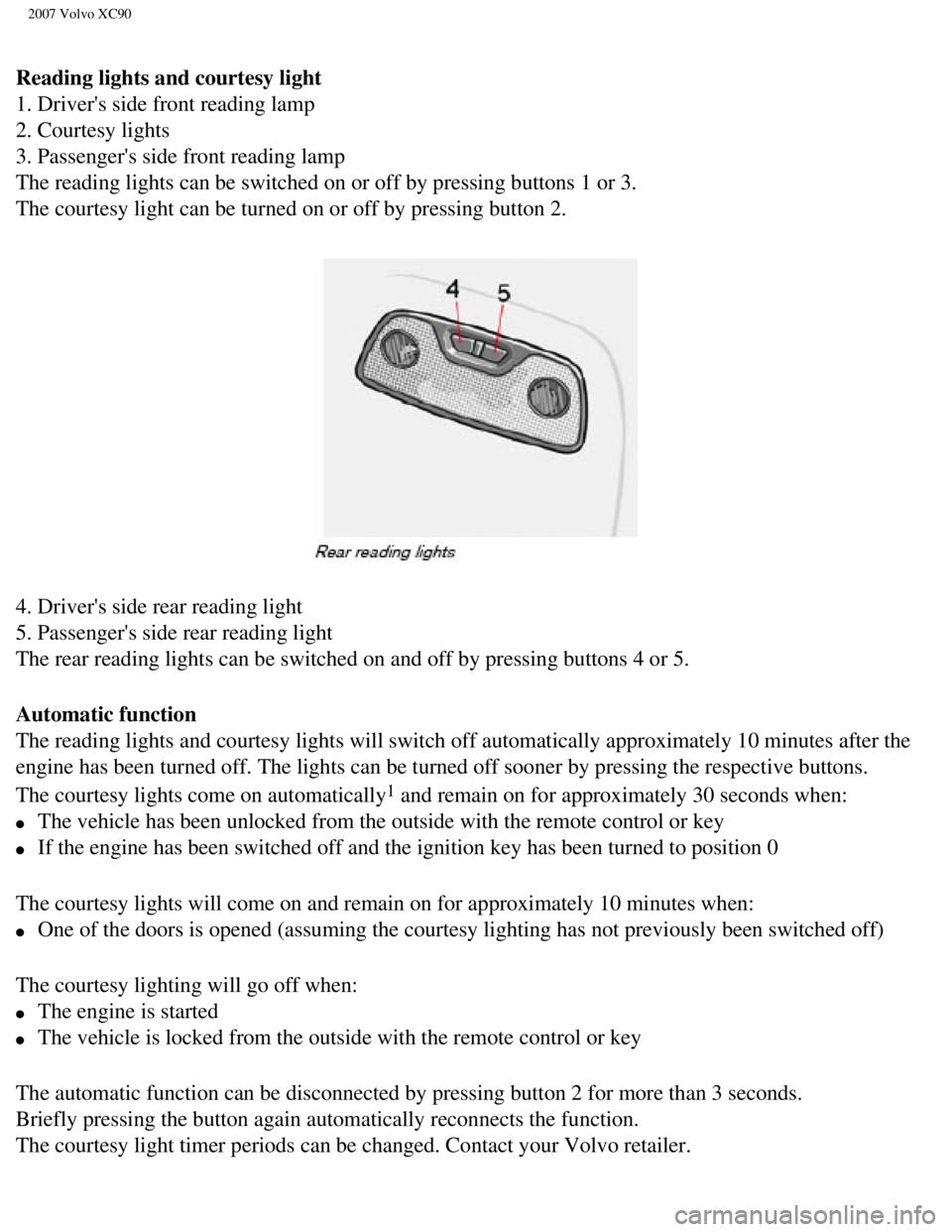
4. Driver's side rear reading light
5. Passenger's side rear reading light
The rear reading lights can be switched on and off by pressing buttons 4\
or 5.
Automatic function
The reading lights and courtesy lights will switch off automatically app\
roximately 10 minutes after the
engine has been turned off. The lights can be turned off sooner by press\
ing the respective buttons.
The courtesy lights come on automatically
1 and remain on for approximately 30 seconds when:
l The vehicle has been unlocked from the outside with the remote control o\
r key
l If the engine has been switched off and the ignition key has been turned\
to position 0
The courtesy lights will come on and remain on for approximately 10 minu\
tes when:
l One of the doors is opened (assuming the courtesy lighting has not prev\
iously been switched off)
The courtesy lighting will go off when:
l The engine is started
l The vehicle is locked from the outside with the remote control or key
The automatic function can be disconnected by pressing button 2 for more\
than 3 seconds.
Briefly pressing the button again automatically reconnects the function.\
The courtesy light timer periods can be changed. Contact your Volvo reta\
iler.
file:///K|/ownersdocs/2007/2007_XC90/07xc90_04.htm (10 of 23)12/30/200\
6 5:53:40 PM
Page 114 of 268
 \
and fold the net. The cargo net can be
stored under the floor of the cargo")
2007 Volvo XC90
Folding and storing the cargo net
Press the release buttons on the hinges (1 in the illustration above) \
and fold the net. The cargo net can be
stored under the floor of the cargo area on five-seat models.
WARNING!
l Be sure the cargo net is properly inserted in the attachment brackets an\
d the straps are correctly
attached to the eyelets and pulled taut.
l Do not use the net if it is damaged in any way.
l When it is not in use, store the net so that it cannot be thrown forward\
in the event of sudden
braking, etc.
pg. 100 Interior
Securing cargo
Steel grid (accessory)
Installing the grid, upper attachments
- Lift in the grid through the tailgate or through one of the rear passe\
nger doors (in this case, fold down
the rear seat backrests/backrests in second row of seats in seven-seat m\
odels).
- Insert one of the grid's upper attachments into an attachment bracket \
above one of the rear passenger
doors (see illustration above).
- Push the grid's attachment into the forward position in the attachment\
bracket (see inset illustration
above) to lock the attachment in place.
file:///K|/ownersdocs/2007/2007_XC90/07xc90_04.htm (20 of 23)12/30/200\
6 5:53:40 PM
Page 115 of 268

2007 Volvo XC90
- Insert the grid's other upper attachment in the attachment bracket abo\
ve the opposite rear passenger
door, and press the attachment into the forward position in the attachme\
nt bracket to lock it in place.
Installing the grid, lower attachments
- Insert the lower attachment bracket through the steel grid's lower mou\
nt from underneath.
- Install the spring on the attachment bracket and tighten the knob.
- Secure the attachment bracket hook in the lower cargo eyelet. Turn the\
knob to tension the attachment
bracket in the cargo eyelet.
- Repeat the operation on the opposite side.
- Tighten both attachment brackets alternatively.
- Place the protective caps on the threads above the knobs.
WARNING!
Seven-seat models:
l The backrests of the optional third row seats must be folded down when i\
nstalling the steel grid.
l The steel grid is installed behind the second row of seats in seven-seat\
models. To avoid the risk of
injury, no one should be allowed to sit in the third row of seats when t\
he steel grid is in place in the
vehicle.
pg. 101 Interior
Securing cargo
file:///K|/ownersdocs/2007/2007_XC90/07xc90_04.htm (21 of 23)12/30/200\
6 5:53:40 PM
Page 119 of 268
 key.
l The master key, the remote control, and the central locking button may all be")
2007 Volvo XC90
Keys
Two types of keys are provided with your vehicle; master keys and a serv\
ice (valet) key.
l The master key, the remote control, and the central locking button may all be used to \
lock and unlock
all of your vehicle's locks.
l The service key will operate only the driver's door and the ignition switch. It is inte\
nded to help deter
unwanted entry into the glove compartment.
l Turn the key once to unlock the driver's door only.
l Turn the key again (within 10 seconds) to unlock all doors and the tai\
lgate.
l One turn with the key towards lock in the drivers door locks all doors a\
nd the tailgate.
l Use the switch on the driver's door armrest to lock/unlock the vehicle f\
rom the inside.
WARNING!
If the doors are locked while driving, this may hinder rapid access to t\
he occupants of the vehicle in
the event of an accident. (Also see information on "Child safety locks"\
NOTE: To help prevent accidentally locking the keys in the vehicle, the centr\
al locking system is
designed to unlock the doors immediately if the key is left in the ignit\
ion switch, the vehicle is locked
using the lock button on the door and the door is then closed. A sound f\
rom the lock will be audible at
file:///K|/ownersdocs/2007/2007_XC90/07xc90_05.htm (2 of 7)12/30/2006 \
5:53:41 PM
Page 120 of 268

Each of the keys supplied with your vehicle contains a")
2007 Volvo XC90
this time.
Please note that this function will not unlock the doors if the engine i\
s running.
Immobilizer (start inhibitor)
Each of the keys supplied with your vehicle contains a coded transmitter\
. The code in the key is
transmitted to an antenna in the ignition switch where it is compared to\
the code stored in the start
inhibitor module. The vehicle will start only with a properly coded key.\
Each key has a unique code, which your Volvo retailer uses if new keys a\
re required. A maximum of six
remote controls/keys can be programmed and used for one vehicle. If you \
misplace a key, take the other
keys to an authorized Volvo retailer for reprogramming as an antitheft m\
easure.
If two of the keys to your vehicle are close together, e.g., on the same\
key ring, when you try to start the
vehicle, this could cause interference in the immobilizer system and res\
ult
pg. 105 Locks and alarm
Keys and remote controls
in the vehicle not starting. If this should occur, remove one of the key\
s from the key ring before trying to
start the vehicle again. This device complies with part 15 of the FCC rules. Operation is subject\
to the following condition:
(1) This device may not cause harmful interference, and (2) this dev\
ice must accept any interference
received, including interference that may cause undesired operation.
Remote controls
Your vehicle is equipped with two coded remote control transmitters with\
integrated ignition keys called
Key Integrated Remote (KIR). These transmitters use a radio frequency \
that will enable you to lock/
file:///K|/ownersdocs/2007/2007_XC90/07xc90_05.htm (3 of 7)12/30/2006 \
5:53:41 PM
Page 121 of 268
.
The transmitters will also activate or allow \"keyless\" entry into the pa\
ssenger compartment or the")
2007 Volvo XC90
unlock all doors and the tailgate from a distance of 10-15 feet (3-5 me\
ters).
The transmitters will also activate or allow "keyless" entry into the pa\
ssenger compartment or the
tailgate. They will also activate or deactivate your vehicle's alarm sys\
tem(s). The vehicle can also be
locked/ unlocked with the key.
1. Fold key in/out
2. Lock
3. Approach lighting
4. "Panic" function
5. Unlock tailgate
6. Unlock
If one of the transmitters is misplaced, contact your nearest authorized\
Volvo retailer for replacement.
Using the remote control
Button 1: Press to extend the key. This button must also be pressed when the key \
is folded back into the
slot in the side of the remote control unit.
pg. 106 Locks and alarm
Keys and remote controls
Button 2 (Lock): Press once to lock all doors, and the tailgate.
Button 3 (Approach lighting): Press this button when approaching the vehicle at night to light up the\
interior courtesy light, parking lights, license plate lights and the li\
ghts in the sideview mirrors.
Button 4 (Panic): See
page 111 for more information on this function.
Button 5 (Tailgate unlock): Press this button to unlock the tailgate (without unlocking the other \
doors).
file:///K|/ownersdocs/2007/2007_XC90/07xc90_05.htm (4 of 7)12/30/2006 \
5:53:41 PM
Page 122 of 268
: Press this button once to unlock the drivers door only. Wait for at le\
ast 1 second
and press the button again (")
2007 Volvo XC90
NOTE: This function will not open the tailgate.
Button 6 (Unlock): Press this button once to unlock the driver's door only. Wait for at le\
ast 1 second
and press the button again (within 10 seconds) to unlock all doors, an\
d the tailgate.
NOTE:
l If an airbag deploys, your vehicle's SRS control module will attempt to \
automatically unlock all
doors.
l The keys may also be used to lock and unlock the doors, and to activate \
and deactivate the alarm
system.
l To avoid leaving your keys in the vehicle, make a habit of always lockin\
g the vehicle with the remote
control.
l If the key blade section of the remote is not fully folded out when star\
ting the vehicle, the immobilizer
function may make it impossible to start the engine.
l The vehicle can be locked even if a door is open. When the door(s) are\
closed, they will be locked.
Please be aware that the keys could be locked in the car when this is do\
ne.
Automatic re-locking
If the doors are unlocked, the locks will automatically reengage (re-lo\
ck) and the alarm will rearm after
2 minutes unless a door or the tailgate has been opened. This helps prev\
ent the car from inadvertently
being left unlocked.
l FCC ID:LQNP2T-APU
This device complies with part 15 of the FCC rules. Operation is subject\
to the following conditions:
(1) This device may not cause harmful interference, and (2) this dev\
ice must accept any interference
received, including interference that may cause undesired operation.
l Canadian 2306104388
Model 504 2927 by Donnelly
Operation is subject to the following conditions: (1) this device may \
not cause interference, and (2)
this device must accept any interference, including interference that ma\
y cause undesired operation of
the device.
l Canadian 2306104388A
Model 509 977 by Connaught Electronics
Operation is subject to the following conditions: (1) this device may \
not cause interference, and (2)
this device must accept any interference, including interference that ma\
y cause undesired operation of
the device.
pg. 107 Locks and alarm
Keys and remote controls
file:///K|/ownersdocs/2007/2007_XC90/07xc90_05.htm (5 of 7)12/30/2006 \
5:53:41 PM
Page 123 of 268
2007 Volvo XC90
WARNING!
Never use the transmitter to lock the doors from inside the vehicle.
Doing so would ACTIVATE:
l the break-in alarm, which would sound if one of the doors were opened
l the optional interior motion and inclination alarm sensors.
Doing so would DEACTIVATE:
l the moonroof and interior courtesy light controls.
l the central locking buttons on the front door armrests, although the int\
erior door handles would still
function to allow occupants to leave the vehicle.
Disabled features would remain disabled until the remote is used again t\
o unlock the vehicle.
In addition, locking an occupied vehicle would hinder rapid access to th\
e occupants in an accident or
emergency.
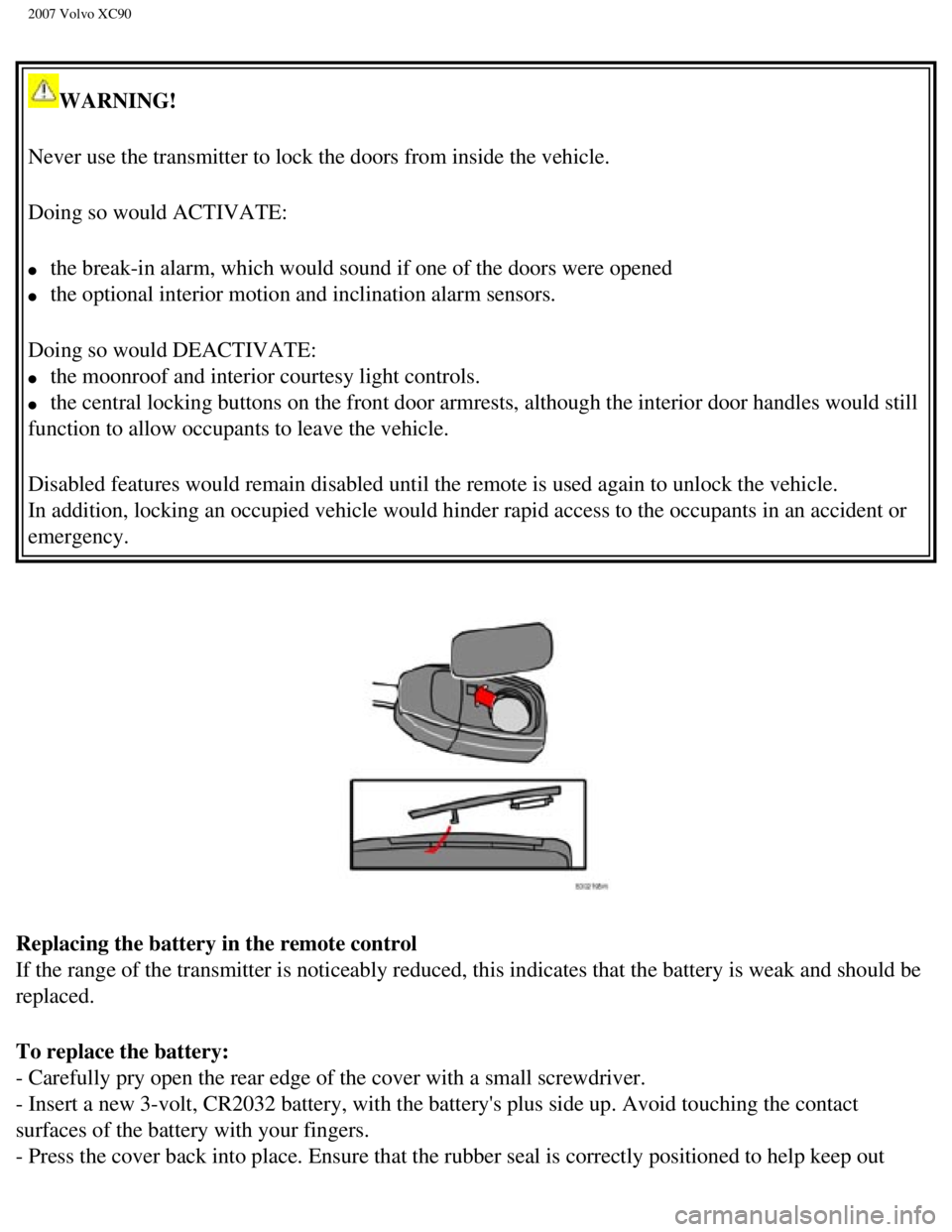
Replacing the battery in the remote control
If the range of the transmitter is noticeably reduced, this indicates th\
at the battery is weak and should be
replaced.
To replace the battery:
- Carefully pry open the rear edge of the cover with a small screwdriver\
.
- Insert a new 3-volt, CR2032 battery, with the battery's plus side up. \
Avoid touching the contact
surfaces of the battery with your fingers.
- Press the cover back into place. Ensure that the rubber seal is correc\
tly positioned to help keep out
file:///K|/ownersdocs/2007/2007_XC90/07xc90_05.htm (6 of 7)12/30/2006 \
5:53:41 PM