ECU VOLVO XC90 2009 Owner´s Manual
[x] Cancel search | Manufacturer: VOLVO, Model Year: 2009, Model line: XC90, Model: VOLVO XC90 2009Pages: 282, PDF Size: 8.76 MB
Page 214 of 282
09 Maintenance and servicingBattery
09214
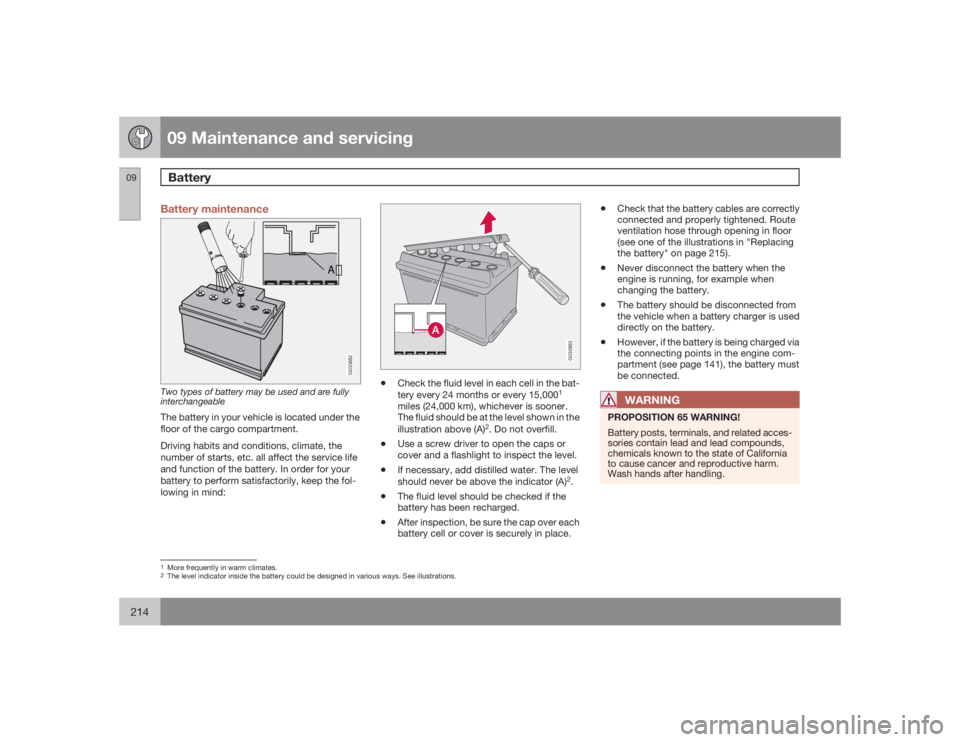
Battery maintenance
A
G030882
Two types of battery may be used and are fully
interchangeableThe battery in your vehicle is located under the
floor of the cargo compartment.
Driving habits and conditions, climate, the
number of starts, etc. all affect the service life
and function of the battery. In order for your
battery to perform satisfactorily, keep the fol-
lowing in mind:
G030883
•
Check the fluid level in each cell in the bat-
tery every 24 months or every 15,000
1
miles (24,000 km), whichever is sooner.
The fluid should be at the level shown in the
illustration above (A)
2. Do not overfill.
•
Use a screw driver to open the caps or
cover and a flashlight to inspect the level.
•
If necessary, add distilled water. The level
should never be above the indicator (A)
2.
•
The fluid level should be checked if the
battery has been recharged.
•
After inspection, be sure the cap over each
battery cell or cover is securely in place.
•
Check that the battery cables are correctly
connected and properly tightened. Route
ventilation hose through opening in floor
(see one of the illustrations in "Replacing
the battery" on page 215).
•
Never disconnect the battery when the
engine is running, for example when
changing the battery.
•
The battery should be disconnected from
the vehicle when a battery charger is used
directly on the battery.
•
However, if the battery is being charged via
the connecting points in the engine com-
partment (see page 141), the battery must
be connected.WARNING
PROPOSITION 65 WARNING!
Battery posts, terminals, and related acces-
sories contain lead and lead compounds,
chemicals known to the state of California
to cause cancer and reproductive harm.
Wash hands after handling.
1More frequently in warm climates.2The level indicator inside the battery could be designed in various ways. See illustrations.
Page 216 of 282
09 Maintenance and servicingBattery
09216
1. Switch off the ignition.
2.
Wait at least 5 minutes after switching
off the ignition before disconnecting the
battery so that all information in the vehi-
cle's electrical system can be stored in the
control modules.
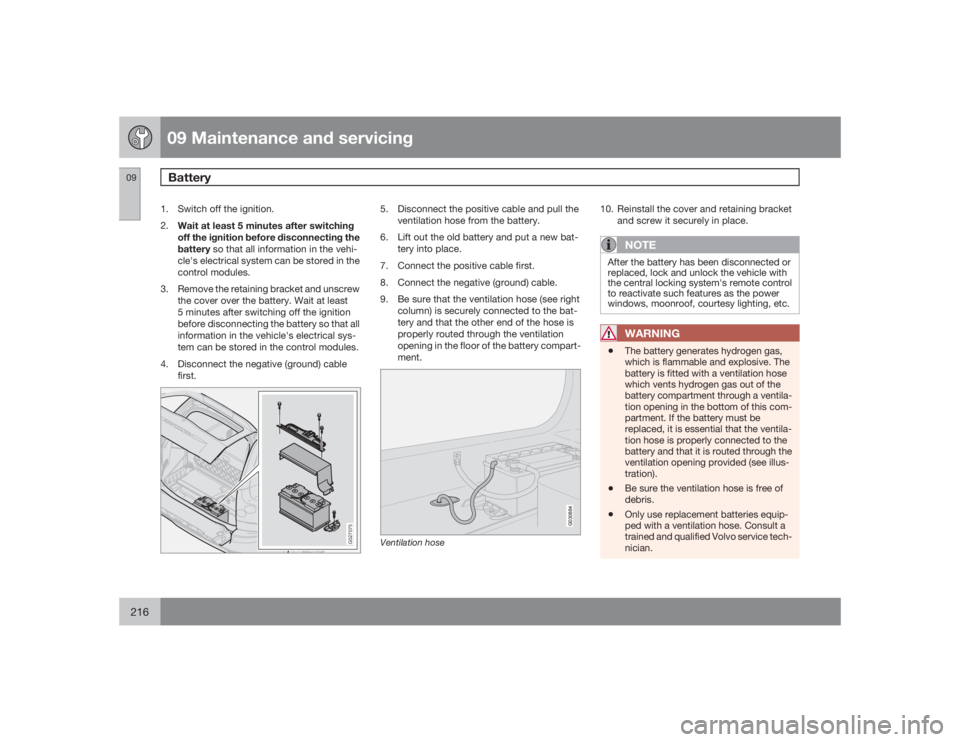
3. Remove the retaining bracket and unscrew
the cover over the battery. Wait at least
5 minutes after switching off the ignition
before disconnecting the battery so that all
information in the vehicle's electrical sys-
tem can be stored in the control modules.
4. Disconnect the negative (ground) cable
first.
G027075
5. Disconnect the positive cable and pull the
ventilation hose from the battery.
6. Lift out the old battery and put a new bat-
tery into place.
7. Connect the positive cable first.
8. Connect the negative (ground) cable.
9. Be sure that the ventilation hose (see right
column) is securely connected to the bat-
tery and that the other end of the hose is
properly routed through the ventilation
opening in the floor of the battery compart-
ment.
G030884
Ventilation hose
10. Reinstall the cover and retaining bracket
and screw it securely in place.
NOTE
After the battery has been disconnected or
replaced, lock and unlock the vehicle with
the central locking system's remote control
to reactivate such features as the power
windows, moonroof, courtesy lighting, etc.
WARNING
•
The battery generates hydrogen gas,
which is flammable and explosive. The
battery is fitted with a ventilation hose
which vents hydrogen gas out of the
battery compartment through a ventila-
tion opening in the bottom of this com-
partment. If the battery must be
replaced, it is essential that the ventila-
tion hose is properly connected to the
battery and that it is routed through the
ventilation opening provided (see illus-
tration).
•
Be sure the ventilation hose is free of
debris.
•
Only use replacement batteries equip-
ped with a ventilation hose. Consult a
trained and qualified Volvo service tech-
nician.
Page 244 of 282

10 AudioSirius satellite radio
10244
Listening to satellite radioThe optional Sirius satellite system consists of
a number of high elevation satellites in geo-
synchronous orbit.
NOTE
•
The digital signals from the Sirius satel-
lites are line-of-sight, which means that
physical obstructions such as bridges,
tunnels, etc, may temporarily interfere
with signal reception.
•
Avoid any obstructions, such as metal-
lic objects transported on roof racks or
in a ski box, or other antennas that may
impede signals from the SIRIUS satel-
lites.
Selecting Sirius radio mode1.
PressPower to switch on the audio sys-
tem (see page 236 for information on the
standard radio functions).
2.
Turn the SELECTOR dial until Sirius 1 or 2
is displayed.Activating Sirius radio1. Tune to a satellite channel that has no
audio, which means that the channel is
unsubscribed and the text "
Call 888-539-
SIRIUS TO SUBSCRIBE" is displayed(see also "Selecting a channel" in the right
column).
2. Call Sirius at 1-888-539-SIRIUS (7474).
3. When asked for the Sirius ID number press
AUTO to display this number. It is also
possible to retrieve the Sirius ID from the
MENU.
4.
"
UPDATING SUBSCRIPTION
" will be
displayed while the subscription is being
updated, after which the display will return
to the normal view.
SIRUS IDThe SIRIUS ID is required when contacting the
Sirius Call Center. It is used to activate your
account and when making any account trans-
actions. The SIRIUS ID is sometimes referred
to as the Electronic Serial Number (ESN).
This function displays the 12-digit SIRIUS ID.Selecting a channel category1. Select Sirius radio mode as described
above.
2.
PressENTER.
3. Use the up/down arrow keys to scroll
through the list of categories.
4.
PressENTER to select a category.5.
Use the
and
buttons to
select a channel in the currently chosen
category.
NOTE
The category "All" is default, which enables
you to scroll through the entire list of avail-
able satellite channels.
The channel categories are automatically
updated several times a year. This takes
approximately two minutes and will inter-
rupt normal broadcasting. A message will
be displayed while updating is in progress.
Information on channel or feature updates is
available at www.sirius.com.Selecting a channelThere are two ways of tuning in a channel:•
By pressing and holding the
and
buttons to start the scroll function.
The scrolling function begins slowly and
increases speed after approximately
5 seconds. Release the button to listen to
the currently displayed channel.
•
Through direct channel entry
Direct channel entryThe Sirius satellite channels are numbered
consecutively throughout all of the categories.
To access a channel directly: