ignition VOLVO XC90 2013 Owner´s Manual
[x] Cancel search | Manufacturer: VOLVO, Model Year: 2013, Model line: XC90, Model: VOLVO XC90 2013Pages: 310, PDF Size: 8.62 MB
Page 75 of 310
02 Instruments and controls
Right-side steering wheel lever
02
* Option/accessory, for more information, see Introduction.73 Tailgate wiper/washer
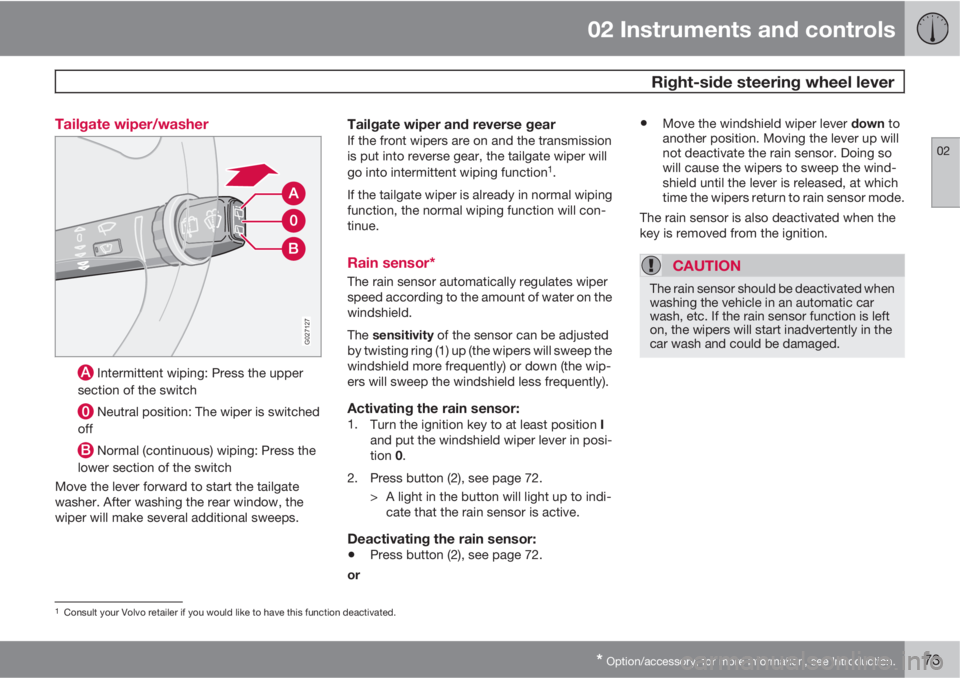
G027127
Intermittent wiping: Press the upper
section of the switch
Neutral position: The wiper is switched
off
Normal (continuous) wiping: Press the
lower section of the switch
Move the lever forward to start the tailgate
washer. After washing the rear window, the
wiper will make several additional sweeps.
Tailgate wiper and reverse gearIf the front wipers are on and the transmission
is put into reverse gear, the tailgate wiper will
go into intermittent wiping function
1.
If the tailgate wiper is already in normal wiping
function, the normal wiping function will con-
tinue.
Rain sensor*
The rain sensor automatically regulates wiper
speed according to the amount of water on the
windshield.
The sensitivity of the sensor can be adjusted
by twisting ring (1) up (the wipers will sweep the
windshield more frequently) or down (the wip-
ers will sweep the windshield less frequently).
Activating the rain sensor:1.
Turn the ignition key to at least position I
and put the windshield wiper lever in posi-
tion 0.
2. Press button (2), see page 72.
> A light in the button will light up to indi-
cate that the rain sensor is active.
Deactivating the rain sensor:
•Press button (2), see page 72.
or
•Move the windshield wiper lever down to
another position. Moving the lever up will
not deactivate the rain sensor. Doing so
will cause the wipers to sweep the wind-
shield until the lever is released, at which
time the wipers return to rain sensor mode.
The rain sensor is also deactivated when the
key is removed from the ignition.
CAUTION
The rain sensor should be deactivated when
washing the vehicle in an automatic car
wash, etc. If the rain sensor function is left
on, the wipers will start inadvertently in the
car wash and could be damaged.
1Consult your Volvo retailer if you would like to have this function deactivated.
Page 82 of 310
02 Instruments and controls
12-volt sockets
02
80* Option/accessory, for more information, see Introduction.
These 12 volt sockets can be used to plug in
certain accessories such as cellular tele-
phones, etc.
The ignition key must be in at least position I
for the sockets in the front seat and the optional
socket at the rear of the center console to func-
tion.
The maximum current consumption is 10A
(120W) if only one of the 12-volt sockets in the
passenger compartment is in use. If both the
front and rear sockets are used at the same
time, the maximum current consumption per
socket is 7.5A (90W).
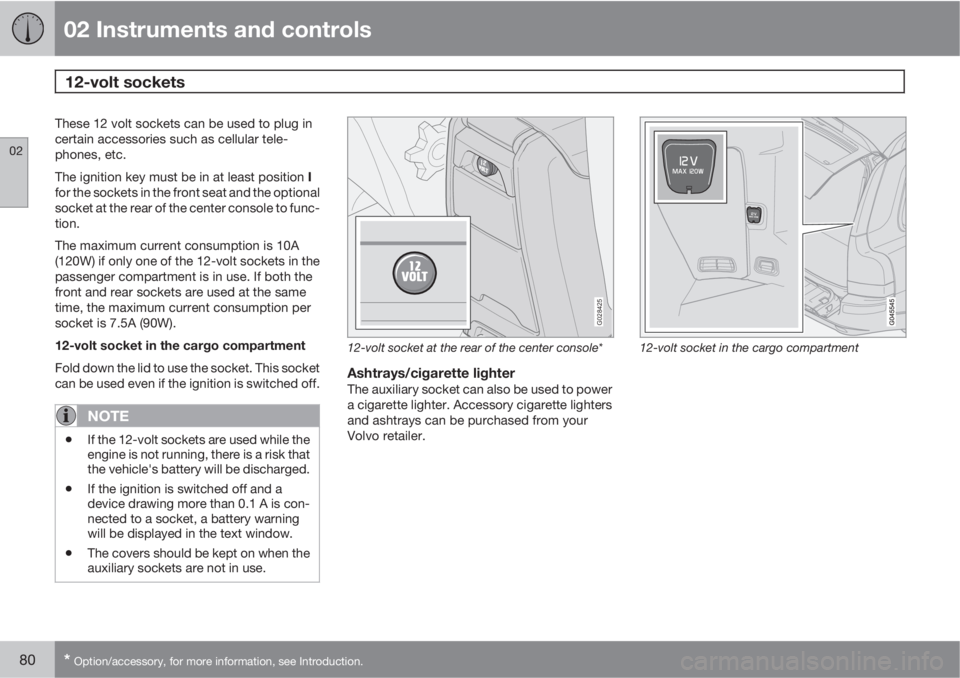
12-volt socket in the cargo compartment
Fold down the lid to use the socket. This socket
can be used even if the ignition is switched off.
NOTE
•If the 12-volt sockets are used while the
engine is not running, there is a risk that
the vehicle's battery will be discharged.
•If the ignition is switched off and a
device drawing more than 0.1 A is con-
nected to a socket, a battery warning
will be displayed in the text window.
•The covers should be kept on when the
auxiliary sockets are not in use.
G028425
12-volt socket at the rear of the center console*
Ashtrays/cigarette lighterThe auxiliary socket can also be used to power
a cigarette lighter. Accessory cigarette lighters
and ashtrays can be purchased from your
Volvo retailer.
12-volt socket in the cargo compartment
Page 84 of 310
02 Instruments and controls
Power windows
02
82
Power windows
The power windows are controlled by buttons
in the arm rests. The ignition switch must be
ON
1 (ignition key in position I, II or the engine
running) for the electrically operated windows
to function.
To lower: Press down the front edge of the but-
ton to the first detent ("stop").
To raise: Lightly pull up the front edge of the
button to the first detent ("stop").
Auto up/down function (front doors only):Either front door window can be opened or
closed automatically.
Auto down: Press the front part of the button
as far down as possible and release it immedi-
ately. To stop the window at any time, pull the
button up.
Auto up: Pull the front part of the button up as
far as possible and release it immediately. To
stop the window at any time, press the button
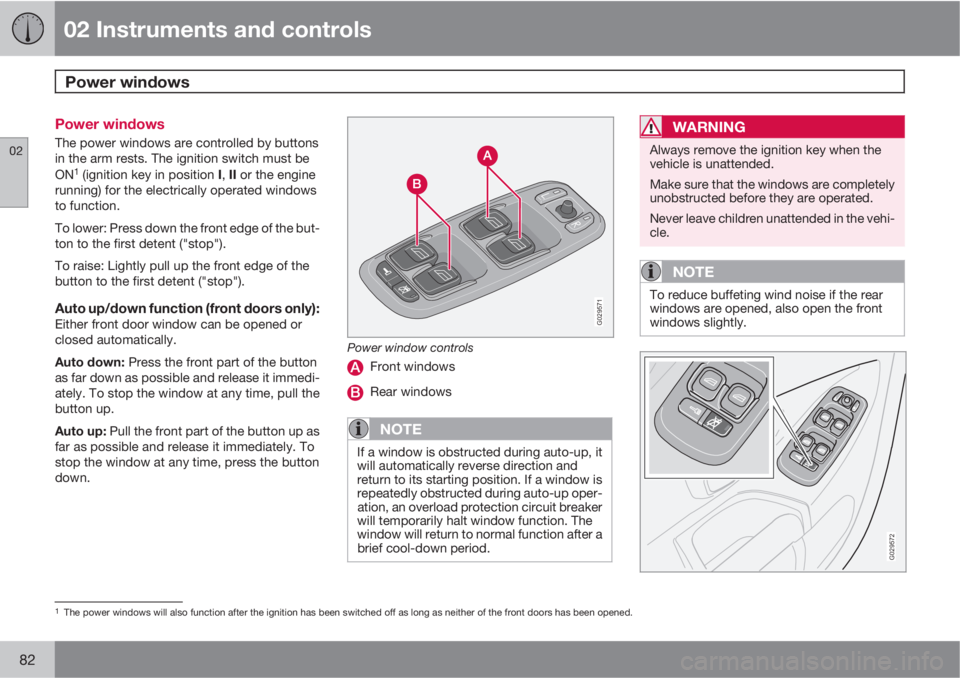
down.G029571
Power window controls
Front windows
Rear windows
NOTE
If a window is obstructed during auto-up, it
will automatically reverse direction and
return to its starting position. If a window is
repeatedly obstructed during auto-up oper-
ation, an overload protection circuit breaker
will temporarily halt window function. The
window will return to normal function after a
brief cool-down period.
WARNING
Always remove the ignition key when the
vehicle is unattended.
Make sure that the windows are completely
unobstructed before they are operated.
Never leave children unattended in the vehi-
cle.
NOTE
To reduce buffeting wind noise if the rear
windows are opened, also open the front
windows slightly.
G029572
1The power windows will also function after the ignition has been switched off as long as neither of the front doors has been opened.
Page 86 of 310
02 Instruments and controls
Mirrors
02
84* Option/accessory, for more information, see Introduction.
Rearview mirror
G026660
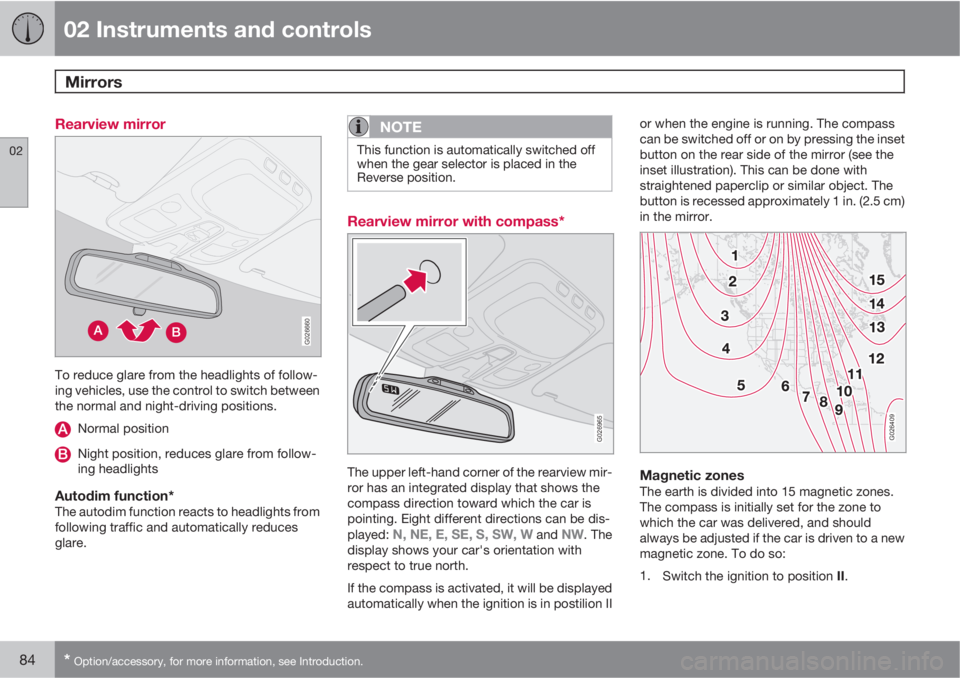
To reduce glare from the headlights of follow-
ing vehicles, use the control to switch between
the normal and night-driving positions.
Normal position
Night position, reduces glare from follow-
ing headlights
Autodim function*The autodim function reacts to headlights from
following traffic and automatically reduces
glare.
NOTE
This function is automatically switched off
when the gear selector is placed in the
Reverse position.
Rearview mirror with compass*
G026965
The upper left-hand corner of the rearview mir-
ror has an integrated display that shows the
compass direction toward which the car is
pointing. Eight different directions can be dis-
played:
N, NE, E, SE, S, SW, W and NW. The
display shows your car's orientation with
respect to true north.
If the compass is activated, it will be displayed
automatically when the ignition is in postilion IIor when the engine is running. The compass
can be switched off or on by pressing the inset
button on the rear side of the mirror (see the
inset illustration). This can be done with
straightened paperclip or similar object. The
button is recessed approximately 1 in. (2.5 cm)
in the mirror.
G026409
Magnetic zonesThe earth is divided into 15 magnetic zones.
The compass is initially set for the zone to
which the car was delivered, and should
always be adjusted if the car is driven to a new
magnetic zone. To do so:
1.
Switch the ignition to position II.
Page 89 of 310
02 Instruments and controls
Power moonroof
02
87 Power moonroof
G007503
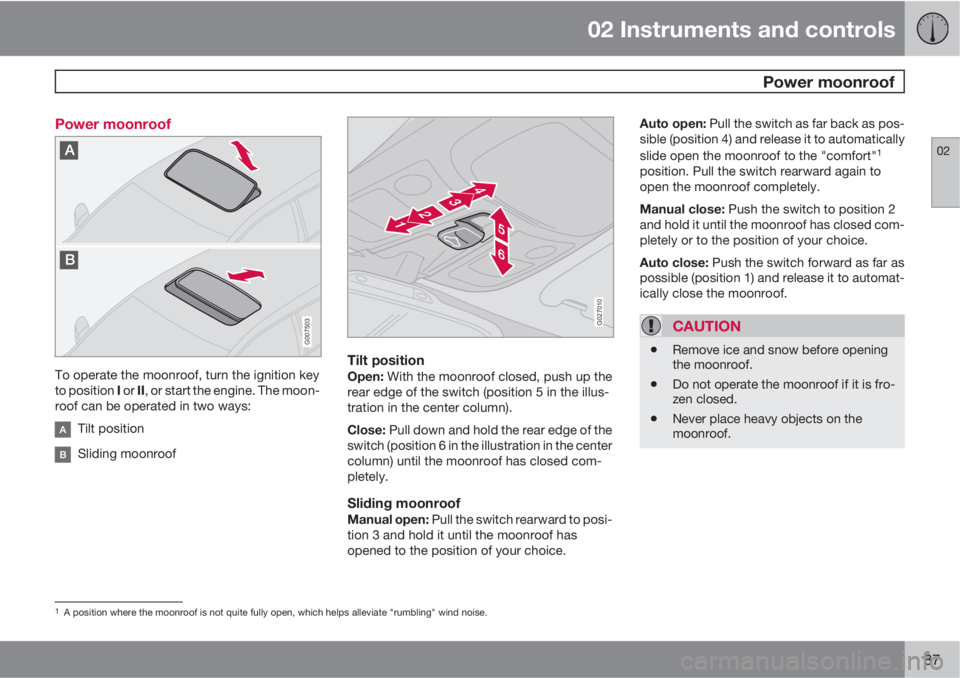
To operate the moonroof, turn the ignition key
to position I or II, or start the engine. The moon-
roof can be operated in two ways:
Tilt position
Sliding moonroof
G027010
Tilt positionOpen: With the moonroof closed, push up the
rear edge of the switch (position 5 in the illus-
tration in the center column).
Close: Pull down and hold the rear edge of the
switch (position 6 in the illustration in the center
column) until the moonroof has closed com-
pletely.
Sliding moonroofManual open: Pull the switch rearward to posi-
tion 3 and hold it until the moonroof has
opened to the position of your choice.Auto open: Pull the switch as far back as pos-
sible (position 4) and release it to automatically
slide open the moonroof to the "comfort"
1
position. Pull the switch rearward again to
open the moonroof completely.
Manual close: Push the switch to position 2
and hold it until the moonroof has closed com-
pletely or to the position of your choice.
Auto close: Push the switch forward as far as
possible (position 1) and release it to automat-
ically close the moonroof.
CAUTION
•Remove ice and snow before opening
the moonroof.
•Do not operate the moonroof if it is fro-
zen closed.
•Never place heavy objects on the
moonroof.
1A position where the moonroof is not quite fully open, which helps alleviate "rumbling" wind noise.
Page 90 of 310
02 Instruments and controls
Power moonroof
02
88
WARNING
•Never open/close the moonroof if it is
obstructed in any way when in opera-
tion.
•Never allow a child to operate the
moonroof.
•Never extend any object or body part
through the open moonroof, even if the
vehicle's ignition is completely
switched off.
•Never leave a child alone in a vehicle.
If the moonroof is obstructed during auto-close
operation, it will automatically reverse direction
and return to its starting position. If the moon-
roof is repeatedly obstructed during auto-close
operation, an overload circuit breaker will tem-
porarily halt moonroof function. The moonroof
will return to normal function after a brief cool-
down period.G020157
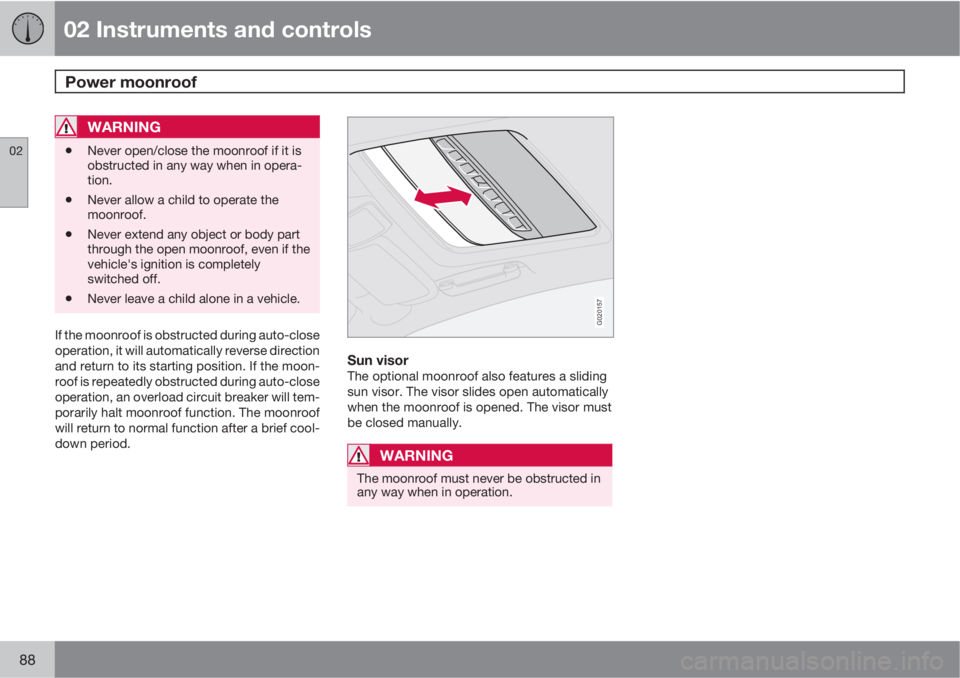
Sun visorThe optional moonroof also features a sliding
sun visor. The visor slides open automatically
when the moonroof is opened. The visor must
be closed manually.
WARNING
The moonroof must never be obstructed in
any way when in operation.
Page 91 of 310
02 Instruments and controls
HomeLink® Wireless Control System*
02
* Option/accessory, for more information, see Introduction.89 Introduction
G030070
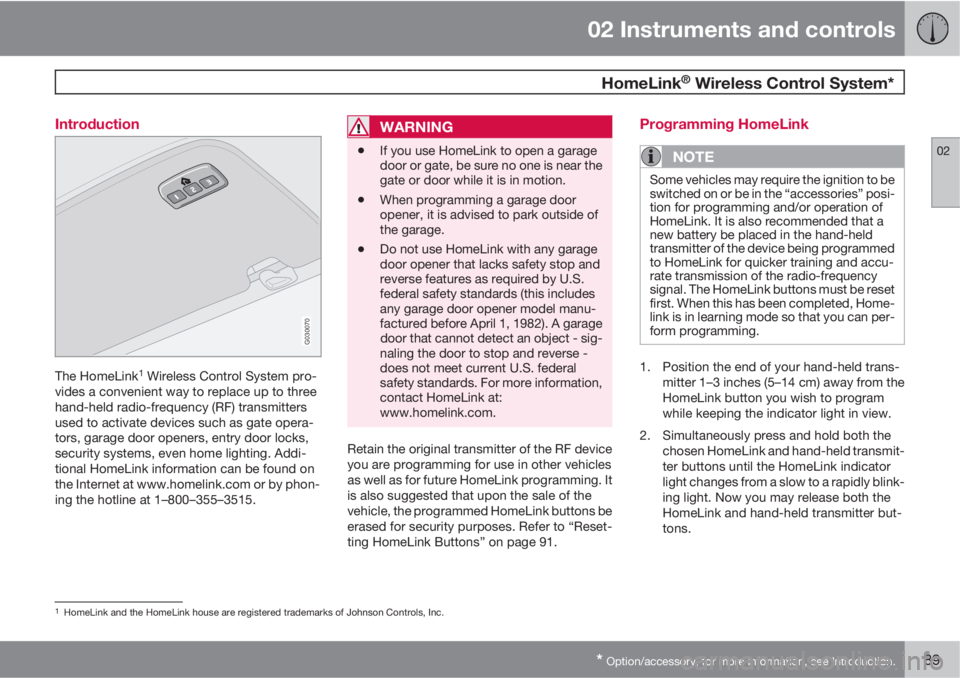
The HomeLink1 Wireless Control System pro-
vides a convenient way to replace up to three
hand-held radio-frequency (RF) transmitters
used to activate devices such as gate opera-
tors, garage door openers, entry door locks,
security systems, even home lighting. Addi-
tional HomeLink information can be found on
the Internet at www.homelink.com or by phon-
ing the hotline at 1–800–355–3515.
WARNING
•If you use HomeLink to open a garage
door or gate, be sure no one is near the
gate or door while it is in motion.
•When programming a garage door
opener, it is advised to park outside of
the garage.
•Do not use HomeLink with any garage
door opener that lacks safety stop and
reverse features as required by U.S.
federal safety standards (this includes
any garage door opener model manu-
factured before April 1, 1982). A garage
door that cannot detect an object - sig-
naling the door to stop and reverse -
does not meet current U.S. federal
safety standards. For more information,
contact HomeLink at:
www.homelink.com.
Retain the original transmitter of the RF device
you are programming for use in other vehicles
as well as for future HomeLink programming. It
is also suggested that upon the sale of the
vehicle, the programmed HomeLink buttons be
erased for security purposes. Refer to “Reset-
ting HomeLink Buttons” on page 91.
Programming HomeLink
NOTE
Some vehicles may require the ignition to be
switched on or be in the “accessories” posi-
tion for programming and/or operation of
HomeLink. It is also recommended that a
new battery be placed in the hand-held
transmitter of the device being programmed
to HomeLink for quicker training and accu-
rate transmission of the radio-frequency
signal. The HomeLink buttons must be reset
first. When this has been completed, Home-
link is in learning mode so that you can per-
form programming.
1. Position the end of your hand-held trans-
mitter 1–3 inches (5–14 cm) away from the
HomeLink button you wish to program
while keeping the indicator light in view.
2. Simultaneously press and hold both the
chosen HomeLink and hand-held transmit-
ter buttons until the HomeLink indicator
light changes from a slow to a rapidly blink-
ing light. Now you may release both the
HomeLink and hand-held transmitter but-
tons.
1HomeLink and the HomeLink house are registered trademarks of Johnson Controls, Inc.
Page 93 of 310
02 Instruments and controls
HomeLink® Wireless Control System*
02
* Option/accessory, for more information, see Introduction.91
NOTE
If the ignition is switched off, HomeLink will
function for 30 minutes after the driver's
door has been opened.
Resetting HomeLink Buttons
Use the following procedure to reset (erase
programming) from the three HomeLink but-
tons (individual buttons cannot be reset but
can be “reprogrammed” as outlined in the fol-
lowing section):
1. Press and hold the two outer HomeLink
buttons until the indicator light begins to
flash.
2. Release both buttons.
> HomeLink is now in the training (or
learning) mode and can be programmed
at any time beginning with “Program-
ming” - step 1.
Reprogramming a Single HomeLink
Button
To program a device to HomeLink using a
HomeLink button previously trained, follow
these steps:
1. Press and hold the desired HomeLink but-
ton. DO NOT release the button.
2. The indicator light will begin to flash after
20 seconds. Without releasing the Home-
Link button, proceed with “Programming”
- step 1.
For questions or comments, contact HomeLink
at: www.homelink.com or phone 1–800–355–
3515.
This device complies with FCC rules part 15
and Industry Canada (IC) RSS-210. Operation
is subject to the following two conditions: (1)
This device may not cause harmful interfer-
ence, and (2) This device must accept any
interference that may be received including
interference that may cause undesired opera-
tion.
NOTE
The transmitter has been tested and com-
plies with FCC and IC rules. Changes or
modifications not expressly approved by
the party responsible for compliance could
void the user’s authority to operate the
device.
2
2The term “IC:” before the certification/registration number only signifies that Industry Canada technical specifications were met.
Page 97 of 310
03 Climate
Climate control system – general information
03
95 Climate system blower
The climate system blower will be automati-
cally switched off when the engine is not run-
ning (even if the ignition key is in position I or
II) to avoid unnecessary battery drain. To acti-
vate the blower, turn the control to the desired
setting.
The climate system blower may start automat-
ically during a period of up to approximately
50 minutes after the ignition has been turned
off to remove condensation in the A/C evapo-
rator. It will run for 15 minutes and switch off
automatically.
Passenger compartment blower
Approximately 50 minutes after the ignition is
turned off, the blower may come on automati-
cally, and run for seven minutes, to remove
condensation in the A/C evaporator.
Blower function to reduce battery drain
The climate system's blower functions nor-
mally while the engine is running.
However, when the engine is switched off
(even if the ignition is switched to positions I or
II), the blower control will be automatically
switched off to avoid unnecessary battery
drain.The following points pertain if the ignition is on
but the engine in not running:
•To restart the blower, turn the control knob
to the setting of your choice.
•After approximately 2 minutes, the blower
speed will be reduced to avoid battery
drain.
You can reset the blower speed at any time.
Please be aware that the system has been
designed to reduce the blower's speed again
after 2 minutes, until the engine is started.
If the battery becomes drained:
•LOW BATTERY, FAN IS REDUCED will
be displayed in the text window in the
instrument panel.
•The yellow warning light in the instrument
panel (see page 58) will also light up.
Page 107 of 310
04 Interior
Front seats
04
* Option/accessory, for more information, see Introduction.105 Power seat*
OperationDriver's seat: The seat can be adjusted if the
ignition key is in position I, II or if the engine is
running. It can also be adjusted as follows with
the ignition off:
•Within several minutes after the driver's
door has been unlocked from the outside,
has been opened, and remains open.
•Within a short period if the driver's door has
just been closed.
•Within a short period if the driver's door has
not been opened after the ignition has
been switched off.
Passenger seat: The seat can only be
adjusted if the ignition key is in position I, II or
if the engine is running.G027036
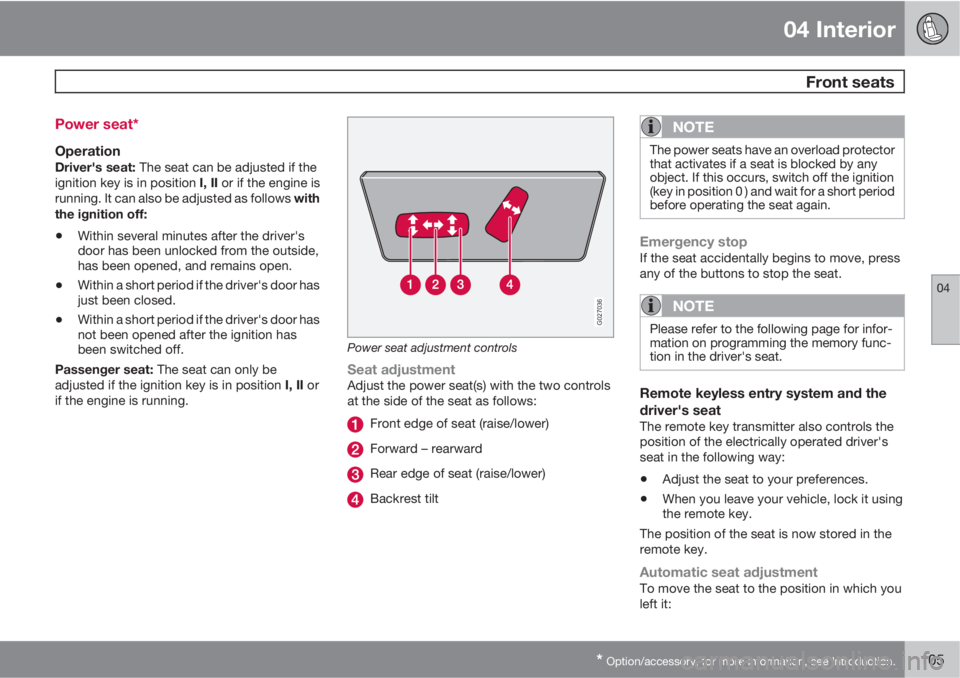
Power seat adjustment controls
Seat adjustmentAdjust the power seat(s) with the two controls
at the side of the seat as follows:
Front edge of seat (raise/lower)
Forward – rearward
Rear edge of seat (raise/lower)
Backrest tilt
NOTE
The power seats have an overload protector
that activates if a seat is blocked by any
object. If this occurs, switch off the ignition
(key in position 0 ) and wait for a short period
before operating the seat again.
Emergency stopIf the seat accidentally begins to move, press
any of the buttons to stop the seat.
NOTE
Please refer to the following page for infor-
mation on programming the memory func-
tion in the driver's seat.
Remote keyless entry system and the
driver's seat
The remote key transmitter also controls the
position of the electrically operated driver's
seat in the following way:
•Adjust the seat to your preferences.
•When you leave your vehicle, lock it using
the remote key.
The position of the seat is now stored in the
remote key.
Automatic seat adjustmentTo move the seat to the position in which you
left it: