brake VOLVO XC90 2014 Owner´s Manual
[x] Cancel search | Manufacturer: VOLVO, Model Year: 2014, Model line: XC90, Model: VOLVO XC90 2014Pages: 308, PDF Size: 13.31 MB
Page 81 of 308
02 Instruments and controls
Cruise control
02
79
NOTE
Cruise control is automatically disengaged if:
• When the brake pedal is depressed.
• the engine is switched off
• the gear selector is placed in (
N) Neu-
tral
• the wheels start to spin or lock
• if an increase in speed is maintained for more than one minute
• if the vehicle's speed falls belowapproximately 20 mph (30 km/h).
Temporarily disengaging the cruise control
1. Press
0 to temporarily disengage cruise
control. >
CRUISE will be displayed in the infor-
mation window in the instrument panel.
2. Depress the brake pedal. Pressing "resume"
causes the vehicle to
return to the previously set speed.
WARNING
Cruise control should not be used in heavy traffic or when driving on wet or slipperyroads, or when driving on unpaved oruneven road surfaces. Cruise control maynot maintain set speed on steep down-grades.
Page 106 of 308
04 Interior
Front seats
04
104* Option/accessory, for more information, see Introduction.
Manually adjusted front seats
G027214
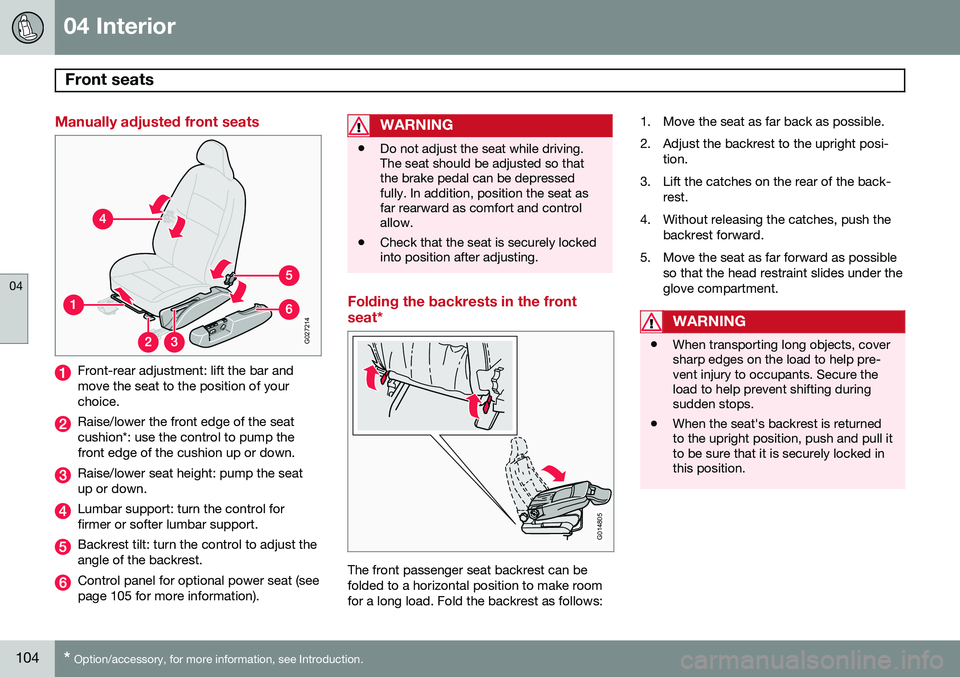
Front-rear adjustment: lift the bar and move the seat to the position of yourchoice.
Raise/lower the front edge of the seat cushion*: use the control to pump thefront edge of the cushion up or down.
Raise/lower seat height: pump the seat up or down.
Lumbar support: turn the control for firmer or softer lumbar support.
Backrest tilt: turn the control to adjust the angle of the backrest.
Control panel for optional power seat (see page 105 for more information).
WARNING
• Do not adjust the seat while driving. The seat should be adjusted so thatthe brake pedal can be depressedfully. In addition, position the seat asfar rearward as comfort and controlallow.
• Check that the seat is securely lockedinto position after adjusting.
Folding the backrests in the front seat*
G014805
The front passenger seat backrest can be folded to a horizontal position to make roomfor a long load. Fold the backrest as follows: 1. Move the seat as far back as possible.
2. Adjust the backrest to the upright posi-
tion.
3. Lift the catches on the rear of the back- rest.
4. Without releasing the catches, push the backrest forward.
5. Move the seat as far forward as possible so that the head restraint slides under the glove compartment.
WARNING
•When transporting long objects, cover sharp edges on the load to help pre-vent injury to occupants. Secure theload to help prevent shifting duringsudden stops.
• When the seat's backrest is returnedto the upright position, push and pull itto be sure that it is securely locked inthis position.
Page 108 of 308
04 Interior
Front seats
04
106* Option/accessory, for more information, see Introduction.
Automatic seat adjustmentTo move the seat to the position in which you left it:
1. Unlock the driver's door with the same
remote key (the one used to lock the doors)
2. Open the driver's door within 2 minutes. The driver's seat will automatically move to the position in which you left it.
NOTE
• The seat will move to this position even if someone else has moved it to adifferent seating position and lockedthe vehicle with a different remote key.
• This feature will work in the same waywith all of the remote key transmitters(up to 3 ) that you use with your vehi-cle.
• This feature will not function if you lockyour vehicle with the key.
WARNING
•Because the driver's seat can be adjusted with the ignition off, childrenshould never be left unattended in thevehicle.
• Movement of the seat can be STOP-PED at any time by pressing any but-ton on the power seat control panel.
• Do not adjust the seat while driving.
• The seat should be adjusted so thatthe brake pedal can be depressedfully. In addition, position the seat asfar rearward as comfort and controlallow.
• The seat rails on the floor must not beobstructed in any way when the seat isin motion.
G027037
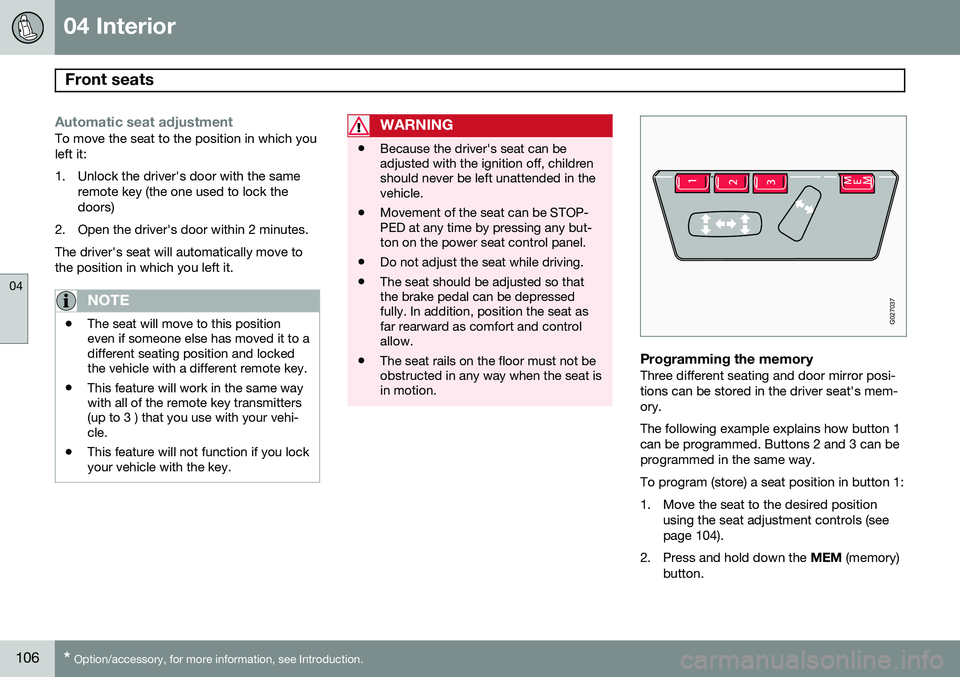
Programming the memoryThree different seating and door mirror posi- tions can be stored in the driver seat's mem-ory. The following example explains how button 1 can be programmed. Buttons 2 and 3 can beprogrammed in the same way. To program (store) a seat position in button 1:
1. Move the seat to the desired position
using the seat adjustment controls (see page 104).
2. Press and hold down the MEM (memory)
button.
Page 112 of 308
04 Interior
Rear seats
04
110
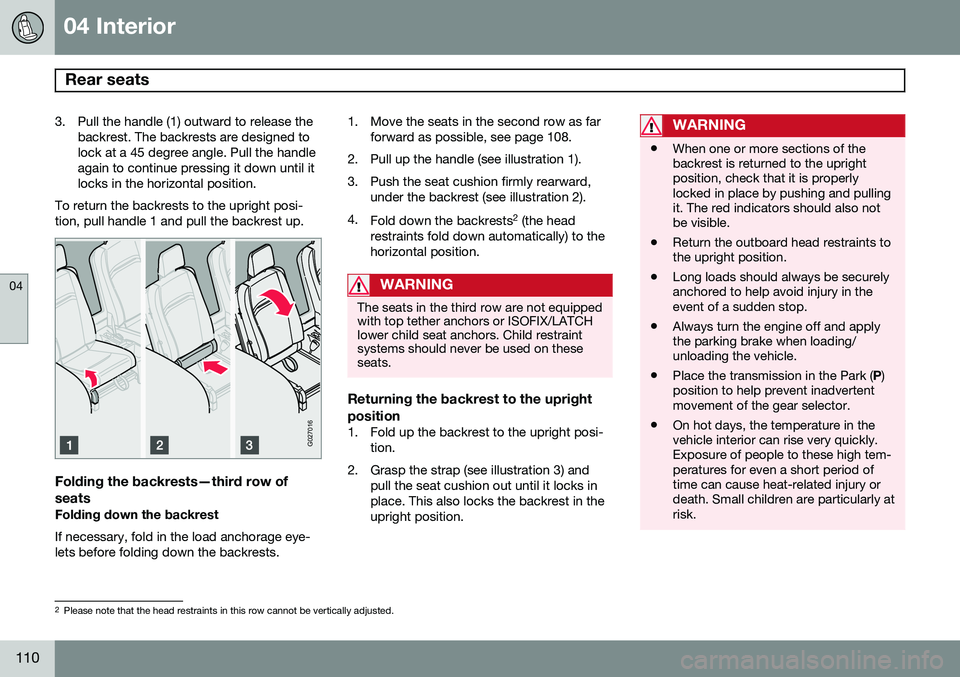
3. Pull the handle (1) outward to release thebackrest. The backrests are designed to lock at a 45 degree angle. Pull the handleagain to continue pressing it down until itlocks in the horizontal position.
To return the backrests to the upright posi-tion, pull handle 1 and pull the backrest up.
G027016
Folding the backrests—third row of seats
Folding down the backrest If necessary, fold in the load anchorage eye- lets before folding down the backrests. 1. Move the seats in the second row as far
forward as possible, see page 108.
2. Pull up the handle (see illustration 1).
3. Push the seat cushion firmly rearward, under the backrest (see illustration 2).
4. Fold down the backrests 2
(the head
restraints fold down automatically) to the horizontal position.
WARNING
The seats in the third row are not equipped with top tether anchors or ISOFIX/LATCHlower child seat anchors. Child restraintsystems should never be used on theseseats.
Returning the backrest to the upright position
1. Fold up the backrest to the upright posi- tion.
2. Grasp the strap (see illustration 3) and pull the seat cushion out until it locks in place. This also locks the backrest in theupright position.
WARNING
•When one or more sections of the backrest is returned to the uprightposition, check that it is properlylocked in place by pushing and pullingit. The red indicators should also notbe visible.
• Return the outboard head restraints tothe upright position.
• Long loads should always be securelyanchored to help avoid injury in theevent of a sudden stop.
• Always turn the engine off and applythe parking brake when loading/unloading the vehicle.
• Place the transmission in the Park (
P)
position to help prevent inadvertentmovement of the gear selector.
• On hot days, the temperature in thevehicle interior can rise very quickly.Exposure of people to these high tem-peratures for even a short period oftime can cause heat-related injury ordeath. Small children are particularly atrisk.
2
Please note that the head restraints in this row cannot be vertically adjusted.
Page 138 of 308
136* Option/accessory, for more information, see Introduction. General information............................................................................... 138
Fuel requirements................................................................................. 139Refueling............................................................................................... 141
Starting the vehicle............................................................................... 143
Ignition switch and steering wheel lock................................................ 145
Economical driving................................................................................ 146
Difficult driving conditions..................................................................... 147
Automatic transmission........................................................................ 149Jump starting........................................................................................ 152All Wheel Drive*..................................................................................... 153
Brake system........................................................................................154Parking brake........................................................................................ 157Stability system..................................................................................... 158
Front/rear park assist*........................................................................... 160Towing.................................................................................................. 162Towing a trailer...................................................................................... 164
Detachable trailer hitch......................................................................... 167
Load carriers (accessory)...................................................................... 168
Cold weather precautions..................................................................... 169
Before a long distance trip.................................................................... 170
Blind Spot Information System*............................................................ 171
Page 145 of 308

06 Starting and driving
Starting the vehicle
06
143
Starting the engine
WARNING
Before starting, check that the seat, steer- ing wheel and mirrors are adjusted prop-erly. Make sure the brake pedal can bedepressed completely. Adjust the seat ifnecessary, see page 104.
1. Fasten the seat belt.
2. Apply the parking brake (hand brake) ifnot already set. The gear selector is locked in the P position (SHIFTLOCK).
3. Without touching the accelerator pedal, turn the ignition key 1
to the starting posi-
tion. Allow the starter to operate for up to10 seconds. Release the key as soon as the engine starts 2
. If the engine fails to
start, repeat this step.
CAUTION
If the engine does not start after the third try, wait for approximately 3 minutesbefore trying to start it again to give thebattery time to recover its startingcapacity.
WARNING
• Never use more than one floor mat at a time on the driver's floor. An extramat on the driver's floor can cause theaccelerator and/or brake pedal tocatch. Check that the movement ofthese pedals is not impeded.
• Volvo's floor mats are specially manu-factured for your car. They must befirmly secured in the clips on the floorso that they cannot slide and becometrapped under the pedals on the driv-er's side.
NOTE
•If the key blade section of the remote is not fully folded out when starting thevehicle, the immobilizer function maymake it impossible to start the engine.
• After a cold start, idle speed may benoticeably higher than normal for ashort period. This is done to help bringcomponents in the emission controlsystem to their normal operating tem-perature as quickly as possible, whichenables them to control emissions andhelp reduce the vehicle's impact onthe environment.
• To release the gear selector from the
P
(Park) position, the engine must berunning (or the ignition key must be inposition II) and the brake pedal must
be depressed.
• Select the desired gear. The gearengages after a very slight delay whichis especially noticeable when selecting R.
1
If two of the keys to your vehicle are close together, e.g. on the same key ring when you try to start the vehicle, this could cause interference in the immobilizer system and result in the vehicle not starting. If this should occur, remove one of the keys from the key ring before trying to start the vehicle again.
2 On vehicles equipped with the autostart feature, release the key immediately. See also page 145.
Page 146 of 308
06 Starting and driving
Starting the vehicle
06
144
NOTE
Your vehicle is equipped with a KEYLOCK
system. When the engine is switched off, the gear selector must be in the P position
before the key can be removed from theignition switch. When starting in cold weather, the trans- mission may shift up at slightly higherengine speeds than normal until the auto-matic transmission fluid reaches normaloperating temperature.
NOTE
Do not race a cold engine immediately after starting. Oil flow may not reach somelubrication points fast enough to preventengine damage.
WARNING
Always place the gear selector in Park and apply the parking brake before leaving thevehicle. Never leave the vehicle unatten-ded with the engine running.
• Always open garage doors fully before starting the engine inside a garage toensure adequate ventilation. Theexhaust gases contain carbon monox-ide, which is invisible and odorless butvery poisonous.
CAUTION
Automatic transmission
• The engine should be idling when you move the gear selector. Never acceler-ate until after you feel the transmissionengage! Accelerating immediately afterselecting a gear will cause harshengagement and premature transmis-sion wear.
• Selecting
P or N when idling at a
standstill for prolonged periods of timewill help prevent overheating of theautomatic transmission fluid.
Page 148 of 308
06 Starting and driving
Economical driving
06
146
Economical driving conserves natural resources
Better driving economy may be obtained by thinking ahead, avoiding rapid starts andstops and adjusting the speed of your vehicleto immediate traffic conditions. Observe thefollowing rules:
• Bring the engine to normal operating tem- perature as soon as possible by drivingwith a light foot on the accelerator pedalfor the first few minutes of operation. Acold engine uses more fuel and is subjectto increased wear.
• Whenever possible, avoid using the vehi-cle for driving short distances. This doesnot allow the engine to reach normaloperating temperature.
• Drive carefully and avoid rapid accelera-tion and hard braking.
• Use the transmission's
D (Drive) position
as often as possible and avoid using"kickdown" to help improve fuel econ-omy.
• Do not exceed posted speed limits.
• Avoid carrying unnecessary items (extraload) in the vehicle.
• Maintain correct tire pressure. Check tirepressure regularly (when tires are cold).
• Remove snow tires when threat of snowor ice has ended. •
Note that roof racks, ski racks, etc,increase air resistance and also fuel con-sumption.
• At highway driving speeds, fuel consump-tion will be lower with the air conditioningon and the windows closed than with theair conditioning off and the windowsopen.
• Using the onboard trip computer's fuelconsumption modes can help you learnhow to drive more economically.
Other factors that decrease gas mileage are: • Dirty air cleaner
• Dirty engine oil and clogged oil filter
• Dragging brakes
• Incorrect front end alignment.
Some of the above mentioned items and oth- ers are checked at the standard MaintenanceService intervals.
CAUTION
Drive slowly and carefully if going through standing water (i.e. flooded roadways,etc.). Damage to the engine could result ifexcess water is drawn in through the airintake system. Never drive the vehicle inwater deeper than 18 inches (48 cm).
Page 149 of 308
06 Starting and driving
Difficult driving conditions
06
147
Driving on rough/unpaved surfaces
The Volvo XC90 is designed primarily for on- road driving, and it has excellent handlingcharacteristics on very rough or unpavedroads. When driving on poorly maintained or unpaved roads, please keep the following inmind:
• Reduce speed on rough surfaces to mini- mize possible damage to the vehicle'sunderbody.
• When driving on soft surfaces such as drysand or snow, try to avoid stopping if atall possible.
WARNING
•Avoid driving diagonally across steep inclines as this could increase the riskof a roll-over. Try to drive straight upor down the slope.
• If the road is very steep, avoid turningthe vehicle around to help avoid therisk of rolling over. Back the vehicle upor down the incline instead.
NOTE
Avoid driving on steep inclines if the fuel tank is nearly empty. If the flow of fuel tothe engine is interrupted due to the vehi-cle's angle of inclination, this could resultin damage to the three-way catalytic con-verter. We recommend keeping the fueltank at least half full when driving on steepinclines.
Driving through water
The vehicle can be driven through water up to a depth of approximately 16 inches (40 cm),at a maximum speed of 6 mph (10 km/h). Take particular care when driving through flowing water. Clean the electrical connections for trailer wir- ing after driving in mud or water. When driving through water, maintain low speed and do not stop in the water.
WARNING
• Avoid driving through standing or rushing water. Doing so can be dan-gerous and it may also be difficult todetermine the actual depth of thewater.
• If water cannot be avoided, after driv-ing through the water, press lightly onthe brake pedal to ensure that thebrakes are functioning normally. Wateror mud can make the brake liningsslippery, resulting in delayed brakingeffect.
Page 151 of 308
06 Starting and driving
Automatic transmission
06
149
G026990
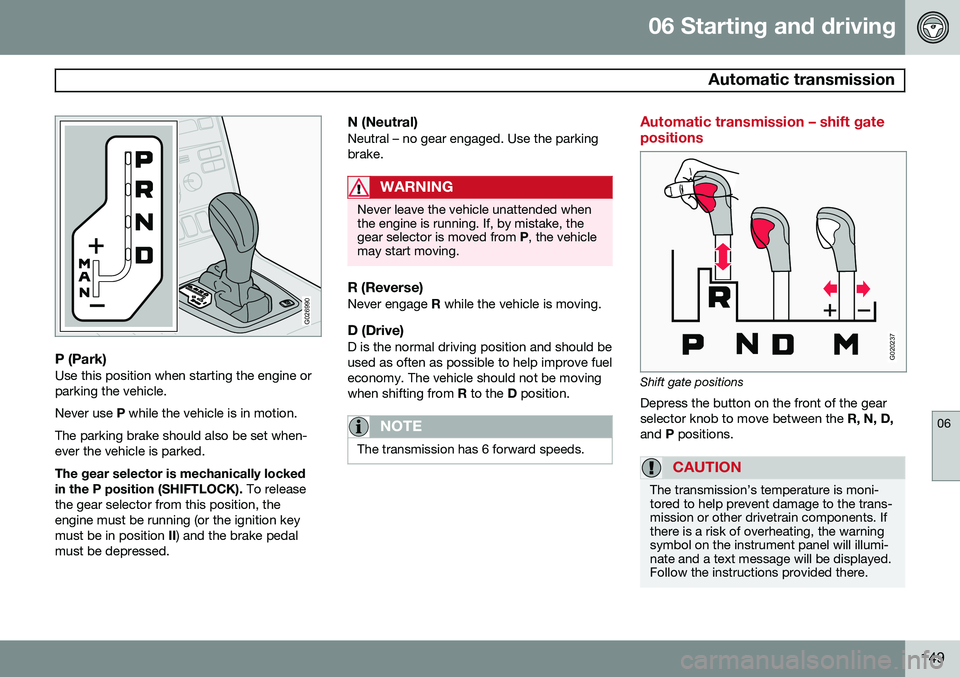
P (Park)Use this position when starting the engine or parking the vehicle. Never use P while the vehicle is in motion.
The parking brake should also be set when- ever the vehicle is parked. The gear selector is mechanically locked in the P position (SHIFTLOCK). To release
the gear selector from this position, the engine must be running (or the ignition keymust be in position II) and the brake pedal
must be depressed.
N (Neutral)Neutral – no gear engaged. Use the parkingbrake.
WARNING
Never leave the vehicle unattended when the engine is running. If, by mistake, thegear selector is moved from P, the vehicle
may start moving.
R (Reverse)Never engage R while the vehicle is moving.
D (Drive)D is the normal driving position and should be used as often as possible to help improve fueleconomy. The vehicle should not be movingwhen shifting from R to the D position.
NOTE
The transmission has 6 forward speeds.
Automatic transmission – shift gate positions
G020237
Shift gate positions
Depress the button on the front of the gear selector knob to move between the R, N, D,
and P positions.
CAUTION
The transmission’s temperature is moni- tored to help prevent damage to the trans-mission or other drivetrain components. Ifthere is a risk of overheating, the warningsymbol on the instrument panel will illumi-nate and a text message will be displayed.Follow the instructions provided there.