key VOLVO XC90 2014 Owner´s Manual
[x] Cancel search | Manufacturer: VOLVO, Model Year: 2014, Model line: XC90, Model: VOLVO XC90 2014Pages: 308, PDF Size: 13.31 MB
Page 84 of 308
02 Instruments and controls
Power windows
02
82
Power windows
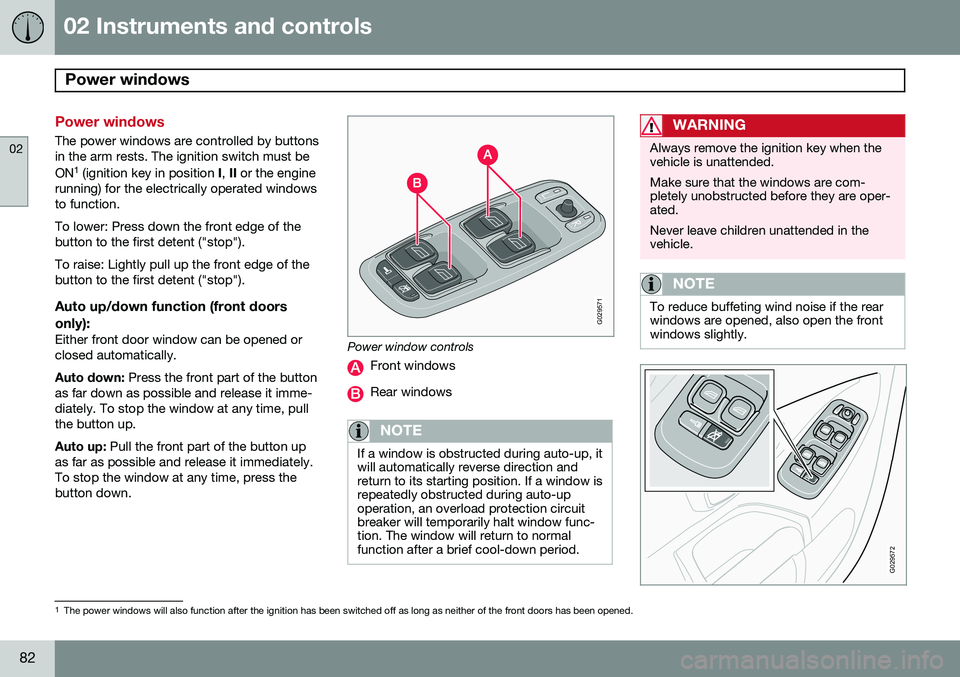
The power windows are controlled by buttons in the arm rests. The ignition switch must be ON1
(ignition key in position I, II or the engine
running) for the electrically operated windows to function. To lower: Press down the front edge of the button to the first detent ("stop"). To raise: Lightly pull up the front edge of the button to the first detent ("stop").
Auto up/down function (front doors
only):
Either front door window can be opened orclosed automatically. Auto down: Press the front part of the button
as far down as possible and release it imme- diately. To stop the window at any time, pullthe button up. Auto up: Pull the front part of the button up
as far as possible and release it immediately. To stop the window at any time, press thebutton down.
G029571
Power window controls
Front windows
Rear windows
NOTE
If a window is obstructed during auto-up, it will automatically reverse direction andreturn to its starting position. If a window isrepeatedly obstructed during auto-upoperation, an overload protection circuitbreaker will temporarily halt window func-tion. The window will return to normalfunction after a brief cool-down period.
WARNING
Always remove the ignition key when the vehicle is unattended. Make sure that the windows are com- pletely unobstructed before they are oper-ated. Never leave children unattended in the vehicle.
NOTE
To reduce buffeting wind noise if the rear windows are opened, also open the frontwindows slightly.
G029572
1 The power windows will also function after the ignition has been switched off as long as neither of the front doors has been opened.
Page 88 of 308
02 Instruments and controls
Mirrors
02
86* Option/accessory, for more information, see Introduction.
For information about the optional folding mirror function see page 64.
WARNING
The mirrors should always be adjusted prior to driving. Objects seen in the pas-senger's side wide-angle door mirror arecloser than they appear to be.
Mirror memory function (with the
central locking system)*
If you lock the vehicle and later unlock it with the same remote key and open the driver's
door, the door mirrors (and the driver's seat)will automatically move to the position theywere in when you left the vehicle. This featurewill work in the same way with all of theremote key transmitters (up to 3) that you usewith your vehicle. This feature will not func-tion if you lock your vehicle with the key.
Water repellent glassThe side door mirrors can be treatedwith a water repellent coating. The
symbol to the left indicates these windowshave this coating.
The coating improves vision by causing the water to run off quickly. For information on cleaning this type of glass, see page 210.
CAUTION
Use the heating function to remove ice, snow, or mist from the mirrors.
Page 89 of 308
02 Instruments and controls
Power moonroof
02
87
Power moonroof
G007503
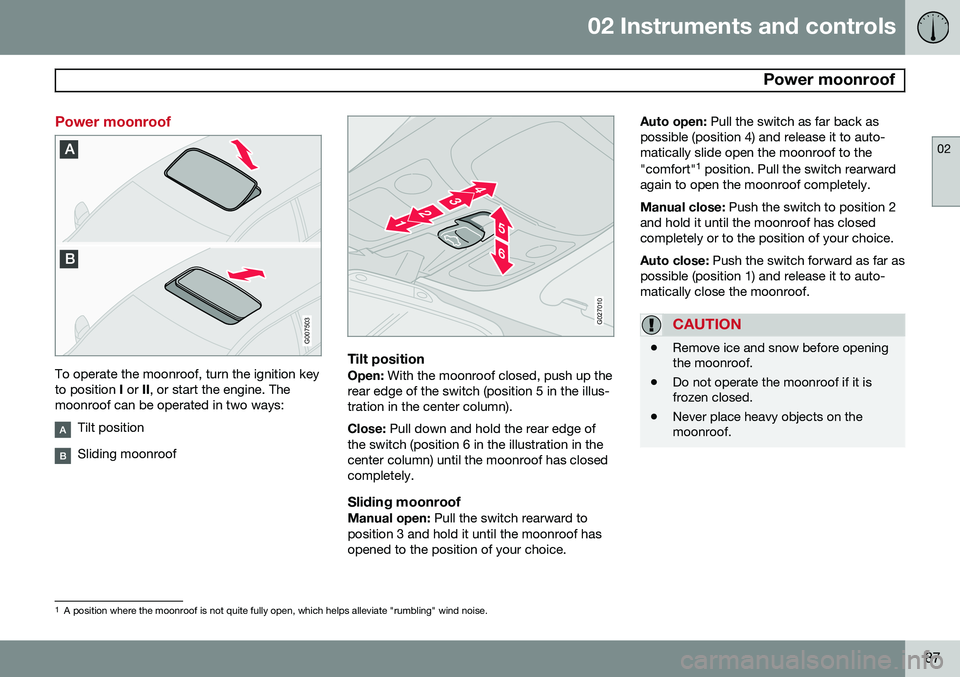
To operate the moonroof, turn the ignition key to position I or II, or start the engine. The
moonroof can be operated in two ways:
Tilt position
Sliding moonroof
G027010
Tilt positionOpen: With the moonroof closed, push up the
rear edge of the switch (position 5 in the illus- tration in the center column). Close: Pull down and hold the rear edge of
the switch (position 6 in the illustration in the center column) until the moonroof has closedcompletely.
Sliding moonroofManual open: Pull the switch rearward to
position 3 and hold it until the moonroof hasopened to the position of your choice. Auto open:
Pull the switch as far back as
possible (position 4) and release it to auto-matically slide open the moonroof to the "comfort" 1
position. Pull the switch rearward
again to open the moonroof completely. Manual close: Push the switch to position 2
and hold it until the moonroof has closed completely or to the position of your choice. Auto close: Push the switch forward as far as
possible (position 1) and release it to auto- matically close the moonroof.
CAUTION
• Remove ice and snow before opening the moonroof.
• Do not operate the moonroof if it isfrozen closed.
• Never place heavy objects on themoonroof.
1
A position where the moonroof is not quite fully open, which helps alleviate "rumbling" wind noise.
Page 97 of 308
03 Climate
Climate control system – general information
03
95
Climate system blower
The climate system blower will be automati- cally switched off when the engine is not run-ning (even if the ignition key is in position I or
II ) to avoid unnecessary battery drain. To
activate the blower, turn the control to thedesired setting. The climate system blower may start auto- matically during a period of up to approxi-mately 50 minutes after the ignition has beenturned off to remove condensation in the A/Cevaporator. It will run for 15 minutes andswitch off automatically.
Passenger compartment blower
Approximately 50 minutes after the ignition is turned off, the blower may come on automati-cally, and run for seven minutes, to removecondensation in the A/C evaporator.
Blower function to reduce battery drain
The climate system's blower functions nor- mally while the engine is running. However, when the engine is switched off (even if the ignition is switched to positions I
or II), the blower control will be automatically
switched off to avoid unnecessary batterydrain. The following points pertain if the ignition ison but the engine in not running:
• To restart the blower, turn the control knob to the setting of your choice.
• After approximately 2 minutes, the blowerspeed will be reduced to avoid batterydrain.
You can reset the blower speed at any time. Please be aware that the system has beendesigned to reduce the blower's speed againafter 2 minutes, until the engine is started. If the battery becomes drained: • LOW BATTERY, FAN IS REDUCED
will
be displayed in the text window in the instrument panel.
• The yellow warning light in the instrumentpanel (see page 58) will also light up.
Page 107 of 308
04 Interior
Front seats
04
* Option/accessory, for more information, see Introduction.105
Power seat*
OperationDriver's seat: The seat can be adjusted if the
ignition key is in position I, II or if the engine
is running. It can also be adjusted as follows with the ignition off:
• Within several minutes after the driver's door has been unlocked from the outside,has been opened, and remains open.
• Within a short period if the driver's doorhas just been closed.
• Within a short period if the driver's doorhas not been opened after the ignitionhas been switched off.
Passenger seat: The seat can only be
adjusted if the ignition key is in position I, II or
if the engine is running.
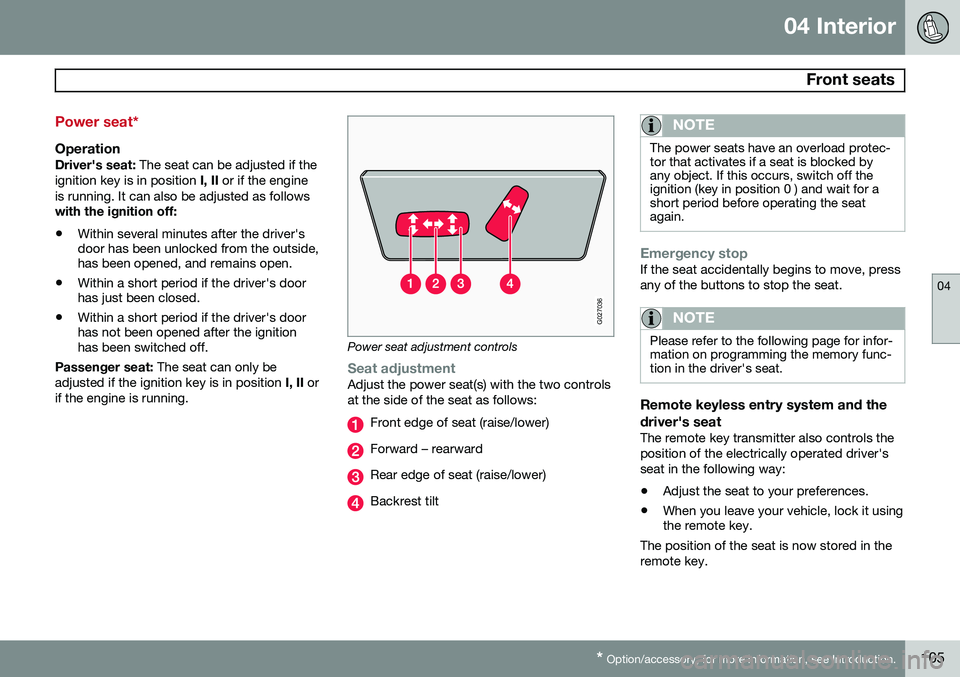
G027036
Power seat adjustment controls
Seat adjustmentAdjust the power seat(s) with the two controls at the side of the seat as follows:
Front edge of seat (raise/lower)
Forward – rearward
Rear edge of seat (raise/lower)
Backrest tilt
NOTE
The power seats have an overload protec- tor that activates if a seat is blocked byany object. If this occurs, switch off theignition (key in position 0 ) and wait for ashort period before operating the seatagain.
Emergency stopIf the seat accidentally begins to move, press any of the buttons to stop the seat.
NOTE
Please refer to the following page for infor- mation on programming the memory func-tion in the driver's seat.
Remote keyless entry system and the driver's seat
The remote key transmitter also controls the position of the electrically operated driver'sseat in the following way:
• Adjust the seat to your preferences.
• When you leave your vehicle, lock it using the remote key.
The position of the seat is now stored in the remote key.
Page 108 of 308
04 Interior
Front seats
04
106* Option/accessory, for more information, see Introduction.
Automatic seat adjustmentTo move the seat to the position in which you left it:
1. Unlock the driver's door with the same
remote key (the one used to lock the doors)
2. Open the driver's door within 2 minutes. The driver's seat will automatically move to the position in which you left it.
NOTE
• The seat will move to this position even if someone else has moved it to adifferent seating position and lockedthe vehicle with a different remote key.
• This feature will work in the same waywith all of the remote key transmitters(up to 3 ) that you use with your vehi-cle.
• This feature will not function if you lockyour vehicle with the key.
WARNING
•Because the driver's seat can be adjusted with the ignition off, childrenshould never be left unattended in thevehicle.
• Movement of the seat can be STOP-PED at any time by pressing any but-ton on the power seat control panel.
• Do not adjust the seat while driving.
• The seat should be adjusted so thatthe brake pedal can be depressedfully. In addition, position the seat asfar rearward as comfort and controlallow.
• The seat rails on the floor must not beobstructed in any way when the seat isin motion.
G027037
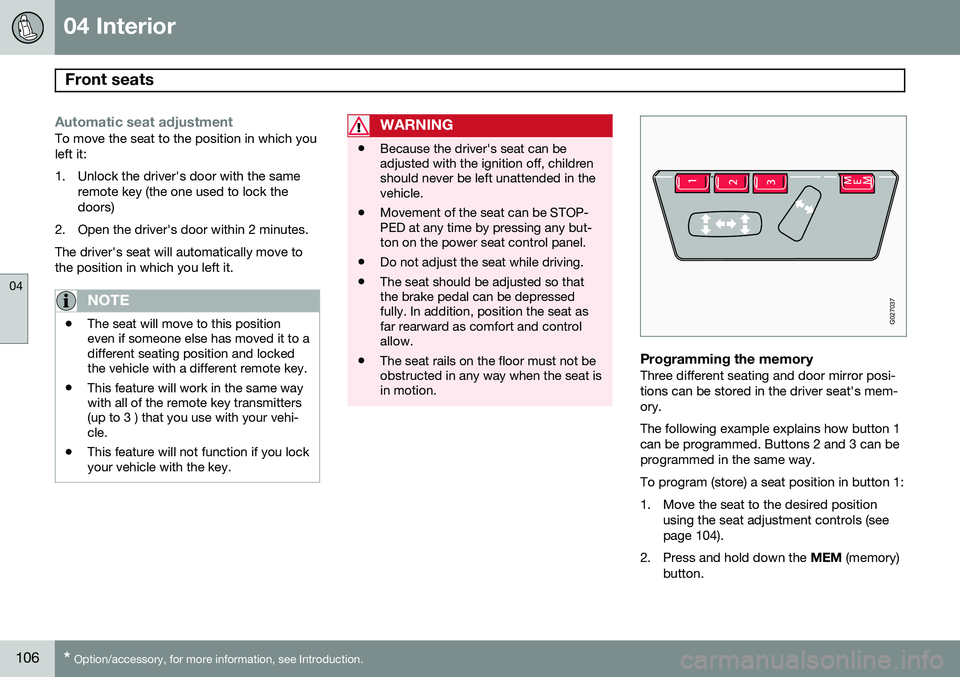
Programming the memoryThree different seating and door mirror posi- tions can be stored in the driver seat's mem-ory. The following example explains how button 1 can be programmed. Buttons 2 and 3 can beprogrammed in the same way. To program (store) a seat position in button 1:
1. Move the seat to the desired position
using the seat adjustment controls (see page 104).
2. Press and hold down the MEM (memory)
button.
Page 113 of 308
04 Interior
Interior lighting
04
}}
111
Reading lights and courtesy light
G026960
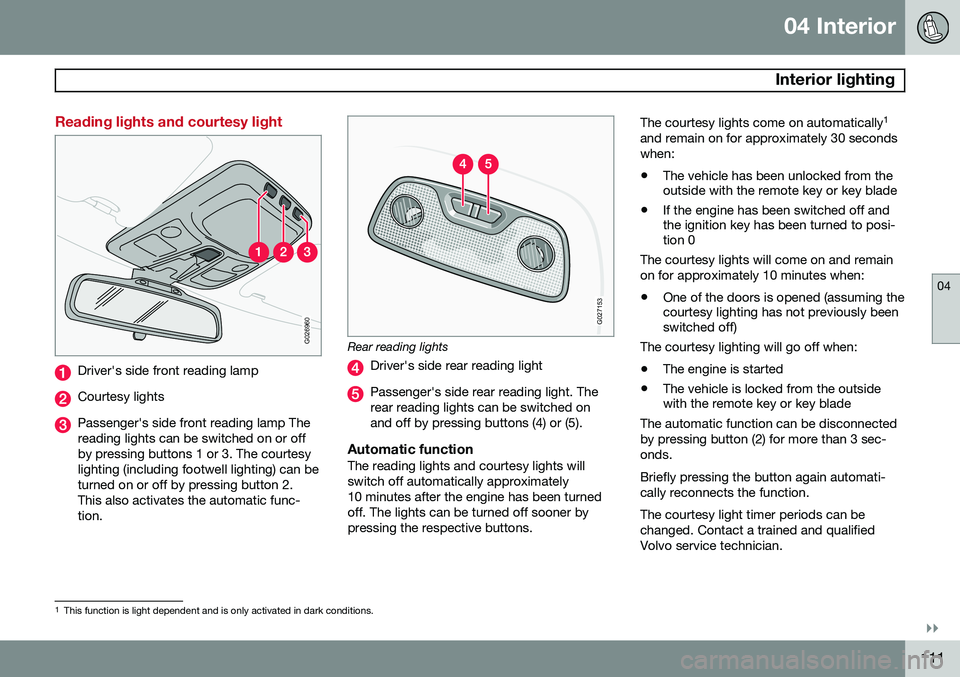
Driver's side front reading lamp
Courtesy lights
Passenger's side front reading lamp The reading lights can be switched on or offby pressing buttons 1 or 3. The courtesylighting (including footwell lighting) can beturned on or off by pressing button 2.This also activates the automatic func-tion.
G027153
Rear reading lights
Driver's side rear reading light
Passenger's side rear reading light. The rear reading lights can be switched onand off by pressing buttons (4) or (5).
Automatic functionThe reading lights and courtesy lights willswitch off automatically approximately10 minutes after the engine has been turnedoff. The lights can be turned off sooner bypressing the respective buttons.The courtesy lights come on automatically
1
and remain on for approximately 30 secondswhen: • The vehicle has been unlocked from the outside with the remote key or key blade
• If the engine has been switched off andthe ignition key has been turned to posi-tion 0
The courtesy lights will come on and remain on for approximately 10 minutes when:
• One of the doors is opened (assuming the courtesy lighting has not previously beenswitched off)
The courtesy lighting will go off when:
• The engine is started
• The vehicle is locked from the outsidewith the remote key or key blade
The automatic function can be disconnected by pressing button (2) for more than 3 sec-onds. Briefly pressing the button again automati- cally reconnects the function. The courtesy light timer periods can be changed. Contact a trained and qualifiedVolvo service technician.
1 This function is light dependent and is only activated in dark conditions.
Page 118 of 308
04 Interior
Storage compartments
04
116
G027018
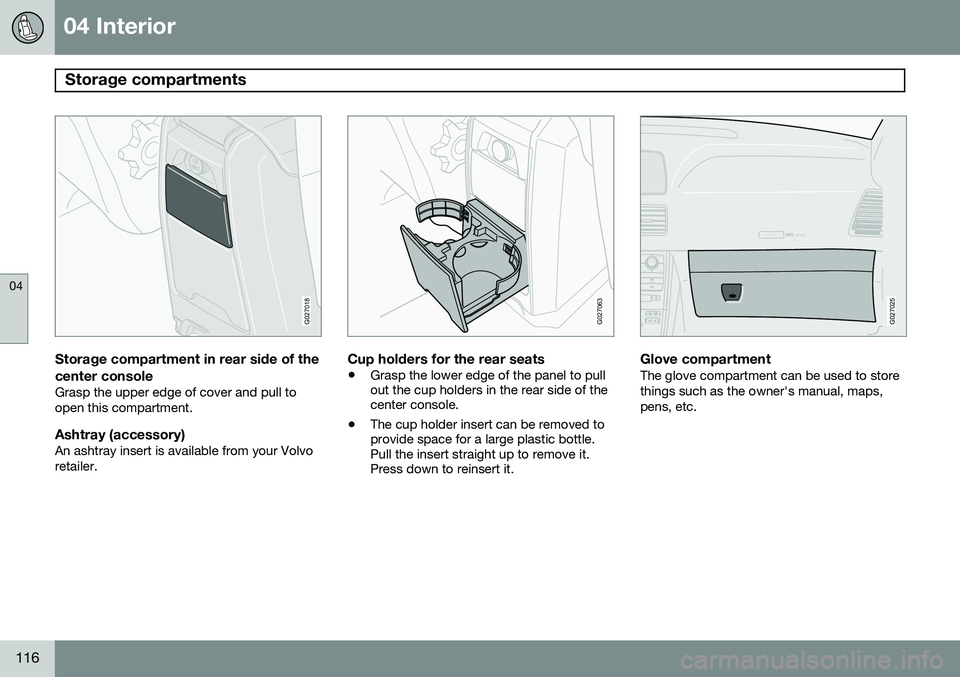
Storage compartment in rear side of the
center console
Grasp the upper edge of cover and pull to open this compartment.
Ashtray (accessory)An ashtray insert is available from your Volvoretailer.
G027063
Cup holders for the rear seats
• Grasp the lower edge of the panel to pull out the cup holders in the rear side of thecenter console.
• The cup holder insert can be removed toprovide space for a large plastic bottle.Pull the insert straight up to remove it.Press down to reinsert it.
ATTENTIONPakjdskdl ioiuip kjöpp opoodidåuswi
CSOUND
MENU
80
ENTERLSEEEXITMY KEYRTO
AIRBAG
G027025
Glove compartmentThe glove compartment can be used to store things such as the owner's manual, maps,pens, etc.
Page 126 of 308
124
Remote keys and key blades................................................................ 126
Locking and unlocking.......................................................................... 130
Child safety locks..................................................................................132Alarm..................................................................................................... 133
Page 128 of 308

05 Locks and alarm
Remote keys and key blades
05
126
Key blades
Your vehicle is equipped with two coded remote key transmitters with integrated igni-tion key blades called Key Integrated Remote(KIR). To unlock/lock the vehicle using the key blade:
1. If necessary, press button (1) to fold outthe key blade.
2. Insert the key blade in the driver's door lock and turn it once to unlock the driv-
er's door only .
3. Turn the key blade again (within 10 sec- onds) to unlock all doors and the tailgate. 4. Turn the key blade once in the opposite
direction to lock all doors and the tailgate.
Use the switch on the driver's door armrest to lock/unlock the vehicle from the inside.
WARNING
If the doors are locked while driving, this may hinder rapid access to the occupantsof the vehicle in the event of an accident.(Also see information on "Child safetylocks".)
NOTE
To help prevent accidentally locking the keys in the vehicle, the central locking sys-tem is designed to unlock the doors imme-diately if the key is left in the ignitionswitch, the vehicle is locked using the lockbutton on the door and the door is thenclosed. A sound from the lock will be audi-ble at this time. Please note that this function will not unlock the doors if the engine is running.
Immobilizer (start inhibitor)Each of the keys supplied with your vehicle contains a coded transmitter. The code in thekey is transmitted to an antenna in the igni-tion switch where it is compared to the code stored in the start inhibitor module. The vehi-cle will start only with a properly coded key. Each key has a unique code, which your Volvo retailer uses if new keys are required. Amaximum of six remote keys can be pro-grammed and used for one vehicle. If you misplace a key, take the other keys to an authorized Volvo retailer for reprogram-ming as an antitheft measure. If two of the keys to your vehicle are close together, e.g., on the same key ring, whenyou try to start the vehicle, this could causeinterference in the immobilizer system andresult in the vehicle not starting. If this shouldoccur, remove one of the keys from the keyring before trying to start the vehicle again.
NOTE
This device complies with part 15 of the FCC rules. Operation is subject to the fol-lowing condition: (1) This device may notcause harmful interference, and (2) thisdevice must accept any interferencereceived, including interference that maycause undesired operation.