lights VOLVO XC90 2014 Owner´s Manual
[x] Cancel search | Manufacturer: VOLVO, Model Year: 2014, Model line: XC90, Model: VOLVO XC90 2014Pages: 308, PDF Size: 13.31 MB
Page 73 of 308
02 Instruments and controls
Left-side steering wheel lever
02
71
Lever positions
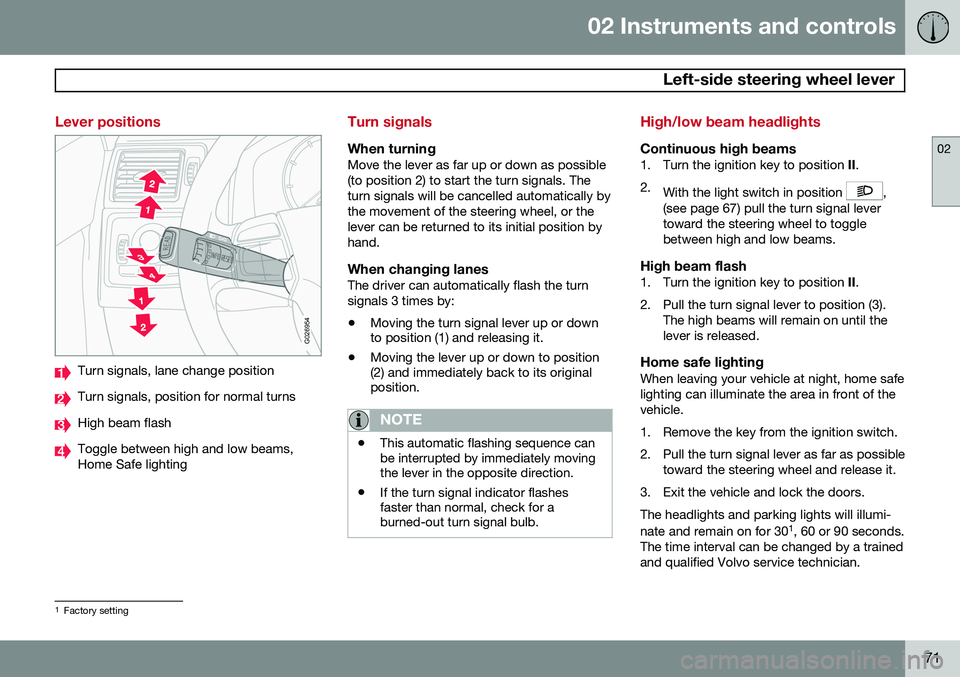
G026954
Turn signals, lane change position
Turn signals, position for normal turns
High beam flash
Toggle between high and low beams, Home Safe lighting
Turn signals
When turningMove the lever as far up or down as possible (to position 2) to start the turn signals. Theturn signals will be cancelled automatically bythe movement of the steering wheel, or thelever can be returned to its initial position byhand.
When changing lanesThe driver can automatically flash the turnsignals 3 times by:• Moving the turn signal lever up or down to position (1) and releasing it.
• Moving the lever up or down to position(2) and immediately back to its originalposition.
NOTE
• This automatic flashing sequence can be interrupted by immediately movingthe lever in the opposite direction.
• If the turn signal indicator flashesfaster than normal, check for aburned-out turn signal bulb.
High/low beam headlights
Continuous high beams1. Turn the ignition key to position
II.
2. With the light switch in position
,
(see page 67) pull the turn signal lever toward the steering wheel to togglebetween high and low beams.
High beam flash1. Turn the ignition key to position II.
2. Pull the turn signal lever to position (3). The high beams will remain on until thelever is released.
Home safe lightingWhen leaving your vehicle at night, home safelighting can illuminate the area in front of thevehicle.
1. Remove the key from the ignition switch.
2. Pull the turn signal lever as far as possibletoward the steering wheel and release it.
3. Exit the vehicle and lock the doors.The headlights and parking lights will illumi- nate and remain on for 30 1
, 60 or 90 seconds.
The time interval can be changed by a trained and qualified Volvo service technician.
1 Factory setting
Page 74 of 308
02 Instruments and controls
Right-side steering wheel lever
02
72
Windshield wipers
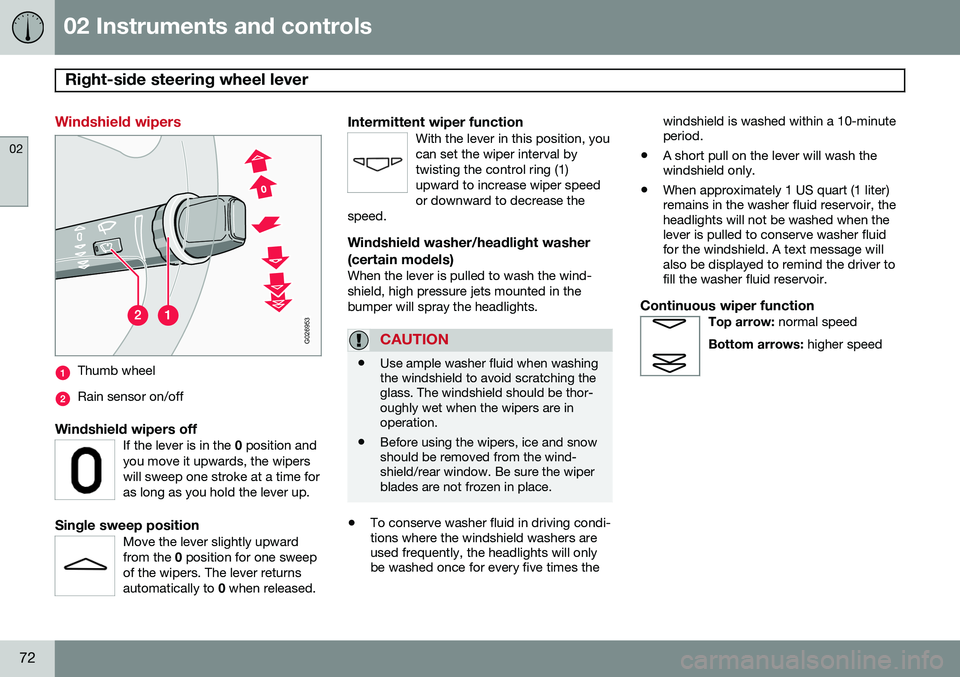
G026953
Thumb wheel
Rain sensor on/off
Windshield wipers offIf the lever is in the 0 position and
you move it upwards, the wipers will sweep one stroke at a time foras long as you hold the lever up.
Single sweep positionMove the lever slightly upward from the 0 position for one sweep
of the wipers. The lever returnsautomatically to 0 when released.
Intermittent wiper functionWith the lever in this position, you can set the wiper interval bytwisting the control ring (1)upward to increase wiper speedor downward to decrease the
speed.
Windshield washer/headlight washer (certain models)
When the lever is pulled to wash the wind- shield, high pressure jets mounted in thebumper will spray the headlights.
CAUTION
• Use ample washer fluid when washing the windshield to avoid scratching theglass. The windshield should be thor-oughly wet when the wipers are inoperation.
• Before using the wipers, ice and snowshould be removed from the wind-shield/rear window. Be sure the wiperblades are not frozen in place.
•
To conserve washer fluid in driving condi- tions where the windshield washers areused frequently, the headlights will onlybe washed once for every five times the windshield is washed within a 10-minuteperiod.
• A short pull on the lever will wash thewindshield only.
• When approximately 1 US quart (1 liter)remains in the washer fluid reservoir, theheadlights will not be washed when thelever is pulled to conserve washer fluidfor the windshield. A text message willalso be displayed to remind the driver tofill the washer fluid reservoir.
Continuous wiper functionTop arrow:
normal speed
Bottom arrows: higher speed
Page 86 of 308
02 Instruments and controls
Mirrors
02
84* Option/accessory, for more information, see Introduction.
Rearview mirror
G026660
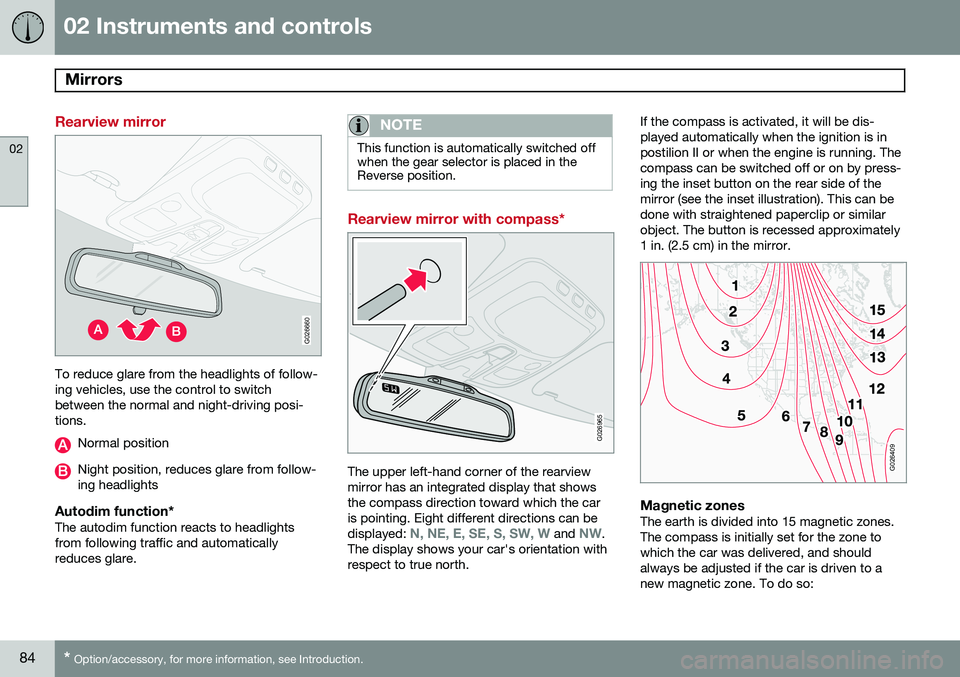
To reduce glare from the headlights of follow- ing vehicles, use the control to switchbetween the normal and night-driving posi-tions.
Normal position
Night position, reduces glare from follow- ing headlights
Autodim function*The autodim function reacts to headlightsfrom following traffic and automaticallyreduces glare.
NOTE
This function is automatically switched off when the gear selector is placed in theReverse position.
Rearview mirror with compass*
G026965
The upper left-hand corner of the rearview mirror has an integrated display that showsthe compass direction toward which the caris pointing. Eight different directions can be displayed:
N, NE, E, SE, S, SW, W and NW.
The display shows your car's orientation with respect to true north. If the compass is activated, it will be dis-played automatically when the ignition is inpostilion II or when the engine is running. Thecompass can be switched off or on by press-ing the inset button on the rear side of themirror (see the inset illustration). This can bedone with straightened paperclip or similarobject. The button is recessed approximately1 in. (2.5 cm) in the mirror.
G026409
Magnetic zonesThe earth is divided into 15 magnetic zones. The compass is initially set for the zone towhich the car was delivered, and shouldalways be adjusted if the car is driven to anew magnetic zone. To do so:
Page 103 of 308
03 Climate
Electronic climate control (ECC)
03
* Option/accessory, for more information, see Introduction.101
Blower control for rear climate
system*
Turn the control to increase or decrease blower speed.
OperationPress to operate the air quality sensor (nor-mal setting). or: Select one of the following three functions by pressing 1, 2 or 3 times.
1. The AUT LED lights. The air quality sen-
sor is now activated.
2. No LED lights. Recirculation is not acti- vated unless needed to cool the passen- ger compartment in a warm climate.
3. The MAN LED lights. Recirculation is now
activated.
Keep in mind the following:
• Make it a rule to have the air quality sen- sor activated at all times.
• Recirculation is limited in cold climates toavoid fogging.
• If window fogging occurs, you shoulddeactivate the air quality sensor. Also usethe defroster functions for the windshield,side windows and rear window, seepage 98. •
The filter should be changed at the inter-vals recommended in the service sched-ule. However, if the vehicle is used in aseverely contaminated environment, itmay be necessary to change the filtermore frequently.
Page 113 of 308
04 Interior
Interior lighting
04
}}
111
Reading lights and courtesy light
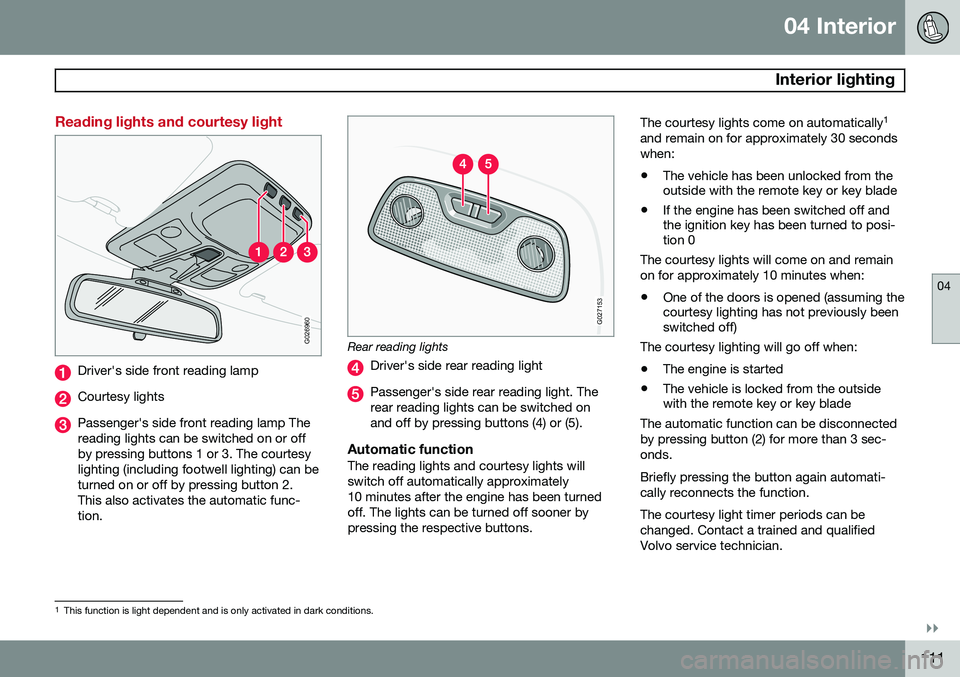
G026960
Driver's side front reading lamp
Courtesy lights
Passenger's side front reading lamp The reading lights can be switched on or offby pressing buttons 1 or 3. The courtesylighting (including footwell lighting) can beturned on or off by pressing button 2.This also activates the automatic func-tion.
G027153
Rear reading lights
Driver's side rear reading light
Passenger's side rear reading light. The rear reading lights can be switched onand off by pressing buttons (4) or (5).
Automatic functionThe reading lights and courtesy lights willswitch off automatically approximately10 minutes after the engine has been turnedoff. The lights can be turned off sooner bypressing the respective buttons.The courtesy lights come on automatically
1
and remain on for approximately 30 secondswhen: • The vehicle has been unlocked from the outside with the remote key or key blade
• If the engine has been switched off andthe ignition key has been turned to posi-tion 0
The courtesy lights will come on and remain on for approximately 10 minutes when:
• One of the doors is opened (assuming the courtesy lighting has not previously beenswitched off)
The courtesy lighting will go off when:
• The engine is started
• The vehicle is locked from the outsidewith the remote key or key blade
The automatic function can be disconnected by pressing button (2) for more than 3 sec-onds. Briefly pressing the button again automati- cally reconnects the function. The courtesy light timer periods can be changed. Contact a trained and qualifiedVolvo service technician.
1 This function is light dependent and is only activated in dark conditions.
Page 130 of 308

05 Locks and alarm
Remote keys and key blades
05
128
press the button again (within 10 seconds) to unlock all doors, and the tailgate.
Tailgate unlock
Press this button to unlock the tailgate (with- out unlocking the other doors). This functionwill not open the tailgate.
Panic function
For more information on this function, see page 133.
Approach lighting
Press this button when approaching the vehi- cle at night to light up the interior courtesylight, parking lights, license plate lights andthe lights in the door mirrors.
Lock
Press once to lock all doors, and the tailgate.
Fold key blade in/out
Press to extend the key blade. This button must also be pressed when the key blade isfolded back into the slot in the side of theremote key unit.
NOTE
• If an airbag deploys, your vehicle's SRS control module will attempt toautomatically unlock all doors.
• The key blade may also be used tolock and unlock the doors, and to acti-vate and deactivate the alarm system.
• To avoid leaving your keys in the vehi-cle, make a habit of always locking thevehicle with the remote key.
• If the key blade section of the remoteis not fully folded out when starting thevehicle, the immobilizer function maymake it impossible to start the engine.
• The vehicle can be locked even if adoor is open. When the door(s) areclosed, they will be locked. Please beaware that the keys could be locked inthe car when this is done.
Automatic re-lockingIf the doors are unlocked, the locks will auto- matically reengage (re-lock) and the alarm willrearm after 2 minutes unless a door or thetailgate has been opened. This helps preventthe car from inadvertently being left unlocked. FCC ID: LQNP2T-APU This device complies with part 15 of the FCC rules. Operation is subject to the following conditions: (1) This device may not causeharmful interference, and (2) this device mustaccept any interference received, includinginterference that may cause undesired opera-tion. Canadian 2306104388 Model 504 2927 by Donnelly Operation is subject to the following condi- tions: (1) this device may not cause interfer-ence, and (2) this device must accept anyinterference, including interference that maycause undesired operation of the device. Canadian 2306104388A Model 509 977 by Connaught Electronics Operation is subject to the following condi- tions: (1) this device may not cause interfer-ence, and (2) this device must accept anyinterference, including interference that maycause undesired operation of the device.
Page 147 of 308
06 Starting and driving
Ignition switch and steering wheel lock
06
145
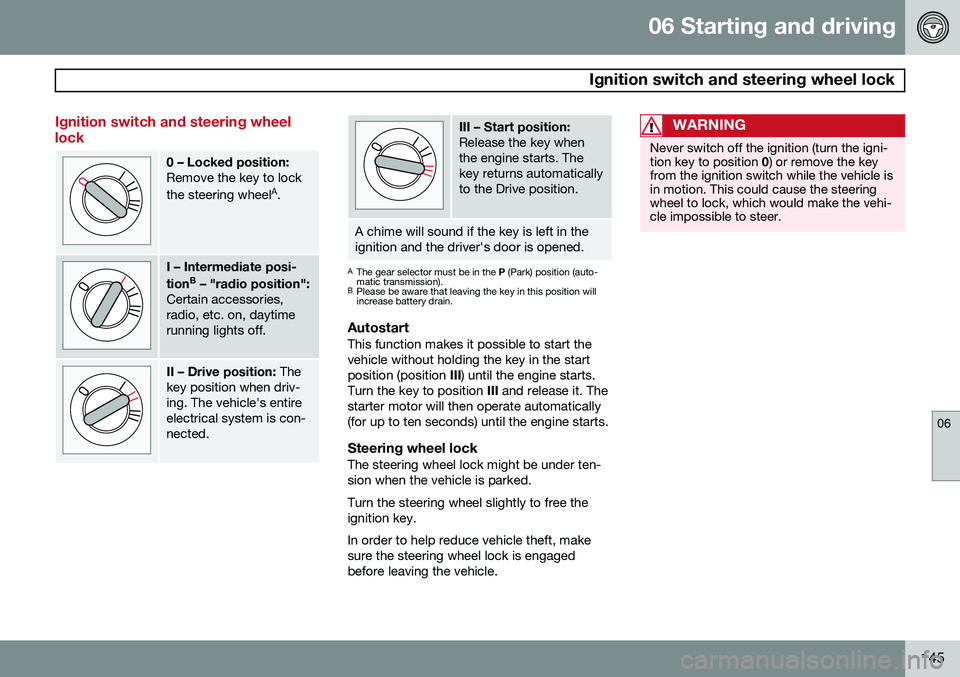
Ignition switch and steering wheel lock
0 – Locked position: Remove the key to lock the steering wheelA
.
I – Intermediate posi- tion B
– "radio position":
Certain accessories, radio, etc. on, daytimerunning lights off.
II – Drive position: The
key position when driv- ing. The vehicle's entireelectrical system is con-nected.
III – Start position: Release the key when the engine starts. Thekey returns automaticallyto the Drive position.
A chime will sound if the key is left in the ignition and the driver's door is opened.
A The gear selector must be in the P (Park) position (auto-
matic transmission).
B Please be aware that leaving the key in this position will increase battery drain.
AutostartThis function makes it possible to start the vehicle without holding the key in the startposition (position III) until the engine starts.
Turn the key to position III and release it. The
starter motor will then operate automatically(for up to ten seconds) until the engine starts.
Steering wheel lockThe steering wheel lock might be under ten-sion when the vehicle is parked. Turn the steering wheel slightly to free the ignition key. In order to help reduce vehicle theft, make sure the steering wheel lock is engagedbefore leaving the vehicle.
WARNING
Never switch off the ignition (turn the igni- tion key to position 0) or remove the key
from the ignition switch while the vehicle isin motion. This could cause the steeringwheel to lock, which would make the vehi-cle impossible to steer.
Page 157 of 308
06 Starting and driving
Brake system
06
155
WARNING
•Use the jack intended for the vehicle when changing a tire. For any otherjob, use stands to support the vehicle.
• The jack should be kept well-greasedand clean, and should not be dam-aged.
• Be sure the jack is on a firm, level,non-slippery surface.
• No objects should be placed betweenthe base of jack and the ground, orbetween the jack and the attachmentbar on the vehicle.
• The jack must correctly engage thejack attachment.
• Never allow any part of your body tobe extended under a vehicle suppor-ted by a jack.
Power brakes function only when the engine is running
The power brakes utilize vacuum pressure which is only created when the engine is run-ning. Never let the vehicle roll to a stop withthe engine switched off. If the power brakes are not working, consid- erably higher pressure will be required on thebrake pedal to compensate for the lack ofpower assistance. This can happen for exam- ple when towing your vehicle or if the engineis switched off when the vehicle is rolling. Thebrake pedal feels harder than usual.
Water on brake discs and brake pads
affects braking
Driving in rain and slush or passing throughan automatic car wash can cause water tocollect on the brake discs and pads. This willcause a delay in braking effect when thepedal is depressed. To avoid such a delaywhen the brakes are needed, depress thepedal occasionally when driving through rain,slush etc. This will remove the water from thebrakes. Check that brake application feelsnormal. This should also be done after wash-ing or starting in very damp or cold weather.
Severe strain on the brake systemThe brakes will be subject to severe strainwhen driving in mountains or hilly areas, orwhen towing a trailer. Vehicle speed is usuallyslower, which means that the cooling of thebrakes is less efficient than when driving onlevel roads. To reduce the strain on thebrakes, shift into a lower gear and let theengine help with the braking. Do not forgetthat, if you are towing a trailer, the brakes willbe subjected to a greater than normal load.
Anti-lock brakes (ABS)If the ABS warning lamp lights up there is a
malfunction in the ABS system (the standardbraking system will however function) and thevehicle should be driven cautiously to atrained and qualified Volvo service technicianfor inspection. The Anti-lock Braking System(ABS) helps to improve vehicle control (stop-ping and steering) during severe braking con-ditions by limiting brake lockup. When thesystem "senses" impending lockup, brakingpressure is automatically modulated in orderto help prevent lockup, which could lead to askid. The system performs a self-diagnostic test when the engine is started and when thevehicle first reaches a speed of approxi- mately 12 mph (20 km/h). The brake pedal
will pulsate several times and a sound may be audible from the ABS control module. This isnormal. To obtain optimal effect from the ABS sys- tem, constant pressure should be kept on thebrake pedal. Do not pump the brake pedal. The switching of the ABS modulator will be audible and the brake pedal will pulsate dur-ing braking. Please be aware that ABS doesnot increase the absolute braking potential ofthe vehicle. While control will be enhanced,ABS will not shorten stopping distances onslippery surfaces.
Page 158 of 308
06 Starting and driving
Brake system
06
156
ABS with EBD (Electronic Brake Force
Distribution)
EBD is an integrated part of the ABS system. EBD regulates the hydraulic pressure to therear brakes to help provide optimal brakingcapacity. The brake pedal will pulsate duringbraking, which is normal. If the BRAKE and ABS warning lights come on at the same time, this could indicate afault in the brake system.
1. Stop the vehicle in a suitable place and switch off the engine.
2. Restart the engine.
• If both warning lights go off, no further action is required.
• If both lights are still on after the enginehas been restarted, switch off the engineagain and check the brake fluid level (seepage 225 for the location of the brakefluid reservoir).
WARNING
If the fluid level is below the
MIN mark in
the reservoir or if a Brake failure –
Service urgent message is displayed in
the text window: DO NOT DRIVE. Have the vehicle towed to a trained and qualifiedVolvo service technician and have thebrake system inspected.
• If the brake fluid level is above the
MIN
mark, drive carefully to a trained and qualified Volvo service technician andhave the brake system inspected.
Emergency Brake Assistance (EBA)The EBA function is designed to provide full brake effect immediately in the event of sud-den, hard braking. The system is activated bythe speed with which you depress the brakepedal.
NOTE
• When the EBA system is activated, the brake pedal will go down and pressurein the brake system immediatelyincreases to the maximum level. Youmust maintain full pressure on thebrake pedal in order to utilize the sys-tem completely. There will be no brak-ing effect if the pedal is released. EBAis automatically deactivated when thebrake pedal is released.
• When the vehicle has been parked forsome time, the brake pedal may sinkmore than usual when the engine isstarted. This is normal and the pedalwill return to its usual position when itis released.
Page 162 of 308
06 Starting and driving
Front/rear park assist*
06
160* Option/accessory, for more information, see Introduction.
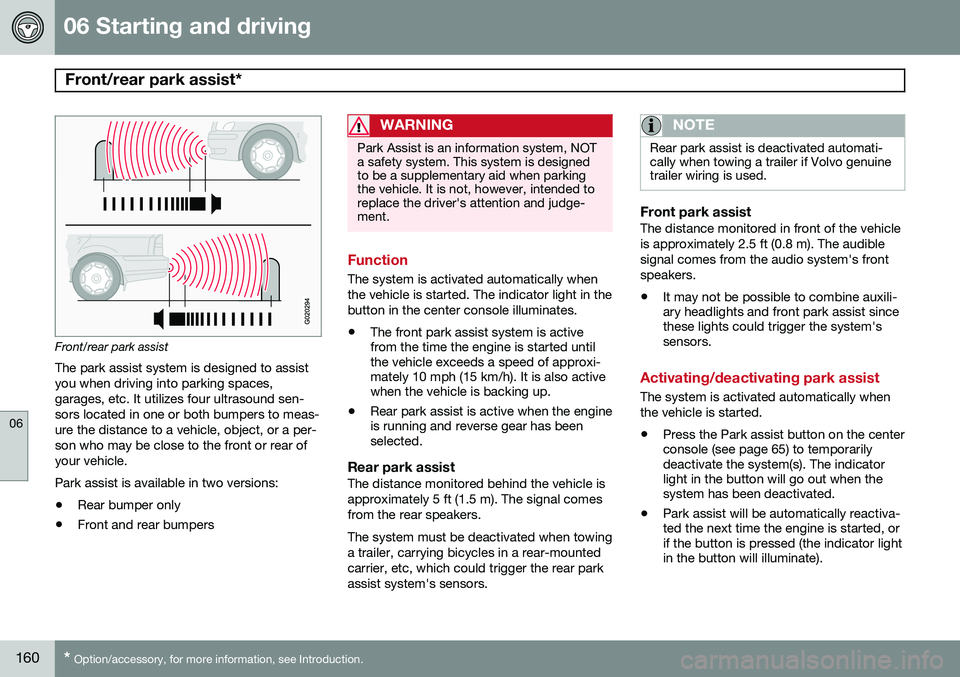
Front/rear park assist
The park assist system is designed to assist you when driving into parking spaces,garages, etc. It utilizes four ultrasound sen-sors located in one or both bumpers to meas-ure the distance to a vehicle, object, or a per-son who may be close to the front or rear ofyour vehicle. Park assist is available in two versions:
• Rear bumper only
• Front and rear bumpers
WARNING
Park Assist is an information system, NOT a safety system. This system is designedto be a supplementary aid when parkingthe vehicle. It is not, however, intended toreplace the driver's attention and judge-ment.
Function
The system is activated automatically when the vehicle is started. The indicator light in thebutton in the center console illuminates. • The front park assist system is active from the time the engine is started untilthe vehicle exceeds a speed of approxi-mately 10 mph (15 km/h). It is also activewhen the vehicle is backing up.
• Rear park assist is active when the engineis running and reverse gear has beenselected.
Rear park assistThe distance monitored behind the vehicle is approximately 5 ft (1.5 m). The signal comesfrom the rear speakers. The system must be deactivated when towing a trailer, carrying bicycles in a rear-mountedcarrier, etc, which could trigger the rear parkassist system's sensors.
NOTE
Rear park assist is deactivated automati- cally when towing a trailer if Volvo genuinetrailer wiring is used.
Front park assistThe distance monitored in front of the vehicle is approximately 2.5 ft (0.8 m). The audiblesignal comes from the audio system's frontspeakers.
• It may not be possible to combine auxili- ary headlights and front park assist sincethese lights could trigger the system'ssensors.
Activating/deactivating park assist
The system is activated automatically when the vehicle is started.
• Press the Park assist button on the center console (see page 65) to temporarilydeactivate the system(s). The indicatorlight in the button will go out when thesystem has been deactivated.
• Park assist will be automatically reactiva-ted the next time the engine is started, orif the button is pressed (the indicator lightin the button will illuminate).