lights VOLVO XC90 2014 Owner´s Manual
[x] Cancel search | Manufacturer: VOLVO, Model Year: 2014, Model line: XC90, Model: VOLVO XC90 2014Pages: 308, PDF Size: 13.31 MB
Page 172 of 308
06 Starting and driving
Before a long distance trip
06
170
It is always worthwhile to have your vehicle checked by a trained and qualified Volvoservice technician before driving long dis-tances. Your retailer or service technician willalso be able to supply you with bulbs, fuses,spark plugs and wiper blades for your use inthe event that problems occur. As a minimum, the following items should be checked before any long trip:• Check that engine runs smoothly and that fuel consumption is normal.
• Check for fuel, oil, and fluid leakage.
• Check transmission oil level 1
.
• Check condition of drive belts.
• Check state of the battery's charge.
• Examine tires carefully (the spare tire aswell), and replace those that are worn.Check tire pressures.
• The brakes, front wheel alignment, andsteering gear should be checked by atrained and qualified Volvo service techni-cian only.
• Check all lights, including high beams.
• Reflective warning triangles are legallyrequired in some states/provinces. •
Have a word with your Volvo retailer ifyou intend to drive in countries where itmay be difficult to obtain the correct fuel.
• Consider your destination. If you will bedriving through an area where snow or iceare likely to occur, consider snow tires.
1
To prevent injury from contact with hot surfaces, do not inspect your vehicle’s transmission fluid yourself. Have your vehicle’s transmission fluid level inspected by a qualified Volvo service techni- cian.
Page 173 of 308
06 Starting and driving
Blind Spot Information System*
06
* Option/accessory, for more information, see Introduction.171
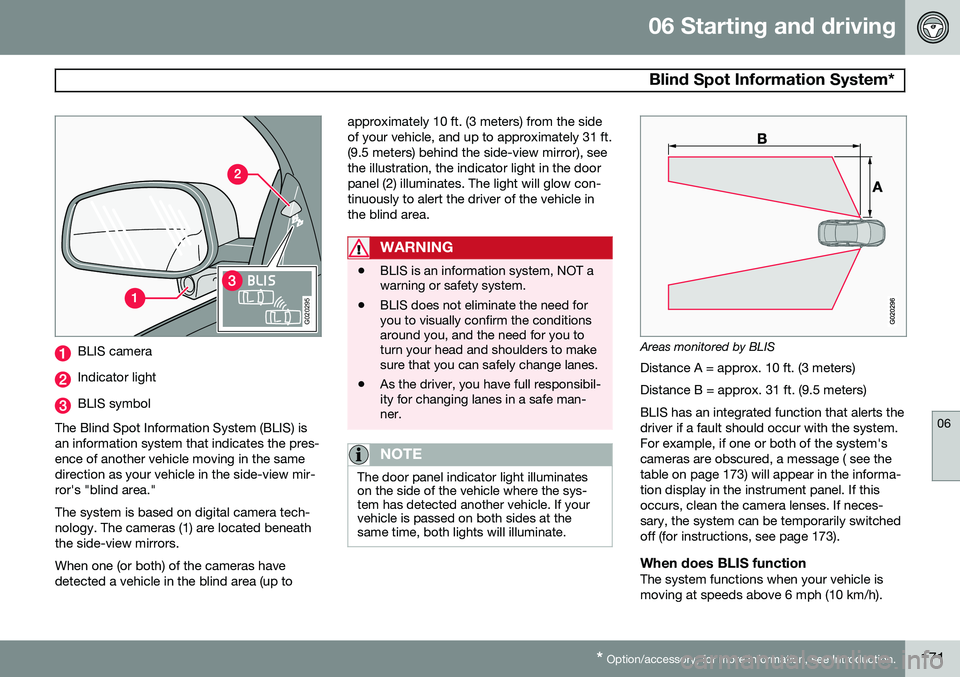
G020295
BLIS camera
Indicator light
BLIS symbol
The Blind Spot Information System (BLIS) is an information system that indicates the pres-ence of another vehicle moving in the samedirection as your vehicle in the side-view mir-ror's "blind area." The system is based on digital camera tech- nology. The cameras (1) are located beneaththe side-view mirrors. When one (or both) of the cameras have detected a vehicle in the blind area (up to approximately 10 ft. (3 meters) from the sideof your vehicle, and up to approximately 31 ft.(9.5 meters) behind the side-view mirror), seethe illustration, the indicator light in the doorpanel (2) illuminates. The light will glow con-tinuously to alert the driver of the vehicle inthe blind area.
WARNING
•
BLIS is an information system, NOT a warning or safety system.
• BLIS does not eliminate the need foryou to visually confirm the conditionsaround you, and the need for you toturn your head and shoulders to makesure that you can safely change lanes.
• As the driver, you have full responsibil-ity for changing lanes in a safe man-ner.
NOTE
The door panel indicator light illuminates on the side of the vehicle where the sys-tem has detected another vehicle. If yourvehicle is passed on both sides at thesame time, both lights will illuminate.
Areas monitored by BLIS
Distance A = approx. 10 ft. (3 meters) Distance B = approx. 31 ft. (9.5 meters)BLIS has an integrated function that alerts the driver if a fault should occur with the system.For example, if one or both of the system'scameras are obscured, a message ( see thetable on page 173) will appear in the informa-tion display in the instrument panel. If thisoccurs, clean the camera lenses. If neces-sary, the system can be temporarily switchedoff (for instructions, see page 173).
When does BLIS functionThe system functions when your vehicle ismoving at speeds above 6 mph (10 km/h).
Page 174 of 308
06 Starting and driving
Blind Spot Information System*
06
172* Option/accessory, for more information, see Introduction.
When you pass another vehicle: The system reacts when you pass another vehicle at a speed of up to 6 mph (10 km/h)faster than that vehicle. When you are passed by another vehicle:The system reacts if your vehicle is passed by another vehicle at a speed of up to 43 mph(70 km/h) faster than your vehicle.
WARNING
• BLIS does not function in sharp curves.
• BLIS does not function when yourvehicle is backing up.
• If you are towing a wide trailer, thismay prevent the BLIS cameras fromdetecting other vehicles in adjacentlanes.
How BLIS functions in daylight and darkness
Daylight BLIS reacts to the
shape of surrounding vehi-
cles. The system is designed to help detect motor vehicles such as cars, trucks, buses,motorcycles, etc. Darkness BLIS reacts to the
headlights of surrounding
vehicles. In order to be detected by BLIS, a vehicle in the blind area must have its head-lights on. This means, for example, that thesystem will not detect a trailer without head-lights that is being towed behind a car ortruck.
WARNING
• BLIS does not react to cyclists or mopeds.
• BLIS does not react to vehicles thatare standing still.
• The BLIS cameras have the same limi-tation as the human eye. In otherwords, their "vision is impaired" byadverse weather conditions such asheavy snowfall, intense light directlyinto the camera, dense fog, etc.
Cleaning the BLIS camera lensesIn order to function optimally, the BLIS cam- era lenses must be kept clean. They can bewiped clean with a soft cloth or wet sponge.
CAUTION
• Clean the lenses carefully to avoid scratching.
• The lenses are electrically heated tohelp melt ice or snow. If necessary,gently brush away snow from the len-ses.
LimitationsIn certain situations, the BLIS indicator light(s) may illuminate even when there are no othervehicles in the area monitored by the system.
NOTE
If the BLIS indicator lights illuminate occa- sionally even when there are no other vehi-cles in the blind area, this does not indi-cate a fault in the system. In the event of a fault,
Blind spot syst.
service required will be displayed.
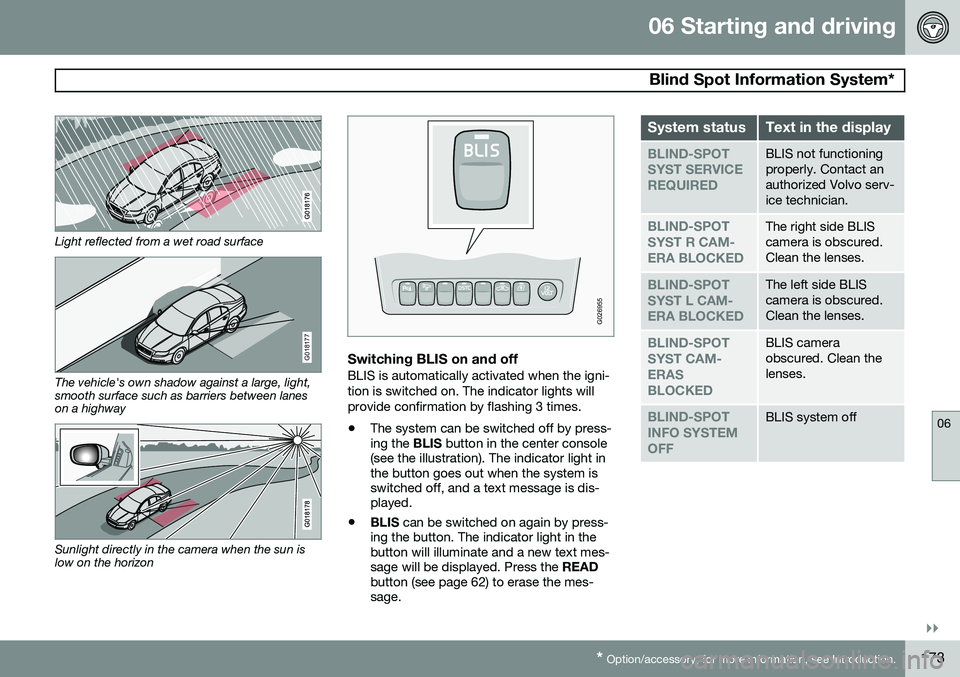
The following are several examples of situa- tions in which the BLIS indicator light(s) mayilluminate even when there are no other vehi-cles in the area monitored by the system.
Page 175 of 308
06 Starting and driving
Blind Spot Information System*
06
}}
* Option/accessory, for more information, see Introduction.173
Light reflected from a wet road surface
G018177
The vehicle's own shadow against a large, light, smooth surface such as barriers between laneson a highway
Sunlight directly in the camera when the sun is low on the horizon
G026955
Switching BLIS on and offBLIS is automatically activated when the igni- tion is switched on. The indicator lights willprovide confirmation by flashing 3 times.
• The system can be switched off by press- ing the
BLIS button in the center console
(see the illustration). The indicator light inthe button goes out when the system isswitched off, and a text message is dis-played.
• BLIS
can be switched on again by press-
ing the button. The indicator light in thebutton will illuminate and a new text mes-sage will be displayed. Press the READ
button (see page 62) to erase the mes-sage.
System statusText in the display
BLIND-SPOT SYST SERVICEREQUIREDBLIS not functioning properly. Contact anauthorized Volvo serv-ice technician.
BLIND-SPOT SYST R CAM-ERA BLOCKEDThe right side BLIS camera is obscured.Clean the lenses.
BLIND-SPOT SYST L CAM-ERA BLOCKEDThe left side BLIS camera is obscured.Clean the lenses.
BLIND-SPOT SYST CAM-ERASBLOCKEDBLIS camera obscured. Clean thelenses.
BLIND-SPOT INFO SYSTEMOFFBLIS system off
Page 210 of 308
08 Car care
Washing and cleaning the vehicle
08
208
Washing
•The vehicle should be washed at regular intervals since dirt, dust, insects and tarspots adhere to the paint and may causedamage. It is particularly important towash the vehicle frequently in the winter-time to prevent corrosion, when salt hasbeen used on the roads.
• When washing the vehicle, do not exposeit to direct sunlight. Use lukewarm waterto soften the dirt before you wash with asponge, and plenty of water, to avoidscratching.
• Bird droppings: Remove from paintworkas soon as possible. Otherwise the finishmay be permanently damaged.
• A detergent can be used to facilitate thesoftening of dirt and oil.
CAUTION
Chromed wheels
: Clean chrome-plated
wheels using the same detergents used for the body of the vehicle. Aggressive wheelcleaning agents can permanently stainchrome-plated wheels.
• Dry the vehicle with a clean chamois and remember to clean the drain holes in thedoors and rocker panels.
• Tar spots can be removed with tarremover after the vehicle has beenwashed.
• A stiff-bristle brush and lukewarm soapywater can be used to clean the wiperblades. Frequent cleaning of the wind-shield and wiper blades improves visibilityconsiderably and also helps prolong theservice life of the wiper blades.
• Wash off the dirt from the underside(wheel housings, fenders, etc.).
• In areas of high industrial fallout, morefrequent washing is recommended.
Suitable detergentsSpecial vehicle washing detergents should be used. A suitable mixture is about 2.5 fl. oz.(8.5 cl) of detergent to 2.6 US gal. (10 liters) ofwarm water. After washing with a detergentthe vehicle should be well rinsed with cleanwater.
CAUTION
•Avoid waxing or polishing plastic or rubber components
• Polishing chromed strips can wearaway or damage the surface
• Polishes containing abrasive sub-stances should not be used
CAUTION
•Dirt, snow, etc., on the headlights can reduce lighting capacity considerably.Clean the headlights regularly, forexample when refueling.
• During high pressure washing, thespray mouthpiece must never becloser to the vehicle than 13 " (30 cm).Do not spray into the locks.
Special moonroof cautions:
• Always close the moonroof and sunshade before washing your vehicle.
• Never use abrasive cleaning agents onthe moonroof.
• Never use wax on the rubber sealsaround the moonroof.
Page 211 of 308
08 Car care
Washing and cleaning the vehicle
08
209
Exterior componentsVolvo recommends the use of special clean- ing products, available at your Volvo retailer,for cleaning colored plastic, rubber, or orna-mental components such as chromed stripson the exterior of your vehicle. The instruc-tions for using these products should be fol-lowed carefully. Solvents or stain removersshould not be used.
CAUTION
•Avoid waxing or polishing plastic or rubber components
• Polishing chromed strips can wearaway or damage the surface
• Polishes containing abrasive sub-stances should not be used
NOTE
When washing the vehicle, remember to remove dirt from the drain holes in thedoors and sills.
WARNING
•When the vehicle is driven immediately after being washed, apply the brakesseveral times in order to remove anymoisture from the brake linings.
• Engine cleaning agents should not beused when the engine is warm. Thisconstitutes a fire risk.
Automatic washing – simple and quick
•
We do NOT recommend washing your vehicle in an automatic wash during thefirst few months (because the paint willnot have hardened sufficiently).
• An automatic wash is a simple and quickway to clean your vehicle, but it is worthremembering that it may not be as thor-ough as when you yourself go over thevehicle with sponge and water. Keepingthe underbody clean is most important,especially in the winter. Some automaticwashers do not have facilities for washingthe underbody.
• Before driving into an automatic carwash, make sure that side view mirrors,auxiliary lamps, etc, are secure, and thatany antenna(s) are retracted or removed.Otherwise there is risk of the machinedislodging them.
Exterior lightingCondensation may form temporarily on the inside of the lenses of exterior lights such asheadlights, fog lights, or tail lights. This is nor-mal and the lights are designed to withstandmoisture. Normally, condensation will dissi-pate after the lights have been on for a shorttime.
Polishing and waxing
•
Normally, polishing is not required during the first year after delivery, however, wax-ing may be beneficial.
• Before applying polish or wax the vehiclemust be washed and dried. Tar spots canbe removed with kerosene or tar remover.Difficult spots may require a fine rubbingcompound.
• After polishing use liquid or paste wax.
• Several commercially available productscontain both polish and wax.
• Waxing alone does not substitute for pol-ishing a dull surface.
• A wide range of polymer-based carwaxes can be purchased today. Thesewaxes are easy to use and produce along-lasting, high-gloss finish that pro-
Page 219 of 308
09 Maintenance and servicing
Maintaining your vehicle09
}}
217
Owner maintenance
Periodic maintenance requirements and inter- vals are described in your vehicle's Warrantyand Service Records Information booklet. The following points can be carried out between the normally scheduled maintenanceservices.
Each time the vehicle is refueled
•Check the engine oil level
• Clean the windshield, windshield wipers, headlights, and tail lights
Monthly
•Check cold tire pressure in all tires.Inspect the tires for wear.
• Check that engine coolant and other fluidlevels are between the indicated "
min"
and " max" markings.
• Clean interior glass surfaces with a glasscleaner and soft paper towels.
• Wipe driver information displays with asoft cloth.
• Visually inspect battery terminals for cor-rosion. Corrosion may indicate a looseterminal connector, or a battery near theend of its useful service life. Consult atrained and qualified Volvo service techni-cian for additional information.
As needed
•
Wash the vehicle, including the undercar-riage, to reduce wear that can be causedby a buildup of dirt, and corrosion thatcan be caused by salt residues.
• Clean leaves and twigs from air intakevents at the base of the windshield, andfrom other places where they may collect.
• Complete service information for qualifiedtechnicians is available online for pur-chase or subscription at www.volvote-chinfo.com.
Emission inspection readiness
What is an Onboard Diagnostic System
(OBD II)?
OBD II is part of your vehicle's computerized engine management system. It stores diag-nostic information about your vehicle's emis-sion controls. It can light the Check Enginelight (MIL) if it detects an emission control"fault." A "fault" is a component or systemthat is not performing within an expectedrange. A fault may be permanent or tempo-rary. OBD II will store a message about anyfault.
How do states use OBD II for emission
inspections?
Many states connect a computer directly to avehicle's OBD II system. The inspector can then read "faults." In some states, this type ofinspection has replaced the tailpipe emissiontest.
How can my vehicle fail OBD II emission
inspection?
Your vehicle can fail OBD II emission inspec-tion for any of the following reasons.
• If your Check Engine (MIL) light is lit, your vehicle may fail inspection.
• If your vehicle's Check Engine light waslit, but went out without any action onyour part, OBD II will still have a recordedfault. Your vehicle may pass or fail,depending on the inspection practices inyour area.
• If you had recent service that requireddisconnecting the battery, OBD II diag-nostic information may be incompleteand "not ready" for inspection. A vehiclethat is not ready may fail inspection.
How can I prepare for my next OBD II
emission inspection?
• If your Check Engine (MIL) light is lit – orwas lit but went out without service, haveyour vehicle diagnosed and, if necessary,serviced by a qualified Volvo technician.
• If you recently had service for a lit CheckEngine light, or if you had service thatrequired disconnecting the battery, aperiod of driving is necessary to bring the
Page 232 of 308
09 Maintenance and servicing
Replacing bulbs 09
230* Option/accessory, for more information, see Introduction.
When replacing bulbs, keep the following points in mind:
• Never touch the glass of bulbs with your fingers. Grease and oils from your fingersvaporize in the heat and will leave adeposit on the reflector, which will dam-age it.
• The optional Active Bending Light bulbscontain trace amounts of mercury. Thesebulbs should always be disposed of by anauthorized Volvo retailer.
The following bulbs should only be replaced by a trained and qualified Volvo service tech-nician:
• Active Bending Lights (ABL)
• Daytime running lights (DRL) under the front bumper
• Turn signals and courtesy lights in theside door mirrors
• Reading lights and glove compartmentlight
• Courtesy (dome) lighting
• Rear parking lights
• Brake lights
• High-mounted brake lights
If a problem occurs with the daytime running lights (DRL) under the front bumper, the entirelamp housing will have to be replaced. If a problem occurs with the rear parkinglights or the brake lights, the entire taillighthousing will have to be replaced. See page 236 for a list of bulb specifications.
Replacing high/low beams/turn signal/parking light bulbs
WARNING
•
The engine should not be running when changing bulbs.
• If the engine has been running justprior to replacing bulbs in the head-light housing, please keep in mind thatcomponents in the engine compart-ment will be hot.
WARNING
Active Bending Lights* - due to the high voltage used by these headlights, thesebulbs should only be replaced by a trainedand qualified Volvo service technician.
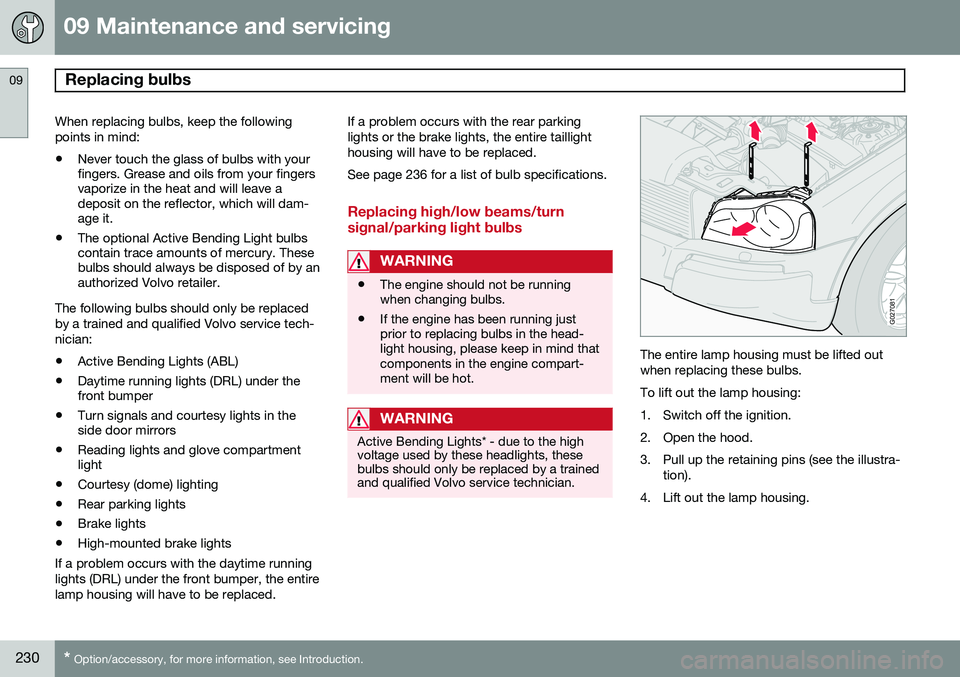
G027081
The entire lamp housing must be lifted out when replacing these bulbs. To lift out the lamp housing:
1. Switch off the ignition.
2. Open the hood.
3. Pull up the retaining pins (see the illustra-
tion).
4. Lift out the lamp housing.
Page 233 of 308
09 Maintenance and servicing
Replacing bulbs09
}}
* Option/accessory, for more information, see Introduction.231
G027083
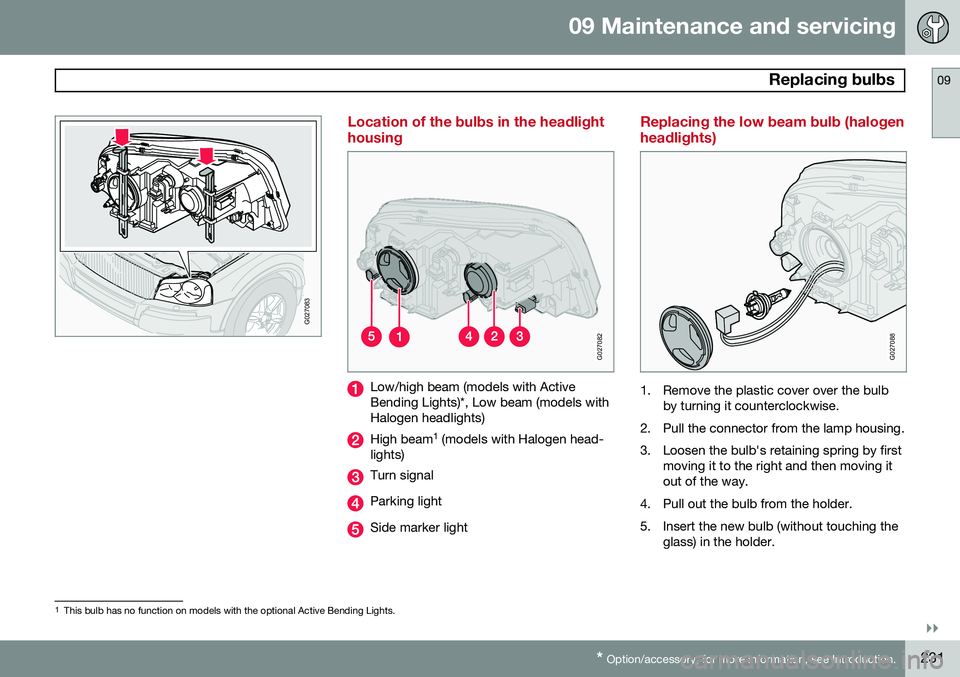
Location of the bulbs in the headlight housing
G027082
Low/high beam (models with Active Bending Lights)*, Low beam (models withHalogen headlights)
High beam 1
(models with Halogen head-
lights)
Turn signal
Parking light
Side marker light
Replacing the low beam bulb (halogen headlights)
G027088
1. Remove the plastic cover over the bulb by turning it counterclockwise.
2. Pull the connector from the lamp housing.
3. Loosen the bulb's retaining spring by first moving it to the right and then moving it out of the way.
4. Pull out the bulb from the holder.
5. Insert the new bulb (without touching the glass) in the holder.
1This bulb has no function on models with the optional Active Bending Lights.
Page 234 of 308
09 Maintenance and servicing
Replacing bulbs 09
232
6. Move the retaining spring up and push itslightly to the left until it seats properly.
7. Press the bulb holder into place on the headlight housing.
8. Reinstall the plastic cap. The letters "HAUT " on the cap must be upward.
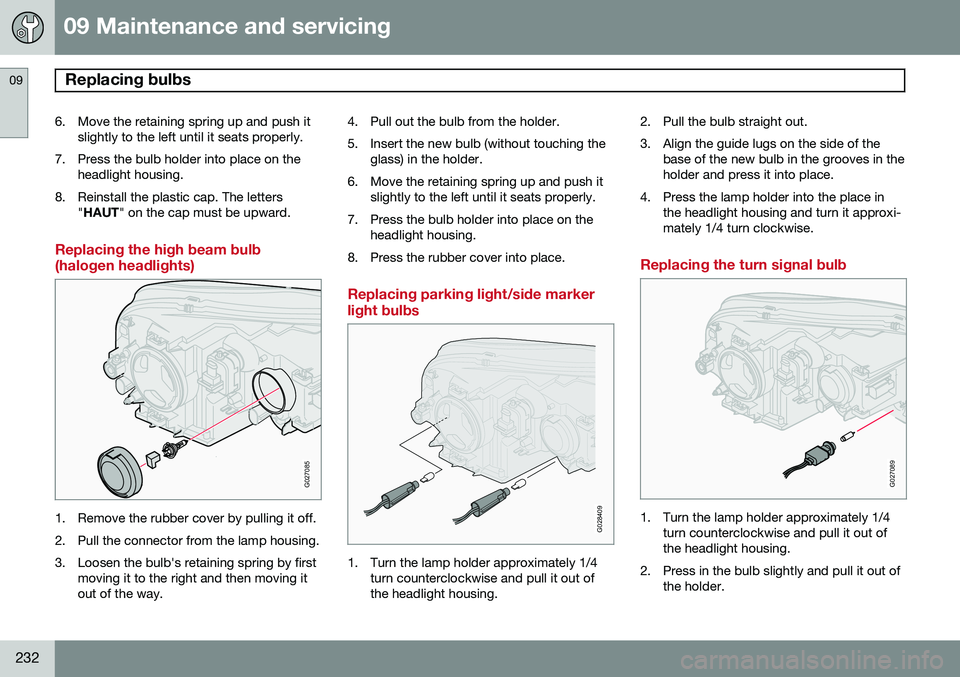
Replacing the high beam bulb (halogen headlights)
G027085
1. Remove the rubber cover by pulling it off.
2. Pull the connector from the lamp housing.
3. Loosen the bulb's retaining spring by first
moving it to the right and then moving it out of the way. 4. Pull out the bulb from the holder.
5. Insert the new bulb (without touching the
glass) in the holder.
6. Move the retaining spring up and push it slightly to the left until it seats properly.
7. Press the bulb holder into place on the headlight housing.
8. Press the rubber cover into place.
Replacing parking light/side marker light bulbs
G028409
1. Turn the lamp holder approximately 1/4 turn counterclockwise and pull it out of the headlight housing. 2. Pull the bulb straight out.
3. Align the guide lugs on the side of the
base of the new bulb in the grooves in the holder and press it into place.
4. Press the lamp holder into the place in the headlight housing and turn it approxi-mately 1/4 turn clockwise.
Replacing the turn signal bulb
G027089
1. Turn the lamp holder approximately 1/4turn counterclockwise and pull it out of the headlight housing.
2. Press in the bulb slightly and pull it out of the holder.