ECO mode VOLVO XC90 2014 Owner´s Manual
[x] Cancel search | Manufacturer: VOLVO, Model Year: 2014, Model line: XC90, Model: VOLVO XC90 2014Pages: 308, PDF Size: 13.31 MB
Page 259 of 308
10 Audio
Audio system controls
10
257
3. Use the menu selection buttons to set the
level or use the SELECTOR control.
4. Press ENTER to select the next fre-
quency. You can select five frequencies.
5. Press ENTER until you come to the menu
mode to save the changes you have made.
Equalizer RREQ – REAR (certain audio systems) This function is used to fine-tune the sound from the rear speakers. 1. Select
AUDIO SETTINGS in the menu
and press ENTER.
2. Select
EQ- REAR and press ENTER.
3. Use the menu selection buttons to set the level or use the SELECTOR control.
4. Press ENTER to select the next fre-
quency. You can select five frequencies
5. Press ENTER until you come to the menu
mode to save the changes you have made.
Optimal sound reproductionThe audio system is calibrated for optimalsound reproduction through the use of digitalsignal processing. This calibration takes intoaccount the speakers, amplifier, cabin acous-tics, the seating position of the listener, etc., for each combination of vehicle and audiosystem. There is also dynamic calibration thattakes into account the setting of the volumecontrol, radio reception, and the vehicle'sspeed. The sound settings described in this manual, such as
BASS, TREBLE, andEQUALIZER are only intended to enable the
user to adapt sound reproduction to his/her personal preferences.
Page 260 of 308
10 Audio
Radio functions
10
258
Station search
G027148
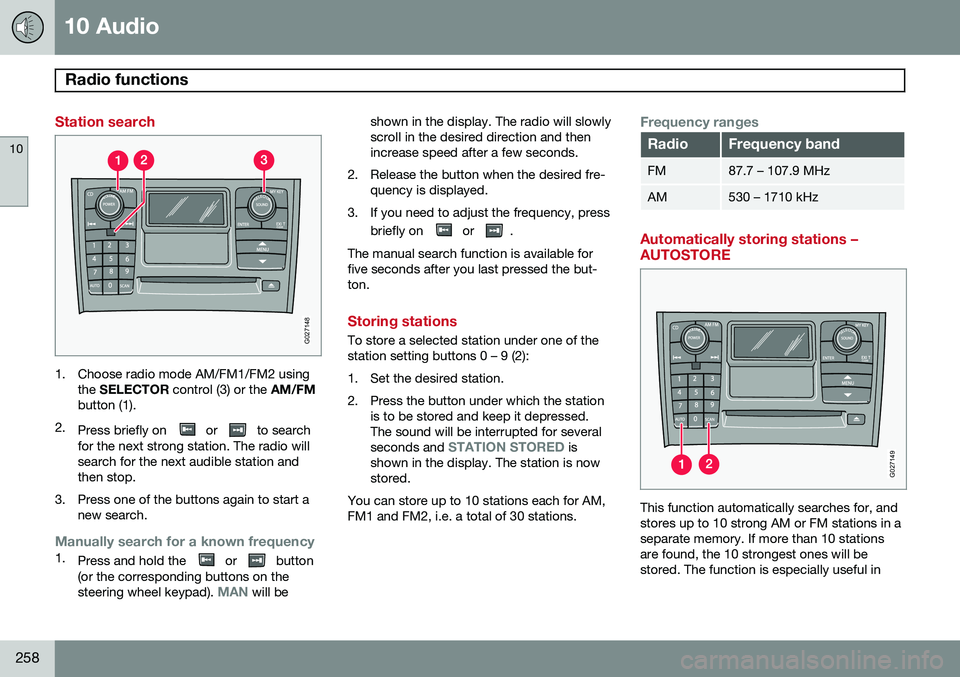
1. Choose radio mode AM/FM1/FM2 usingthe SELECTOR control (3) or the AM/FM
button (1).
2. Press briefly on
or to search
for the next strong station. The radio will search for the next audible station andthen stop.
3. Press one of the buttons again to start a new search.
Manually search for a known frequency1.Press and hold the or button
(or the corresponding buttons on the steering wheel keypad).
MAN will be shown in the display. The radio will slowly scroll in the desired direction and thenincrease speed after a few seconds.
2. Release the button when the desired fre- quency is displayed.
3. If you need to adjust the frequency, press briefly on
or .
The manual search function is available for five seconds after you last pressed the but-ton.
Storing stations
To store a selected station under one of the station setting buttons 0 – 9 (2):
1. Set the desired station.
2. Press the button under which the station is to be stored and keep it depressed. The sound will be interrupted for several seconds and
STATION STORED is
shown in the display. The station is now stored.
You can store up to 10 stations each for AM,FM1 and FM2, i.e. a total of 30 stations.
Frequency ranges
RadioFrequency band
FM87.7 – 107.9 MHz
AM530 – 1710 kHz
Automatically storing stations – AUTOSTORE
G027149
This function automatically searches for, and stores up to 10 strong AM or FM stations in aseparate memory. If more than 10 stationsare found, the 10 strongest ones will bestored. The function is especially useful in
Page 262 of 308
10 Audio
Radio functions
10
260
HD Radio™reception (U.S.
models only) 1
Introduction
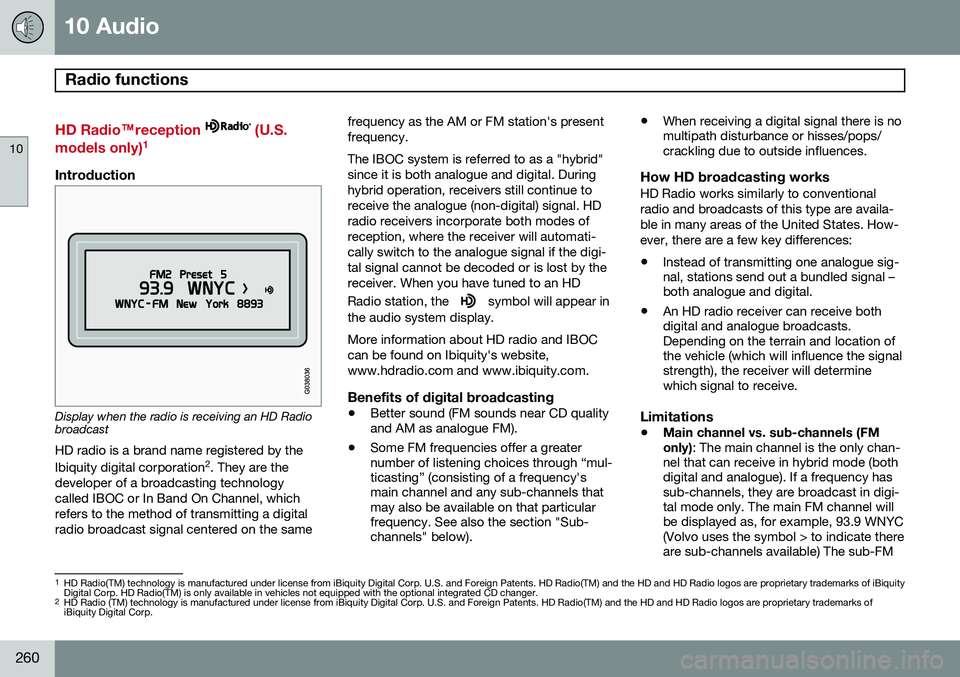
Display when the radio is receiving an HD Radio broadcast HD radio is a brand name registered by the Ibiquity digital corporation
2
. They are the
developer of a broadcasting technology called IBOC or In Band On Channel, whichrefers to the method of transmitting a digitalradio broadcast signal centered on the same frequency as the AM or FM station's presentfrequency. The IBOC system is referred to as a "hybrid" since it is both analogue and digital. Duringhybrid operation, receivers still continue toreceive the analogue (non-digital) signal. HDradio receivers incorporate both modes ofreception, where the receiver will automati-cally switch to the analogue signal if the digi-tal signal cannot be decoded or is lost by thereceiver. When you have tuned to an HD Radio station, the
symbol will appear in
the audio system display. More information about HD radio and IBOC can be found on Ibiquity's website,www.hdradio.com and www.ibiquity.com.
Benefits of digital broadcasting
• Better sound (FM sounds near CD quality and AM as analogue FM).
• Some FM frequencies offer a greaternumber of listening choices through “mul-ticasting” (consisting of a frequency'smain channel and any sub-channels thatmay also be available on that particularfrequency. See also the section "Sub-channels" below). •
When receiving a digital signal there is nomultipath disturbance or hisses/pops/crackling due to outside influences.
How HD broadcasting worksHD Radio works similarly to conventional radio and broadcasts of this type are availa-ble in many areas of the United States. How-ever, there are a few key differences:
• Instead of transmitting one analogue sig- nal, stations send out a bundled signal –both analogue and digital.
• An HD radio receiver can receive bothdigital and analogue broadcasts.Depending on the terrain and location ofthe vehicle (which will influence the signalstrength), the receiver will determinewhich signal to receive.
Limitations
• Main channel vs. sub-channels (FM only)
: The main channel is the only chan-
nel that can receive in hybrid mode (both digital and analogue). If a frequency hassub-channels, they are broadcast in digi-tal mode only. The main FM channel willbe displayed as, for example, 93.9 WNYC(Volvo uses the symbol > to indicate thereare sub-channels available) The sub-FM
1 HD Radio(TM) technology is manufactured under license from iBiquity Digital Corp. U.S. and Foreign Patents. HD Radio(TM) and the HD and HD Radio logos are proprietary trademarks of iBiquity Digital Corp. HD Radio(TM) is only available in vehicles not equipped with the optional integrated CD changer.
2 HD Radio (TM) technology is manufactured under license from iBiquity Digital Corp. U.S. and Foreign Patents. HD Radio(TM) and the HD and HD Radio logos are proprietary trademarks ofiBiquity Digital Corp.
Page 263 of 308
10 Audio
Radio functions
10
261
channels will be displayed as 93.9 – 2 WNYC, 93.9 - 3 WNYC, etc.
• Reception coverage area
: Due to cur-
rent IBOC transmitter power limitations,the reception coverage area in digitalmode is somewhat more limited than thestation's analogue coverage area. Pleasebe aware that as with any radio broadcasttechnology, terrain, time of day, foliagelevel and building location can have posi-tive or negative effects on radio recep-tion.
• Analogue to digital/digital to analogue blending
: Analogue to digital blending
will occur as the signal strength reaches a preset threshold in the receiver. This willbe noticeable in fringe areas (areas withweak reception) and is normal.
NOTE
There may be a noticeable difference in sound quality when a change from ana-logue to digital or digital to analogueoccurs, such as:
• Volume increase or decrease
• Equalizer settings, i.e., Bass/ Mid- range/Treble cut or boost
• Time alignment (Digital program mate-rial in extreme cases can be as muchas 8 seconds behind the analogue).This will noticeable as a "stuttering"effect.
The above items are dependant on the broadcaster's equipment settings and do not indicate a fault in the vehicle's radio receiver or antenna systems .
Switching HD on or offThe factory setting for HD radio is on. How-
ever, when driving through areas with weak HD signals (fringe areas), you may experiencethat the radio repeatedly switches betweenanalogue/digital and digital/analogue recep-tion. If this happens, it may be desirable toswitch HD off. To do so:
1. Be sure the audio system is switched on and in AM or FM mode.
2. Press MENU in the center console con-
trol panel. 3. Press
ENTER to turn HD off (the X will
disappear from the box on the display screen).
This will disable the radio's capability to receive digital broadcasts but it will continueto function as a conventional (analogue)AM/FM receiver. Please note that when HD isswitched off, it will not be possible to tune tosub-channels (see the following section for amore detailed explanation of sub-channels). Repeat steps 2 and 3 above to reactivate HD (an X will appear in the box on the displayscreen).
Sub-channels
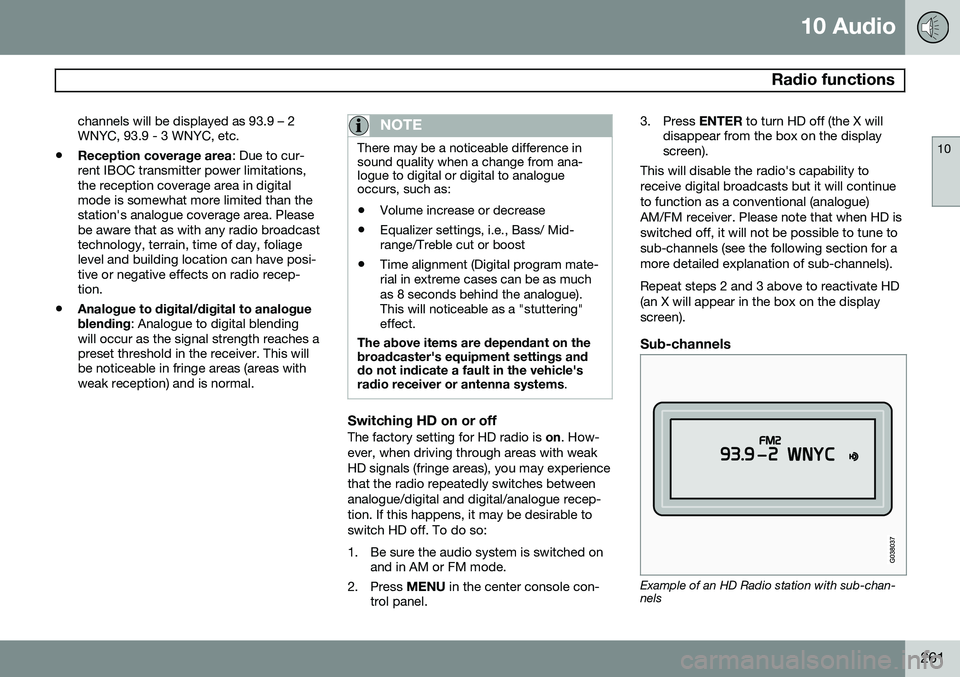
Example of an HD Radio station with sub-chan- nels
Page 264 of 308
10 Audio
Radio functions
10
262
In many cases, a main HD Radio station (FM wavebands only) will also have sub-channelsoffering additional types of programming ormusic. In such cases, a number will be displayed to the right of the frequency number indicatingthat the currently tuned frequency has at leastone sub-channel. The "2" in the illustrationindicates that you are currently listening tothe first sub-channel on frequency 93.9.
Selecting sub-channelsTo listen to a station's sub-channel(s), press the right arrow key on the center console oron the steering wheel keypad. To go back tothe main channel, press the left arrow key. Togo to subchannel 2 (if available), press theright arrow key. If you are currently tuned to a frequency's main channel, pressing the left arrow key willtune to the next lower radio frequency.
NOTE
•When the radio has gone into HD mode, it may take several secondsbefore the ">" symbol (if the currentfrequency has any sub-channels) isdisplayed to the right of the frequency.Pressing the arrow keys before thenumber is displayed will cause theradio to tune to the next available radiostation, not to the current station'ssub-channels.
• When you are no longer in broadcast-ing range of the currently tuned
sub-
channel ,
No HD reception will be
displayed. The radio will then be muted and it will be necessary to tuneto or search for a new radio station.
Sub-channels can also be stored as presets, see page 258 for information on storing sta-tions. If you press a sub-channel's preset button, it may take up to 6 seconds before the channel
becomes audible. If you press this buttonwhile you are out of digital range of the trans- mitter,
No HD reception will be displayed.
Page 265 of 308
10 Audio
SiriusXM™ satellite radio
10
263
Listening to satellite radio
The SiriusXM ™ satellite system consists of a
number of high elevation satellites in geosyn- chronous orbit.
NOTE
• The digital signals from the SiriusXM
™
satellites are line-of-sight, which means that physical obstructions suchas bridges, tunnels, etc, may tempo-rarily interfere with signal reception.
• Avoid any obstructions, such as metal-lic objects transported on roof racks orin a ski box, or other antennas thatmay impede signals from the Sir-iusXM
™ satellites.
Selecting SiriusXM™ radio mode
1. Press Power to switch on the audio sys-
tem (see page 252 for information on the standard radio functions).
2. Turn the SELECTOR dial until Sirius 1 or
2 is displayed.
Activating SiriusXM ™ radio
1. Tune to a satellite channel that has no
audio, which means that the channel is unsubscribed and the text "
Call
888-539-SIRIUS TO SUBSCRIBE" is displayed (see also "Selecting a channel" in the right column).
2. Call SiriusXM ™ at 1-888-539-SIRIUS
(7474).
3. When asked for the SiriusXM ™ ID num-
ber press AUTO to display this number. It
is also possible to retrieve the SiriusXM ™
ID from the MENU.
4. "
UPDATING SUBSCRIPTION" will be
displayed while the subscription is being updated, after which the display willreturn to the normal view.
SiriusXM™ ID
The SiriusXM ™ ID is required when contact-
ing the SiriusXM ™ Call Center. It is used to
activate your account and when making any account transactions. The SiriusXM ™ ID is
sometimes referred to as the Electronic SerialNumber (ESN). This function displays the 12-digit Sir- iusXM ™ID.
Selecting a channel category1. Select SiriusXM ™ radio mode as descri-
bed above.
2. Press ENTER. 3. Use the up/down arrow keys to scroll
through the list of categories.
4. Press ENTER to select a category.
5. Use the
and buttons to select
a channel in the currently chosen cate- gory.
NOTE
The category "All" is default, which ena- bles you to scroll through the entire list ofavailable satellite channels. The channel categories are automatically updated several times a year. This takesapproximately two minutes and will inter-rupt normal broadcasting. A message willbe displayed while updating is in progress.Information on channel or feature updatesis available at www.sirius.com.
Selecting a channelThere are two ways of tuning in a channel:
• By pressing and holding the
and
buttons to start the scroll function.
The scrolling function begins slowly and increases speed after approximately5 seconds. Release the button to listen tothe currently displayed channel.
• Through direct channel entry
Page 272 of 308
10 Audio
CD player/changer
10
270* Option/accessory, for more information, see Introduction.
G027151
Playing a CD
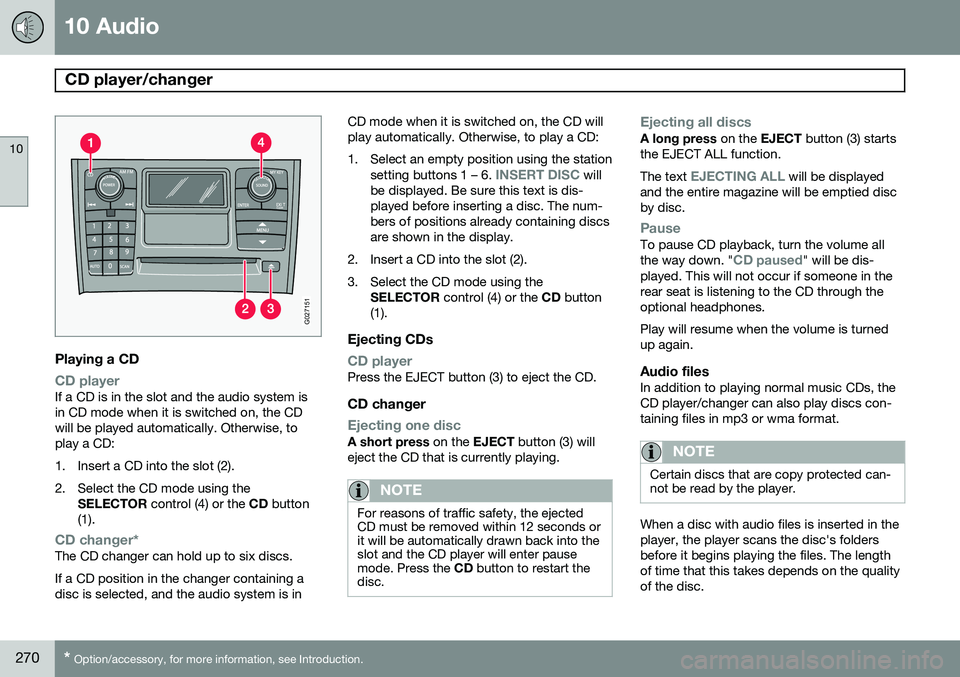
CD playerIf a CD is in the slot and the audio system is in CD mode when it is switched on, the CDwill be played automatically. Otherwise, toplay a CD:
1. Insert a CD into the slot (2).
2. Select the CD mode using the
SELECTOR control (4) or the CD button
(1).
CD changer*The CD changer can hold up to six discs. If a CD position in the changer containing a disc is selected, and the audio system is in CD mode when it is switched on, the CD willplay automatically. Otherwise, to play a CD:
1. Select an empty position using the station
setting buttons 1 – 6.
INSERT DISC will
be displayed. Be sure this text is dis- played before inserting a disc. The num-bers of positions already containing discsare shown in the display.
2. Insert a CD into the slot (2).
3. Select the CD mode using the SELECTOR control (4) or the CD button
(1).
Ejecting CDs
CD playerPress the EJECT button (3) to eject the CD.
CD changer
Ejecting one discA short press on the EJECT button (3) will
eject the CD that is currently playing.
NOTE
For reasons of traffic safety, the ejected CD must be removed within 12 seconds orit will be automatically drawn back into theslot and the CD player will enter pausemode. Press the CD button to restart the
disc.
Ejecting all discsA long press on the EJECT button (3) starts
the EJECT ALL function. The text
EJECTING ALL will be displayed
and the entire magazine will be emptied disc by disc.
PauseTo pause CD playback, turn the volume all the way down. "CD paused" will be dis-
played. This will not occur if someone in the rear seat is listening to the CD through theoptional headphones. Play will resume when the volume is turned up again.
Audio filesIn addition to playing normal music CDs, theCD player/changer can also play discs con-taining files in mp3 or wma format.
NOTE
Certain discs that are copy protected can- not be read by the player.
When a disc with audio files is inserted in the player, the player scans the disc's foldersbefore it begins playing the files. The lengthof time that this takes depends on the qualityof the disc.
Page 277 of 308
10 Audio
Bluetooth®
hands-free connection
10
}}
275
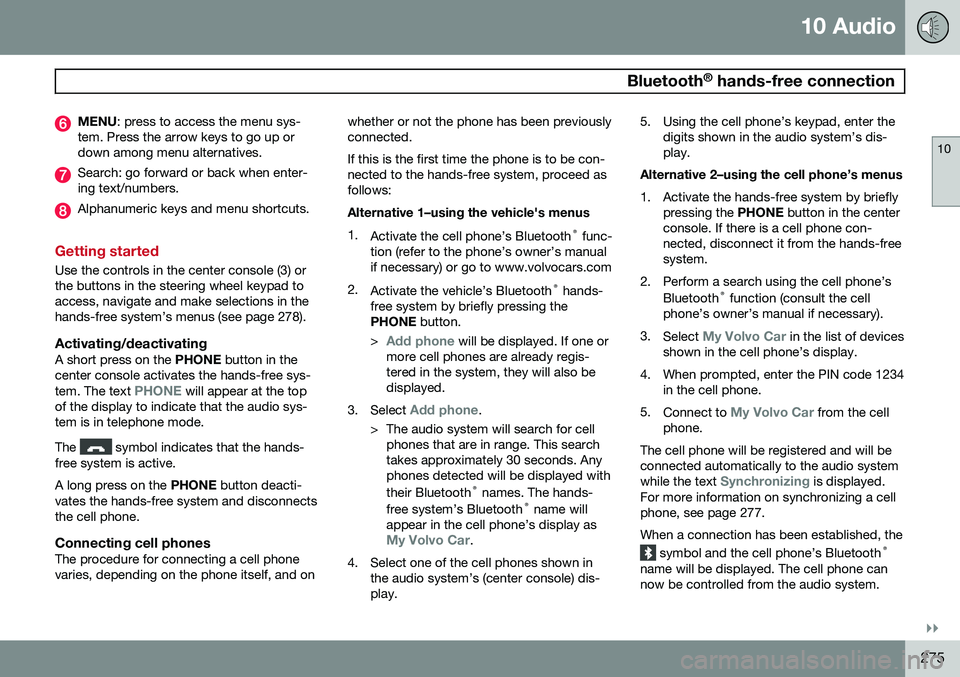
MENU : press to access the menu sys-
tem. Press the arrow keys to go up or down among menu alternatives.
Search: go forward or back when enter- ing text/numbers.
Alphanumeric keys and menu shortcuts.
Getting started
Use the controls in the center console (3) or the buttons in the steering wheel keypad toaccess, navigate and make selections in thehands-free system’s menus (see page 278).
Activating/deactivatingA short press on the PHONE button in the
center console activates the hands-free sys- tem. The text
PHONE will appear at the top
of the display to indicate that the audio sys- tem is in telephone mode. The
symbol indicates that the hands-
free system is active. A long press on the PHONE button deacti-
vates the hands-free system and disconnects the cell phone.
Connecting cell phonesThe procedure for connecting a cell phonevaries, depending on the phone itself, and on whether or not the phone has been previouslyconnected. If this is the first time the phone is to be con- nected to the hands-free system, proceed asfollows: Alternative 1–using the vehicle's menus 1.
Activate the cell phone’s Bluetooth ®
func-
tion (refer to the phone’s owner’s manual if necessary) or go to www.volvocars.com
2. Activate the vehicle’s Bluetooth ®
hands-
free system by briefly pressing thePHONE button.
>
Add phone will be displayed. If one or
more cell phones are already regis- tered in the system, they will also bedisplayed.
3. Select
Add phone.
> The audio system will search for cell phones that are in range. This search takes approximately 30 seconds. Anyphones detected will be displayed with their Bluetooth ®
names. The hands-
free system’s Bluetooth ®
name will
appear in the cell phone’s display as
My Volvo Car.
4. Select one of the cell phones shown in the audio system’s (center console) dis- play. 5. Using the cell phone’s keypad, enter the
digits shown in the audio system’s dis-play.
Alternative 2–using the cell phone’s menus
1. Activate the hands-free system by briefly pressing the PHONE button in the center
console. If there is a cell phone con- nected, disconnect it from the hands-freesystem.
2. Perform a search using the cell phone’s Bluetooth ®
function (consult the cell
phone’s owner’s manual if necessary).
3. Select
My Volvo Car in the list of devices
shown in the cell phone’s display.
4. When prompted, enter the PIN code 1234 in the cell phone.
5. Connect to
My Volvo Car from the cell
phone.
The cell phone will be registered and will be connected automatically to the audio system while the text
Synchronizing is displayed.
For more information on synchronizing a cell phone, see page 277. When a connection has been established, the
symbol and the cell phone’s Bluetooth ®
name will be displayed. The cell phone can now be controlled from the audio system.
Page 278 of 308
10 Audio
Bluetooth®
hands-free connection
10
276
Making a call1. Ensure that Phone is shown at the top of
the center console display and that the
symbol is visible (by pressing briefly
on PHONE on the center console).
2. Dial the desired phone number or use the phone book (see page 277).
3. Press ENTER.
End the call by pressing EXIT.
Disconnecting the cell phoneThe cell phone is automatically disconnected from the audio system if it is moved out ofrange. For more information about connec-tions, see page 275. The cell phone can be manually disconnected from the hands-free system by pressingPHONE. The hands-free system is also deac-
tivated when the ignition is switched off. When the cell phone is disconnected from the hands-free system, a call in progress can becontinued using the cell phone’s own speakerand microphone.
NOTE
Certain cell phones may require confirma- tion from the phone’s keypad when a callis transferred from hands-free to the cellphone.
Handling calls
Incoming calls–Press ENTER to answer a call, even if the
audio system is currently in e.g., CD or FM mode.
–Press EXIT to reject a call.
Automatic answerThis function means that incoming calls will be answered automatically. Activate or deac-tivate the function in the menu system under
PHONE MENUCALL OPTIONSAuto.
answer.
Call settingsWhile a call is in progress, press MENU or
ENTER on the center console to access the
following functions:
•
Mute microphone: mute the audio sys-
tem’s microphone.
•
Transf call to cell: transfer the call from
hands-free to the cell phone.
•
Phone book: this feature enables you to
search for a stored telephone number.
NOTE
• On certain cell phones, the connection is broken when the mute function isused, which is normal. If this happens,the hands-free system will prompt youto reconnect.
• A new call cannot be initiated whileanother call is in progress.
Sound settings
Call volumeCall volume can be adjusted while a call is in progress using the buttons in the steeringwheel keypad.
Audio system volumeWhen
PHONE is displayed, volume for the
audio system can be adjusted in the normalway with the audio system's VOLUME con-
trol. In order to adjust volume during a phonecall, the audio system must be switched toone of the other modes (FM, CD, etc). Audio system sound can be automatically muted when a phone call is received in
PHONE MENUPHONE SETTINGS
SOUNDS AND VOLUMEMute radio
and adjust the volume with the / keys
on the center console.