display VOLVO XC90 2014 Owner´s Manual
[x] Cancel search | Manufacturer: VOLVO, Model Year: 2014, Model line: XC90, Model: VOLVO XC90 2014Pages: 308, PDF Size: 13.31 MB
Page 273 of 308
10 Audio
CD player/changer
10
271
Navigating the disc and playing tracksIf a disc with audio files is in the CD player, press ENTER to display a list of folders on
the disc. Use the up and down arrows to move among the folders on the disc. Audio files have the
symbol and folders containing these
files have the
symbol.
Press ENTER to play a selected folder or a
file. When the music file has been played, the player will continue to play the rest of the filesin the current folder. When all of the files inthe folder have been played, the player willautomatically go to the next folder and playthe files in it.
NOTE
Press or if the entire name of
the current track does not fit in the display.
Changing tracks
CD player/CD changer1. Briefly press or to go to the
next/previous track or file. The steering wheel keypad can be used in the same way.
2. Press and hold down
or to
search within a track/file. The search con- tinues as long as the buttons aredepressed. The steering wheel keypadcan be used in the same way.
SCANThis function plays the first ten seconds of each track or file 1
.
1. Press SCAN to begin scanning the tracks
or files on the currently selected CD.
2. Press EXIT/CLEAR or SCAN to interrupt
the scan function and listen to an entire track or file.
Random play
CD playerThis function plays the tracks or files on a CD in random order (shuffle).
If a normal music CD is being playedSelect RANDOM in the menu and press
ENTER .
If a CD with mp3 or wma files is being
played
Select DISC or FOLDER in the menu and
press ENTER .
CD changerThis function offers two alternatives for play- ing the tracks on the disc(s) in the CDchanger in random order (shuffle). •
SINGLE DISC (random order on the cur-
rently selected disc)
•
ALL DISCS (random order on all of the
CDs in the changer)
If a normal music CD is being played
• Select RANDOM in the menu and press
ENTER .
• Select
SINGLE DISC or ALL DISCS and
press ENTER .
NOTE
Press to play the next randomly selected track. This can only be done on the cur-rently selected disc.
If a CD with mp3 or wma files is being played
Select SINGLE DISC or FOLDER In the
menu and press ENTER.
This function is deactivated when a new disc is selected.
1 CD changer: SCAN only functions on the currently selected disc.
Page 274 of 308
10 Audio
CD player/changer
10
272
DisctextCertain CDs contain information about the disc, such as the titles of the tracks, etc. Thisinformation can be shown in the display by activating the
DISCTEXT function.
1. Press the MENU button.
2. Select
DISCTEXT in the menu and press
ENTER .
3. Any information that may be stored on the disc will be displayed.
To deactivate this function, select
DISCTEXTand press ENTER.
Compact disc care
•Do not put tape or labels on the disc itself. They could become stuck in theplayer.
• Use CD standard EN 60908 discs only.Discs not meeting this standard maycause problems with system (poorsound). CDR discs can cause listeningproblems due to the quality of the disc orrecording equipment used.
• DualDisc: The audio side of a DualDisc(combined CD/DVD) does not meet CDspecifications and may not play in youraudio system.
• Keep the discs clean. Wipe them with asoft, clean, lint-free cloth, working fromthe center outwards. If necessary, dampen the cloth with a neutral soap sol-ution. Dry thoroughly before using.
• Never use cleaning spray or antistatic liq-uid. Use only cleaners specifically madefor CD's.
• Use discs of the correct size only (3.5"discs should never be used).
• Volvo does not recommend the use ofplastic outer rings on the disc.
• Condensation may occur on discs/opticalcomponents of the changer in cold winterweather. The disc can be dried with aclean, lint-free cloth. Optical componentsin the CD changer may, however, take upto one hour to dry off.
• Never attempt to play a disc which isdamaged in any way.
• When not in use, the discs should bestored in their covers. Avoid storing discsin excessive heat, direct sunlight or dustylocations.
Page 276 of 308
10 Audio
Bluetooth®
hands-free connection
10
274
Introduction
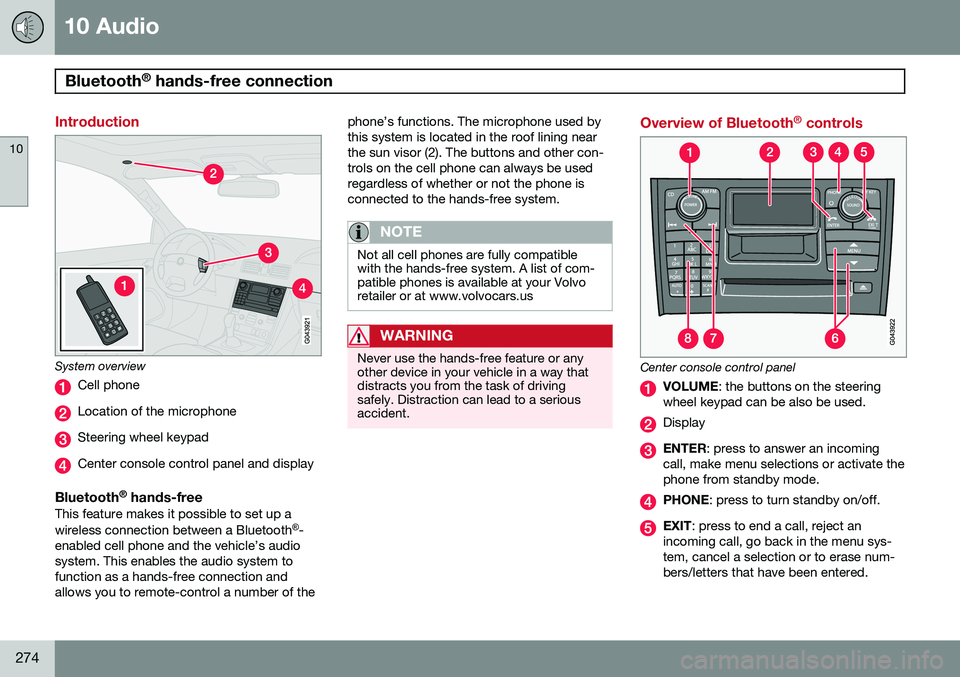
System overview
Cell phone
Location of the microphone
Steering wheel keypad
Center console control panel and display
Bluetooth ®
hands-freeThis feature makes it possible to set up a wireless connection between a Bluetooth ®
-
enabled cell phone and the vehicle’s audio system. This enables the audio system tofunction as a hands-free connection andallows you to remote-control a number of the phone’s functions. The microphone used bythis system is located in the roof lining nearthe sun visor (2). The buttons and other con-trols on the cell phone can always be usedregardless of whether or not the phone isconnected to the hands-free system.
NOTE
Not all cell phones are fully compatible with the hands-free system. A list of com-patible phones is available at your Volvoretailer or at www.volvocars.us
WARNING
Never use the hands-free feature or any other device in your vehicle in a way thatdistracts you from the task of drivingsafely. Distraction can lead to a seriousaccident.
Overview of Bluetooth
®
controls
Center console control panel
VOLUME : the buttons on the steering
wheel keypad can be also be used.
Display
ENTER : press to answer an incoming
call, make menu selections or activate the phone from standby mode.
PHONE : press to turn standby on/off.
EXIT: press to end a call, reject an
incoming call, go back in the menu sys- tem, cancel a selection or to erase num-bers/letters that have been entered.
Page 277 of 308
10 Audio
Bluetooth®
hands-free connection
10
}}
275
MENU : press to access the menu sys-
tem. Press the arrow keys to go up or down among menu alternatives.
Search: go forward or back when enter- ing text/numbers.
Alphanumeric keys and menu shortcuts.
Getting started
Use the controls in the center console (3) or the buttons in the steering wheel keypad toaccess, navigate and make selections in thehands-free system’s menus (see page 278).
Activating/deactivatingA short press on the PHONE button in the
center console activates the hands-free sys- tem. The text
PHONE will appear at the top
of the display to indicate that the audio sys- tem is in telephone mode. The
symbol indicates that the hands-
free system is active. A long press on the PHONE button deacti-
vates the hands-free system and disconnects the cell phone.
Connecting cell phonesThe procedure for connecting a cell phonevaries, depending on the phone itself, and on whether or not the phone has been previouslyconnected. If this is the first time the phone is to be con- nected to the hands-free system, proceed asfollows: Alternative 1–using the vehicle's menus 1.
Activate the cell phone’s Bluetooth ®
func-
tion (refer to the phone’s owner’s manual if necessary) or go to www.volvocars.com
2. Activate the vehicle’s Bluetooth ®
hands-
free system by briefly pressing thePHONE button.
>
Add phone will be displayed. If one or
more cell phones are already regis- tered in the system, they will also bedisplayed.
3. Select
Add phone.
> The audio system will search for cell phones that are in range. This search takes approximately 30 seconds. Anyphones detected will be displayed with their Bluetooth ®
names. The hands-
free system’s Bluetooth ®
name will
appear in the cell phone’s display as
My Volvo Car.
4. Select one of the cell phones shown in the audio system’s (center console) dis- play. 5. Using the cell phone’s keypad, enter the
digits shown in the audio system’s dis-play.
Alternative 2–using the cell phone’s menus
1. Activate the hands-free system by briefly pressing the PHONE button in the center
console. If there is a cell phone con- nected, disconnect it from the hands-freesystem.
2. Perform a search using the cell phone’s Bluetooth ®
function (consult the cell
phone’s owner’s manual if necessary).
3. Select
My Volvo Car in the list of devices
shown in the cell phone’s display.
4. When prompted, enter the PIN code 1234 in the cell phone.
5. Connect to
My Volvo Car from the cell
phone.
The cell phone will be registered and will be connected automatically to the audio system while the text
Synchronizing is displayed.
For more information on synchronizing a cell phone, see page 277. When a connection has been established, the
symbol and the cell phone’s Bluetooth ®
name will be displayed. The cell phone can now be controlled from the audio system.
Page 278 of 308
10 Audio
Bluetooth®
hands-free connection
10
276
Making a call1. Ensure that Phone is shown at the top of
the center console display and that the
symbol is visible (by pressing briefly
on PHONE on the center console).
2. Dial the desired phone number or use the phone book (see page 277).
3. Press ENTER.
End the call by pressing EXIT.
Disconnecting the cell phoneThe cell phone is automatically disconnected from the audio system if it is moved out ofrange. For more information about connec-tions, see page 275. The cell phone can be manually disconnected from the hands-free system by pressingPHONE. The hands-free system is also deac-
tivated when the ignition is switched off. When the cell phone is disconnected from the hands-free system, a call in progress can becontinued using the cell phone’s own speakerand microphone.
NOTE
Certain cell phones may require confirma- tion from the phone’s keypad when a callis transferred from hands-free to the cellphone.
Handling calls
Incoming calls–Press ENTER to answer a call, even if the
audio system is currently in e.g., CD or FM mode.
–Press EXIT to reject a call.
Automatic answerThis function means that incoming calls will be answered automatically. Activate or deac-tivate the function in the menu system under
PHONE MENUCALL OPTIONSAuto.
answer.
Call settingsWhile a call is in progress, press MENU or
ENTER on the center console to access the
following functions:
•
Mute microphone: mute the audio sys-
tem’s microphone.
•
Transf call to cell: transfer the call from
hands-free to the cell phone.
•
Phone book: this feature enables you to
search for a stored telephone number.
NOTE
• On certain cell phones, the connection is broken when the mute function isused, which is normal. If this happens,the hands-free system will prompt youto reconnect.
• A new call cannot be initiated whileanother call is in progress.
Sound settings
Call volumeCall volume can be adjusted while a call is in progress using the buttons in the steeringwheel keypad.
Audio system volumeWhen
PHONE is displayed, volume for the
audio system can be adjusted in the normalway with the audio system's VOLUME con-
trol. In order to adjust volume during a phonecall, the audio system must be switched toone of the other modes (FM, CD, etc). Audio system sound can be automatically muted when a phone call is received in
PHONE MENUPHONE SETTINGS
SOUNDS AND VOLUMEMute radio
and adjust the volume with the / keys
on the center console.
Page 279 of 308
10 Audio
Bluetooth®
hands-free connection
10
277
Ringing volume
Go to PHONE MENUPHONE SETTINGS
SOUNDS AND VOLUMERing volume
and adjust the volume with the / keys
on the center console.
Ringing tonesThe hands-free system’s integrated ringing tones can be selected in
PHONE MENU
PHONE SETTINGSSOUNDS AND
VOLUME
Ring signalsRing signal 1,
etc.
NOTE
The connected cell phone’s ring tone may not be switched off when one of thehands-free system's ringing tones is used.
If you prefer to use the connected cell phone’s ring tone 1
, go to
PHONE MENU
PHONE SETTINGSSOUNDS AND
VOLUME
Ring signalsUse cell phone
signal
More information about registering and connecting cell phones
A maximum of 5 cell phones can be regis- tered in the hands-free system. Registrationonly needs to be done once for each phone.After registration, the cell phones can then befound in the list of registered phones. Onlyone cell phone can be connected to hands-free at a time. Phones can be unregistered in
PHONE MENUBLUETOOTHRemove
phone.
Automatic connectionWhen the hands-free system is active and the most recently connected cell phone is withinrange, it is detected automatically. When theaudio system searches for the most recentlyconnected phone, this phone’s name appearsin the display. To manually connect a differentcell phone, press EXIT.
Manual connectionTo connect a phone other than the one thatwas most recently connected or to switchbetween cell phones that are already regis-tered in the hands-free system: Put the audio system in telephone mode (
Phone) and follow the instructions in the dis-
play or change the connected cell by going into the menu system under
PHONE MENU
BLUETOOTHChange phoneAdd
phone.
Phone book
In order to use the hands-free system’s phone book (list of contacts), PHONE must
be displayed at the top of the center console display and the
symbol must be visible.
The audio system stores a copy of the phone book of each registered cell phone. Thephone book is automatically copied each timea phone is connected. This function can be activated in
PHONE SETTINGSSync ph
book. Searches for contacts are only made in
the phone book of the currently connected cell phone.
NOTE
If a particular cell phone does not support copying of the phone book, List is emptywill be displayed when copying has been completed.
If the phone book contains information about someone who is trying to call you, this infor-mation will be shown in the display.
1 Not supported by all cell phones.
Page 280 of 308
10 Audio
Bluetooth®
hands-free connection
10
278
Searching for contactsThe easiest way to search for a contact in the phone book is to press and hold any of thebuttons 2–9 in the center console (no. 8 in the
illustration on page 274). This starts a searchbased on the first letter on the button that hasbeen pressed. The phone book can also be accessed by pressing the navigation buttons
/ on
the center console or by pressing
/on the steering wheel keypad. A search can also be made in the phone book’s search menu in
PHONE BOOKSearch:
1. Enter the first letter of the contact’s name and press ENTER or simply press
ENTER.
2. Select the desired contact and press ENTER to make a call to that person.
Voice mail numberThe phone number to your voice mail can be changed in the menu
CALL OPTIONSVoice mail no.. If no number has been
stored, this menu can be accessed by a pro- longed press on button 1. Once a phone
number has been stored, press and hold 1 to
dial this number.
Call listsLists of calls in a particular cell phone arecopied to the hands-free system each timethat phone is connected. These lists are thenupdated while the phone is connected. PressENTER to show the most recently dialed
numbers. Other call lists can be found under
Call register….
NOTE
Certain cell phones display the list of the most recently dialed numbers in reverseorder.
Entering textText is entered by using the number buttons in the center console. Press a button once toenter the first letter on the button, twice toenter the second letter, etc. Continue to pressthe button to display other characters. Press EXIT briefly to erase a character. Press
and hold EXIT to erase all of the characters
that have been entered. Use the
/ but-
tons on the center console to navigate among the characters.
Bluetooth ®
menus
1. CALL REGISTER
1.1. Last 10 missed calls 1.2. Last 10 received calls1.3. Last 10 dialed calls
2. PHONE BOOK
2.1. Search2.2. Copy to cell phone
3. BLUETOOTH
3.1. Change phone3.1.1. Add phone3.1.2–4. Added phones 2
3.2. Remove phone
3.3. Connect fr. cell phone
3.4. Car Bluetooth info
4. CALL OPTIONS
4.1. Automatic answer
4.2. Voice mail number
5. PHONE SETTINGS
5.1. SOUNDS AND VOLUME5.1.1. Ring volume
2Max. 3 phones
Page 296 of 308
11 Specifications
Overview of information and warning symbols
11
294
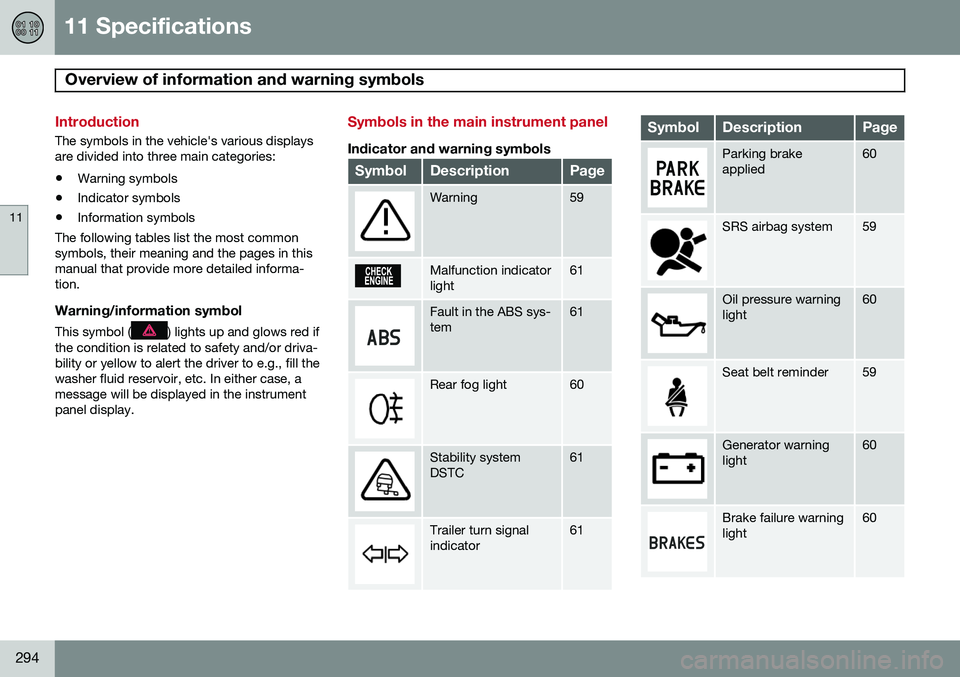
Introduction
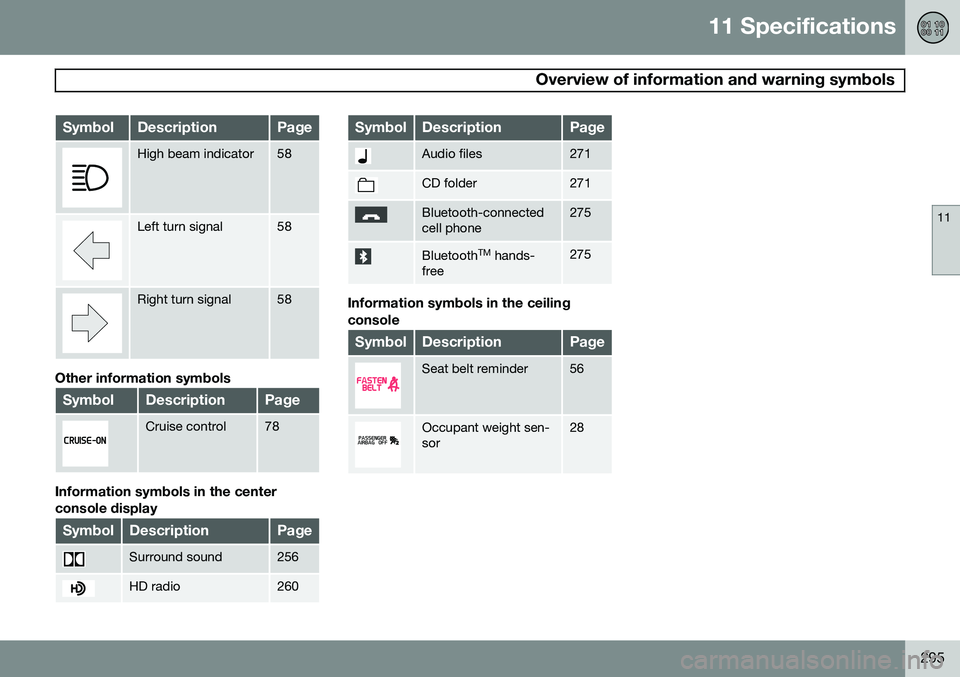
The symbols in the vehicle's various displays are divided into three main categories:• Warning symbols
• Indicator symbols
• Information symbols
The following tables list the most commonsymbols, their meaning and the pages in thismanual that provide more detailed informa-tion.
Warning/information symbol
This symbol () lights up and glows red if
the condition is related to safety and/or driva- bility or yellow to alert the driver to e.g., fill thewasher fluid reservoir, etc. In either case, amessage will be displayed in the instrumentpanel display.
Symbols in the main instrument panel
Indicator and warning symbols
SymbolDescriptionPage
Warning59
Malfunction indicator light61
Fault in the ABS sys- tem61
Rear fog light60
Stability system DSTC61
Trailer turn signal indicator61
SymbolDescriptionPage
Parking brake applied60
SRS airbag system59
Oil pressure warning light60
Seat belt reminder59
Generator warning light60
Brake failure warning light60
Page 297 of 308
11 Specifications
Overview of information and warning symbols
11
295
SymbolDescriptionPage
High beam indicator58
Left turn signal58
Right turn signal58
Other information symbols
SymbolDescriptionPage
Cruise control78
Information symbols in the center console display
SymbolDescriptionPage
Surround sound256
HD radio260
SymbolDescriptionPage
Audio files271
CD folder271
Bluetooth-connected cell phone275
BluetoothTM
hands-
free275
Information symbols in the ceiling console
SymbolDescriptionPage
Seat belt reminder56
Occupant weight sen- sor28
Page 301 of 308
12 Index
12
299
Central locking system - remote key....... 127
Changing a wheel.................................... 200
Changing coolant.................................... 220
Charge air cooler..................................... 291
Check Engine warning light....................... 61
Child restraint anchors......................... 49, 51Child restraints recalls and registration......................... 40
Child restraint systems.............................. 41
Child safety................................................ 38
Child safety locks.................................... 132
Climate system.......................................... 94 refrigerant............................................. 94
Clock reset button..................................... 58
Coat hanger............................................. 117
Cold weather precautions........................ 169Compact disc care CD care............................................... 272
Convertible seats....................................... 45
Coolant.................................................... 224 changing............................................. 220
Courtesy light........................................... 111Cup holder rear seat.............................................. 116 Curb weight............................................. 187
Current fuel consumption.......................... 76
D
Daytime running lights............................... 68 Defroster
rear window and door mirrors.............. 75
rear window and mirrors..................... 100
windshield............................................. 99
Detachable trailer hitch............................ 167
Dimensions.............................................. 284Disabling the passenger's side front air-
bag............................................................. 28
Display, instrument panel.......................... 58
Dolby Pro Logic II (DPL II)........................ 255
Door mirrors............................................... 85 defroster............................................... 75
Door mirrors, folding.................................. 64
Driver distraction warning.......................... 14
Driving conditions, difficult...................... 147
Driving economically................................ 146
Driving through water.............................. 147
E
Economical driving.................................. 146
Electrically operated moonroof.................. 87
Electrical system...................................... 292
Emergency locking retractor...................... 39
Emission inspection readiness................ 217Engine specifications...................................... 291
starting................................................ 143
Engine oil................................................. 222 checking............................................. 222
specifications...................................... 290
Environment............................................... 13
F
Federal Clean Air Act............................... 216 Flat tires changing............................................. 198
repairing with tire sealing system....... 192
Floor mats cleaning.............................................. 211
placing correctly................................. 143
Fog light............................................... 60, 69