warning VOLVO XC90 2015 Owners Manual
[x] Cancel search | Manufacturer: VOLVO, Model Year: 2015, Model line: XC90, Model: VOLVO XC90 2015Pages: 570, PDF Size: 12.44 MB
Page 280 of 570
DRIVER SUPPORT
278
NOTE
•Due to local traffic regulations in certain markets, RCW will
not activate the rear
turn signals. That part of the function will be deactivated.
• The use of the rear turn signals will alsobe deactivated if the City Safety warning level is set at
Later. See also the section
"Setting a warning level (distance)" in the article "City Safety settings."
• If RCW detects a vehicle approachingfrom behind, the seat belt pretensionersand Whiplash Protection System will beactivated.
LimitationsIn some circumstances, it may be difficult for RCW to help the driver if there is a risk of a colli-sion, such as: •
In slippery conditions when Electronic Stability Control is active
• If the vehicle approaching from the rear isdetected at a late stage
• If the vehicle approaching from the rearchanges lanes at a late stage
• If the vehicle approaching from the rear ismoving at a speed above approx. 50 mph(80 km/h) detected at a late stage
Related information
•
City Safety
™ (p. 273)
• Whiplash protection system (p. 89)
• Seat belts (p. 58)
• City Safety warning level settings (p. 275)
City Safety limitations
City Safety ™ may have limited or reduced func-
tionality in certain situations.
The function has several limitations that the driver should be familiar with:
Low objectsHanging objects, such as flags for overhanging loads or accessories such as auxiliary lights orfront protective grids that extend beyond theheight of the hood may limit City Safety's func-tion.
Slippery driving conditionsThe extended braking distance on slippery roads may reduce City Safety's capacity to help avoid acollision. In situations of this type, the ABSbrakes and Electronic Stability Control will helpprovide braking power and stability.
BacklightingStrong sunlight, reflections, extreme light con- trasts, the use of sunglasses, or if the driver is notlooking straight ahead may make the visual warn-ing signal in the windshield difficult to see.
Page 281 of 570

DRIVER SUPPORT
279
HeatIf the temperature in the passenger compartment is very high, the camera and radar sensor may betemporarily turned off for approx. 15 minutesafter the engine has been started to protect theirelectronic components. When the temperaturehas cooled sufficiently, the camera and radarsensor will restart automatically. The visual warning signal may also be temporarily disabled due to high passenger compartmenttemperatures caused by strong sunlight. Warnings may not be given if the distance to the vehicle ahead is short and the driver is activelyoperating the vehicle (clearly depressing a pedalor turning the steering wheel).
Reduced visibilityCity Safety's functions may be greatly impeded or deactivated by e.g., intense snowfall or rain, indense fog, in very dusty conditions or if there isblowing snow in front of the vehicle. Condensa-tion, ice, snow or dirt on the windshield may alsoreduce the system's functionality.
NOTE
•Keep the windshield in front of the radar sensor free of ice, snow, dirt, etc.
• Snow or ice on the hood deeper than2 inches (5 cm) may obstruct the sensor.Keep the hood free of ice and snow.
• Do not mount or in any way attach any-thing on the windshield that couldobstruct the radar sensor.
Camera and radar sensor's field of visionThe camera and radar sensor have limited fields of vision. In some situations they may detect avehicle, pedestrian or cyclist later than expectedor not detect them at all. Other vehicles that are dirty may be detected later than others and in dark conditions, motorcy-cles may be detected late or not at all. If a text message is displayed in the instrument panel indicates that the camera or radar sensorare blocked, it may be difficult for City Safety todetect a vehicle, pedestrian or cyclist and thesystem's functionality may be reduced. Camera and radar sensor components should only be serviced or replaced by a trained andqualified Volvo service technician.
Other limitations
WARNING
• Warnings and braking may be delayed or not occur at all if traffic, weather or otherconditions prevent the camera and/orradar sensor from detecting pedestrians,cyclists or other vehicles correctly.
• Other vehicles can only be detected indarkness if their headlights and taillightsare clearly visible.
• The sensors have a limited range forpedestrians and cyclists. The systemfunctions best at speeds up to 30 mph(50 km/h). For stationary or slow-movingvehicles, the system functions best atspeeds up to approx. 43 mph (70 km/h).
• Warnings for stationary or slow-movingvehicles may be impeded by darkness orpoor visibility.
• Warnings and braking for pedestrians andcyclists will not be provided at speedsabove approx. 50 mph (80 km/h).
• Do not place, attach or mount any objectson the inside or outside of the windshieldnear or over the sensor. This could affectthe camera-based functions.
Page 282 of 570

DRIVER SUPPORT
280
Action by the driver
Backing upCity Safety is temporarily deactivated while the vehicle is backing up.
Low speedCity Safety is not activated at very low speeds (under approx. 3 mph (4 km/h). This means thatthe system will not be triggered if your vehicleapproaches a vehicle ahead, such as when park-ing.
Active driverAction by the driver always has priority. For this reason, City Safety may not react or react laterthan expected in situations in which the driver isactively operating the vehicle, even if a collision isimminent. This is also done to help eliminateexcessive warnings.
Related information
•City Safety
™ (p. 273)
City Safety ™ troubleshooting
Messages pertaining to any possible problems with City Safety will be displayed in the instru-ment panel.
Troubleshooting and remedial action
Location of the camera and the radar sensor
If a message is displayed in the instrument panel saying that the camera/radar sensor is blocked,
City Safety cannot detect vehicles, cyclists orpedestrians ahead of you, which means that thesystem is not functioning properly. However, this message will not be displayed in all situations in which the camera/radar sensor isobstructed. For this reason, the driver mustensure that the area of the windshield in front ofthe camera/radar sensor is always kept clean. The following table shows some of the situationsthat can cause the message to be displayed andsuggested actions.
CauseAction
The area of the wind- shield in front of thecamera/radar sensor isdirty or covered by ice orsnow.Clean the wind- shield or removethe ice/ snow.
Thick fog or heavy rain/ snow blocks reduces thecamera/radar sensor'srange of visibility.No action. The driver should beextra alert in condi-tions of this type.
There is dirt between the inside of the wind-shield and the camera/radar sensor.Have the area of the windshieldcleaned by atrained and quali-fied Volvo servicetechnician.
Page 283 of 570

DRIVER SUPPORT
* Option/accessory, for more information, see Introduction.281
CAUTION
•Service and maintenance on City Safety may only be carried out by a trained andqualified Volvo service technician.
• If a crack, scratch or stone chip shouldoccur in the section of the windshield infront the camera/radar sensor, contact atrained and qualified Volvo service techni-cian to repair or replace the windshield.Failing to do so may result in reducedCity Safety functionality.
To help prevent limited or reduced functional- ity, please also observe the following:
• Volvo recommends that cracks, scratches or stone chips on the windshield in front of the camera/radar sensor should
not
be repaired; in such cases, the entire windshield should be replaced.
• Before the windshield is replaced, con-tact a Volvo retailer to ensure that thecorrect windshield is ordered and instal-led. If the wrong type of windshield isused, this may cause City Safety to func-tion improperly or not at all.
• Volvo recommends the use of only Genu-ine Volvo Replacement Windshields.
• When replacing windshield wipers, usethe same type or ones approved by Volvo.
After the windshield has been replaced, the camera/radar sensor will have to be recalibra-ted by a trained and qualified Volvo servicetechnician to help ensure proper function ofall of the vehicle's camera-/radar-based sys-tems.
MaintenanceIn order for City Safety to function properly, the area of the windshield must be kept free of dirt,ice, snow, etc.
Other vehicle functionsIf a message is displayed in the instrument panel,this means that the other systems using the cam-era/radar sensor (see the list below) will not havefull functionality or may not function at all. The radar sensor is used by the following func- tions:
• Distance Alert
*
• Driver Alert Control
*
• Adaptive Cruise Control
*
• Pilot Assist
*
• Road Sign Information
*
• Active High Beams
*
• Lane Keeping Aid
*
Do not mount or in any way attach anything onthe windshield that could obstruct the camera/radar sensor.
WARNING
• The camera has the same type of limita- tions as the human eye, i.e., it cannot seeas well in heavy snowfall or rain, thick fogor in heavy blowing dust or snow. In suchconditions, systems depending on thecamera may experience greatly reducedfunctionality or may be temporarily deacti-vated.
• Never place any objects, decals, etc., onthe windshield in front of the camera. Thiscould reduce or block the camera
Page 289 of 570
DRIVER SUPPORT
* Option/accessory, for more information, see Introduction.287
Deactivating1.
Tap the Speed Sign Assist button in the
center display's Function view.
> ASL will be deactivated and the Speed limiter (SL) will be activated.
2. Press the
button on the left-side steer-
ing wheel keypad.
> SL will go into standby mode.
WARNING
After switching from ASL to SL, the vehicle will no longer adapt speed to posted speedlimits. It will only limit the vehicle's maximumspeed.
Related information
• Speed limiter (SL)
* (p. 283)
• Automatic Speed Limiter (ASL)
* (p. 285)
Changing tolerance for the Automatic Speed Limiter
Posted speed limit toleranceASL can be set to allow the vehicle to drive a maximum of 5 mph (10 km/h) above or belowthe posted speed limit. For example, if the currentposted speed limit is 50 mph (70 km/h), thedriver can opt to allow the vehicle to drive at aspeed of 55 mph (80 km/h).
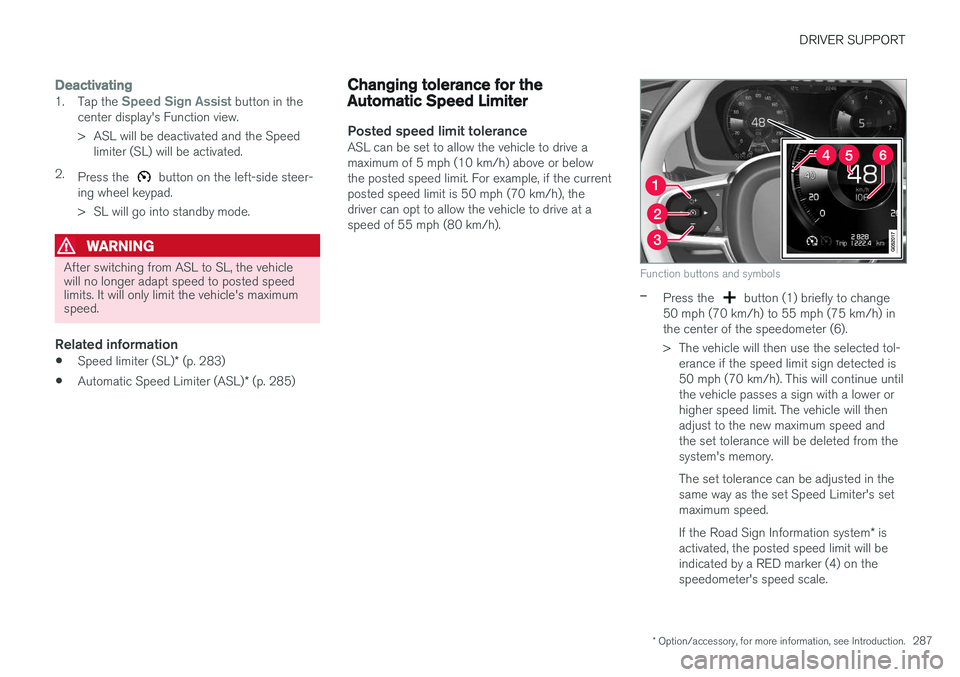
Function buttons and symbols
–Press the button (1) briefly to change
50 mph (70 km/h) to 55 mph (75 km/h) in the center of the speedometer (6).
> The vehicle will then use the selected tol- erance if the speed limit sign detected is 50 mph (70 km/h). This will continue untilthe vehicle passes a sign with a lower orhigher speed limit. The vehicle will thenadjust to the new maximum speed andthe set tolerance will be deleted from thesystem's memory. The set tolerance can be adjusted in the same way as the set Speed Limiter's setmaximum speed. If the Road Sign Information system * is
activated, the posted speed limit will be indicated by a RED marker (4) on thespeedometer's speed scale.
Page 292 of 570
DRIVER SUPPORT
* Option/accessory, for more information, see Introduction.
290
Turning the Speed Limiter * off
The Speed Limiter (SL) can be turned off.
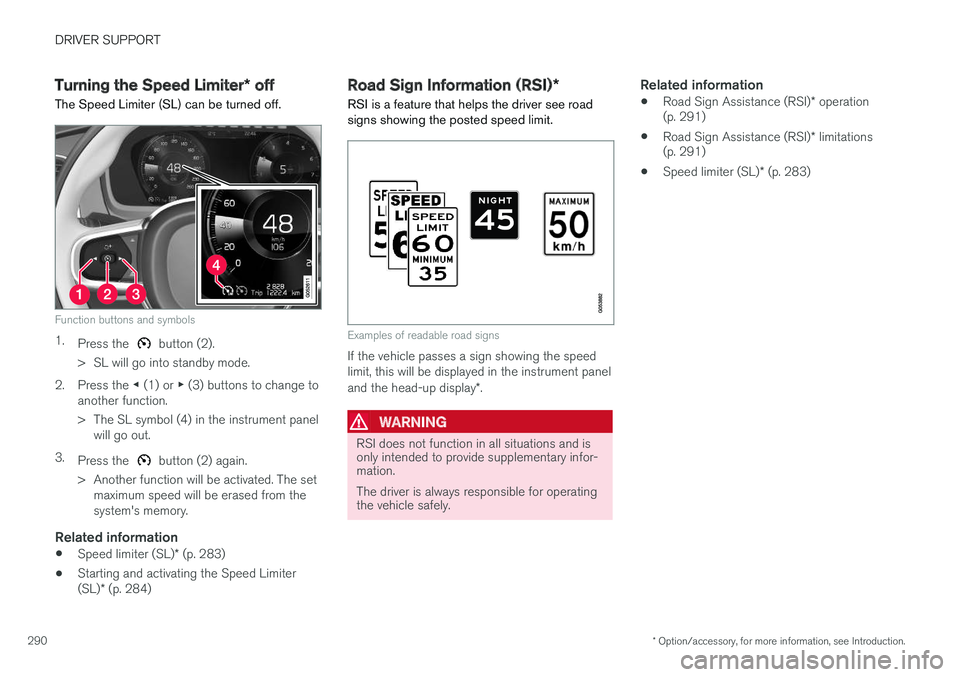
Function buttons and symbols
1. Press the button (2).
> SL will go into standby mode.
2. Press the ◀ (1) or ▶ (3) buttons to change to
another function.
> The SL symbol (4) in the instrument panel will go out.
3. Press the
button (2) again.
> Another function will be activated. The set maximum speed will be erased from the system's memory.
Related information
• Speed limiter (SL)
* (p. 283)
• Starting and activating the Speed Limiter (SL)
* (p. 284)
Road Sign Information (RSI) *
RSI is a feature that helps the driver see road signs showing the posted speed limit.
Examples of readable road signs
If the vehicle passes a sign showing the speed limit, this will be displayed in the instrument panel and the head-up display *.
WARNING
RSI does not function in all situations and is only intended to provide supplementary infor-mation. The driver is always responsible for operating the vehicle safely.
Related information
• Road Sign Assistance (RSI)
* operation
(p. 291)
• Road Sign Assistance (RSI)
* limitations
(p. 291)
• Speed limiter (SL)
* (p. 283)
Page 293 of 570
DRIVER SUPPORT
* Option/accessory, for more information, see Introduction.291
Road Sign Assistance (RSI)*
operation
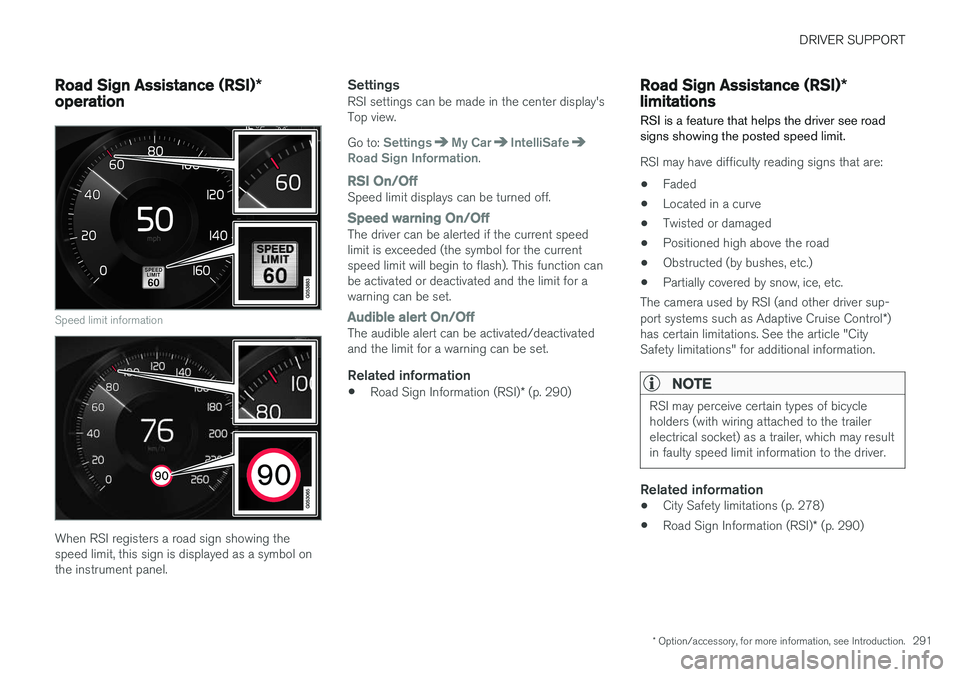
Speed limit information
When RSI registers a road sign showing the speed limit, this sign is displayed as a symbol onthe instrument panel.
SettingsRSI settings can be made in the center display'sTop view. Go to:
SettingsMy CarIntelliSafeRoad Sign Information.
RSI On/OffSpeed limit displays can be turned off.
Speed warning On/OffThe driver can be alerted if the current speed limit is exceeded (the symbol for the currentspeed limit will begin to flash). This function canbe activated or deactivated and the limit for awarning can be set.
Audible alert On/OffThe audible alert can be activated/deactivated and the limit for a warning can be set.
Related information
• Road Sign Information (RSI)
* (p. 290)
Road Sign Assistance (RSI) *
limitations
RSI is a feature that helps the driver see road signs showing the posted speed limit.
RSI may have difficulty reading signs that are:
• Faded
• Located in a curve
• Twisted or damaged
• Positioned high above the road
• Obstructed (by bushes, etc.)
• Partially covered by snow, ice, etc.
The camera used by RSI (and other driver sup- port systems such as Adaptive Cruise Control *)
has certain limitations. See the article "City Safety limitations" for additional information.
NOTE
RSI may perceive certain types of bicycle holders (with wiring attached to the trailerelectrical socket) as a trailer, which may resultin faulty speed limit information to the driver.
Related information
• City Safety limitations (p. 278)
• Road Sign Information (RSI)
* (p. 290)
Page 294 of 570

DRIVER SUPPORT
* Option/accessory, for more information, see Introduction.
292
Park Assist *
The Park Assist system is designed to assist you
when driving into parking spaces, garages, etc. An audible signal and symbols in the instrumentpanel and center display indicate the distance tothe object.
Display view showing object zones and sensor sectors
The center display shows an overview of the vehi- cle in relation to objects that have been detected. The highlighted sector shows which of the sen- sors has detected the object. The closer the vehi-cle symbol is to the highlighted sector, the closerthe actual object is to your vehicle. The Park Assist system uses an intermittent tone that pulses faster as you come closer to anobject. Sound from the infotainment system willbe temporarily turned down. The tone becomes constant when you are withinapproximately 1 ft (30 cm) of an object and theactive sensor fields will be completely filled in. Ifthere are objects within this distance both behindand in front of the vehicle, the tone alternatesbetween front and rear speakers. While an audible signal is being given, its volume level can be raised/lowered using the
>II control
in the center console.
WARNING
Park Assist is an information system, NOT a safety system. This system is designed to bea supplementary aid when parking the vehicle.It is not, however, intended to replace the driv-er's attention and judgement.
Rear park assist
The system's rear sensors are activated automat- ically when the engine is started and are active ifthe vehicle rolls rearward with the gear selector in N or if R has been selected.
The distance monitored behind the vehicle is approximately 5 ft (1.5 m). The audible signalcomes from the rear speakers. The rear sensors will be deactivated automatically when towing a trailer if Volvo genuine trailer wir-ing is used. If a non-Volvo trailer hitch is beingused, it may be necessary to switch off the sys-tem manually.
Side park assist
The system's side sensors are activated automat- ically when the engine is started and are active atspeeds below approximately 6 mph (10 km/h).
Page 295 of 570

DRIVER SUPPORT
* Option/accessory, for more information, see Introduction.293
The distance monitored along the sides of the vehicle is approximately 1 ft (0.3 m). The audiblesignal comes from the side speakers.
Front park assist
The system's front sensors are activated auto- matically when the engine is started and areactive at speeds below approximately 6 mph(10 km/h). The distance monitored in front of the vehicle is approximately 2.5 ft (0.8 m). The audible signalcomes from the front speakers. Front Park Assist is deactivated if the driver presses the brake pedal or if the gear selector is put in
P.
When installing auxiliary headlights, be sure that they do not obstruct the front sensors. Otherwise,these lights could trigger a Park Assist warning.
Related information
• Activating/deactivating Park Assist (p. 293)
• Park Assist limitations (p. 294)
• Park assist symbols and messages (p. 295)
Activating/deactivating Park Assist
The Park Assist system can be turned on or off.
On/OffPark Assist's front and side sensors are activated automatically when the engine is started. Therear sensors activate if the vehicle rolls rearward in N or if P is selected.
This function can be activated/ deactivated in the center dis-play's Function view.
–Tap the Park Assist button.
> Green indicator: the function is active. Gray indicator: the function is deactivated.
Related information
• Park Assist
* (p. 292)
• Park Assist limitations (p. 294)
• Park assist symbols and messages (p. 295)
Page 296 of 570

DRIVER SUPPORT
* Option/accessory, for more information, see Introduction.
294
Park Assist limitations
The Park Assist system has certain limitations.
NOTE
A trailer hitch whose wiring is integrated with the vehicle's electrical system will be includedin the measurement of the available spacebehind the vehicle.
NOTE
• The system will not detect high objects, such as a loading dock, etc.
• Objects such as chains, thin shiny polesor low objects may temporarily not bedetected by the system. This may resultin the pulsing tone unexpectedly stoppinginstead of changing to a constant tone asthe vehicle approaches the object. Insuch cases, use caution when backing upor stop the vehicle to help avoid damage.
• In certain circumstances, the park assistsystem may give unexpected warning sig-nals that can be caused by externalsound sources that use the same ultra-sound frequencies as the system. Thismay include such things as the horns ofother vehicles, wet tires on asphalt, pneu-matic brakes, motorcycle exhaust pipes,etc. This does not indicate a fault in thesystem.
Cleaning the sensors
Location of the Park Assist sensors
The sensors must be cleaned regularly to ensure that they work properly. Clean them with waterand a suitable car washing detergent.
NOTE
If the sensors are obstructed by e.g., dirt, snow, or ice, this could result in false warningsignals from the park assist system.
Related information
•
Park Assist
* (p. 292)
• Activating/deactivating Park Assist (p. 293)
• Park assist symbols and messages (p. 295)