warning VOLVO XC90 2015 Owners Manual
[x] Cancel search | Manufacturer: VOLVO, Model Year: 2015, Model line: XC90, Model: VOLVO XC90 2015Pages: 570, PDF Size: 12.44 MB
Page 267 of 570
DRIVER SUPPORT
* Option/accessory, for more information, see Introduction.265
Setting a Pilot Assist time interval
Different time intervals to the vehicle ahead can be selected and are shown in the instrumentpanel as 1–5 horizontal bars.
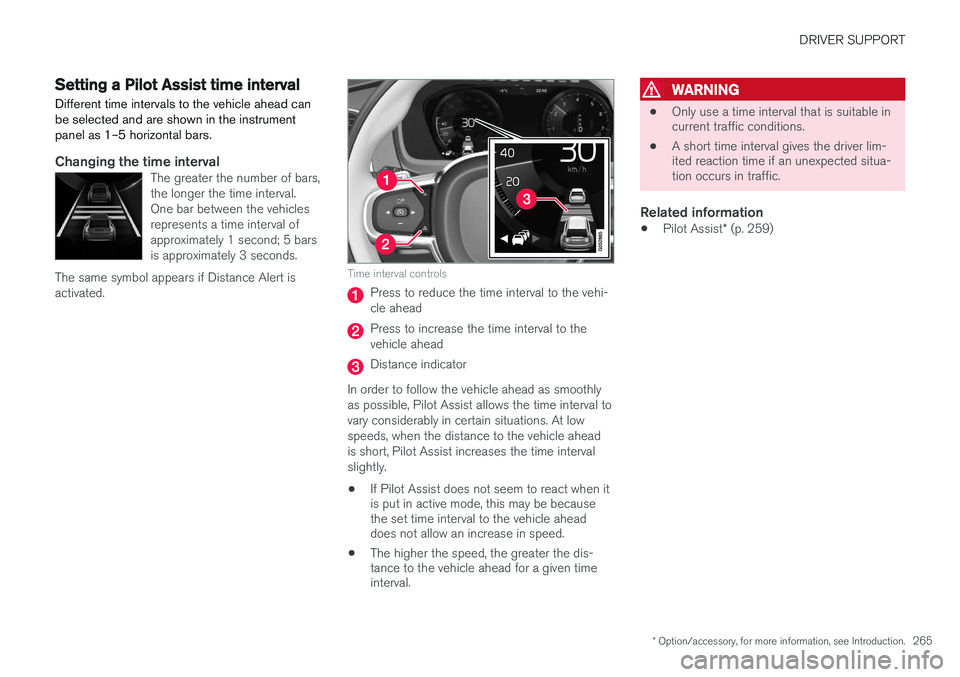
Changing the time intervalThe greater the number of bars, the longer the time interval.One bar between the vehiclesrepresents a time interval ofapproximately 1 second; 5 barsis approximately 3 seconds.
The same symbol appears if Distance Alert isactivated.
Time interval controls
Press to reduce the time interval to the vehi- cle ahead
Press to increase the time interval to the vehicle ahead
Distance indicator
In order to follow the vehicle ahead as smoothly as possible, Pilot Assist allows the time interval tovary considerably in certain situations. At lowspeeds, when the distance to the vehicle aheadis short, Pilot Assist increases the time intervalslightly.
• If Pilot Assist does not seem to react when it is put in active mode, this may be becausethe set time interval to the vehicle aheaddoes not allow an increase in speed.
• The higher the speed, the greater the dis-tance to the vehicle ahead for a given timeinterval.
WARNING
• Only use a time interval that is suitable in current traffic conditions.
• A short time interval gives the driver lim-ited reaction time if an unexpected situa-tion occurs in traffic.
Related information
•
Pilot Assist
* (p. 259)
Page 269 of 570

DRIVER SUPPORT
* Option/accessory, for more information, see Introduction.267
WARNING
•Pilot Assist is not a collision avoidance system. The driver is always responsiblefor applying the brakes if the system doesnot detect another vehicle.
• Do not use Pilot Assist in demandingdriving conditions such as city driving orother heavy traffic situations, in slipperyconditions, when there is a great deal ofwater or slush on the road, during heavyrain or snow, in poor visibility, on windingroads or on highway on- or off-ramps.
• Pilot Assist uses the vehicle's cameraand radar sensor, which have limitations.
Pilot Assist may deactivate or not function optimally if:
• the lane's side market lines are missing, badly faded or cross each other.
• the division of lanes is not clear, e.g.,when a line divides or merges withanother, at exits or if there are many roadsigns/markers.
• if there are edges or other lines on ornear the lane, e.g., curbs, cracks, repairedareas, sharp shadows, etc.
• the lane is narrow or winding.
• the weather conditions (rain, snow, fog,slush, poor visibility, backlighting, etc).
The driver should also be aware that Pilot Assist has the following limitations:
• High curbs, barriers and temporary obsta- cles (cones, barriers etc) may not bedetected or could be detected incorrectlyas side marker lines, which may create arisk of collision. The driver must ensure asafe distance to these obstacles.
• The camera or radar sensor may not beable to detect objects if there are pot-holes or if there are stationary objectspartially or completely blocking the road.
• Pilot Assist does not "see" pedestrians,animals, etc.
• Pilot Assist's steering capacity is limitedand may not always be able to help thedriver keep the vehicle in the lane.
The driver can always take action to override Pilot Assist.
Steep roads and/or heavy loadsPilot Assist is primarily intended for use on rela-tively level roads. The function may not be able tomaintain the correct time interval to the vehicleahead on when driving down steep hills, when thevehicle is transporting a heavy load or if it is tow-ing a trailer. The driver should be attentive andprepared to apply the brakes in these situations.
Related information
• Radar sensor limitations (p. 245)
• Pilot Assist
* (p. 259)
• Starting and activating Pilot Assist (p. 262) •
Setting a Pilot Assist time interval (p. 265)
• Deactivating/resuming Pilot Assist (p. 263)
• Pilot Assistauto-hold brake function (p. 266)
• Camera limitations (p. 241)
Page 270 of 570
DRIVER SUPPORT
268
Other Adaptive Cruise Control (ACC) functionsACC is an optional system designed to assist
the driver by maintaining a set speed or a set time interval to the vehicle ahead.
ACC has several supplementary functions:
• Changing target vehicles
• Automatic standby mode when changing tar- gets
• Auto-hold brake function
• Deactivation of the auto-hold brake function
• Automatically setting the parking brake
Changing target vehicles
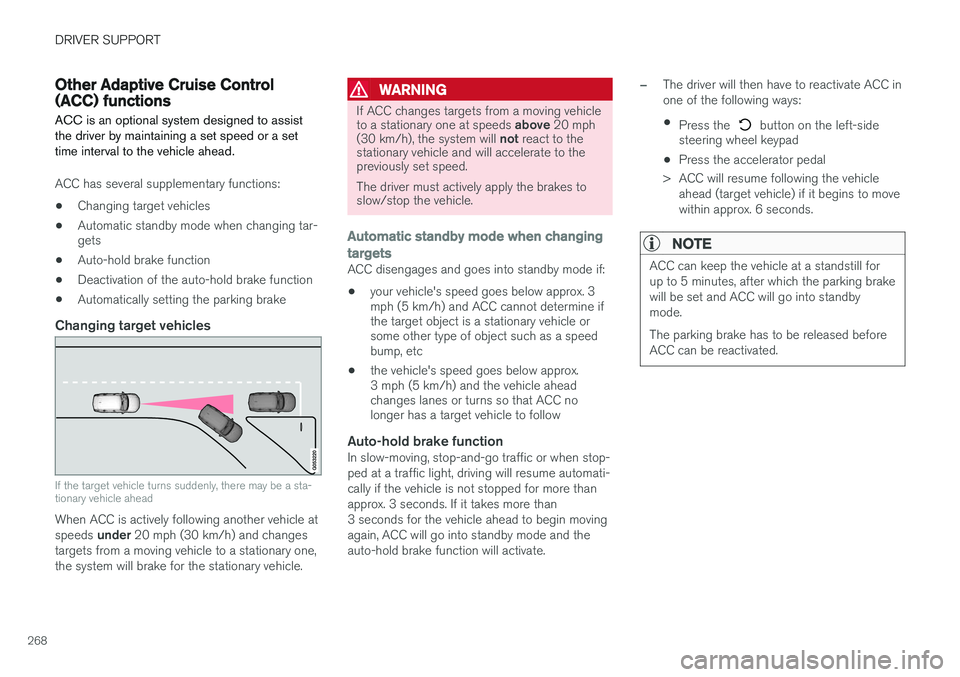
If the target vehicle turns suddenly, there may be a sta- tionary vehicle ahead
When ACC is actively following another vehicle at speeds
under 20 mph (30 km/h) and changes
targets from a moving vehicle to a stationary one, the system will brake for the stationary vehicle.
WARNING
If ACC changes targets from a moving vehicle to a stationary one at speeds above 20 mph
(30 km/h), the system will not react to the
stationary vehicle and will accelerate to the previously set speed. The driver must actively apply the brakes to slow/stop the vehicle.
Automatic standby mode when changing targets
ACC disengages and goes into standby mode if:
• your vehicle's speed goes below approx. 3 mph (5 km/h) and ACC cannot determine ifthe target object is a stationary vehicle orsome other type of object such as a speedbump, etc
• the vehicle's speed goes below approx.3 mph (5 km/h) and the vehicle aheadchanges lanes or turns so that ACC nolonger has a target vehicle to follow
Auto-hold brake functionIn slow-moving, stop-and-go traffic or when stop- ped at a traffic light, driving will resume automati-cally if the vehicle is not stopped for more thanapprox. 3 seconds. If it takes more than3 seconds for the vehicle ahead to begin movingagain, ACC will go into standby mode and theauto-hold brake function will activate.
–The driver will then have to reactivate ACC in one of the following ways:
• Press the
button on the left-side
steering wheel keypad
• Press the accelerator pedal
> ACC will resume following the vehicle ahead (target vehicle) if it begins to move
within approx. 6 seconds.
NOTE
ACC can keep the vehicle at a standstill for up to 5 minutes, after which the parking brakewill be set and ACC will go into standbymode. The parking brake has to be released before ACC can be reactivated.
Page 272 of 570

DRIVER SUPPORT
* Option/accessory, for more information, see Introduction.
270
Radar sensor - type approval
USA & Canada:
FCC ID: L2C0054TR IC: 3432A-0054TR FCC
ID: L2C0055TR IC: 3432A-0055TR This device complies with Part 15 of the FCC Rules and with Industry Canada license-exemptRSS standard(s). Operation is subject to the fol-lowing two conditions: (1) This device may not cause harmful interfer- ence, and (2) This device must accept any interference received, including interference that may causeundesired operation.
WARNING
Changes or modifications not expressively approved by the party responsible for compli-ance could void the user's authority to oper-ate the equipment. The term
Page 273 of 570

DRIVER SUPPORT
* Option/accessory, for more information, see Introduction.271
Adaptive Cruise Control (ACC) - fault tracing
ACC is an optional system designed to assist the driver by maintaining a set speed or a settime interval to the vehicle ahead.
If this symbol is displayed in the instru- ment panel and the message
Windscreen sensor Sensor
blocked, see Owner's manual
appears, the ACC radar sensor is blocked and cannot detect vehicles ahead.
This message also indicates that the following systems may have reduced functionality:
• Distance Alert
• City Safety
• Driver Alert Control
• Pilot Assist
• Lane Departure Warning (LDW)
• Lane Keeping Aid (LKA)
• Traffic Sign Information (TSI) The following table lists possible causes for thismessage being displayed and suitable actions:
CauseAction
The windshield in front of the radar is dirty or covered with snow/ice.Clean/clear the windshield in front of the radar.
Heavy rain or snow is interfering with the radar signals.No action possible. Heavy precipitation may affect the function of the radar.
Swirling water or snow from the surface of the road may interfere with the radar signals.No action possible. A very wet or snow-covered road surface may affect the function of the radar.
The windshield in front of the radar is clean but the message remains in the display.Wait a short time. It may take several minutes for the radar to detect that it is no longer obstructed.
A text message can be erased by briefly pressing the
O button on the right-side steering wheel
keypad. If the message recurs, contact a trained and authorized Volvo service technician orretailer.
Related information
• Adaptive Cruise Control (ACC)
* (p. 252)
Page 275 of 570

DRIVER SUPPORT
273
City Safety™
City Safety ™ is a support system designed to
help alert the driver to pedestrians, cyclists and vehicles that may appear suddenly in front ofyour vehicle. Visual and audible alerts are provi-ded. The vehicle will brake automatically if thedriver is unable to react quickly enough.
City Safety introduction
Location of the camera and radar sensor
City Safety can help prevent a collision or lower the vehicle's speed at the point of impact.
WARNING
• City Safety
™ is a supplemental aid to the
driver. It can never replace the driver
Page 276 of 570
DRIVER SUPPORT
274When triggered, City Safety carries out three steps in the following order: 1.
Collision warning
2. Brake assistance
3. Auto-brake
1: Collision warningThe driver is first alerted to the risk of an immi- nent collision. City Safety can detect pedestrians, cyclists or vehicles that are stationary or that are moving inthe same direction as your vehicle. The driver isalerted by a flashing red warning signal, an audi-ble signal and pulsations in the brake pedal.
2: Brake assistanceIf the risk of a collision increases, brake supportwill be activated. This function increases pressure on the brake pedal if the driver does not apply enough pres-sure to the pedal.
3: Auto-brakeThe brakes will be applied automatically. If the driver has not taken action at this stage and a collision is imminent, auto-braking will be trig-gered. Full braking effect will be used to avoidthe collision if possible or to make the speed atthe point of impact as low as possible. In certain situations, auto-braking may begin with limited effect before full braking is used. If City Safety has prevented a collision, the vehi-cle will be kept at a standstill until the drivertakes action. If the vehicle has slowed to avoidcolliding with the vehicle ahead, your speed willbe reduced to that vehicle's speed. When auto-break is triggered, the seat belt pre- tensioners may also be activated, see the article"Seat belts" for additional information. Auto-braking can be cancelled if the driver presses hard on the accelerator pedal. When City Safety applies the brakes, the brake lights will illuminate. When City Safety is triggered and applies the brakes, a text message will be displayed in theinstrument panel.
WARNING
Warnings will only be provided if there is an imminent risk of a collision taking place. Thedriver should be aware of the system's limita-tions before operating the vehicle. Warnings for pedestrians and cyclists will not be provided if the vehicle's speed is above50 mph (80 km/h). City Safety's auto-brake function can help prevent a collision or reduce the speed atwhich a collision occurs. However, the drivershould always apply the brakes, even if auto-brake is operating. The driver is always responsible for maintain- ing the correct speed and distance in relationto the vehicle ahead. Never wait for a collisionwarning or for City Safety to intervene. City Safety maintenance may only be carried out by a trained and qualified Volvo servicetechnician.
Related information
•
City Safety
™ troubleshooting (p. 280)
• City Safety in crossing traffic (p. 277)
• City Safety limitations (p. 278)
• City Safety symbols and messages (p. 282)
• Detecting cyclists and pedestrians with City Safety (p. 275)
• Rear Collision Warning (RCW) (p. 277)
• City Safety warning level settings (p. 275)
Page 277 of 570
DRIVER SUPPORT
275
City Safety warning level settingsCity Safety is always activated but the function's warning distance can be adjusted.
NOTE
City Safety cannot be turned off and activates automatically each time the engine is started.
Setting a warning level (distance)The distance set for warnings determines the system's responsiveness and sets the distance atwhich visual, audible and tangible (haptic) warn-ings will be triggered. If the driver feels that warnings are given too often, the warning level can be lowered. Thismeans that warnings will be provided later, result-ing in fewer warnings being given. To do so:1. Tap
Settings in the center display's Top
view.
2. Tap
My CarIntelliSafeCity Safety.
3. Choose among
Earlier, Normal or Later.
Begin by choosing
Earlier. If too many warnings
are given, change to Normal.
The setting
Later should only used in exceptional
circumstances, e.g., for a more dynamic driving style.
WARNING
• No automatic system can be guaranteed to function 100% correctly in all situa-tions. For that reason, never test CitySafety by driving toward a person orobject. This could result in serious injuryor death.
• Even if the setting
Earlier has been
selected, warnings may be perceived as being given late, e.g., if the difference inspeed is great or if the vehicle aheadbrakes suddenly.
• City Safety can provide a warning for apotential collision but it can never shortenthe driver's reaction time.
• To help make City Safety as effective as possible, always using the setting
Earlieris recommended.
Related information
•City Safety limitations (p. 278)
• City Safety
™ (p. 273)
• Rear Collision Warning (RCW) (p. 277)
Detecting cyclists and pedestrians with City Safety
City Safety can detect vehicles, cyclists and pedestrians.
VehiclesCity Safety detects most types of vehicles that are either stationary, moving in the same direc-tion as your vehicle or approaching when you areabout to turn left. In order for City Safety to detect a vehicle in darkness, its headlights and taillights must be onand clearly visible.
Cyclists
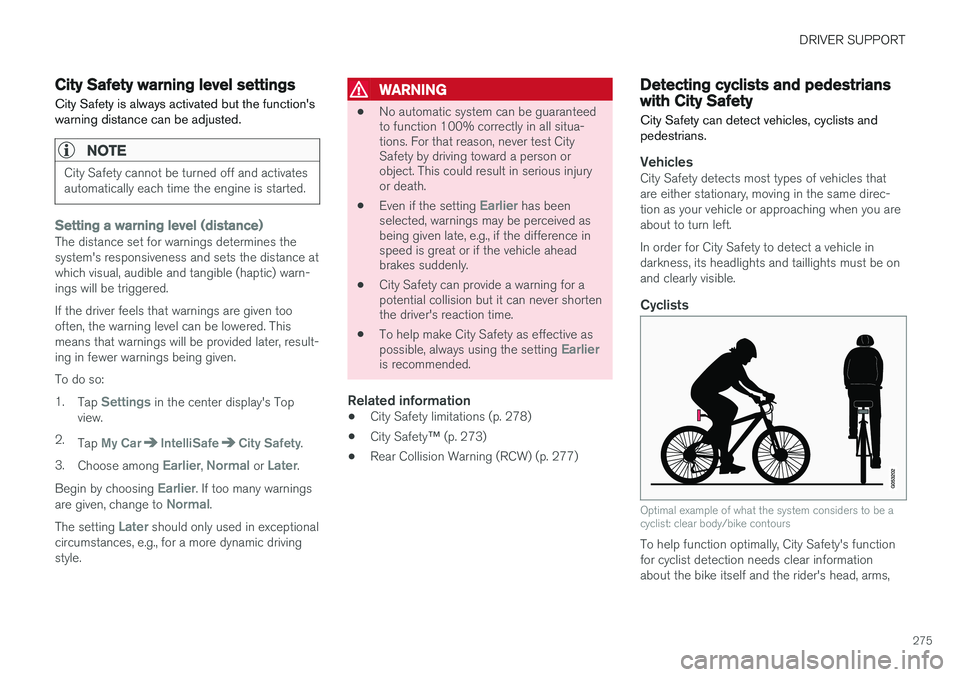
Optimal example of what the system considers to be a cyclist: clear body/bike contours
To help function optimally, City Safety's function for cyclist detection needs clear informationabout the bike itself and the rider's head, arms,
Page 278 of 570
DRIVER SUPPORT
276shoulders, legs, the upper and lower parts of the body and a cyclist's normal pattern of movement.
• If major parts of the cyclist's body are not visible to the camera, the system cannotdetect the cyclist.
• The cyclist must be an adult riding an "adult-size" bike.
WARNING
City Safety is designed to be a supplementary driving aid. It cannot detect:
• all cyclists in all situations, e.g., a partially obscured cyclist will not be detected.
• a cyclist whose clothing prevents a clearview of the person's body contours.
• a cyclist transporting a large object.
The driver is always responsible for operating the vehicle in a safe manner.
Pedestrians
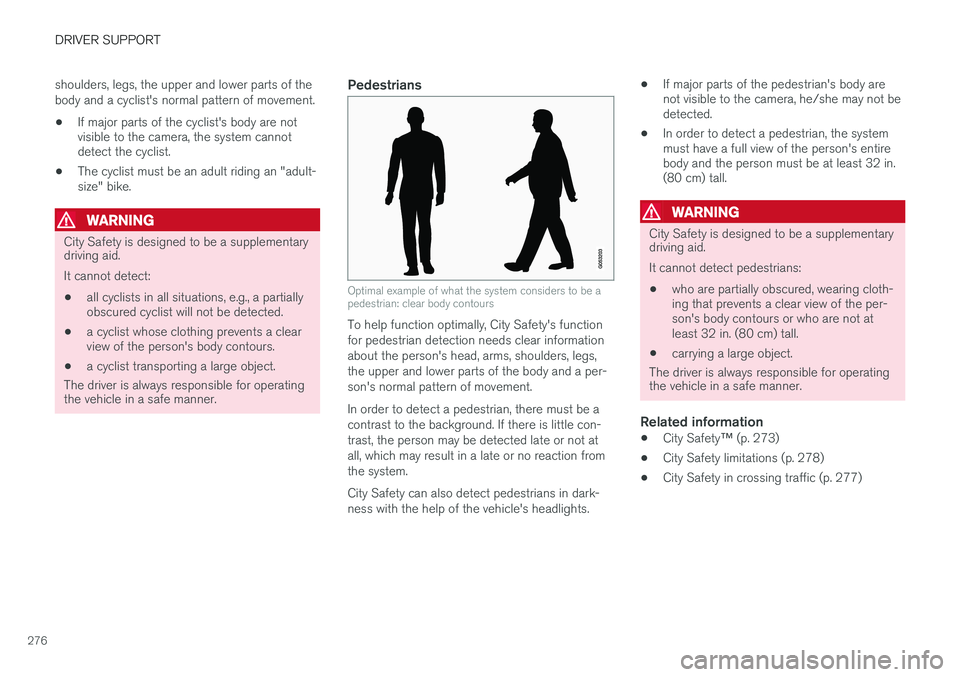
Optimal example of what the system considers to be a pedestrian: clear body contours
To help function optimally, City Safety's function for pedestrian detection needs clear informationabout the person's head, arms, shoulders, legs,the upper and lower parts of the body and a per-son's normal pattern of movement. In order to detect a pedestrian, there must be a contrast to the background. If there is little con-trast, the person may be detected late or not atall, which may result in a late or no reaction fromthe system. City Safety can also detect pedestrians in dark- ness with the help of the vehicle's headlights. •
If major parts of the pedestrian's body are not visible to the camera, he/she may not bedetected.
• In order to detect a pedestrian, the systemmust have a full view of the person's entirebody and the person must be at least 32 in.(80 cm) tall.
WARNING
City Safety is designed to be a supplementary driving aid. It cannot detect pedestrians:
• who are partially obscured, wearing cloth- ing that prevents a clear view of the per-son's body contours or who are not atleast 32 in. (80 cm) tall.
• carrying a large object.
The driver is always responsible for operating the vehicle in a safe manner.
Related information
• City Safety
™ (p. 273)
• City Safety limitations (p. 278)
• City Safety in crossing traffic (p. 277)
Page 279 of 570
DRIVER SUPPORT
277
City Safety in crossing traffic
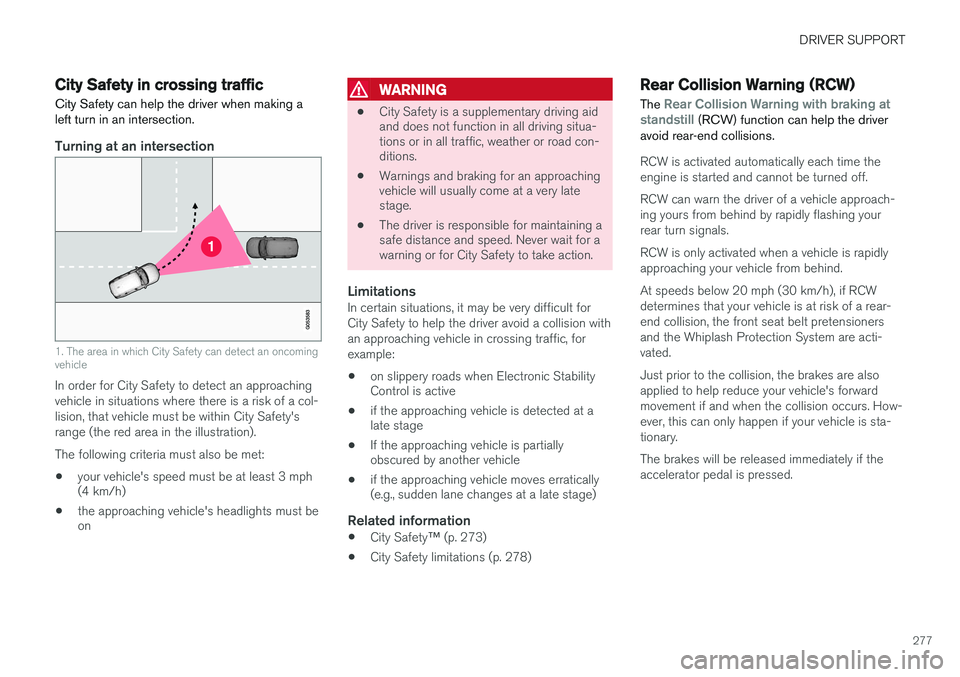
City Safety can help the driver when making a left turn in an intersection.
Turning at an intersection
1. The area in which City Safety can detect an oncoming vehicle
In order for City Safety to detect an approaching vehicle in situations where there is a risk of a col-lision, that vehicle must be within City Safety'srange (the red area in the illustration). The following criteria must also be met:
• your vehicle's speed must be at least 3 mph (4 km/h)
• the approaching vehicle's headlights must beon
WARNING
•
City Safety is a supplementary driving aid and does not function in all driving situa-tions or in all traffic, weather or road con-ditions.
• Warnings and braking for an approachingvehicle will usually come at a very latestage.
• The driver is responsible for maintaining asafe distance and speed. Never wait for awarning or for City Safety to take action.
LimitationsIn certain situations, it may be very difficult for City Safety to help the driver avoid a collision withan approaching vehicle in crossing traffic, forexample:
• on slippery roads when Electronic Stability Control is active
• if the approaching vehicle is detected at alate stage
• If the approaching vehicle is partiallyobscured by another vehicle
• if the approaching vehicle moves erratically(e.g., sudden lane changes at a late stage)
Related information
•
City Safety
™ (p. 273)
• City Safety limitations (p. 278)
Rear Collision Warning (RCW)
The
Rear Collision Warning with braking at
standstill (RCW) function can help the driver
avoid rear-end collisions.
RCW is activated automatically each time the engine is started and cannot be turned off. RCW can warn the driver of a vehicle approach- ing yours from behind by rapidly flashing yourrear turn signals. RCW is only activated when a vehicle is rapidly approaching your vehicle from behind. At speeds below 20 mph (30 km/h), if RCW determines that your vehicle is at risk of a rear-end collision, the front seat belt pretensionersand the Whiplash Protection System are acti-vated. Just prior to the collision, the brakes are also applied to help reduce your vehicle's forwardmovement if and when the collision occurs. How-ever, this can only happen if your vehicle is sta-tionary. The brakes will be released immediately if the accelerator pedal is pressed.