ABS VOLVO XC90 2015 User Guide
[x] Cancel search | Manufacturer: VOLVO, Model Year: 2015, Model line: XC90, Model: VOLVO XC90 2015Pages: 570, PDF Size: 12.44 MB
Page 335 of 570
STARTING AND DRIVING
333
When Auto-hold is off, Hill Start Assist (HSA) will be activated to help prevent the vehicle from roll-ing backwards when starting up a hill.
Instrument panel symbol
SymbolExplanation
The symbol in the instrument panel illuminates when this func-tion is using the normal brakes tokeep the vehicle stationary.
A
B
This symbol in the instrument panel illuminates when Auto-holdis using the parking brake to keepthe vehicle stationary
A
US models
B Canadian models
Related information
• Hill Start Assist (p. 335)
• Brake functions (p. 332)
Brake assist system
The Brake Assist System (BAS) increases brak- ing force, thereby helping reduce braking dis-tance. The system monitors the driver's braking habits and increases braking force when necessary.Brake force can be increased up to the point atwhich the ABS system is activated. The functionis deactivated when pressure on the brake pedaldecreases.
NOTE
•When BAS is activated, the brake pedal will go down farther than usual. Depressthe pedal as long as necessary.
• Braking will stop when the pedal isreleased.
Related information
•Brakes (p. 330)
Braking effect after a collision
In the event of a collision in which the airbags or seat belt pretensioners deploy or if a collisionwith an animal is detected, the vehicle's brakesare applied to help prevent or mitigate a secon-dary collision.
Maintaining control of the vehicle after a collision may be difficult. To help avoid or mitigate theeffect of a secondary collision, the brakes areapplied automatically to help bring the vehicle toa stop. The brake lights and hazard warning flashers will be activated and the flashers will remain on afterthe vehicle has come to a standstill. The parkingbrake will then be applied automatically. In a situation where stopping the vehicle may not be desirable, the driver can override this systemby pressing the accelerator pedal. This feature can only function if the brake system is intact after the collision.
Related information
• Brake functions (p. 332)
• Airbag system (p. 83)
• Rear Collision Warning (RCW) (p. 277)
Page 336 of 570
STARTING AND DRIVING
* Option/accessory, for more information, see Introduction.
334
Emergency brake lights
The emergency brake lights activate in the event of hard braking/rapid deceleration at most nor-mal driving speeds or if the ABS system is acti-vated. This function causes an additional taillighton each side of the vehicle to illuminate to helpalert vehicles traveling behind.
Once the emergency brake lights have been acti- vated, if the driver releases the brake pedal, thebrake lights will return to their normal function.
Related information
• Brakes (p. 330)
• Hazard warning flashers (p. 144)
• Brake lights (p. 143)
Hill Descent Control (HDC) HDC is a type of low-speed automatic engine brake and makes it possible to increase ordecrease the vehicle's speed on steep downhillgradients using only the accelerator pedal, with-out applying the brakes. HDC is integrated into the
Off Road drive mode.
HDC is particularly useful when driving down steep hills with rough surfaces, and where theroad may have slippery patches.
WARNING
HDC does not function in all situations, and is a supplementary braking aid. The driver hasfull responsibility for driving in a safe manner.
FunctionHDC allows the vehicle to roll forward or in reverse at very low speed with enhanced enginebraking. However, speed can be adjusted withthe accelerator pedal. When the acceleratorpedal is released, the vehicle will return to verylow speed. The driver can use the brakes to slow or stop the vehicle at any time. HDC is activated along with Low Speed Control (LSC), which together make driving on slipperysurfaces at low speeds easier. When HDC and LSC are activated, this changes the response from the accelerator pedal andengine.
Activating HDCHDC only functions at low speeds.
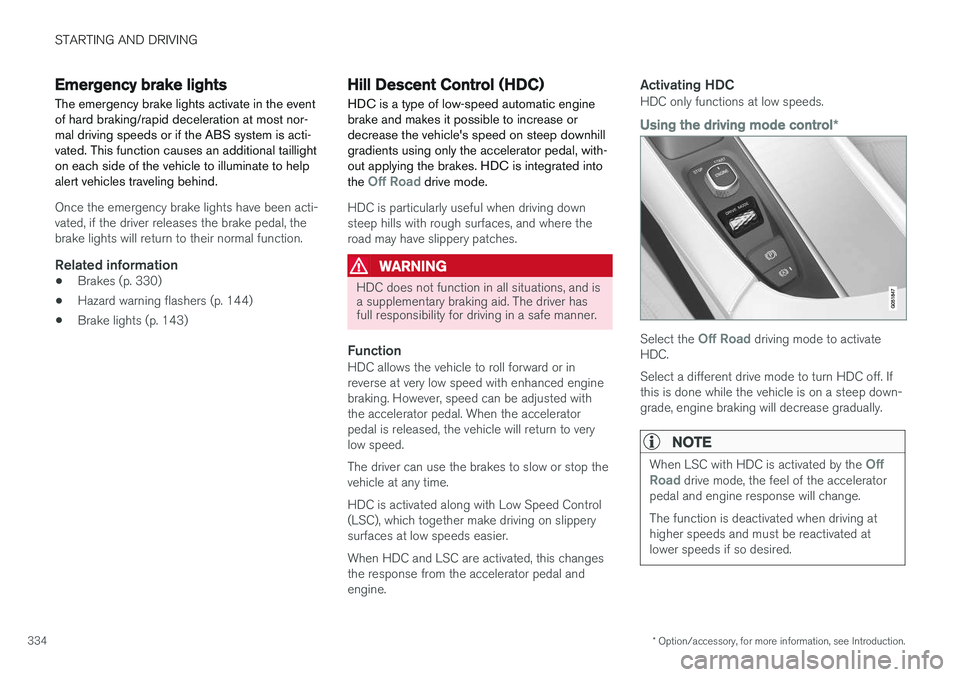
Using the driving mode control
*
Select the Off Road driving mode to activate
HDC. Select a different drive mode to turn HDC off. If this is done while the vehicle is on a steep down-grade, engine braking will decrease gradually.
NOTE
When LSC with HDC is activated by the Off
Road drive mode, the feel of the accelerator
pedal and engine response will change. The function is deactivated when driving at higher speeds and must be reactivated atlower speeds if so desired.
Page 343 of 570

STARTING AND DRIVING
341
CAUTION
•Engine damage will occur if water is drawn into the air cleaner.
• Damage to any components, the engine,transmission, turbo-charger, differential orits internal components caused by flood-ing, vapor lock or insufficient oil is notcovered under warranty.
• Do not allow the vehicle to stand in waterup to the door sills longer than absolutelynecessary. This could result in electricalmalfunctions.
• If the engine has been stopped while thevehicle is in water, do not attempt torestart it. Have the vehicle towed out ofthe water.
WARNING
•Avoid driving through standing or rushing water. Doing so can be dangerous and itmay also be difficult to determine theactual depth of the water.
• If water cannot be avoided, after drivingthrough the water, press lightly on thebrake pedal to ensure that the brakes arefunctioning normally. Water or mud canmake the brake linings slippery, resultingin delayed braking effect.
Related information
•Towing recommendations (p. 344)
Overheating the engine and transmission
In demanding driving conditions, such as when transporting heavy loads, driving in mountainousareas or in very hot weather there is a risk ofoverheating the engine or transmission.
• The engine's output may be slightly limited if there is a risk of overheating.
• Remove e.g., auxiliary lights mounted in frontof the grille in hot weather.
• If the temperature of the engine coolantbecomes too high, the warning symbol will illuminate and the message
Engine
temperature/Stop safely will be displayed.
Stop the vehicle as soon as possible in a safe place and let the engine idle for severalminutes.
• If the message
Engine temperature/High
temperature Turn off engine or Engine
coolant/Stop safely is displayed, stop
safely and turn off the engine.
• If the transmission begins to overheat, an alternative gear shifting program will beselected. An integrated protective functionwill also by activated, the warning symbol will illuminate and the message
Transmission
warmHigh temperature Reduce speed
or Transmission warmStop safely, wait
for cooling will be displayed in the instru-
ment panel.
Page 353 of 570
STARTING AND DRIVING
351
WARNING
•Do not connect the jumper cable to any part of the fuel system or to any movingparts. Avoid touching hot manifolds.
• Batteries generate hydrogen gas, whichis flammable and explosive.
• Battery fluid contains sulfuric acid. Do notallow battery fluid to contact eyes, skin,fabrics or painted surfaces. If contactoccurs, flush the affected area immedi-ately with water. Obtain medical helpimmediately if eyes are affected.
• Never expose the battery to open flameor electric spark.
• Do not smoke near the battery.
• Failure to follow the instructions for jumpstarting can lead to injury.
Related information
• Ignition modes (p. 355)
• Starting the engine (p. 356)
• Turning the engine off (p. 359)
Driving with a trailer
When towing a trailer, always observe the legal requirements of the state/province.
• All Volvo models are equipped with energy- absorbing shock-mounted bumpers. Trailerhitch installation should not interfere with theproper operation of this bumper system.
Trailer towing does not normally present any par- ticular problems, but take into consideration:
• Increase tire pressure to recommended full pressure.
• When your vehicle is new, avoid towing heavytrailers during the first 620 miles (1,000 km).
• Maximum speed when towing a trailer:50 mph (80 km/h).
• Engine and transmission are subject toincreased loads. Therefore, engine coolanttemperature should be closely watched whendriving in hot climates or hilly terrain. Use alower gear and turn off the air conditioner ifthe temperature gauge needle enters the redrange.
• If the automatic transmission begins to over-heat, a message will be displayed in the textwindow.
• Avoid overload and other abusive operation.
• Hauling a trailer affects handling, durability,and economy.
• It is necessary to balance trailer brakes withthe towing vehicle brakes to provide a safe stop (check and observe state/local regula-tions).
• Do not connect the trailer's brake systemdirectly to the vehicle's brake system.
• More frequent vehicle maintenance isrequired.
• Remove the ball holder when the hitch is notbeing used.
NOTE
• When parking the vehicle with a trailer on a hill, apply the parking brake before put- ting the gear selector in
P. Always follow
the trailer manufacturer's recommenda- tions for wheel chocking.
• When starting on a hill, put the gear selector in
D before releasing the parking
brake.
• If you use the manual (Geartronic) shift positions while towing a trailer, make surethe gear you select does not put toomuch strain on the engine (using toohigh a gear).
• The drawbar assembly/trailer hitch maybe rated for trailers heavier than the vehi-cle is designed to tow. Please adhere toVolvo's recommended trailer weights.
• Avoid driving with a trailer on inclines ofmore than 15%.
Page 361 of 570
STARTING AND DRIVING
* Option/accessory, for more information, see Introduction.359
Turning the engine off
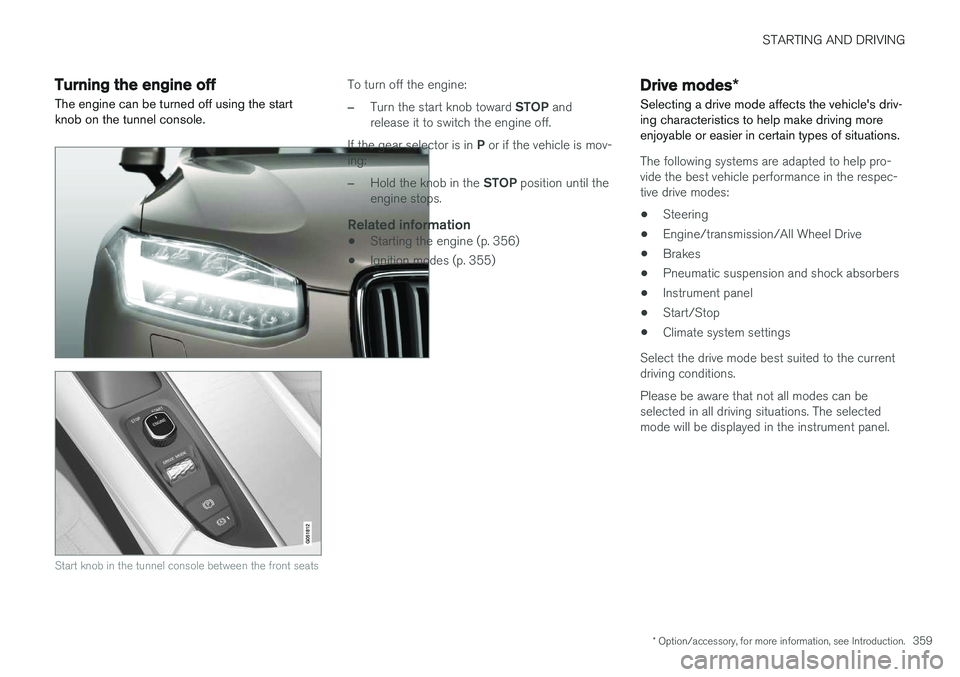
The engine can be turned off using the start knob on the tunnel console.
Start knob in the tunnel console between the front seats
To turn off the engine:
–Turn the start knob toward STOP and
release it to switch the engine off.
If the gear selector is in P or if the vehicle is mov-
ing:
–Hold the knob in the STOP position until the
engine stops.
Related information
• Starting the engine (p. 356)
• Ignition modes (p. 355)
Drive modes
*
Selecting a drive mode affects the vehicle's driv- ing characteristics to help make driving moreenjoyable or easier in certain types of situations.
The following systems are adapted to help pro- vide the best vehicle performance in the respec-tive drive modes: • Steering
• Engine/transmission/All Wheel Drive
• Brakes
• Pneumatic suspension and shock absorbers
• Instrument panel
• Start/Stop
• Climate system settings
Select the drive mode best suited to the current driving conditions. Please be aware that not all modes can be selected in all driving situations. The selectedmode will be displayed in the instrument panel.
Page 363 of 570
STARTING AND DRIVING
* Option/accessory, for more information, see Introduction.361
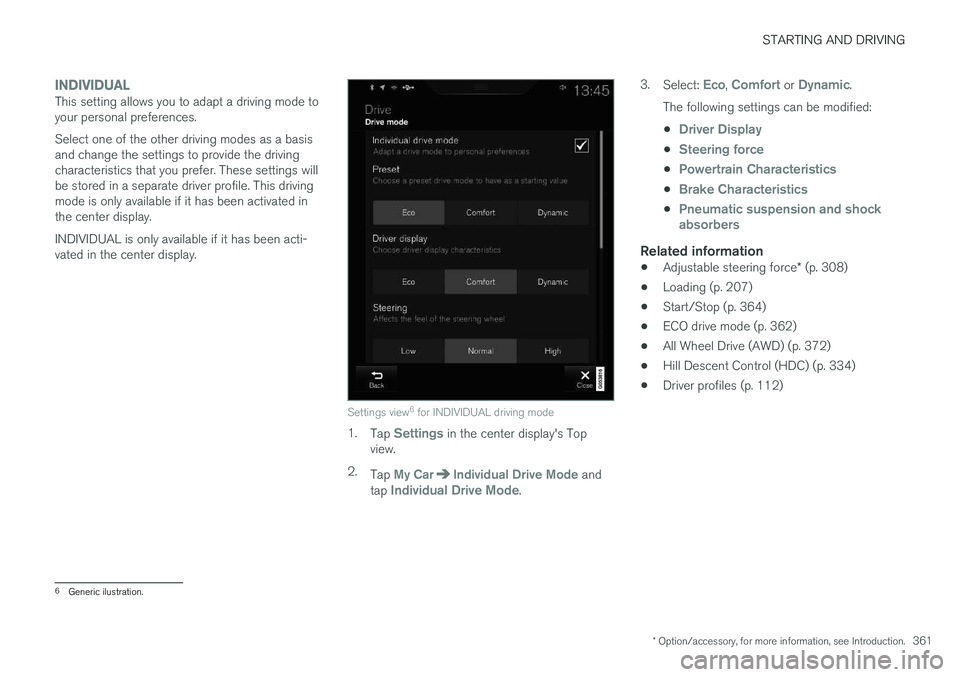
INDIVIDUALThis setting allows you to adapt a driving mode to your personal preferences. Select one of the other driving modes as a basis and change the settings to provide the drivingcharacteristics that you prefer. These settings willbe stored in a separate driver profile. This drivingmode is only available if it has been activated inthe center display. INDIVIDUAL is only available if it has been acti- vated in the center display.
Settings view6
for INDIVIDUAL driving mode
1. Tap Settings in the center display's Top
view.
2. Tap
My CarIndividual Drive Mode and
tap Individual Drive Mode. 3.
Select:
Eco, Comfort or Dynamic.
The following settings can be modified: •
Driver Display
•Steering force
•Powertrain Characteristics
•Brake Characteristics
•Pneumatic suspension and shock absorbers
Related information
• Adjustable steering force
* (p. 308)
• Loading (p. 207)
• Start/Stop (p. 364)
• ECO drive mode (p. 362)
• All Wheel Drive (AWD) (p. 372)
• Hill Descent Control (HDC) (p. 334)
• Driver profiles (p. 112)
6
Generic ilustration.
Page 368 of 570
STARTING AND DRIVING
366•
the road's incline is very steep.
• the hood is opened.
• the transmission has not reached its normal operating temperature.
• driving at high altitude and the engine hasnot reached its normal operating tempera-ture.
• the gear selector is in the manual shiftingposition.
• the ABS brakes have activated.
• hard braking (even if the ABS brakes havenot activated).
• many starts during a short time period havetriggered the starter motor's overheating pro-tection.
• a trailer's electrical system is connected tothe vehicle's electrical system.
The engine does not auto-startIn certain situations or conditions, the engine may not auto-start
after an auto-stop, such as:
• if the driver is not wearing a seat belt
• the gear selector is in the
P position and the
driver's door is open. The engine must be started normally.
The engine auto-starts while the brake
pedal is depressed
In the following situations, the engine will auto-
start even though the brake pedal is depressed: •
condensation forms on the inside of the win-dows.
• the climate system cannot keep the desiredsettings in the passenger compartment.
• electrical current consumption is temporarilyhigh or the main battery's charge is belowthe minimum level.
• the brake pedal is pumped repeatedly.
• the hood is opened.
• the vehicle begins to move or increasesspeed slightly (if the engine auto-stoppedbefore the vehicle was at a standstill).
• the driver's seat belt is unbuckled while the gear selector is in the
D or N positions.
• the gear selector is moved from
D to R or ±.
• the driver's door is opened with the gearselector in
D: an audible signal and a text
message will inform the driver that the igni- tion is on.
WARNING
Do not open the hood if the engine has auto- stopped. The engine could suddenly auto-start. Before opening the hood:
• Switch off the ignition by turning the start knob in the tunnel console toward
STOP.
• Be aware that if the engine has been run- ning, components in the engine compart-ment will be very hot.
Related information
• Using the Start/Stop function (p. 364)
Page 374 of 570
STARTING AND DRIVING
* Option/accessory, for more information, see Introduction.
372
All Wheel Drive (AWD) 11
Your Volvo can be equipped with All Wheel Drive, which means that power is distributedautomatically between the front and rear wheels.
Under normal driving conditions, most of the engine's power is directed to the front wheels.However, if there is any tendency for the frontwheels to spin, an electronically controlled cou-pling distributes power to the wheels that havethe best traction. AWD reacts differently, depending on the drive mode * selected.
Related information
• Drive modes
* (p. 359)
• Low Speed Control (LSC) (p. 371)
Suspension and leveling control
*
The leveling control system adjusts the suspen- sion and shock absorbers automatically to helpprovide good comfort and control while driving.Leveling can also be controlled manually tomake loading or getting in and out of the vehicleeasier.
Pneumatic suspension and shock absorbers
This system is linked to the selected drive mode and is adapted to the vehicle's speed. The pneu-matic suspension reduces the vehicle's groundclearance at higher speeds to reduce wind resis-tance and increase stability. The shock absorbersare normally set to provide the best possiblecomfort and are adjusted continuously accordingto the road surface, acceleration, braking andcornering. A message will be displayed in the instrument panel when the suspension level is beingadjusted. The level cannot be adjusted if one of the side doors or the hood is open.
Suspension leveling settings
Easy entryThe vehicle can be lowered to entering and exit- ing easier. Select
SettingsVehicleEasy Entry/Exit
Control via the center display's Top view to lower
the vehicle when getting in or out. When the vehicle is parked and the engine is turned off, the level is lowered (if a side door isopened, the level adjustment will stop). When theengine is started and the vehicle begins to move,the level will be raised to the height set by theselected drive mode.
Turning off suspension and leveling
control
In certain situations, this function has to be turned off, for example when lifting the vehicle ona jack or garage hoist. 1. Tap
Settings in the center display's Top
view.
2. Tap
My CarSuspension .
3. Select
Disable Suspension & Leveling
Control.
Changing suspension controlThree different levels of suspension control can be selected from the center display: 1. Tap
Settings in the center display's Top
view.
2. Tap
My CarDrive Mode.
3. Under
Suspension Control, selectComfort, Normal or Dynamic.
11
Standard equipment on certain models.
Page 493 of 570
MAINTENANCE AND SERVICING
491
Remote updates With the vehicle connected to the Internet, updates for a number of the vehicle's systemscan be downloaded from the center display.
The Remote updates app is
started from the center dis- play's App view and makes itpossible to:
• search for and update system software
• update the Sensus Navigation maps
• download, update and uninstall apps
Related information
•Downloading, updating and uninstalling apps (p. 404)
• System updates (p. 490)
• Map updates with MapCare (p. 456)
Vehicle status
The vehicle's general status can be displayed in the center display along with the possibility to book service 1
The Car status app is started
in the center display's App view and has three tabs:
•Messages: stored messages
•
Status: tire pressure and engine oil level
•
Appointments: booking service or repairs 1
Related information
•
Using the center display (p. 46)
• Booking service and repairs (p. 491)
• Checking inflation pressure (p. 482)
• Checking and refilling engine oil (p. 521)
Booking service and repairs Connected Service Booking (CSB) makes it possible to use the vehicle's Internet connectionto set up a time for service, maintenance and/orrepairs.
The information is handled through the Car
status app, which can be opened from the cen-
ter display's App view. Information about your vehicle is sent to your retailer, who will contact you to make a workshopappointment. The system will also send areminder as the appointment approaches and theSensus Navigation system will provide directionsto the workshop if necessary. This feature makes it convenient to book a work- shop appointment directly from your vehicle.Vehicle-related information is sent to yourretailer, who prepares your visit to the workshop.The retailer will send you an email with a link tothe Volvo On-Line Service Scheduler where youcan book a workshop appointment at a conven-ient time. Information about your retailer is alsoavailable in the vehicle so that you can contactthe retailer/workshop at any time.
1 Certain markets only.
Page 497 of 570
MAINTENANCE AND SERVICING
495
Climate system serviceService and repairs on the air conditioning sys- tem should only be done by a trained and quali-fied Volvo service technician.
Troubleshooting and repairsThe air conditioning system contains a floures- cent tracer substance. Ultraviolet light is used tosearch for leaks in the system.
Refrigerant R134a
WARNING
The air conditioning system contains the refrigerant R134a under pressure. Serviceand repairs on the system should only bedone by a trained and qualified Volvo servicetechnician.
Related information
• Climate control system (p. 176)
Start battery
The start (main) battery is used to power the starter motor and other electrical componentsand systems. The start battery should only be replaced by a trained and qualified Volvo service technician.
The vehicle has an alternating current generator. The start battery is called an Absorbed Glass Mat (AGM) 12-volt battery that is dimensioned foruse in vehicles with carbon dioxide-reducingfunctions such as Start/Stop and regenerativecharging, and to support the vehicle's variouselectrical systems and functions. The service life of a battery is affected by factors such as driving conditions/style, the number ofstarts, climate, etc. Extreme cold may also furtherdecrease the battery