ABS VOLVO XC90 2015 Owners Manual
[x] Cancel search | Manufacturer: VOLVO, Model Year: 2015, Model line: XC90, Model: VOLVO XC90 2015Pages: 570, PDF Size: 12.44 MB
Page 27 of 570

INTRODUCTION
25
Related information
•Volvo Structural Parts Statement (p. 25)
Volvo Structural Parts Statement
Volvo has always been and continues to be a leader in automotive safety.
Volvo engineers and manufactures vehicles designed to help protect vehicle occupants in theevent of a collision. Volvos are designed to absorb the impact of a collision. This energy absorption system including,but not limited to, structural components such asbumper reinforcement bars, bumper energyabsorbers, frames, rails, fender aprons, A-pillars,B-pillars and body panels must work together tomaintain cabin integrity and protect the vehicleoccupants. The supplemental restraint system including but not limited to air bags, side curtain air bags, anddeployment sensors work together with theabove components to provide proper timing forair bag deployment. Due to the above, Volvo Cars of North America does not support the use of aftermarket, alterna-tive or anything other than original Volvo parts forcollision repair. In addition Volvo does not support the use or re- use of structural components from an existingvehicle that has been previously damaged.Although these parts may appear equivalent, it isdifficult to tell if the parts have been previouslyreplaced with non-OE parts or if the part hasbeen damaged as a result of a prior collision. The quality of these used parts may also have beenaffected due to environmental exposure.
Related information
•
Crash event data (p. 26)
• Contacting Volvo (p. 14)
Page 48 of 570
INTRODUCTION
46
Using the center display
Many of the vehicle's functions can be con- trolled and settings can be made from thescreen in the center console, referred to in thisowner's information as the center display, whichis a touchscreen.Using the center display's touchscreen functionality
Two people can interact with the screen at the same time, e.g., to adjust the temperature for thedriver and passenger sides. The screen reacts differently depending on whether the user taps, drags or swipes on thescreen. This makes it possible to move betweenviews, mark objects, scroll in lists and move appsby touching the screen in various ways. The fol-lowing table lists the gestures that can be usedon the screen: An infrared film on the screen enables it to react if a finger is directly in front of the screen (butnot actually touching it). This makes it possible touse the screen while wearing gloves.
CAUTION
Do not touch the screen with sharp objects because this could cause scratches.
ProcedureGestureResult
Tap once.Marks an object, confirms a selection or activates a function.
Double-tap.Zooms in on an object such as a map.
Press and hold."Grabs" an object so that it can be dragged. Press and hold on the screen and drag the object to the desired position.
Page 58 of 570
SAFETY
56
General safety information The vehicle is equipped with a number of safety systems for the driver and passengers.
Warning symbol in the instrument panelThe warning symbol in the instrument panel illuminates when the ignition is in mode II or higher. It will go out after
approx. 6 seconds if no faults are
detected in the airbag system.
WARNING
• If the SRS warning light stays on after the engine has started or if it illuminateswhile you are driving, have the vehicleinspected by a trained and qualified Volvoservice technician as soon as possible.
• Never try to repair any component or partof the SRS yourself. Any interference inthe system could cause malfunction andserious injury. All work on these systemsshould be performed by a trained andqualified Volvo service technician.
Related information
• Safety during pregnancy (p. 62)
• Seat belts (p. 58)
• Safety systems (p. 83)
• Airbag system (p. 83)
Occupant safety Safety is Volvo's cornerstone.
Volvo's concern for safetyOur concern for safety dates back to 1927 when the first Volvo rolled off the production line.Three-point seat belts (a Volvo invention), safetycages, and energy-absorbing impact zones weredesigned into Volvo vehicles long before it wasfashionable or required by government regulation. We will not compromise our commitment to safety. We continue to seek out new safety fea-tures and to refine those already in our vehicles.You can help. We would appreciate hearing yoursuggestions about improving automobile safety.We also want to know if you ever have a safetyconcern with your vehicle. Call us in the U.S. at:1-800-458-1552 or in Canada at:1-800-663-8255.
Occupant safety remindersHow safely you drive doesn't depend on how old you are but rather on:
• How well you see.
• Your ability to concentrate.
• How quickly you make decisions under stress to avoid an accident.
The following suggestions are intended to help you cope with the ever changing traffic environ-ment. •
Never drink and drive.
• If you are taking any medication, consult your physician about its potential effects on yourdriving abilities.
• Take a driver-retraining course.
• Have your eyes checked regularly.
• Keep your windshield and headlights clean.
• Replace wiper blades when they start toleave streaks.
• Take into account the traffic, road, andweather conditions, particularly with regard tostopping distance.
• Never send text messages while driving.
• Refrain from using or minimize the use of acell phone while driving.
Related information
• Recall information (p. 58)
• Reporting safety defects (p. 57)
Page 84 of 570
SAFETY
82
WARNING
•Never attempt to repair the vehicle your- self or to reset the electrical system after the vehicle has displayed
Safety mode.
This could result in injury or improper sys- tem function.
• Restoring the vehicle to normal operatingstatus should only be done by a trainedand qualified Volvo service technician.
• After
Safety mode has been displayed, if
you detect the odor of fuel vapor, or see any signs of fuel leakage, do not attemptto start the vehicle. Leave the vehicleimmediately.
Related information
• Starting or moving a vehicle in safety mode(p. 82)
• General safety information (p. 56)
Starting or moving a vehicle in safety mode
If
Safety mode has been set and damage to
the vehicle is minor and there is no fuel leakage, you may attempt to start the engine and movethe vehicle.
Starting the engine1. Turn the start knob to STOP and release it.
2. The vehicle's electrical system will attempt to reset to normal mode.
WARNING
If the message Safety mode is still dis-
played, the vehicle should not be driven and must be towed. Concealed faults may makethe vehicle difficult to control.
3. Try to start the vehicle.
Moving the vehicle
If the message Normal mode is displayed, the
vehicle may be moved carefully from its present position if, for example, it is blocking traffic. It should, however, not be moved farther than is absolutely necessary.
WARNING
Even if the vehicle appears to be drivable afterSafety mode has been set, it should not be
driven or towed (pulled on the ground by another vehicle ). There may be concealeddamage that could make it difficult or impos-sible to control. The vehicle should be transported on a flat- bed tow truck to a trained and qualified Volvoservice technician for inspection/repairs.
Related information
• Safety mode (p. 81)
Page 128 of 570

INSTRUMENTS AND CONTROLS
126
Indicator symbols in the instrument panelThe indicator symbols alert the driver when cer- tain functions are activated, that a system isactively working or that a fault may have occur-red in a system or function.
SymbolExplanation
Information, see the text mes- sage in the instrument panel The information symbol illuminates in combination with a text mes-sage if one of the vehicle's sys-tems requires the driver's atten-tion. The information symbol canalso illuminate in combination withother symbols.
A
B
Brake system
SymbolExplanation
A
B
ABS brake system This symbol indicates a possible fault in the ABS braking function.The vehicle's normal brakes willstill function but without ABSbrake modulation.
A
B
Parking brake/Auto-brake This function keeps the vehicle at a standstill after it has stopped.The symbol is on when the func-tion is activated and the brakes orparking brake are being used.
Tire pressure system The symbol illuminates to indicate low tire pressure or a fault in thetire pressure system.
Malfunction indicator light (check engine light) This symbol will illuminate if there is a fault in the emissions controlsystem. If this happens, pleasehave your vehicle checked by atrained and qualified Volvo servicetechnician as soon as possible.
SymbolExplanation
Left/right turn signals Both turn signal indicators will flash when the hazard warningflashers are being used.
Forward lights
Active Bending Lights (ABL) This symbol will illuminate if there is a fault in the ABL system.
Automatic/active high beams on The symbol will be blue when the automatic high beams are on.
Automatic/active high beams off The symbol will be white when
the automatic high beams are off.
High beam indicator The symbol will illuminate when the high beams are on or whenhigh beam flash is being used.
Page 138 of 570
INSTRUMENTS AND CONTROLS
136
WARNING
•If the fluid level is below the
MIN mark in
the brake fluid reservoir or if a warning message is displayed in the text window: DO NOT DRIVE . Have the vehicle towed
to a trained and qualified Volvo service technician and have the brake systeminspected.
• If the
BRAKE and ABS symbols illumi-
nate at the same time, there is a risk ofreduced vehicle stability.
Related information
• Instrument panel (p. 128)
• Indicator symbols in the instrument panel(p. 126)
Compass
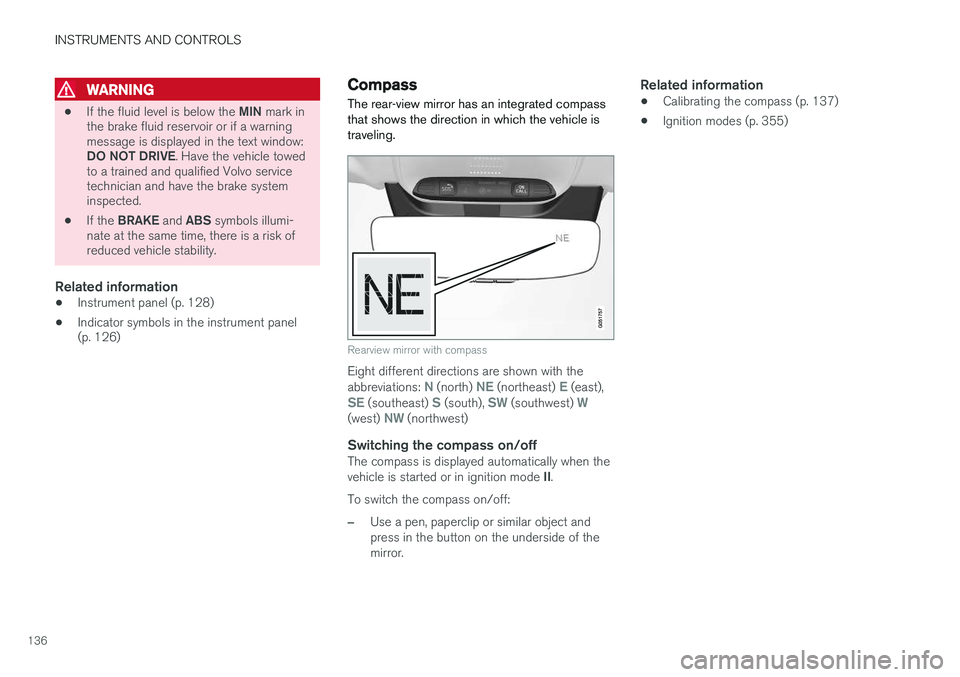
The rear-view mirror has an integrated compass that shows the direction in which the vehicle istraveling.
Rearview mirror with compass
Eight different directions are shown with the abbreviations: N (north) NE (northeast) E (east),SE (southeast) S (south), SW (southwest) W(west) NW (northwest)
Switching the compass on/offThe compass is displayed automatically when the vehicle is started or in ignition mode II.
To switch the compass on/off:
–Use a pen, paperclip or similar object and press in the button on the underside of themirror.
Related information
• Calibrating the compass (p. 137)
• Ignition modes (p. 355)
Page 183 of 570
CLIMATE
* Option/accessory, for more information, see Introduction.181
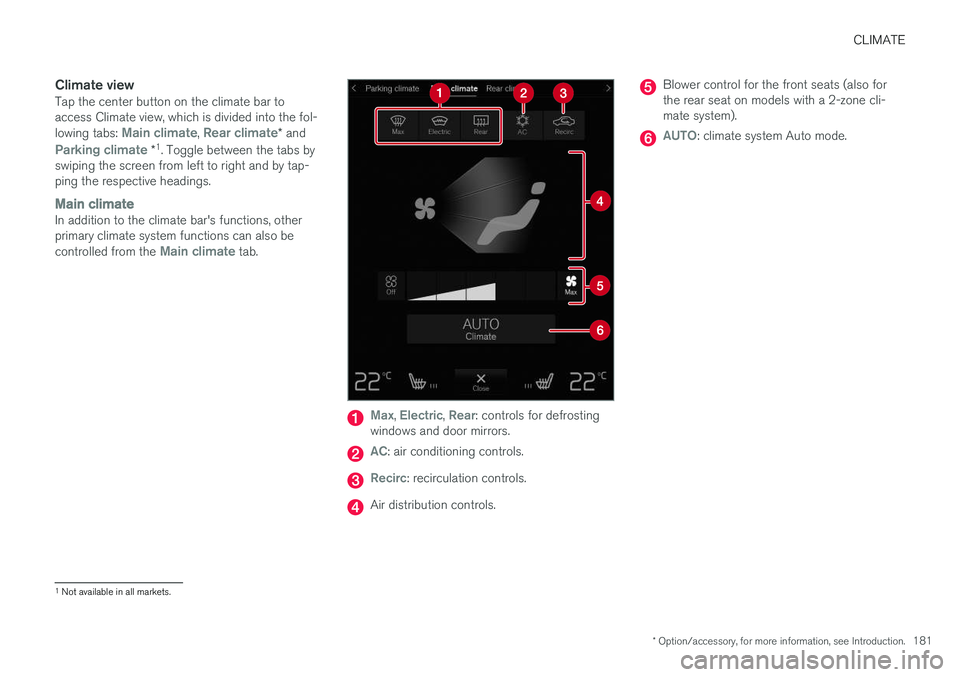
Climate viewTap the center button on the climate bar to access Climate view, which is divided into the fol- lowing tabs:
Main climate, Rear climate* and
Parking climate *1
. Toggle between the tabs by
swiping the screen from left to right and by tap- ping the respective headings.
Main climateIn addition to the climate bar's functions, other primary climate system functions can also be controlled from the
Main climate tab.
Max, Electric, Rear: controls for defrosting
windows and door mirrors.
AC: air conditioning controls.
Recirc: recirculation controls.
Air distribution controls.
Blower control for the front seats (also for the rear seat on models with a 2-zone cli-mate system).
AUTO: climate system Auto mode.
1 Not available in all markets.
Page 280 of 570
DRIVER SUPPORT
278
NOTE
•Due to local traffic regulations in certain markets, RCW will
not activate the rear
turn signals. That part of the function will be deactivated.
• The use of the rear turn signals will alsobe deactivated if the City Safety warning level is set at
Later. See also the section
"Setting a warning level (distance)" in the article "City Safety settings."
• If RCW detects a vehicle approachingfrom behind, the seat belt pretensionersand Whiplash Protection System will beactivated.
LimitationsIn some circumstances, it may be difficult for RCW to help the driver if there is a risk of a colli-sion, such as: •
In slippery conditions when Electronic Stability Control is active
• If the vehicle approaching from the rear isdetected at a late stage
• If the vehicle approaching from the rearchanges lanes at a late stage
• If the vehicle approaching from the rear ismoving at a speed above approx. 50 mph(80 km/h) detected at a late stage
Related information
•
City Safety
™ (p. 273)
• Whiplash protection system (p. 89)
• Seat belts (p. 58)
• City Safety warning level settings (p. 275)
City Safety limitations
City Safety ™ may have limited or reduced func-
tionality in certain situations.
The function has several limitations that the driver should be familiar with:
Low objectsHanging objects, such as flags for overhanging loads or accessories such as auxiliary lights orfront protective grids that extend beyond theheight of the hood may limit City Safety's func-tion.
Slippery driving conditionsThe extended braking distance on slippery roads may reduce City Safety's capacity to help avoid acollision. In situations of this type, the ABSbrakes and Electronic Stability Control will helpprovide braking power and stability.
BacklightingStrong sunlight, reflections, extreme light con- trasts, the use of sunglasses, or if the driver is notlooking straight ahead may make the visual warn-ing signal in the windshield difficult to see.
Page 332 of 570

STARTING AND DRIVING
* Option/accessory, for more information, see Introduction.
330
Starting and driving The vehicle is equipped with features that sup- plement its basic functions, such as shifting gears with steering wheel paddles * and the fuel-
conserving start/stop function.
The vehicle is equipped with an automatic trans- mission that also makes it possible to shift gearsmanually. Certain functions can also be used when the engine is not running, depending on the ignitionmode being used.
Related information
• Starting the engine (p. 356)
• Ignition modes (p. 355)
• Automatic transmission (p. 367)
• Opening/closing the fuel filler door (p. 348)
• Start/Stop (p. 364)
• Parking brake (p. 335)
Brakes The brake system is a hydraulic system consist- ing of two separate brake circuits. If a problemshould occur in one of these circuits, it is stillpossible to stop the vehicle with the other brakecircuit.
Brake systemIf one of the brake circuits is not functioning, more pressure will be needed on the brake pedal(and the pedal will go down farther) for normalbraking effect. If the brake pedal must be depressed farther than normal and requires greater foot pressure,the stopping distance will be longer. Pressure on the brake pedal is enhanced by the power braking function. The power brakes only function when the engine is running. If the power brakes are not working, considerably higher pressure will be required on the brakepedal to compensate for the lack of power assis-tance. This can happen for example when towingyour vehicle or if the engine is switched off whenthe vehicle is rolling. The brake pedal feels stifferthan usual. When the Hill Start Assist function is being used, it will take slightly longer for the brake pedal toreturn to its normal position if the vehicle isparked on an incline or uneven surface. When driving in very hilly areas or if the vehicle iscarrying a heavy load, manual gear shifting canbe used (move the gear selector toward +/-) forengine braking to augment the brakes. Hill Descent Control or the
Off Road*
driving mode
can also be used to increase the engine braking effect at low speeds.
Anti-lock Braking System ABSThe ABS system helps to improve vehicle control (stopping and steering) during severe brakingconditions by limiting brake lockup. When ABS is operating, there may be some vibration in the brake pedal, which is normal. The system performs a brief self-diagnostic test when the engine has been started and driverreleases the brake pedal. Another automatic testmay be performed when the vehicle first reachesa speed of approximately 6 mph (10 km/h). Thebrake pedal will pulsate several times and asound may be audible from the ABS controlmodule, which is normal.
Cleaning the brake discsCoatings of dirt and water on the brake discsmay result in delayed brake function. This delay isminimized by cleaning the brake linings. Cleaning the brake pads is advisable in wet weather, prior to long-term parking, and after thevehicle has been washed. Do this by braking gen-tly for a short period while the vehicle is moving.
Page 333 of 570
STARTING AND DRIVING
* Option/accessory, for more information, see Introduction.331
Driving on wet or salted roadsProlonged driving on wet or salted roads can affect brake function and increase stopping dis-tance. Be sure to keep a safe distance to thevehicle ahead when driving under these condi-tions.
Brake pad inspection
On vehicles equipped with a jack*, the condition
of the brake pads can be checked by raising thevehicle and performing a visual inspection of thebrake pads.
WARNING
• If the vehicle has been driven immediately prior to a brake pad inspection, the wheelhub, brake components, etc., will be veryhot. Allow time for these components tocool before carrying out the inspection.
• Apply the parking brake and put the gear selector in the Park (
P) position.
• Block the wheels standing on the ground, use rigid wooden blocks or large stones.
WARNING
•
Use the jack intended for the vehicle when changing a tire. For any other job,use stands to support the vehicle.
• The jack should be kept well-greased andclean, and should not be damaged.
• Be sure the jack is on a firm, level, non-slippery surface.
• No objects should be placed between thebase of jack and the ground, or betweenthe jack and the attachment bar on thevehicle.
• The jack must correctly engage the jackattachment.
• Never allow any part of your body to beextended under a vehicle supported by ajack.
Instrument panel symbols
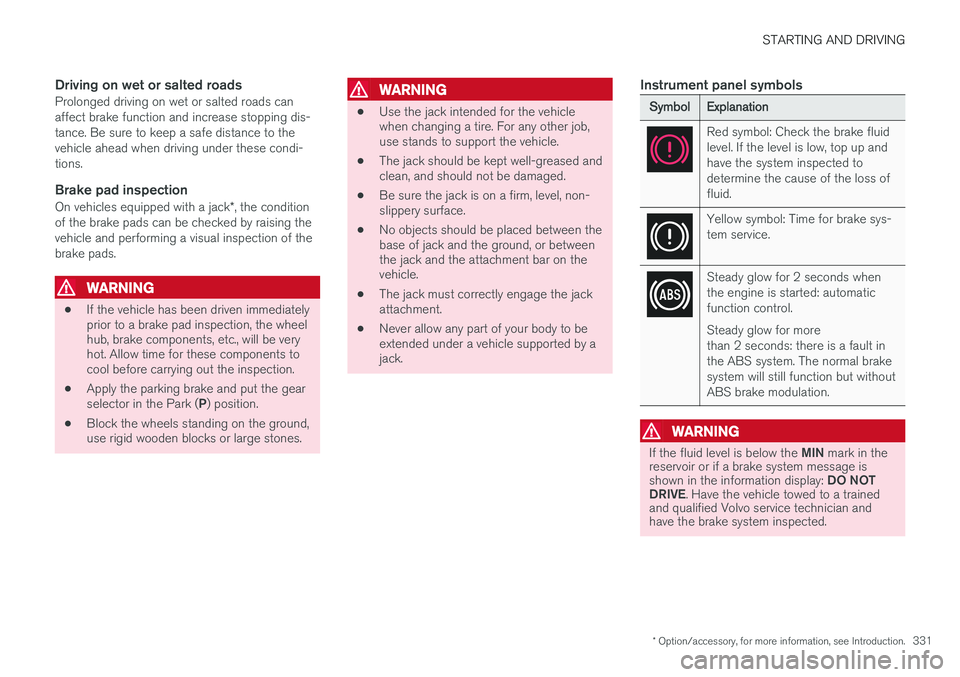
SymbolExplanation
Red symbol: Check the brake fluid level. If the level is low, top up andhave the system inspected todetermine the cause of the loss offluid.
Yellow symbol: Time for brake sys- tem service.
Steady glow for 2 seconds when the engine is started: automaticfunction control. Steady glow for more than 2 seconds: there is a fault inthe ABS system. The normal brakesystem will still function but withoutABS brake modulation.
WARNING
If the fluid level is below the
MIN mark in the
reservoir or if a brake system message is shown in the information display: DO NOT
DRIVE . Have the vehicle towed to a trained
and qualified Volvo service technician and have the brake system inspected.