tire type VOLVO XC90 2015 User Guide
[x] Cancel search | Manufacturer: VOLVO, Model Year: 2015, Model line: XC90, Model: VOLVO XC90 2015Pages: 570, PDF Size: 12.44 MB
Page 475 of 570
WHEELS AND TIRES
473
Snow tires and chains
The use of snow chains and/or winter tires can help improve traction in winter driving conditions.
Snow chains can be used on your Volvo with the following restrictions:
• Snow chains should be installed on front wheels only. Use only Volvo approved snowchains.
• If accessory, aftermarket or "custom" tiresand wheels are installed and are of a size dif-ferent than the original tires and wheels,chains in some cases CANNOT be used.Sufficient clearances between chains andbrakes, suspension and body componentsmust be maintained.
• Some strap-on type chains will interfere withbrake components and therefore CANNOTbe used.
• All Wheel Drive models
: Snow chains
should only be installed on the front wheels.
• Certain size tires may not allow the assemblyof snow chains/traction devices.
Consult your Volvo retailer for additional snow chain information.
CAUTION
• Snow chains should not be used on wheels larger than 19".
• Always follow the chain manufacturer'sinstallation instructions carefully. Installchains as tightly as possible andretighten periodically.
• Check local regulations regarding the useof snow chains before installing.
• Use single-sided snow chains only.
• Never exceed the chain manufacturer'sspecified maximum speed limit. (Underno circumstances should you exceed31 mph (50 km/h).
• Avoid bumps, holes or sharp turns whendriving with snow chains.
• The handling of the vehicle can beadversely affected when driving withchains. Avoid fast or sharp turns as wellas locked wheel braking.
Checking tire inflation pressure
Correct tire inflation pressure helps improve driv- ing stability, save fuel and increase the servicelife of the tires.
WARNING
• Under-inflation is the most common cause of tire failure and may result insevere tire cracking, tread separation, or"blow-out," with unexpected loss of vehi-cle control and increased risk of injury.
• Under-inflated tires reduce the load car-rying capacity of your vehicle.
Cold tiresInflation pressure should be checked when the tires are cold. The tires are considered to be cold when they have the same temperature as the sur-rounding (ambient) air. This temperature is normally reached after the vehicle has been parked for at least 3 hours. After driving a distance of approximately 1 mile (1.6 km), the tires are considered to be hot. If youhave to drive farther than this distance to pumpyour tire(s), check and record the tire pressurefirst and add the appropriate air pressure whenyou get to the pump. When weather temperature changes occur, tire inflation pressures also change. A 10-degree
Page 484 of 570
WHEELS AND TIRES
4823.
Select
SettingsMy CarIntelliSafe
Tire Pressure Monitor in the Top view
and deselect (tap) the button.
> The function will remain off until it is reac- tivated.
Related information
• Checking inflation pressure (p. 482)
• Reinflating tires equipped with the Tire Pressure Monitoring System (TPMS)(p. 483)
• Tire Pressure Monitoring System type appro-val (p. 484)
• Ignition modes (p. 355)
Checking inflation pressure The Tire Pressure Monitoring System makes it possible to view the current inflation pressure ofall four tires.
Checking inflation pressure
Open the Car status app in
the center display's Application view. Tap
Status to see the
current inflation pressure of all four tires.
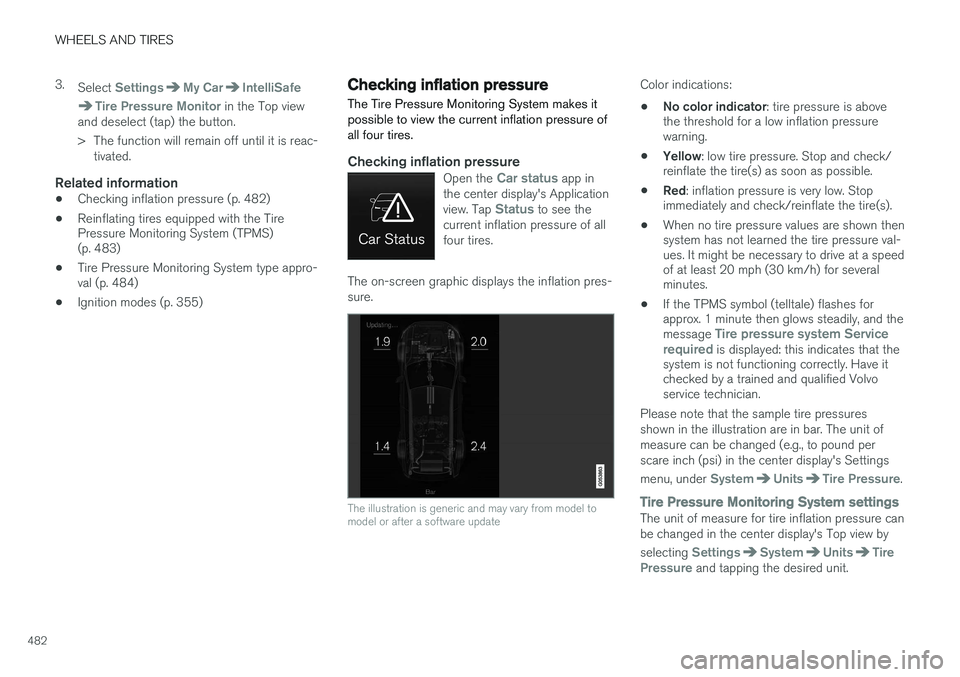
The on-screen graphic displays the inflation pres- sure.
The illustration is generic and may vary from model to model or after a software update
Color indications:
• No color indicator
: tire pressure is above
the threshold for a low inflation pressure warning.
• Yellow
: low tire pressure. Stop and check/
reinflate the tire(s) as soon as possible.
• Red
: inflation pressure is very low. Stop
immediately and check/reinflate the tire(s).
• When no tire pressure values are shown thensystem has not learned the tire pressure val-ues. It might be necessary to drive at a speedof at least 20 mph (30 km/h) for severalminutes.
• If the TPMS symbol (telltale) flashes forapprox. 1 minute then glows steadily, and the message
Tire pressure system Service
required is displayed: this indicates that the
system is not functioning correctly. Have it checked by a trained and qualified Volvoservice technician.
Please note that the sample tire pressures shown in the illustration are in bar. The unit ofmeasure can be changed (e.g., to pound perscare inch (psi) in the center display's Settings menu, under
SystemUnitsTire Pressure.
Tire Pressure Monitoring System settingsThe unit of measure for tire inflation pressure can be changed in the center display's Top view by selecting
SettingsSystemUnitsTire
Pressure and tapping the desired unit.
Page 486 of 570

WHEELS AND TIRES
484
WARNING
•Incorrect inflation pressure could lead to tire failure, resulting in a loss of control ofthe vehicle.
• Tire monitoring systems cannot indicatesudden tire damage caused by externalfactors (e.g., a blowout) in advance.
Related information
•
Tire Pressure Monitoring System (TPMS)(p. 480)
• Checking inflation pressure (p. 482)
Calibrating the Tire Pressure Monitoring System (TPMS) 6
In certain situations, a text pertaining to calibra- tion requirements may appear in the center dis-play. This text is generic and does not apply
to North American models .Tire Pressure Monitoring System type approval
NOTE
USA FCC ID: MRXVHSS4 Canada IC:2546A-VHSS4 M :VHSS4This device complies with part 15 of the FCC rules and with licence exempt RSS standardsof Industry Canada. Operation is subject to the following condi- tions: (1) This device may not cause harmful inter- ference, and (2) this device must accept any interference received, including interference that maycause undesired operation.
6
Certain markets only.
Page 491 of 570
MAINTENANCE AND SERVICING
489
Emission inspection readiness
How do states use OBD II for emission
inspections?
Many states connect a computer directly to a vehicle's OBD II system. The inspector can thenread "faults." In some states, this type of inspec-tion has replaced the tailpipe emission test.
How can my vehicle fail OBD II emission
inspection?
Your vehicle can fail OBD II emission inspection for any of the following reasons.
• If your Check Engine (MIL) light is lit, your vehicle may fail inspection.
• If your vehicle's Check Engine light was lit,but went out without any action on your part,OBD II will still have a recorded fault. Yourvehicle may pass or fail, depending on theinspection practices in your area.
• If you had recent service that required dis-connecting the battery, OBD II diagnosticinformation may be incomplete and "notready" for inspection. A vehicle that is notready may fail inspection.
How can I prepare for my next
OBD II
emission inspection?
• If your Check Engine (MIL) light is lit – or was lit but went out without service, have yourvehicle diagnosed and, if necessary, servicedby a qualified Volvo technician.
• If you recently had service for a lit CheckEngine light, or if you had service that required disconnecting the battery, a periodof driving is necessary to bring the OBD IIsystem to "ready" for inspection. Two half-hour trips of mixed stop-and-go/highwaydriving are typically needed to allow OBD II toreach readiness. Your Volvo retailer can pro-vide you with more information on planning atrip.
• Maintain your vehicle in accordance with yourvehicle's maintenance schedule.
Owner maintenancePeriodic maintenance requirements and intervals are described in your vehicle's Warranty andService Records Information booklet. The following points can be carried out between the normally scheduled maintenance services.
Each time the car is refueled:
•Check the engine oil level.
• Clean the windshield, windshield wipers, headlights, and taillights.
Monthly:
•
Check cold tire pressure in all tires. Inspect the tires for wear.
• Check that engine coolant and other fluidlevels are between the indicated "min" and"max" markings.
• Clean interior glass surfaces with a glasscleaner and soft paper towels.
• Wipe driver information displays with a softcloth. •
Visually inspect battery terminals for corro-sion. Corrosion may indicate a loose terminalconnector, or a battery near the end of itsuseful service life. Consult your Volvo retailerfor additional information.
As needed:Wash the car, including the undercarriage, to reduce wear that can be caused by a buildup ofdirt, and corrosion that can be caused by salt res-idues. Clean leaves and twigs from air intake vents at the base of the windshield, and from other placeswhere they may collect.
NOTE
Complete service information for qualified technicians is available online for purchase orsubscription at www.volvotechinfo.com.
Related information
•
Climate system service (p. 495)
Page 565 of 570
563
deactivating/reactivating 288
starting/activating 284
Spin control 308
Stability system 308 sport mode 309
Start/Stop (engine function) 364, 365Start and lock system type designations 220
Starting and driving 330
Starting the engine 356Starting the vehicle after a crash (crash mode) 81, 82
Start inhibitor (immobilizer) 221
Steel grid in cargo area 211
Steering wheel 157 adjusting 159
heated 189
horn 157
keypad 157
Steering wheel paddles 157
Stone chips, touching up 530, 531
Storage compartments 200
Studded tires 473Sunroof laminated panoramic roof 101, 102
Sun shade 104, 106
Sun visor 203
Suspension 372
System updates 490
T
Tailgate locking/unlocking 233 operating with the foot movement sen-
sor 228
power operated 235
wiper/washer 157
Tailgate wipers 523
Technician certification 54Temperature perceived 176
Temperature sensor ambient 116
Temporary spare tire 476Tethering wi-fi sharing 406
Three-way catalytic converter 349
Tire inflation pressure 545
Tire Pressure Monitoring System 480, 483 calibrating 484
type approval 484
Tire Pressure Monitoring System (TPMS) 484
Tires 466changing 475
changing from summer to winter 470
glossary of terms 469
improving economy 466
inflation pressure 473
inflation pressure table 545installing (mounting) a wheel on the
vehicle 479
rotation 467
snow 473
spare 476
specifications 467
storing 467
studded 473
tire pressure monitoring system 480, 483
tools in the cargo compartment 475
tread wear indicator 471
uniform tire quality grading 472
wheel bolts 477
Top tether anchors (child restraint systems) 74
Touching up paint 530, 531
Towing a trailer 351, 354 trailer hitch 353
Towing eyelet 343
Towing the vehicle 344
Traction control 308