fuel VOLVO XC90 2015 Owner's Manual
[x] Cancel search | Manufacturer: VOLVO, Model Year: 2015, Model line: XC90, Model: VOLVO XC90 2015Pages: 570, PDF Size: 12.44 MB
Page 353 of 570
STARTING AND DRIVING
351
WARNING
•Do not connect the jumper cable to any part of the fuel system or to any movingparts. Avoid touching hot manifolds.
• Batteries generate hydrogen gas, whichis flammable and explosive.
• Battery fluid contains sulfuric acid. Do notallow battery fluid to contact eyes, skin,fabrics or painted surfaces. If contactoccurs, flush the affected area immedi-ately with water. Obtain medical helpimmediately if eyes are affected.
• Never expose the battery to open flameor electric spark.
• Do not smoke near the battery.
• Failure to follow the instructions for jumpstarting can lead to injury.
Related information
• Ignition modes (p. 355)
• Starting the engine (p. 356)
• Turning the engine off (p. 359)
Driving with a trailer
When towing a trailer, always observe the legal requirements of the state/province.
• All Volvo models are equipped with energy- absorbing shock-mounted bumpers. Trailerhitch installation should not interfere with theproper operation of this bumper system.
Trailer towing does not normally present any par- ticular problems, but take into consideration:
• Increase tire pressure to recommended full pressure.
• When your vehicle is new, avoid towing heavytrailers during the first 620 miles (1,000 km).
• Maximum speed when towing a trailer:50 mph (80 km/h).
• Engine and transmission are subject toincreased loads. Therefore, engine coolanttemperature should be closely watched whendriving in hot climates or hilly terrain. Use alower gear and turn off the air conditioner ifthe temperature gauge needle enters the redrange.
• If the automatic transmission begins to over-heat, a message will be displayed in the textwindow.
• Avoid overload and other abusive operation.
• Hauling a trailer affects handling, durability,and economy.
• It is necessary to balance trailer brakes withthe towing vehicle brakes to provide a safe stop (check and observe state/local regula-tions).
• Do not connect the trailer's brake systemdirectly to the vehicle's brake system.
• More frequent vehicle maintenance isrequired.
• Remove the ball holder when the hitch is notbeing used.
NOTE
• When parking the vehicle with a trailer on a hill, apply the parking brake before put- ting the gear selector in
P. Always follow
the trailer manufacturer's recommenda- tions for wheel chocking.
• When starting on a hill, put the gear selector in
D before releasing the parking
brake.
• If you use the manual (Geartronic) shift positions while towing a trailer, make surethe gear you select does not put toomuch strain on the engine (using toohigh a gear).
• The drawbar assembly/trailer hitch maybe rated for trailers heavier than the vehi-cle is designed to tow. Please adhere toVolvo's recommended trailer weights.
• Avoid driving with a trailer on inclines ofmore than 15%.
Page 362 of 570
STARTING AND DRIVING
360
Selecting a drive mode
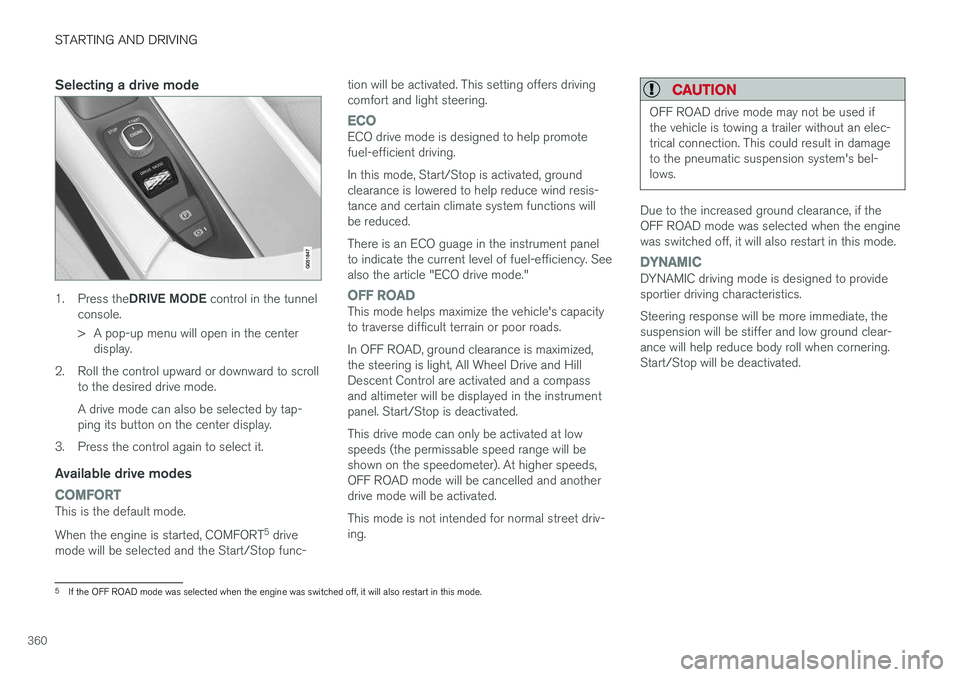
1.Press the DRIVE MODE control in the tunnel
console.
> A pop-up menu will open in the center display.
2. Roll the control upward or downward to scroll to the desired drive mode. A drive mode can also be selected by tap- ping its button on the center display.
3. Press the control again to select it.
Available drive modes
COMFORTThis is the default mode. When the engine is started, COMFORT 5
drive
mode will be selected and the Start/Stop func- tion will be activated. This setting offers driving comfort and light steering.
ECOECO drive mode is designed to help promote fuel-efficient driving. In this mode, Start/Stop is activated, ground clearance is lowered to help reduce wind resis-tance and certain climate system functions willbe reduced. There is an ECO guage in the instrument panel to indicate the current level of fuel-efficiency. Seealso the article "ECO drive mode."
OFF ROADThis mode helps maximize the vehicle's capacity to traverse difficult terrain or poor roads. In OFF ROAD, ground clearance is maximized, the steering is light, All Wheel Drive and HillDescent Control are activated and a compassand altimeter will be displayed in the instrumentpanel. Start/Stop is deactivated. This drive mode can only be activated at low speeds (the permissable speed range will beshown on the speedometer). At higher speeds,OFF ROAD mode will be cancelled and anotherdrive mode will be activated. This mode is not intended for normal street driv- ing.
CAUTION
OFF ROAD drive mode may not be used if the vehicle is towing a trailer without an elec-trical connection. This could result in damageto the pneumatic suspension system's bel-lows.
Due to the increased ground clearance, if the OFF ROAD mode was selected when the enginewas switched off, it will also restart in this mode.
DYNAMICDYNAMIC driving mode is designed to provide sportier driving characteristics. Steering response will be more immediate, the suspension will be stiffer and low ground clear-ance will help reduce body roll when cornering.Start/Stop will be deactivated.
5
If the OFF ROAD mode was selected when the engine was switched off, it will also restart in this mode.
Page 364 of 570
STARTING AND DRIVING
* Option/accessory, for more information, see Introduction.
362
ECO drive mode
The Eco drive mode is a function designed to give the driver the opportunity to drive more eco-nomically and to help reduce fuel consumption.
When this mode is activated, the following cha- racteristics are modified:
• The automatic transmission's shifting points
• The engine management system and accel- erator pedal response
• Eco Coast functionality is activated: enginebraking is disabled at speeds betweenapprox. 40 and 85 mph (65 and 140 km/h)
• Climate system settings: certain functionswill be temporarily reduced or deactivated
• The suspension's self-leveling function
* low-
ers ground clearance to help reduce windresistance
• Information is shown in an ECO gauge in theinstrument panel to help promote more eco-nomical driving
NOTE
When Eco is activated, several climate system parameters are changed and the function ofcertain current-consuming systems will bereduced. Some of these functions can be restarted manually but full functionality will not berestored until Eco is deactivated.
Selecting ECO modeWhen the engine is switched off, ECO mode is deactivated and must be reactivated each time the engine is started.
ECO will appear in the
instrument panel when the function is activated.
Via Function view
Select Driving mode ECO in
the center display's Function view. A green indicator light inthe button shows that the func-tion is activated.
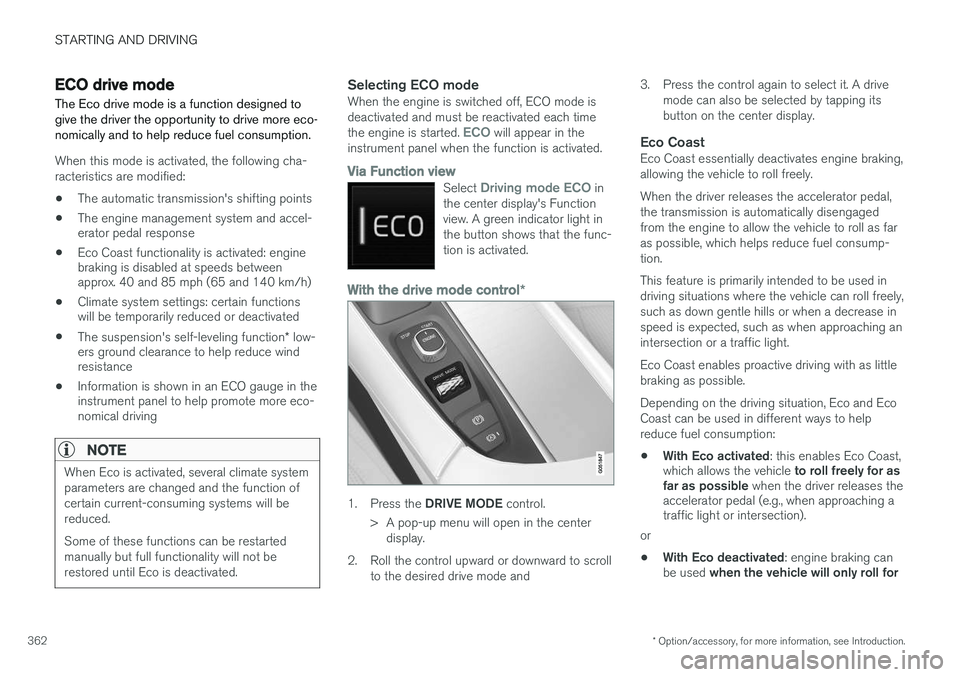
With the drive mode control *
1.
Press the DRIVE MODE control.
> A pop-up menu will open in the center display.
2. Roll the control upward or downward to scroll to the desired drive mode and 3. Press the control again to select it. A drive
mode can also be selected by tapping its button on the center display.
Eco CoastEco Coast essentially deactivates engine braking,allowing the vehicle to roll freely. When the driver releases the accelerator pedal, the transmission is automatically disengagedfrom the engine to allow the vehicle to roll as faras possible, which helps reduce fuel consump-tion. This feature is primarily intended to be used in driving situations where the vehicle can roll freely,such as down gentle hills or when a decrease inspeed is expected, such as when approaching anintersection or a traffic light. Eco Coast enables proactive driving with as little braking as possible. Depending on the driving situation, Eco and Eco Coast can be used in different ways to helpreduce fuel consumption: • With Eco activated
: this enables Eco Coast,
which allows the vehicle to roll freely for as
far as possible when the driver releases the
accelerator pedal (e.g., when approaching a traffic light or intersection).
or
• With Eco deactivated
: engine braking can
be used when the vehicle will only roll for
Page 365 of 570
STARTING AND DRIVING
* Option/accessory, for more information, see Introduction.363
a short distance
(in heavy traffic, etc.) or
when driving down hills .
To help keep fuel consumption as low as possi- ble, Eco Coast should not be used in traffic situa-tions where the brakes have to be used fre-quently.
Activating Eco CoastEco Coast is activated when the accelerator pedal is released completely if:
• Eco is activated
• The gear selector is in
D
• The vehicle's speed is between approxi- mately 25–85 mph (40–140 km/h). Alwaysobserve posted speed limits
• The gradient of a down-slope is less thanapproximately 6%
COASTING will appear in the instrument panel
when Eco Coast is being used.
LimitationsEco Coast is not available if:
• The engine and/or transmission have not reached their normal operating temperature
• Cruise control is activated
• The gear selector is moved from
D to " +/-"
for manual shifting
• The vehicle's speed is not within the25–85 mph (40–140 km/h) range
• The gradient of a down-slope is more thanapproximately 6% •
The steering wheel paddles
* are used for
manual shifting
Deactivating and turning off Eco CoastIn certain situations, it may be advisable to switch off the Eco Coast function, such as:
• When driving down steep hills, in order to uti- lize engine braking
• Prior to passing another vehicle, in order todo so as safely as possible
Deactivating Eco Coast (and reactivating engine braking) can be done in the following ways: • Move the gear selector to the manual "
+/
Page 366 of 570
STARTING AND DRIVING
364
Start/Stop
Start/Stop is a function that temporarily switches off the engine when the vehicle is not moving,for instance in heavy traffic or at a traffic light, tohelp reduce fuel consumption. The engine startsagain automatically when the brake pedal isreleased.
Start/Stop is one of several fuel-conserving fea- tures that also help reduce emissions. This feature helps make it possible to drive more economically by allowing the engine to auto-stopin certain situations.
Related information
• Conditions for Start/Stop (p. 365)
• Using the Start/Stop function (p. 364)
• ECO drive mode (p. 362)
Using the Start/Stop function Start/Stop is a function that temporarily switches off the engine when the vehicle is not moving,for instance in heavy traffic or at a traffic light, tohelp reduce fuel consumption. The engine startsagain automatically when the brake pedal isreleased.
Start/Stop is available when the engine has been started. The instrument panel will indicate if thefunction is available/unavailable/active. All of the vehicle's normal systems such as light- ing, infotainment, etc., function normally when theengine has auto-stopped. However, certain func-tions, such as climate system blower speed orvery high infotainment system volume, will betemporarily reduced.
Auto-stopThe following conditions must be met for theengine to auto-stop:
• Stop the vehicle by applying the brakes and keep the brake pedal depressed. The engine will auto-stop. If the COMFORT 8
or ECO driv-
ing modes are activated, the engine can auto-stop before the vehicle has come to astandstill.
If the
Adaptive cruise or Pilot Assist functions
are activated, the engine will auto-stop after approx. 3 seconds. See also the article "Condi-tions for Start/Stop."
Auto-startThe following conditions must be met for theengine to auto-start:
• Release the brake pedal; the engine will automatically restart. When starting on anuphill incline, the Hill Start Assist (HSA)function will be activated to help prevent thevehicle from rolling backward.
• When the brake system's Auto Hold functionis activated, the engine will not auto-startuntil the accelerator pedal is pressed.
• When
Adaptive cruise or Pilot Assist are
activated, the engine will auto-start when the accelerator pedal is pressed or if the
button is pressed on the left-side steering wheel keypad.
• Keep the brake pedal depressed but pressthe accelerator pedal. The engine will auto-start.
• On a downhill incline, release the brake pedalso that the vehicle begins to roll. The enginewill auto-start after a slight increase in speed.
8
The default driving mode.
Page 372 of 570
STARTING AND DRIVING
* Option/accessory, for more information, see Introduction.
370
Gear shift indicator
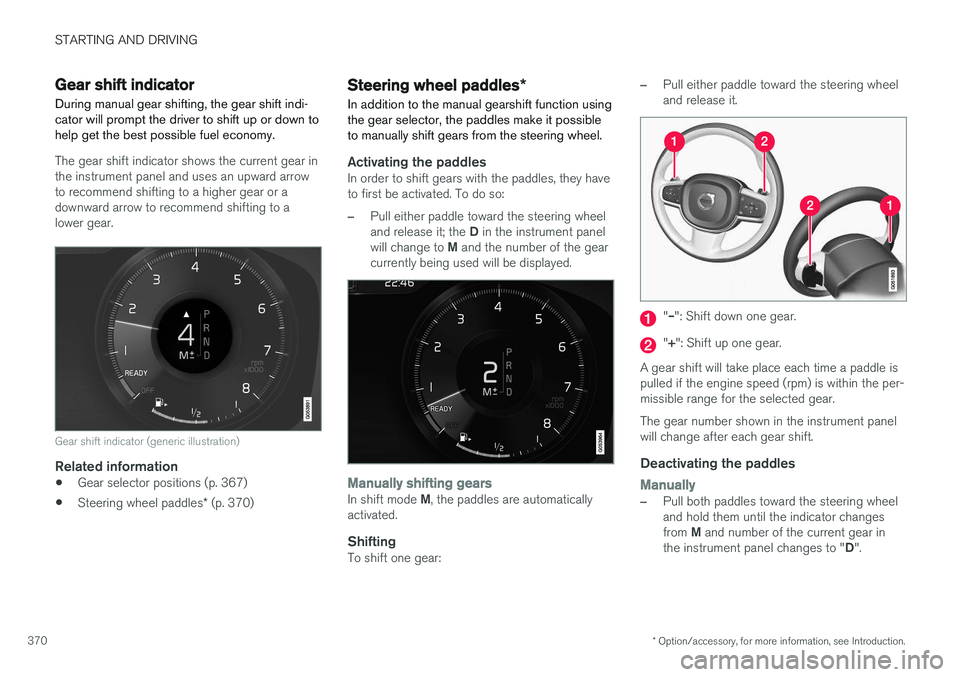
During manual gear shifting, the gear shift indi- cator will prompt the driver to shift up or down tohelp get the best possible fuel economy.
The gear shift indicator shows the current gear in the instrument panel and uses an upward arrowto recommend shifting to a higher gear or adownward arrow to recommend shifting to alower gear.
Gear shift indicator (generic illustration)
Related information
• Gear selector positions (p. 367)
• Steering wheel paddles
* (p. 370)
Steering wheel paddles *
In addition to the manual gearshift function using the gear selector, the paddles make it possibleto manually shift gears from the steering wheel.
Activating the paddlesIn order to shift gears with the paddles, they have to first be activated. To do so:
–Pull either paddle toward the steering wheel and release it; the D in the instrument panel
will change to M and the number of the gear
currently being used will be displayed.
Manually shifting gearsIn shift mode M, the paddles are automatically
activated.
ShiftingTo shift one gear:
–Pull either paddle toward the steering wheel and release it.
"
Page 418 of 570
VOLVO ON CALL WITH SENSUS CONNECT *
* Option/accessory, for more information, see Introduction.
416
FunctionCus-
tomer
service centerApp A
Engine remote start (ERS)X
Locating the vehicleXX
Instrument panel informa- tionX
Vehicle "checkup"X
Driving logbookX
Vehicle informationX
A
Some of these functions may not be available for all models.
Related information
• Volvo On Call (VOC)
* (p. 414)
• Volvo On Call mobile app (p. 416)
• Volvo On Call convenience services (p. 416)
• Volvo On Call safety services (p. 424)
• Volvo On Call security services (p. 425)
Volvo On Call convenience services
Convenience services are available by using the mobile app to e.g., remote-start the engine *, etc.
As a VOC user, a mobile app is available that enables you to have telephone contact from aniPhone or from Windows/Android phones withyour vehicle when it is parked. With it, you canlocate the vehicle, lock it from another location,check the fuel level and much more. Read moreabout this app in the following section.
Related information
• Volvo On Call (VOC)
* (p. 414)
• Volvo On Call mobile app (p. 416)
• Volvo On Call (VOC) functions (p. 415)
Volvo On Call mobile app
As a VOC user, you can download a mobile app that enables you to have telephone contact withyour vehicle when it is parked.
Certain functions may not be available in all mod- els. The mobile app is updated regularly, which may result in this information not being completelyup-to-date with respect to the functionality availa-ble. For additional information about the app, goto: United States http://www.volvocars.com/us/support Canada English: http://support.volvocars.com/en-CA French: http://support.volvocars.com/fr-CAThe Volvo On Call mobile app is available for the iPhone and for Windows/Android phones andcan be downloaded from Apple's AppStore, Win-dows Phone Store or Google Play. A personal Volvo ID is required in order to use the mobile app. For additional information about the Volvo ID, the features it offers and how to create it, see thearticle "Volvo ID".
Page 419 of 570
VOLVO ON CALL WITH SENSUS CONNECT *
* Option/accessory, for more information, see Introduction.
417
Locating the vehicleThe vehicle's location is shown on a map and directions to the vehicle can be provided. There isalso a digital compass to help show the ownerthe right direction. When you are within approx.100 yards/meters of the vehicle, you can activateits horn and turn signals to help locate it.
The vehicle's instrument panelThis function provides information such as: thefuel level, range on the remaining fuel, averagefuel consumption, average speed and odometer/trip odometer readings.
Vehicle "checkup"The mobile app monitors the vehicle's conditionand provides information about bulbs and the lev-els of brake fluid, coolant and engine oil.
Driving logbookDetailed information about each trip made duringthe past 40 days can be saved and downloaded.All or part of this information can be exportedfrom the mobile app to a spreadsheet format andsent to an email address. This is very useful fore.g., keeping track of business-related driving. This function can be deactivated, in which case the vehicle will not transmit logbook informationat the end of each trip.
Vehicle informationBasic information such as model, license platenumber and VIN number are readily accessible.
Theft notificationIf the vehicle's alarm is triggered, the owner willbe informed via his/her cell phone.
Remote door unlockThe status of all doors and windows is provided.The owner can lock/unlock the vehicle fromanother location but for security reasons, theapp's password is always required before thevehicle can be unlocked.
Engine remote start (ERS)*1ERS makes it possible to remotely start theengine using the remote key to enable the cli-mate system to cool or heat the passenger com-partment before driving. When the engine starts, the climate and infotain- ment systems will restart using the same settingsas when the engine was switched off. You can choose to let the engine run for between 1 and 15 minutes before it automati-cally switches off again. After 2 ERS starts, theengine must be started in the normal way beforeERS can be used again.
WARNING
Keep the following in mind before using ERS:
• The vehicle should be in view.
• The vehicle should be unoccupied.
• The vehicle must not be parked indoors or in an enclosed area. Exhaust fumes areharmful to the health.
NOTE
Always observe applicable state, province and/or local laws regarding engine idlingwhen using ERS.
Related information
•Volvo On Call convenience services (p. 416)
• Volvo On Call (VOC)
* (p. 414)
• Volvo ID (p. 27)
• Starting the engine (p. 356)
• Volvo On Call (VOC) functions (p. 415)
1
Certain models only.
Page 422 of 570
VOLVO ON CALL WITH SENSUS CONNECT *
* Option/accessory, for more information, see Introduction.
420
Personal information Personal information is gathered for use with the Volvo On Call (VOC) service.
Volvo's sales companies are responsible for pro- cessing and storing VOC-related information.This information is treated according to legisla-tion and regulations pertaining to data of thistype.
CountrySales company
United StatesVolvo Cars of North America, LLC
CanadaVolvo Cars of Canada
Why information is gatheredPersonal information is used by Volvo and its partners to provide and develop the VOC service.
Types of personal information gatheredThe primary types of personal information gath-ered for VOC-related purposes are:
• Personal information that the customer pro- vides in connection with the activation of theVOC service and during other contact withVolvo, including name, address, telephonenumber, type of service and the duration ofthe service.
• When information about a specific VOC-rela-ted event is automatically transmitted fromthe vehicle. A message of this type contains:the vehicle identification number (VIN), time when the service is used, type of service, ifairbags have been triggered, if the seat belttensioners have been triggered, current fuellevel, current temperature inside and outsidethe vehicle, whether the doors are lockedand windows are closed and the vehicle'slast six locations, including speed and direc-tion.
• Other information associated with theowner/driver, such as telephone calls withpeople in the vehicle, the customer servicecenter that provided the service and notesmade by the customer service operator.
Access to my personal informationVolvo uses sub-contractors to provide the service. These sub-contractors work on behalf of Volvoand may only process personal information to theextent necessary to provide service. All sub-con-tractors are bound by agreements requiring themto observe strict confidentiality and to treat per-sonal details in accordance with applicable legis-lation.
Deleting personal informationThe personal details required to provide the VOCservice are stored during the subscription periodand thereafter for as long as necessary in orderfor Volvo to fulfil its obligations according to leg-islation and other regulations. Information gener-ated during events covered by the VOC service isdeleted three months after an event has occur-red.
Corrections and register extractsPrivate persons have the right to request correc-tions of incorrect information and to obtain anextract showing the personal information that hasbeen processed. Requests for extracts from theregister must be submitted in writing and signedby the applicant and include name, address andcustomer number. The request should be postedto: Volvo Cars of North America, LLC Customer Care Center 1 Volvo Drive,P.O. Box 914Rockleigh, New Jersey 07647Phone: 1-800-458-1552 Volvo Cars of Canada National Customer Service 9130 Leslie Street, Suite 101Richmond Hill, Ontario L4B 0B9Phone: 1-800-663-8255
Consent to gather VOC-related personal
information
By activating a VOC subscription in accordance with the instructions in this document, the useragrees to the collection of VOC-related personalinformation.
Page 427 of 570
VOLVO ON CALL WITH SENSUS CONNECT *
* Option/accessory, for more information, see Introduction.
425
Roadside assistanceRequest help for e.g., flat tires, a discharged bat- tery, if you have run out of fuel, etc.
Emergency numberWhen an emergency call has been initiated, VOCattempts to contact the customer service center.If this is not possible, the call will be transferredto the emergency 911 number instead.
Related information
•Volvo On Call (VOC)
* (p. 414)
• Volvo On Call manual safety service (p. 424)
• Volvo On Call roadside assistance (p. 425)
• Using Volvo On Call (p. 414)
Volvo On Call roadside assistance
Use VOC to summon help in the event of a flat tire, an empty fuel tank, etc.
1. Press the ON CALL button for at least
2 seconds.
2. The VOC customer service center attempts to establish voice contact with the driver to determine the need for assistance.
Related information
•Volvo On Call (VOC)
* (p. 414)
• Volvo On Call safety services (p. 424)
• Volvo On Call manual safety service (p. 424)
• Using Volvo On Call (p. 414)
Volvo On Call security services The Volvo On Call (VOC) security services are intended to provide assistance, for instance, ifyou are locked out of your vehicle, if it has beenstolen, etc.
Volvo On Call's security services are primarily intended to help minimize the risk of the vehiclebeing stolen. If the vehicle's normal electrical system is not functioning properly, VOC's reserve battery pro-vides the system with current.
Theft notificationA signal will be sent automatically to the VolvoOn Call customer service center in the event of abreak-in or theft (if the vehicle's alarm has beentriggered). This service will be interrupted if the alarm is turned off using one of the vehicle's remote keys.
Remote door unlockIf the vehicle's remote key has been lost orlocked in the car, the doors can be unlockedremotely within the following 5 days with assis-tance from the VOC customer service centerafter the owner's identity has been verified byhis/her pin code.
Remote vehicle immobilizerIf the vehicle has been stolen, the owner or policecan contact the VOC customer service center to