tailgate VOLVO XC90 2015 Owner's Manual
[x] Cancel search | Manufacturer: VOLVO, Model Year: 2015, Model line: XC90, Model: VOLVO XC90 2015Pages: 570, PDF Size: 12.44 MB
Page 227 of 570
LOCKS AND ALARM
* Option/accessory, for more information, see Introduction.225
Avoid keeping the remote key closer than approx. 4-6 in. (10-15 cm) from a cell phone or metallicobject. If interference persists, unlock the vehicle with the detachable key blade and place the remotekey in the backup key reader in the tunnel con-sole cup holder to disarm the alarm.
WARNING
Always remove the remote key from the pas- senger compartment when leaving the vehicle and ensure that the ignition in mode
0, espe-
cially if there are children in the vehicle.
Ordering new keysTwo remote keys are provided with the vehicle (a Key Tag is also included for vehicles equippedwith the optional Passive Entry system). Addi-tional keys (a total of 12) can be ordered andused with the vehicle. A new driver profile will beadded to each new key (including the Key Tag).
Loss of a remote keyIf a remote key is lost, the others should be takenwith the vehicle to a Volvo retailer. As an anti-theft measure, the code of the lost remote keymust be erased from the system. The number ofregistered keys for the vehicle can be found inthe center display's Top view.
NOTE
Additional or duplicate remote control keys can be obtained from any authorized Volvoretailer. You can also obtain additional or duplicate remote control keys from certain independentrepair facilities and locksmiths that are quali-fied to make remote control keys. Each keymust be programmed to work with your vehi-cle. A list of independent repair facilities and/or locksmiths known to Volvo that can cut andcode replacement keys can be found: • on the Volvo website, www.volvocars.com/us
• by calling Volvo Customer Care at1-800-458-1552.
Key TagIn addition to the two remote keys provided, a smaller third key, called a Key Tag, is also provi-ded for vehicles equipped with the optionalPassive Entry system. This key functions in the same way as a standard remote key but does not have a detachable keyblade and its battery cannot be replaced; a newKey Tag has to be ordered.
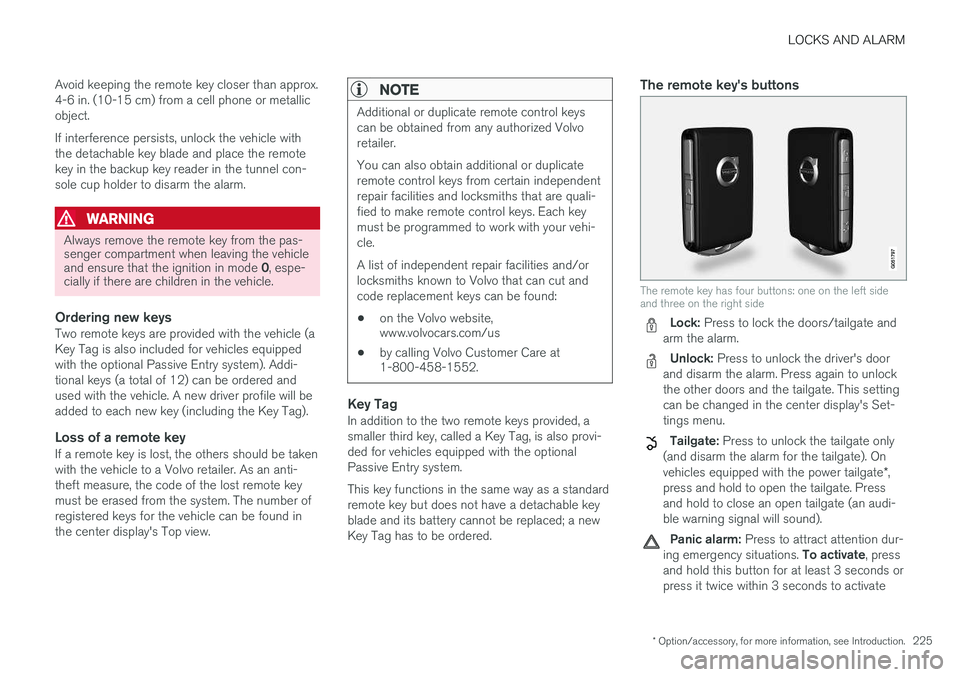
The remote key's buttons
The remote key has four buttons: one on the left side and three on the right side
Lock: Press to lock the doors/tailgate and
arm the alarm.
Unlock: Press to unlock the driver's door
and disarm the alarm. Press again to unlock the other doors and the tailgate. This settingcan be changed in the center display's Set-tings menu.
Tailgate: Press to unlock the tailgate only
(and disarm the alarm for the tailgate). On vehicles equipped with the power tailgate *,
press and hold to open the tailgate. Press and hold to close an open tailgate (an audi-ble warning signal will sound).
Panic alarm: Press to attract attention dur-
ing emergency situations. To activate, press
and hold this button for at least 3 seconds or press it twice within 3 seconds to activate
Page 230 of 570

LOCKS AND ALARM
* Option/accessory, for more information, see Introduction.
228
Detaching the key blade
Hold the remote key with the front side
(with the Volvo symbol) toward you and move the button on lower edge of the key near thekey ring to the right. Slide the front coverslightly upward.
The cover will loosen and can be
removed from the key.
Remove the key blade.
After use, press the key blade back into
its position in the key, put the cover back on the key and slide it into position.
> A click indicates that the cover is correctly in place.
Related information
• Locking/unlocking with the detachable key blade (p. 237)
• Child safety locks (p. 218)
Foot movement tailgate operation
*
The foot movement sensor * makes it easy and
convenient to open or close the tailgate without using your hands. 7
Foot movement sensor under the rear bumper
8
NOTE
One of the remote keys must be in your pos- session when you are behind the vehicle inorder to activate the foot movement sensor,even if the tailgate is already unlocked. This isdone to help prevent the sensor from inadver-tently opening the tailgate, for example, in acar wash.
7
Models equipped with the optional power tailgate only.
8 If the vehicle is equipped with a skid plate *, the sensor is located farther to the left under the bumper.
Page 231 of 570

LOCKS AND ALARM
* Option/accessory, for more information, see Introduction.229
Operation
–Move your foot back and forth under sensor on the underside of the rear bumper. It is notnecessary to touch the bumper.
> A brief audible signal will sound when the
tailgate begins to open/close.
If several attempts have been made to open/ close the tailgate without a remote key in yourpossession, the function will time out and will notbe available for a short period. The tailgate can be closed (or closed and locked) by pressing the
or buttons on the lower
edge of the tailgate 9
. It can also be operated
manually or by pressing the button on the lighting panel in the passenger compartment or on theremote key.
NOTE
Foot operation may not be possible if the sensor is obstructed by snow, ice, etc.
Related information
• Power tailgate
* (p. 235)
• Locking/unlocking the tailgate (p. 233)
• Remote key's range (p. 224)
Locking and unlocking confirmation
The turn signals can be used to indicate that the vehicle has been locked/unlocked with theremote key. These settings can also bechanged.
Exterior confirmation
• Locking: the turn signals flash once and the door mirrors will fold in (retract) 10
• Unlocking: the turn signals flash twice andthe door mirrors will fold out 10
When the vehicle is locked, confirmation will only be given if all doors/tailgate and the hood areclosed. If the vehicle is locked while only the driver's door is closed, all doors/tailgate will lock but confirma-tion will only be given when all doors/tailgate/hood are closed.
Interior confirmation
Lock and alarm indicator light on the dashboard
A long flash indicates the vehicle is locked. While the vehicle is locked, the indicator will flashbriefly. LEDs in the lock buttons on the doors illuminate when the doors are locked.
9 Vehicles equipped with the optional Passive Entry system only.
10 Models with retractable door mirrors only.
Page 233 of 570
LOCKS AND ALARM
* Option/accessory, for more information, see Introduction.231
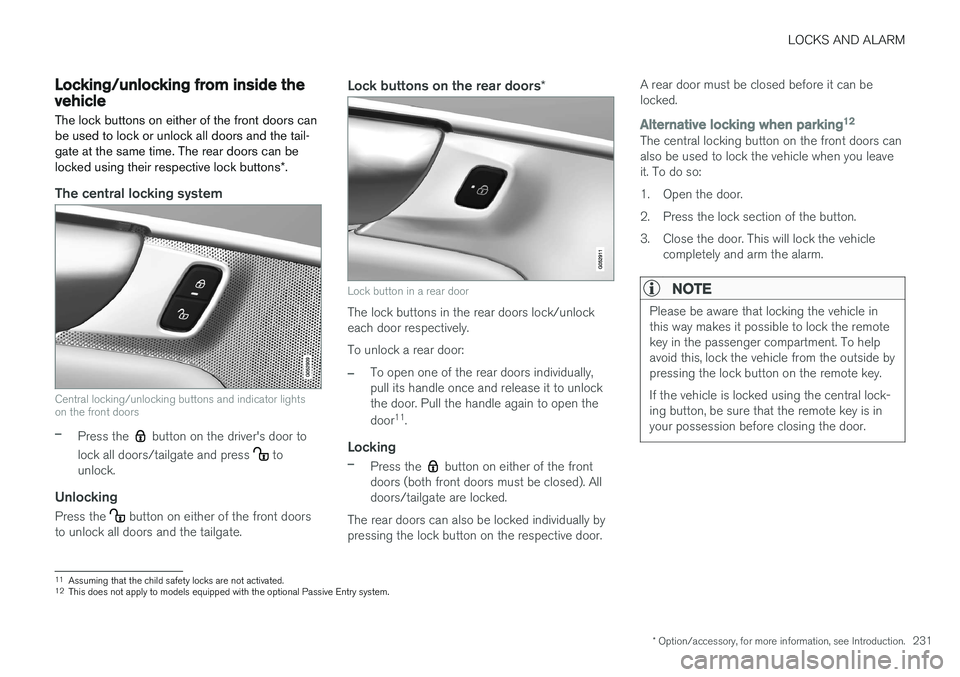
Locking/unlocking from inside the vehicle The lock buttons on either of the front doors can be used to lock or unlock all doors and the tail-gate at the same time. The rear doors can be locked using their respective lock buttons*.
The central locking system
Central locking/unlocking buttons and indicator lights on the front doors
–Press the button on the driver's door to
lock all doors/tailgate and press
to
unlock.
Unlocking
Press the button on either of the front doors
to unlock all doors and the tailgate.
Lock buttons on the rear doors *
Lock button in a rear door
The lock buttons in the rear doors lock/unlock each door respectively. To unlock a rear door:
–To open one of the rear doors individually, pull its handle once and release it to unlockthe door. Pull the handle again to open the door11
.
Locking
–Press the button on either of the front
doors (both front doors must be closed). All doors/tailgate are locked.
The rear doors can also be locked individually bypressing the lock button on the respective door. A rear door must be closed before it can belocked.
Alternative locking when parking
12The central locking button on the front doors can also be used to lock the vehicle when you leaveit. To do so:
1. Open the door.
2. Press the lock section of the button.
3. Close the door. This will lock the vehicle
completely and arm the alarm.
NOTE
Please be aware that locking the vehicle in this way makes it possible to lock the remotekey in the passenger compartment. To helpavoid this, lock the vehicle from the outside bypressing the lock button on the remote key. If the vehicle is locked using the central lock- ing button, be sure that the remote key is inyour possession before closing the door.
11Assuming that the child safety locks are not activated.12
This does not apply to models equipped with the optional Passive Entry system.
Page 234 of 570

LOCKS AND ALARM
* Option/accessory, for more information, see Introduction.
232
Automatic lockingAll of the doors/tailgate can be locked automati- cally when the vehicle begins to move. To acti-vate/deactivate this setting: 1.
Tap
Settings in the center display's Top
view.
2. Tap
My CarLocking
3. Select Auto Door Locking
>Doors and tailgate lock when the vehicle moves will be displayed and the
doors and tailgate will lock automatically when the vehicle begins to move.
Related information
• Locking/unlocking from outside the vehicle (p. 232)
• Child safety locks (p. 218)
Locking/unlocking from outside the vehicle The buttons on the remote key can be used to lock or unlock all doors and the tailgate at thesame time. This can also be done without press-ing the remote key buttons on models equippedwith the optional keyless Passive Entry system. The power tailgate
* can also be opened/closed
by moving your foot under a sensor beneath therear bumper *.
The lock/unlock settings can be changed in the center display's Top view. Go to:
SettingsMy CarRemote Unlockand select Unlock All Doors or Driver Door
Only.
In order to lock the vehicle, the driver's door must be closed. If the tailgate or any of the other doorsare open, they will be locked and the alarm will bearmed when they are closed.
NOTE
Be sure the remote key is outside of the vehi- cle before the other doors/tailgate are closedto help avoid locking the remote inside thevehicle.
If the locks repeatedly do not react when the unlock button is pressed, it may be necessary toreplace the battery in the remote. In this case, the driver's door can be unlocked with the detacha-ble key blade.
Keyless Passive Entry
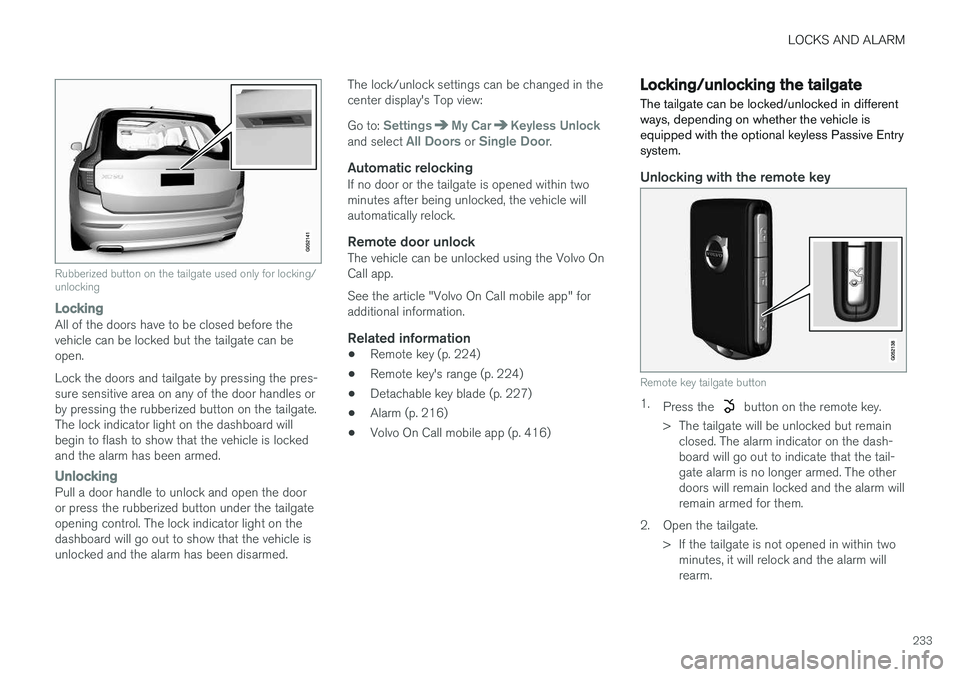
*If the vehicle is equipped with this system, it isonly necessary to have a remote key in your pos-session to operate the central locking system. Models with Passive Entry have an indentation on the outside of the handle for locking the vehicleand a pressure-sensitive area on the inside of thehandle for unlocking. The tailgate has a rubber-ized button used only for locking/unlocking.
Outer indentation for locking, the pressure sensitive area on the inside of the handle is for unlocking
Page 235 of 570
LOCKS AND ALARM
233
Rubberized button on the tailgate used only for locking/ unlocking
LockingAll of the doors have to be closed before the vehicle can be locked but the tailgate can beopen. Lock the doors and tailgate by pressing the pres- sure sensitive area on any of the door handles orby pressing the rubberized button on the tailgate.The lock indicator light on the dashboard willbegin to flash to show that the vehicle is lockedand the alarm has been armed.
UnlockingPull a door handle to unlock and open the door or press the rubberized button under the tailgateopening control. The lock indicator light on thedashboard will go out to show that the vehicle isunlocked and the alarm has been disarmed.The lock/unlock settings can be changed in thecenter display's Top view: Go to:
SettingsMy CarKeyless Unlockand select All Doors or Single Door.
Automatic relockingIf no door or the tailgate is opened within two minutes after being unlocked, the vehicle willautomatically relock.
Remote door unlockThe vehicle can be unlocked using the Volvo OnCall app. See the article "Volvo On Call mobile app" for additional information.
Related information
•
Remote key (p. 224)
• Remote key's range (p. 224)
• Detachable key blade (p. 227)
• Alarm (p. 216)
• Volvo On Call mobile app (p. 416)
Locking/unlocking the tailgate The tailgate can be locked/unlocked in different ways, depending on whether the vehicle isequipped with the optional keyless Passive Entrysystem.
Unlocking with the remote key
Remote key tailgate button
1.
Press the button on the remote key.
> The tailgate will be unlocked but remain closed. The alarm indicator on the dash- board will go out to indicate that the tail-gate alarm is no longer armed. The otherdoors will remain locked and the alarm willremain armed for them.
2. Open the tailgate. > If the tailgate is not opened in within twominutes, it will relock and the alarm willrearm.
Page 236 of 570
LOCKS AND ALARM
* Option/accessory, for more information, see Introduction.
234
Keyless unlocking *
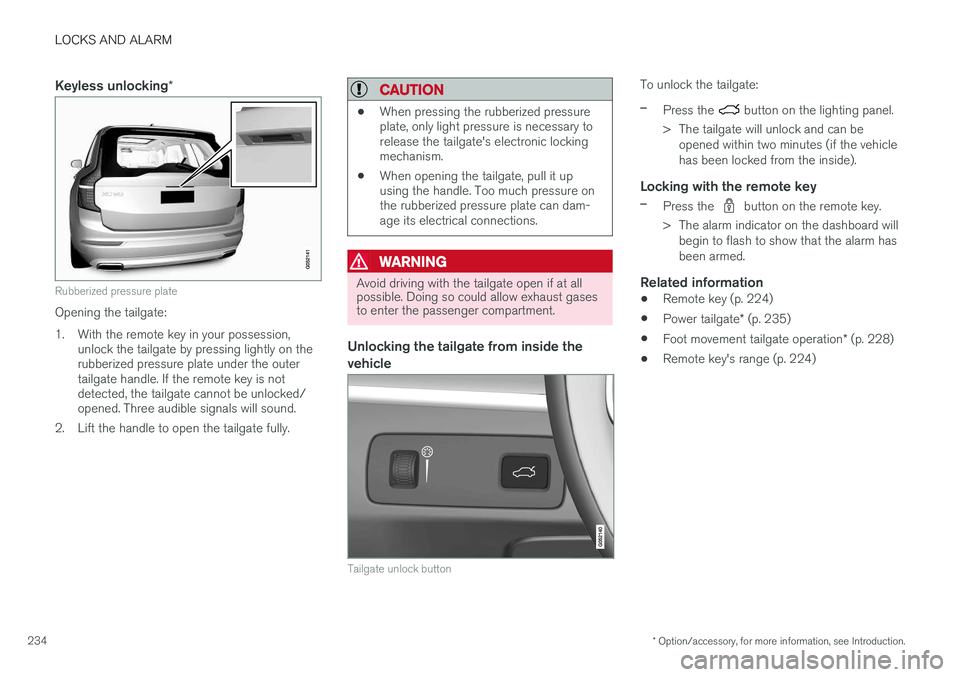
Rubberized pressure plate
Opening the tailgate:
1. With the remote key in your possession,
unlock the tailgate by pressing lightly on the rubberized pressure plate under the outertailgate handle. If the remote key is notdetected, the tailgate cannot be unlocked/opened. Three audible signals will sound.
2. Lift the handle to open the tailgate fully.
CAUTION
• When pressing the rubberized pressure plate, only light pressure is necessary torelease the tailgate's electronic lockingmechanism.
• When opening the tailgate, pull it upusing the handle. Too much pressure onthe rubberized pressure plate can dam-age its electrical connections.
WARNING
Avoid driving with the tailgate open if at all possible. Doing so could allow exhaust gasesto enter the passenger compartment.
Unlocking the tailgate from inside the vehicle
Tailgate unlock button
To unlock the tailgate:
–Press the button on the lighting panel.
> The tailgate will unlock and can be opened within two minutes (if the vehicle has been locked from the inside).
Locking with the remote key
–Press the button on the remote key.
> The alarm indicator on the dashboard will begin to flash to show that the alarm has been armed.
Related information
• Remote key (p. 224)
• Power tailgate
* (p. 235)
• Foot movement tailgate operation
* (p. 228)
• Remote key's range (p. 224)
Page 237 of 570

LOCKS AND ALARM
* Option/accessory, for more information, see Introduction.235
Power tailgate*
The optional power tailgate can be opened/ closed in several ways.
The power tailgate can be opened/closed using the
button on the lighting panel in the pas-
senger compartment, the
on the remote key
or by moving your foot under a sensor under the rear bumper *.
Buttons in the lower edge of the tailgate
Button on the lighting panel in the passenger compart- ment
Opening the tailgateThe power tailgate can be opened electrically by:
• Pressing and holding the
button on the
lighting panel until the tailgate begins to open.
• Pressing and holding the
button on the
remote key until the tailgate begins to open.
• Pressing lightly on the rubber-covered button under the tailgate's outside handle.
• Moving your foot under a sensor under the rear bumper
*.
Closing the tailgateThe tailgate can be closed by moving your foot under a sensor beneath the rear bumper *, by
pressing the button on the lighting panel, with the remote key or by pressing the button on the lower edge of the tailgate *13
To close the tailgate 14
:
–Press the button on the lighting panel
or on the
button on the remote key.
> The tailgate will close automatically and audible signal will sound. This will not
lock the tailgate.
Buttons on the lower edge of the tailgate
13 Models equipped with the optional Passive Entry system have a button to close the tailgate and a button to close and lock the tailgate.
14 See also the article "Foot movement tailgate opening/closing."
Page 238 of 570

LOCKS AND ALARM
* Option/accessory, for more information, see Introduction.
236
–Press the button 13
on the lower edge of
the tailgate.
> The tailgate will close automatically but will not be locked .
–Press the button13
on the lower edge of
the tailgate.
> The tailgate will close automatically. The tailgate and doors will also be locked and
the alarm will be armed.
If the remote key is not close enough to the tail- gate, automatic locking/unlocking/opening/clos-ing will not be possible. Three short audible sig-nals will sound.
Interrupting opening/closing
–This can be done in five ways: • Press the button on the lighting panel
• Press the button on the remote key
• Press either of the buttons on the lower edge of the tailgate
• Press lightly on the rubber-covered buttonunder the tailgate's outside handle
• Move your foot under a sensor beneath the rear bumper
*
> The tailgate will stop moving
Programming the tailgate's maximum opening angle
The tailgate's maximum opening angle can be programmed, for example, if the tailgate has to beopened in a garage with a low ceiling. Programming the opening angle:
–Open the tailgate manually to the desired angle and press and hold the closing buttonon the tailgate's lower edge for at least 3seconds. Release the tailgate.
> Two audible signals will sound to indicate that the selected opening angle has been stored.
Erasing tailgate programming
–Open the tailgate manually to its highest position and press and hold the closing but-ton on the tailgate's lower edge for at least 3seconds. Release the tailgate.
> Two audible signals will sound to indicate that the programmed opening angle has been erased.
NOTE
If the tailgate has been opened and closed continuously too long, the automatic functionwill be deactivated to avoid overloading theelectrical system. The automatic function canbe used again after approximately 2 minutes. If the vehicle's battery has been discharged or disconnected, or if the tailgate has been openfor more than 24 hours, the tailgate must beopened and closed once manually to resetthe system.
Pinch protectionIf the tailgate is obstructed when being opened/ closed, a pinch protection mechanism is acti-vated.
• While opening: the tailgate will stop moving and an audible signal will sound.
• While closing: the tailgate will stop andreturn to the maximum programmable open-ing position. An audible signal will sound.
WARNING
Be sure that no one is near the tailgate when it is opened or closed automatically. The tail-gate should never be obstructed in any waywhen it is operated.
13
Models equipped with the optional Passive Entry system have a button to close the tailgate and a button to close and lock the tailgate.
Page 239 of 570
LOCKS AND ALARM
* Option/accessory, for more information, see Introduction.237
Related information
•Remote key's range (p. 224)
• Locking/unlocking from outside the vehicle (p. 232)
• Foot movement tailgate operation
* (p. 228)
Locking/unlocking with the detachable key blade
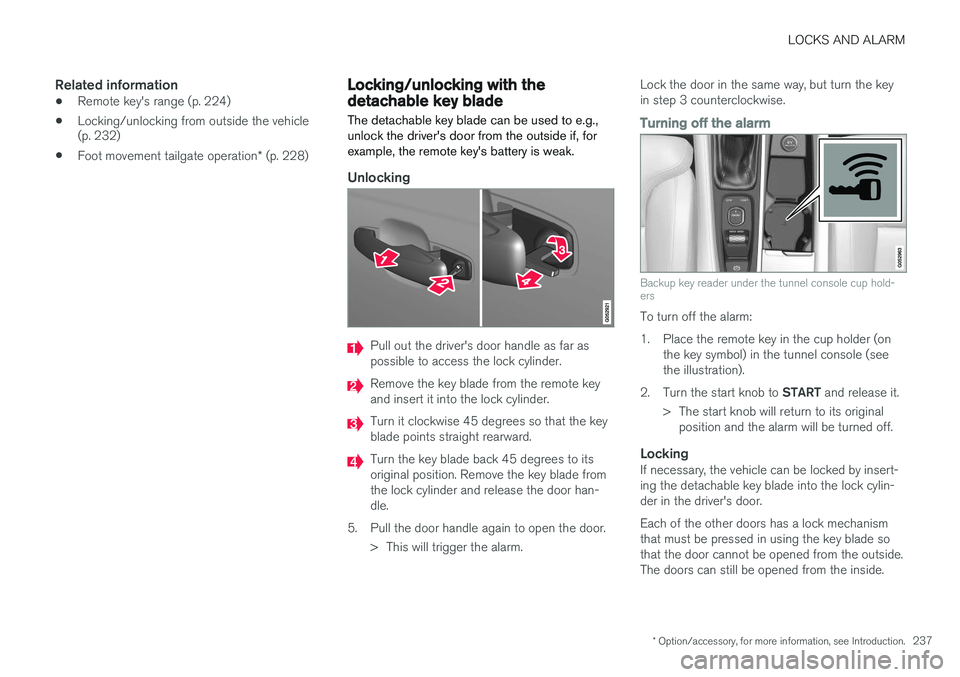
The detachable key blade can be used to e.g., unlock the driver's door from the outside if, forexample, the remote key's battery is weak.
Unlocking
Pull out the driver's door handle as far as possible to access the lock cylinder.
Remove the key blade from the remote key and insert it into the lock cylinder.
Turn it clockwise 45 degrees so that the key blade points straight rearward.
Turn the key blade back 45 degrees to its original position. Remove the key blade fromthe lock cylinder and release the door han-dle.
5. Pull the door handle again to open the door. > This will trigger the alarm. Lock the door in the same way, but turn the keyin step 3 counterclockwise.
Turning off the alarm
Backup key reader under the tunnel console cup hold- ers
To turn off the alarm:
1. Place the remote key in the cup holder (on
the key symbol) in the tunnel console (see the illustration).
2. Turn the start knob to START and release it.
> The start knob will return to its original position and the alarm will be turned off.
LockingIf necessary, the vehicle can be locked by insert-ing the detachable key blade into the lock cylin-der in the driver's door. Each of the other doors has a lock mechanism that must be pressed in using the key blade sothat the door cannot be opened from the outside.The doors can still be opened from the inside.