lane assist VOLVO XC90 2015 Owners Manual
[x] Cancel search | Manufacturer: VOLVO, Model Year: 2015, Model line: XC90, Model: VOLVO XC90 2015Pages: 570, PDF Size: 12.44 MB
Page 9 of 570

7
Electronic Stability Control (ESC) symbols and messages310
Driver Alert Control (DAC) 312
Driver Alert Control limitations 313
Using Driver Alert Control (DAC) 313
Distance Alert *
314
Using Distance Alert *
314
Distance Alert * limitations
315
Blind Spot Information (BLIS) *
315
Blind Spot Information (BLIS) * On/Off
317
Blind Spot Information (BLIS) * limitations
317
Cross Traffic Alert (CTA) *
318
Activating/deactivating Cross Traffic Alert (CTA) * 319
Cross Traffic Alert (CTA) * limitations
320
Blind Spot Information (BLIS) * with
Cross Traffic Alert (CTA) * symbols
and messages 322
Driving lane assistance 323
Activating/deactivating Lane Departure Warning (LDW) 325
Activating/deactivating Lane Keeping Aid (LKA) * 325
Driving lane assistance symbols and messages 327
STARTING AND DRIVING
Starting and driving
330
Brakes 330
Brake functions 332
Auto-hold brake function 332
Brake assist system 333
Braking effect after a collision 333
Emergency brake lights 334
Hill Descent Control (HDC) 334
Hill Start Assist 335
Parking brake 335
Using the parking brake 336
Parking brake malfunctions 338
Before a long distance trip 339
Driving economically 339
Driving through standing water 340
Overheating the engine and transmission 341
Winter driving 342
Towing eyelet 343
Towing recommendations 344
Fuel 346
Octane rating 347
Opening/closing the fuel filler door 348
Emission controls 349
Jump starting 350
Driving with a trailer351
Detachable trailer hitch 353
Trailer Stability Assist (TSA) 354
Ignition modes 355
Battery drain 356
Starting the engine 356
Turning the engine off 359
Drive modes *
359
ECO drive mode 362
Start/Stop 364
Using the Start/Stop function 364
Conditions for Start/Stop 365
Automatic transmission 367
Gear selector positions 367
Shiftlock 369
Gear shift indicator 370
Steering wheel paddles *
370
Low Speed Control (LSC) 371
All Wheel Drive (AWD) 372
Suspension and leveling control *
372
Page 18 of 570

INTRODUCTION
* Option/accessory, for more information, see Introduction.
16
Owner's manual and the environment
The wood pulp in Volvo's printed owner's infor- mation comes from FSC ®
(Forest Stewardship
Council ®
) certified forests and other responsible
sources.
FSC ®
The symbol above indicates that the wood pulp is FSC
®
certified.
Related information
• Volvo and the environment (p. 15)
IntelliSafe
—driver support
IntelliSafe is Volvo's philosophy regarding vehi- cle safety. It encompasses a number of systems,both standard and optional, that are designed tohelp make driving and traveling in a Volvo safer.
SupportSystems that help make driving safer are an inte- gral part of IntelliSafe. These include optional features such as Adaptive Cruise Control * that
helps maintain a set distance to a vehicle ahead,Park Assist Pilot *, which assists in parking the
vehicle, Cross Traffic Alert *, Blind Spot
Information *, etc.
Accident preventionSystems such as City Safety are designed to automatically apply the brakes in situations inwhich the driver does not have time to react. Lane Keeping Aid * alerts the drive if the vehicle
inadvertently crosses a lane's/road's side marker line.
ProtectionThe vehicle is equipped with e.g., seat belt pre-tensioners that pull the seat belts taut in criticalsituations when there is a collision risk andnumerous airbags designed to help provide cush-ioning if certain types of collisions should occur.
Related information
• Adaptive Cruise Control (ACC)
* (p. 252)
• Park Assist Pilot (PAP)
* (p. 301) •
Airbag system (p. 83)
• High and low beam headlights (p. 140)
• Cross Traffic Alert (CTA)
* (p. 318)
• Blind Spot Information (BLIS)
* (p. 315)
• City Safety
™ (p. 273)
• Driving lane assistance (p. 323)
• Rollover protection system (p. 89)
• Seat belts (p. 58)
• General safety information (p. 56)
Page 229 of 570
LOCKS AND ALARM
* Option/accessory, for more information, see Introduction.227
play's Top view:
SettingsSystemDriver
Profile
Red key.
Several of the vehicle's safety function cannot be turned off the by a restricted key user. The restrictions are designed to help reduce the risk of an accident and they cannot be changedby a restricted key user. These settings cannotbe changed by the Red Key's user.
Possible settingsThe following settings can be made for a restric-ted key:
Speed Limiter * (On/Off)
• Setting interval: 30-160 mph (50-250 km/h)
• Default setting: 75 mph (120 km/h)
• Increments: 5 mph (10 km/h)
• See the article "Speed limiter" for additional information.
Speed reminder (On/Off):
•Setting interval: 0-160 mph (0-250 km/h
• Default settings: 30, 45 and 55 mph (50, 70 and 90 km/h.)
• Increments: 1 mph (1 km/h)
• Max. number of reminders: 6
Reduced max. volume (on/off)
•Default settings: On
Adaptive cruise control
* (On/Off)
• Initial setting: On at the longest interval
• See the article "Adaptive cruise control" for additional information
Safety functionsThe following safety functions will always be active for a restricted key user:
• Blind Spot Information (BLIS)
*
• Lane Departure Warning/Lane Keeping Aid (LDW/LKA)
*
• Distance Alert
*
• City Safety
*
• Driver Alert Control (DAC)
*
• Road Sign Information
*
Related information
•Remote key (p. 224)
• Driver profiles (p. 112)
• Adaptive Cruise Control (ACC)
* (p. 252)
• Speed limiter (SL)
* (p. 283)
• Blind Spot Information (BLIS)
* (p. 315)
• Driving lane assistance (p. 323)
• Distance Alert
* (p. 314)
• City Safety
™ (p. 273)
• Driver Alert Control (DAC) (p. 312)
• Road Sign Information (RSI)
* (p. 290)
Detachable key blade Your vehicle's remote key contains a detachable key blade that can be used to unlock the driver'sdoor, etc. A Volvo retailer can provide you with the key blade's unique code.
Using the detachable key bladeThe remote key's detachable key blade can be used to:
• Unlock the driver's door if the central locking system cannot be activated using the remotekey
• Lock all doors
• Activate/deactivate the mechanical childsafety locks in the rear doors
The Key Tag 6
does not have a detachable key
blade.
6 Models with the optional Passive Entry system only.
Page 242 of 570
DRIVER SUPPORT
* Option/accessory, for more information, see Introduction.
240
Driver support systems
The vehicle is equipped with a number of driver support systems that help provide the driver withactive/passive support.
Some of these systems are standard while others are optional and they are designed to e.g., helpthe driver maintain a set speed or a set distanceto a vehicle ahead, or warn the driver of a poten-tial collision situation and in certain cases applythe brakes if necessary. Certain optional systemscan also assist in various parking situations.
Related information
• Adjustable steering force
* (p. 308)
• Electronic Stability Control (ESC) (p. 308)
• Speed limiter (SL)
* (p. 283)
• Cruise Control (CC) (p. 248)
• Adaptive Cruise Control (ACC)
* (p. 252)
• Pilot Assist
* (p. 259)
• Distance Alert
* (p. 314)
• City Safety
™ (p. 273)
• Blind Spot Information (BLIS)
* (p. 315)
• Cross Traffic Alert (CTA)
* (p. 318)
• Driver Alert Control (DAC) (p. 312)
• Driving lane assistance (p. 323)
• Road Sign Information (RSI)
* (p. 290)
• Park Assist
* (p. 292)
• Park Assist Pilot (PAP)
* (p. 301) •
Park Assist Camera (PAC)
* (p. 296)
Driver support system camera
The camera is used by a number of driver sup- port systems to e.g., detect a driving lane's sidemarker lines or traffic signs.
The camera is used by the following driver sup- port systems:
• Lane Departure Warning/Lane Keeping Aid
*
• Driver Alert Control
*
• Pilot Assist
*
• City Safety
• Road sign information
*
• Active high beams
*
Related information
•High and low beam headlights (p. 140)
• Driving lane assistance (p. 323)
• Pilot Assist
* (p. 259)
• Road Sign Information (RSI)
* (p. 290)
• City Safety
™ (p. 273)
• Driver Alert Control (DAC) (p. 312)
Page 245 of 570
DRIVER SUPPORT
* Option/accessory, for more information, see Introduction.243
•
Road Sign Assistance (RSI)
* limitations
(p. 291)
• Park Assist Pilot (PAP)
* limitations (p. 305)
• City Safety limitations (p. 278)
• Driving lane assistance (p. 323)
• Adaptive Cruise Control (ACC)
* (p. 252)
Page 249 of 570

DRIVER SUPPORT
* Option/accessory, for more information, see Introduction.247
High temperaturesIf the temperature in the passenger compartment is very high, the camera and radar sensor may betemporarily turned off for approx. 15 minutesafter the engine has been started to protect theirelectronic components. When the temperaturehas cooled sufficiently, the camera and radarsensor will restart automatically.Damaged windshield
CAUTION
•Service and maintenance on City Safety may only be carried out by a trained andqualified Volvo service technician.
• If a crack, scratch or stone chip shouldoccur in the section of the windshield infront the camera/radar sensor, contact atrained and qualified Volvo service techni-cian to repair or replace the windshield.Failing to do so may result in reducedCity Safety functionality.
To help prevent limited or reduced functional- ity, please also observe the following:
• Volvo recommends that cracks, scratches or stone chips on the windshield in front of the camera/radar sensor should
not
be repaired; in such cases, the entire windshield should be replaced.
• Before the windshield is replaced, con-tact a Volvo retailer to ensure that thecorrect windshield is ordered and instal-led. If the wrong type of windshield isused, this may cause City Safety to func-tion improperly or not at all.
• Volvo recommends the use of only Genu-ine Volvo Replacement Windshields.
• When replacing windshield wipers, usethe same type or ones approved by Volvo.
After the windshield has been replaced, the camera/radar sensor will have to be recalibra-ted by a trained and qualified Volvo servicetechnician to help ensure proper function ofall of the vehicle's camera-/radar-based sys-tems.
MaintenanceIn order for camera and radar sensor to function properly, the area of the windshield must be keptfree of dirt, ice, snow, etc. and should be washedregularly with a suitable car washing detergent.
Related information
•
City Safety
™ (p. 273)
• Driver support systems (p. 240)
• Road Sign Assistance (RSI)
* limitations
(p. 291)
• Park Assist Pilot (PAP)
* limitations (p. 305)
• City Safety limitations (p. 278)
• Driving lane assistance (p. 323)
• Adaptive Cruise Control (ACC)
* (p. 252)
Page 254 of 570

DRIVER SUPPORT
* Option/accessory, for more information, see Introduction.
252
Adaptive Cruise Control (ACC) *
ACC is an optional system designed to assist the driver by maintaining a set speed or a settime interval to the vehicle ahead.
The driver sets that desired speed and time inter- val to the vehicle ahead. When the camera andradar sensor detects a slower moving vehicleahead, your vehicle's speed is automaticallyadapted. When there are no longer slower mov-ing vehicles ahead, your vehicle will accelerate toresume the set speed. ACC is designed to follow a vehicle ahead in the same lane and maintain a time interval to thatvehicle set by the driver. If the radar sensor doesnot detect a vehicle ahead, ACC will insteadmaintain the speed set by the driver. ACC is designed to smoothly regulate speed. However, the driver must apply the brakes in sit-uations that require immediate braking. Thisapplies when there are great differences inspeed between vehicles, or if the vehicle aheadbrakes suddenly. Due to limitations in the radarsensor, braking may occur unexpectedly or not atall. Adaptive Cruise Control can follow another vehi- cle from a standstill up to 125 mph (200 km/h).Always observe posted speed limits.
WARNING
• It is advisable to read through all of the related articles pertaining to ACC (seethe list at the end of this article).
• Adaptive Cruise Control cannot cover alldriving situations and traffic, weather androad conditions.
• This system is designed to be a supple-mentary driving aid. It is not, however,intended to replace the driver's attentionand judgement. The driver is responsiblefor maintaining a safe distance and speedand must intervene if Adaptive CruiseControl does not maintain a suitablespeed or suitable distance to the vehicleahead.
• Maintenance of ACC components mayonly be performed by a trained and quali-fied Volvo technician.
OverviewThe distance to the vehicle ahead (in the same lane) is monitored by a radar sensor. Your vehi-cle's speed is regulated by accelerating andbraking. The brakes may emit a sound when theyare being modulated by the adaptive cruise con-trol system. This is normal.
WARNING
•
Adaptive Cruise Control is not a collision avoidance system. The driver is alwaysresponsible for applying the brakes if thesystem does not detect another vehicle.
• Adaptive Cruise Control does not react topeople or animals, or small vehicles suchas bicycles and motorcycles. It also doesnot react to slow moving, parked orapproaching vehicles, or stationaryobjects.
• Do not use Adaptive Cruise Control indemanding driving conditions such as citydriving or other heavy traffic situations, inslippery conditions, when there is a greatdeal of water or slush on the road, duringheavy rain or snow, in poor visibility, onwinding roads or on highway on- or off-ramps.
Page 261 of 570

DRIVER SUPPORT
* Option/accessory, for more information, see Introduction.259
time interval to the vehicle ahead does not allow an increase in speed.
• The higher the speed, the greater the dis-tance to the vehicle ahead for a given timeinterval.
• Only use time intervals permitted by localtraffic regulations.
WARNING
•
Only use a time interval that is suitable in current traffic conditions.
• A short time interval gives the driver lim-ited reaction time if an unexpected situa-tion occurs in traffic.
Related information
•
Adaptive Cruise Control (ACC)
* (p. 252)
• Starting and activating Adaptive CruiseControl (ACC) (p. 254)
• Deactivating/resuming Adaptive CruiseControl (ACC) (p. 255)
• Adaptive cruise control passing assistance(p. 270)
• Adaptive Cruise Control (ACC) symbols andmessages (p. 272)
Pilot Assist
*
The Pilot Assist feature helps keep the vehicle in its current traffic lane, at a set speed and a settime interval to the vehicle ahead.
FunctionThe vehicle's camera monitors the traffic lane's side marker lines and a distance monitor helpsmaintain the set time interval to the vehicleahead. Pilot Assist helps provide more relaxed driving in heavy, slow-moving traffic at speeds up to30 mph (50 km/h) on highways and major roads.
Function overview
Windshield module containing the camera/ radar sensor
Monitoring distance
Monitoring side marker lines The driver sets the desired time interval to the vehicle ahead. Pilot Assist monitors that vehicleand the traffic lane's side market lines using thecamera and radar sensor mounted in the upper,center section of the windshield. It helps maintainthe set time interval by automatically adjustingspeed and by providing steering assistance tohelp keep your vehicle in the lane. Pilot Assist's steering assistance is based on monitoring the direction of the vehicle ahead andthe traffic lane's side marker lines. The driver canalways override Pilot Assist and steer the vehicleto e.g., change lanes, etc. If the camera and radar sensor cannot detect the lane's side marker lines or a vehicle ahead, PilotAssist goes into standby mode. When Pilot Assist is in standby mode and your vehicle comes too close to the vehicle ahead, thedriver will be alerted by the Distance Alert func-tion.
Page 262 of 570

DRIVER SUPPORT
260
WARNING
•Pilot Assist is designed to be a supple- mentary driving aid and cannot cover alldriving situations, traffic, weather and/orroad conditions.
• The driver should be familiar with all ofthe information in this article regardingPilot Assist, including its limitations.
• Pilot Assist is not intended to replace thedriver's attention and judgement.
• Pilot Assist must only be used wherethere are clearly visible traffic lane sidemarker lines on both sides of the currenttraffic lane. In other circumstances thereis an increased risk of collision with sur-rounding obstacles that are not detectedby the system.
• The driver is always responsible for steer-ing the vehicle and maintaining a suitablespeed and distance to the vehicle aheadand must intervene if necessary, even ifPilot Assist is being used.
Pilot Assist is designed to regulate speed smoothly but in situations calling for fast braking,the driver must apply the brakes. This applies tosituations where there are considerable differen-ces in speed or if the vehicle ahead brakes sud-denly. Due to the limitations of the camera andradar sensor, the system may apply the brakes inyour vehicle suddenly or not at all. The default speed for Pilot Assist is preset toapprox. 30 mph (50 km/h) and cannot bechanged. If the vehicle ahead increases speed toover 30 mph (50 km/h) and pulls away from yourvehicle, Pilot Assist will go into standby mode.
NOTE
•
Pilot Assist maintenance should only be carried out by a trained and qualifiedVolvo service technician.
• Pilot Assist regulates your vehicle'sspeed using the accelerator pedal andthe brakes. Please be aware that theremay be a faint sound from the brakeswhen the system is using them.
WARNING
•Pilot Assist does not react to people or animals, or small vehicles such as bicy-cles and motorcycles. It also does notreact to low trailers, slow moving, parkedor approaching vehicles, or stationaryobjects.
• Do not use Pilot Assist in demandingdriving conditions such as city driving orother heavy traffic situations, in slipperyconditions, when there is a great deal ofwater or slush on the road, during heavyrain or snow, in poor visibility, on windingroads or on highway on- or off-ramps.
Pilot Assist overview
Controls
Function buttons and symbols
[]: Press to activate Pilot Assist or put it
in standby mode
Arrow key [ < ]: change from Pilot Assist to
Adaptive Cruise Control (symbol (6) will also change)
Reduce the distance (time interval) to the vehicle ahead
Arrow key [ > ]: change from Adaptive Cruise
Control to Pilot Assist (symbol (6) will also change)
Increase the distance (time interval) to the vehicle ahead
Function symbols
Page 264 of 570
DRIVER SUPPORT
* Option/accessory, for more information, see Introduction.
262
WARNING
Pilot Assist only provides warnings for vehi- cles that its radar sensor and camera havedetected. For this reason, a warning may begiven later than expected or not at all. Thedriver should never wait for a warning beforeapplying the brakes.
Related information
• Pilot Assist limitations (p. 266)
• Pilot Assistauto-hold brake function (p. 266)
• Distance Alert
* (p. 314)
• Other Adaptive Cruise Control (ACC) func- tions (p. 268)
• Setting an Adaptive Cruise Control timeinterval (p. 258)
Starting and activating Pilot Assist
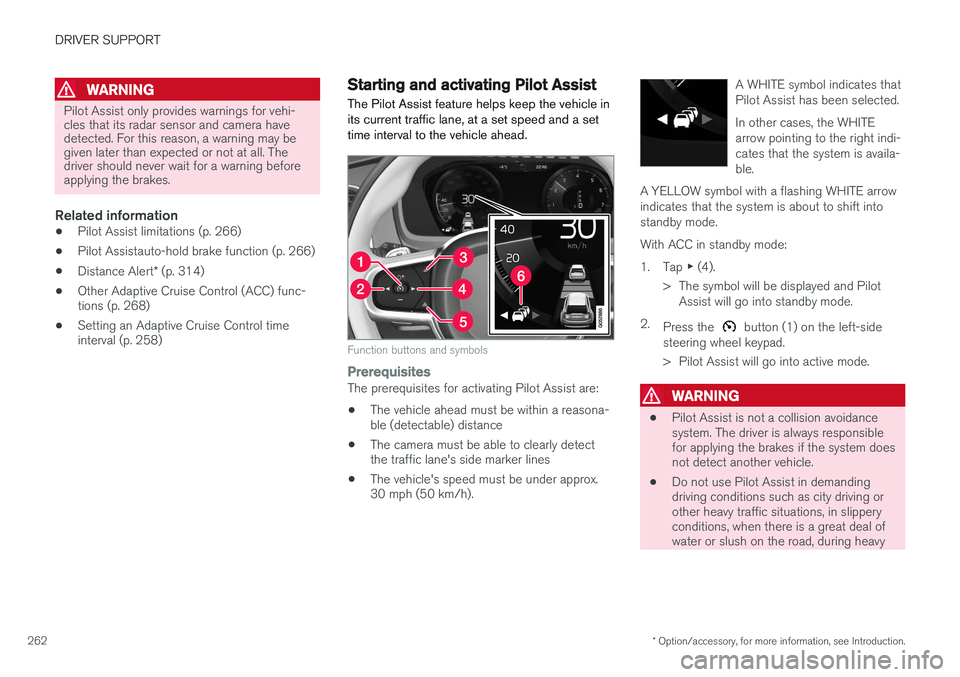
The Pilot Assist feature helps keep the vehicle in its current traffic lane, at a set speed and a settime interval to the vehicle ahead.
Function buttons and symbols
PrerequisitesThe prerequisites for activating Pilot Assist are:
• The vehicle ahead must be within a reasona- ble (detectable) distance
• The camera must be able to clearly detectthe traffic lane's side marker lines
• The vehicle's speed must be under approx.30 mph (50 km/h). A WHITE symbol indicates that Pilot Assist has been selected. In other cases, the WHITE arrow pointing to the right indi-cates that the system is availa-ble.
A YELLOW symbol with a flashing WHITE arrowindicates that the system is about to shift intostandby mode.
With ACC in standby mode: 1. Tap ▶ (4).
> The symbol will be displayed and Pilot Assist will go into standby mode.
2. Press the
button (1) on the left-side
steering wheel keypad.
> Pilot Assist will go into active mode.
WARNING
• Pilot Assist is not a collision avoidance system. The driver is always responsiblefor applying the brakes if the system doesnot detect another vehicle.
• Do not use Pilot Assist in demandingdriving conditions such as city driving orother heavy traffic situations, in slipperyconditions, when there is a great deal ofwater or slush on the road, during heavy