wheel VOLVO XC90 2015 Service Manual
[x] Cancel search | Manufacturer: VOLVO, Model Year: 2015, Model line: XC90, Model: VOLVO XC90 2015Pages: 570, PDF Size: 12.44 MB
Page 193 of 570
CLIMATE
* Option/accessory, for more information, see Introduction.191
NOTE
Air conditioning for the third row of seats*
cannot be activated if the main air condition- ing unit or the air conditioning for the second row of seats * is/are deactivated.
Activating/deactivating the third row air conditioning when the engine is started
The air conditioning for the optional third row of seats 7
can be set to start automatically when the
engine is started. 1. Tap
Settings in the center display's Top
view.
2. Tap
Climate.
3. Select
Third Row Climate On At Engine
Start to activate/deactivate the air condition-
ing for the third row of seats when the engine is started.
Related information
• Climate system controls in the center display (p. 180)
Turning seat heating
* on and off
The seats can be heated for added comfort in cold weather.
Activating/deactivating front seat heating
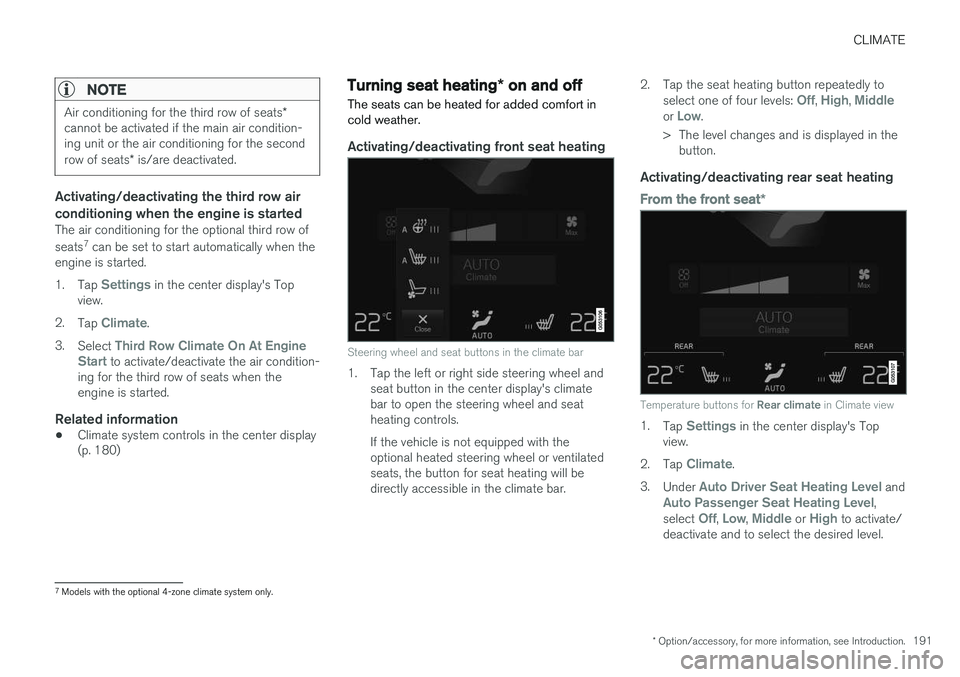
Steering wheel and seat buttons in the climate bar
1. Tap the left or right side steering wheel and seat button in the center display's climate bar to open the steering wheel and seatheating controls. If the vehicle is not equipped with the optional heated steering wheel or ventilatedseats, the button for seat heating will bedirectly accessible in the climate bar. 2. Tap the seat heating button repeatedly to
select one of four levels:
Off, High, Middleor Low.
> The level changes and is displayed in the button.
Activating/deactivating rear seat heating
From the front seat *
Temperature buttons for Rear climate in Climate view
1.
Tap Settings in the center display's Top
view.
2. Tap
Climate.
3. Under
Auto Driver Seat Heating Level andAuto Passenger Seat Heating Level,
select Off, Low, Middle or High to activate/
deactivate and to select the desired level.
7 Models with the optional 4-zone climate system only.
Page 195 of 570
CLIMATE
* Option/accessory, for more information, see Introduction.193
Turning front seat ventilation* on
and off
Seat ventilation can be used e.g., to help remove dampness from the seat occupant's clothing.
The ventilation system consists of fans in the seats and backrests that draw air through theseat upholstery. The cooling effect increases asthe air in the passenger compartment becomescooler. This feature can be activated when theengine is running and it monitors the seat's tem-perature, sunlight in the passenger compartmentand the ambient temperature.
Activating/deactivating front seat ventilation
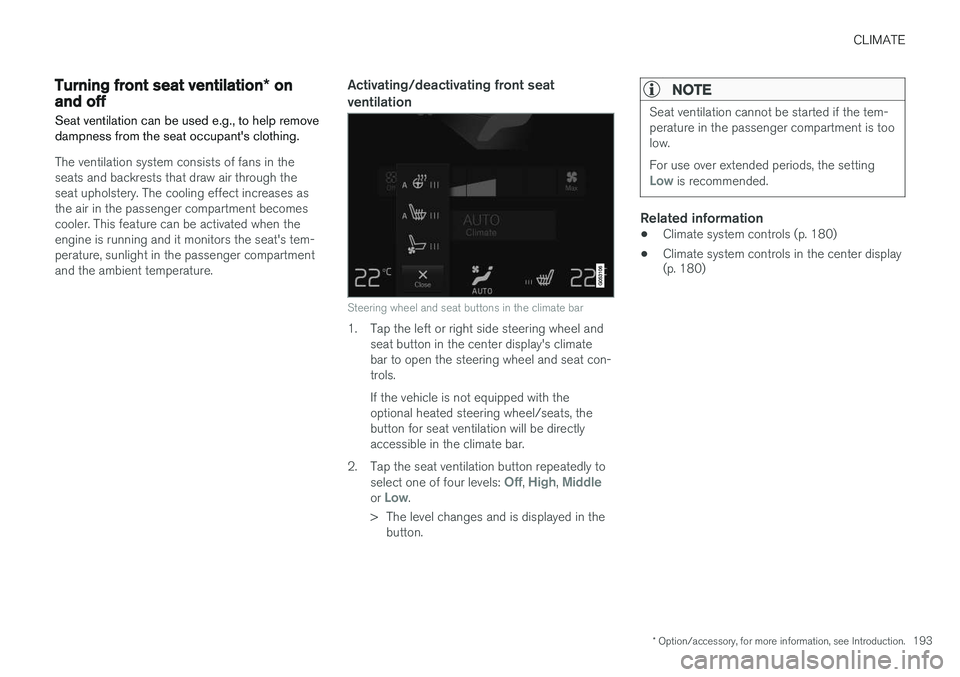
Steering wheel and seat buttons in the climate bar
1. Tap the left or right side steering wheel and seat button in the center display's climate bar to open the steering wheel and seat con-trols. If the vehicle is not equipped with the optional heated steering wheel/seats, thebutton for seat ventilation will be directlyaccessible in the climate bar.
2. Tap the seat ventilation button repeatedly to select one of four levels:
Off, High, Middleor Low.
> The level changes and is displayed in the button.
NOTE
Seat ventilation cannot be started if the tem- perature in the passenger compartment is toolow. For use over extended periods, the setting
Low is recommended.
Related information
• Climate system controls (p. 180)
• Climate system controls in the center display (p. 180)
Page 196 of 570
CLIMATE
* Option/accessory, for more information, see Introduction.
194
Air distribution
The incoming air is distributed through a number of different vents in the passenger compartment.
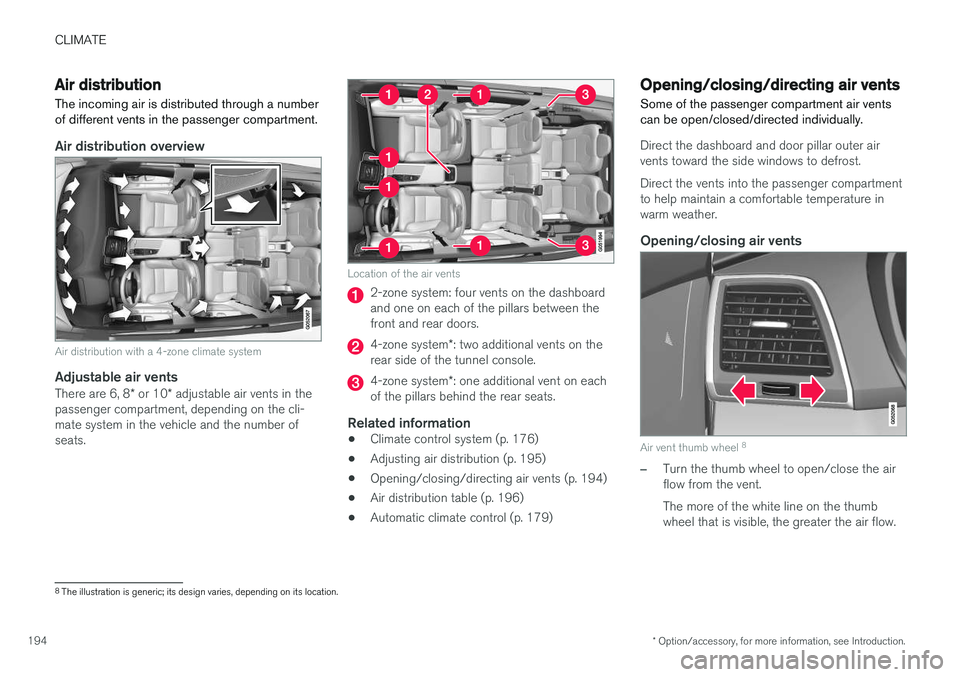
Air distribution overview
Air distribution with a 4-zone climate system
Adjustable air vents
There are 6, 8 * or 10 * adjustable air vents in the
passenger compartment, depending on the cli- mate system in the vehicle and the number ofseats.
Location of the air vents
2-zone system: four vents on the dashboard and one on each of the pillars between thefront and rear doors.
4-zone system *: two additional vents on the
rear side of the tunnel console.
4-zone system *: one additional vent on each
of the pillars behind the rear seats.
Related information
• Climate control system (p. 176)
• Adjusting air distribution (p. 195)
• Opening/closing/directing air vents (p. 194)
• Air distribution table (p. 196)
• Automatic climate control (p. 179)
Opening/closing/directing air vents
Some of the passenger compartment air vents can be open/closed/directed individually.
Direct the dashboard and door pillar outer air vents toward the side windows to defrost. Direct the vents into the passenger compartment to help maintain a comfortable temperature inwarm weather.
Opening/closing air vents
Air vent thumb wheel 8
–Turn the thumb wheel to open/close the air flow from the vent. The more of the white line on the thumb wheel that is visible, the greater the air flow.
8
The illustration is generic; its design varies, depending on its location.
Page 202 of 570
LOADING AND STORAGE
* Option/accessory, for more information, see Introduction.
200
Cargo space
The vehicle has flexible cargo capacity that makes it possible to load and secure largeobjects.
By folding down the backrests in the second and third rows * of seats, the cargo capacity of the
vehicle increases considerably. To make loading easier, the rear section of the vehicle can beraised and lowered using the pneumatic suspen- sion *. Use the load anchoring eyelets or the gro-
cery bag holder to secure objects and the cargo compartment cover helps conceal the load. The spare tire, jack and tools can be found under the cargo compartment's floor.
Related information
• Loading (p. 207)
• Cargo compartment cover
* (p. 213)
• Cargo net (p. 209)
• Grocery bag holder (p. 209)
• Load anchoring eyelets (p. 212)
• Steel cargo grid
* (p. 211)
Passenger compartment storage spaces
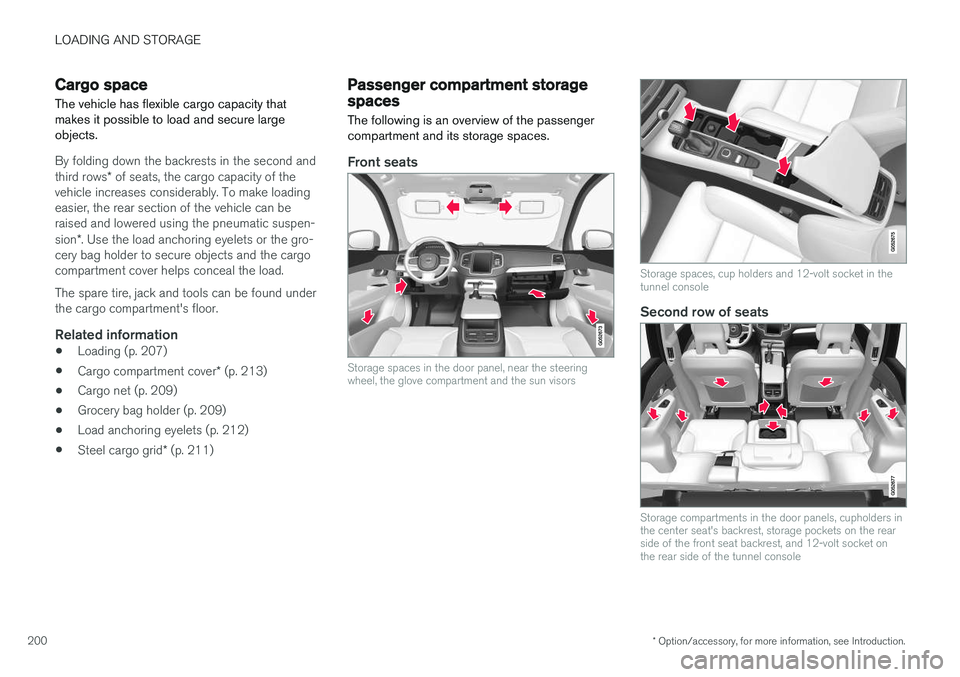
The following is an overview of the passenger compartment and its storage spaces.
Front seats
Storage spaces in the door panel, near the steering wheel, the glove compartment and the sun visors
Storage spaces, cup holders and 12-volt socket in the tunnel console
Second row of seats
Storage compartments in the door panels, cupholders in the center seat's backrest, storage pockets on the rearside of the front seat backrest, and 12-volt socket onthe rear side of the tunnel console
Page 251 of 570
DRIVER SUPPORT
249
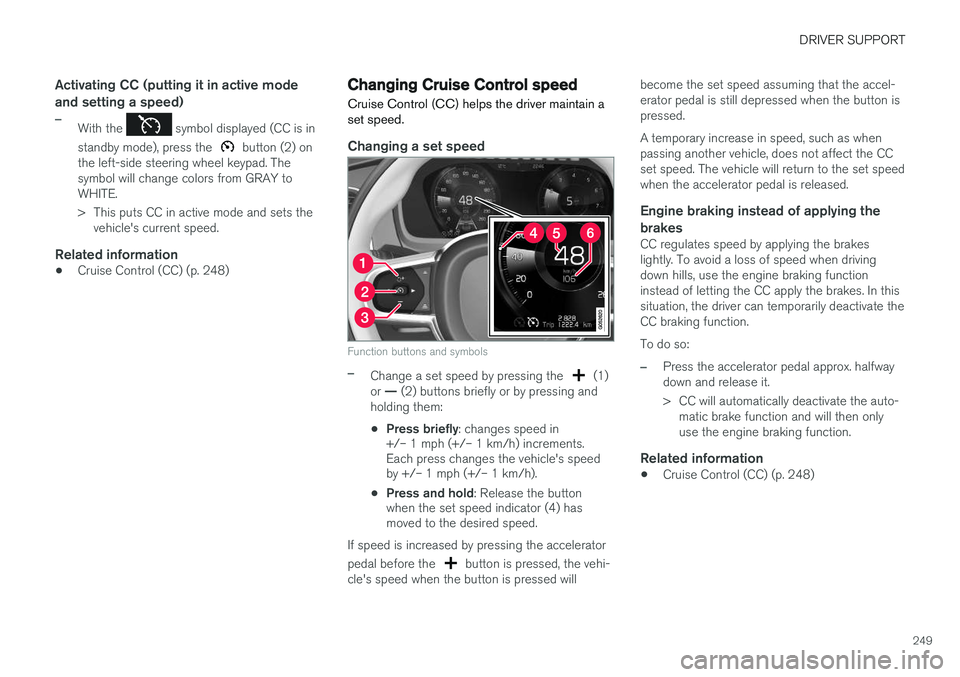
Activating CC (putting it in active mode and setting a speed)
–With the symbol displayed (CC is in
standby mode), press the
button (2) on
the left-side steering wheel keypad. The symbol will change colors from GRAY toWHITE.
> This puts CC in active mode and sets the vehicle's current speed.
Related information
• Cruise Control (CC) (p. 248)
Changing Cruise Control speed
Cruise Control (CC) helps the driver maintain a set speed.
Changing a set speed
Function buttons and symbols
–Change a set speed by pressing the (1)
or
Page 252 of 570
DRIVER SUPPORT
250
Deactivating/resuming Cruise Control (CC) Cruise Control (CC) can be temporarily deacti- vated and put in standby mode.
Deactivating and putting CC in standby
mode
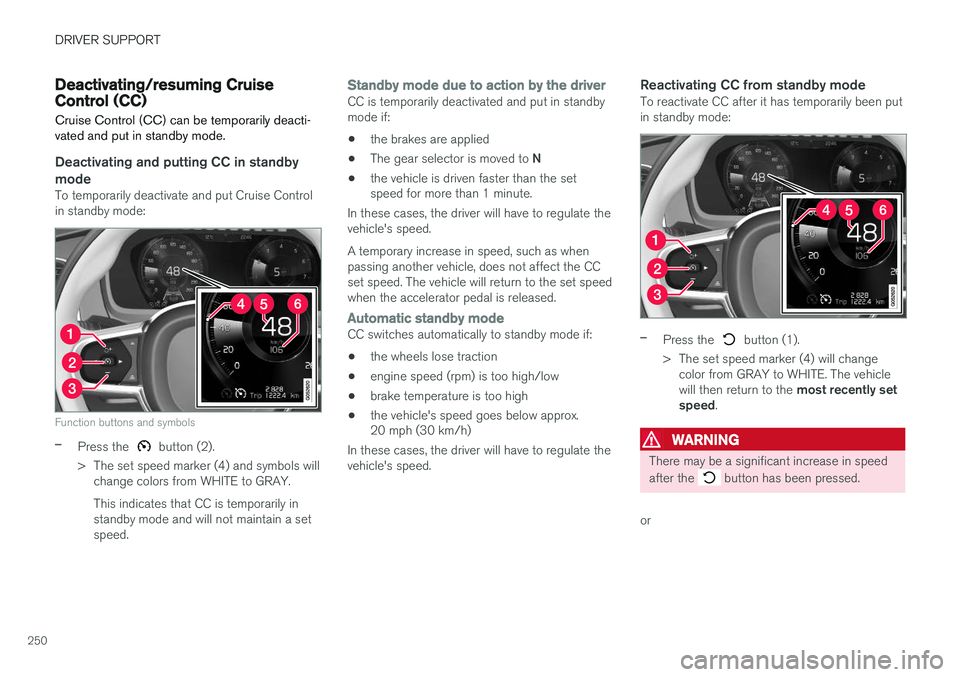
To temporarily deactivate and put Cruise Control in standby mode:
Function buttons and symbols
–Press the button (2).
> The set speed marker (4) and symbols will change colors from WHITE to GRAY. This indicates that CC is temporarily in standby mode and will not maintain a setspeed.
Standby mode due to action by the driverCC is temporarily deactivated and put in standby mode if:
• the brakes are applied
• The gear selector is moved to
N
• the vehicle is driven faster than the set speed for more than 1 minute.
In these cases, the driver will have to regulate the vehicle's speed. A temporary increase in speed, such as when passing another vehicle, does not affect the CCset speed. The vehicle will return to the set speedwhen the accelerator pedal is released.
Automatic standby modeCC switches automatically to standby mode if:
• the wheels lose traction
• engine speed (rpm) is too high/low
• brake temperature is too high
• the vehicle's speed goes below approx. 20 mph (30 km/h)
In these cases, the driver will have to regulate the vehicle's speed.
Reactivating CC from standby modeTo reactivate CC after it has temporarily been putin standby mode:
–Press the button (1).
> The set speed marker (4) will change color from GRAY to WHITE. The vehicle will then return to the most recently set
speed .
WARNING
There may be a significant increase in speed after the
button has been pressed.
or
Page 253 of 570
DRIVER SUPPORT
251
–Press the button (2).
> The set speed marker (4) and symbols will change colors from GRAY to WHITE. CC will then set and maintain the vehicle's current speed.
Related information
•Cruise Control (CC) (p. 248)
• Starting and activating Cruise Control (p. 248)
Turning Cruise Control off
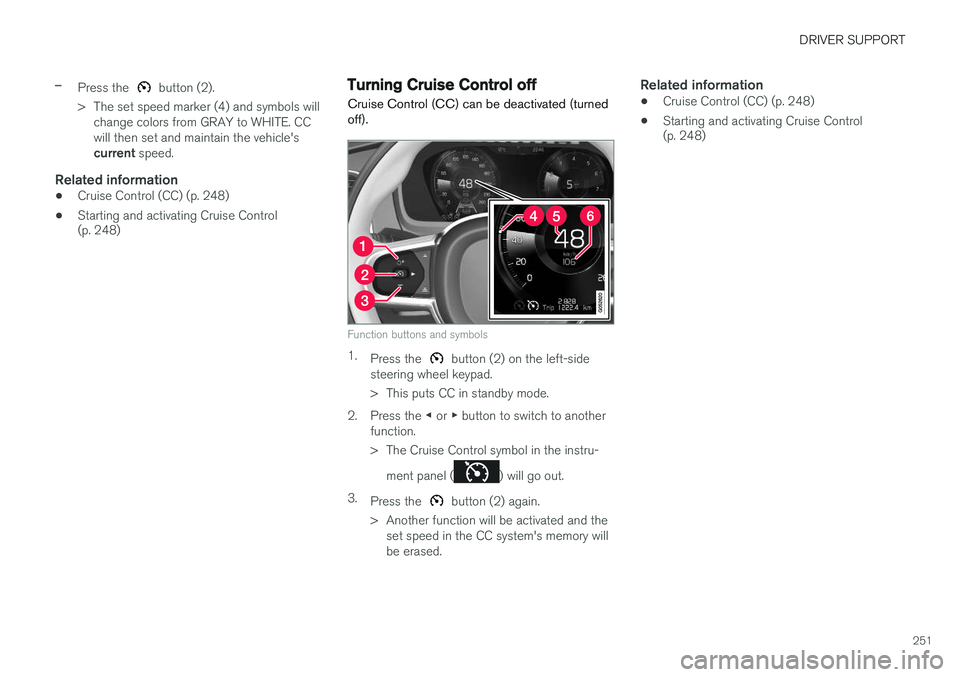
Cruise Control (CC) can be deactivated (turned off).
Function buttons and symbols
1. Press the button (2) on the left-side
steering wheel keypad.
> This puts CC in standby mode.
2. Press the ◀ or ▶ button to switch to another
function.
> The Cruise Control symbol in the instru-
ment panel (
) will go out.
3. Press the
button (2) again.
> Another function will be activated and the set speed in the CC system's memory will be erased.
Related information
• Cruise Control (CC) (p. 248)
• Starting and activating Cruise Control (p. 248)
Page 257 of 570
DRIVER SUPPORT
* Option/accessory, for more information, see Introduction.255
•
The driver's seat belt must be buckled and the driver's door must be closed.
• There must be a vehicle ahead (a target vehi-cle) or your vehicle's current speed must beat least 10 mph (15 km/h).
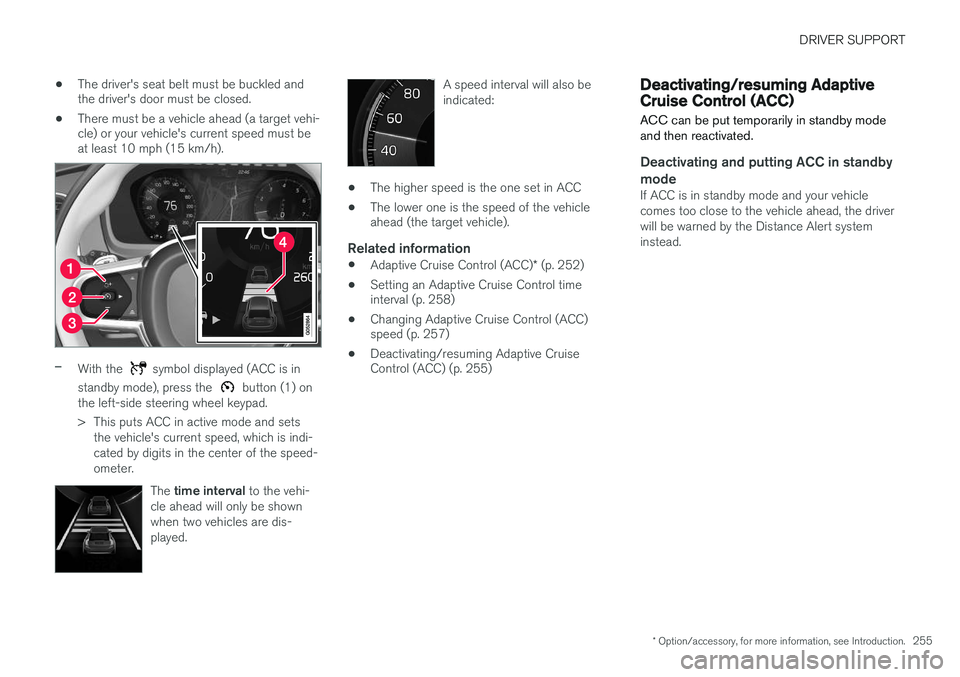
–With the symbol displayed (ACC is in
standby mode), press the
button (1) on
the left-side steering wheel keypad.
> This puts ACC in active mode and sets the vehicle's current speed, which is indi- cated by digits in the center of the speed-ometer.
The time interval to the vehi-
cle ahead will only be shownwhen two vehicles are dis-played.
A speed interval will also be indicated:
• The higher speed is the one set in ACC
• The lower one is the speed of the vehicle ahead (the target vehicle).
Related information
•
Adaptive Cruise Control (ACC)
* (p. 252)
• Setting an Adaptive Cruise Control timeinterval (p. 258)
• Changing Adaptive Cruise Control (ACC)speed (p. 257)
• Deactivating/resuming Adaptive CruiseControl (ACC) (p. 255)
Deactivating/resuming Adaptive Cruise Control (ACC)
ACC can be put temporarily in standby mode and then reactivated.
Deactivating and putting ACC in standby mode
If ACC is in standby mode and your vehicle comes too close to the vehicle ahead, the driverwill be warned by the Distance Alert systeminstead.
Page 258 of 570

DRIVER SUPPORT
* Option/accessory, for more information, see Introduction.
256 To temporarily deactivate and put Adaptive Cruise Control in standby mode:
Function buttons and symbols
–Press the button (2).
> The
symbol in the instrument panel
will change colors from WHITE to GRAY and the set speed in the center of thespeedometer will change from BEIGE toGRAY.
Standby mode due to action by the driverACC is temporarily deactivated and put in standby mode if:
• the brakes are applied
• The gear selector is moved to
N
• the vehicle is driven faster than the set speed for more than 1 minute. In these cases, the driver will have to regulate the vehicle's speed. A temporary increase in speed, such as when passing another vehicle, does not affect the ACCset speed. The vehicle will return to the set speedwhen the accelerator pedal is released.
Automatic standby modeACC interacts with other systems, such as Electronic Stability Control. If any of these othersystems are not functioning properly, ACC willturn off automatically.
WARNING
If this happens, the driver will be alerted by an audible signal and a message in the instru-ment panel. The driver will have to adapt thevehicle's speed, apply the brakes when nec-essary and keep a safe distance to the vehicleahead.
ACC switches automatically to standby mode if: • the vehicle's speed goes below approx. 3 mph (5 km/h) and ACC cannot determineif the vehicle ahead is stationary or is anobject such as a speed bump, etc
• the vehicle's speed goes below approx.3 mph (5 km/h) and the vehicle aheadchanges lanes or turns so that ACC nolonger has a target vehicle to follow
• the driver opens the door
• the driver unbuckles the seat belt •
engine speed (rpm) is too high/low
• the wheels lose traction
• the parking brake is applied
• the stability system's
ESC Sport Mode is
activated
• the
Off Road drive mode is selected
• The radar sensor is covered by e.g., wet snow or if heavy rain interferes with radar waves
Reactivating ACC from standby modeTo reactivate ACC after it has temporarily been put in standby mode:
–Press the button (1).
> The vehicle will then return to the most
recently set speed .
WARNING
There may be a significant increase in speed after the
button has been pressed.
Related information
•Adaptive Cruise Control (ACC)
* (p. 252)
• Starting and activating Adaptive Cruise Control (ACC) (p. 254)
• Changing Adaptive Cruise Control (ACC)speed (p. 257)
• Setting an Adaptive Cruise Control timeinterval (p. 258)
Page 264 of 570
DRIVER SUPPORT
* Option/accessory, for more information, see Introduction.
262
WARNING
Pilot Assist only provides warnings for vehi- cles that its radar sensor and camera havedetected. For this reason, a warning may begiven later than expected or not at all. Thedriver should never wait for a warning beforeapplying the brakes.
Related information
• Pilot Assist limitations (p. 266)
• Pilot Assistauto-hold brake function (p. 266)
• Distance Alert
* (p. 314)
• Other Adaptive Cruise Control (ACC) func- tions (p. 268)
• Setting an Adaptive Cruise Control timeinterval (p. 258)
Starting and activating Pilot Assist
The Pilot Assist feature helps keep the vehicle in its current traffic lane, at a set speed and a settime interval to the vehicle ahead.
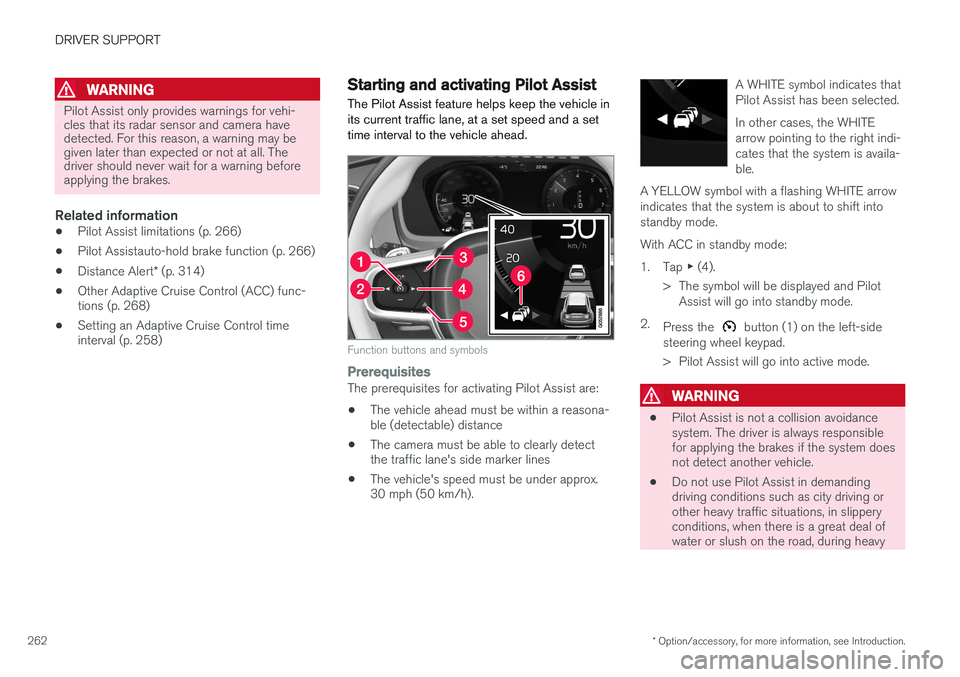
Function buttons and symbols
PrerequisitesThe prerequisites for activating Pilot Assist are:
• The vehicle ahead must be within a reasona- ble (detectable) distance
• The camera must be able to clearly detectthe traffic lane's side marker lines
• The vehicle's speed must be under approx.30 mph (50 km/h). A WHITE symbol indicates that Pilot Assist has been selected. In other cases, the WHITE arrow pointing to the right indi-cates that the system is availa-ble.
A YELLOW symbol with a flashing WHITE arrowindicates that the system is about to shift intostandby mode.
With ACC in standby mode: 1. Tap ▶ (4).
> The symbol will be displayed and Pilot Assist will go into standby mode.
2. Press the
button (1) on the left-side
steering wheel keypad.
> Pilot Assist will go into active mode.
WARNING
• Pilot Assist is not a collision avoidance system. The driver is always responsiblefor applying the brakes if the system doesnot detect another vehicle.
• Do not use Pilot Assist in demandingdriving conditions such as city driving orother heavy traffic situations, in slipperyconditions, when there is a great deal ofwater or slush on the road, during heavy