237 VOLVO XC90 2015 Owners Manual
[x] Cancel search | Manufacturer: VOLVO, Model Year: 2015, Model line: XC90, Model: VOLVO XC90 2015Pages: 570, PDF Size: 12.44 MB
Page 7 of 570

5
Air distribution table196
LOADING AND STORAGE
Cargo space200
Passenger compartment storage spaces 200
Using the glove compartment 201
Tunnel console 202
Sun visors 203
Electrical sockets 204
Loading 207
Grocery bag holder 209
Cargo net 209
Steel cargo grid *
211
Load anchoring eyelets 212
Cargo compartment cover *
213
LOCKS AND ALARM
Locks and remote keys
216
Alarm 216
Automatically arming/disarming the alarm 218
Deactivating the alarm without afunctioning remote key 218
Child safety locks 218
Antenna locations for the start andlock system 220
Start and lock system type designations 220
Immobilizer 221
Changing the remote key's battery 222
Remote key's range 224
Remote key 224
Restricted key *
226
Detachable key blade 227
Foot movement tailgate operation *
228
Locking and unlocking confirmation 229
Locking/unlocking from inside thevehicle 231
Locking/unlocking from outside thevehicle 232
Locking/unlocking the tailgate 233
Power tailgate *
235
Locking/unlocking with the detacha-ble key blade 237
Page 230 of 570

LOCKS AND ALARM
* Option/accessory, for more information, see Introduction.
228
Detaching the key blade
Hold the remote key with the front side
(with the Volvo symbol) toward you and move the button on lower edge of the key near thekey ring to the right. Slide the front coverslightly upward.
The cover will loosen and can be
removed from the key.
Remove the key blade.
After use, press the key blade back into
its position in the key, put the cover back on the key and slide it into position.
> A click indicates that the cover is correctly in place.
Related information
• Locking/unlocking with the detachable key blade (p. 237)
• Child safety locks (p. 218)
Foot movement tailgate operation
*
The foot movement sensor * makes it easy and
convenient to open or close the tailgate without using your hands. 7
Foot movement sensor under the rear bumper
8
NOTE
One of the remote keys must be in your pos- session when you are behind the vehicle inorder to activate the foot movement sensor,even if the tailgate is already unlocked. This isdone to help prevent the sensor from inadver-tently opening the tailgate, for example, in acar wash.
7
Models equipped with the optional power tailgate only.
8 If the vehicle is equipped with a skid plate *, the sensor is located farther to the left under the bumper.
Page 239 of 570
LOCKS AND ALARM
* Option/accessory, for more information, see Introduction.237
Related information
•Remote key's range (p. 224)
• Locking/unlocking from outside the vehicle (p. 232)
• Foot movement tailgate operation
* (p. 228)
Locking/unlocking with the detachable key blade
The detachable key blade can be used to e.g., unlock the driver's door from the outside if, forexample, the remote key's battery is weak.
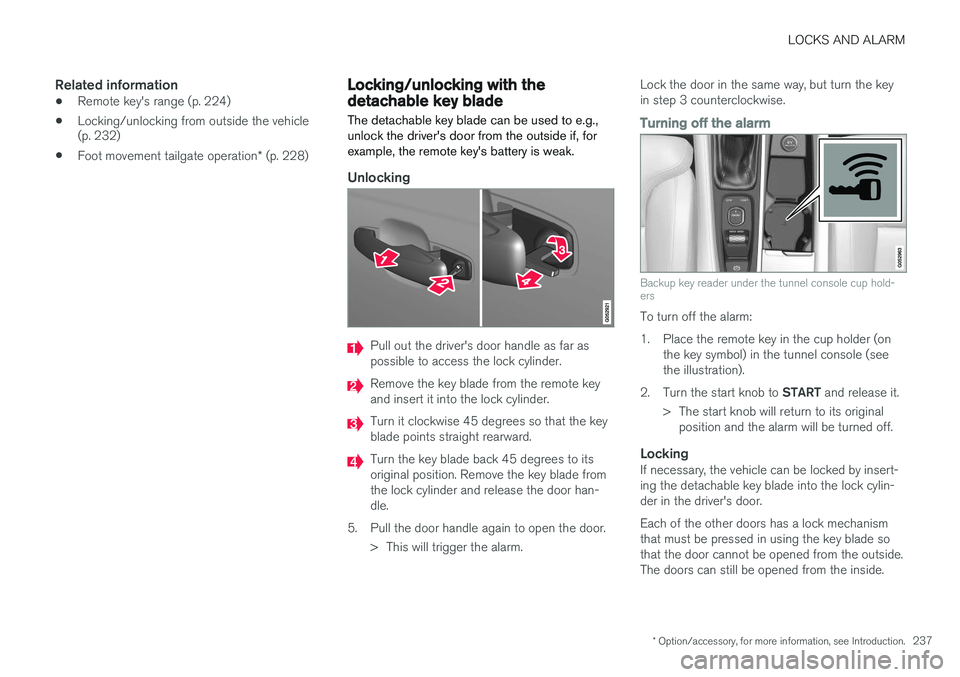
Unlocking
Pull out the driver's door handle as far as possible to access the lock cylinder.
Remove the key blade from the remote key and insert it into the lock cylinder.
Turn it clockwise 45 degrees so that the key blade points straight rearward.
Turn the key blade back 45 degrees to its original position. Remove the key blade fromthe lock cylinder and release the door han-dle.
5. Pull the door handle again to open the door. > This will trigger the alarm. Lock the door in the same way, but turn the keyin step 3 counterclockwise.
Turning off the alarm
Backup key reader under the tunnel console cup hold- ers
To turn off the alarm:
1. Place the remote key in the cup holder (on
the key symbol) in the tunnel console (see the illustration).
2. Turn the start knob to START and release it.
> The start knob will return to its original position and the alarm will be turned off.
LockingIf necessary, the vehicle can be locked by insert-ing the detachable key blade into the lock cylin-der in the driver's door. Each of the other doors has a lock mechanism that must be pressed in using the key blade sothat the door cannot be opened from the outside.The doors can still be opened from the inside.
Page 559 of 570

557
blower 183
center display controls 180
Electronic Climate Control 180
introduction 176, 180
passenger compartment filter 178
rear controls 180, 182
recirculation 186
refrigerant 541
service 495
setting the temperature 184
voice commands 122
Clock 116
Cold weather driving 342
Collision warning system 274
Compass in rearview mirror 136 calibrate 137
Connected service booking 491
Convertible seats 69
Coolant 542
copyright 462
Corrosion protection 529
Courtesy lighting 146
Crash event data 26
Crash mode 81, 82
Cross Traffic Alert 318, 319, 320, 322
Cruise control 248, 249, 250, 251 adaptive 252, 254, 255, 257, 258, 259 , 268 , 269 , 270 , 271 , 272
Curb weight 471, 539
D
Daytime running lights 138, 140 Defroster rear window and mirrors 187
Destination save 441
Detachable key blade 227, 237
Digital owner's manual 52, 53
Dimensions 537
Disconnecting the front passenger
Page 561 of 570
559
Head restraints, rear seat 167
Head-up display 117
Heated front seats 191
Heated oxygen sensors 349
Heated steering wheel 189
High beam bulb, replacing 513
High beams 140
active 141
Hill Descent Control 334
Hill Start Assist (HSA) 335
Hoisting the vehicle 516 HomeLink ®
Wireless Control System 94, 95
Home safe lighting 146
Hood, opening/closing 518
Horn, Keypad, Paddles, Signal 157
I
ID, Volvo 27
Ignition modes 355
Immobilizer (start inhibitor) 221
Indicator lights 134
Infant seats 67
Inflatable Curtain 87
Inflation pressure 473
Inflation pressure table 545
Information lights 134
Infotainment 412
Infotainment (Infotainment system) 376
Infotainment system 380, 381, 382 CD player 394
cell phone 387
general sound settings 376
Gracenote 399
introduction 376
media player 393, 395
media player sound settings 398
media search 397
radio 377
searching for radio stations 378
sound settings 376, 398
type approval 408
video 399
voice control 120
Inspection readiness 488
Instrument lighting 139
Instrument overview 98
Intellisafe 16
Interior Air Quality System 178
Interior lighting 146Internet connection 401 applications (apps) 403
bluetooth settings 404
booking service 491
establishing a connection 402
troubleshooting 405
ISOFIX/LATCH anchors 72 Itinerary Guidance points 444
J
Jack 476
location of 476, 478
Jump starting 345, 350
K
Key remote 110, 224
Key blade 227, 237
Keys 226