compas VOLVO XC90 2015 Owners Manual
[x] Cancel search | Manufacturer: VOLVO, Model Year: 2015, Model line: XC90, Model: VOLVO XC90 2015Pages: 570, PDF Size: 12.44 MB
Page 5 of 570

3
Starting or moving a vehicle in safety mode82
Safety systems 83
Airbag system 83
Driver/passenger side airbags 84
Inflatable curtains 87
Side impact airbags 88
Rollover protection system 89
Whiplash protection system 89
INSTRUMENTS AND CONTROLS
Trip computer92
Displaying trip computer information 92
Displaying trip statistics 94
HomeLink ®
Wireless Control System *94
Programming the HomeLink ®
Wire-
less Control System * 95
Instruments and controls 98
Adjusting the power door mirrors 100
Laminated panoramic roof *
101
Operating the laminated panoramic roof *
102
Power windows 104
Operating the power windows 104
Rearview mirror 105
Using sun shades 106
Settings view 106
Categories in Settings view 107
Changing system settings in Set- tings view 109
Linking a remote key to a driver profile 110
Changing settings in apps 111
Resetting the settings view 111
Resetting user data when the vehiclechanges owners 112
Driver profiles 112
Editing a driver profile 114
Importing/exporting a driver profile from/to a USB flash drive115
Ambient temperature sensor 116
Clock 116
Head-up display (HUD) *
117
Voice control 120
Using voice commands 121
Voice control for cell phones 121
Voice control for radio and media 122
Climate system voice commands 122
Navigation system voice commands 124
Voice control settings 125
Indicator symbols in the instrument panel 126
Instrument panel 128
Instrument panel App menu 129
Instrument panel licenses 130
Warning symbols in the instrument panel 134
Compass 136
Calibrating the compass 137
Lighting panel and controls 138
Low beam headlights 139
Daytime Running Lights (DRL) 140
High and low beam headlights 140
Active Bending Lights *
142
Page 18 of 570

INTRODUCTION
* Option/accessory, for more information, see Introduction.
16
Owner's manual and the environment
The wood pulp in Volvo's printed owner's infor- mation comes from FSC ®
(Forest Stewardship
Council ®
) certified forests and other responsible
sources.
FSC ®
The symbol above indicates that the wood pulp is FSC
®
certified.
Related information
• Volvo and the environment (p. 15)
IntelliSafe
—driver support
IntelliSafe is Volvo's philosophy regarding vehi- cle safety. It encompasses a number of systems,both standard and optional, that are designed tohelp make driving and traveling in a Volvo safer.
SupportSystems that help make driving safer are an inte- gral part of IntelliSafe. These include optional features such as Adaptive Cruise Control * that
helps maintain a set distance to a vehicle ahead,Park Assist Pilot *, which assists in parking the
vehicle, Cross Traffic Alert *, Blind Spot
Information *, etc.
Accident preventionSystems such as City Safety are designed to automatically apply the brakes in situations inwhich the driver does not have time to react. Lane Keeping Aid * alerts the drive if the vehicle
inadvertently crosses a lane's/road's side marker line.
ProtectionThe vehicle is equipped with e.g., seat belt pre-tensioners that pull the seat belts taut in criticalsituations when there is a collision risk andnumerous airbags designed to help provide cush-ioning if certain types of collisions should occur.
Related information
• Adaptive Cruise Control (ACC)
* (p. 252)
• Park Assist Pilot (PAP)
* (p. 301) •
Airbag system (p. 83)
• High and low beam headlights (p. 140)
• Cross Traffic Alert (CTA)
* (p. 318)
• Blind Spot Information (BLIS)
* (p. 315)
• City Safety
™ (p. 273)
• Driving lane assistance (p. 323)
• Rollover protection system (p. 89)
• Seat belts (p. 58)
• General safety information (p. 56)
Page 130 of 570

INSTRUMENTS AND CONTROLS
128
Related information
•Instrument panel (p. 128)
• Warning symbols in the instrument panel (p. 134)
• Door and seat belt reminders (p. 61)
Instrument panel
The instrument panel displays vehicle- and driv- ing-related information.
Gauges, indicators and symbols in the
instrument panel
Left side
• Speedometer
• Trip odometer
• Odometer
• Cruise control/speed limiter information
• Road sign information
Center
•
Indicator and warning symbols
• Ambient temperature sensor
• Clock •
Messages (and in certain cases also graph- ics)
• Distance to empty tank
• Door and seat belt status
• Compass and altimeter
• Media player
• Navigation system map
• Cell phone
• Voice control
Right side
• Tachometer
• Fuel gauge
• Gear shift indicator
• Current driving mode
• ECO gauge
• Start/Stop function's status
• Current fuel consumption
• App menu (activated using the right-side steering wheel keypad)
Page 138 of 570
INSTRUMENTS AND CONTROLS
136
WARNING
•If the fluid level is below the
MIN mark in
the brake fluid reservoir or if a warning message is displayed in the text window: DO NOT DRIVE . Have the vehicle towed
to a trained and qualified Volvo service technician and have the brake systeminspected.
• If the
BRAKE and ABS symbols illumi-
nate at the same time, there is a risk ofreduced vehicle stability.
Related information
• Instrument panel (p. 128)
• Indicator symbols in the instrument panel(p. 126)
Compass
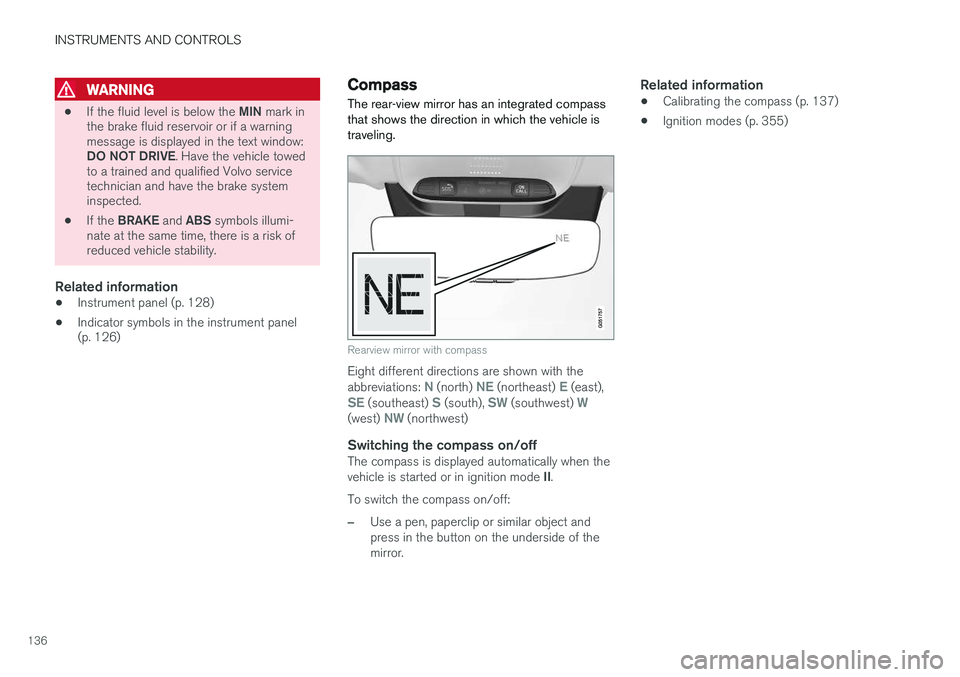
The rear-view mirror has an integrated compass that shows the direction in which the vehicle istraveling.
Rearview mirror with compass
Eight different directions are shown with the abbreviations: N (north) NE (northeast) E (east),SE (southeast) S (south), SW (southwest) W(west) NW (northwest)
Switching the compass on/offThe compass is displayed automatically when the vehicle is started or in ignition mode II.
To switch the compass on/off:
–Use a pen, paperclip or similar object and press in the button on the underside of themirror.
Related information
• Calibrating the compass (p. 137)
• Ignition modes (p. 355)
Page 139 of 570
INSTRUMENTS AND CONTROLS
* Option/accessory, for more information, see Introduction.137
Calibrating the compass
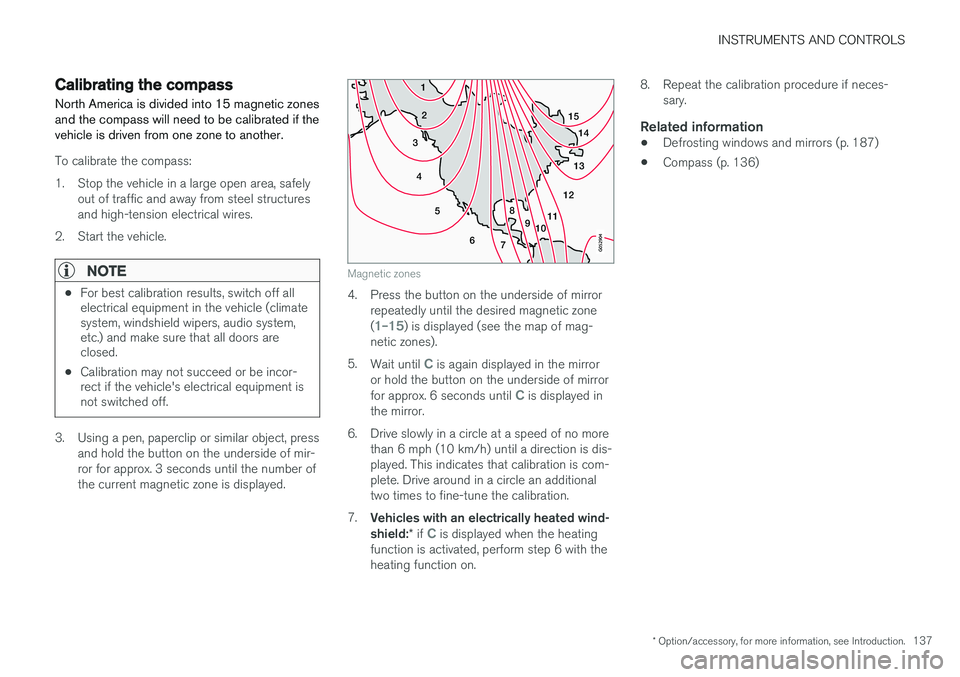
North America is divided into 15 magnetic zones and the compass will need to be calibrated if thevehicle is driven from one zone to another.
To calibrate the compass:
1. Stop the vehicle in a large open area, safely out of traffic and away from steel structures and high-tension electrical wires.
2. Start the vehicle.
NOTE
• For best calibration results, switch off all electrical equipment in the vehicle (climatesystem, windshield wipers, audio system,etc.) and make sure that all doors areclosed.
• Calibration may not succeed or be incor-rect if the vehicle's electrical equipment isnot switched off.
3. Using a pen, paperclip or similar object, press
and hold the button on the underside of mir- ror for approx. 3 seconds until the number ofthe current magnetic zone is displayed.
15
14
13
12
11
9
8
7
6
5
4
3
2
1
10
Magnetic zones
4. Press the button on the underside of mirrorrepeatedly until the desired magnetic zone (
1
Page 362 of 570
STARTING AND DRIVING
360
Selecting a drive mode
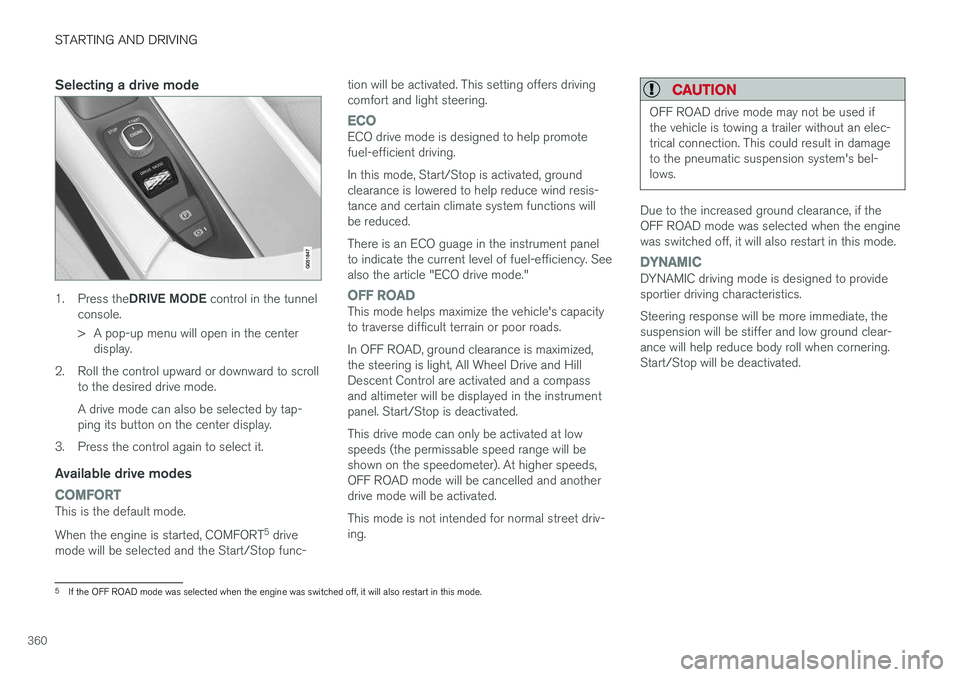
1.Press the DRIVE MODE control in the tunnel
console.
> A pop-up menu will open in the center display.
2. Roll the control upward or downward to scroll to the desired drive mode. A drive mode can also be selected by tap- ping its button on the center display.
3. Press the control again to select it.
Available drive modes
COMFORTThis is the default mode. When the engine is started, COMFORT 5
drive
mode will be selected and the Start/Stop func- tion will be activated. This setting offers driving comfort and light steering.
ECOECO drive mode is designed to help promote fuel-efficient driving. In this mode, Start/Stop is activated, ground clearance is lowered to help reduce wind resis-tance and certain climate system functions willbe reduced. There is an ECO guage in the instrument panel to indicate the current level of fuel-efficiency. Seealso the article "ECO drive mode."
OFF ROADThis mode helps maximize the vehicle's capacity to traverse difficult terrain or poor roads. In OFF ROAD, ground clearance is maximized, the steering is light, All Wheel Drive and HillDescent Control are activated and a compassand altimeter will be displayed in the instrumentpanel. Start/Stop is deactivated. This drive mode can only be activated at low speeds (the permissable speed range will beshown on the speedometer). At higher speeds,OFF ROAD mode will be cancelled and anotherdrive mode will be activated. This mode is not intended for normal street driv- ing.
CAUTION
OFF ROAD drive mode may not be used if the vehicle is towing a trailer without an elec-trical connection. This could result in damageto the pneumatic suspension system's bel-lows.
Due to the increased ground clearance, if the OFF ROAD mode was selected when the enginewas switched off, it will also restart in this mode.
DYNAMICDYNAMIC driving mode is designed to provide sportier driving characteristics. Steering response will be more immediate, the suspension will be stiffer and low ground clear-ance will help reduce body roll when cornering.Start/Stop will be deactivated.
5
If the OFF ROAD mode was selected when the engine was switched off, it will also restart in this mode.
Page 419 of 570
VOLVO ON CALL WITH SENSUS CONNECT *
* Option/accessory, for more information, see Introduction.
417
Locating the vehicleThe vehicle's location is shown on a map and directions to the vehicle can be provided. There isalso a digital compass to help show the ownerthe right direction. When you are within approx.100 yards/meters of the vehicle, you can activateits horn and turn signals to help locate it.
The vehicle's instrument panelThis function provides information such as: thefuel level, range on the remaining fuel, averagefuel consumption, average speed and odometer/trip odometer readings.
Vehicle "checkup"The mobile app monitors the vehicle's conditionand provides information about bulbs and the lev-els of brake fluid, coolant and engine oil.
Driving logbookDetailed information about each trip made duringthe past 40 days can be saved and downloaded.All or part of this information can be exportedfrom the mobile app to a spreadsheet format andsent to an email address. This is very useful fore.g., keeping track of business-related driving. This function can be deactivated, in which case the vehicle will not transmit logbook informationat the end of each trip.
Vehicle informationBasic information such as model, license platenumber and VIN number are readily accessible.
Theft notificationIf the vehicle's alarm is triggered, the owner willbe informed via his/her cell phone.
Remote door unlockThe status of all doors and windows is provided.The owner can lock/unlock the vehicle fromanother location but for security reasons, theapp's password is always required before thevehicle can be unlocked.
Engine remote start (ERS)*1ERS makes it possible to remotely start theengine using the remote key to enable the cli-mate system to cool or heat the passenger com-partment before driving. When the engine starts, the climate and infotain- ment systems will restart using the same settingsas when the engine was switched off. You can choose to let the engine run for between 1 and 15 minutes before it automati-cally switches off again. After 2 ERS starts, theengine must be started in the normal way beforeERS can be used again.
WARNING
Keep the following in mind before using ERS:
• The vehicle should be in view.
• The vehicle should be unoccupied.
• The vehicle must not be parked indoors or in an enclosed area. Exhaust fumes areharmful to the health.
NOTE
Always observe applicable state, province and/or local laws regarding engine idlingwhen using ERS.
Related information
•Volvo On Call convenience services (p. 416)
• Volvo On Call (VOC)
* (p. 414)
• Volvo ID (p. 27)
• Starting the engine (p. 356)
• Volvo On Call (VOC) functions (p. 415)
1
Certain models only.
Page 431 of 570
NAVIGATION*
* Option/accessory, for more information, see Introduction.
429
Button for toggling between 2D/3D map views
Compass and button for north at the top of the map/current direction at the top of themap
Related information
•Sensus Navigation (p. 428)
• Using the center display (p. 46)
• Center display overview (p. 29)
Common navigation system features
The most common features of the navigation system are described here.
• Where am I?
• Direction at the top of the map/North at the top of the map
• 2D for 3D view
• Zoom
• Scroll
• Find the vehicle symbol on the map
• Change the headers displayed
• Go back to the map view
• "Wrong" language in illustrations
Where am I?Where is the vehicle's current location?
• Click the vehicle symbol (blue triangle) forinformation directly on the map.
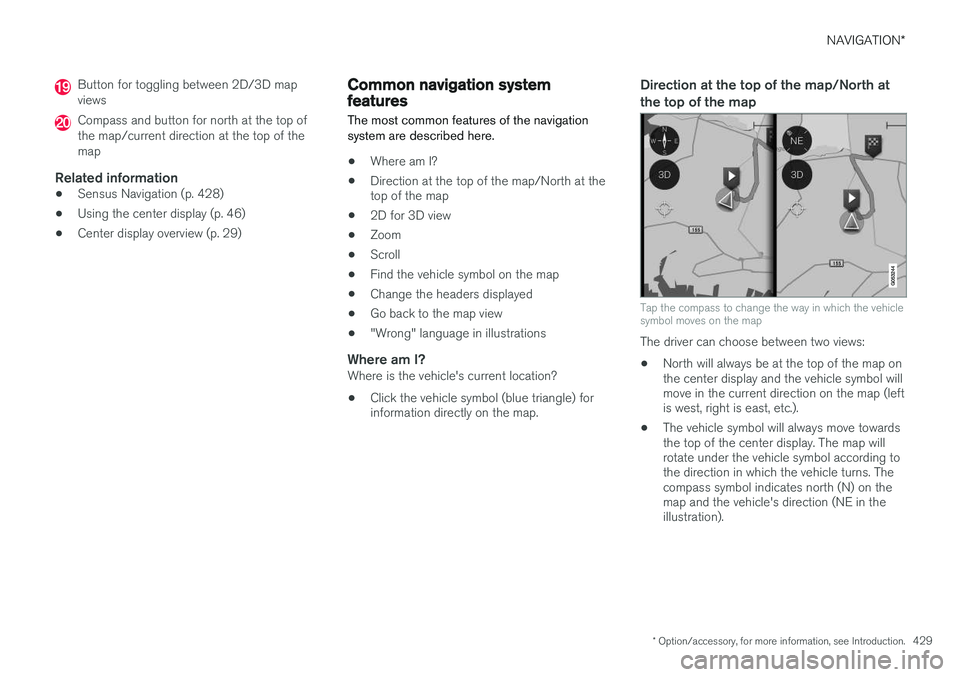
Direction at the top of the map/North at the top of the map
Tap the compass to change the way in which the vehicle symbol moves on the map
The driver can choose between two views: •
North will always be at the top of the map on the center display and the vehicle symbol willmove in the current direction on the map (leftis west, right is east, etc.).
• The vehicle symbol will always move towardsthe top of the center display. The map willrotate under the vehicle symbol according tothe direction in which the vehicle turns. Thecompass symbol indicates north (N) on themap and the vehicle's direction (NE in theillustration).
Page 432 of 570
NAVIGATION*
* Option/accessory, for more information, see Introduction.
430
Compass symbolsDirection
NNorth
NENortheast
EEast
SESoutheast
SSouth
SWSouthwest
WWest
NWNorthwest
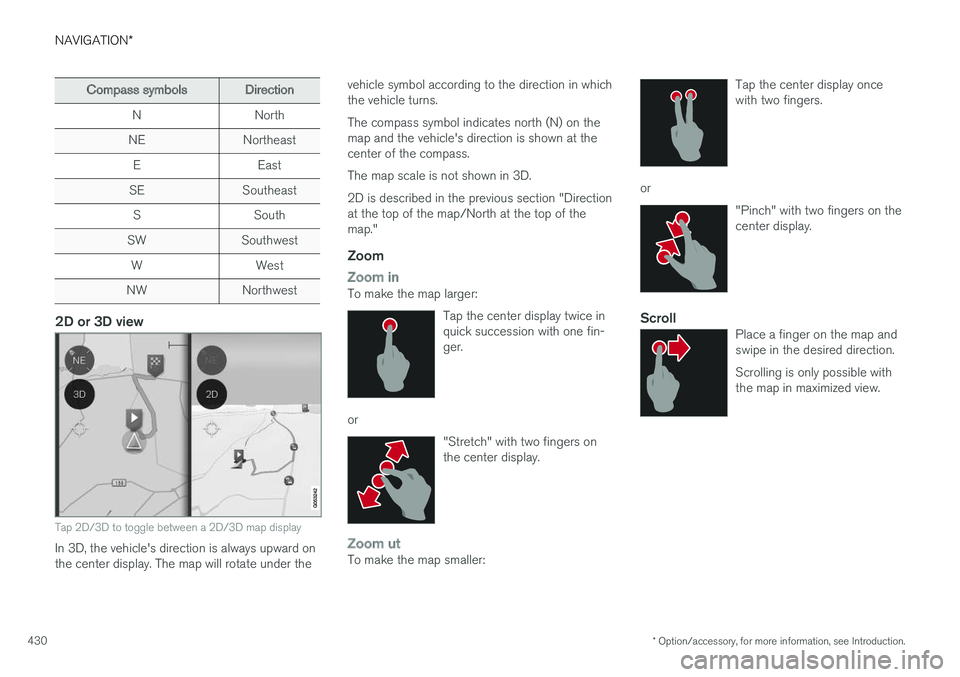
2D or 3D view
Tap 2D/3D to toggle between a 2D/3D map display
In 3D, the vehicle's direction is always upward on the center display. The map will rotate under the vehicle symbol according to the direction in whichthe vehicle turns. The compass symbol indicates north (N) on the map and the vehicle's direction is shown at thecenter of the compass. The map scale is not shown in 3D.2D is described in the previous section "Direction at the top of the map/North at the top of themap."
Zoom
Zoom inTo make the map larger:
Tap the center display twice in quick succession with one fin-ger.
or"Stretch" with two fingers on the center display.
Zoom utTo make the map smaller: Tap the center display once with two fingers.
or
"Pinch" with two fingers on the center display.
ScrollPlace a finger on the map and swipe in the desired direction. Scrolling is only possible with the map in maximized view.
Page 440 of 570
NAVIGATION*
* Option/accessory, for more information, see Introduction.
438
CoordinatesA destination can also be set by entering its map coordinates.
• For example, enter: "N 58.1234 E 12.5678" and tap
Search/.
Map coordinates can be written in different ways, such as:
N 58.1234 E 12.5678 (with spaces)
N 58.1234 E12.5678 (without spaces)
58.1234 N 12.5678 E (with the points on the
compass after the coordinates)
58.1234 -12.5678 (with a hyphen without the
points on the compass)
Both periods [.] and commas [,] can be used.
Related information
• Entering a destination (p. 435)
• Navigation displays and controls (p. 433)
• Using the center display keyboard (p. 32)
• Information cards on the map (p. 446)
Setting a destination using Recent/ Favorites/Library Selecting from a list is one way of setting a des- tination.
To display these lists:
1. Tap
Set dest. in the lower
margin. A keyboard will be dis- played with search alternativesin the upper margin. 2. Continue by selecting one of the lists in the upper margin:
•Recent
•Favorites
•Library
After marking an alternative, it will be added as a destination by tapping the Start navigation orAdd as waypoint buttons.
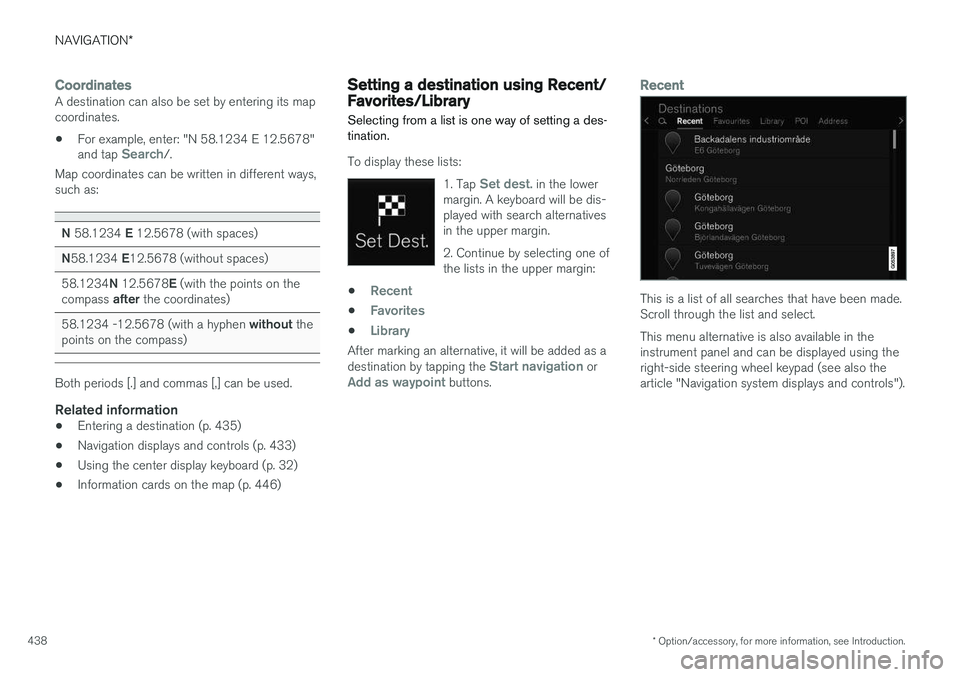
Recent
This is a list of all searches that have been made. Scroll through the list and select. This menu alternative is also available in the instrument panel and can be displayed using theright-side steering wheel keypad (see also thearticle "Navigation system displays and controls").