warning VOLVO XC90 2017 Owner´s Manual
[x] Cancel search | Manufacturer: VOLVO, Model Year: 2017, Model line: XC90, Model: VOLVO XC90 2017Pages: 560, PDF Size: 9.97 MB
Page 292 of 560
||
DRIVER SUPPORT
* Option/accessory.
290
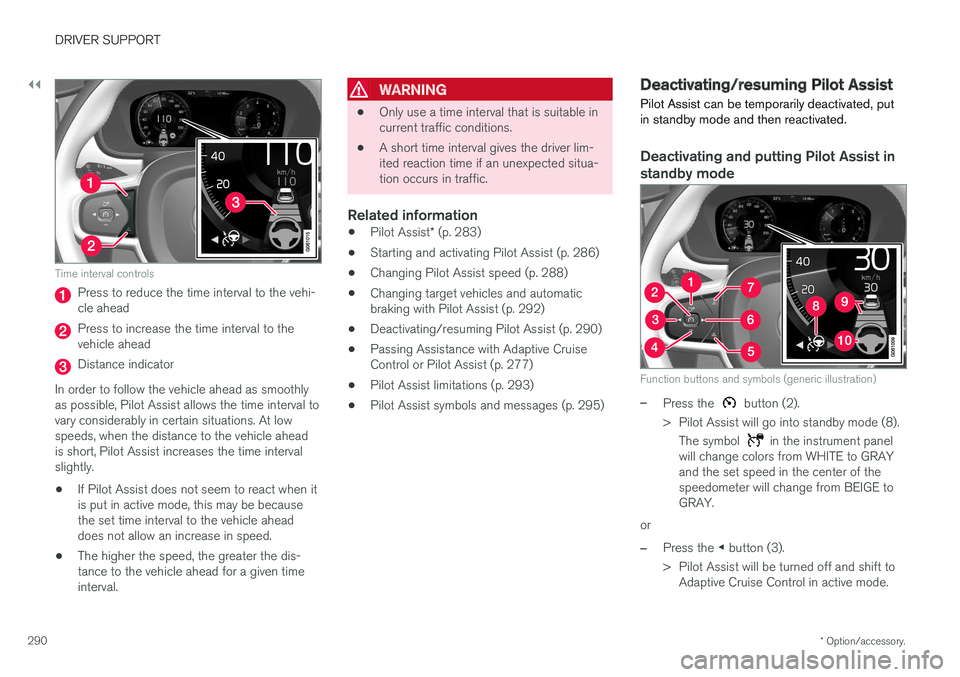
Time interval controls
Press to reduce the time interval to the vehi- cle ahead
Press to increase the time interval to the vehicle ahead
Distance indicator
In order to follow the vehicle ahead as smoothly as possible, Pilot Assist allows the time interval tovary considerably in certain situations. At lowspeeds, when the distance to the vehicle aheadis short, Pilot Assist increases the time intervalslightly.
• If Pilot Assist does not seem to react when itis put in active mode, this may be becausethe set time interval to the vehicle aheaddoes not allow an increase in speed.
• The higher the speed, the greater the dis-tance to the vehicle ahead for a given timeinterval.
WARNING
• Only use a time interval that is suitable in current traffic conditions.
• A short time interval gives the driver lim-ited reaction time if an unexpected situa-tion occurs in traffic.
Related information
•
Pilot Assist
* (p. 283)
• Starting and activating Pilot Assist (p. 286)
• Changing Pilot Assist speed (p. 288)
• Changing target vehicles and automaticbraking with Pilot Assist (p. 292)
• Deactivating/resuming Pilot Assist (p. 290)
• Passing Assistance with Adaptive CruiseControl or Pilot Assist (p. 277)
• Pilot Assist limitations (p. 293)
• Pilot Assist symbols and messages (p. 295)
Deactivating/resuming Pilot Assist Pilot Assist can be temporarily deactivated, put in standby mode and then reactivated.
Deactivating and putting Pilot Assist in standby mode
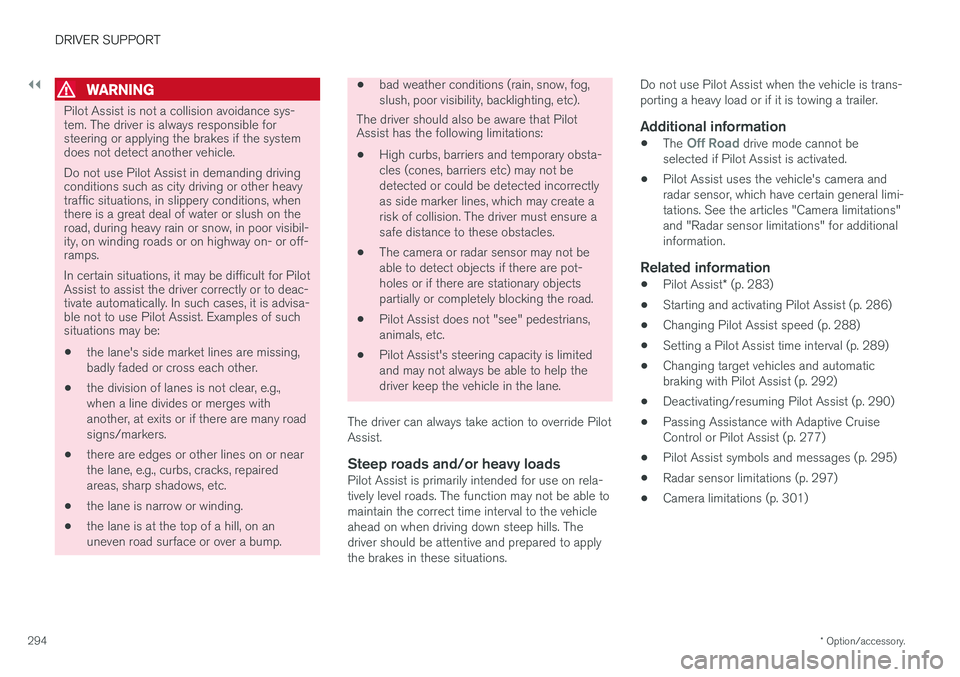
Function buttons and symbols (generic illustration)
–Press the button (2).
> Pilot Assist will go into standby mode (8). The symbol
in the instrument panel
will change colors from WHITE to GRAY and the set speed in the center of thespeedometer will change from BEIGE toGRAY.
or
–Press the ◀ button (3).
> Pilot Assist will be turned off and shift to Adaptive Cruise Control in active mode.
Page 293 of 560
DRIVER SUPPORT
}}
* Option/accessory.291
In standby mode, the driver will have to regulate the vehicle's speed and the distance to the vehi-cle ahead. When Pilot Assist is in standby mode and your vehicle comes too close to another vehicle, thedriver will be alerted by the Distance Alert func-tion.
Standby mode due to action by the driver
Pilot Assist is temporarily deactivated and put in standby mode if:
• the brakes are applied
• The gear selector is moved to
N
• the turn signals are used for more than1 minute
• the vehicle is driven faster than the setspeed for more than 1 minute.
A temporary increase in speed, such as whenpassing another vehicle, does not affect the PilotAssist set speed. The vehicle will return to the setspeed when the accelerator pedal is released. When the turn signals are used, Pilot Assist's steering function will be temporarily deactivated.When this is no longer the case, the steeringfunction will reactivate if the traffic lane's sidemarker lines can still be detected.
Automatic standby mode
Pilot Assist interacts with other systems, such as Electronic Stability Control. If any of these other systems are not functioning properly, Pilot Assistwill automatically be deactivated.
WARNING
If this happens, the driver will be alerted by an audible signal and a message in the instru-ment panel. The driver will have to adapt thevehicle's speed, apply the brakes when nec-essary and keep a safe distance to the vehicleahead.
Pilot Assist switches automatically to standby mode if: • the vehicle's speed is below approx. 3 mph(5 km/h) and Pilot Assist cannot determine ifa vehicle ahead is a stationary vehicle or anobject.
• the vehicle's speed is below approx. 3 mph(5 km/h) and the vehicle ahead turns so thatPilot Assist no longer has a vehicle to follow(target vehicle).
• the driver's hands are not on the steeringwheel
• the driver's door is opened
• the driver unbuckles the seat belt
• engine speed (rpm) is too high/low
• the wheels lose traction
• brake temperature is too high
• the parking brake is set •
The camera lens/radar sensor is covered bye.g., snow or if heavy rain interferes withradar wavesReactivating Pilot Assist from standby
mode
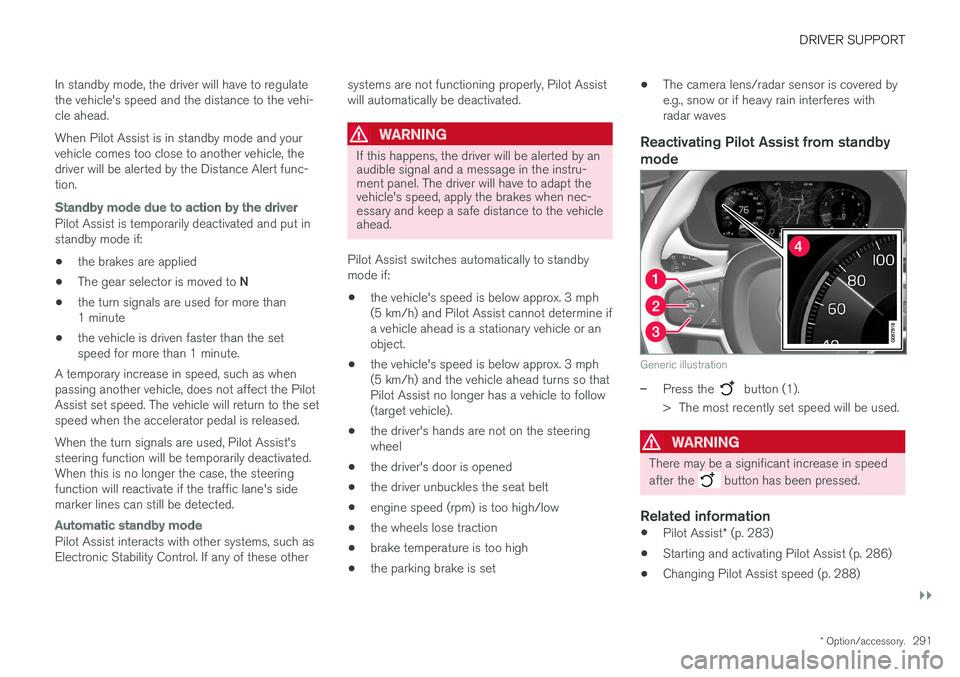
Generic illustration
–Press the button (1).
> The most recently set speed will be used.
WARNING
There may be a significant increase in speed after the
button has been pressed.
Related information
• Pilot Assist
* (p. 283)
• Starting and activating Pilot Assist (p. 286)
• Changing Pilot Assist speed (p. 288)
Page 294 of 560
DRIVER SUPPORT
* Option/accessory.
292 •
Setting a Pilot Assist time interval (p. 289)
• Changing target vehicles and automatic braking with Pilot Assist (p. 292)
• Passing Assistance with Adaptive CruiseControl or Pilot Assist (p. 277)
• Pilot Assist limitations (p. 293)
• Pilot Assist symbols and messages (p. 295)
• Distance Alert
* (p. 267)
Changing target vehicles and automatic braking with Pilot Assist
At certain speeds, Pilot Assist can change target vehicles and automatically apply the brakes.
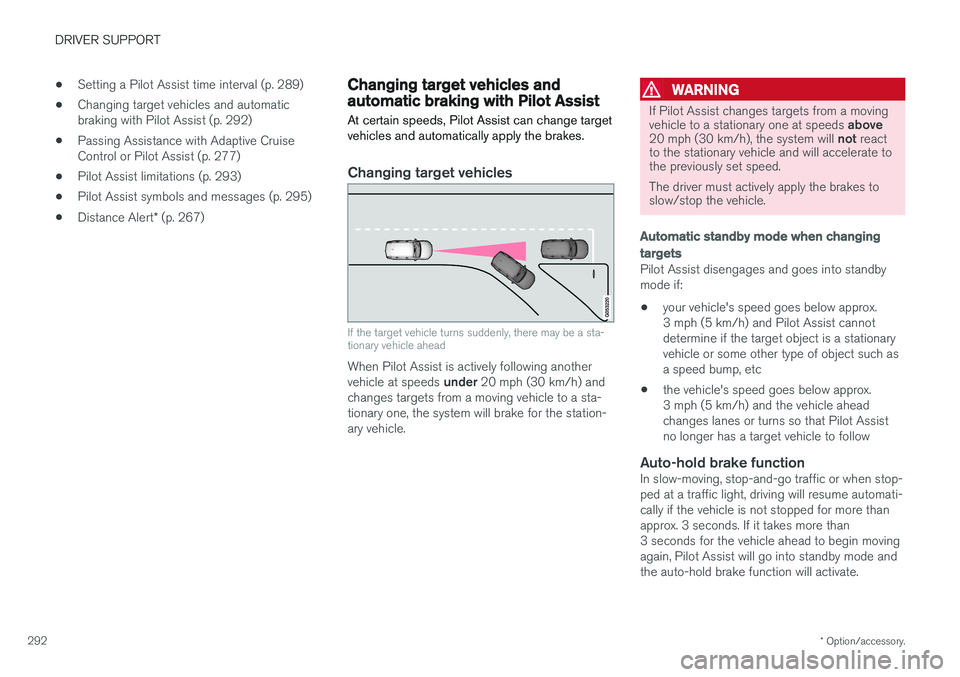
Changing target vehicles
If the target vehicle turns suddenly, there may be a sta- tionary vehicle ahead
When Pilot Assist is actively following another vehicle at speeds under 20 mph (30 km/h) and
changes targets from a moving vehicle to a sta- tionary one, the system will brake for the station-ary vehicle.
WARNING
If Pilot Assist changes targets from a moving vehicle to a stationary one at speeds above
20 mph (30 km/h), the system will not react
to the stationary vehicle and will accelerate to the previously set speed. The driver must actively apply the brakes to slow/stop the vehicle.
Automatic standby mode when changing targets
Pilot Assist disengages and goes into standby mode if:
• your vehicle's speed goes below approx.3 mph (5 km/h) and Pilot Assist cannotdetermine if the target object is a stationaryvehicle or some other type of object such asa speed bump, etc
• the vehicle's speed goes below approx.3 mph (5 km/h) and the vehicle aheadchanges lanes or turns so that Pilot Assistno longer has a target vehicle to follow
Auto-hold brake functionIn slow-moving, stop-and-go traffic or when stop-ped at a traffic light, driving will resume automati-cally if the vehicle is not stopped for more thanapprox. 3 seconds. If it takes more than3 seconds for the vehicle ahead to begin movingagain, Pilot Assist will go into standby mode andthe auto-hold brake function will activate.
Page 296 of 560
||
DRIVER SUPPORT
* Option/accessory.
294
WARNING
Pilot Assist is not a collision avoidance sys- tem. The driver is always responsible forsteering or applying the brakes if the systemdoes not detect another vehicle. Do not use Pilot Assist in demanding driving conditions such as city driving or other heavytraffic situations, in slippery conditions, whenthere is a great deal of water or slush on theroad, during heavy rain or snow, in poor visibil-ity, on winding roads or on highway on- or off-ramps. In certain situations, it may be difficult for Pilot Assist to assist the driver correctly or to deac-tivate automatically. In such cases, it is advisa-ble not to use Pilot Assist. Examples of suchsituations may be:
• the lane's side market lines are missing, badly faded or cross each other.
• the division of lanes is not clear, e.g.,when a line divides or merges withanother, at exits or if there are many roadsigns/markers.
• there are edges or other lines on or nearthe lane, e.g., curbs, cracks, repairedareas, sharp shadows, etc.
• the lane is narrow or winding.
• the lane is at the top of a hill, on anuneven road surface or over a bump.
•bad weather conditions (rain, snow, fog, slush, poor visibility, backlighting, etc).
The driver should also be aware that Pilot Assist has the following limitations: • High curbs, barriers and temporary obsta- cles (cones, barriers etc) may not bedetected or could be detected incorrectlyas side marker lines, which may create arisk of collision. The driver must ensure asafe distance to these obstacles.
• The camera or radar sensor may not beable to detect objects if there are pot-holes or if there are stationary objectspartially or completely blocking the road.
• Pilot Assist does not "see" pedestrians,animals, etc.
• Pilot Assist's steering capacity is limitedand may not always be able to help thedriver keep the vehicle in the lane.
The driver can always take action to override PilotAssist.
Steep roads and/or heavy loadsPilot Assist is primarily intended for use on rela-tively level roads. The function may not be able tomaintain the correct time interval to the vehicleahead on when driving down steep hills. Thedriver should be attentive and prepared to applythe brakes in these situations. Do not use Pilot Assist when the vehicle is trans-porting a heavy load or if it is towing a trailer.
Additional information
•
The Off Road drive mode cannot be
selected if Pilot Assist is activated.
• Pilot Assist uses the vehicle's camera and radar sensor, which have certain general limi-tations. See the articles "Camera limitations"and "Radar sensor limitations" for additionalinformation.
Related information
•
Pilot Assist
* (p. 283)
• Starting and activating Pilot Assist (p. 286)
• Changing Pilot Assist speed (p. 288)
• Setting a Pilot Assist time interval (p. 289)
• Changing target vehicles and automaticbraking with Pilot Assist (p. 292)
• Deactivating/resuming Pilot Assist (p. 290)
• Passing Assistance with Adaptive CruiseControl or Pilot Assist (p. 277)
• Pilot Assist symbols and messages (p. 295)
• Radar sensor limitations (p. 297)
• Camera limitations (p. 301)
Page 299 of 560
DRIVER SUPPORT
}}
297
Radar sensor limitations
The radar sensor used by several of the driver support systems has certain limitations, whichalso affect the systems using it.
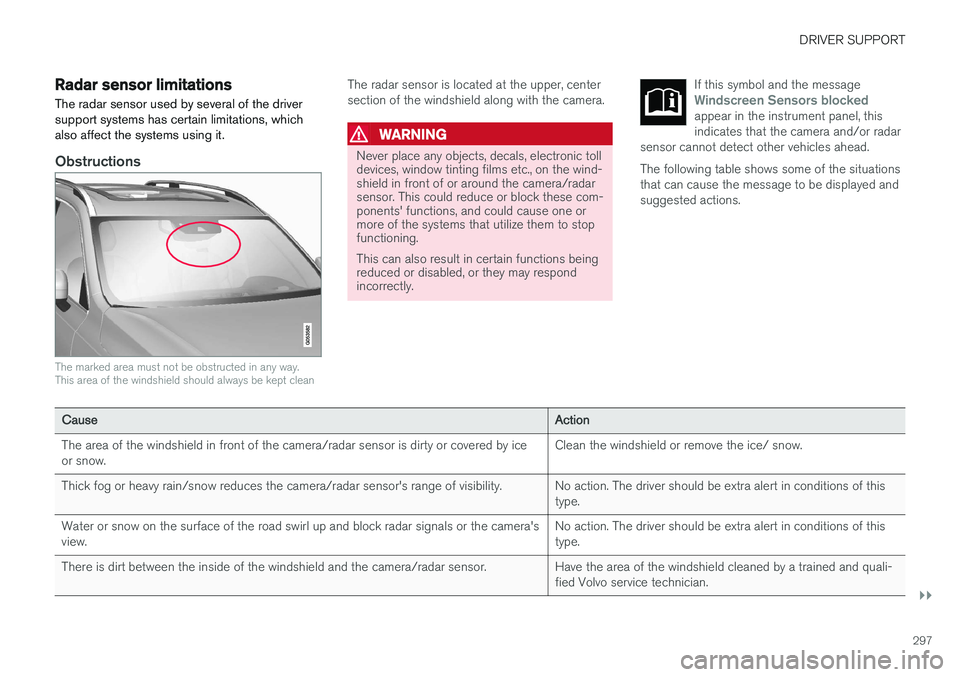
Obstructions
The marked area must not be obstructed in any way. This area of the windshield should always be kept clean
The radar sensor is located at the upper, center section of the windshield along with the camera.
WARNING
Never place any objects, decals, electronic toll devices, window tinting films etc., on the wind-shield in front of or around the camera/radarsensor. This could reduce or block these com-ponents' functions, and could cause one ormore of the systems that utilize them to stopfunctioning. This can also result in certain functions being reduced or disabled, or they may respondincorrectly. If this symbol and the message
Windscreen Sensors blockedappear in the instrument panel, this indicates that the camera and/or radar
sensor cannot detect other vehicles ahead.
The following table shows some of the situations that can cause the message to be displayed andsuggested actions.
Cause Action
The area of the windshield in front of the camera/radar sensor is dirty or covered by ice or snow. Clean the windshield or remove the ice/ snow.
Thick fog or heavy rain/snow reduces the camera/radar sensor's range of visibility. No action. The driver should be extra alert in conditions of this type.
Water or snow on the surface of the road swirl up and block radar signals or the camera'sview. No action. The driver should be extra alert in conditions of thistype.
There is dirt between the inside of the windshield and the camera/radar sensor. Have the area of the windshield cleaned by a trained and quali- fied Volvo service technician.
Page 302 of 560
DRIVER SUPPORT
* Option/accessory.
300
Radar sensor - type approval
USA & Canada:
FCC ID: L2C0054TR IC: 3432A-0054TR FCC
ID: L2C0055TR IC: 3432A-0055TR This device complies with Part 15 of the FCC Rules and with Industry Canada license-exemptRSS standard(s). Operation is subject to the fol-lowing two conditions: (1) This device may not cause harmful interfer- ence, and (2) This device must accept any interference received, including interference that may causeundesired operation.
WARNING
Changes or modifications not expressively approved by the party responsible for compli-ance could void the user's authority to oper-ate the equipment.
The term “IC:” before the radio certification num- ber only signifies that Industry Canada technicalspecifications were met.
Related information
• Driver support system radar sensor (p. 296)
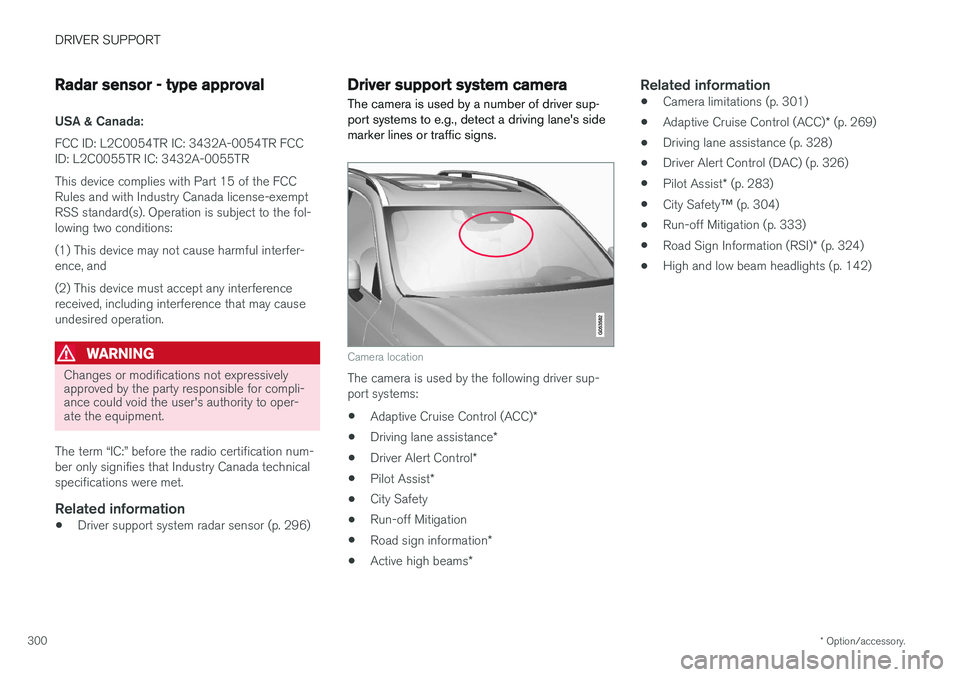
Driver support system camera
The camera is used by a number of driver sup- port systems to e.g., detect a driving lane's sidemarker lines or traffic signs.
Camera location
The camera is used by the following driver sup- port systems:
• Adaptive Cruise Control (ACC)
*
• Driving lane assistance
*
• Driver Alert Control
*
• Pilot Assist
*
• City Safety
• Run-off Mitigation
• Road sign information
*
• Active high beams
*
Related information
•Camera limitations (p. 301)
• Adaptive Cruise Control (ACC)
* (p. 269)
• Driving lane assistance (p. 328)
• Driver Alert Control (DAC) (p. 326)
• Pilot Assist
* (p. 283)
• City Safety
™ (p. 304)
• Run-off Mitigation (p. 333)
• Road Sign Information (RSI)
* (p. 324)
• High and low beam headlights (p. 142)
Page 303 of 560
DRIVER SUPPORT
}}
301
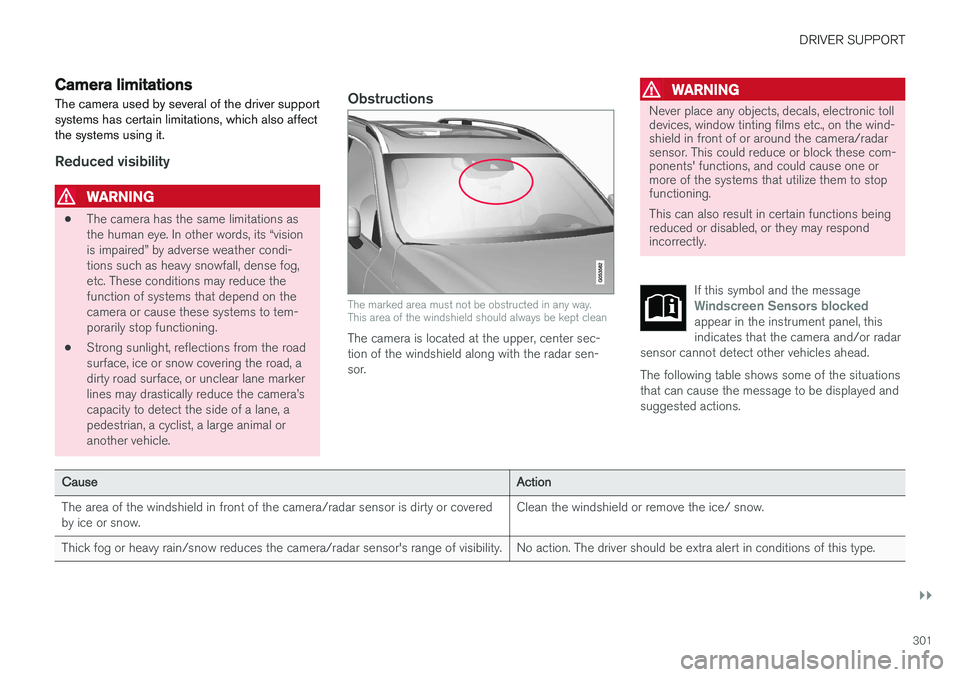
Camera limitations
The camera used by several of the driver support systems has certain limitations, which also affectthe systems using it.
Reduced visibility
WARNING
• The camera has the same limitations as the human eye. In other words, its “visionis impaired” by adverse weather condi-tions such as heavy snowfall, dense fog,etc. These conditions may reduce thefunction of systems that depend on thecamera or cause these systems to tem-porarily stop functioning.
• Strong sunlight, reflections from the roadsurface, ice or snow covering the road, adirty road surface, or unclear lane markerlines may drastically reduce the camera
Page 306 of 560
DRIVER SUPPORT
304
City Safety™
City Safety ™ is a support system designed to
help alert the driver to pedestrians, cyclists, large animals and vehicles that may appear suddenlyin front of your vehicle by providing visual, audi-ble and haptic alerts. The vehicle will brake auto-matically if the driver is unable to react quicklyenough.
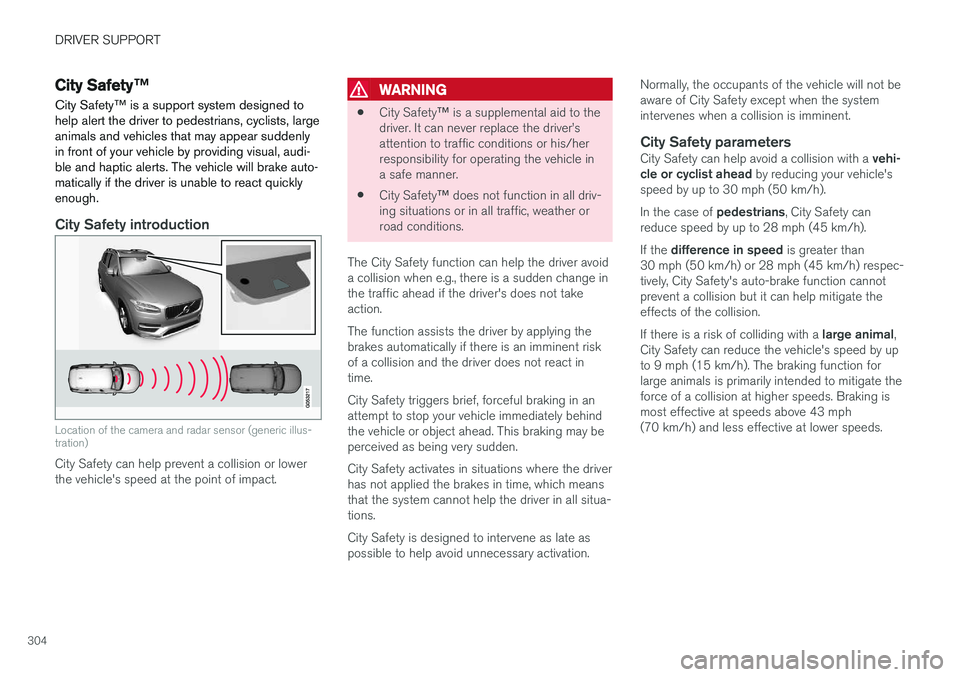
City Safety introduction
Location of the camera and radar sensor (generic illus- tration)
City Safety can help prevent a collision or lower the vehicle's speed at the point of impact.
WARNING
• City Safety
™ is a supplemental aid to the
driver. It can never replace the driver
Page 307 of 560
DRIVER SUPPORT
}}
305
WARNING
Warnings will only be provided if there is an imminent risk of a collision taking place. Thedriver should be aware of the system's limita-tions before operating the vehicle. Warnings and automatic braking for pedes- trians and cyclists are deactivated at speedsabove approx. 43 mph (70 km/h). City Safety's auto-brake function can help prevent a collision or reduce the speed atwhich a collision occurs. However, the drivershould always apply the brakes, even if auto-brake is operating. The driver is always responsible for maintain- ing the correct speed and distance in relationto the vehicle ahead. Never wait for a collisionwarning or for City Safety to intervene. City Safety does not activate the auto-brake function during fast acceleration. City Safety maintenance may only be carried out by a trained and qualified Volvo servicetechnician.
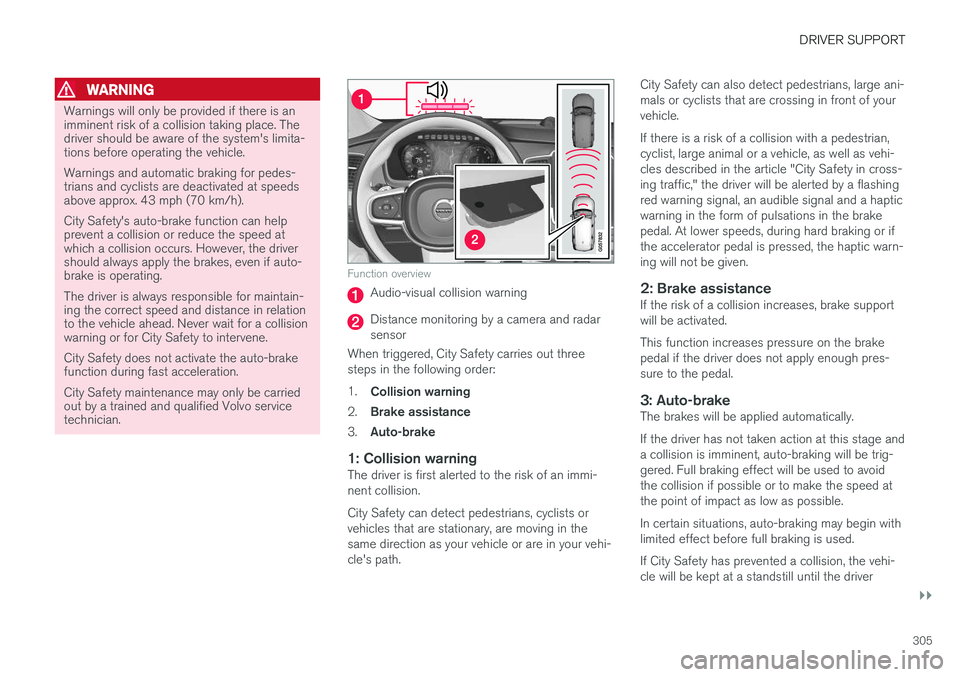
Function overview
Audio-visual collision warning
Distance monitoring by a camera and radar sensor
When triggered, City Safety carries out threesteps in the following order: 1. Collision warning
2. Brake assistance
3. Auto-brake
1: Collision warningThe driver is first alerted to the risk of an immi- nent collision. City Safety can detect pedestrians, cyclists or vehicles that are stationary, are moving in thesame direction as your vehicle or are in your vehi-cle's path. City Safety can also detect pedestrians, large ani-mals or cyclists that are crossing in front of yourvehicle. If there is a risk of a collision with a pedestrian, cyclist, large animal or a vehicle, as well as vehi-cles described in the article "City Safety in cross-ing traffic," the driver will be alerted by a flashingred warning signal, an audible signal and a hapticwarning in the form of pulsations in the brakepedal. At lower speeds, during hard braking or ifthe accelerator pedal is pressed, the haptic warn-ing will not be given.
2: Brake assistanceIf the risk of a collision increases, brake supportwill be activated. This function increases pressure on the brake pedal if the driver does not apply enough pres-sure to the pedal.
3: Auto-brakeThe brakes will be applied automatically. If the driver has not taken action at this stage and a collision is imminent, auto-braking will be trig-gered. Full braking effect will be used to avoidthe collision if possible or to make the speed atthe point of impact as low as possible. In certain situations, auto-braking may begin with limited effect before full braking is used. If City Safety has prevented a collision, the vehi- cle will be kept at a standstill until the driver
Page 308 of 560
||
DRIVER SUPPORT
306takes action. If the vehicle has slowed to avoid colliding with the vehicle ahead, your speed willbe reduced to that vehicle's speed. When auto-brake is triggered, the seat belt pre- tensioners may also be activated, see the article"Seat belts" for additional information. Auto-braking can be cancelled if the driver presses hard on the accelerator pedal. When City Safety applies the brakes, the brake lights will illuminate. When City Safety is triggered and applies the brakes, a text message will be displayed in theinstrument panel.
Related information
•
City Safety
™ troubleshooting (p. 310)
• City Safety in crossing traffic (p. 309)
• City Safety limitations (p. 312)
• City Safety symbols and messages (p. 315)
• Detecting obstructions with City Safety(p. 307)
• Rear Collision Warning (RCW) (p. 316)
• City Safety warning level settings (p. 306)
• City Safety in crossing traffic (p. 309)
• Seat belts (p. 60)
• City Safety when evasive action is not possi-ble (p. 310)
City Safety warning level settings
City Safety is always activated but the function's warning distance can be adjusted.
NOTE
City Safety cannot be turned off and activates automatically each time the engine is started.
Setting a warning level (distance)
The distance set for warnings determines the system's responsiveness and sets the distance atwhich visual, audible and tangible (haptic) warn-ings will be triggered. To do so:1. Tap
Settings in the center display's Top
view.
2. Tap
My CarIntelliSafeCity Safety
Warning.
3. Choose among
Earlier, Normal or Later.
Begin by choosing
Earlier. If too many warnings
are given, change to Normal.
If the driver feels that warnings are given too often, the warning level can be lowered. Thismeans that warnings will be provided later, result-ing in fewer warnings being given. The setting
Later should only used in exceptional
circumstances, e.g., for a more dynamic driving style.
WARNING
• No automatic system can be guaranteed to function 100% correctly in all situa-tions. For that reason, never test CitySafety by driving toward a person orobject. This could result in serious injuryor death.
• Even if the setting
Earlier has been
selected, warnings may be perceived as being given late, e.g., if the difference inspeed is great or if the vehicle aheadbrakes suddenly.
• City Safety can provide a warning for apotential collision but it can never shortenthe driver's reaction time.
• To help make City Safety as effective as possible, always using the setting
Earlieris recommended.
NOTE
•
Due to local traffic regulations in certain markets, Rear Collision Warning (RCW) will
not activate the rear turn signals.
That part of the function will be deacti- vated.
• The use of the rear turn signals will alsobe deactivated if the City Safety warning level is set at
Later. See also the section