display VOLVO XC90 2017 Owner´s Manual
[x] Cancel search | Manufacturer: VOLVO, Model Year: 2017, Model line: XC90, Model: VOLVO XC90 2017Pages: 560, PDF Size: 9.97 MB
Page 245 of 560
LOCKS AND ALARM
}}
243
Related information
•Locking/unlocking the tailgate (p. 238)
• Using the glove compartment (p. 211)
• Navigating in the center display's views (p. 38)
Locking/unlocking with the detachable key blade
The detachable key blade can be used to e.g., unlock the driver's door from the outside if, forexample, the remote key's battery is weak.
Unlocking
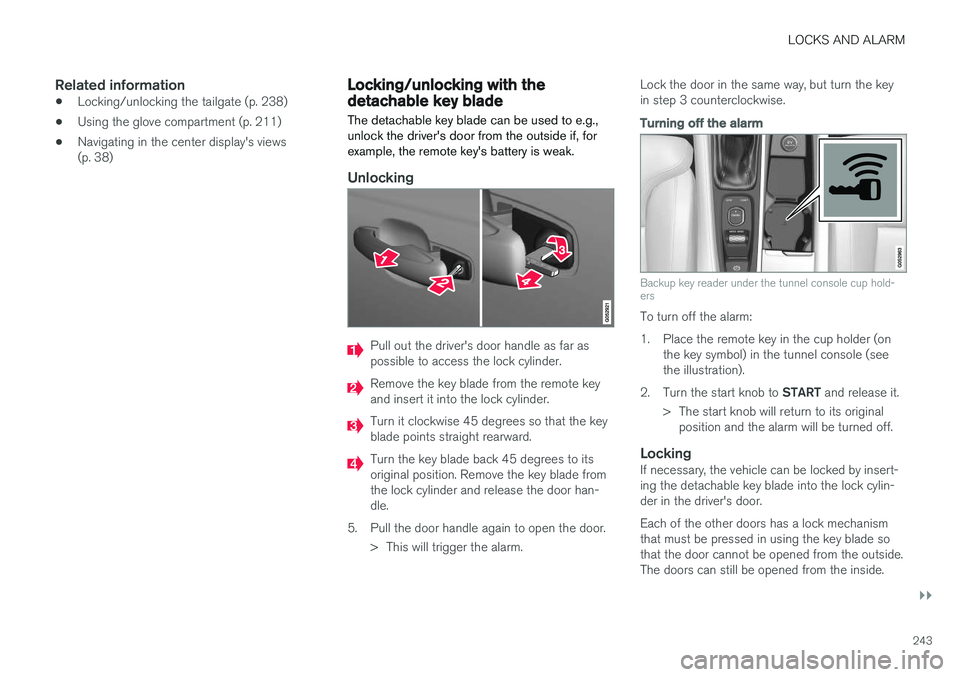
Pull out the driver's door handle as far as possible to access the lock cylinder.
Remove the key blade from the remote key and insert it into the lock cylinder.
Turn it clockwise 45 degrees so that the key blade points straight rearward.
Turn the key blade back 45 degrees to its original position. Remove the key blade fromthe lock cylinder and release the door han-dle.
5. Pull the door handle again to open the door. > This will trigger the alarm. Lock the door in the same way, but turn the keyin step 3 counterclockwise.
Turning off the alarm
Backup key reader under the tunnel console cup hold- ers
To turn off the alarm:
1. Place the remote key in the cup holder (on
the key symbol) in the tunnel console (see the illustration).
2. Turn the start knob to START and release it.
> The start knob will return to its original position and the alarm will be turned off.
LockingIf necessary, the vehicle can be locked by insert-ing the detachable key blade into the lock cylin-der in the driver's door. Each of the other doors has a lock mechanism that must be pressed in using the key blade sothat the door cannot be opened from the outside.The doors can still be opened from the inside.
Page 247 of 560
LOCKS AND ALARM
}}
* Option/accessory.245
Alarm
The alarm system provides a warning if an attempt is made to break into the vehicle.
The following conditions will trigger the alarm:
• a door/hood/tailgate are opened
• the battery is disconnected
• the alarm siren is disconnected
If a problem is detected in the alarm system, this symbol and
Alarm
system failure Service required will
be displayed in the instrument panel.
Do not attempt to repair any of the components in the alarm system yourself; this could affect theinsurance policy on the vehicle. Contact a trainedand qualified Volvo service technician.
NOTE
One of the alarm sensors, which is sensitive to metallic objects, is located under the tunnelconsole cup holders. Avoid leaving coins,keys, etc., in the cup holders because theymay inadvertently trigger the alarm.
Arming the alarm
–Lock the vehicle by pressing the remote key's lock button. On models with theoptional Passive Entry system, the vehiclecan also be locked by pressing the outerindentation for locking on one of the doorhandles or by pressing the tailgate's rubber-ized pressure plate. If the vehicle is equipped with a power tail- gate *, the button on the lower edge of the
tailgate can also be used to lock the vehicle and arm the alarm.
Disarming the alarmThe alarm can be disarmed by: • Unlock the vehicle by pressing the remote key's unlock button
• Pressing the pressure-sensitive area on theinside of one of the door handles on modelswith the optional Passive Entry system.
• Pressing the tailgate's rubberized pressureplate on models with the optional PassiveEntry system.
Turning off a triggered (sounding)
alarm
–Press the remote key's unlock button or put the ignition in mode I by turning the start
knob to START and releasing it.
Alarm signalsThe following occurs if the alarm has been trig- gered:
• A siren will sound for 30 seconds or until thealarm is turned off
• All turn signals flash for 5 minutes or untilthe alarm is turned off
If the door that triggered the alarm is left open,
the alarm cycle will be repeated 10 times.
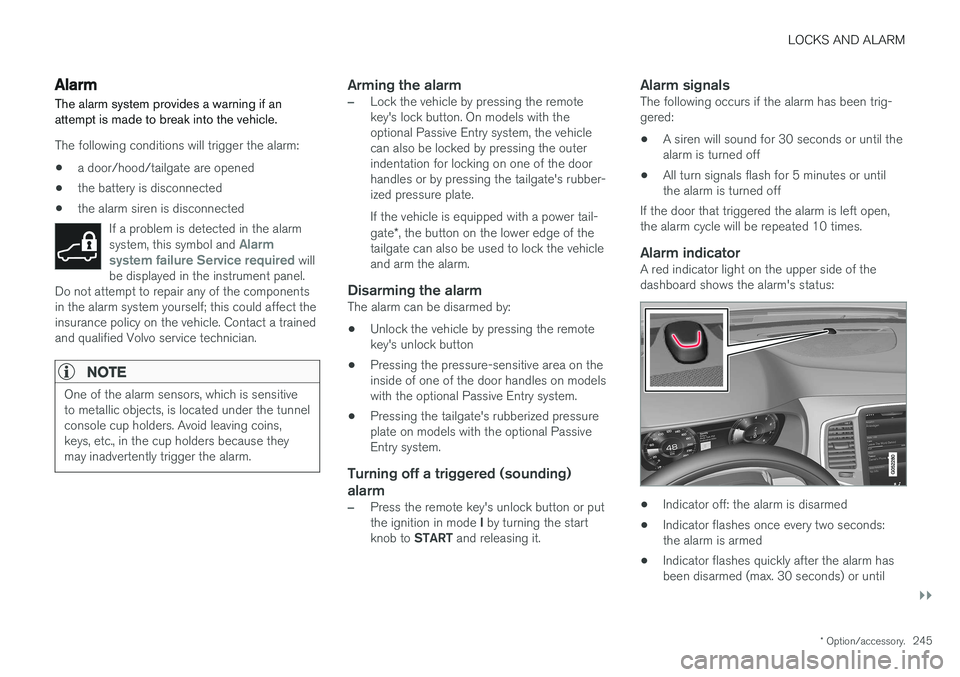
Alarm indicatorA red indicator light on the upper side of thedashboard shows the alarm's status:
• Indicator off: the alarm is disarmed
• Indicator flashes once every two seconds: the alarm is armed
• Indicator flashes quickly after the alarm hasbeen disarmed (max. 30 seconds) or until
Page 252 of 560
DRIVER SUPPORT
* Option/accessory.
250
Driver support systems
The vehicle is equipped with a number of driver support systems that help provide the driver withactive/passive support.
Some of these systems are standard while others are optional and they are designed to e.g., helpthe driver maintain a set speed or a set distanceto a vehicle ahead, or warn the driver of a poten-tial collision situation and in certain cases applythe brakes if necessary. Certain optional systemscan also assist in various parking situations.
Related information
• Adjustable steering force
* (p. 250)
• Electronic Stability Control (ESC) (p. 251)
• Roll stability control (RSC) (p. 255)
• Speed limiter (SL)
* (p. 255)
• Distance Alert
* (p. 267)
• Cruise Control (CC) (p. 262)
• Adaptive Cruise Control (ACC)
* (p. 269)
• Pilot Assist
* (p. 283)
• Driver support system radar sensor (p. 296)
• Driver support system camera (p. 300)
• City Safety
™ (p. 304)
• Blind Spot Information (BLIS)
* (p. 317)
• Cross Traffic Alert (CTA)
* (p. 319)
• Road Sign Information (RSI)
* (p. 324) •
Driver Alert Control (DAC) (p. 326)
• Driving lane assistance (p. 328)
• Run-off Mitigation (p. 333)
• Park Assist
* (p. 336)
• Park Assist Camera (PAC)
* (p. 340)
• Park Assist Pilot (PAP)
* (p. 346)
Adjustable steering force *
Steering force increases with the speed of the vehicle to give the driver an enhanced sense ofcontrol and stability. At low speed the vehicle iseasier to steer in order to facilitate parking, etc.
Changing the steering force levelTo change the level of steering force, see theinformation under the heading "individual" in arti-cle "Drive modes" for additional information. On models not equipped with the drive mode control in the center console, the selection ismade in the center display's Top view under:
SettingsMy CarDrive ModesSteering force
NOTE
•This steering force level menu function cannot be accessed when the vehicle isin motion.
• In certain situations, the power steeringfunction may become too hot and mustbe temporarily cooled. During cooling,power steering effect will be reduced andmore force may be necessary to turn thesteering wheel and a message will bedisplayed in the instrument panel.
Page 254 of 560
||
DRIVER SUPPORT
* Option/accessory.
252
Related information
• Detachable trailer hitch
* (p. 378)
• Driving with a trailer (p. 376)
• Trailer Stability Assist (TSA) (p. 379)
• Electronic Stability Control (ESC) sport mode (p. 252)
• Electronic Stability Control (ESC) symbolsand messages (p. 253)
Electronic Stability Control (ESC) sport mode
ESC is always activated and cannot be switched off.
However, the driver can select Sport mode,
which offers more active driving characteristics. In Sport mode, the engine management system
monitors movement of the accelerator pedal and steering wheel for sportier driving and allowsmore lateral movement of the rear wheels beforeESC is triggered. Under certain circumstances, such as when driv- ing with snow chains, or driving in deep snow orloose sand, it may be advisable to temporarily use Sport mode for maximum tractive force.
If the driver releases pressure on the accelerator pedal, ETC will also activate to help stabilize thevehicle.
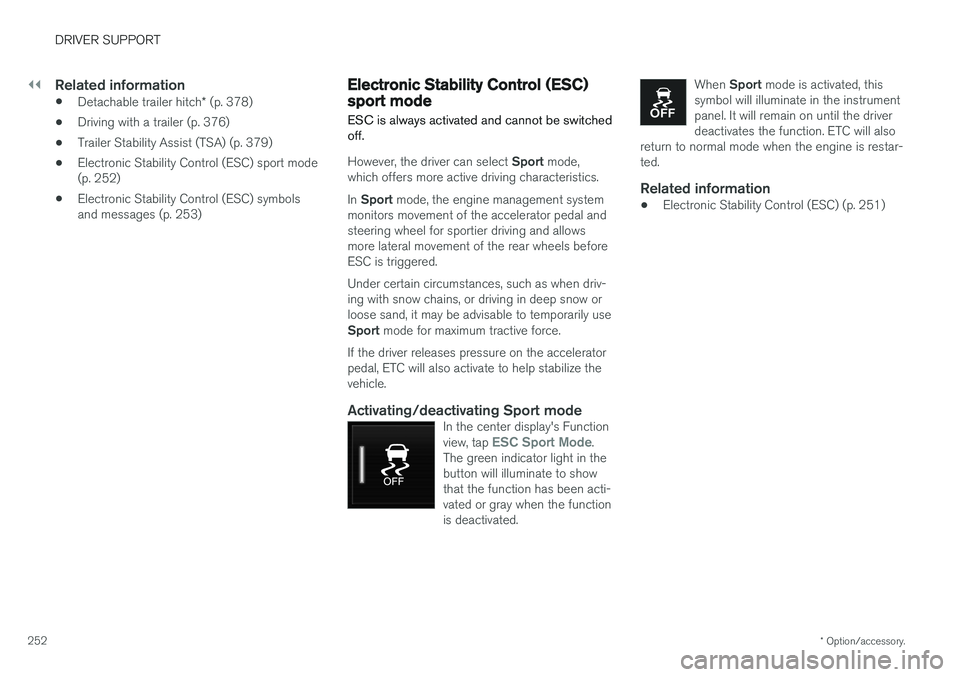
Activating/deactivating Sport modeIn the center display's Function view, tap ESC Sport Mode.
The green indicator light in the button will illuminate to showthat the function has been acti-vated or gray when the functionis deactivated.
When Sport mode is activated, this
symbol will illuminate in the instrument panel. It will remain on until the driverdeactivates the function. ETC will also
return to normal mode when the engine is restar-ted.
Related information
• Electronic Stability Control (ESC) (p. 251)
Page 256 of 560
||
DRIVER SUPPORT
254
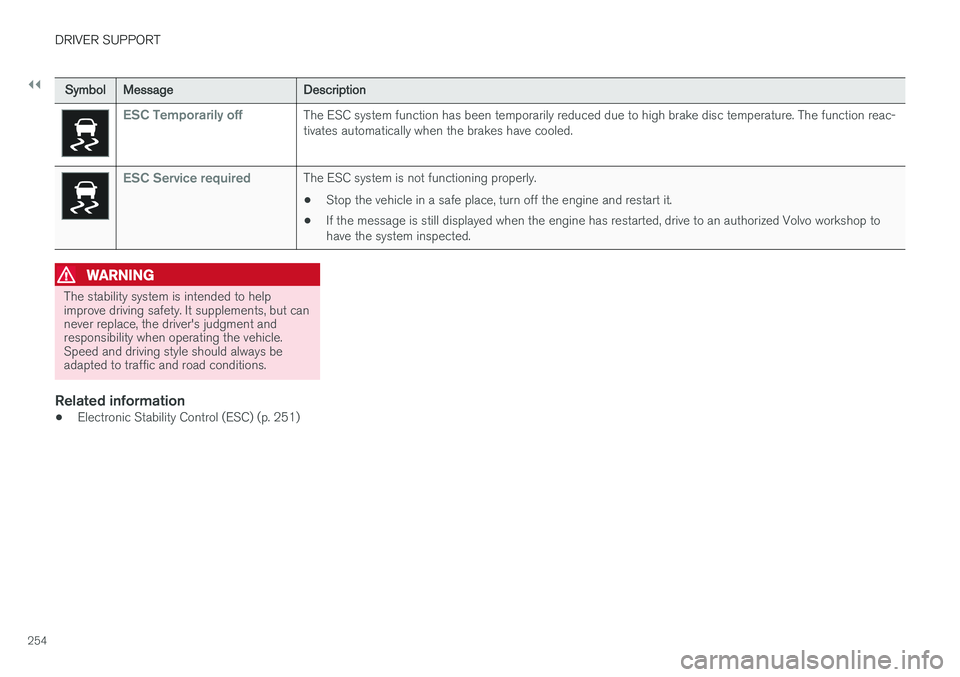
SymbolMessage Description
ESC Temporarily offThe ESC system function has been temporarily reduced due to high brake disc temperature. The function reac- tivates automatically when the brakes have cooled.
ESC Service requiredThe ESC system is not functioning properly.
• Stop the vehicle in a safe place, turn off the engine and restart it.
• If the message is still displayed when the engine has restarted, drive to an authorized Volvo workshop to have the system inspected.
WARNING
The stability system is intended to help improve driving safety. It supplements, but cannever replace, the driver's judgment andresponsibility when operating the vehicle.Speed and driving style should always beadapted to traffic and road conditions.
Related information
• Electronic Stability Control (ESC) (p. 251)
Page 258 of 560
||
DRIVER SUPPORT
* Option/accessory.
256
Related information
• Starting and activating the Speed Limiter (SL)
* (p. 256)
• Deactivating/reactivating the Speed Limiter
*
(p. 260)
• Changing a Speed Limiter (SL)
* maximum
speed (p. 257)
• Automatic Speed Limiter (ASL)
* (p. 257)
• Activating/deactivating the Automatic SpeedLimiter (ASL)
* (p. 259)
• Changing tolerance for the Automatic Speed Limiter (p. 259)
• Turning the Speed Limiter
* off (p. 261)
Starting and activating the Speed Limiter (SL) *
The Speed Limiter (SL) is a feature that has to be selected and activated in order to set a maxi-mum speed.
Selecting SL (putting it in standby mode)
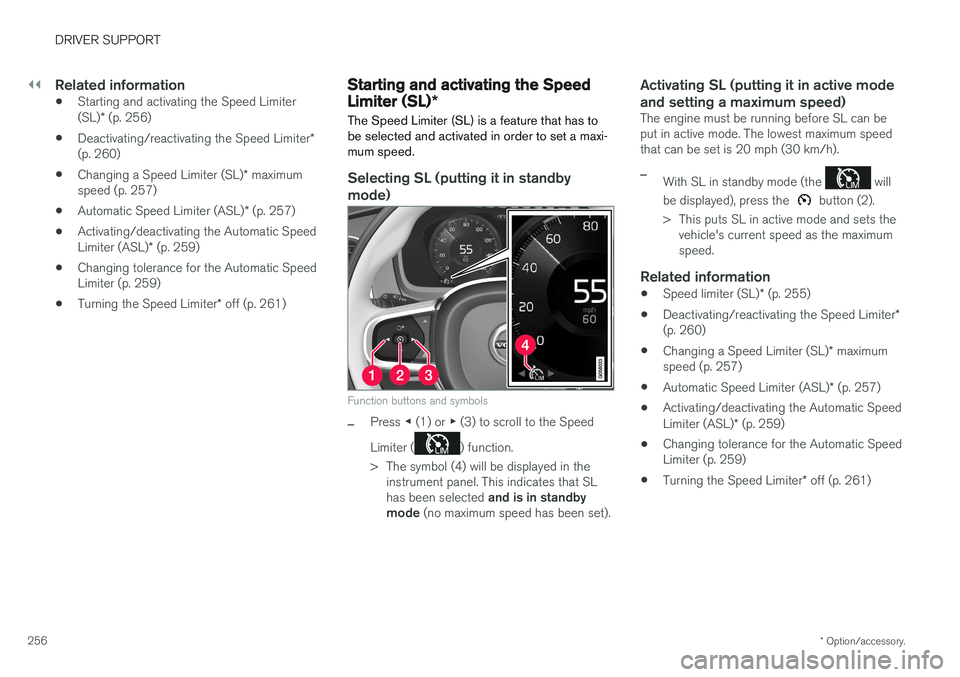
Function buttons and symbols
–Press ◀ (1) or ▶ (3) to scroll to the Speed
Limiter (
) function.
> The symbol (4) will be displayed in the instrument panel. This indicates that SL has been selected and is in standby
mode (no maximum speed has been set).
Activating SL (putting it in active mode and setting a maximum speed)
The engine must be running before SL can be put in active mode. The lowest maximum speedthat can be set is 20 mph (30 km/h).
–With SL in standby mode (the will
be displayed), press the
button (2).
> This puts SL in active mode and sets the vehicle's current speed as the maximum speed.
Related information
• Speed limiter (SL)
* (p. 255)
• Deactivating/reactivating the Speed Limiter
*
(p. 260)
• Changing a Speed Limiter (SL)
* maximum
speed (p. 257)
• Automatic Speed Limiter (ASL)
* (p. 257)
• Activating/deactivating the Automatic Speed Limiter (ASL)
* (p. 259)
• Changing tolerance for the Automatic Speed Limiter (p. 259)
• Turning the Speed Limiter
* off (p. 261)
Page 260 of 560
||
DRIVER SUPPORT
* Option/accessory.
258
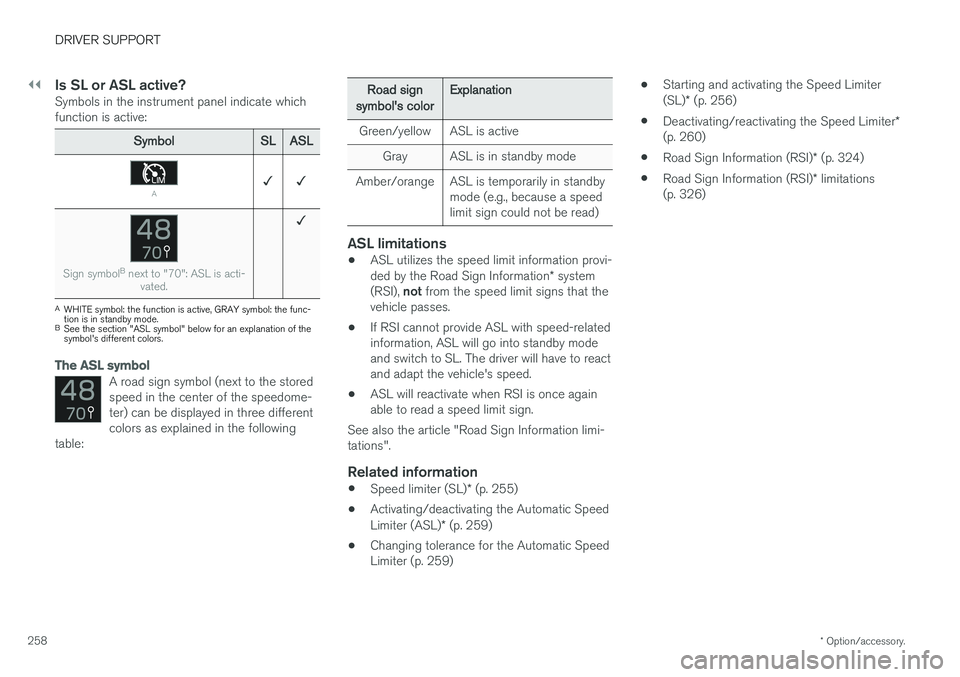
Is SL or ASL active?Symbols in the instrument panel indicate which function is active:
Symbol SLASL
A✓ ✓
Sign symbol B
next to "70": ASL is acti-
vated.
✓
AWHITE symbol: the function is active, GRAY symbol: the func- tion is in standby mode.
B See the section "ASL symbol" below for an explanation of thesymbol's different colors.
The ASL symbol
A road sign symbol (next to the stored speed in the center of the speedome-ter) can be displayed in three differentcolors as explained in the following
table:
Road sign
symbol's color Explanation
Green/yellow ASL is active Gray ASL is in standby mode
Amber/orange ASL is temporarily in standby mode (e.g., because a speed limit sign could not be read)
ASL limitations
•ASL utilizes the speed limit information provi- ded by the Road Sign Information
* system
(RSI), not from the speed limit signs that the
vehicle passes.
• If RSI cannot provide ASL with speed-related information, ASL will go into standby modeand switch to SL. The driver will have to reactand adapt the vehicle's speed.
• ASL will reactivate when RSI is once againable to read a speed limit sign.
See also the article "Road Sign Information limi-tations".
Related information
• Speed limiter (SL)
* (p. 255)
• Activating/deactivating the Automatic Speed Limiter (ASL)
* (p. 259)
• Changing tolerance for the Automatic Speed Limiter (p. 259) •
Starting and activating the Speed Limiter (SL)
* (p. 256)
• Deactivating/reactivating the Speed Limiter
*
(p. 260)
• Road Sign Information (RSI)
* (p. 324)
• Road Sign Information (RSI)
* limitations
(p. 326)
Page 261 of 560
DRIVER SUPPORT
}}
* Option/accessory.259
Activating/deactivating the Automatic Speed Limiter (ASL) *
The function Automatic Speed Limiter (ASL) is a
supplement to the Speed Limiter (SL) and can be activated/deactivated.
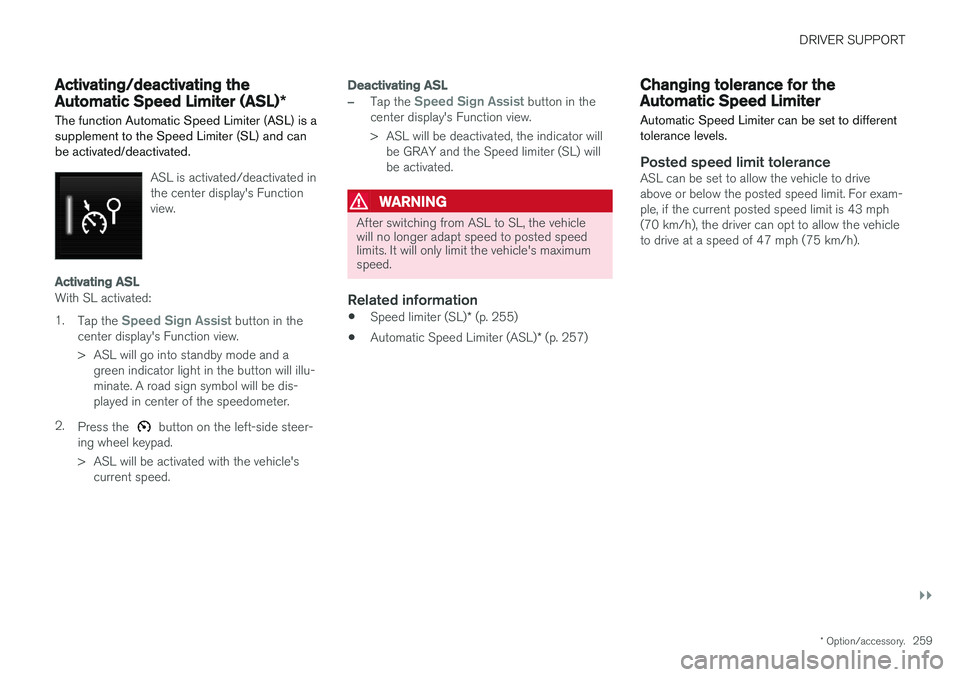
ASL is activated/deactivated in the center display's Functionview.
Activating ASL
With SL activated: 1.
Tap the
Speed Sign Assist button in the
center display's Function view.
> ASL will go into standby mode and a green indicator light in the button will illu- minate. A road sign symbol will be dis-played in center of the speedometer.
2. Press the
button on the left-side steer-
ing wheel keypad.
> ASL will be activated with the vehicle's current speed.
Deactivating ASL
–Tap the Speed Sign Assist button in the
center display's Function view.
> ASL will be deactivated, the indicator will be GRAY and the Speed limiter (SL) will be activated.
WARNING
After switching from ASL to SL, the vehicle will no longer adapt speed to posted speedlimits. It will only limit the vehicle's maximumspeed.
Related information
• Speed limiter (SL)
* (p. 255)
• Automatic Speed Limiter (ASL)
* (p. 257)
Changing tolerance for the Automatic Speed Limiter
Automatic Speed Limiter can be set to different tolerance levels.
Posted speed limit toleranceASL can be set to allow the vehicle to drive above or below the posted speed limit. For exam-ple, if the current posted speed limit is 43 mph(70 km/h), the driver can opt to allow the vehicleto drive at a speed of 47 mph (75 km/h).
Page 264 of 560
DRIVER SUPPORT
* Option/accessory.
262
Cruise Control (CC)
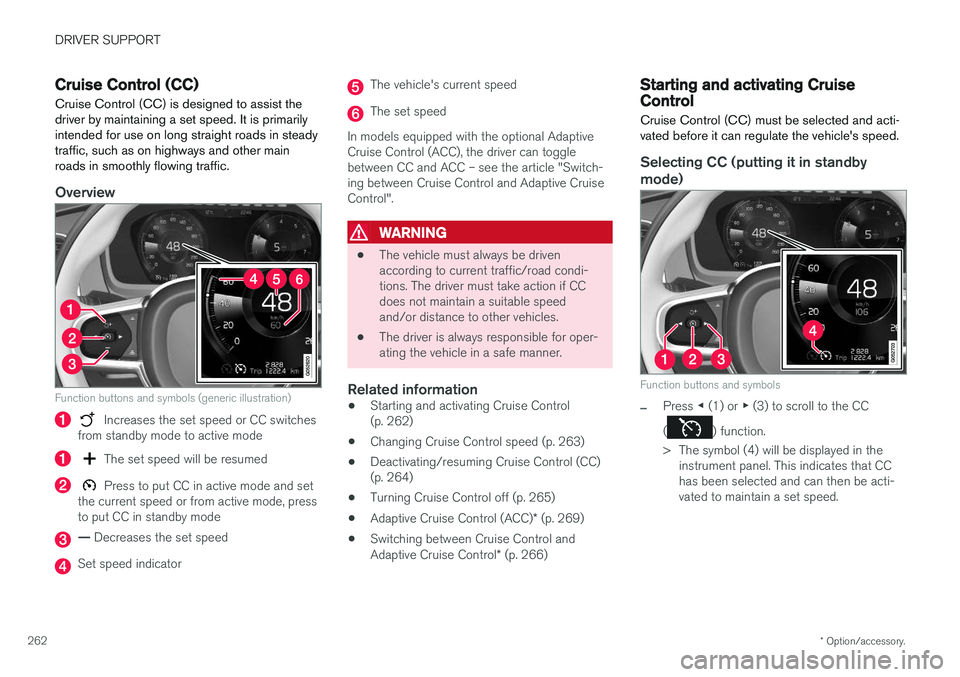
Cruise Control (CC) is designed to assist the driver by maintaining a set speed. It is primarilyintended for use on long straight roads in steadytraffic, such as on highways and other mainroads in smoothly flowing traffic.
Overview
Function buttons and symbols (generic illustration)
Increases the set speed or CC switches
from standby mode to active mode
The set speed will be resumed
Press to put CC in active mode and set
the current speed or from active mode, press to put CC in standby mode
— Decreases the set speed
Set speed indicator
The vehicle's current speed
The set speed
In models equipped with the optional Adaptive Cruise Control (ACC), the driver can togglebetween CC and ACC – see the article "Switch-ing between Cruise Control and Adaptive CruiseControl".
WARNING
• The vehicle must always be driven according to current traffic/road condi-tions. The driver must take action if CCdoes not maintain a suitable speedand/or distance to other vehicles.
• The driver is always responsible for oper-ating the vehicle in a safe manner.
Related information
•Starting and activating Cruise Control(p. 262)
• Changing Cruise Control speed (p. 263)
• Deactivating/resuming Cruise Control (CC)(p. 264)
• Turning Cruise Control off (p. 265)
• Adaptive Cruise Control (ACC)
* (p. 269)
• Switching between Cruise Control and Adaptive Cruise Control
* (p. 266)
Starting and activating Cruise Control
Cruise Control (CC) must be selected and acti- vated before it can regulate the vehicle's speed.
Selecting CC (putting it in standby
mode)
Function buttons and symbols
–Press ◀ (1) or ▶ (3) to scroll to the CC
(
) function.
> The symbol (4) will be displayed in the instrument panel. This indicates that CC has been selected and can then be acti-vated to maintain a set speed.
Page 265 of 560
DRIVER SUPPORT
* Option/accessory.263
NOTE
Before CC can be activated, the vehicle's speed must be at least 20 mph (30 km/h).This is also the lowest speed that can be set.
Activating CC (putting it in active mode and setting a speed)
–With the symbol displayed (CC is in
standby mode), press the
button (2) on
the left-side steering wheel keypad.
> This puts CC in active mode and will maintain the vehicle's current speed.
Related information
• Cruise Control (CC) (p. 262)
• Switching between Cruise Control and Adaptive Cruise Control
* (p. 266)
• Deactivating/resuming Cruise Control (CC) (p. 264)
• Turning Cruise Control off (p. 265)
Changing Cruise Control speed
Changing a set speed
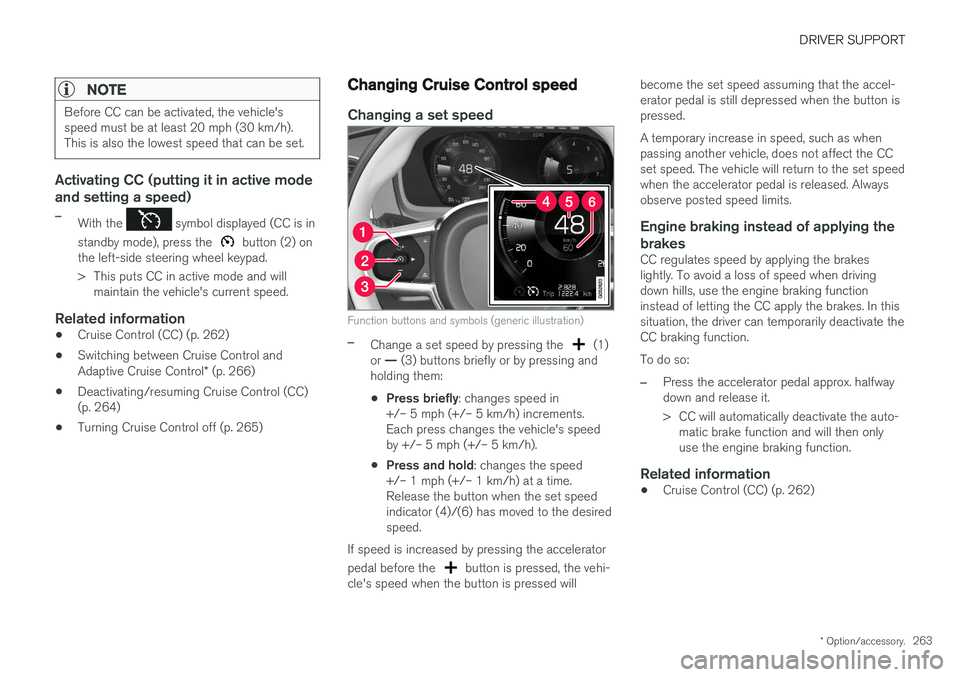
Function buttons and symbols (generic illustration)
–Change a set speed by pressing the (1)
or — (3) buttons briefly or by pressing and
holding them:
• Press briefly
: changes speed in
+/– 5 mph (+/– 5 km/h) increments. Each press changes the vehicle's speedby +/– 5 mph (+/– 5 km/h).
• Press and hold
: changes the speed
+/– 1 mph (+/– 1 km/h) at a time.Release the button when the set speedindicator (4)/(6) has moved to the desiredspeed.
If speed is increased by pressing the accelerator pedal before the
button is pressed, the vehi-
cle's speed when the button is pressed will become the set speed assuming that the accel- erator pedal is still depressed when the button ispressed. A temporary increase in speed, such as when passing another vehicle, does not affect the CCset speed. The vehicle will return to the set speedwhen the accelerator pedal is released. Alwaysobserve posted speed limits.
Engine braking instead of applying the
brakes
CC regulates speed by applying the brakeslightly. To avoid a loss of speed when drivingdown hills, use the engine braking functioninstead of letting the CC apply the brakes. In thissituation, the driver can temporarily deactivate theCC braking function. To do so:
–Press the accelerator pedal approx. halfway down and release it.
> CC will automatically deactivate the auto- matic brake function and will then only use the engine braking function.
Related information
• Cruise Control (CC) (p. 262)