Activating speed limit information VOLVO XC90 2017 Owner´s Manual
[x] Cancel search | Manufacturer: VOLVO, Model Year: 2017, Model line: XC90, Model: VOLVO XC90 2017Pages: 560, PDF Size: 9.97 MB
Page 291 of 560
DRIVER SUPPORT
}}
* Option/accessory.289
become the set speed assuming that the accel- erator pedal is still depressed when the button ispressed. A temporary increase in speed, such as when passing another vehicle, does not affect thespeed set for Pilot Assist. The vehicle will returnto the set speed when the accelerator pedal isreleased. Pilot Assist can follow another vehicle from a standstill up to a speed of approx. 125 mph(200 km/h). Always observe posted speed limits. The lowest speed that can be set/stored for Pilot Assist is 20 mph (30 km/h). However, PilotAssist can monitor and react to the speed of thevehicle ahead down to a standstill. The highest speed that can be set/stored is approx. 125 mph (200 km/h). Always observeposted speed limits.
Related information
•
Pilot Assist
* (p. 283)
• Starting and activating Pilot Assist (p. 286)
• Setting a Pilot Assist time interval (p. 289)
• Changing target vehicles and automaticbraking with Pilot Assist (p. 292)
• Deactivating/resuming Pilot Assist (p. 290)
• Passing Assistance with Adaptive CruiseControl or Pilot Assist (p. 277)
• Pilot Assist limitations (p. 293) •
Pilot Assist symbols and messages (p. 295)
Setting a Pilot Assist time interval
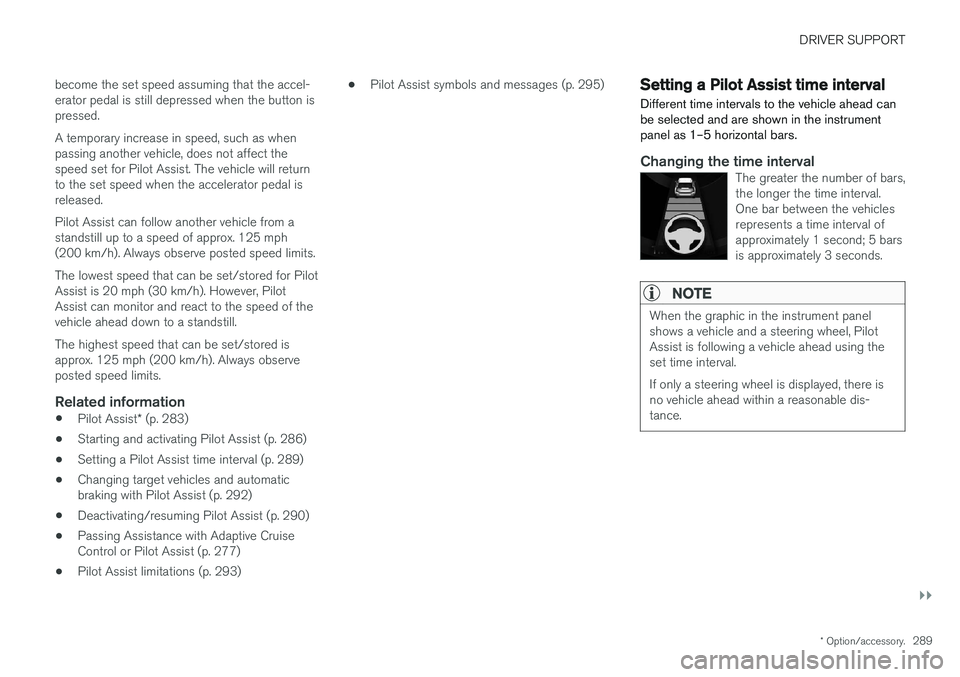
Different time intervals to the vehicle ahead can be selected and are shown in the instrumentpanel as 1–5 horizontal bars.
Changing the time intervalThe greater the number of bars, the longer the time interval.One bar between the vehiclesrepresents a time interval ofapproximately 1 second; 5 barsis approximately 3 seconds.
NOTE
When the graphic in the instrument panel shows a vehicle and a steering wheel, PilotAssist is following a vehicle ahead using theset time interval. If only a steering wheel is displayed, there is no vehicle ahead within a reasonable dis-tance.
Page 292 of 560
||
DRIVER SUPPORT
* Option/accessory.
290
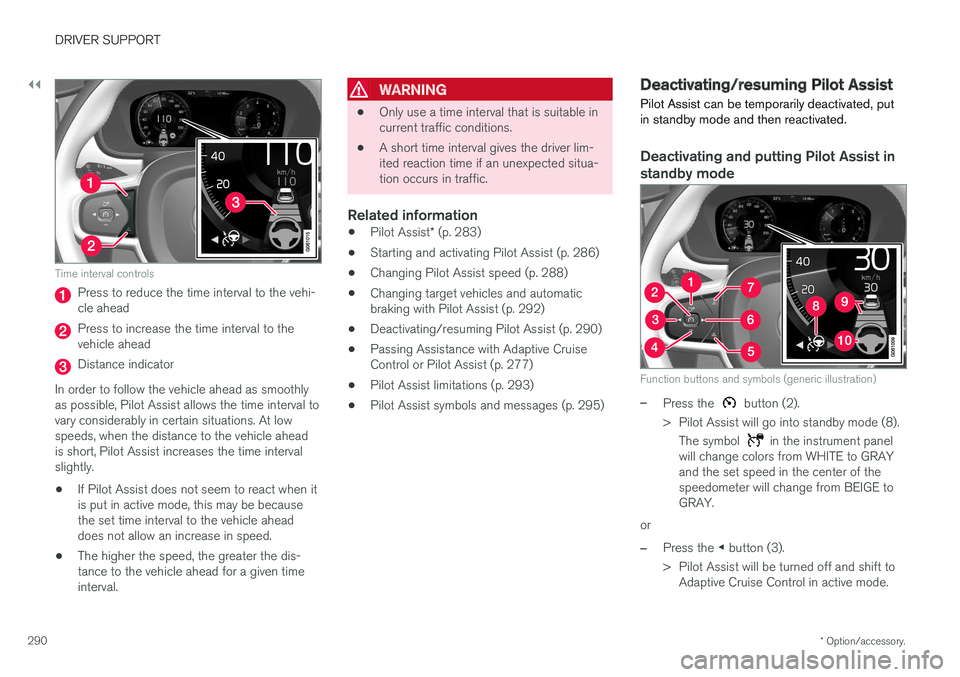
Time interval controls
Press to reduce the time interval to the vehi- cle ahead
Press to increase the time interval to the vehicle ahead
Distance indicator
In order to follow the vehicle ahead as smoothly as possible, Pilot Assist allows the time interval tovary considerably in certain situations. At lowspeeds, when the distance to the vehicle aheadis short, Pilot Assist increases the time intervalslightly.
• If Pilot Assist does not seem to react when itis put in active mode, this may be becausethe set time interval to the vehicle aheaddoes not allow an increase in speed.
• The higher the speed, the greater the dis-tance to the vehicle ahead for a given timeinterval.
WARNING
• Only use a time interval that is suitable in current traffic conditions.
• A short time interval gives the driver lim-ited reaction time if an unexpected situa-tion occurs in traffic.
Related information
•
Pilot Assist
* (p. 283)
• Starting and activating Pilot Assist (p. 286)
• Changing Pilot Assist speed (p. 288)
• Changing target vehicles and automaticbraking with Pilot Assist (p. 292)
• Deactivating/resuming Pilot Assist (p. 290)
• Passing Assistance with Adaptive CruiseControl or Pilot Assist (p. 277)
• Pilot Assist limitations (p. 293)
• Pilot Assist symbols and messages (p. 295)
Deactivating/resuming Pilot Assist Pilot Assist can be temporarily deactivated, put in standby mode and then reactivated.
Deactivating and putting Pilot Assist in standby mode
Function buttons and symbols (generic illustration)
–Press the button (2).
> Pilot Assist will go into standby mode (8). The symbol
in the instrument panel
will change colors from WHITE to GRAY and the set speed in the center of thespeedometer will change from BEIGE toGRAY.
or
–Press the ◀ button (3).
> Pilot Assist will be turned off and shift to Adaptive Cruise Control in active mode.
Page 295 of 560
DRIVER SUPPORT
}}
* Option/accessory.293
–The driver will then have to reactivate Pilot Assist in one of the following ways:
• Press the
button on the left-side
steering wheel keypad
• Press the accelerator pedal
> Pilot Assist will resume following the vehi- cle ahead (target vehicle) if it begins to move within approx. 6 seconds.
NOTE
Pilot Assist can keep the vehicle at a stand- still for up to 5 minutes, after which the park-ing brake will be set and Pilot Assist will gointo standby mode. The parking brake has to be released before Pilot Assist can be reactivated.
Deactivation of the auto-hold brake function
In certain situations, auto-hold will be deactivated when the vehicle is at a standstill and Pilot Assistwill go into standby mode. This means that the brakes will be released and the vehicle can begin to roll. The driver must actively apply the brakes to keep the vehicle at a standstill. This can occur in the following situations: • the driver presses the brake pedal
• the parking brake is set •
the gear selector is moved to the
P, N or R
positions
• the driver puts Pilot Assist in standby mode
Automatically setting the parking brakeIn certain situations, the parking brake is set automatically to help keep the vehicle at a stand-still. This occurs if Pilot Assist keeps the vehicle at a standstill with the brakes and:
• the driver unbuckles the seat belt or opensthe door
• Pilot Assist has kept the vehicle at a stand-still for more than approx. 5 minutes
• the engine is turned off
• the brakes overheat
Related information
•
Pilot Assist
* (p. 283)
• Starting and activating Pilot Assist (p. 286)
• Changing Pilot Assist speed (p. 288)
• Setting a Pilot Assist time interval (p. 289)
• Deactivating/resuming Pilot Assist (p. 290)
• Passing Assistance with Adaptive CruiseControl or Pilot Assist (p. 277)
• Pilot Assist limitations (p. 293)
• Pilot Assist symbols and messages (p. 295)
Pilot Assist limitations
Pilot Assist functionality may be limited in certain situations.
Pilot Assist is designed to help the driver in a number of situations. However, the driver alwayshas the primary responsibility for maintaining asafe distance to other vehicles and for keepingthe vehicle in its proper traffic lane.
Page 296 of 560
||
DRIVER SUPPORT
* Option/accessory.
294
WARNING
Pilot Assist is not a collision avoidance sys- tem. The driver is always responsible forsteering or applying the brakes if the systemdoes not detect another vehicle. Do not use Pilot Assist in demanding driving conditions such as city driving or other heavytraffic situations, in slippery conditions, whenthere is a great deal of water or slush on theroad, during heavy rain or snow, in poor visibil-ity, on winding roads or on highway on- or off-ramps. In certain situations, it may be difficult for Pilot Assist to assist the driver correctly or to deac-tivate automatically. In such cases, it is advisa-ble not to use Pilot Assist. Examples of suchsituations may be:
• the lane's side market lines are missing, badly faded or cross each other.
• the division of lanes is not clear, e.g.,when a line divides or merges withanother, at exits or if there are many roadsigns/markers.
• there are edges or other lines on or nearthe lane, e.g., curbs, cracks, repairedareas, sharp shadows, etc.
• the lane is narrow or winding.
• the lane is at the top of a hill, on anuneven road surface or over a bump.
•bad weather conditions (rain, snow, fog, slush, poor visibility, backlighting, etc).
The driver should also be aware that Pilot Assist has the following limitations: • High curbs, barriers and temporary obsta- cles (cones, barriers etc) may not bedetected or could be detected incorrectlyas side marker lines, which may create arisk of collision. The driver must ensure asafe distance to these obstacles.
• The camera or radar sensor may not beable to detect objects if there are pot-holes or if there are stationary objectspartially or completely blocking the road.
• Pilot Assist does not "see" pedestrians,animals, etc.
• Pilot Assist's steering capacity is limitedand may not always be able to help thedriver keep the vehicle in the lane.
The driver can always take action to override PilotAssist.
Steep roads and/or heavy loadsPilot Assist is primarily intended for use on rela-tively level roads. The function may not be able tomaintain the correct time interval to the vehicleahead on when driving down steep hills. Thedriver should be attentive and prepared to applythe brakes in these situations. Do not use Pilot Assist when the vehicle is trans-porting a heavy load or if it is towing a trailer.
Additional information
•
The Off Road drive mode cannot be
selected if Pilot Assist is activated.
• Pilot Assist uses the vehicle's camera and radar sensor, which have certain general limi-tations. See the articles "Camera limitations"and "Radar sensor limitations" for additionalinformation.
Related information
•
Pilot Assist
* (p. 283)
• Starting and activating Pilot Assist (p. 286)
• Changing Pilot Assist speed (p. 288)
• Setting a Pilot Assist time interval (p. 289)
• Changing target vehicles and automaticbraking with Pilot Assist (p. 292)
• Deactivating/resuming Pilot Assist (p. 290)
• Passing Assistance with Adaptive CruiseControl or Pilot Assist (p. 277)
• Pilot Assist symbols and messages (p. 295)
• Radar sensor limitations (p. 297)
• Camera limitations (p. 301)
Page 298 of 560
||
DRIVER SUPPORT
* Option/accessory.
296
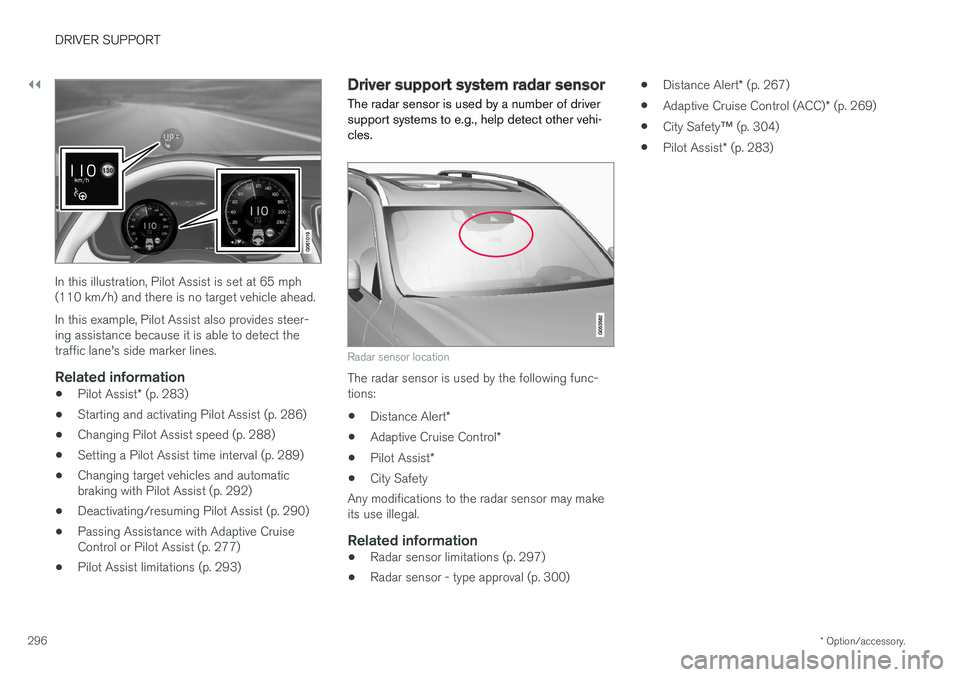
In this illustration, Pilot Assist is set at 65 mph (110 km/h) and there is no target vehicle ahead. In this example, Pilot Assist also provides steer- ing assistance because it is able to detect thetraffic lane's side marker lines.
Related information
• Pilot Assist
* (p. 283)
• Starting and activating Pilot Assist (p. 286)
• Changing Pilot Assist speed (p. 288)
• Setting a Pilot Assist time interval (p. 289)
• Changing target vehicles and automaticbraking with Pilot Assist (p. 292)
• Deactivating/resuming Pilot Assist (p. 290)
• Passing Assistance with Adaptive CruiseControl or Pilot Assist (p. 277)
• Pilot Assist limitations (p. 293)
Driver support system radar sensor
The radar sensor is used by a number of driver support systems to e.g., help detect other vehi-cles.
Radar sensor location
The radar sensor is used by the following func- tions:
• Distance Alert
*
• Adaptive Cruise Control
*
• Pilot Assist
*
• City Safety
Any modifications to the radar sensor may makeits use illegal.
Related information
• Radar sensor limitations (p. 297)
• Radar sensor - type approval (p. 300) •
Distance Alert
* (p. 267)
• Adaptive Cruise Control (ACC)
* (p. 269)
• City Safety
™ (p. 304)
• Pilot Assist
* (p. 283)
Page 327 of 560
DRIVER SUPPORT
* Option/accessory.325
Activating/deactivating RSI
RSI can be activated/deacti- vated in the center display'sfunction view.
–Tap the Road Sign Information button in
Function view.
> When RSI is activated, the indicator light in the button will be green. The indicator light will be gray when the function isdeactivated.
Activating/deactivating the speed warning function
The driver can be alerted if the current speed limit is being exceeded (the symbol for the cur-rent speed limit will begin to flash). This functioncan be activated or deactivated and the limit for awarning can be set. 1. Tap
Settings in the center display's Top
view.
2. Tap
My CarIntelliSafeRoad Sign
Information.
3. Tap
Speed Limit Warning to activate/deac-
tivate this function.
> If the function is activated, a speed selec- tor will be displayed. 4. Select the limit at which the speed warning is
to be given by pressing the up/down arrows. Please be aware that the set warning limit will not be used when a speed camera sym-bol is displayed in the instrument panel.
Activating/deactivating the audible alert
The audible alert can be activated/deactivated and the limit for a warning can be set. 1.Tap
Settings in the center display's Top
view.
2. Tap
My CarIntelliSafeRoad Sign
Information.
3. Tap
Audio Warning to activate/deactivate
this function.
Speed camera alert
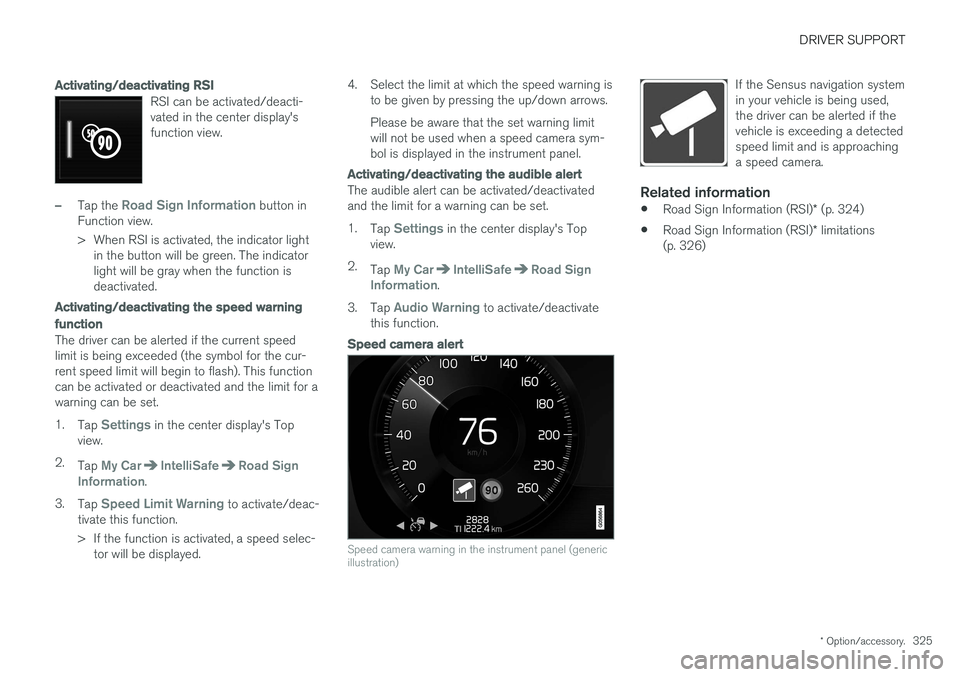
Speed camera warning in the instrument panel (generic illustration)
If the Sensus navigation system in your vehicle is being used,the driver can be alerted if thevehicle is exceeding a detectedspeed limit and is approachinga speed camera.
Related information
• Road Sign Information (RSI)
* (p. 324)
• Road Sign Information (RSI)
* limitations
(p. 326)
Page 339 of 560
DRIVER SUPPORT
* Option/accessory.337
Side park assist
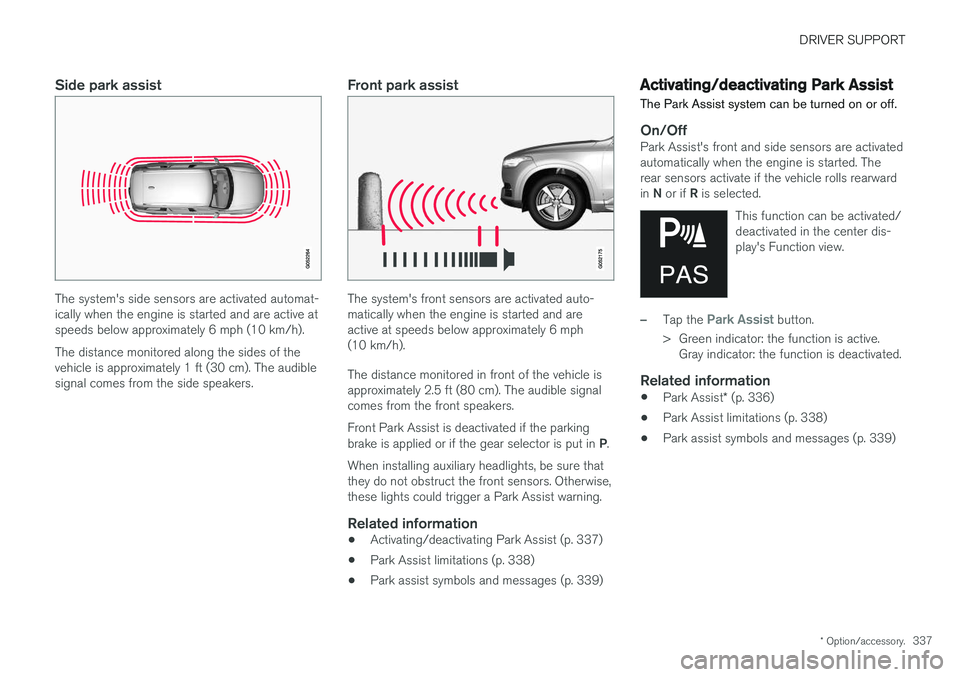
The system's side sensors are activated automat- ically when the engine is started and are active atspeeds below approximately 6 mph (10 km/h). The distance monitored along the sides of the vehicle is approximately 1 ft (30 cm). The audiblesignal comes from the side speakers.
Front park assist
The system's front sensors are activated auto- matically when the engine is started and areactive at speeds below approximately 6 mph(10 km/h). The distance monitored in front of the vehicle is approximately 2.5 ft (80 cm). The audible signalcomes from the front speakers. Front Park Assist is deactivated if the parking brake is applied or if the gear selector is put in P.
When installing auxiliary headlights, be sure that they do not obstruct the front sensors. Otherwise,these lights could trigger a Park Assist warning.
Related information
• Activating/deactivating Park Assist (p. 337)
• Park Assist limitations (p. 338)
• Park assist symbols and messages (p. 339)
Activating/deactivating Park Assist
The Park Assist system can be turned on or off.
On/OffPark Assist's front and side sensors are activated automatically when the engine is started. Therear sensors activate if the vehicle rolls rearward in N or if R is selected.
This function can be activated/ deactivated in the center dis-play's Function view.
–Tap the Park Assist button.
> Green indicator: the function is active. Gray indicator: the function is deactivated.
Related information
• Park Assist
* (p. 336)
• Park Assist limitations (p. 338)
• Park assist symbols and messages (p. 339)
Page 556 of 560
INDEX
554Rollover Protection System (ROPS) 255
Roll Stability Control (RSC) 255
Run-off mitigation 333, 335
S
Safety, occupant 56
Safety defects, reporting 57
Safety locks, child 246
Safety mode 74Seat
adjusting the passenger's seat from the
driver's seat 164
Seat belt reminder 64
Seat belts Automatic locking retractor/Emergency
locking retractor 77
buckling 62
pretensioners 60, 61
reminder 64
securing child restraint systems 79, 81, 83
unbuckling 62
use during pregnancy 58
using 60
Seats rear 169
Sensus 17 Service connected service booking 484
Settings view categories 110
resetting 113
system settings 112
Shiftlock override 393
Side door mirrors 102
Side impact airbags 72Sirius Satellite radio Travel link 413
SiriusXM ®
Satellite radio
traffic information 410, 411, 412
Snow chains 459
Snow tires 459Sound settings media 436
ringtones 425
Sound settings, audio system 403, 436 Specifications bulbs 511
Speed camera alert 324
Speed limiter 255, 257, 261 automatic 257, 259deactivating/reactivating 260
starting/activating 256
Spin control 251
Stability system 251 sport mode 252
Start/Stop (engine function) 389, 391Start and lock system type designations 248
Starting and driving 354
Starting the engine 382Starting the vehicle after a crash (crash mode) 74
Start inhibitor (immobilizer) 224
Steel grid in cargo area 215
Steering wheel 160 adjusting 161
heated 197
horn 160
keypad 160
Steering wheel paddles 160
Stone chips, touching up 528, 529
Storage compartments 210
Studded tires 459Sunroof laminated panoramic roof 103, 104
Sun shade 107, 109