parking brake VOLVO XC90 2017 Owner´s Manual
[x] Cancel search | Manufacturer: VOLVO, Model Year: 2017, Model line: XC90, Model: VOLVO XC90 2017Pages: 560, PDF Size: 9.97 MB
Page 397 of 560
STARTING AND DRIVING
}}
395
Park – P
Select P when the vehicle is parked or when the
starting the engine. The vehicle must be station- ary when P is selected.
The ignition must be in mode II and the brake
pedal must be depressed before the gear selec-tor can be moved from P.
In position P, the transmission is mechanically
locked. Always apply the parking brake when the vehicle is parked.
NOTE
The gear selector must be in the P position
before the vehicle can be locked and the alarm set.
WARNING
Always apply the parking brake when the vehicle is parked, particularly when parking on a hill. The transmission's P mode may not be
able to keep the vehicle stationary if it is parked on an incline.
Reverse – R
The vehicle must be stationary before R can be
selected.
Neutral – N
No gear is selected and the engine can be started. Always apply the parking brake if thevehicle is not moving and the gear selector is in the N position.
The ignition must be in mode II and the brake
pedal must be depressed before the gear selec-tor can be moved from N.
Drive – D
D is the normal driving position and gear shifting
is fully automatic. The vehicle must be stationary when the gear selector is moved from R to D.
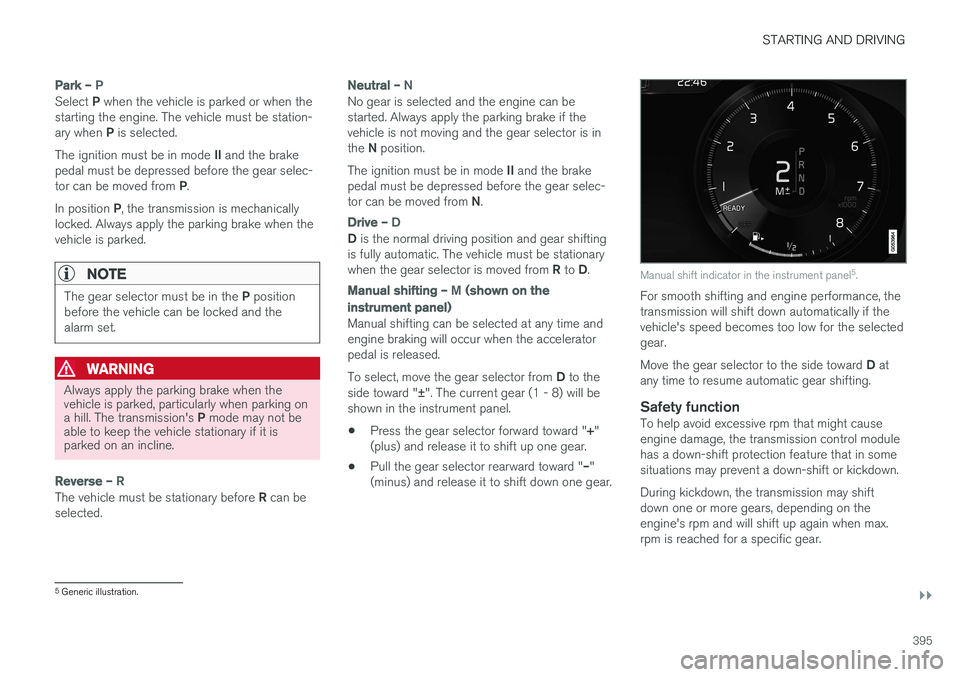
Manual shifting – M (shown on the
instrument panel)
Manual shifting can be selected at any time and engine braking will occur when the acceleratorpedal is released. To select, move the gear selector from D to the
side toward " ±". The current gear (1 - 8) will be
shown in the instrument panel.
• Press the gear selector forward toward "
+"
(plus) and release it to shift up one gear.
• Pull the gear selector rearward toward "
–"
(minus) and release it to shift down one gear.
Manual shift indicator in the instrument panel 5
.
For smooth shifting and engine performance, the transmission will shift down automatically if thevehicle's speed becomes too low for the selectedgear. Move the gear selector to the side toward D at
any time to resume automatic gear shifting.
Safety functionTo help avoid excessive rpm that might cause engine damage, the transmission control modulehas a down-shift protection feature that in somesituations may prevent a down-shift or kickdown. During kickdown, the transmission may shift down one or more gears, depending on theengine's rpm and will shift up again when max.rpm is reached for a specific gear.
5 Generic illustration.
Page 464 of 560
WHEELS AND TIRES
* Option/accessory.
462
Changing tires
When changing wheels to another dimension, always follow Volvo's instructions.
When changing to tires of another
dimension
If you mount tires with a dimension other thanthe factory-installed tires, contact an authorizedVolvo retailer to update the vehicle's software.This may also be necessary when changing fromsummer to winter tires, or vice versa.
Related information
• Snow tires and chains (p. 459)
• Spare tire (p. 463)
• Installing a wheel (p. 466)
• Removing a wheel (p. 465)
Tools
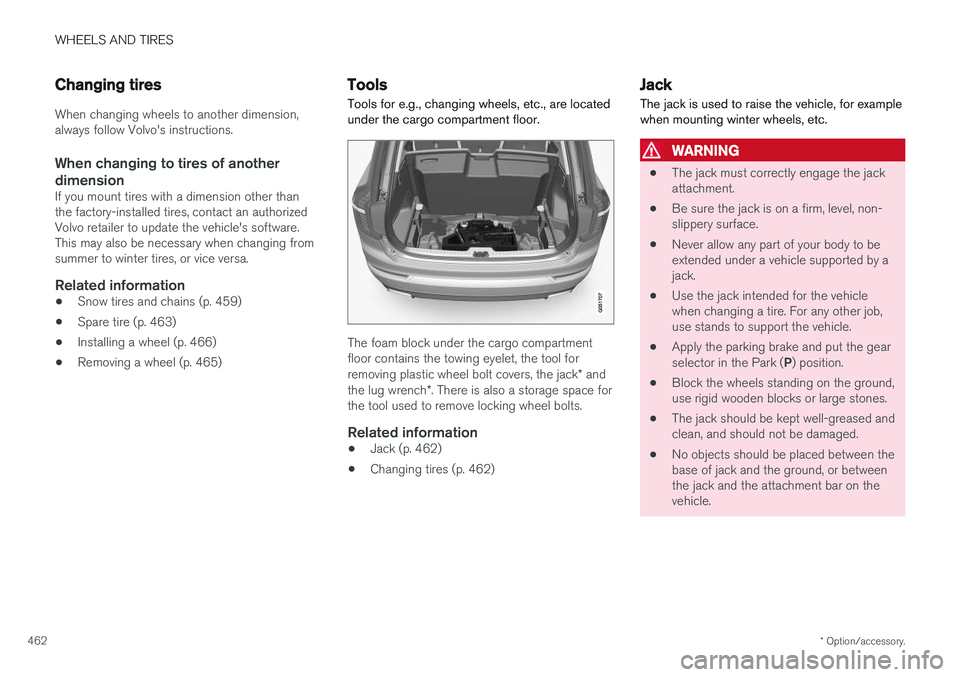
Tools for e.g., changing wheels, etc., are located under the cargo compartment floor.
The foam block under the cargo compartment floor contains the towing eyelet, the tool for removing plastic wheel bolt covers, the jack * and
the lug wrench *. There is also a storage space for
the tool used to remove locking wheel bolts.
Related information
• Jack (p. 462)
• Changing tires (p. 462)
Jack
The jack is used to raise the vehicle, for example when mounting winter wheels, etc.
WARNING
• The jack must correctly engage the jack attachment.
• Be sure the jack is on a firm, level, non-slippery surface.
• Never allow any part of your body to beextended under a vehicle supported by ajack.
• Use the jack intended for the vehiclewhen changing a tire. For any other job,use stands to support the vehicle.
• Apply the parking brake and put the gear selector in the Park (
P) position.
• Block the wheels standing on the ground, use rigid wooden blocks or large stones.
• The jack should be kept well-greased andclean, and should not be damaged.
• No objects should be placed between thebase of jack and the ground, or betweenthe jack and the attachment bar on thevehicle.
Page 467 of 560
WHEELS AND TIRES
}}
* Option/accessory.465
Removing a wheel
Wheel changes should always be carried out correctly.
1. Turn on the hazard warning flashers if the wheel change has to be done near passing traffic.
2. Apply the parking brake and put the gear selector in P.
CAUTION
Models with suspension and level con- trol *:
Turn this function off before raising the vehi- cle. To do so, go to
SettingsVehicleDisable Leveling Control in the center dis-
play's Top view.
WARNING
• The jack must correctly engage the jack attachment.
• Be sure the jack is on a firm, level, non-slippery surface.
• Never allow any part of your body to beextended under a vehicle supported by ajack.
• Use the jack intended for the vehicle whenchanging a tire. For any other job, usestands to support the vehicle.
• Apply the parking brake and put the gear selector in the Park (
P) position.
• Block the wheels standing on the ground, use rigid wooden blocks or large stones.
• The jack should be kept well-greased andclean, and should not be damaged.
• No objects should be placed between thebase of jack and the ground, or betweenthe jack and the attachment bar on thevehicle.
NOTE
The jack provided with your vehicle is intended to be used only in temporary situa-tions such as changing wheels in the event ofa flat tire. Only the jack that came with yourparticular model should be used to lift thevehicle. If the vehicle needs to be lifted morefrequently or for a prolonged period, using agarage jack or hoist is recommended. Alwaysfollow this device
Page 498 of 560
||
MAINTENANCE AND SERVICING
* Option/accessory.
496 •
Fuses 18–30, 35–37, 46–54 and 55–70 are called "Micro".
• Fuses 31–34, 38–45 and 71–78 are called"MCase" and should only be replaced by atrained and qualified Volvo service technician.
Function
A
– –
– –
– –
– –
– –
Front USB socket* 5
12-volt socket in the front tun- nel console 15
12-volt socket on the rear side of the tunnel console15
12-volt socket in the cargo com- partment15
– –
Driver's side headlight, certain LED models15
Passenger's side headlight, cer- tain LED models15
Function
A
– –
Heated windshield*, driver side Shunt
Heated windshield
*, driver side 40
Headlight washers
*25
Windshield washer 25
– –
Horn 20
Alarm siren 5
Brake system control module (valves, parking brake) 40
Windshield wipers 30
Tailgate window washer 25
Heated windshield
*, passenger
side 40
– –
Brake system control module (ABS pump)
40
– –
Function
A
Heated windshield*, passenger
side Shunt
Feed when ignition is switched on to: engine control module,transmission components, elec-trical power steering, centralelectrical module; Brake system control module 5
– –
Passenger side headlight Passenger's side headlight, cer- tain LED models
7.5
15
– –
– –
Battery connection control mod- ule 5
Air bags; Occupant Weight Sen- sor (OWS)5
Driver side headlight Driver's side headlight, certain LED models7.5
15
Accelerator pedal sensor 5
Page 502 of 560
||
MAINTENANCE AND SERVICING
* Option/accessory.
500
Positions
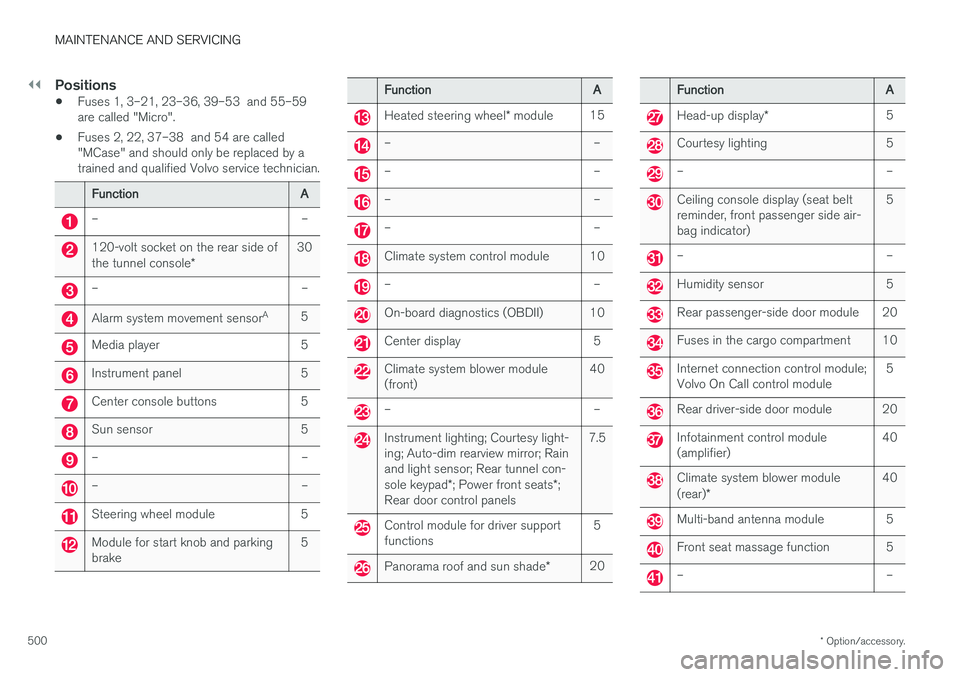
• Fuses 1, 3–21, 23–36, 39–53 and 55–59 are called "Micro".
• Fuses 2, 22, 37–38 and 54 are called"MCase" and should only be replaced by atrained and qualified Volvo service technician.
Function
A
– –
120-volt socket on the rear side of the tunnel console* 30
– –
Alarm system movement sensor
A
5
Media player 5
Instrument panel 5
Center console buttons 5
Sun sensor 5
– –
– –
Steering wheel module 5
Module for start knob and parking brake 5
Function
A
Heated steering wheel* module 15
– –
– –
– –
– –
Climate system control module 10
– –
On-board diagnostics (OBDII) 10
Center display 5
Climate system blower module (front) 40
– –
Instrument lighting; Courtesy light- ing; Auto-dim rearview mirror; Rainand light sensor; Rear tunnel con- sole keypad
*; Power front seats *;
Rear door control panels 7.5
Control module for driver support functions
5
Panorama roof and sun shade
*20
Function
A
Head-up display* 5
Courtesy lighting 5
– –
Ceiling console display (seat belt reminder, front passenger side air-bag indicator) 5
– –
Humidity sensor 5
Rear passenger-side door module 20
Fuses in the cargo compartment 10
Internet connection control module; Volvo On Call control module
5
Rear driver-side door module 20
Infotainment control module (amplifier)40
Climate system blower module (rear)
* 40
Multi-band antenna module 5
Front seat massage function 5
– –
Page 525 of 560
MAINTENANCE AND SERVICING
}}
523
CAUTION
•During high pressure washing, the spray mouthpiece must never be closer to thevehicle than 13" (30 cm). Do not sprayinto the locks.
• Dirt, snow, etc., on the headlights canreduce lighting capacity considerably.Clean the headlights regularly, for exam-ple when refueling.
Special laminated panoramic roof cau-
tions:
• Always close the laminated panoramicroof and sun shade before washing yourvehicle.
• Never use abrasive cleaning agents onthe laminated panoramic roof.
• Never use wax on the rubber sealsaround the laminated panoramic roof.
NOTE
When washing the vehicle, remember to remove dirt from the drain holes in the doorsand sills.
Automatic car washes
• We do NOT recommend washing your vehi- cle in an automatic wash during the first few months (because the paint will not havehardened sufficiently).
• An automatic wash is a simple and quick wayto clean your vehicle, but it is worth remem-bering that it may not be as thorough aswhen you yourself go over the vehicle withsponge and water. Keeping the underbodyclean is most important, especially in the win-ter. Some automatic washers do not havefacilities for washing the underbody.
NOTE
Condensation may form temporarily on the inside of the lenses of exterior lights such asheadlights or taillights. This is normal and thelights are designed to withstand moisture.Normally, condensation will dissipate after thelights have been on for a short time.
CAUTION
When using an automatic car wash in which the vehicle has to be able to roll freely, theauto-hold brake function must be deactivated.If this is not done, the brakes will automati-cally be applied when the vehicle is stationary. To deactivate this function:
1. Drive the vehicle into the car wash
2. Turn off the auto-hold function using the
control on the center console
3. Turn off the parking brake's automatic function in the center display's Top view (tap
Settings, tap My CarParking
Brake and Suspension and deselectAuto Activate Parking Brake)
4. Put the gear selector in N
5. Switch off the ignition by turning the start knob to STOP and holding it in this posi-
tion for at least 4 seconds
The vehicle will then be able to roll freely.
Page 526 of 560
||
MAINTENANCE AND SERVICING
* Option/accessory.
524
CAUTION
• Before driving into an automatic car wash, turn off the optional rain sensor toavoid damaging the windshield wipers.
• Make sure that side view mirrors, auxiliarylamps, etc, are secure, and that anyantenna(s) are retracted or removed. Oth-erwise there is risk of the machine dis-lodging them.
• Chromed wheels:
Clean chrome-plated
wheels using the same detergents usedfor the body of the vehicle. Aggressivewheel-cleaning agents can permanentlystain chrome-plated wheels.
WARNING
• When the vehicle is driven immediately after being washed, apply the brakes,including the parking brake, several timesin order to remove any moisture from thebrake linings.
• Engine cleaning agents should not beused when the engine is warm. This con-stitutes a fire risk.
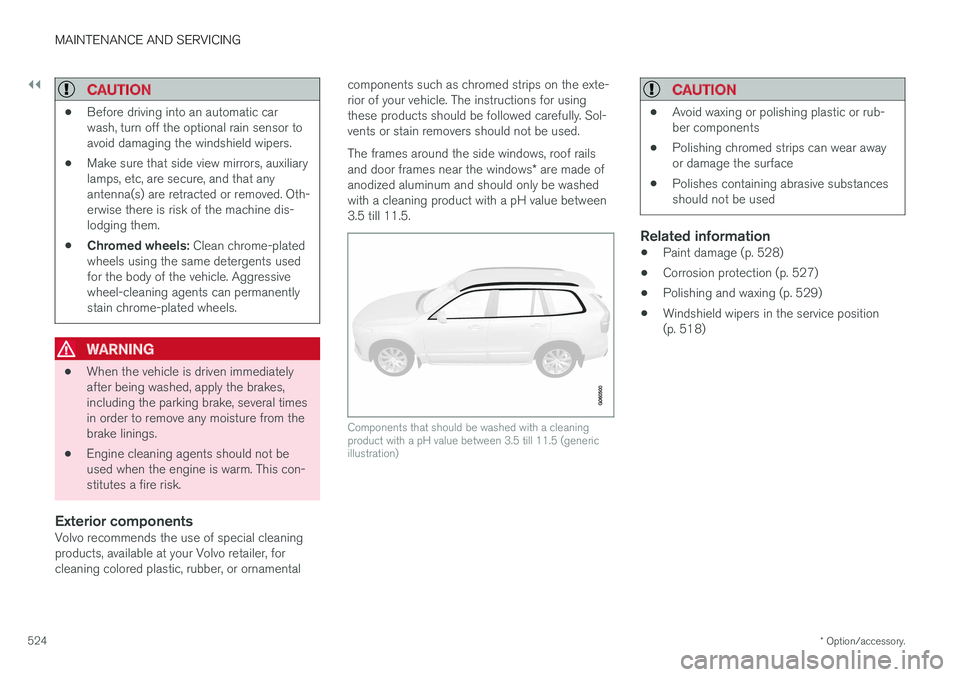
Exterior componentsVolvo recommends the use of special cleaningproducts, available at your Volvo retailer, forcleaning colored plastic, rubber, or ornamental components such as chromed strips on the exte-rior of your vehicle. The instructions for usingthese products should be followed carefully. Sol-vents or stain removers should not be used. The frames around the side windows, roof rails and door frames near the windows
* are made of
anodized aluminum and should only be washed with a cleaning product with a pH value between3.5 till 11.5.
Components that should be washed with a cleaning product with a pH value between 3.5 till 11.5 (genericillustration)
CAUTION
• Avoid waxing or polishing plastic or rub- ber components
• Polishing chromed strips can wear awayor damage the surface
• Polishes containing abrasive substancesshould not be used
Related information
•Paint damage (p. 528)
• Corrosion protection (p. 527)
• Polishing and waxing (p. 529)
• Windshield wipers in the service position (p. 518)
Page 555 of 560

INDEX
553
P
Paint, touching up 528, 529
Park assist 336, 337, 338, 339
Park Assist Camera 340, 342, 344, 345settings 340, 344
Park Assist Pilot 346, 347, 350, 352Parking brake electric, applying/releasing 361, 363
Parking light bulb, replacing 510Passenger compartment fuses 498
Passive Entry system location of antennas 236
Permissible axle weight 537Phone phone book 423
receiving calls 422
text messages 424, 426
Pilot Assist 277, 283, 286, 289, 290, 292, 293
Polishing 529 Power front seat memory function 165
Power mirrors 102 defroster 194
Power steeringadjustable 250
Power tailgate 240
Power windows 107
Pregnancy, using seat belts during 58
PROPOSITION 65 WARNING 374
R
Radar driver support systems 296, 300
Radar sensor limitations 297
Radio RBDS 405
settings 404 SiriusXM ®
Satellite radio 410, 411, 412
Radio functions HD digital radio 406, 408, 409
Rain sensor 157
Rear Collision Warning 316
Rear fog lights 145
Rear park assist 336, 337, 338, 339
Rear seat head restraints 170
Rear seats 169 accessing the third row 174
adjusting backrest tilt 172
center head restraint 170
folding 173, 174, 175
moving forward/rearward 171
Rearview mirror compass 136, 137
Rear window defroster 194
Recalls 58
Recalls, child restraints 77
Recirculation (climate system) 194
Refrigerant (A/C system) 540
Refueling 371, 372 fuel filler door 373
Registering child restraints 77
Remote key 227, 230, 237 immobilizer 224
linking to a driver profile 177
range 229
replacing the battery 225
restricted (red) key 230
Remote updates 483
Replacing bulbs 505
Replacing fuses 493, 494, 498, 502
Reporting safety defects 57
Roadside Assistance 14
Road sign information (RSI) 324, 326