parking brake VOLVO XC90 2017 Owner´s Manual
[x] Cancel search | Manufacturer: VOLVO, Model Year: 2017, Model line: XC90, Model: VOLVO XC90 2017Pages: 560, PDF Size: 9.97 MB
Page 252 of 560
DRIVER SUPPORT
* Option/accessory.
250
Driver support systems
The vehicle is equipped with a number of driver support systems that help provide the driver withactive/passive support.
Some of these systems are standard while others are optional and they are designed to e.g., helpthe driver maintain a set speed or a set distanceto a vehicle ahead, or warn the driver of a poten-tial collision situation and in certain cases applythe brakes if necessary. Certain optional systemscan also assist in various parking situations.
Related information
• Adjustable steering force
* (p. 250)
• Electronic Stability Control (ESC) (p. 251)
• Roll stability control (RSC) (p. 255)
• Speed limiter (SL)
* (p. 255)
• Distance Alert
* (p. 267)
• Cruise Control (CC) (p. 262)
• Adaptive Cruise Control (ACC)
* (p. 269)
• Pilot Assist
* (p. 283)
• Driver support system radar sensor (p. 296)
• Driver support system camera (p. 300)
• City Safety
™ (p. 304)
• Blind Spot Information (BLIS)
* (p. 317)
• Cross Traffic Alert (CTA)
* (p. 319)
• Road Sign Information (RSI)
* (p. 324) •
Driver Alert Control (DAC) (p. 326)
• Driving lane assistance (p. 328)
• Run-off Mitigation (p. 333)
• Park Assist
* (p. 336)
• Park Assist Camera (PAC)
* (p. 340)
• Park Assist Pilot (PAP)
* (p. 346)
Adjustable steering force *
Steering force increases with the speed of the vehicle to give the driver an enhanced sense ofcontrol and stability. At low speed the vehicle iseasier to steer in order to facilitate parking, etc.
Changing the steering force levelTo change the level of steering force, see theinformation under the heading "individual" in arti-cle "Drive modes" for additional information. On models not equipped with the drive mode control in the center console, the selection ismade in the center display's Top view under:
SettingsMy CarDrive ModesSteering force
NOTE
•This steering force level menu function cannot be accessed when the vehicle isin motion.
• In certain situations, the power steeringfunction may become too hot and mustbe temporarily cooled. During cooling,power steering effect will be reduced andmore force may be necessary to turn thesteering wheel and a message will bedisplayed in the instrument panel.
Page 276 of 560
||
DRIVER SUPPORT
* Option/accessory.
274
WARNING
When ACC is in standby mode, the driver has to control the vehicle's speed and distance toa vehicle ahead. When ACC is in standby mode, the driver will be alerted if the distance to the vehicle aheadis too short by the Distance Alert function.See the article "Distance Alert" for additionalinformation.
Standby mode due to action by the driver
ACC is temporarily deactivated and put in standby mode if:
• the brakes are applied
• The gear selector is moved to
N
• the vehicle is driven faster than the setspeed for more than 1 minute.
In these cases, the driver will have to regulate thevehicle's speed. A temporary increase in speed, such as when passing another vehicle, does not affect the ACCset speed. The vehicle will return to the set speedwhen the accelerator pedal is released.
Automatic standby mode
ACC interacts with other systems, such as Electronic Stability Control. If any of these othersystems are not functioning properly, ACC willturn off automatically.
WARNING
If this happens, the driver will be alerted by an audible signal and a message in the instru-ment panel. The driver will have to adapt thevehicle's speed, apply the brakes when nec-essary and keep a safe distance to the vehicleahead.
ACC switches automatically to standby mode if: • the vehicle's speed goes below approx. 3 mph (5 km/h) and ACC cannot determineif the vehicle ahead is stationary or is anobject such as a speed bump, etc
• the vehicle's speed goes below approx.3 mph (5 km/h) and the vehicle aheadchanges lanes or turns so that ACC nolonger has a target vehicle to follow
• the driver opens the door
• the driver unbuckles the seat belt
• the engine speed (rpm) is too high/low
• the wheels lose traction
• the brake temperature is too high
• the parking brake is applied
• the stability system's
ESC Sport Mode is
activated
• the
Off Road drive mode is selected
• The radar sensor is covered by e.g., wet snow or if heavy rain interferes with radar waves
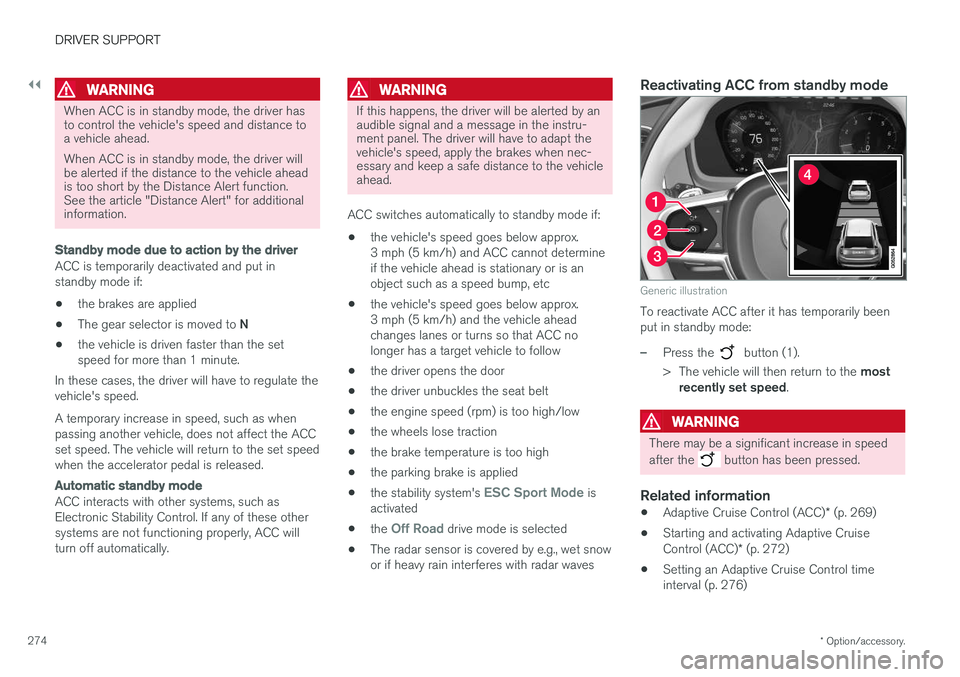
Reactivating ACC from standby mode
Generic illustration
To reactivate ACC after it has temporarily been put in standby mode:
–Press the button (1).
> The vehicle will then return to the most
recently set speed .
WARNING
There may be a significant increase in speed after the
button has been pressed.
Related information
•Adaptive Cruise Control (ACC)
* (p. 269)
• Starting and activating Adaptive Cruise Control (ACC)
* (p. 272)
• Setting an Adaptive Cruise Control time interval (p. 276)
Page 280 of 560
||
DRIVER SUPPORT
* Option/accessory.
278
WARNING
At speeds above 20 mph (30 km/h), if ACC
changes targets from a moving vehicle to a stationary one, the system will not react to the
stationary vehicle and will accelerate to the previously set speed. The driver must actively apply the brakes to slow/stop the vehicle.
Automatic standby mode when changing targets
ACC disengages and goes into standby mode if:
• your vehicle's speed goes below approx. 3 mph (5 km/h) and ACC cannot determineif the target object is a stationary vehicle orsome other type of object such as a speedbump, etc
• the vehicle's speed goes below approx.3 mph (5 km/h) and the vehicle aheadchanges lanes or turns so that ACC nolonger has a target vehicle to follow.
Auto-hold brake functionIn slow-moving, stop-and-go traffic or when stop-ped at a traffic light, driving will resume automati-cally if the vehicle is not stopped for more thanapprox. 3 seconds. If it takes more than3 seconds for the vehicle ahead to begin movingagain, ACC will go into standby mode and theauto-hold brake function will activate.
–The driver will then have to reactivate ACC in one of the following ways:
• Press the
button on the left-side
steering wheel keypad.
• Press the accelerator pedal.
> ACC will resume following the vehicle ahead (target vehicle) if it begins to move within approx. 6 seconds.
NOTE
ACC can keep the vehicle at a standstill for up to 5 minutes, after which the parking brakewill be set and ACC will go into standbymode. The parking brake has to be released before ACC can be reactivated.
Deactivation of the auto-hold brake function
In certain situations, auto-hold will be deactivated when the vehicle is at a standstill and ACC will gointo standby mode. This means that the brakes will be released and the vehicle can begin to roll. The driver must actively apply the brakes to keep the vehicle at a standstill. This can occur in the following situations: • the driver presses the brake pedal
• the parking brake is set •
the gear selector is moved to the
P, N or R
positions
• the driver puts ACC in standby mode.
Automatically setting the parking brakeIn certain situations, the parking brake is set automatically to help keep the vehicle at a stand-still. This occurs if ACC keeps the vehicle at a stand- still with the brakes and:
• the driver unbuckles the seat belt or opensthe door
• ACC has kept the vehicle at a standstill formore than approx. 5 minutes
• the brakes overheat
• the engine is turned off.
Related information
•
Adaptive Cruise Control (ACC)
* (p. 269)
• Auto-hold brake function (p. 356)
• Parking brake (p. 360)
Page 293 of 560
DRIVER SUPPORT
}}
* Option/accessory.291
In standby mode, the driver will have to regulate the vehicle's speed and the distance to the vehi-cle ahead. When Pilot Assist is in standby mode and your vehicle comes too close to another vehicle, thedriver will be alerted by the Distance Alert func-tion.
Standby mode due to action by the driver
Pilot Assist is temporarily deactivated and put in standby mode if:
• the brakes are applied
• The gear selector is moved to
N
• the turn signals are used for more than1 minute
• the vehicle is driven faster than the setspeed for more than 1 minute.
A temporary increase in speed, such as whenpassing another vehicle, does not affect the PilotAssist set speed. The vehicle will return to the setspeed when the accelerator pedal is released. When the turn signals are used, Pilot Assist's steering function will be temporarily deactivated.When this is no longer the case, the steeringfunction will reactivate if the traffic lane's sidemarker lines can still be detected.
Automatic standby mode
Pilot Assist interacts with other systems, such as Electronic Stability Control. If any of these other systems are not functioning properly, Pilot Assistwill automatically be deactivated.
WARNING
If this happens, the driver will be alerted by an audible signal and a message in the instru-ment panel. The driver will have to adapt thevehicle's speed, apply the brakes when nec-essary and keep a safe distance to the vehicleahead.
Pilot Assist switches automatically to standby mode if: • the vehicle's speed is below approx. 3 mph(5 km/h) and Pilot Assist cannot determine ifa vehicle ahead is a stationary vehicle or anobject.
• the vehicle's speed is below approx. 3 mph(5 km/h) and the vehicle ahead turns so thatPilot Assist no longer has a vehicle to follow(target vehicle).
• the driver's hands are not on the steeringwheel
• the driver's door is opened
• the driver unbuckles the seat belt
• engine speed (rpm) is too high/low
• the wheels lose traction
• brake temperature is too high
• the parking brake is set •
The camera lens/radar sensor is covered bye.g., snow or if heavy rain interferes withradar wavesReactivating Pilot Assist from standby
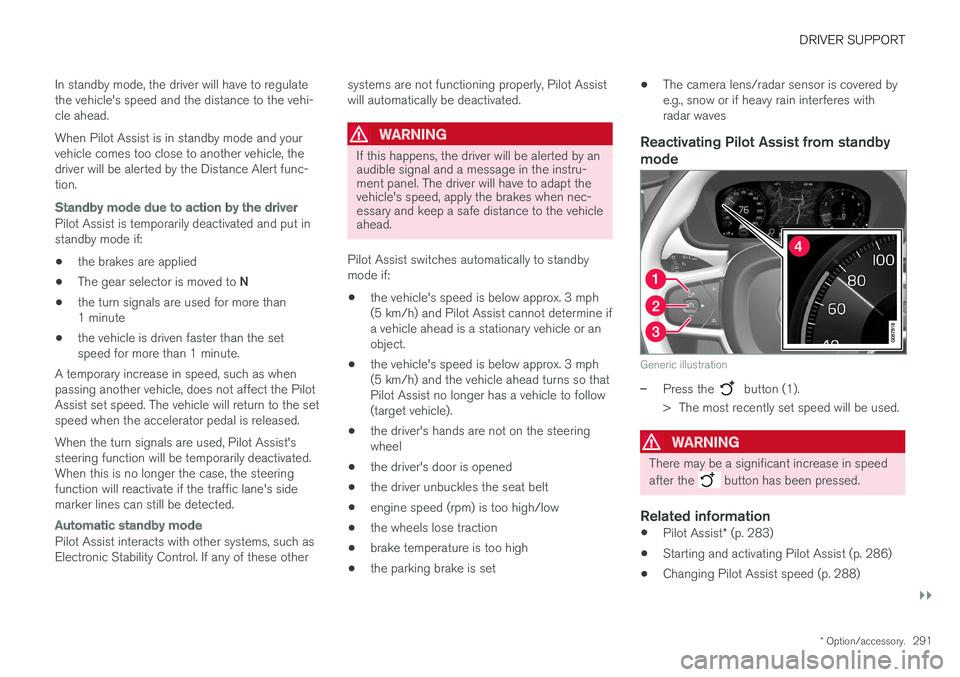
mode
Generic illustration
–Press the button (1).
> The most recently set speed will be used.
WARNING
There may be a significant increase in speed after the
button has been pressed.
Related information
• Pilot Assist
* (p. 283)
• Starting and activating Pilot Assist (p. 286)
• Changing Pilot Assist speed (p. 288)
Page 295 of 560
DRIVER SUPPORT
}}
* Option/accessory.293
–The driver will then have to reactivate Pilot Assist in one of the following ways:
• Press the
button on the left-side
steering wheel keypad
• Press the accelerator pedal
> Pilot Assist will resume following the vehi- cle ahead (target vehicle) if it begins to move within approx. 6 seconds.
NOTE
Pilot Assist can keep the vehicle at a stand- still for up to 5 minutes, after which the park-ing brake will be set and Pilot Assist will gointo standby mode. The parking brake has to be released before Pilot Assist can be reactivated.
Deactivation of the auto-hold brake function
In certain situations, auto-hold will be deactivated when the vehicle is at a standstill and Pilot Assistwill go into standby mode. This means that the brakes will be released and the vehicle can begin to roll. The driver must actively apply the brakes to keep the vehicle at a standstill. This can occur in the following situations: • the driver presses the brake pedal
• the parking brake is set •
the gear selector is moved to the
P, N or R
positions
• the driver puts Pilot Assist in standby mode
Automatically setting the parking brakeIn certain situations, the parking brake is set automatically to help keep the vehicle at a stand-still. This occurs if Pilot Assist keeps the vehicle at a standstill with the brakes and:
• the driver unbuckles the seat belt or opensthe door
• Pilot Assist has kept the vehicle at a stand-still for more than approx. 5 minutes
• the engine is turned off
• the brakes overheat
Related information
•
Pilot Assist
* (p. 283)
• Starting and activating Pilot Assist (p. 286)
• Changing Pilot Assist speed (p. 288)
• Setting a Pilot Assist time interval (p. 289)
• Deactivating/resuming Pilot Assist (p. 290)
• Passing Assistance with Adaptive CruiseControl or Pilot Assist (p. 277)
• Pilot Assist limitations (p. 293)
• Pilot Assist symbols and messages (p. 295)
Pilot Assist limitations
Pilot Assist functionality may be limited in certain situations.
Pilot Assist is designed to help the driver in a number of situations. However, the driver alwayshas the primary responsibility for maintaining asafe distance to other vehicles and for keepingthe vehicle in its proper traffic lane.
Page 339 of 560
DRIVER SUPPORT
* Option/accessory.337
Side park assist
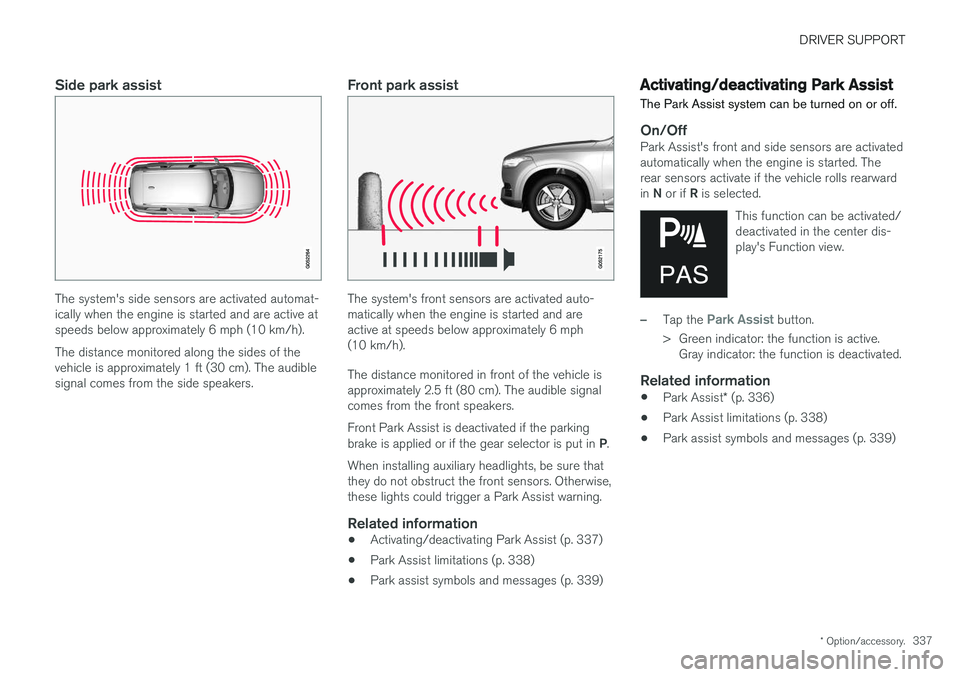
The system's side sensors are activated automat- ically when the engine is started and are active atspeeds below approximately 6 mph (10 km/h). The distance monitored along the sides of the vehicle is approximately 1 ft (30 cm). The audiblesignal comes from the side speakers.
Front park assist
The system's front sensors are activated auto- matically when the engine is started and areactive at speeds below approximately 6 mph(10 km/h). The distance monitored in front of the vehicle is approximately 2.5 ft (80 cm). The audible signalcomes from the front speakers. Front Park Assist is deactivated if the parking brake is applied or if the gear selector is put in P.
When installing auxiliary headlights, be sure that they do not obstruct the front sensors. Otherwise,these lights could trigger a Park Assist warning.
Related information
• Activating/deactivating Park Assist (p. 337)
• Park Assist limitations (p. 338)
• Park assist symbols and messages (p. 339)
Activating/deactivating Park Assist
The Park Assist system can be turned on or off.
On/OffPark Assist's front and side sensors are activated automatically when the engine is started. Therear sensors activate if the vehicle rolls rearward in N or if R is selected.
This function can be activated/ deactivated in the center dis-play's Function view.
–Tap the Park Assist button.
> Green indicator: the function is active. Gray indicator: the function is deactivated.
Related information
• Park Assist
* (p. 336)
• Park Assist limitations (p. 338)
• Park assist symbols and messages (p. 339)
Page 348 of 560
||
DRIVER SUPPORT
* Option/accessory.
346
Dark camera sectors
A dark camera sector may also be displayed in the following situations but without the defective
camera symbol. A sector may be dark because: • the door mirror is folded in
• the door is open
• the tailgate is open
Ambient lightingThe camera images are adjusted automatically to the ambient light, which means the image mayvary slightly in terms of light and quality. Poorambient lighting may reduce the quality of theimage.
Maintenance
•Keep the camera's lens free of dirt, ice andsnow. This is particularly important in poorambient lighting conditions.
• Remove dirt, ice and snow carefully to avoidscratching the lenses.
• Clean the lens regularly with warm water anda suitable car washing detergent.
Related information
•
Park Assist Camera (PAC)
* (p. 340)
Park Assist Pilot (PAP) *
Park Assist Pilot (PAP) helps the driver drive into parallel or perpendicular parking spaces andleave parallel parking spaces.
Park Assist Pilot provides assistance when park- ing by measuring the parking space and turningthe steering wheel to guide the vehicle into thespace. Information about the actions required by the driver is provided in the center display in the formof symbols, images and text.
NOTE
While PAP is active, the driver's task is to:
• carefully monitor the area around the vehicle
• follow the instructions provided in thecenter display
• select a gear (
D or R) when prompted
• regulate the vehicle's speed
• apply the brakes when necessary andstop the vehicle
Types of parking
Parallel parking
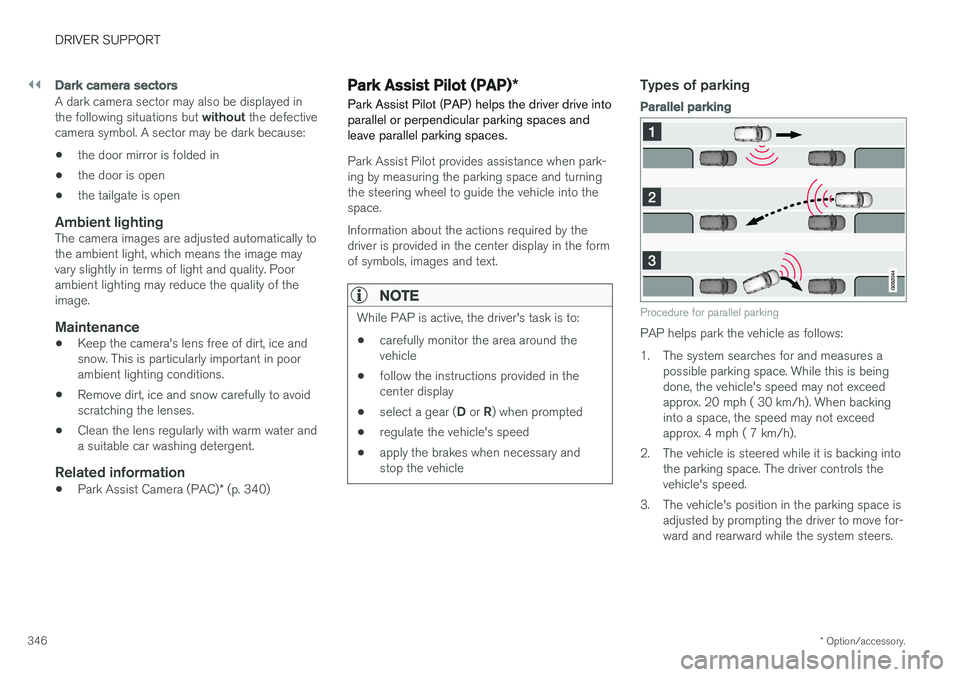
Procedure for parallel parking
PAP helps park the vehicle as follows:
1. The system searches for and measures a
possible parking space. While this is being done, the vehicle's speed may not exceedapprox. 20 mph ( 30 km/h). When backinginto a space, the speed may not exceedapprox. 4 mph ( 7 km/h).
2. The vehicle is steered while it is backing into the parking space. The driver controls thevehicle's speed.
3. The vehicle's position in the parking space is adjusted by prompting the driver to move for-ward and rearward while the system steers.
Page 349 of 560
DRIVER SUPPORT
}}
* Option/accessory.347
Perpendicular parking
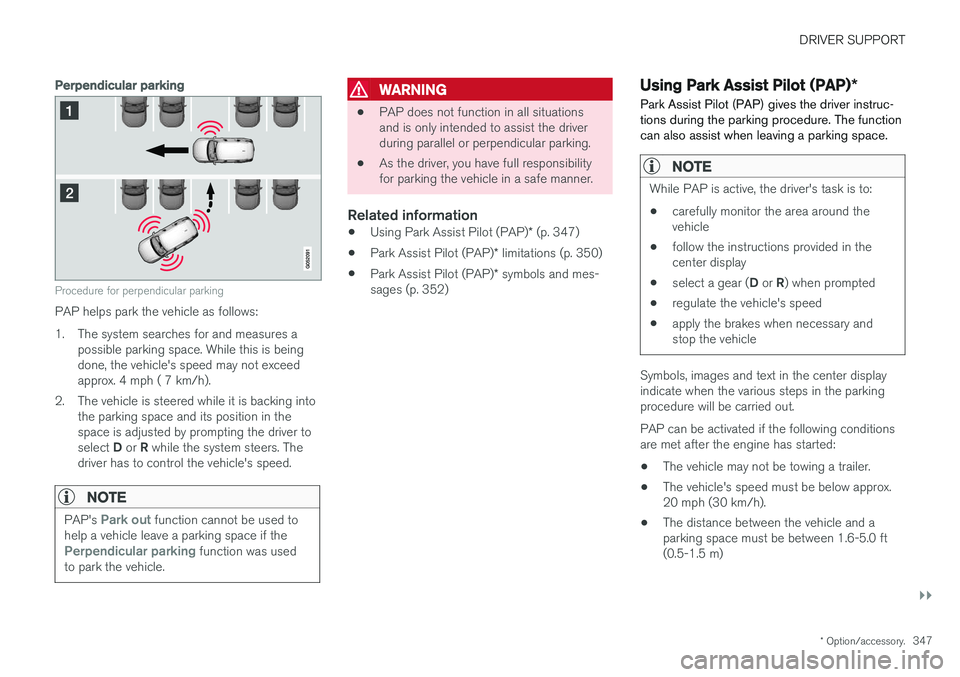
Procedure for perpendicular parking
PAP helps park the vehicle as follows:
1. The system searches for and measures a
possible parking space. While this is being done, the vehicle's speed may not exceedapprox. 4 mph ( 7 km/h).
2. The vehicle is steered while it is backing into the parking space and its position in thespace is adjusted by prompting the driver to select D or R while the system steers. The
driver has to control the vehicle's speed.
NOTE
PAP's Park out function cannot be used to
help a vehicle leave a parking space if the
Perpendicular parking function was used
to park the vehicle.
WARNING
• PAP does not function in all situations and is only intended to assist the driverduring parallel or perpendicular parking.
• As the driver, you have full responsibilityfor parking the vehicle in a safe manner.
Related information
•
Using Park Assist Pilot (PAP)
* (p. 347)
• Park Assist Pilot (PAP)
* limitations (p. 350)
• Park Assist Pilot (PAP)
* symbols and mes-
sages (p. 352)
Using Park Assist Pilot (PAP) *
Park Assist Pilot (PAP) gives the driver instruc- tions during the parking procedure. The functioncan also assist when leaving a parking space.
NOTE
While PAP is active, the driver's task is to:
• carefully monitor the area around the vehicle
• follow the instructions provided in thecenter display
• select a gear (
D or R) when prompted
• regulate the vehicle's speed
• apply the brakes when necessary andstop the vehicle
Symbols, images and text in the center display indicate when the various steps in the parkingprocedure will be carried out. PAP can be activated if the following conditions are met after the engine has started:
• The vehicle may not be towing a trailer.
• The vehicle's speed must be below approx.20 mph (30 km/h).
• The distance between the vehicle and aparking space must be between 1.6-5.0 ft(0.5-1.5 m)
Page 352 of 560
||
DRIVER SUPPORT
* Option/accessory.
350 adjusted by driving slightly forward and backing up. 1.
Put the gear selector in D, wait until the
steering wheel has turned and drive forward slowly.
2. Stop the vehicle when you are instructed by PAP to do so.
3. Put the gear selector in R, back up slowly
and stop when you are instructed by PAP todo so.
When the parking procedure is finished (this willbe indicated by a text message and a graphicimage), PAP switches off automatically. If neces-sary, the driver may need to make minor adjust-ments to ensure that the vehicle is parked cor-rectly.
CAUTION
The warning distance is shorter when PAP is using the sensors than when Park Assist isusing them.
Leaving a parking spaceThis function can only be used for a vehicle that has been par-
allel parked and is activated in
the center display's Function view.
1. Tap the Park out button in the center display's
Function view. 2. Use the turn signal to indicate the direction in which the vehicle should leave the parking space. 3. Follow the instructions provided in the center display. The procedure is the same as when park-ing the vehicle. The steering wheel may turn back slightly when the function is completed and the driver mayhave to turn the back before leaving the parkingspace. If PAP determines that the driver can leave the parking space without assistance, the functionwill deactivate before the vehicle is completelyout of the space.
Related information
• Park Assist Pilot (PAP)
* (p. 346)
• Park Assist Pilot (PAP)
* limitations (p. 350)
• Park Assist Pilot (PAP)
* symbols and mes-
sages (p. 352)
Park Assist Pilot (PAP) * limitations
The PAP function may be limited in certain situa- tions.
The PAP parking sequence is cancelledA parking sequence will be cancelled:
• if the vehicle is driven too fast: above approx. 4 mph (7 km/h)
• if the driver taps
Cancel in the center display
• if the driver moves the steering wheel with sufficient force.
• if the anti-lock brakes or Electronic StabilityControl are activated (e.g., if a wheel beginsto spin or lose traction)
In such cases, a text message will explain whythe parking sequence was cancelled.
NOTE
• PAP will not function correctly if its sen- sors are obstructed by dirt, snow, etc.
• In certain situations, PAP may not be ableto measure a parking space. This couldbe due to external sources of sound (e.g.,a vehicle's horn, tires on wet asphalt,pneumatic brakes, noise from a motorcy-cle's exhaust, etc.) emitting ultrasoundusing approximately the same frequen-cies as PAP.
Page 356 of 560
STARTING AND DRIVING
* Option/accessory.
354
Starting and driving The vehicle is equipped with features that sup- plement its basic functions, such as shifting gears with steering wheel paddles * and the fuel-
conserving start/stop function.
The vehicle is equipped with an automatic trans- mission that also makes it possible to shift gearsmanually. Certain functions can also be used when the engine is not running, depending on the ignitionmode being used.
Related information
• Starting the engine (p. 382)
• Ignition modes (p. 380)
• Automatic transmission (p. 392)
• Opening/closing the fuel filler door (p. 373)
• Start/Stop (p. 389)
• Parking brake (p. 360)
Brakes The brake system is a hydraulic system consist- ing of two separate brake circuits. If a problemshould occur in one of these circuits, it is stillpossible to stop the vehicle with the other brakecircuit.
Brake systemIf one of the brake circuits is not functioning, more pressure will be needed on the brake pedal(and the pedal will go down farther) for normalbraking effect. If the brake pedal must be depressed farther than normal and requires greater foot pressure,the stopping distance will be longer. Pressure on the brake pedal is enhanced by the power braking function. The power brakes only function when the engine is running. If the power brakes are not working, considerably higher pressure will be required on the brakepedal to compensate for the lack of power assis-tance. This can happen for example when towingyour vehicle or if the engine is switched off whenthe vehicle is rolling. The brake pedal feels stifferthan usual. When the Hill Start Assist function is being used, it will take slightly longer for the brake pedal toreturn to its normal position if the vehicle isparked on an incline or uneven surface. When driving in very hilly areas or if the vehicle iscarrying a heavy load, manual gear shifting canbe used for engine braking to augment the brakes. Use the
Off Road*
drive mode on steep
downgrades to increase the engine braking effect at low speeds.
Anti-lock Braking System ABS
The ABS system helps to improve vehicle control (stopping and steering) during severe brakingconditions by limiting brake lockup. When ABS is operating, there may be some vibration in the brake pedal, which is normal. The system performs a brief self-diagnostic test when the engine has been started and driverreleases the brake pedal. Another automatic testmay be performed when the vehicle first reachesa speed of approximately 6 mph (10 km/h). Thebrake pedal will pulsate several times and asound may be audible from the ABS controlmodule, which is normal.
Cleaning the brake discsCoatings of dirt and water on the brake discsmay result in delayed brake function. This delay isminimized by cleaning the brake linings. Cleaning the brake pads is advisable in wet weather, prior to long-term parking, and after thevehicle has been washed. Do this by braking gen-tly for a short period while the vehicle is moving.