lock VOLVO XC90 2018 Owner´s Manual
[x] Cancel search | Manufacturer: VOLVO, Model Year: 2018, Model line: XC90, Model: VOLVO XC90 2018Pages: 666, PDF Size: 11.32 MB
Page 580 of 666
||
MAINTENANCE AND SERVICE
578
Related information
•Vehicle status (p. 580)
• Scheduling service and repairs (p. 580)
• Connecting equipment to the vehicle's data link connector (p. 36)
• Technician certification (p. 37)
• Climate control system service (p. 586)
• Maintenance of the brake system (p. 411)
• Engine compartment overview (p. 587)
Data transfer between vehicle andworkshop over Wi-Fi
Volvo workshops have a designated Wi-Fi net- work for secure data transfer between your vehi-cle and the workshop. Your visit to the workshopwill be easier and more effective when diagnos-tics information and software can be transferredover the workshop's network.
When you arrive at the workshop, your technician can connect your vehicle to the workshop's Wi-Finetwork to perform troubleshooting and down-load software. For this type of communication,the vehicle only connects to the workshop's net-work. The vehicle can only be connected to thedesignated workshop networks, not to any othernetwork, e.g. your home network.
Manual connection to workshop Wi-FiManual connection is usually performed by aservice technician. Because the technician usesthe buttons on your remote key to connect thevehicle, it is important that you bring a key withbuttons when taking the vehicle in to a workshop.Pressing the lock button on the remote key threetimes will connect the vehicle to the workshop'sWi-Fi network. When the car is connected to a Wi-Fi network, the
symbol appears in the center display.
WARNING
The vehicle may not be driven when it is con- nected to the workshop's networks and sys-tems.
Related information
• Handling system updates via Download Cen- ter (p. 579)
• Scheduling service and repairs (p. 580)
Page 587 of 666
MAINTENANCE AND SERVICE
}}
585
Opening and closing the hood To open the hood, pull the lever in the passen- ger compartment and then turn the handle underthe hood.
Opening the hood
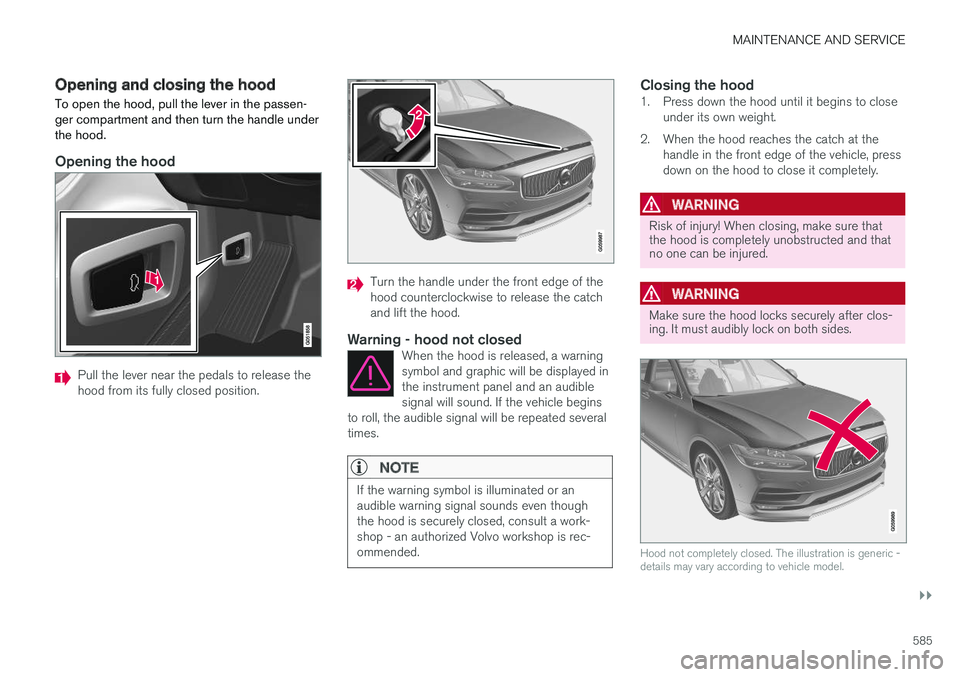
Pull the lever near the pedals to release the hood from its fully closed position.
Turn the handle under the front edge of the hood counterclockwise to release the catchand lift the hood.
Warning - hood not closedWhen the hood is released, a warningsymbol and graphic will be displayed inthe instrument panel and an audiblesignal will sound. If the vehicle begins
to roll, the audible signal will be repeated severaltimes.
NOTE
If the warning symbol is illuminated or an audible warning signal sounds even thoughthe hood is securely closed, consult a work-shop - an authorized Volvo workshop is rec-ommended.
Closing the hood1. Press down the hood until it begins to close under its own weight.
2. When the hood reaches the catch at the handle in the front edge of the vehicle, press down on the hood to close it completely.
WARNING
Risk of injury! When closing, make sure that the hood is completely unobstructed and thatno one can be injured.
WARNING
Make sure the hood locks securely after clos- ing. It must audibly lock on both sides.
Hood not completely closed. The illustration is generic - details may vary according to vehicle model.
Page 597 of 666
MAINTENANCE AND SERVICE
}}
595
Replacing the low beam headlightbulbs
The low beam bulbs in the halogen headlights can be changed without the help of a workshop.
CAUTION
Never touch the bulb glass with your bare fin- gers. Grease and oils from your fingers vapor-ize in the heat and will leave a deposit on thereflector, which may damage it.
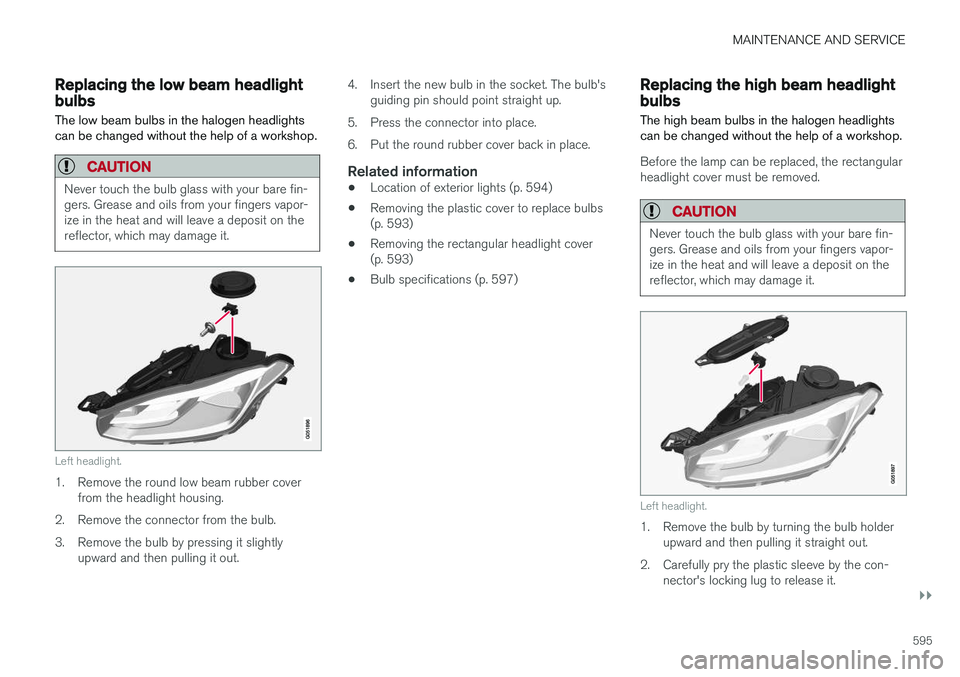
Left headlight.
1. Remove the round low beam rubber cover from the headlight housing.
2. Remove the connector from the bulb.
3. Remove the bulb by pressing it slightly upward and then pulling it out. 4. Insert the new bulb in the socket. The bulb's
guiding pin should point straight up.
5. Press the connector into place.
6. Put the round rubber cover back in place.
Related information
• Location of exterior lights (p. 594)
• Removing the plastic cover to replace bulbs (p. 593)
• Removing the rectangular headlight cover(p. 593)
• Bulb specifications (p. 597)
Replacing the high beam headlightbulbs
The high beam bulbs in the halogen headlights can be changed without the help of a workshop.
Before the lamp can be replaced, the rectangular headlight cover must be removed.
CAUTION
Never touch the bulb glass with your bare fin- gers. Grease and oils from your fingers vapor-ize in the heat and will leave a deposit on thereflector, which may damage it.
Left headlight.
1. Remove the bulb by turning the bulb holder upward and then pulling it straight out.
2. Carefully pry the plastic sleeve by the con- nector's locking lug to release it.
Page 623 of 666
MAINTENANCE AND SERVICE
}}
621
Polishing and waxingPolish and wax the vehicle when the paint is matte or to provide extra protection. The vehicledoes not need to be polished until it is at least ayear old. However, it can be waxed during thefirst year. Do not polish or wax the vehicle indirect sunlight. The surface of the vehicle shouldnot be warmer than approximately 45 °C(113 °F).
• Wash and dry the vehicle very carefully before polishing or waxing. Remove asphaltand tar stains with asphalt remover or paintthinner. More stubborn stains can beremoved with a grinding paste designed forvehicle paint.
• Use polish first and then liquid or paste wax.Follow the instructions on the package care-fully. Many products contain both polish andwax.
• A wide range of polymer-based waxes canbe purchased today. These waxes are easy touse and produce a long-lasting, high-glossfinish that protects the bodywork against oxi-dation, road dirt and fading.
CAUTION
Avoid waxing and polishing plastic and rubber. If using degreaser on plastic and rubber, only rub (if necessary) with slight pressure. Use asoft sponge. Polishing glossy trim moldings can wear away or damage the glossy surface layer. Polish containing abrasives must not be used.
CAUTION
Only use paintwork treatments recommended by Volvo. Other treatments, such as preserva-tion, sealing, protection, luster sealing or simi-lar, could damage the paintwork. Paintworkdamage caused by such treatments are notcovered by Volvo's warranty.
Related information
•
Cleaning the exterior (p. 620)
• Hand washing (p. 621)
• Automatic car washes (p. 623)
• High-pressure washing (p. 624)
• Cleaning the wiper blades (p. 624)
• Cleaning exterior plastic, rubber and trim components (p. 625)
• Cleaning rims (p. 626)
• Corrosion protection (p. 626)
Hand washing
The vehicle should be washed as soon as it becomes dirty. This makes the vehicle easier toclean because dirt does not attach as strongly. Italso reduces the risk of scratches and keeps thevehicle looking new. Wash the vehicle in a carwash or garage with an oil separator. Use a carwashing detergent.
Hand washingKeep the following points in mind when washing the vehicle:
• Avoid washing the vehicle in direct sunlight.This could cause the detergent or wax to dryout and become abrasive.
• Remove bird droppings from paintwork assoon as possible. They contain chemicalsthat affect and discolor paint very quickly.Use e.g. soft paper or a sponge soaked inlots of water. Consult an authorized Volvoworkshop for assistance removing discolora-tion.
• Hose down the underbody, including thewheel housings and bumper.
• Hose down the entire vehicle and removeany loose dirt, droppings etc. to reduce therisk of scratches from washing. Do not spraydirectly onto locks.
• If necessary, use cold degreaser on heavilysoiled surfaces. Note that in such cases thesurfaces must not be hot from the sun.
Page 625 of 666
MAINTENANCE AND SERVICE
623
Automatic car washes The vehicle should be washed as soon as it becomes dirty. This makes the vehicle easier toclean because dirt does not attach as strongly. Italso reduces the risk of scratches and keeps thevehicle looking new.
Automatic car washesAn automatic car wash is a fast and easy way to keep your vehicle clean, but it does not reach allareas of the vehicle. For best results, Volvo rec-ommends hand washing your vehicle or supple-menting automatic car washes with a hand wash.
NOTE
Volvo recommends not washing the vehicle in an automatic car wash during the first fewmonths; the paintwork on new vehicles takessome time to fully harden.
CAUTION
Before driving the vehicle into a car wash, deactivate the Automatic Braking when Sta-tionary and Automatic Parking Brake Applica-tion functions. If the functions are not deacti-vated, the brake system will seize when thevehicle is stationary and the vehicle will not beable to roll.
CAUTION
For automatic car washes in which the vehicle is pulled forward on rolling wheels:
1. Before washing the vehicle, make surethat the automatic rain sensor is deacti- vated. If it is not deactivated and inadver-tently starts, the wiper arms could bedamaged.
2. To help prevent damage from the auto- matic car wash machinery, make surethat the door mirrors are folded in, anten-nas retracted or removed, and any auxili-ary lights secured.
3. Drive into the automatic car wash.
4. Turn off the "Automatic Braking when Stationary" function using the switch in the tunnel console.
5. Turn off the "Automatic Parking Brake Application" function in the center dis-play's Top view.
6. Turn off the engine by turning the start knob in the tunnel console clockwise.Hold the knob in position for at least2 seconds.
The vehicle is now ready for the automatic carwash.
Related information
• Cleaning the exterior (p. 620)
• Polishing and waxing (p. 621)
• Hand washing (p. 621)
• High-pressure washing (p. 624)
• Cleaning the wiper blades (p. 624)
• Cleaning exterior plastic, rubber and trim components (p. 625)
• Cleaning rims (p. 626)
• Corrosion protection (p. 626)
Page 626 of 666
MAINTENANCE AND SERVICE
624
High-pressure washing
The vehicle should be washed as soon as it becomes dirty. This makes the vehicle easier toclean because dirt does not attach as strongly. Italso reduces the risk of scratches and keeps thevehicle looking new. Wash the vehicle in a carwash or garage with an oil separator. Use a carwashing detergent.
High-pressure washingIf washing the vehicle with a high-pressure wash, use sweeping movements and keep the nozzle atleast 30 cm (13 in.) from the vehicle. Do notspray directly onto locks.
Related information
• Cleaning the exterior (p. 620)
• Polishing and waxing (p. 621)
• Hand washing (p. 621)
• Automatic car washes (p. 623)
• Cleaning the wiper blades (p. 624)
• Cleaning exterior plastic, rubber and trimcomponents (p. 625)
• Cleaning rims (p. 626)
• Corrosion protection (p. 626)
Cleaning the wiper blades The vehicle should be washed as soon as it becomes dirty. This makes the vehicle easier toclean because dirt does not attach as strongly. Italso reduces the risk of scratches and keeps thevehicle looking new. Wash the vehicle in a carwash or garage with an oil separator. Use a carwashing detergent.
Wiper bladesAsphalt, dust and salt residue on wiper blades, as well as insects, ice etc. on the windshield, shortenthe service life of wiper blades. When cleaning, put the wiper blades in the serv- ice position.
NOTE
Wash the wiper blades and windshield regu- larly with a lukewarm soap solution or vehicleshampoo. Do not use strong solvents.
Related information
• Cleaning the exterior (p. 620)
• Polishing and waxing (p. 621)
• Hand washing (p. 621)
• Automatic car washes (p. 623)
• High-pressure washing (p. 624)
• Cleaning exterior plastic, rubber and trim components (p. 625) •
Cleaning rims (p. 626)
• Corrosion protection (p. 626)
Page 631 of 666
MAINTENANCE AND SERVICE
}}
629
It is important to use the right color.
Related information
•
Paintwork (p. 627)
• Touching up minor paint damage (p. 627)
Changing rear window wipers
The wiper blades help remove water from the windshield and rear window. Along with thewasher fluid, they clean the glass and helpimprove visibility while driving. The windshieldand rear window wiper blades can be replaced.
Changing rear window wipers
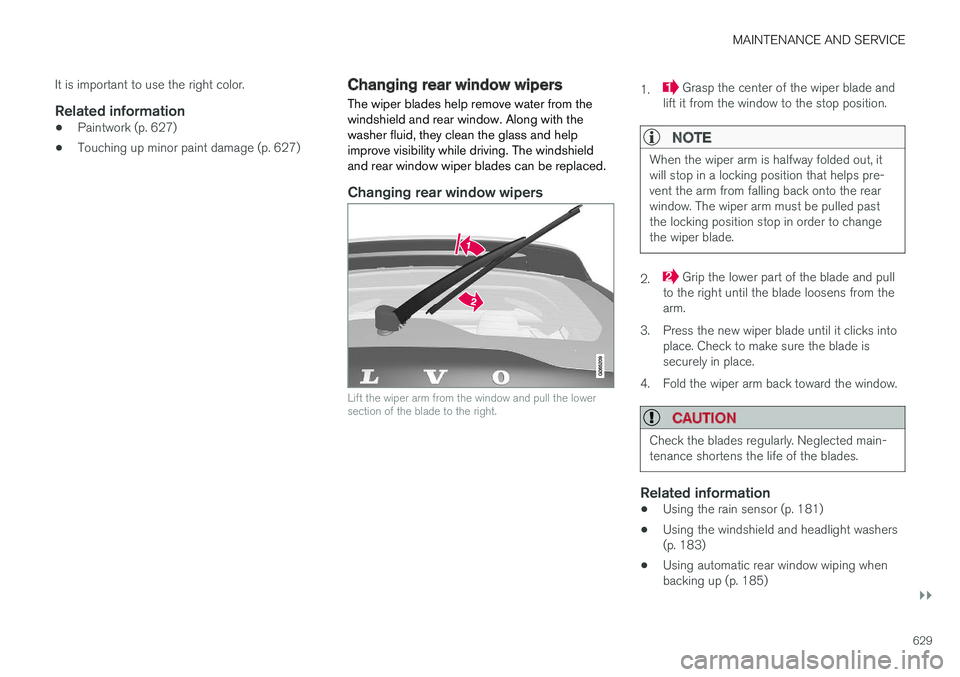
Lift the wiper arm from the window and pull the lower section of the blade to the right.
1. Grasp the center of the wiper blade and
lift it from the window to the stop position.
NOTE
When the wiper arm is halfway folded out, it will stop in a locking position that helps pre-vent the arm from falling back onto the rearwindow. The wiper arm must be pulled pastthe locking position stop in order to changethe wiper blade.
2. Grip the lower part of the blade and pull
to the right until the blade loosens from the arm.
3. Press the new wiper blade until it clicks into place. Check to make sure the blade issecurely in place.
4. Fold the wiper arm back toward the window.
CAUTION
Check the blades regularly. Neglected main- tenance shortens the life of the blades.
Related information
• Using the rain sensor (p. 181)
• Using the windshield and headlight washers (p. 183)
• Using automatic rear window wiping whenbacking up (p. 185)
Page 651 of 666

INDEX
649
1, 2, 3 ...
4WD 423
A
ABSanti-lock brakes 409
AC (Air conditioning) 233
ACC - Adaptive Cruise Control 293, 296, 297, 298, 299, 300, 302, 303, 304, 305, 307
Accessories and extra equipment 35 installation 36
Accessory installation warning 36
Active Bending Lights 161
Adapting driving characteristics 270, 423
Adaptive Cruise Control 293, 296, 297, 298, 299, 300, 302, 303, 304, 305, 307
change cruise control functionality 305
function 293
manage speed 297, 298
pass 302, 303
radar sensor 324
set time interval 299, 300
troubleshooting 305
Adjusting the steering wheel 203
Airbag 52 activation/deactivation 56
driver's side 53
passenger side 53, 56
Air bag, see Airbag 52
Air conditioning 233Air conditioning, fluid volume and grade 646
Air distribution 212 air vents 212, 213
changing 212
defrosting 225
recirculation 224
table showing options 214
Air quality 209, 210 allergy and asthma 210
passenger compartment filter 211
Air recirculation 224
Alarm 266 deactivating 267
Allergy and asthma-inducing substances 210
All Wheel Drive, AWD 423
All Wheel Drive (AWD) 423
All Wheel Drive (four-wheel drive) 423
Android Auto 496, 498 Antenna location 255Apple CarPlay 493, 495
Approach lighting 164
Apps 465
Assistance at risk of collision 370, 371, 372, 373, 374, 375, 376, 378
Audio and media 464Audio system HD digital radio 475 SiriusXM ® Satellite radio 476, 477, 478
Auto-climate 223
Auto hold 415
Auto-hold brakes 415 activate and deactivate 416
after collision 417
Automatic car wash 623 Automatic engine stop auto-stop 428
Automatic high beam 159
Automatic locking 259
Automatic relocking 239, 252
Automatic Speed Limiter 280, 282, 283
Automatic transmission 418 kickdown 422
oil 645
Trailer 449
INDEX
Page 652 of 666
INDEX
650
B
Backrestfront seat, adjusting 188, 189, 192, 193 , 194
rear seat, adjusting 200, 201
rear seat, folding 196, 201, 202
Battery jump-start 447
Maintenance 598
start 598
support 601
symbols on the battery 602
warning symbols 602
BLIS 346, 347, 348, 349 Blower adjusting 228, 229
air distribution 212
air vents 213
Bluetooth connect 491
connecting vehicle to Internet 509
phone 498
settings 507
Book service and repair 580
Booster cushions 71 Brake assist after collision 417
Brake fluid
grade 645
Brake functions 408
Brake light 163
Brakes 409 anti-lock brakes, ABS 409
automatic when stationary 415
Brake Assist System, BAS 410
brake lights 163
brake system 408
emergency brake lights 163
handbrake 411
Maintenance 411
on salted roads 411
on wet roads 410
brake system fluid 645
C
Camera sensor 342
Camera unit 329
Capacity weight 556, 641
Cargo compartment 564
attachment points 567
cargo net 571
electrical outlet 560, 562
Lighting 166
Cargo compartment cover 567, 568
cargo net 571
Car wash 620, 621, 623, 624, 625, 626
Catalytic converter 445 recovery 453
CD player 489
Cell phone, see Phone 499
Center console 559Center display change appearance 133
cleaning 615
climate controls 217
Function view 124
keyboard 128
messages 142, 143, 144
operation 114, 117, 121, 126
overview 111
settings 134, 135, 136
switch off and change volume 133
symbols in status bar 126
views 117
Central locking 255
Change of owner 136
Changing a wheel 542
Checking engine oil level 589
Page 653 of 666
INDEX
651
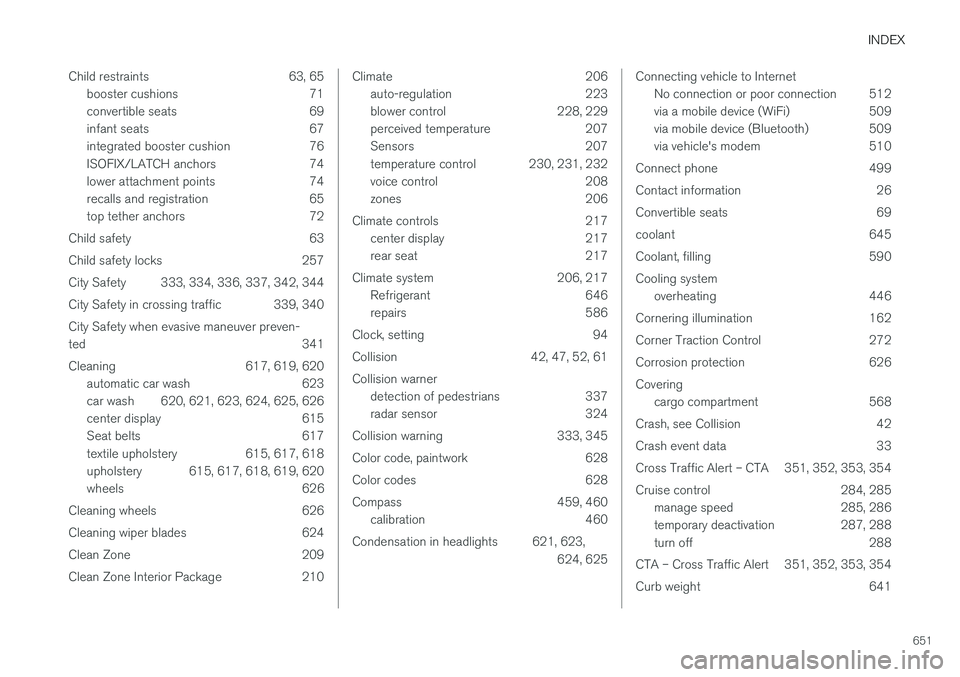
Child restraints 63, 65
booster cushions 71
convertible seats 69
infant seats 67
integrated booster cushion 76
ISOFIX/LATCH anchors 74
lower attachment points 74
recalls and registration 65
top tether anchors 72
Child safety 63
Child safety locks 257
City Safety 333, 334, 336, 337, 342, 344
City Safety in crossing traffic 339, 340 City Safety when evasive maneuver preven- ted 341
Cleaning 617, 619, 620 automatic car wash 623
car wash 620, 621, 623, 624, 625, 626
center display 615
Seat belts 617
textile upholstery 615, 617, 618
upholstery 615, 617, 618, 619, 620
wheels 626
Cleaning wheels 626
Cleaning wiper blades 624
Clean Zone 209
Clean Zone Interior Package 210
Climate 206 auto-regulation 223
blower control 228, 229
perceived temperature 207
Sensors 207
temperature control 230, 231, 232
voice control 208
zones 206
Climate controls 217 center display 217
rear seat 217
Climate system 206, 217 Refrigerant 646
repairs 586
Clock, setting 94
Collision 42, 47, 52, 61 Collision warner detection of pedestrians 337
radar sensor 324
Collision warning 333, 345
Color code, paintwork 628
Color codes 628
Compass 459, 460 calibration 460
Condensation in headlights 621, 623, 624, 625Connecting vehicle to InternetNo connection or poor connection 512
via a mobile device (WiFi) 509
via mobile device (Bluetooth) 509
via vehicle's modem 510
Connect phone 499
Contact information 26
Convertible seats 69
coolant 645
Coolant, filling 590 Cooling system overheating 446
Cornering illumination 162
Corner Traction Control 272
Corrosion protection 626Covering cargo compartment 568
Crash, see Collision 42
Crash event data 33
Cross Traffic Alert – CTA 351, 352, 353, 354
Cruise control 284, 285 manage speed 285, 286
temporary deactivation 287, 288
turn off 288
CTA – Cross Traffic Alert 351, 352, 353, 354
Curb weight 641