lock VOLVO XC90 2018 Owner´s Manual
[x] Cancel search | Manufacturer: VOLVO, Model Year: 2018, Model line: XC90, Model: VOLVO XC90 2018Pages: 666, PDF Size: 11.32 MB
Page 424 of 666
||
STARTING AND DRIVING
* Option/accessory.
422
Related information
• Shiftlock (p. 421)
• Gear selector positions for automatic trans- missions (p. 418)
The kickdown function
Kickdown is used when maximum acceleration is needed, e.g. when passing.
When the accelerator pedal is depressed all the way to the floor (past the normal full acceleratorposition), the transmission will automaticallyengage kickdown, i.e. immediately shift down to alower gear. If the accelerator pedal is released from the kick- down position, the transmission will automaticallyshift up again.
Safety function
The transmission control module is equipped with a downshift protection feature to help prevent theengine from overheating. In some conditions, the transmission will prevent downshifting/kickdown if this would lead to suchhigh engine speed (rpm) that the engine couldbe damaged. If the driver still attempts downshift-ing or kickdown at a high rpm, nothing will hap-pen and the original gear will remain selected. With kickdown, the vehicle can downshift one or more steps at a time depending on the enginespeed. The vehicle upshifts when the engine rea-ches its maximum rpm to prevent engine dam-age.
Related information
• Gear selector positions for automatic trans-missions (p. 418)
Gear indicator
*
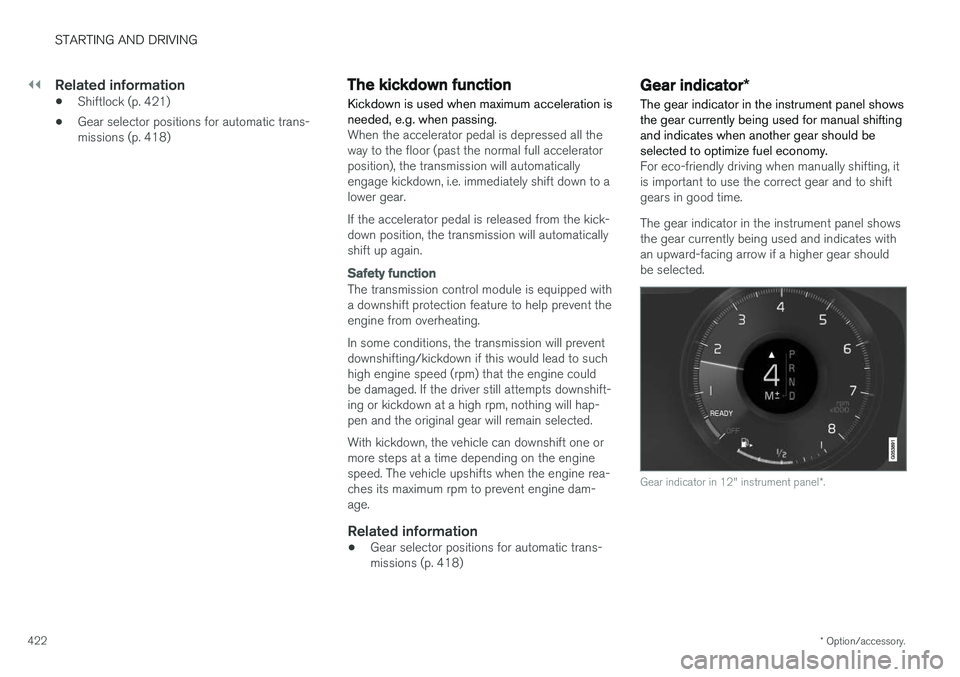
The gear indicator in the instrument panel shows the gear currently being used for manual shiftingand indicates when another gear should beselected to optimize fuel economy.
For eco-friendly driving when manually shifting, it is important to use the correct gear and to shiftgears in good time. The gear indicator in the instrument panel shows the gear currently being used and indicates withan upward-facing arrow if a higher gear shouldbe selected.
Gear indicator in 12" instrument panel *.
Page 443 of 666
STARTING AND DRIVING
* Option/accessory.441
Driving through standing water
Driving the vehicle through a deep pool of stand- ing water on a water-covered roadway is calledfording. This must be done with great caution.
The vehicle can be driven through water up to a depth of 45 cm (17.7 in) at no more than walkingspeed. Be particularly careful when drivingthrough flowing water. When driving through standing water, drive slowly and do not stop the vehicle. When you havepassed the water, press lightly on the brake pedaland check that the brakes are functioning prop-erly. Water, mud, slush, etc. can make the brakelinings slippery, resulting in delayed brakingeffect.
• If the vehicle is equipped with contacts for anelectric heater or trailer coupling, clean theseafter driving in water or mud.
• Do not allow the vehicle to stand in water upto the sills any longer than absolutely neces-sary. This could result in electrical malfunc-tions.
CAUTION
•Engine damage could occur if water enters the air cleaner.
• If water enters the transmission, the lubri-cating ability of the oils is reduced andthe service life of these systems is short-ened.
• Damage to any component, engine,transmission, turbocharger, differential orits internal components caused by flood-ing, vapor lock or insufficient oil is notcovered under warranty.
• If the engine stalls while the vehicle is inwater, do not attempt to restart it. Havethe vehicle towed out of the water to aworkshop. An authorized Volvo workshopis recommended. Risk of engine failure.
Related information
• Recovery (p. 455)
• Low Speed Control
* (p. 435)
Opening/closing the fuel filler door The vehicle must be unlocked before the fuel filler door can be opened 5
.
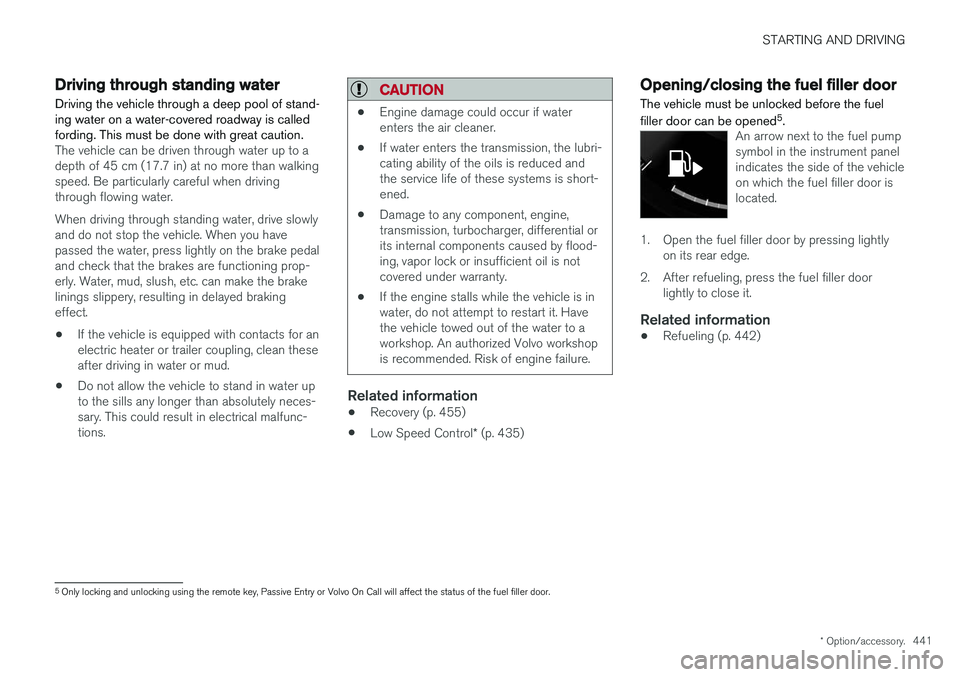
An arrow next to the fuel pump symbol in the instrument panelindicates the side of the vehicleon which the fuel filler door islocated.
1. Open the fuel filler door by pressing lightly
on its rear edge.
2. After refueling, press the fuel filler door lightly to close it.
Related information
• Refueling (p. 442)
5
Only locking and unlocking using the remote key, Passive Entry or Volvo On Call will affect the status of the fuel filler door.
Page 444 of 666
STARTING AND DRIVING
442
RefuelingThe fuel tank is equipped with a fuel filling sys- tem without a cover.
Refueling the vehicle at a service station
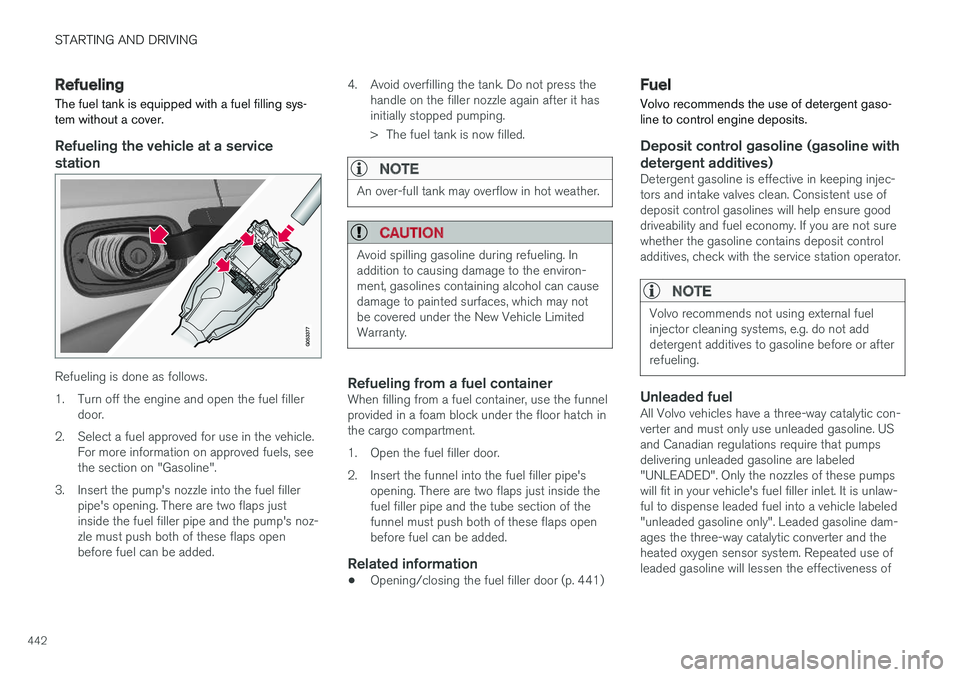
Refueling is done as follows.
1. Turn off the engine and open the fuel filler door.
2. Select a fuel approved for use in the vehicle. For more information on approved fuels, see the section on "Gasoline".
3. Insert the pump's nozzle into the fuel filler pipe's opening. There are two flaps justinside the fuel filler pipe and the pump's noz-zle must push both of these flaps openbefore fuel can be added. 4. Avoid overfilling the tank. Do not press the
handle on the filler nozzle again after it hasinitially stopped pumping.
> The fuel tank is now filled.
NOTE
An over-full tank may overflow in hot weather.
CAUTION
Avoid spilling gasoline during refueling. In addition to causing damage to the environ-ment, gasolines containing alcohol can causedamage to painted surfaces, which may notbe covered under the New Vehicle LimitedWarranty.
Refueling from a fuel containerWhen filling from a fuel container, use the funnel provided in a foam block under the floor hatch inthe cargo compartment.
1. Open the fuel filler door.
2. Insert the funnel into the fuel filler pipe'sopening. There are two flaps just inside the fuel filler pipe and the tube section of thefunnel must push both of these flaps openbefore fuel can be added.
Related information
• Opening/closing the fuel filler door (p. 441)
Fuel Volvo recommends the use of detergent gaso- line to control engine deposits.
Deposit control gasoline (gasoline with detergent additives)
Detergent gasoline is effective in keeping injec- tors and intake valves clean. Consistent use ofdeposit control gasolines will help ensure gooddriveability and fuel economy. If you are not surewhether the gasoline contains deposit controladditives, check with the service station operator.
NOTE
Volvo recommends not using external fuel injector cleaning systems, e.g. do not adddetergent additives to gasoline before or afterrefueling.
Unleaded fuelAll Volvo vehicles have a three-way catalytic con- verter and must only use unleaded gasoline. USand Canadian regulations require that pumpsdelivering unleaded gasoline are labeled"UNLEADED". Only the nozzles of these pumpswill fit in your vehicle's fuel filler inlet. It is unlaw-ful to dispense leaded fuel into a vehicle labeled"unleaded gasoline only". Leaded gasoline dam-ages the three-way catalytic converter and theheated oxygen sensor system. Repeated use ofleaded gasoline will lessen the effectiveness of
Page 450 of 666
||
STARTING AND DRIVING
* Option/accessory.
448 11. Start the engine of the vehicle with the dead
battery.
CAUTION
Do not touch the connections between the cable and the vehicle during the start attempt.Risk of sparking.
12. Remove the jumper cables in the reverse
order ‒ first the black cables and then the
red cables. Make sure that none of the clamps of the black jumper cables come into contact witheither vehicle's positive (+) jump start termi-nals or either of the red jumper cable's con-nected clamps.
WARNING
PROPOSITION 65 WARNING! Battery posts,
terminals, and related accessories contain lead and lead compounds, chemicals knownto the state of California to cause cancer andreproductive harm. Wash hands after han-dling.
WARNING
• Batteries generate hydrogen gas, which is flammable and explosive.
• Do not connect the jumper cable to anypart of the fuel system or to any movingparts. Avoid touching hot manifolds.
• Battery fluid contains sulfuric acid. Do notallow battery fluid to contact eyes, skin,fabrics or painted surfaces.
• If contact occurs, flush the affected areaimmediately with water. Obtain medicalhelp immediately if eyes are affected.
• Never expose the battery to open flameor electric spark. Do not smoke near thebattery. Failure to follow the instructionsfor jump starting can lead to injury.
Related information
• Starting the vehicle (p. 404)
• Ignition modes (p. 407)
• Adjusting the steering wheel (p. 203)
• Selecting ignition mode (p. 408)
Detachable towbar
*
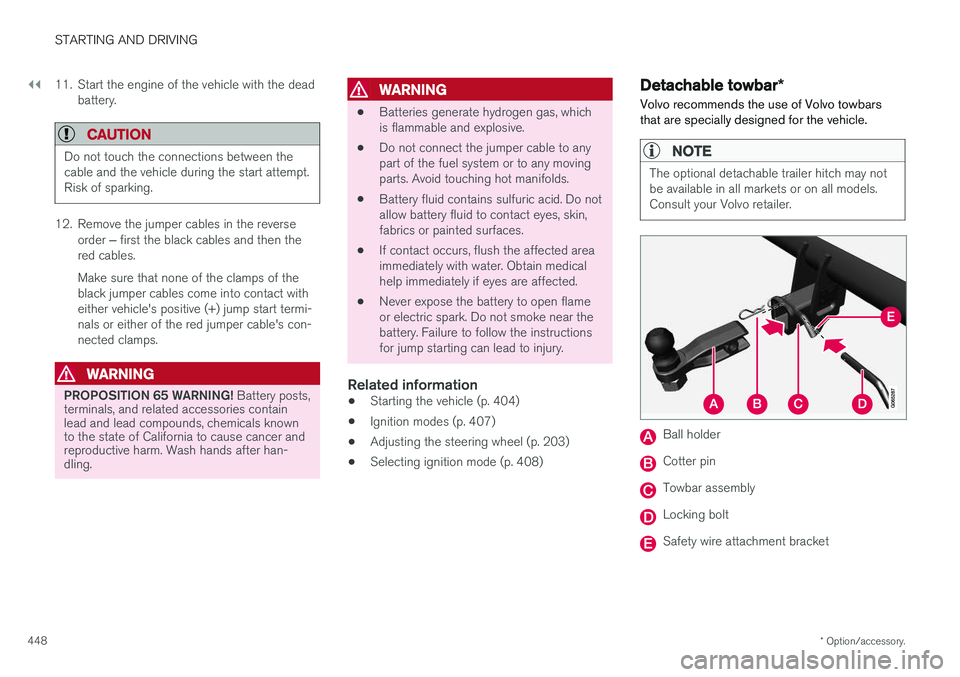
Volvo recommends the use of Volvo towbars that are specially designed for the vehicle.
NOTE
The optional detachable trailer hitch may not be available in all markets or on all models.Consult your Volvo retailer.
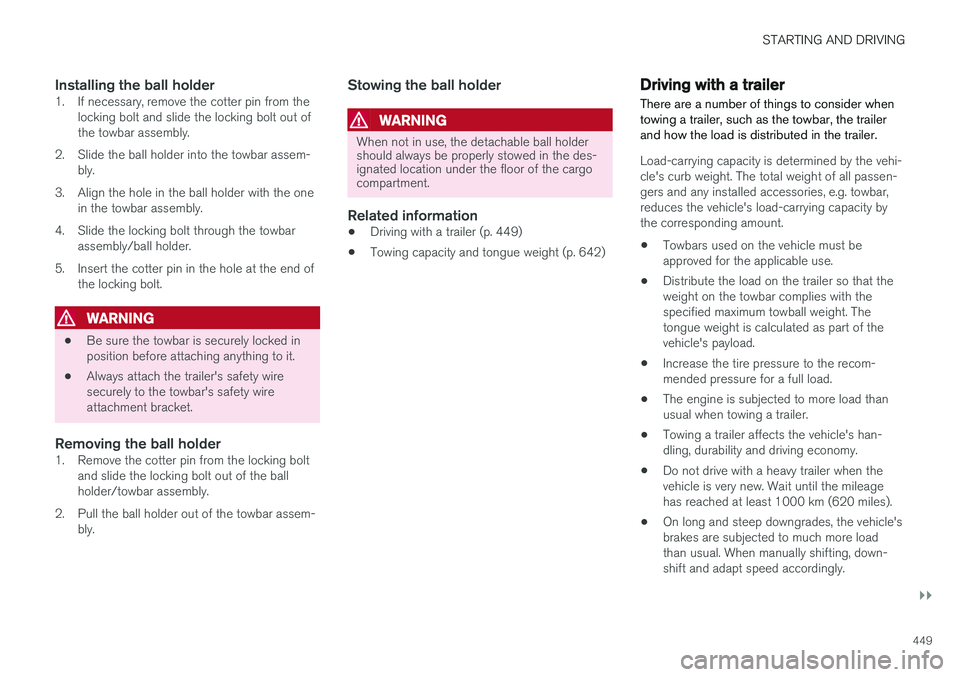
Ball holder
Cotter pin
Towbar assembly
Locking bolt
Safety wire attachment bracket
Page 451 of 666
STARTING AND DRIVING
}}
449
Installing the ball holder1. If necessary, remove the cotter pin from thelocking bolt and slide the locking bolt out of the towbar assembly.
2. Slide the ball holder into the towbar assem- bly.
3. Align the hole in the ball holder with the one in the towbar assembly.
4. Slide the locking bolt through the towbar assembly/ball holder.
5. Insert the cotter pin in the hole at the end of the locking bolt.
WARNING
• Be sure the towbar is securely locked in position before attaching anything to it.
• Always attach the trailer's safety wiresecurely to the towbar's safety wireattachment bracket.
Removing the ball holder1. Remove the cotter pin from the locking bolt
and slide the locking bolt out of the ballholder/towbar assembly.
2. Pull the ball holder out of the towbar assem- bly.
Stowing the ball holder
WARNING
When not in use, the detachable ball holder should always be properly stowed in the des-ignated location under the floor of the cargocompartment.
Related information
• Driving with a trailer (p. 449)
• Towing capacity and tongue weight (p. 642)
Driving with a trailer
There are a number of things to consider when towing a trailer, such as the towbar, the trailerand how the load is distributed in the trailer.
Load-carrying capacity is determined by the vehi- cle's curb weight. The total weight of all passen-gers and any installed accessories, e.g. towbar,reduces the vehicle's load-carrying capacity bythe corresponding amount. • Towbars used on the vehicle must be approved for the applicable use.
• Distribute the load on the trailer so that theweight on the towbar complies with thespecified maximum towball weight. Thetongue weight is calculated as part of thevehicle's payload.
• Increase the tire pressure to the recom-mended pressure for a full load.
• The engine is subjected to more load thanusual when towing a trailer.
• Towing a trailer affects the vehicle's han-dling, durability and driving economy.
• Do not drive with a heavy trailer when thevehicle is very new. Wait until the mileagehas reached at least 1000 km (620 miles).
• On long and steep downgrades, the vehicle'sbrakes are subjected to much more loadthan usual. When manually shifting, down-shift and adapt speed accordingly.
Page 453 of 666
STARTING AND DRIVING
}}
* Option/accessory.451
The automatic transmission selects the optimal gear for the current load and engine speed.
Steep inclines
Do not lock the automatic transmission into a higher gear than what the engine can handle
‒ it
is not always preferable to drive in high gears at low rpm.
Parking on a hill
1. Depress the brake pedal.
2. Apply the parking brake.3. Put the gear selector in P.
4. Release the brake pedal.Put chocks behind the wheels when the vehicle is parked on a hill with a trailer attached.
Starting on a hill
1. Depress the brake pedal. 2. Put the gear selector in D.
3. Release the parking brake.
4. Release the brake pedal and start driving.
Related information
• Trailer Stability Assist
* (p. 451)
• Checking trailer lights (p. 452)
• Towing capacity and tongue weight (p. 642)
• Overheating of engine and transmission (p. 446)
Trailer Stability Assist
*
Trailer Stability Assist (TSA 8
) is a function
designed to help stabilize a vehicle that is tow- ing a trailer when the vehicle and trailer havebegun to sway. The function is part of the Elec- tronic Stability Control system ESC 9
.
Reasons for swayingA vehicle towing a trailer may begin to sway for various reasons. Normally this only occurs at highspeeds. However, if the trailer is overloaded orunevenly distributed, e.g. too far back, there is arisk of swaying even at low speeds. Swaying may be caused by factors such as:
• The vehicle and trailer are hit by a sudden, strong crosswind.
• The vehicle and trailer are traveling on anuneven road or over a bump.
• Sudden movements of the steering wheel.
Once swaying has begun, it can be difficult orimpossible to stop it. This makes the vehicle andtrailer difficult to control and there is a risk ofswerving into oncoming traffic or driving off theroad.
Trailer Stability Assist functionTrailer Stability Assist continuously monitors thevehicle's movements, particularly lateral move- ments. If swaying is detected, the brakes areapplied individually on the front wheels, which hasa stabilizing effect on the vehicle and trailer. Thisis often enough to enable the driver to regaincontrol of the vehicle. If the Trailer Stability Assist function's first attempt is not adequate to stop the swayingmotion, the brakes are applied on all wheels andengine power is temporarily reduced. As theswaying motion begins to decrease and the vehi-cle and trailer have once again become stable,TSA stops regulating the brakes/engine powerand the driver regains control of the vehicle.
NOTE
Trailer Stability Assist is deactivated if the driver selects the sport mode by deactivating
ESC in the center display's menu system.
Trailer Stability Assist may not intervene if the driver tries to compensate for the swaying motionby moving the steering wheel rapidly, becausethe system will then not be able to determine if itis the trailer or the driver causing the swaying.
8
Trailer Stability Assist
9 Electronic Stability Control
Page 455 of 666
STARTING AND DRIVING
}}
453
Disabling the automatic check
The automatic light check can be disabled in the center display. 1.Tap
Settings in the Top view.
2. Tap
My CarLights and Lighting.
3. Deselect
Automatic Trailer Lamp Check.
Manual check
If the automatic check has been disabled, the check can be started manually. 1.Tap
Settings in the Top view.
2. Tap
My CarLights and Lighting.
3. Select
Manual Trailer Lamp Check.
> The light check will begin. Get out of the vehicle to perform the check.
Related information
• Driving with a trailer (p. 449)
Towing using a towline
This section refers to one vehicle being towed behind another using a towline.
Before towing another vehicle, check applicable speed limit regulations.
Preparations and towing
CAUTION
Note that the vehicle must always be towed with the wheels rolling forward.
• Do not tow a vehicle with automatictransmission at a speed greater than80 km/h (50 mph) or for a distancegreater than 80 km (50 miles).
WARNING
•
Ignition mode
II must be active – all air-
bags are deactivated in ignition mode I.
• Always have the remote key in the vehicle when it is towed.
WARNING
The brake and steering servos do not work when the engine is off – it takesabout 5 times more pressure on the brakepedal and steering requires much more effortthan normal. 1. Turn on the hazard warning flashers.
2. Attach the towline to the towing eyelet.3.
Put the vehicle in ignition mode II – without
pressing the brake pedal, turn the start knob clockwise and hold it there for about4 seconds. Release the knob, which willautomatically return to its original position.
4. Move the gear selector to neutral ( N) and
release the parking brake. If the battery charge level is too low, it may not be possible to release the parking brake.Connect an auxiliary battery to the vehicle ifthe battery is discharged.
> The towing vehicle can now start driving.
5. Keep the towline taut when the towing vehi- cle slows down by applying light pressure to the brake pedal. This will help avoid jarringmovements.
6. Be prepared to apply the brakes to stop the vehicle.
Jump startingDo not tow the vehicle to start the engine. Use anauxiliary battery if the start battery's charge levelis so low that the engine cannot be started.
Page 456 of 666
||
STARTING AND DRIVING
454
CAUTION
Attempting to tow with the engine running could result in damage to the three-way cata-lytic converter.
Related information
•Attaching and removing the towing eyelet (p. 454)
• Hazard warning flashers (p. 164)
• Recovery (p. 455)
• Jump starting using another battery (p. 447)
• Selecting ignition mode (p. 408)
Attaching and removing the towingeyelet
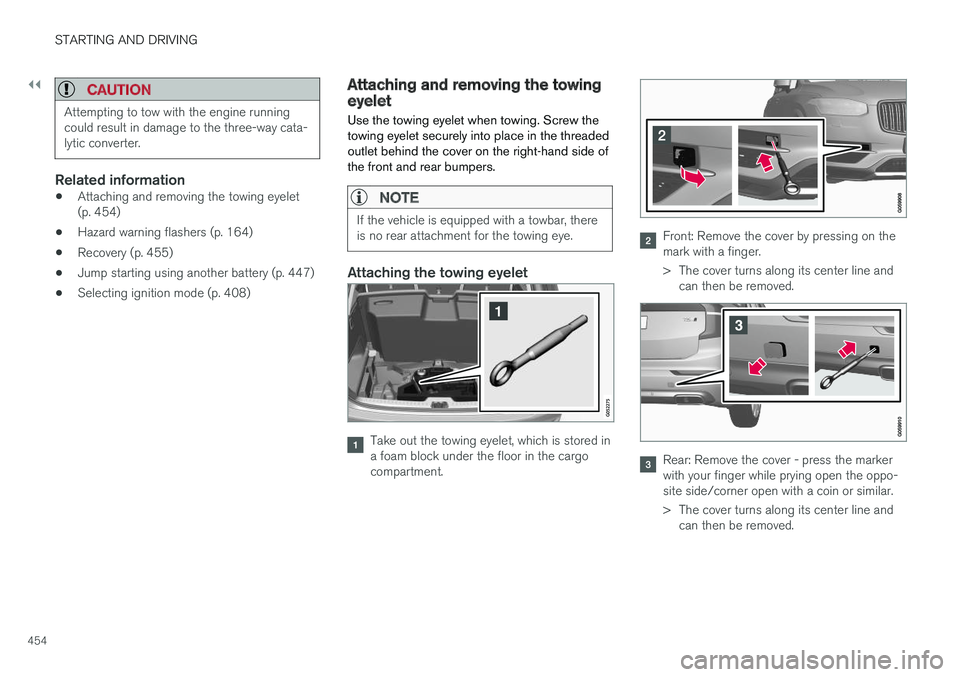
Use the towing eyelet when towing. Screw the towing eyelet securely into place in the threadedoutlet behind the cover on the right-hand side ofthe front and rear bumpers.
NOTE
If the vehicle is equipped with a towbar, there is no rear attachment for the towing eye.
Attaching the towing eyelet
Take out the towing eyelet, which is stored in a foam block under the floor in the cargocompartment.
Front: Remove the cover by pressing on the mark with a finger.
> The cover turns along its center line and can then be removed.
Rear: Remove the cover - press the marker with your finger while prying open the oppo-site side/corner open with a coin or similar.
> The cover turns along its center line andcan then be removed.
Page 514 of 666
||
AUDIO, MEDIA AND INTERNET
* Option/accessory.
512 2. Tap
CommunicationVehicle Wi-Fi
Hotspot.
3. Tap
Network name to assign a name to the
hotspot.
4. Tap
Password and create a password. This
password can then be used to connect other devices to this hotspot.
5. Tap
Frequency band and select a fre-
quency for the hotspot to use to transmit data. Please note that selecting a frequencyis not possible on all markets.
6. Activate/deactivate by tapping to check/ uncheck the
Vehicle Wi-Fi Hotspot box.
7. If Wi-Fi was previously used to connect to the Internet, confirm the change of connec- tions.
> It is now possible for external devices toconnect to the vehicle's Wi-Fi hotspot.
NOTE
Activation of Wi-Fi hotspot can cause addi- tional charges from your network operator. Contact your network operator about data traffic costs.
The connection status is shown by a symbol in the center display's status bar. Tap
Connected devices to see a list of cur-
rently connected devices.
Related information
• Symbols in the center display status bar (p. 126)
• Internet-connected vehicle
* (p. 507)
• No or poor Internet connection (p. 512)
No or poor Internet connection Factors affecting the Internet connection.
The amount of data transmitted depends on the services or apps currently in use in the vehicle.Streaming music, for example, involves the trans-mission of a large amount of data, and thisrequires a good connection and a strong signal.
Phone to vehicleInternet connection speed may vary dependingon the location of the cellular phone in the vehi-cle. Move the phone closer to the center displayto increase signal strength. Make sure that noth-ing is between the phone and center display thatcould be blocking the signal.
Phone to network operatorThe speed of the mobile network varies depend-ing on the coverage in the vehicle's current loca-tion. Coverage may be poorer in e.g. tunnels,mountainous areas, deep valleys or indoors. Con-nection speed is also dependent on the subscrip-tion you have with your service provider.
NOTE
If you experience any problems with data traf- fic, contact your network service provider.
12
This does not apply when the vehicle is connected to the Internet via Wi-Fi.
Page 544 of 666
||
WHEELS AND TIRES
* Option/accessory.
542
Related information
• Recommended tire pressure (p. 537)
• Adjusting tire pressure (p. 536)
• Calibrating the tire pressure monitoring sys- tem
* (p. 539)
• Viewing tire pressure status in the centerdisplay
* (p. 540)
• Tire pressure monitoring system
* (p. 537)
• Inflate tires with the compressor included in the tire sealing system (p. 555)
When changing wheels
The wheels can be changed, e.g. to switch to snow tires or spare tires. Follow the applicableinstructions for removing and installing thewheel.
Changing to tires of another dimensionMake sure that the tire dimension is approved for use on the vehicle. If you change to tires of another dimension, con- tact an authorized Volvo workshop to update thevehicle's software. A software update may benecessary when changing to tires of larger/smaller dimensions or when changing to or fromsnow tires.
Related information
• Removing a wheel (p. 544)
• Installing a wheel (p. 546)
• Tool kit (p. 542)
• Snow tires (p. 549)
• Spare wheel (p. 547)
• Wheel bolts (p. 543)
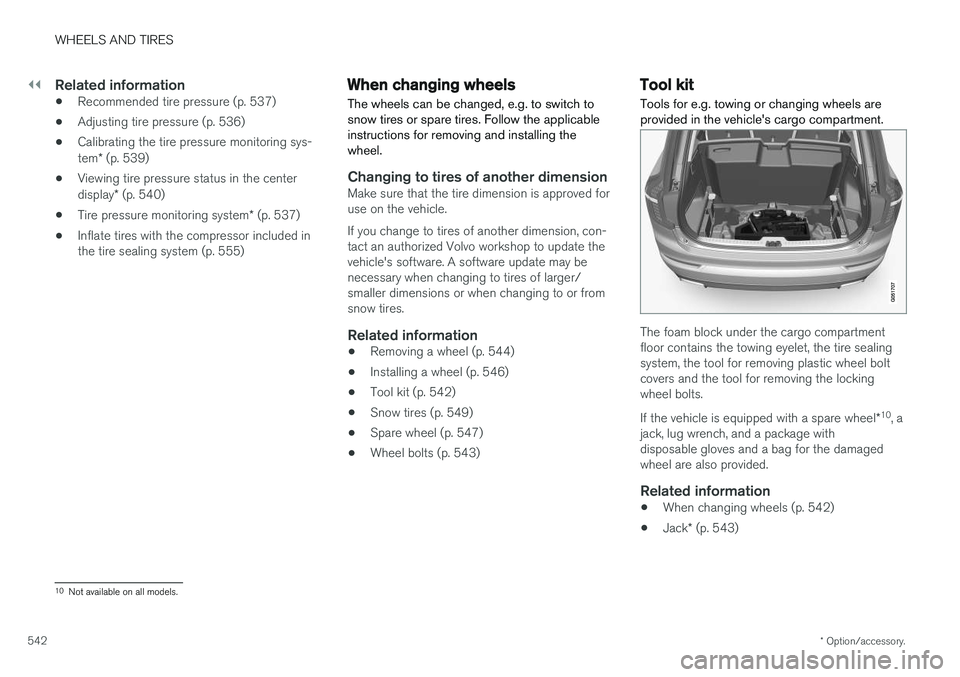
Tool kit Tools for e.g. towing or changing wheels are provided in the vehicle's cargo compartment.
The foam block under the cargo compartment floor contains the towing eyelet, the tire sealingsystem, the tool for removing plastic wheel boltcovers and the tool for removing the lockingwheel bolts. If the vehicle is equipped with a spare wheel
*10
, a
jack, lug wrench, and a package with disposable gloves and a bag for the damagedwheel are also provided.
Related information
• When changing wheels (p. 542)
• Jack
* (p. 543)
10
Not available on all models.