ABS VOLVO XC90 2018 Owner´s Manual
[x] Cancel search | Manufacturer: VOLVO, Model Year: 2018, Model line: XC90, Model: VOLVO XC90 2018Pages: 666, PDF Size: 11.32 MB
Page 425 of 666
STARTING AND DRIVING
}}
* Option/accessory.423
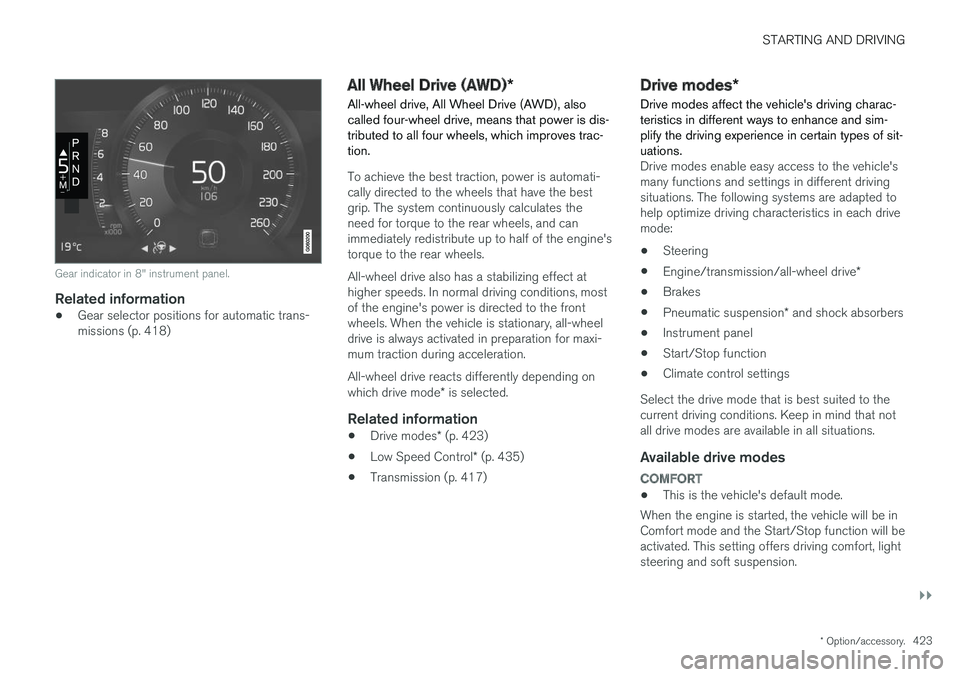
Gear indicator in 8" instrument panel.
Related information
•Gear selector positions for automatic trans- missions (p. 418)
All Wheel Drive (AWD)
*
All-wheel drive, All Wheel Drive (AWD), also called four-wheel drive, means that power is dis-tributed to all four wheels, which improves trac-tion.
To achieve the best traction, power is automati- cally directed to the wheels that have the bestgrip. The system continuously calculates theneed for torque to the rear wheels, and canimmediately redistribute up to half of the engine'storque to the rear wheels. All-wheel drive also has a stabilizing effect at higher speeds. In normal driving conditions, mostof the engine's power is directed to the frontwheels. When the vehicle is stationary, all-wheeldrive is always activated in preparation for maxi-mum traction during acceleration. All-wheel drive reacts differently depending on which drive mode * is selected.
Related information
• Drive modes
* (p. 423)
• Low Speed Control
* (p. 435)
• Transmission (p. 417)
Drive modes
*
Drive modes affect the vehicle's driving charac- teristics in different ways to enhance and sim-plify the driving experience in certain types of sit-uations.
Drive modes enable easy access to the vehicle's many functions and settings in different drivingsituations. The following systems are adapted tohelp optimize driving characteristics in each drivemode: • Steering
• Engine/transmission/all-wheel drive
*
• Brakes
• Pneumatic suspension
* and shock absorbers
• Instrument panel
• Start/Stop function
• Climate control settings
Select the drive mode that is best suited to the current driving conditions. Keep in mind that notall drive modes are available in all situations.
Available drive modes
COMFORT
• This is the vehicle's default mode.
When the engine is started, the vehicle will be in Comfort mode and the Start/Stop function will beactivated. This setting offers driving comfort, lightsteering and soft suspension.
Page 432 of 666
STARTING AND DRIVING
430
Temporarily deactivating the Start/Stop function
In certain situations, it may be advisable to tem- porarily turn the Start/Stop function off.
To turn off Start/Stop, tap theStart/Stop function button in
the center display's Function view. The indicator light in thebutton will go out when thefunction has been turned off.
The function will remain turned off until:
• it is reactivated
• the drive mode is changed to Eco or Comfort
• the engine is restarted.
Related information
•
Driving with the Start/Stop function (p. 428)
• Conditions for the Start/Stop function (p. 430)
Conditions for the Start/Stopfunction Certain conditions must be met for Start/Stop to function.
If any condition is not met, this will be indicated in the instrument panel.
The engine does not auto-stopThe engine will not auto-stop if: •
the vehicle has not reached a speed of ca 10 km/h (6 mph) after starting.
• after several auto-stops, the speed mustagain exceed approximately ca 10 km/h(6 mph) before the next auto-stop.
• the driver's seat belt is unbuckled.
• the start battery's charge is below the mini-mum level.
• the engine is not running at its normal oper-ating temperature.
• the ambient temperature is under approxi-mately -5 °C (23 °F) or over approximately30 °C (86 °F).
• windshield heating is activated.
• the climate system settings and the actualclimate in the passenger compartment differ.
• the vehicle is backing up.
• the start battery's temperature is above orbelow the permitted limits.
• the driver is turning the steering wheel hard. •
the road gradient is very steep.
• the hood is open.
• driving at high altitude and the engine hasnot reached its normal operating tempera-ture.
• ABS has been activated.
• hard braking (even if the ABS system hasnot been activated).
• many starts during a short period of timehave triggered the starter motor's overheat-ing protection.
• a trailer's electrical system is connected tothe vehicle's electrical system.
• the transmission is not running at its normaloperating temperature.
• The gear selector is in mode
M (±).
The engine does not auto-startThe engine will not auto-start after an auto-stopif: • the driver is not wearing a seat belt, the gear selector is in the
P position and the driver's
door is open. The engine must be started normally.
The engine auto-starts while the brake
pedal is depressed
In the following situations, the engine will auto-start even if the brake pedal is depressed:
Page 434 of 666
STARTING AND DRIVING
* Option/accessory.
432
Leveling control * and suspension
The vehicle's leveling control system adjusts the suspension and shock absorbers automaticallyto help provide good comfort and control whiledriving. Leveling can also be controlled manuallyto facilitate loading or getting in and out of thevehicle.
Pneumatic suspension and shock absorbers
The system is adapted to the selected drive mode and vehicle speed. The pneumatic suspen-sion reduces the vehicle's ground clearance athigher speeds to reduce air resistance andincrease stability. The shock absorbers are nor-mally set to provide the best possible comfort and are adjusted continuously according to theroad surface and the vehicle's acceleration, brak-ing and cornering.
The instrument panel indicateswhen the suspension level isbeing adjusted.The level cannot be adjusted when any of the side doors or the tailgate is open.
ParkingWhen parking, make sure that there is adequatespace above and below the vehicle since ground clearance may vary depending on e.g. ambienttemperature, how the vehicle is loaded, if loadingmode is used, which drive mode is selected afterthe engine is started, etc. The level may also be adjusted a period after the vehicle is parked. This is to compensate for anyheight changes that may occur due to tempera-ture changes in the air springs when the vehiclecools.
TransportingWhen transporting the vehicle on a ferry, train ortruck, only secure (lash) the vehicle around thetires, not using any other parts of the chassis.Changes in the pneumatic suspension may occurduring transport, which could adversely affect thelashing and result in damage.
Page 443 of 666
STARTING AND DRIVING
* Option/accessory.441
Driving through standing water
Driving the vehicle through a deep pool of stand- ing water on a water-covered roadway is calledfording. This must be done with great caution.
The vehicle can be driven through water up to a depth of 45 cm (17.7 in) at no more than walkingspeed. Be particularly careful when drivingthrough flowing water. When driving through standing water, drive slowly and do not stop the vehicle. When you havepassed the water, press lightly on the brake pedaland check that the brakes are functioning prop-erly. Water, mud, slush, etc. can make the brakelinings slippery, resulting in delayed brakingeffect.
• If the vehicle is equipped with contacts for anelectric heater or trailer coupling, clean theseafter driving in water or mud.
• Do not allow the vehicle to stand in water upto the sills any longer than absolutely neces-sary. This could result in electrical malfunc-tions.
CAUTION
•Engine damage could occur if water enters the air cleaner.
• If water enters the transmission, the lubri-cating ability of the oils is reduced andthe service life of these systems is short-ened.
• Damage to any component, engine,transmission, turbocharger, differential orits internal components caused by flood-ing, vapor lock or insufficient oil is notcovered under warranty.
• If the engine stalls while the vehicle is inwater, do not attempt to restart it. Havethe vehicle towed out of the water to aworkshop. An authorized Volvo workshopis recommended. Risk of engine failure.
Related information
• Recovery (p. 455)
• Low Speed Control
* (p. 435)
Opening/closing the fuel filler door The vehicle must be unlocked before the fuel filler door can be opened 5
.
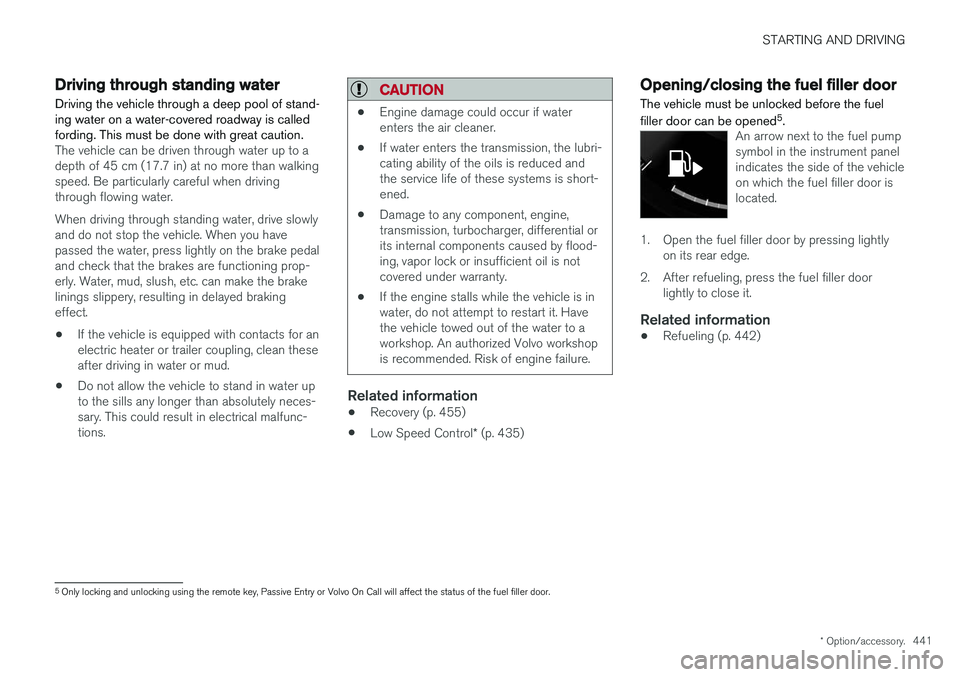
An arrow next to the fuel pump symbol in the instrument panelindicates the side of the vehicleon which the fuel filler door islocated.
1. Open the fuel filler door by pressing lightly
on its rear edge.
2. After refueling, press the fuel filler door lightly to close it.
Related information
• Refueling (p. 442)
5
Only locking and unlocking using the remote key, Passive Entry or Volvo On Call will affect the status of the fuel filler door.
Page 539 of 666
WHEELS AND TIRES
}}
* Option/accessory.537
Recommended tire pressure
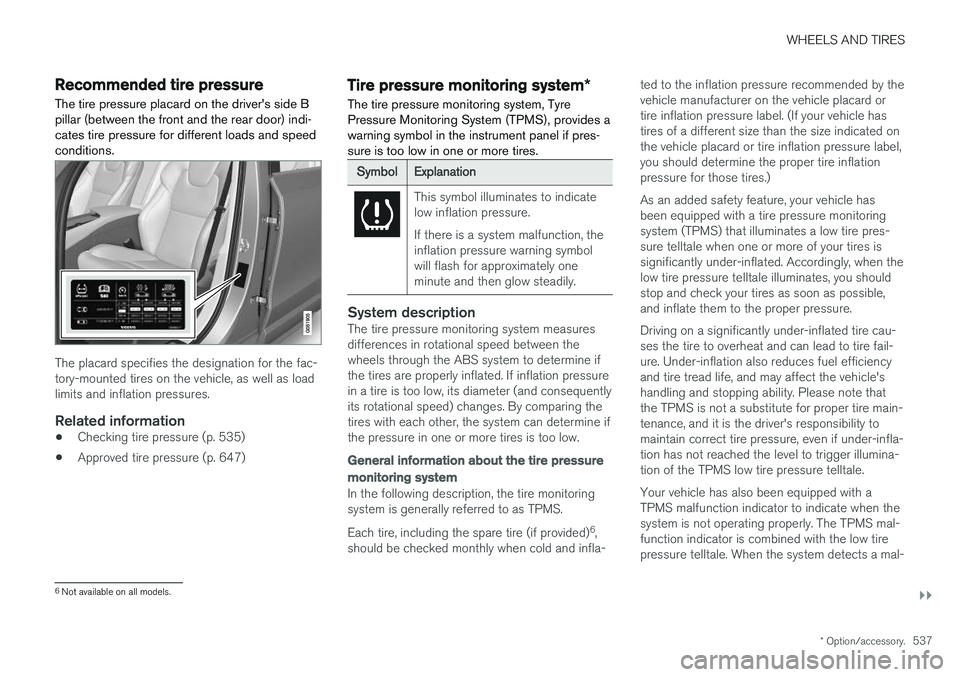
The tire pressure placard on the driver's side B pillar (between the front and the rear door) indi-cates tire pressure for different loads and speedconditions.
The placard specifies the designation for the fac- tory-mounted tires on the vehicle, as well as loadlimits and inflation pressures.
Related information
• Checking tire pressure (p. 535)
• Approved tire pressure (p. 647)
Tire pressure monitoring system
*
The tire pressure monitoring system, Tyre Pressure Monitoring System (TPMS), provides awarning symbol in the instrument panel if pres-sure is too low in one or more tires.
SymbolExplanation
This symbol illuminates to indicate low inflation pressure. If there is a system malfunction, the inflation pressure warning symbolwill flash for approximately oneminute and then glow steadily.
System descriptionThe tire pressure monitoring system measures differences in rotational speed between thewheels through the ABS system to determine ifthe tires are properly inflated. If inflation pressure in a tire is too low, its diameter (and consequently its rotational speed) changes. By comparing thetires with each other, the system can determine ifthe pressure in one or more tires is too low.
General information about the tire pressure
monitoring system
In the following description, the tire monitoring system is generally referred to as TPMS. Each tire, including the spare tire (if provided) 6
,
should be checked monthly when cold and infla- ted to the inflation pressure recommended by the vehicle manufacturer on the vehicle placard ortire inflation pressure label. (If your vehicle hastires of a different size than the size indicated onthe vehicle placard or tire inflation pressure label,you should determine the proper tire inflationpressure for those tires.) As an added safety feature, your vehicle has been equipped with a tire pressure monitoringsystem (TPMS) that illuminates a low tire pres-sure telltale when one or more of your tires issignificantly under-inflated. Accordingly, when thelow tire pressure telltale illuminates, you shouldstop and check your tires as soon as possible,and inflate them to the proper pressure. Driving on a significantly under-inflated tire cau- ses the tire to overheat and can lead to tire fail-ure. Under-inflation also reduces fuel efficiencyand tire tread life, and may affect the vehicle'shandling and stopping ability. Please note thatthe TPMS is not a substitute for proper tire main-tenance, and it is the driver's responsibility tomaintain correct tire pressure, even if under-infla-tion has not reached the level to trigger illumina-tion of the TPMS low tire pressure telltale. Your vehicle has also been equipped with a TPMS malfunction indicator to indicate when thesystem is not operating properly. The TPMS mal-function indicator is combined with the low tirepressure telltale. When the system detects a mal-
6
Not available on all models.
Page 582 of 666
||
MAINTENANCE AND SERVICE
* Option/accessory.
580
Canceling software download
–Tap the checkbox in the activity indicator that replaced the Install button when the down-
load began.
Note that only a download can be cancelled. An installation cannot be cancelled once it hasbegun.
Deactivating the background search for software update
Automatic background searching for softwareupdates is activated as the default factory setting,but the function can be deactivated. 1. Tap
Settings in the center display's Top
view.
2. Tap
SystemDownload Center.
3. Tap to deselect
Auto Software Update.
Related information
• Download Center (p. 579)
• Internet-connected vehicle
* (p. 507)
• Navigating in the center display's views (p. 117)
Vehicle status
The vehicle's general status can be displayed in the center display along with the option to schedule service 3
.
The Car status app is started
from the center display's App view and has four tabs:
•Messages - status messages
•
Status - engine oil level check
•
TPMS - tire inflation pressure check
•
Appointments - appointment information
and vehicle information 3
.
Related information
• Handling messages saved from the instru- ment panel (p. 109)
• Checking and filling engine oil (p. 588)
• Tire pressure monitoring system
* (p. 537)
• Scheduling service and repairs (p. 580)
• Sending vehicle information to the workshop(p. 582)
• Navigating in the center display's views(p. 117)
Scheduling service and repairs4
This service offers a convenient way to schedule service and workshop appoints directly from thevehicle.
When it is time for service, and in certain cases if the vehicle requires repairs, a message will bedisplayed in the instrument panel and at the topof the center display. The time for service isdetermined by how much time has elapsed, thenumber of hours the engine has run, or the dis-tance driven since the last service.
To use the service
• Create a Volvo ID and register the Volvo IDto the vehicle.
• To select a Volvo retailer you would like tocontact, go to www.volvocars.com and log in.
• To send and receive appointment informa-tion, the vehicle must be connected to the Internet 5
.
Book serviceWhen you schedule service from your vehicle, theinformation is sent via your Internet connection 5
.
Submit an appointment request whenever you need service or when a message regarding theneed for service or repairs has been displayed in
3 Certain markets only.
4 Certain markets only.
5 There may be a charge for transmitting data over the Internet, depending on your service plan.
Page 602 of 666
||
MAINTENANCE AND SERVICE
600
BatteryH7 AGMH8 AGM
Dimensions, L×W×H 315×175×190 mm (12.4×6.9×7.5 inches) 353×175×190 mm (13.9×6.9×7.5 inches)
Capacity (Ah) 80 95
A
According to EN standard.
B Cold Cranking Amperes.
Volvo recommends that batteries are replaced by an authorized Volvo workshop.
CAUTION
When replacing the starter battery or support battery, an AGM 19
battery must be installed.
CAUTION
If replacing the starter battery, make sure you replace it with a battery with the same coldstart capacity and type as the original battery(see the decal on the battery).
NOTE
The size of the starter battery should conform to the dimensions of the original battery.
Related information
• Battery symbols (p. 602)
• Support battery (p. 601) •
Jump starting using another battery (p. 447)
19
Absorbed Glass Mat.
Page 604 of 666
||
MAINTENANCE AND SERVICE
602
NOTE
If the starter battery is discharged to the extent that the vehicle does not have normalelectrical functions and the engine must thenbe jump-started with an external battery or abattery charger, the Start/Stop function mayremain activated. If the Start/Stop functionshortly thereafter auto-stops the engine, thereis a huge risk that auto-start of the engine willfail due to insufficient battery capacity sincethe battery had not had time to recharge. If the vehicle has been jump-started or if there has not been enough time for the bat-tery to be charged with a battery charger, it isadvisable to temporarily deactivate theStart/Stop function until the battery has beenrecharged by the vehicle. At an ambient tem-perature of about +15°C (about 60°F), thebattery must be charged by the vehicle for atleast one hour. At lower ambient tempera-tures, the charging time can increase to3-4 hours. It is advisable to charge the batterywith an external battery charger.
Specifications
Voltage (V) 12 Cold start capacityA
-
CCA B
(A) 170
Dimensions, L×W×H150×90×130 mm
(5.9×3.5×5.1 inches)
Capacity (Ah) 10
A According to EN standard.
B Cold Cranking Amperes.
CAUTION
When replacing the starter battery or support battery, an AGM 20
battery must be installed.
Related information
• Start battery (p. 598)
• Start/Stop function (p. 428)
• Battery symbols (p. 602)
Battery symbols
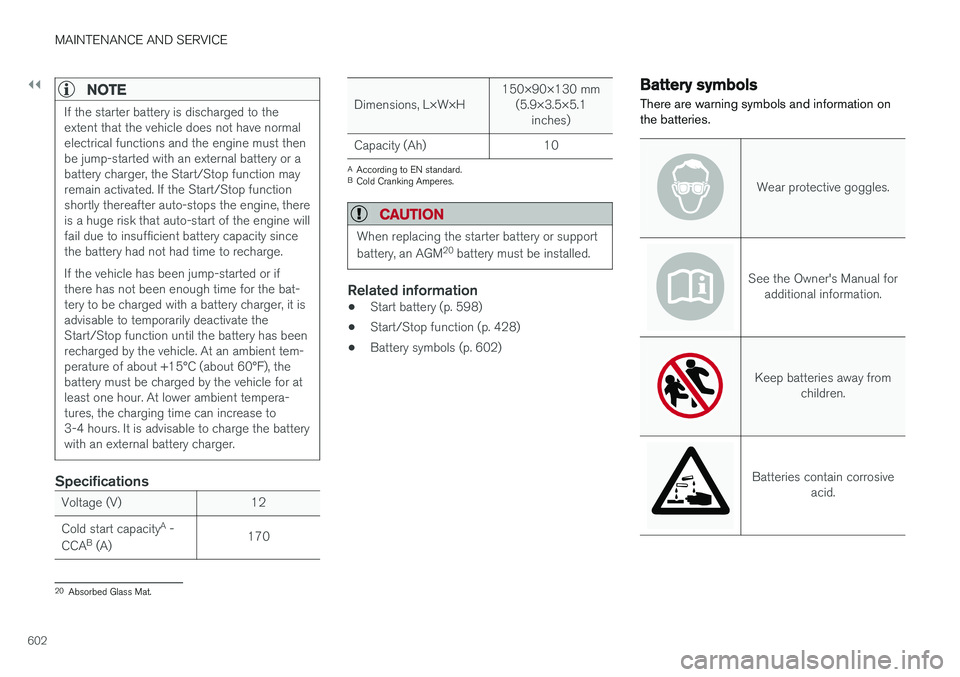
There are warning symbols and information on the batteries.
Wear protective goggles.
See the Owner's Manual for additional information.
Keep batteries away from children.
Batteries contain corrosive acid.
20Absorbed Glass Mat.
Page 609 of 666
MAINTENANCE AND SERVICE
* Option/accessory.607
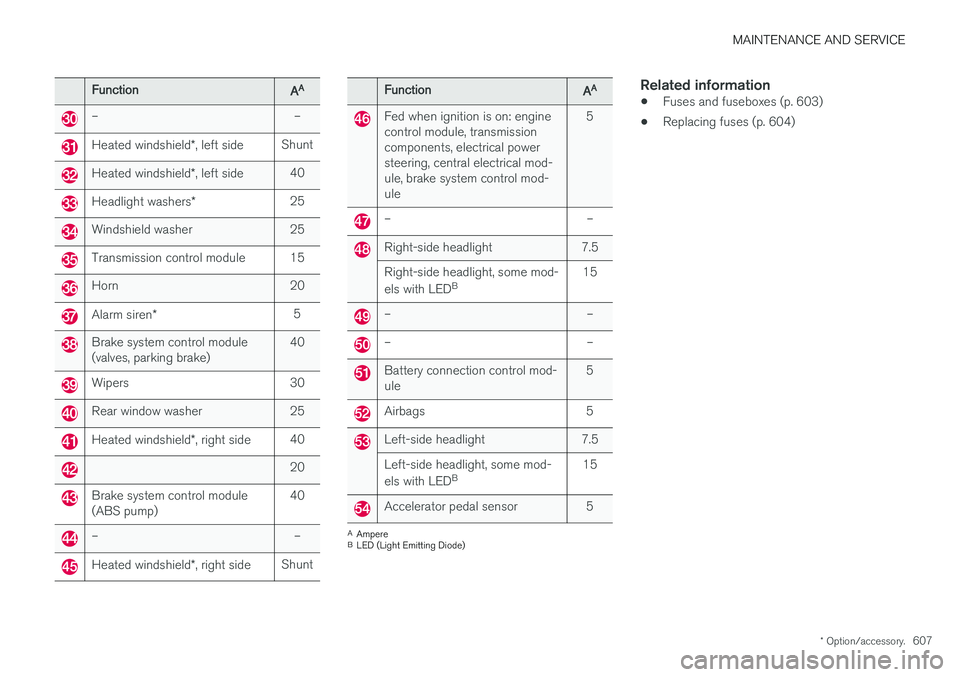
FunctionAA
– –
Heated windshield *, left side Shunt
Heated windshield
*, left side 40
Headlight washers
*25
Windshield washer 25
Transmission control module 15
Horn 20
Alarm siren
* 5
Brake system control module (valves, parking brake) 40
Wipers 30
Rear window washer 25
Heated windshield
*, right side 40
20
Brake system control module (ABS pump) 40
– –
Heated windshield
*, right side Shunt
FunctionAA
Fed when ignition is on: engine control module, transmissioncomponents, electrical powersteering, central electrical mod-ule, brake system control mod-ule 5
– –
Right-side headlight 7.5 Right-side headlight, some mod- els with LED
B 15
– –
– –
Battery connection control mod- ule 5
Airbags 5
Left-side headlight 7.5 Left-side headlight, some mod- els with LED
B 15
Accelerator pedal sensor 5
A
Ampere
B LED (Light Emitting Diode)
Related information
• Fuses and fuseboxes (p. 603)
• Replacing fuses (p. 604)
Page 621 of 666
MAINTENANCE AND SERVICE
619
Cleaning the leather upholstery
1. Apply the leather cleaner to a damp spongeand squeeze it until the cleaner foams.
2. Move the sponge in circular motions to apply the foam to the stain.
3. Dampen the stain thoroughly with the sponge. Let the sponge absorb the stain and do not rub.
4. Dry the stain using a soft towel and let the leather dry completely.
Protecting the leather upholstery
1. Apply a small amount of leather protector toa cloth and then apply the protector to the leather using light circular movements.
2. Let it dry for approximately 20 minutes. Protecting the leather upholstery makes it better able to withstand sunlight's harmful UV rays.
Related information
• Cleaning the interior (p. 615)
• Cleaning the center display (p. 615)
• Cleaning fabric upholstery and ceiling liner(p. 617)
• Cleaning the seat belt (p. 617)
• Cleaning floor mats and inlay mats (p. 617)
• Cleaning the leather steering wheel(p. 619)
• Cleaning interior plastic, metal and wood sur-faces (p. 620)
Cleaning the leather steering wheel
Only use cleaning agents and car care products recommended by Volvo. Clean regularly andtreat stains immediately for best results. It isimportant to vacuum before using a cleaningagent.
Leather steering wheelLeather needs to breathe. Never cover the leather steering wheel with a plastic protector.Volvo Leather Care Kit 951 0251 and LeatherSoftener 943 7429 are recommended for clean-ing the leather steering wheel. First, remove dirt,dust, etc. with a damp sponge or cloth.
CAUTION
Sharp objects such as rings could damage the leather on the steering wheel.
If there are stains on the steering wheel:
Type 1 (ink, wine, coffee, milk, sweat or blood)
–Use a soft cloth or sponge. Wipe the steering wheel using a solution of 5% ammonia. Forblood stains, mix approximately 2 dl(1 cup) ofwater with 25 g (one ounce) of salt and wipethe stain.
Type 2 (grease, oil, sauces or chocolate)
1. Same procedure as for Type 1 stains.
2. Finish by wiping the wheel with an absorbent paper or towel. Type 3
(dry dirt or dust)
1. Remove the dirt/dust using a soft brush.
2. Same procedure as for Type 1 stains.
Related information
• Cleaning the interior (p. 615)
• Cleaning the center display (p. 615)
• Cleaning fabric upholstery and ceiling liner (p. 617)
• Cleaning the seat belt (p. 617)
• Cleaning floor mats and inlay mats (p. 617)
• Cleaning leather upholstery (p. 618)
• Cleaning interior plastic, metal and wood sur-faces (p. 620)